
NWA-8500 - Wireless Access Point ZYXEL - Free user manual and instructions
Find the device manual for free NWA-8500 ZYXEL in PDF.



| Product Type | Wireless Access Point |
| Brand | ZYXEL |
| Model | NWA-8500 |
| Dimensions (W x D x H) | 198.5 x 138.5 x 47.5 mm |
| Weight | 400 g |
| Network Connector | 1 Ethernet RJ-45 port 10/100 Mbps, auto-negotiation, auto MDI/MDI-X |
| Power Supply | PoE (Power over Ethernet) via WLAN controller |
| Antennas | Internal dual-band antennas (2.4 GHz and 5 GHz) |
| Operating Temperature | 0 °C ~ 50 °C |
| Operating Humidity | 10 % ~ 90 % RH (non-condensing) |
| Certifications | EMC: FCC Class B, CE-EMC Class B, C-Tick Class B, VCCI Class B; Safety: CSA, CE EN60950-1 |
| Wall Mounting | Hole spacing: 140 mm; Recommended screws: M4 |
| LED Indicators | PWR, LAN, WLAN 1, WLAN 2 – lit when operating, blink on activity |
Frequently Asked Questions - NWA-8500 ZYXEL
User questions about NWA-8500 ZYXEL
0 question about this device. Answer the ones you know or ask your own.
Ask a new question about this device
Download the instructions for your Wireless Access Point in PDF format for free! Find your manual NWA-8500 - ZYXEL and take your electronic device back in hand. On this page are published all the documents necessary for the use of your device. NWA-8500 by ZYXEL.
USER MANUAL NWA-8500 ZYXEL
802.11a/g Ultra Thin Wireless Business Access Point
Quick Start Guide
Version 1.00
6/2007
Edition 1
CONTENTS
ENGLISH 1
DEUTsCH 19
ESPANOL 27
FRANÇAIS 35
ITALIANO 43
PYCCKNI 51
SVENSKA 59
简体中文 65
繁體中文 71
Introduction
The NWA-8500 is an access point that receives power from a PoE (power over Ethernet) WLAN controller. The NWA-8500 does not require a power adapter or power cord. You can just deploy the NWA-8500 in your wireless network with a PoE wireless switch. Through the NWA-8500 (labeled AP in the following figure), wireless clients on the WLAN can access the Internet or the wired network.
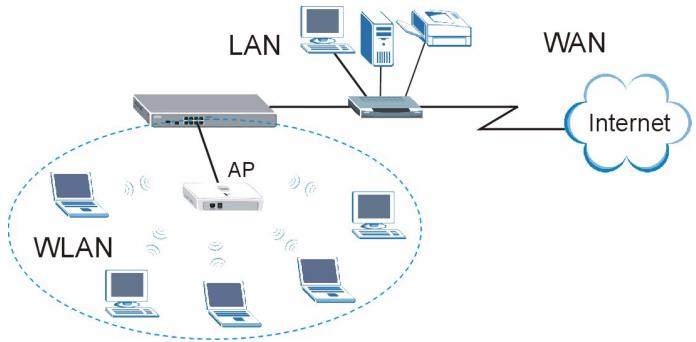
This guide shows you how to connect the NWA-8500 to a WLAN controller and hang your NWA-8500 on a wall.
1 Hardware Connections
Follow the steps below to connect your NWA-8500 for Internet access.
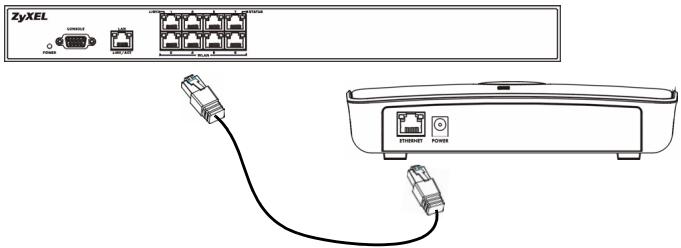
1 Use the included Ethernet cable to connect the ETHERNET port to a PoE WLAN controller's WLAN port. At the time of writing, you can connect only the NWA-8500 to the NXC-8160 model.
1.1 LEDs
Look at the LEDs (lights) on the NWA-8500.
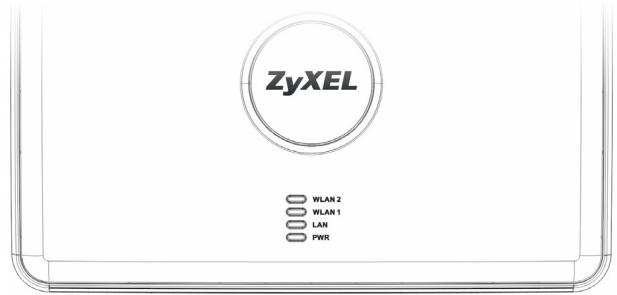
The PWR, LAN, WLAN 1 and WLAN 2 LEDs are all on when the Ethernet port is properly connected. The LAN, WLAN 1 and WLAN 2 LEDs blink when there is traffic.
?
If none of the LEDs are on, check your connections, and inspect your cable for damage. Make sure that your wireless switch is powered on. If the LEDs are still off, contact your vendor.
2 Hardware Mounting
In general, the best location for the access point is at the center of your intended wireless coverage area. For better performance, mount the NWA-8500 in a place that is high up and free of obstructions.
2.1 Wall-mounted
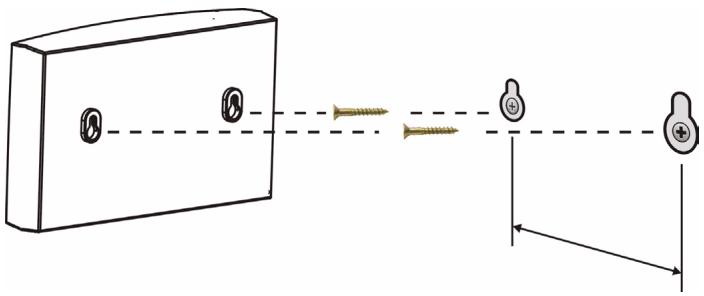
Follow the steps to attach your NWA-8500 to a wall.

See Product Specifications for the size of screws to use and how far apart to place them.
- Locate a high position on the wall that is free of obstructions.
2 Drill two holes for the screws.

Be careful to avoid damaging pipes or cables located inside the wall when drilling holes for the screws.
3 Do not insert the screws all the way into the wall. Leave a small gap of about 0.5cm between the heads of the screws and the wall.
4 Make sure the screws are snugly fastened to the wall. They need to hold the weight of the NWA-8500 with the connection cables.
5 Align the holes on the back of the NWA-8500 with the screws on the wall. Hang the NWA-8500 on the screws.
Product Specifications
Dimension 198.5 (W) x 138.5 (D) x 47.5 (H) mm
| Weight | 400 g | |
| Connector | One auto-negotiating, auto MDI/MDI-X 10/100 Mbps RJ-45 Ethernet port | |
| Antenna | Internal antennas with dual-band support (2.4 GHz and 5 GHz) | |
| Distance between the centers of the holes (for wall mounting) on the device's back. | 140 mm | |
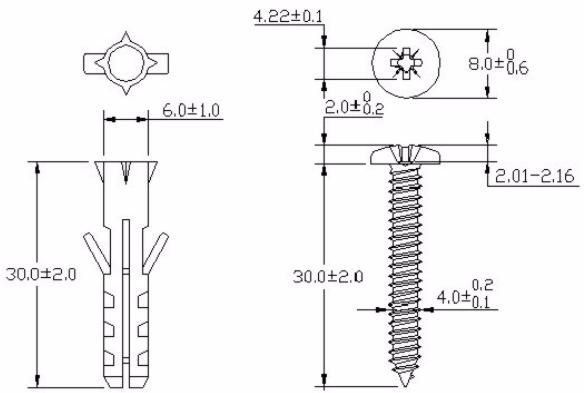
| Recommended type of screws for wall-mounting | M4 Tap Screw (see the figure below) | |
| Operating Temperature | 0°C ~ 50°C | |
| Operating Humidity | 10% ~ 90% RH (non-condensing) | |
| Approvals | EMC: FCC Class B, CE-EMC Class B, C-Tick Class B, VCCI Class B Safety: CSA International, CE EN60950-1 | |
The following are dimensions of an M4 tap screw and masonry plug used for wall mounting. All measurements are in millimeters (mm).
Certifications
Federal Communications Commission (FCC) Interference Statement
The device complies with Part 15 of FCC rules. Operation is subject to the following two conditions:
- This device may not cause harmful interference.
- This device must accept any interference received, including interference that may cause undesired operations.
This device has been tested and found to comply with the limits for a Class B digital device pursuant to Part 15 of the FCC Rules. These limits are designed to provide reasonable protection against harmful interference in a residential installation. This device generates, uses, and can radiate radio frequency energy, and if not installed and used in accordance with the instructions, may cause harmful interference to radio communications. However, there is no guarantee that interference will not occur in a particular installation.
If this device does cause harmful interference to radio/ television reception, which can be determined by turning the device off and on, the user is encouraged to try to correct the interference by one or more of the following measures:
- Reorient or relocate the receiving antenna.
- Increase the separation between the equipment and the receiver.
- Connect the equipment into an outlet on a circuit different from that to which the receiver is connected.
- Consult the dealer or an experienced radio/TV technician for help.
FCC Radiation Exposure Statement
- This transmitter must not be co-located or operating in conjunction with any other antenna or transmitter.
- For operation within 5.15 5.25GHz frequency range, it is restricted to indoor environment.
- IEEE 802.11b or 802.11g operation of this product in the U.S.A. is firmware-limited to channels 1 through 11.
- To comply with FCC RF exposure compliance requirements, a separation distance of at least 20~cm must be maintained between the antenna of this device and all persons.
注意!
依據 低功率電波輻射性電機管理辦法
Changes or modifications not expressly approved by the party responsible for compliance could void the user's authority to operate the equipment.
This device has been designed for the WLAN 2.4 GHz and 5 GHz networks throughout the EC region and Switzerland, with restrictions in France.
This Class B digital apparatus complies with Canadian ICES-003.
Viewing Certifications
1 Go to http://www.zyxel.com.
2 Select your product on the ZyXEL home page to go to that product's page.
3 Select the certification you wish to view from this page.
SafetyWarnings

For your safety, be sure to read and follow all warning notices and instructions.
ENGLISH
- Do NOT use this product near water, for example, in a wet basement or near a swimming pool.
- Do NOT expose your device to dampness, dust or corrosive liquids.
- Do NOT store things on the device.
- Do NOT install, use, or service this device during a thunderstorm. There is a remote risk of electric shock from lightning.
- Connect ONLY suitable accessories to the device.
- Do NOT open the device or unit. Opening or removing covers can expose you to dangerous high voltage points or other risks. ONLY qualified service personnel should service or disassemble this device. Please contact your vendor for further information.
- Make sure to connect the cables to the correct ports.
- Place connecting cables carefully so that no one will step on them or stumble over them.
- Always disconnect all cables from this device before servicing or disassembling.
- Do not use the device outside, and make sure all the connections are indoors. There is a remote risk of electric shock from lightning.
- Do NOT obstruct the device ventilation slots, as insufficient airflow may harm your device.
- Antenna Warning! This device meets ETSI and FCC certification requirements when using the included antenna(s). Only use the included antenna(s).
ENGLISH
- If you wall mount your device, make sure that no electrical lines, gas or water pipes will be damaged.
- The PoE (Power over Ethernet) devices that supply or receive power and their connected Ethernet cables must all be completely indoors.
This product is recyclable. Dispose of it properly.

Warranty
ZyXEL Limited Warranty
ZyXEL warrants to the original end user (purchaser) that this product is free from any defects in materials or workmanship for a period of up to two years from the date of purchase. During the warranty period, and upon proof of purchase, should the product have indications of failure due to faulty workmanship and/or materials, ZyXEL will, at its discretion, repair or replace the defective products or components without charge for either parts or labor, and to whatever extent it shall deem necessary to restore the product or
components to proper operating condition. Any replacement will consist of a new or re-manufactured functionally equivalent product of equal or higher value, and will be solely at the discretion of ZyXEL. This warranty shall not apply if the product has been modified, misused, tampered with, damaged by an act of God, or subjected to abnormal working conditions.
Note
Repair or replacement, as provided under this warranty, is the exclusive remedy of the purchaser. This warranty is in lieu of all other warranties, express or implied, including any implied warranty of merchantability or fitness for a particular use or purpose. ZyXEL shall in no event be held liable for indirect or consequential damages of any kind to the purchaser.
To obtain the services of this warranty, contact ZyXEL's Service Center for your Return Material Authorization number (RMA). Products must be returned Postage Prepaid. It is recommended that the unit be insured when shipped. Any returned products without proof of purchase or those with an out-dated warranty will be repaired or replaced (at the discretion of ZyXEL) and the customer will be billed for parts and labor. All repaired or replaced products will be shipped by ZyXEL to the corresponding return address, Postage Paid. This warranty gives you specific legal rights, and you may also have other rights that vary from country to country.
Related Documentation
Please go to http://www.zyxel.com for product news, firmware, documentation,
and other support materials.
Registration
Register your product online to receive e-mail notices of firmware upgrades and information at www.zyxel.com for global products, or at www.us.zyxel.com for North American products.
User Guide Feedback
Help us help you. E-mail all User Guide-related comments, questions or suggestions for improvement to techwriters@zyxel.com.tw or send regular mail to The Technical Writing Team, ZyXEL Communications Corp., 6 Innovation Road II, Science-Based Industrial Park, Hsinchu, 300, Taiwan. Thank you.
Copyright
Copyright © 2007 by ZyXEL Communications Corporation.
The contents of this publication may not be reproduced in any part or as a whole, transcribed, stored in a retrieval system, translated into any language, or transmitted in any form or by any means, electronic, mechanical, magnetic, optical, chemical, photocopying, manual, or otherwise, without the prior written permission of ZyXEL Communications Corporation.
Published by ZyXEL Communications Corporation. All rights reserved.
Disclaimer
ZyXEL does not assume any liability arising out of the application or use of any products, or software described herein. Neither does it convey any license under its patent rights nor the patent rights of others. ZyXEL further reserves the right to make changes in any products described herein without notice. This publication is subject to change without notice.
Trademarks
ZyNOS (ZyXEL Network Operating System) is a registered trademark of ZyXEL Communications, Inc. Other trademarks mentioned in this publication are used for identification purposes only and may be properties of their respective owners.
Customer Support
Please have the following information ready when you contact customer support.
Product model and serial number.
Warranty Information.
- Date that you received your device.
- Brief description of the problem and the steps you took to solve it.
“+” is the (prefix) number you dial to make an international telephone call.
Corporate Headquarters (Worldwide)
Support E-mail: support@zyxel.com.tw
Sales E-mail: sales@zyxel.com.tw
Telephone: +886-3-578-3942
Fax: +886-3-578-2439
Web: www.zyxel.com, www.europe.zyxel.com
FTP: ftp.zyxel.com, ftp.europe.zyxel.com
- Regular Mail: ZyXEL Communications Corp., 6 Innovation Road II, Science Park, Hsinchu 300, Taiwan
Costa Rica
- Support E-mail: soporte@zyxel.co.cr
Sales E-mail: sales@zyxel.co.cr
Telephone: +506-2017878
Fax: +506-2015098
Web: www.zyxel.co.cr
FTP: ftp.zyxel.co.cr
Regular Mail: ZyXEL Costa Rica, Plaza Roble Escazu, Etapa El Patio, Tercer Piso, San Jose, Costa Rica
Czech Republic
E-mail: info@cz.zyxel.com
Telephone: +420-241-091-350
Fax: +420-241-091-359
Web: www.zyxel.cz
Regular Mail: ZyXEL Communications, Czech s.r.o., Modranska 621, 143 01 Praha 4 - Modrany, Ceská Republka
Denmark
- Support E-mail: support@zyxel.dk
Sales E-mail: sales@zyxel.dk
Telephone: +45-39-55-07-00
Fax: +45-39-55-07-07
Web: www.zyxel.dk
Regular Mail: ZyXEL Communications A/S, Columbusvej, 2860 Soeborg, Denmark
Finland
- Support E-mail: support@zyxel.fi
Sales E-mail: sales@zyxel.fi
Telephone: +358-9-4780-8411
Fax: +358-9-4780-8448
Web: www.zyxel.fi
Regular Mail: ZyXEL Communications Oy, Malminkaari 10, 00700 Helsinki, Finland
France
E-mail: info@zyxel.fr
Telephone: +33-4-72-52-97-97
Fax: +33-4-72-52-19-20
Web: www.zyxel.fr
Regular Mail: ZyXEL France, 1 rue des Vergers, Bat. 1 / C, 69760 Limonest, France
Germany
- Support E-mail: support@zyxel.de
Sales E-mail: sales@zyxel.de
Telephone: +49-2405-6909-69
Fax: +49-2405-6909-99
Web: www.zyxel.de - Regular Mail: ZyXEL Deutschland GmbH., Adenauerstr. 20/A2 D-52146, Wuerselen, Germany
Hungary
- Support E-mail: support@zyxel.hu
Sales E-mail: info@zyxel.hu
Telephone: +36-1-3361649
Fax: +36-1-3259100
Web: www.zyxel.hu
Regular Mail: ZyXEL Hungary, 48, Zoldlomb Str., H-1025, Budapest, Hungary
India
- Support E-mail: support@zyxel.in
Sales E-mail: sales@zyxel.in
Telephone: +91-11-30888144 to +91-11-30888153
Fax: +91-11-30888149, +91-11-26810715
Web: http://www.zyxel.in - Regular Mail: India - ZyXEL Technology India Pvt Ltd., II-Floor, F2/9 Okhra Phase -1, New Delhi 110020, India
Japan
- Support E-mail: support@zyxel.co.jp
Sales E-mail: zyp@zyxel.co.jp
Telephone: +81-3-6847-3700
Fax: +81-3-6847-3705
Web: www.zyxel.co.jp
Regular Mail: ZyXEL Japan, 3F, Office T&U, 1-10-10 Higashi-Gotanda, Shina
gawa-ku, Tokyo 141-0022, Japan
Kazakhstan
- Support: http://zyxel.kz/support
Sales E-mail: sales@zyxel.kz
Telephone: +7-3272-590-698
Fax: +7-3272-590-689
Web: www.zyxel.kz - Regular Mail: ZyXEL Kazakhstan, 43 Dostyk Ave., Office 414, Dostyk Business Centre, 050010 Almaty, Republic of Kazakhstan
Malaysia
Support E-mail: support@zyxel.com.my
Sales E-mail: sales@zyxel.com.my
Telephone: +603-8076-9933
Fax: +603-8076-9833
Web: http://www.zyxel.com.my
Regular Mail: ZyXEL Malaysia Sdn Bhd., 1-02 & 1-03, Jalan Kenari 17F, Bandar Puchong Jaya, 47100 Puchong, Selangor Darul Ehsan, Malaysia
North America
Support E-mail: support@zyxel.com
Sales E-mail: sales@zyxel.com
Telephone: +1-800-255-4101, +1-714-632-0882
Fax: +1-714-632-0858
Web: www.us.zyxel.com
FTP: ftp.us.zyxel.com
Regular Mail: ZyXEL Communications Inc., 1130 N. Miller St., Anaheim, CA 92806-2001, U.S.A.
Norway
- Support E-mail: support@zyxel.no
Sales E-mail: sales@zyxel.no
Telephone: +47-22-80-61-80
Fax: +47-22-80-61-81
Web: www.zyxel.no - Regular Mail: ZyXEL Communications A/S, Nils Hansens vei 13, 0667 Oslo, Norway
Poland
E-mail: info@pl.zyxel.com
Telephone: +48-22-333 8250
Fax: +48-22-333 8251
Web: www.pl.zyoxel.com
Regular Mail: ZyXEL Communications, ul. Okrzei 1A, 03-715 Warszawa, Poland
Russia
- Support: http://zyxel.ru/support
Sales E-mail: sales@zyxel.ru
Telephone: +7-095-542-89-29
Fax: +7-095-542-89-25
Web: www.zyxel.ru
Regular Mail: ZyXEL Russia, Ostrovityanova 37a Str., Moscow 117279, Russia
Singapore
- Support E-mail: support@zyxel.com.sg
Sales E-mail: sales@zyxel.com.sg
Telephone: +65-6899-6678
Fax: +65-6899-8887
Web: http://www.zyxel.com.sg
Regular Mail: ZyXEL Singapore Pte Ltd., No. 2 International Business Park, The Strategy #03-28, Singapore 609930
Spain
- Support E-mail: support@zyxel.es
Sales E-mail: sales@zyxel.es
Telephone: +34-902-195-420
Fax: +34-913-005-345
Web: www.zyxel.es - Regular Mail: ZyXEL Communications, Arte, 21 5^a planta, 28033 Madrid, Spain
Sweden
- Support E-mail: support@zyxel.se
Sales E-mail: sales@zyxel.se
Telephone: +46-31-744-7700
Fax: +46-31-744-7701
Web: www.zyxel.se
Regular Mail: ZyXEL Communications A/S, Sjöporten 4, 41764 Göteborg, Sweden
Thailand
- Support E-mail: support@zyxel.co.th
Sales E-mail: sales@zyxel.co.th
Telephone: +662-831-5315
Fax: +662-831-5395
Web: http://www.zyxel.co.th - Regular Mail: ZyXEL Thailand Co., Ltd., 1/1 Moo 2, Ratchaphruk Road, Bangrak-Noi, Muang, Nonthaburi 11000, Thailand.
Ukraine
Support E-mail: support@ua.zyxel.com
Sales E-mail: sales@ua.zyxel.com
Telephone: +380-44-247-69-78
Fax: +380-44-494-49-32
Web: www.ua.zyxel.com
Regular Mail: ZyXEL Ukraine, 13, Pimonenko Str., Kiev 04050, Ukraine
United Kingdom
Support E-mail: support@zyxel.co.uk
Sales E-mail: sales@zyxel.co.uk
Telephone: +44-1344-303044, 08707-555779 (UK only)
Fax: +44-1344-303034
Web: www.zyxel.co.uk
FTP: ftp.zyxel.co.uk
- Regular Mail: ZyXEL Communications UK Ltd., 11 The Courtyard, Eastern Road, Bracknell, Berkshire RG12 2XB, United Kingdom (UK)
Einführung
EcnH ODNH 3N HndnKaTOpOB He 3aRopaetcny, npOBepbTe HaedexHoCTb NODKlOueHn I COCToHHe Ka6eIy. Y6eDNTecb, yTO BaWb6ecnpoBOdHOm MapwpyTu3aTOp BkIIOueH BCtB. EcnN HndnKaTOpbl BCE eUe He roprT, To o6paTntEc b K npOdaBuY.
2 MoNTaЖ оборудовanity
B o6uem, HauNyue ToUko yCTaHOBKn TOnKn BxOda YBJIaETcZIeHTp 30HbI, B KOTOpO HJXHo OBeCneHTb NOKpItne 6ecnpoBOHDcTn.ДЯdoCTnxKeHnaHlyuwe npOn3BOdntelbHocTn yCTaHOBnTe NWA-8500 noBbIe, B CBO6ODHom OT npEnrTCTBm MeCe.
2.1 KpePJIeHne Ha cTeHy
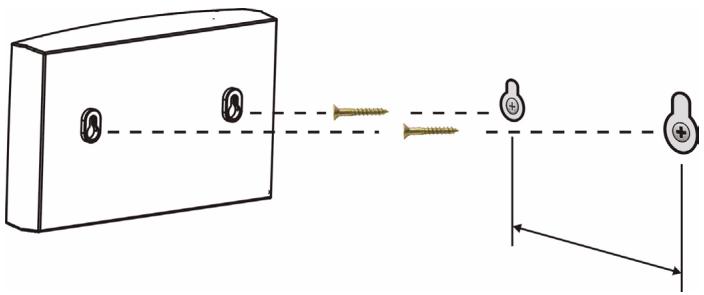
Hnke npBedeHbI nHcTpkyuN no KpePJIeHIO NWA-8500 K CTHe.

СмOTpnte XapaKTePcNTnNи3dJIIna, rIe npBVeDeHbI pa3MepbI nCNoIb3yEmbIX BnHTOB I paCCToHnI MExdY HmM.
1 PacnoJIOKHTe B BepxHeu cTeHbI, B CBO6OJHOM OT nperpad MeCTe.
2ПрсьерпinteДва OTьерстЯДлЯВИNTOB.

БудтЕВиMaTeIbHы:HeПОВpeДИteKaбeПИ Tpy6blBHyTpNCTeHbIпрппocверпьанИ OTВерстNi.
3 He BkpyuBaIte BnHTbI B CTeHy NOnHOCbIO. OCTaBbTe He6oJbIoI npOMexkyTOK B 0,5 cm MeXy rOJOBKO BnHTa I CTeHOI.
4 Y6eIntecb, YTO BnHTbI IIOtHO BOUJIIN B CTeHy. OHN DOnJXHbI BvIDepKINBaT BeC NWA-8500 c CoeHNHTeNbHbIM Na6eIaMn.
5 CoBmecTnTe OTBepCTnHa 3aDHeN NOBepxHocTn NWA-8500 c BnHTamn Ha CTeHe. POnDBecbTe NWA-8500 Ha BnHTax.
XapakTepncTnKn n3dJIy
- Quick Start Guide
- CONTENTS
- Introduction
- Hardware Connections
- LEDs
- ?
- Hardware Mounting
- Wall-mounted
- Product Specifications
- Certifications
- Federal Communications Commission (FCC) Interference Statement
- FCC Radiation Exposure Statement
- 注意!
- Viewing Certifications
- SafetyWarnings
- ENGLISH
- Warranty
- ZyXEL Limited Warranty
- Note
- Related Documentation
- Registration
- User Guide Feedback
- Copyright
- Disclaimer
- Trademarks
- Customer Support
- Corporate Headquarters (Worldwide)
- Costa Rica
- Czech Republic
- Denmark
- Finland
- France
- Germany
- Hungary
- India
- Japan
- Kazakhstan
- Malaysia
- North America
- Norway
- Poland
- Russia
- Singapore
- Spain
- Sweden
- Thailand
- Ukraine
- United Kingdom
- Einführung
- MoNTaЖ оборудовanity
- KpePJIeHne Ha cTeHy
- XapakTepncTnKn n3dJIy
Brand : ZYXEL
Model : NWA-8500
Category : Wireless Access Point