Pumba 8550 Cleankitty Smart - Vacuum Cleaner CECOTEC - Free user manual and instructions
Find the device manual for free Pumba 8550 Cleankitty Smart CECOTEC in PDF.


User questions about Pumba 8550 Cleankitty Smart CECOTEC
0 question about this device. Answer the ones you know or ask your own.
Ask a new question about this device
Download the instructions for your Vacuum Cleaner in PDF format for free! Find your manual Pumba 8550 Cleankitty Smart - CECOTEC and take your electronic device back in hand. On this page are published all the documents necessary for the use of your device. Pumba 8550 Cleankitty Smart by CECOTEC.
USER MANUAL Pumba 8550 Cleankitty Smart CECOTEC
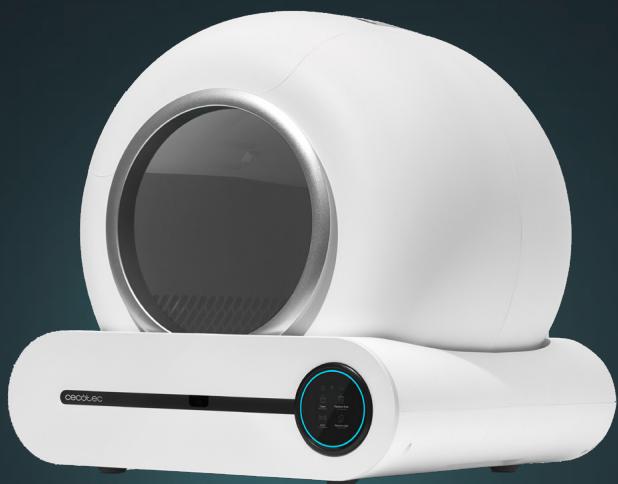
PUMBA 8550 CLEANKITTY SMART
Areneros automáticos / Automatic litter boxes
Safety instructions 8
-
Parts and components 48
-
Before use 49
-
Installation 49
-
Operation 51
-
Wi-Fi connectivity and mobile App 53
-
Cleaning and maintenance 54
-
Troubleshooting 55
-
Technical specifications 56
-
Recycling of electrical and electronic equipment 56
-
Technical support and warranty 56
-
Information on data stored by connected products in accordance with Regulation (EU)
2023/2854 ("Data Regulation") 57
-
Copyright 57
-
Declaration of Conformity 57
SOMMAIRE
[Non-Text]
[Non-Text]
[Non-Text]
[Non-Text]
[Non-Text]
[Non-Text]
[Non-Text]
[Non-Text]
[Non-Text]
[Non-Text]
[Non-Text]
[Non-Text]
[Non-Text]
[Non-Text]
[Non-Text]
[Non-Text]
[Non-Text]
[Non-Text]
[Non-Text]
[Non-Text]
[Non-Text]
[Non-Text]
[Non-Text]
[Non-Text]
[Non-Text]
[Non-Text]
[Non-Text]
[Non-Text]
[Non-Text]
[Non-Text]
[Non-Text]
[Non-Text]
[Non-Text]
[Non-Text]
[Non-Text]
[Non-Text]
[Non-Text]
[Non-Text]
[Non-Text]
[Non-Text]
[Non-Text]
[Non-Text]
[Non-Text]
[Non-Text]
[Non-Text]
[Non-Text]
[Non-Text]
[Non-Text]
[Non-Text]
[Non-Text]
[Non-Text]
[Non-Text]
[Non-Text]
[Non-Text]
[Non-Text]
[Non-Text]
[Non-Text]
[Non-Text]
[Non-Text]
[Non-Text]
[Non-Text]
[Non-Text]
[Non-Text]
[Non-Text]
[Non-Text]
[Non-Text]
[Non-Text]
[Non-Text]
[Non-Text]
[Non-Text]
[Non-Text]
[Non-Text]
[Non-Text]
[Non-Text]
[Non-Text]
[Non-Text]
[Non-Text]
[Non-Text]
[Non-Text]
[Non-Text]
[Non-Text]
[Non-Text]
[Non-Text]
[Non-Text]
[Non-Text]
[Non-Text]
[Non-Text]
[Non-Text]
[Non-Text]
[Non-Text]
[Non-Text]
[Non-Text]
[Non-Text]
[Non-Text]
[Non-Text]
[Non-Text]
[Non-Text]
[Non-Text]
[Non-Text]
[Non-Text]
[Non-Text]
[Non-Text]
[Non-Text]
[Non-Text]
[Non-Text]
[Non-Text]
[Non-Text]
[Non-Text]
[Non-Text]
[Non-Text]
[Non-Text]
[Non-Text]
[Non-Text]
NOTA
EU01_136482_Pumba 8550 CleanKitty Smart
EN • The coding in this manual is generic and applies to all code variants of the appliance.
Read the following instructions carefully before using the appliance. Keep this instruction manual for future reference or new users.
General safety:
- Remove the product and its parts from the packaging. Bags may cause asphyxia; keep away from children or pets.
- Always unplug the appliance when not in use or for cleaning.
- Do not immerse the product in water as this may damage the electronic components.
- Do not disassemble the product beyond what is indicated in this manual.
- Do not use this product for anything for which it was not intended or designed.
- If the cable or plug of the appliance were damaged, the appliance must not be used.
- If the plug becomes wet, switch off the power supply to the socket into which it is plugged before unplugging it.
- Make sure the plug is not wet. The power socket should be located higher than the location of the appliance.
-
The appliance must not be used outdoors.
-
Unplug the appliance every time you handle it.
- This appliance is intended for domestic use only and is not suitable for use in commercial establishments such as bars, restaurants, farms, hotels, motels, and offices.
- Do not use the product if it is malfunctioning or damaged. Do not attempt to repair this appliance yourself, please contact the Technical Support Service.
- Proper location: place the litter box in a quiet, easily accessible location for your pet, avoiding areas of high traffic or noise that may cause stress.
- Keep away from children and pets: locate the litter box in an area where children and other pets do not have access, ensuring a quiet and private space for your pet.
Operation and maintenance:
- Check daily operation: make sure that the automatic litter box is working properly, that the sensors are active and that there are no obstructions in the mechanism.
Responsible use:
- Cleaning and user maintenance should not be carried out by unsupervised children.
- Do not allow pets to chew or swallow any part of the product. To avoid problems, you can pass the cable through a resistant conduit.
- Do not install or store this product in locations that are exposed to precipitation and/or temperatures below 4 °C.
- Regular cleaning: clean the litter box regularly, removing solid waste and changing the litter as instructed to avoid odours and bacteria.
- Use the recommended sand: only use the recommended sand to ensure efficient operation of the litter box and the comfort of your cat.
Animal safety:
- Provide a gradual introduction: introduce your pet to the automatic litter box gradually so that he/she gets used to the new device and associates it with the litter area.
- Monitor the initial adaptation: keep close supervision during the first few days to ensure that your pet uses the litter box correctly and feels comfortable.
INSTRUCTIONS DE SÉCURITÉ
https://cecotec.es/es/information/declaration-of-conformity
ENGLISH
1. PARTS AND COMPONENTS
Fig. 1
- Waste container lid
- Waste container
- Waste container door
- Magnetic retention ring for waste bag
- Barrel entrance
- Barrel
- Barrel ring
- Filter mesh
- Cat litter pad
- Anti-dirt cover for barrel ventilation opening
- Odour elimination gel (not included)
- Barrel rotation shaft fixing slot
- Barrel locking buckle
- Leak-proof tray
- Base
- Display and control panel
- Foot (4 weight sensors)
- Power socket
- Anti-spillage guard
Fig. 2
A. Indicator lights
- Malfunction indicator
- Wi-Fi connection indicator
- Container full indicator
B. Touch control icons
- Cleaning/Level adjustment icon
- Empty container icon
- Auto mode/Wi-Fi connection icon
- Fresh/Replace bag icon
Note:
The graphics in this manual are schematic representations and may not exactly match the appliance.
2. BEFORE USE
- This appliance comes in a packaging designed to protect it during transport. Take the appliance out of its box and remove all packaging materials. You can keep the original box and other packaging materials in a safe place to prevent damage to the appliance if you need to transport it in the future. If you wish to dispose of the original packaging, make sure all items are recycled properly.
- Check that all parts and components are included and in good condition. If any of them are missing or damaged, please contact Cecotec's Official Technical Support Service immediately.
Box content
- Automatic litter box
- Waste bags (15 units on roll)
- Anti-spillage guard
- Filter mesh
- Leak-proof tray
- Instruction manual
3. INSTALLATION
Note:
- Do not drag or force the product downwards. If you need to move it, lift and place it gently.
- The base of this product is strictly prohibited from being submerged in water. If it becomes wet accidentally during the cleaning process, dry it immediately to avoid damaging the electrical components.
- Use the original power adapter to avoid damage to the product or safety hazards.
- Strictly prohibited for cats weighing less than 1.0 kg.
- Use this product indoors and avoid high temperatures, high humidity, and direct sunlight.
Proper product placement
- Ensure the product is positioned on a flat, hard surface with no foreign objects underneath.
- Ensure the product does not lean against or come into contact with walls or surrounding objects, and that no objects are placed on top of it.
- Ensure the product is close to the Wi-Fi signal source and away from other electrical appliances that may cause interference.
- This product is for indoor use only.
- Install the leak-proof tray in the base recess.
- If you need to relocate the litter box, first disconnect the power supply. Do not lift or move the barrel.
ENGLISH
Caution
- Do not place the litter box in an environment where it may be exposed to high temperatures, high humidity, or direct sunlight to prevent reducing the service life of electrical components and plastic parts.
- Do not place the litter box on a soft, uneven surface to avoid affecting the operation of the gravity sensors.
- Do not place any foot of the device on a cat litter mat (if equipped) to avoid affecting the operation of the gravity sensors.
- Do not drag or drop the litter box when positioning it to avoid breaking or damaging it.
- If the infrared sensor is activated, it may trigger frequently when there is an obstacle within 30 cm of the front of the litter box or the floor is highly reflective (shiny tiles, glass, etc.). Users may choose to relocate the litter box.
- If it is necessary to use a litter mat, it is recommended that its thickness does not exceed 3 cm.
Installing the anti-spillage guard
Fig. 3
- Position the anti-spillage guard on the edge of the automatic litter box barrel. Note: This component is designed to prevent litter and waste from spilling during use.
- Align the guard with the barrel edge.
- Press the guard firmly until it is secured in place, ensuring there are no gaps that could allow spillage.
Power-on and self-check
- When switching on the product, you will hear a "beep" indicating the start of the self-check. Wait for it to complete before proceeding.
- Insert the power cable into the protection slot next to the plug to prevent accidental disconnections.
- After the self-check, the product will automatically level the litter and activate Auto mode by default.
4. OPERATION
Touch icon and status light guide
| Touch icon | Function | Operation | Light | Sound |
| Auto mode/Wi-Fi connection | Turn Auto On/Off | Click | [0T28] On/Off | Short beep |
| Connection | Press for 2 seconds | [X48Z] Flashing | 2-second long sound | |
| Cleaning/Level adjustment | Cleaning | Click |  Flashes Flashes | Short beep |
| Cancel cleaning | During cleaning, click to restart barrel |  Flashes Flashes | Short beep | |
| Level | Press for 2 seconds | Outer ring light flashes | Short beep | |
| Empty container | Emptying litter | Press for 2 seconds | [226C] Flashes | Short beep |
| Cancel Emptying | During emptying, click to restart barrel | [073W] Flashes | Short beep | |
| Fresh/Replace bag | Fresh | Click | [T36S] flashes | Short beep |
| Replace bag | Press for 2 seconds |  flashes flashes | Short beep | |
| ((o)) + (Q) | Lock/Unlock | Press for 2 seconds | / | Short beep |
| Sleep mode disabled | Press for 2 seconds during Sleep mode |  | / | |
| Gravity sensor activated | / |  Flashes Flashes | / | |
| Problem | / | [4T02] White light on | 10-second long beep, 5-minute pause, then continues |
ENGLISH
Instructions for adding cat litter
- Verify that the litter pad is properly installed before adding litter.
- This product is compatible with clumping litter.
Caution: Ensure the outer frame of the litter pad is completely inserted into the leak-proof slot of the barrel. Fig. 4
Note: Avoid using large-sized litter or litter longer than 10 mm, as well as non-clumping litter.
- Select the appropriate filter mesh according to the litter type and configure correctly in the app to optimise the experience.
- Add litter through the barrel entrance. Maintain the appropriate litter level to prevent it from sticking to the bottom.
- Press "Cleaning/Level adjustment" for 2 seconds to level the litter. Ensure the level does not exceed the maximum line to avoid waste. Fig. 5.
Fig. 6
A: Filter mesh suitable for tofu litter, mixed litter, and clumping litter.
Container full warning
- When there is excessive waste in the waste container, the container full indicator light illuminates to remind the user to change the waste bag.
- If the container full indicator light illuminates but there is still ample space in the container, you can calibrate the container full setting on the app settings page. The adjustment method is as follows:
- Adjustment range for different litter types: biodegradable and mixed litter 0–7 kg, bentonite litter 5–10 kg, mineral litter 8–15 kg.
- Within the adjustment range, the lower the value, the lower the weight at which the "Container full" warning appears and the sooner the corresponding indicator light illuminates. The higher the value, the higher the weight at which the "Container full" warning appears and the later the indicator light illuminates. If the range is exceeded, there will be a "Container full" warning when little space remains, but not when space is insufficient.
Caution
- The container full warning serves as a reference only. It is a reminder that alerts the user that there is insufficient space in the container, and it is recommended to replace the waste bag as soon as possible.
- However, the container can continue to operate normally.
Instructions for replacing and installing waste bags
- The product includes a pre-installed waste bag.
- To change a used bag, press and hold "Fresh/Replace bag" for 2 seconds. The container will automatically adjust to facilitate replacement. Open the container to perform the change.
- Remove the magnetic ring together with the used bag and place a new one.
- Insert the new bag into the magnetic ring following the direction indicated in Figure 7.
- Wrap the bag outwards around the magnetic ring. Fig. 8
- Align the magnetic ring with the container magnet, ensuring both sides are properly adjusted and the bag edges are correctly positioned. Fig. 9
- After installation, verify that the container lid locking opening is not obstructed and can close properly. Ensure the container door opens and closes smoothly, then close the lid.
⚠️ Important: The magnetic ring magnet must be oriented towards the bag opening to prevent incorrect installation. Ensure the bag edge is not too wide so as not to affect container closure.
Emptying the cat litter
- Before emptying the litter, you must replace it with a new waste bag.
- Press and hold "Empty container" for 2 seconds. When the sound stops, the emptying light flashes white, and the product begins emptying. During emptying, you can press "Empty container" again to stop the process.
- Once the litter is emptied, the product automatically rotates to the bag replacement angle. You must open the waste container lid and remove the waste bag.
5. WI-FI CONNECTIVITY AND MOBILE APP
Scan the following QR code to download the app, access the manual, guides, and technical support.

- Download the Cecotec app from Google Play or App Store.
- If this is your first time using the app, you will need to create an account; otherwise, log in.
- Once inside the Cecotec app, go to the upper right corner and press the "+" icon. Then select the "Add device" option.
- Now switch on the litter box and press and hold the Auto button 📋 for

2 seconds.
- Return to the Cecotec app, and you will notice that the device will appear flashing at the top of the app, indicating it is ready to be paired. Select it to continue with the process and follow the steps shown in the app.
You can also search for and add the product manually. In the app, select the "Add device"
ENGLISH
option, go to the side menu and select the corresponding range "Pets", and locate your product model "Pumba 8550 CleanKitty Smart". Tap on it to start the pairing process and follow the steps indicated in the app.
Once correctly linked for the first time, the device will be saved on your phone and you can access it from the app to control all its functions.
Notes:
- This device is only compatible with 2.4 GHz Wi-Fi networks.
- Ensure your mobile phone is connected to a Wi-Fi network with optimal network speeds.
- You can unlink the device from the app by accessing the device panel (where all its functions are displayed), entering Settings and selecting "Remove device", where you can also delete recorded data.
- If you prefer to do it manually, go to the device while switched on, press and hold the Auto button for 2 seconds. The device will then automatically unlink.
6. CLEANING AND MAINTENANCE
Cleaning
Fig. 10
- Once the barrel is emptied, disconnect the product's power supply. Unlock the barrel fastener and lift to remove it.
- Remove the anti-spillage guard and turn the barrel unlocking ring following the indicated marks to remove it.
- Gently extract the central section of the filter mesh to fold and remove it. Then, lift the litter pad handle and remove it.
- The barrel and its components, as well as the leak-proof tray, can be washed with water. However, the electrical parts of the base must not be washed; clean them with a damp cloth.
- After cleaning, ensure all components are completely dry, reinstall the product correctly, switch it on, wait for it to complete the automatic check, add cat litter, and begin using it.
- Users can empty the litter and clean the barrel and base according to their usage habits.
▲ Important: The litter pad is delicate. When dismounting or mounting, avoid excessive bending or compression of the outer frame to prevent permanent deformation that could cause installation gaps with the barrel and result in litter and urine leakage. If the outer frame becomes deformed, adjust it manually or contact the distributor for replacement.
Tip: Change the waste bag every 3 days in warm weather (considering a single cat), check the leak-proof tray weekly, and perform a complete product cleaning monthly.
- TROUBLESHOOTING
| Problem | Possible solution |
| Cannot connect to the network | Enable Bluetooth on your phone.Check the Wi-Fi network and password.Use the 2.4G network when connecting.Ensure the product has good Wi-Fi signal. |
| No response when switching on | Check the plug and power adapter. |
| The product stops during rotation | Switch off the product, place it on a flat, hard surface, and switch it on again. |
| The barrel bounces when rotating | Remove and reinstall the barrel following the instructions, securing it with the fastener. |
| The barrel does not rotate | Reinstall the barrel and secure it with the fastener.Check for objects blocking rotation. |
| The product does not perform automatic cleaning | Activate the function on the product.Activate the Auto mode in the app. |
| The product does not stop when the cat enters | Not suitable for kittens under 1 kg. |
| Litter and urine leakage | Install the litter pad correctly.Correct frame deformations manually or replace the pad. |
| Litter spillage during cleaning | Add litter according to the maximum line.Use a compatible filter mesh. |
| Sharp friction noise | Check the roller and for friction between the barrel and base. |
| The container lid does not close | Fold the waste bag properly and close again. |
| Waste inside the container lid | Ensure the bag is properly compressed by the retention ring.Check if the bag is damaged. |
| Waste coming out during cleaning | Replace the waste bags promptly. |
ENGLISH
| The container door does not close | Use original bags if the current ones are too thick.Manually remove stuck objects. |
| Litter coming out from the barrel during emptying | Replace with a new waste bag.Ensure appropriate amount of litter in the barrel. |
8. TECHNICAL SPECIFICATIONS
Product reference: EU01_136482
Product: Pumba 8550 CleanKitty Smart
Power supply unit input: 100-240 V\~, 50/60 Hz, 1,0 A
Power supply unit output: 18 W, 1.5 A
Product input: 10 W, 12 V DC
Use only with the power supply unit GRT-A30-120150EW.
Wi-Fi connection: Wi-Fi IEEE 802.11 b/g/n 2.4 GHz
Maximum transmission power: 2.91/3,02 dBi
Technical specifications may change without prior notice to improve product quality. Made in China | Designed in Spain
9. RECYCLING OF ELECTRICAL AND ELECTRONIC EQUIPMENT

This symbol indicates that, according to the applicable regulations, the product and/or batteries must be disposed of separately from household waste. When this product reaches the end of its service life, you must remove the batteries/accumulators and take it to a collection point designated by local authorities.
For detailed information on how to properly dispose of electrical and electronic equipment and/or the corresponding batteries, consumers should contact their local authorities.
Compliance with the above guidelines will help to protect the environment.
10. TECHNICAL SUPPORT AND WARRANTY
Cecotec shall be liable to the end user or consumer for any lack of conformity that exists at the time of product delivery under the terms, conditions and deadlines established by applicable regulations.
Repairs should be carried out by qualified personnel.
If at any moment you detect any problem with your product or have any doubt, do not hesitate to contact the official Cecotec Technical Support Service at +34 963 210 728.
11. INFORMATION ON DATA STORED BY CONNECTED PRODUCTS IN ACCORDANCE WITH REGULATION (EU) 2023/2854 ("DATA REGULATION")
Cecotec's connected products and related services are those that generate different data and information during use. In accordance with the provisions of the Data Regulation, through this document Cecotec provides you with information about your rights concerning the data generated and about how to access such data.
This right allows you to use the data for any lawful purpose, including, among others, product and/or service optimisation or contracting post-sale services with third parties.
As a user, you may exercise your right of access, within the limits provided for by the Data Regulation, through the email address data.act@cecotec.es. To protect the generated data—and in order to prevent fraud or identity theft—CECOTEC may require additional information to verify your status as a user.
Data is stored for a determined period of time.
12. COPYRIGHT
The intellectual property rights over the texts in this manual belong to CECOTEC INNOVACIONES, S.L. All rights reserved. The content of this publication may not, either in part or in its entirety, be reproduced, stored in a retrieval system, transmitted or distributed by any means (electronic, mechanical, photocopying, recording or similar) without prior authorisation from CECOTEC INNOVACIONES, S.L.
13. DECLARATION OF CONFORMITY
CE Cecotec Innovaciones hereby declares that this automatic litter box, model EU01_136482 Pumba 8550 CleanKitty Smart is in conformity with the Radio Equipment Directive 2014/53/EU.
The full text of the EU Declaration of Conformity can be found on the following website: https://cecotec.es/es/information/declaration-of-conformity
FRANÇAIS
1. PIÈCES ET COMPOSANTS
Figure 1
5. CONNECTIVITÉ ET APPLICATION WI-FI
https://cecotec.es/es/information/declaration-of-conformity
1. TEILE UND KOMPONENTEN
Abbildung 1
5. CONNESSIONE WI-FI E APP
https://cecotec.pt/pt/information/declaration-of-conformity
1. ONDERDELEN EN COMPONENTEN
Figuur 1
https://cecotec.es/es/information/declaration-of-conformity
1. CZĘŚCI I KOMPONENTY
Rysunek 1
5. ŁĄCZNOŚĆ WI-FI I APLIKACJA
5.PŘIPOJENÍ K WIFI A APLIKACE
https://cecotec.es/es/information/declaration-of-conformity
1. PARÇALAR VE BILEŞENLER
Şekil 1
https://cecotec.es/es/information/declaration-of-conformity
CATALÀ
1. PECES I COMPONENTS
Figura 1

Fig./Img./Abb./Afb./Rys.1

Fig./Img./Abb./Afb./Rys. 2

Fig./Img./Abb./Afb./Rys. 3
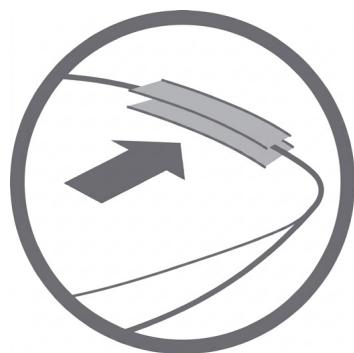
Fig./Img./Abb./Afb./Rys. 4
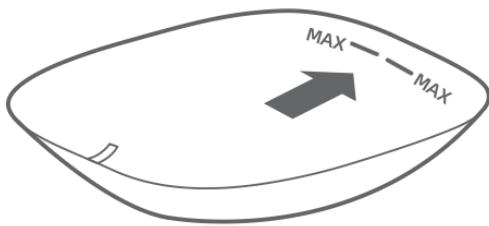
Fig./Img./Abb./Afb./Rys. 5
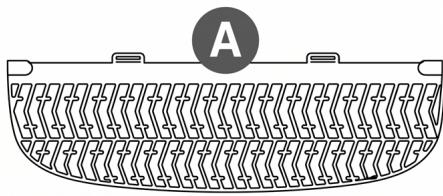
Fig./Img./Abb./Afb./Rys. 6
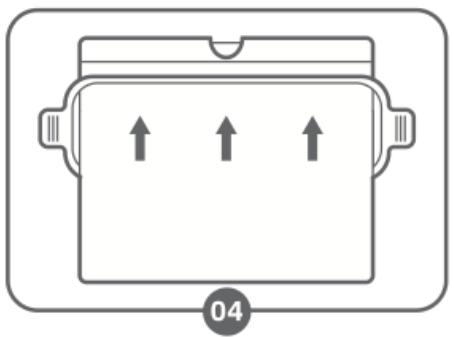
Fig./Img./Abb./Afb./Rys. 7

Fig./Img./Abb./Afb./Rys. 8

Fig./Img./Abb./Afb./Rys. 9

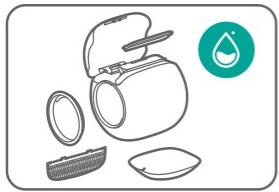
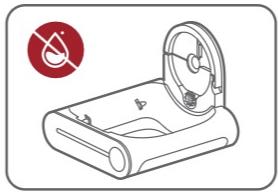

Fig./Img./Abb./Afb./Rys. 10
www.cecotec.es
- PUMBA 8550 CLEANKITTY SMART
- ARENEROS AUTOMÁTICOS / AUTOMATIC LITTER BOXES
- SOMMAIRE
- NOTA
- OPERATION AND MAINTENANCE
- RESPONSIBLE USE
- ANIMAL SAFETY
- INSTRUCTIONS DE SÉCURITÉ
- ENGLISH
- PARTS AND COMPONENTS
- FIG. 1
- FIG. 2
- NOTE
- BEFORE USE
- BOX CONTENT
- INSTALLATION
- PROPER PRODUCT PLACEMENT
- CAUTION
- INSTALLING THE ANTI-SPILLAGE GUARD
- FIG. 3
- POWER-ON AND SELF-CHECK
- OPERATION
- TOUCH ICON AND STATUS LIGHT GUIDE
- INSTRUCTIONS FOR ADDING CAT LITTER
- CONTAINER FULL WARNING
- INSTRUCTIONS FOR REPLACING AND INSTALLING WASTE BAGS
- EMPTYING THE CAT LITTER
- WI-FI CONNECTIVITY AND MOBILE APP
- NOTES
- CLEANING AND MAINTENANCE
- CLEANING
- FIG. 10
- TECHNICAL SPECIFICATIONS
- RECYCLING OF ELECTRICAL AND ELECTRONIC EQUIPMENT
- TECHNICAL SUPPORT AND WARRANTY
- INFORMATION ON DATA STORED BY CONNECTED PRODUCTS IN ACCORDANCE WITH REGULATION (EU) 2023/2854 ("DATA REGULATION")
- COPYRIGHT
- DECLARATION OF CONFORMITY
- FRANÇAIS
- PIÈCES ET COMPOSANTS
- FIGURE 1
- CONNECTIVITÉ ET APPLICATION WI-FI
- TEILE UND KOMPONENTEN
- ABBILDUNG 1
- CONNESSIONE WI-FI E APP
- ONDERDELEN EN COMPONENTEN
- FIGUUR 1
- CZĘŚCI I KOMPONENTY
- RYSUNEK 1
- ŁĄCZNOŚĆ WI-FI I APLIKACJA
- 5.PŘIPOJENÍ K WIFI A APLIKACE
- PARÇALAR VE BILEŞENLER
- ŞEKIL 1
- CATALÀ
- PECES I COMPONENTS
- FIGURA 1
Brand : CECOTEC
Model : Pumba 8550 Cleankitty Smart
Category : Vacuum Cleaner