Pumba 6000 Purrfect Meal Smart - Vacuum Cleaner CECOTEC - Free user manual and instructions
Find the device manual for free Pumba 6000 Purrfect Meal Smart CECOTEC in PDF.


User questions about Pumba 6000 Purrfect Meal Smart CECOTEC
0 question about this device. Answer the ones you know or ask your own.
Ask a new question about this device
Download the instructions for your Vacuum Cleaner in PDF format for free! Find your manual Pumba 6000 Purrfect Meal Smart - CECOTEC and take your electronic device back in hand. On this page are published all the documents necessary for the use of your device. Pumba 6000 Purrfect Meal Smart by CECOTEC.
USER MANUAL Pumba 6000 Purrfect Meal Smart CECOTEC
Safety instructions 7
-
Parts and components 41
-
Before use 41
-
Product assembly 42
-
Operation 42
-
Cleaning and maintenance 45
-
Troubleshooting 45
-
Technical specifications 46
-
Disposal of old electrical and electronic appliances 46
-
Technical support and warranty 47
-
Copyright 47
-
Declaration of conformity 47
SOMMAIRE
Read these instructions thoroughly before using the device. Keep this instruction manual for future reference or new users.
- General safety:
- Remove the product and its parts from the packaging. Bags may cause asphyxia; keep away from children or pets.
- Always unplug the appliance when not in use or for cleaning.
- Do not immerse the product in water as this may damage the electronic components.
- Do not disassemble the product beyond what is indicated in this manual.
- Do not use this product for anything for which it was not intended or designed.
- This appliance is designed for domestic use only and is not intended for bars, restaurants, farmhouses, hotels, motels, and offices.
- The mains plug of the power cord must be removed from the base before cleaning or maintenance operations.
- Unplug the feeder every time you handle it.
- The feeder must not be used outdoors.
-
If the cable or plug of the dispenser is damaged, the appliance must not be used.
-
If the plug gets wet, turn off the power at the socket to which it is plugged in and unplug it.
- Make sure the plug is not wet. The power socket should be located higher than the location of the feeder.
- Do not use the product if it is malfunctioning or damaged. Do not attempt to repair this product yourself, please contact the Technical Support Service.
- Responsible use:
- Cleaning and user maintenance should not be carried out by unsupervised children.
- Do not allow pets to chew or swallow any part of the product. To avoid problems, you can pass the cable through a resistant conduit.
- Do not install or store this product in locations that are exposed to precipitation and/or temperatures below 4 °C.
- Frequently check the amount of food in the compartments to ensure that the feeder is dispensing food correctly.
- Monitoring and training:
- This appliance can be used by children aged 8 years and above and people with reduced physical, sensory, or mental capabilities or lack of experience and knowledge if they have been given supervision or instruction concerning use of the appliance in a safe way and understand the hazards involved. Children must not play with the appliance.
- If you have visitors to your home, be sure to provide them with information about the automatic feeder and how to interact with it safely, especially if they have pets of their own.
- When introducing your pets to the automatic feeder for the first time monitor their initial interaction to make sure they adapt and understand the feeding process safely.
- If you are introducing your pets to the feeder for the first
time, use a gradual training process to get them used to the device before leaving it running unsupervised.
- If you have pets with aggressive or playful behaviour, consider additional training to ensure that the automatic feeder is not subject to nibbling or hitting.
- Operation and maintenance:
- Checking loose parts: before each use, check that all parts and components of the feeder are securely fastened and in place, avoiding any risk of accidental ingestion by pets.
- Appropriate food: only use manufacturer's recommended dry food to prevent clogging of the feeder mechanism and to ensure that pets receive adequate nutrition.
- Clean the feeder at least once a week.
- Conduct regular inspections of the feeder, ensuring that moving parts are functioning properly and that there is no build-up of food debris that could affect performance.
- Regular maintenance: in addition to weekly cleaning, perform more thorough maintenance at least once a month to ensure optimal long-term performance.
- Batteries:
- Requires 4 "AA" batteries. Batteries are NOT included. Only use alkaline batteries.
- Check the low battery indicator light frequently to ensure that the feeder has battery.
- You must remove the batteries from the device before disposing of it.
- The device must be disconnected from the power supply when the battery is removed.
- New and used batteries should not be mixed.
- Batteries must be inserted according to the correct polarity.
-
Discharged batteries must be removed from the appliance and disposed of safely.
-
If the device is to be stored unused for a long period of time, the batteries should be removed.
- The supply terminals must not be short-circuited.
- Los bornes de alimentación no deben ser cortocircuitados.
INSTRUCTIONS DE SÉCURITÉ
- Lid
- Desiccant bag
- Dessicant bracket
- Food tank
- Closing of the food tank
- Main body
- Control panel
- Food dispensing outlet
- Stainless-steel bowl
- Plastic bowl
Please note
The graphics in this manual are schematic representations and may not exactly match the appliance.
2. BEFORE USE
- This appliance is packaged in a way as to protect it during transport. Take the device out of its box and remove all packaging materials. You can keep the original box and other packaging elements in a safe place. This will help you prevent damage to the device when transporting it in the future. In case the original packaging is disposed of, make sure all packaging materials are recycled accordingly.
- Make sure all parts and components are included and in good conditions. If there is any piece missing or in bad conditions, contact the official Cecotec Technical Support Service immediately.
Box content
- Pet feeder
- USB cable
- Adapter
- Safety lock
- Plastic bowl
- Stainless-steel bowl
- Instruction manual
3. PRODUCT ASSEMBLY
1. Plug the appliance into a power supply.
- Open the battery compartment and put 4 AA batteries (not included).
- Plug the appliance into a power supply.
- When the light indicator lights up, the feeder has been switched on.
Fig. 2
-
Battery compartment (4 AA batteries)
-
Power plug
-
This device has a dual power supply (AA batteries and mains connection). Choose the one that suits you best. It is recommended to use batteries as an alternative power source and to connect the device to a power outlet at the same time.
- If there is a power failure or power outage, the batteries can be used as a backup power source to ensure that your pet receives a continuous supply of food and that meals are dispensed on time.
2. Assembly the product by following the steps below.
Please note
Remove the parts from the feeder and assemble them in order.
- Fig. 3. Adjust the direction of the food dispensing elements as shown in the figures. The food outlet should face backwards. Fig 4.
- Put the plastic bowl inside the stainless-steel bowl.
- Place the lid on the food tank. Fig. 5
3. Add pet food into the tank. Fig. 6
Please note
Do not use canned or wet food. Recommended food size: 5-10 mm. Fig. 7
4. Install the safety lock. Fig. 8
4. OPERATION
Fig. 9
-
Button
-
Press the icon once to dispense a food serving manually.
- Press and hold the button (1) for 10 seconds to start Wi-Fi connection.
2. LED indicator
Please note
The appliance is only suitable for 2.4G network connections (it cannot be connected to 5G networks). Make sure to install 4 AA batteries and to plug the device to a power outlet. Place the feeder close to the router. It is recommended to place it at a maximum distance of 6 metres without walls in between.
| Blue indicator light | If flashing rapidly | The feeder is in Bluetooth mode ready to connect to the application. |
| If flashing slowly | The feeder is connecting to the application. | |
| If it remains steady | It has successfully connected to Wi-Fi and is ready for use. | |
| Green indicator light | If flashing rapidly | Wi-Fi has been disconnected. |
| If it remains steady | Wi-Fi has been disconnected. | |
| Red indicator light | If flashing rapidly | Low battery, connect the adapter to the power socket or replace batteries. |
Downloading the application and logging in

-
Scan the QR code or search for the "Cecotec" app in the Apple Store or Google Store to download it.
-
Open the "Cecotec" app on your mobile phone and click on "Register" to create an account. If you already have an account, simply log in.
Please note
Please note that you can only log in to the app from one associated account, but you can use it to connect to multiple devices and use it on multiple phones.
Connecting the feeder to the APP automatically
Follow the instructions in the app to complete the connection process:
- Activate the Wi-Fi connection and the Bluetooth.
- Open the "Cecotec" app and log in to your account.
-
Reset Wi-Fi on the device by pressing and holding the reset icon for 3-5 seconds.
-
The "Add device" message will appear.
- Press the "Add" option to add the device.
- Enter the Wi-Fi network name and password (remember that only the 2.4Gz network can be selected).
- Wait for the device to connect and tap the "Done" option to enter the control interface.
Connecting the feeder to the APP manually
- Add the feeder to the application: after logging into the application, click on the [+] option in the top right corner to add the feeder, we will go to the “Pet Care” part, look for our product “Pumba 6000 Purrfect Meal Smart”. Finally, follow the linking steps.
Please note
Make sure your phone is connected to a Wi-Fi network with optimal network speeds.
Establishing a schedule or meal plan
You can set a daily feeding schedule for your pet.
Please note
The device consumes power very quickly, so it is recommended not to use batteries as the only power source, as the battery will only last about 10 hours.
Tips
- The battery pack is used as a back-up in case of power failure or power failure. Make sure to install 4 AA batteries and to plug the device to a power outlet at the same time.
- It only works with the 2.4Gz network, do not try to connect to the 5Gz network.
- Try placing the device close to the router during connection to ensure a fast connection.
On food portions depending on your pet, breed, size, and type of food, it is advisable to follow the table on the food itself or follow the instructions of a professional.
Warning
Do not use canned or wet food.
Please note
If your pet has not eaten the previously scheduled meal, reduce the dose of the next meal.
5. CLEANING AND MAINTENANCE
Both the feeder and the desiccant bracket can be removed for cleaning.
Use a damp cloth to wipe dirt from inside the feeder and from the dispensing outlet.
Rinse the parts and air dry them thoroughly before putting them back into the appliance.
NOTE: for the sake of your pet's health, it is recommended to clean the feeder regularly.
The washable parts of the feeder are: food tank, stainless steel bowl, plastic bracket, lid (without desiccant bag).
These parts can also be put in the dishwasher or immersed in water.
6. TROUBLESHOOTING
Why can't I connect to Wi-Fi?
Check that you have connected the device correctly and make sure you select the 2.4G Wi-Fi option instead of 5G.
Why doesn't the device dispense food?
- Be sure to fill the tank only with dry food or feed.
- Check if the battery level is low and if the power adapter is connected.
Why are the servings not uniform?
The first servings may vary, but this does not mean that the appliance is defective. After about 6 meals, servings should even out.
| Problem | Possible cause | Solution | |
| 1 | Feeder does not dispense food | Clogged food in the mechanism | Check for obstructions and clear them. |
| Make sure the food is dry and loose. | |||
| 2 | Food spills out of the feeder | Unbalanced or unstable feeder | Place the feeder on a level surface. |
| Check if the parts are correctly assembled. | |||
| 3 | Low battery indicator light on | No battery | Replace the batteries with new ones. |
| Use quality alkaline batteries. | |||
| 4 | Feeder makes strange noises | Loose or worn parts | Inspect and tighten loose parts. |
| Replace worn parts. | |||
| 5 | The feeder does not work | Electrical or electronic problem | Contact Technical Support Service |
| 6 | Moist or sticky food | Moisture in the storage area | Place the feeder in a dry place. |
| Store the feeder indoors. | |||
| Lid not closed properly | |||
| Check that the lid is properly fitted. |
7. TECHNICAL SPECIFICATIONS
Product reference: 09565
Product: Pumba 6000 Purrfect Meal Smart
Suitable for: All types of small-medium sized pets
Rated voltage: 5 V1A
Product power: 5 W
Power supply: DC adaptor and (X4) "AA" alkaline batteries
Wi-Fi connection: Wi-Fi IEEE 802.11 b/g/n 2.4 GHz
Maximum power transmission: 20 dBm
Appliance capacity: 6 L
Type of food: dry food/feed
Portion sizes: consult feed instructions or a professional
Technical specifications may change without prior notification to improve product quality.
Made in China | Designed in Spain
8. DISPOSAL OF OLD ELECTRICAL AND ELECTRONIC APPLIANCES

This symbol indicates that, according to the applicable regulations, the product and/or batteries must be disposed of separately from household waste. When this product reaches the end of its shelf life, you should dispose of the cells/batteries/accumulators and take them to a
collection point designated by the local authorities.
Consumers must contact their local authorities or retailer for information concerning the correct disposal of old appliances and/or their batteries.
Compliance with the above guidelines will help protecting the environment.
9. TECHNICAL SUPPORT AND WARRANTY
Cecotec shall be liable to the end user or consumer for any lack of conformity that exists at the time of delivery of the product under the terms, conditions, and deadlines established by the applicable regulations.
It is recommended that repairs be carried out by qualified personnel.
If at any moment you detect any problem with your product or have any doubt, do not hesitate to contact the official Cecotec Technical Support Service at +34 963 210 728.
10. COPYRIGHT
The intellectual property rights over the texts in this manual belong to CECOTEC INNOVACIONES, S.L. All rights reserved. The contents of this publication may not, in whole or in part, be reproduced, stored in a retrieval system, transmitted, or distributed by any means (electronic, mechanical, photocopying, recording or similar) without the prior authorization of CECOTEC INNOVACIONES, S.L.
11. DECLARATION OF CONFORMITY
Cecotec Innovaciones hereby declares this pet feeder, model 09565_Pumba 6000 Purrfect Meal Smart, complies with the Directive 2014/53/EU on radio equipment.

The complete text of the EU declaration of conformity is available in the following Internet address: www.cecotec.es.
1. PIÈCES ET COMPOSANTS
Img. 1
6. PROBLEEMOPLOSSING
Fig./Img./Abb./Afb./Rys.2

Fig./Img./Abb./Afb./Rys. 3

Fig./Img./Abb./Afb./Rys. 4
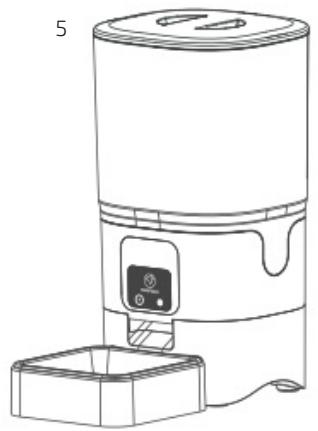
Fig./Img./Abb./Afb./Rys. 5

Fig./Img./Abb./Afb./Rys.6
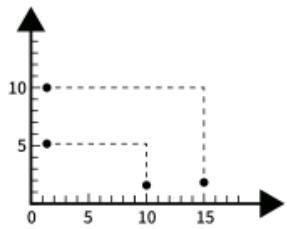
Fig./Img./Abb./Afb./Rys.7

Fig./Img./Abb./Afb./Rys.8

Fig./Img./Abb./Afb./Rys.9
www.cecotec.es
- SOMMAIRE
- INSTRUCTIONS DE SÉCURITÉ
- BEFORE USE
- BOX CONTENT
- PRODUCT ASSEMBLY
- PLUG THE APPLIANCE INTO A POWER SUPPLY
- FIG. 2
- ASSEMBLY THE PRODUCT BY FOLLOWING THE STEPS BELOW
- ADD PET FOOD INTO THE TANK. FIG. 6
- INSTALL THE SAFETY LOCK. FIG. 8
- OPERATION
- FIG. 9
- LED INDICATOR
- DOWNLOADING THE APPLICATION AND LOGGING IN
- CONNECTING THE FEEDER TO THE APP AUTOMATICALLY
- CONNECTING THE FEEDER TO THE APP MANUALLY
- ESTABLISHING A SCHEDULE OR MEAL PLAN
- CLEANING AND MAINTENANCE
- TROUBLESHOOTING
- WHY DOESN'T THE DEVICE DISPENSE FOOD
- WHY ARE THE SERVINGS NOT UNIFORM
- TECHNICAL SPECIFICATIONS
- DISPOSAL OF OLD ELECTRICAL AND ELECTRONIC APPLIANCES
- TECHNICAL SUPPORT AND WARRANTY
- COPYRIGHT
- DECLARATION OF CONFORMITY
- PIÈCES ET COMPOSANTS
- IMG. 1
- PROBLEEMOPLOSSING
Brand : CECOTEC
Model : Pumba 6000 Purrfect Meal Smart
Category : Vacuum Cleaner