Pumba 2500 Refresh Smart - Vacuum Cleaner CECOTEC - Free user manual and instructions
Find the device manual for free Pumba 2500 Refresh Smart CECOTEC in PDF.


| Product type | Smart robot vacuum |
| Brand | Cecotec |
| Model | Pumba 2500 Refresh Smart |
| Suction power | 2500 Pa |
| Battery life | Approximately 110 minutes |
| Dust bin capacity | 0.5 L |
| Water tank capacity | 0.3 L |
| Filtration | HEPA filter |
| Navigation | Infrared detection and anti-fall sensors |
| Scheduling | Daily via mobile app |
| Cleaning modes | Auto, edge, spot, spiral |
| Main brush | Anti-tangle rubber |
| Side brushes | 2 washing brushes |
| Power supply | Rechargeable Li-ion battery 2500 mAh |
| Charging time | 3 hours |
| Noise level | 65 dB (maximum) |
| Dimensions | 34 × 34 × 9.5 cm |
| Weight | 2.8 kg |
| Display | Touch LED screen |
| Safety | Fall detector, bumper, UV protection |
| Maintenance | Regular cleaning of brushes and filter |
| Spare parts | Available from after-sales service |
Frequently Asked Questions - Pumba 2500 Refresh Smart CECOTEC
User questions about Pumba 2500 Refresh Smart CECOTEC
0 question about this device. Answer the ones you know or ask your own.
Ask a new question about this device
Download the instructions for your Vacuum Cleaner in PDF format for free! Find your manual Pumba 2500 Refresh Smart - CECOTEC and take your electronic device back in hand. On this page are published all the documents necessary for the use of your device. Pumba 2500 Refresh Smart by CECOTEC.
USER MANUAL Pumba 2500 Refresh Smart CECOTEC
Safety instructions 6
-
Parts and components 36
-
Before use 36
-
Product assembly 37
-
Operation 37
-
Cleaning and maintenance 39
-
Technical specifications 40
-
Disposal of old electrical and electronic appliances 40
-
Technical support and warranty 41
-
Copyright 41
-
Declaration of conformity 41
SOMMAIRE
Read these instructions thoroughly before using the device. Keep this instruction manual for future reference or new users.
- Remove the product and its parts from the packaging. Bags may cause asphyxia; keep away from children or pets.
- Do not use the appliance if your pets do not reach the fountain or if they have a physical disability.
- Unplug the fountain every time you handle it.
- If the cable or plug of the water fountain is damaged, the appliance must not be used.
- Do not disassemble the product beyond what is indicated in this manual.
- The water fountain must not be used outdoors.
- The mains plug of the power cord must be removed from the base before cleaning or maintenance operations.
- Do not use the product if it is malfunctioning or damaged. Do not attempt to repair this product yourself, please contact the Technical Support Service.
- Cleaning and user maintenance should not be carried out by unsupervised children.
-
Do not allow pets to chew or swallow any part of the product. To avoid problems, you can pass the cable through a resistant conduit.
-
Do not immerse the product in water as this may damage the electronic components.
- Ultraviolet light may cause possible damage to skin or eyes. Disconnect the power supply before performing maintenance.
- If the pump runs dry, the fountain may be damaged. If care is not taken, the warranty will expire.
- Make sure that the pump always runs with water. Clean the pump once a week.
- Change the water every 2 to 3 days (depending on the amount of water your pet drinks). Fill the fountain with water up to the indicated mark (maximum amount of water).
- Make sure the plug is not wet. The power socket should be located higher than the location of the water fountain.
- Ensure that the fountain is placed on a level and stable surface to prevent it from falling or tipping over.
- Do not use this product for anything for which it was not intended or designed.
-
This appliance can be used by children aged 8 years and above and people with reduced physical, sensory, or mental capabilities or lack of experience and knowledge if they have been given supervision or instruction concerning use of the appliance in a safe way and understand the hazards involved. Children must not play with the device.
-
This device is designed for domestic use only and is not intended for bars, restaurants, farmhouses, hotels, motels, and offices.
- Do not install or store this product in locations that are exposed to precipitation and/or temperatures below 4 °C.
- Do not attempt to repair the pump motor yourself.
- Do not put any liquid, other than clean water, inside the product.
- If the fountain has been idle for an extended period of time, inspect the cord and plug before reuse to ensure that there is no damage.
- Do not use harsh detergents or chemicals to clean the water fountain as they may damage the materials, compromising the safety of you and your pet.
INSTRUCTIONS DE SÉCURITÉ
- Water fountain tray
- Filter tray
- Filtration cartridge
- Pipe
- Water tank
- Settings button/indicator light
Fig. 2
- UVC light
- Water pump
- Power supply connector
NOTE:
the graphics in this manual are schematic representations and may not exactly match the device.
2. BEFORE USE
- This appliance is packaged in a way as to protect it during transport. Take the device out of its box and remove all packaging materials. You can keep the original box and other packaging elements in a safe place. This will help you prevent damage to the device when transporting it in the future. In case the original packaging is disposed of, make sure all packaging materials are recycled accordingly.
- Make sure all parts and components are included and in good conditions. If there is any piece missing or in bad conditions, contact the official Cecotec Technical Support Service immediately.
Box content
Fig.3
- Water fountain tray (x1)
- Pipe (x1)
- Filter tray (x1)
- Water tank (x1)
- Filtration cartridge (x1)
- USB adapter (x1)
3. PRODUCT ASSEMBLY
- Insert the pipe into the upper connector of the water pump. Fig 4.
- Place the filtration cartridge on the bottom of the filter tray to assemble the filtration assembly. Fig. 5
- Assemble all accessories in order (top to bottom: water fountain tray, filter tray, filtration cartridge and pipe). Fig. 6
- Plug in the USB adapter. The assembly process is complete. Fig. 7
4. OPERATION
- Remove the water fountain tray and the filter assembly. Fig. 8
- Fill the tank with drinking water. Do not exceed the maximum water level (MAX). Fig. 9
- Next, replace the filter assembly and the water fountain tray. Fig. 10
- Connect the USB adapter. The product is ready for use. Fig. 6
APP connection
*The appliance only supports 2.4 GHz Wi-Fi.
- By means of the following QR code you will be able to access:
- The APP download
- The instruction manual
- Operating instructions and connectivity via the APP
- Cecocare access

Indicator light
- White light: it indicates that the water fountain is operating normally.
- Red light: it indicates that there is not enough water. The water pump stops working. It will resume operation when the water level is above the MIN mark.
ENGLISH
- Blue light: it indicates that it is necessary to substitute the filter. After changing it, press the settings button 3 times in succession. The blue light will remain on for 3 seconds and then it will turn white (if there is not enough water, it will turn red). This will reset the filter lifespan (the default filter lifespan is 30 days).
- If the filter needs to be changed and there is not enough water, the red light will switch on first. Once water has been added to the tank, the indicator light will turn blue. When the filter is changed, the light will return to white.
-
LED light on: it indicates that the pump has been stopped via the app.
-
LED white light on: it indicates that the water fountain is operating normally.
- Red LED light on: it indicates that there is not enough water.
- Blue LED light on: it indicates that it is necessary to substitute the filter.
Settings button
- If you press the button once while the appliance is operating normally, it will continue to operate, and the indicator light will remain on.
- To connect to the Wi-Fi network, press the button for 3 seconds; the indicator light will flash white intermittently and the device will automatically enter the network connection mode. When the device has successfully connected to Wi-Fi, the indicator light will stop flashing and the water fountain will resume its operation.
- If you want to connect to a new Wi-Fi network, press the button for 3 seconds. The water fountain will disconnect from the previous network and the app, and re-enter automatic connection mode. If it fails to connect, it will resume connection to the application and the previous network after 5 minutes.
- Press the button for 10 seconds in any state; the white light will flash intermittently for 3 seconds, and the product will return to the default setting. Before returning to the default settings, the water fountain will resume operation. If you want to control the water fountain via the app, you will need to reconnect the product to the Wi-Fi network.
UVC light (for UVC version and Wi-Fi version)
- Every 4 hours, the UVC light is switched on for half an hour to purify the water and remains off for 3.5 hours.
- When the water fountain is switched on, the magnetic sensor activates the UVC light.
- If you remove the filter tray when the fountain is switched on, the magnetic sensor will not be able to detect the magnetic fields, so the UVC light will remain off to avoid accidents caused by direct exposure to sunlight.
5. CLEANING AND MAINTENANCE
Important
-
Prevent the surface of the water fountain from deteriorating due to direct sun exposure.
-
Do not clean the product with hot water.
- It is recommended to use the same filter for only 30 days. Soak the new filter in water for 3 minutes before use.
- As daily maintenance, clean the surface with a damp cloth.
- It is recommended to clean the appliance at least once a week to reduce bacterial growth.
- It is recommended to change the water every 3-5 days in summer, and every 6-7 days in winter.
- The water pump has to be cleaned once a month to prevent it from clogging with limescale.
- Do not use chemical products to clean the appliance, such as bleach or powder detergent.
- If you are not going to use the appliance for a long period of time, clean it and store it in a dry place.
Troubleshooting
| Problem | Possible cause | Solution |
| The LED light does not switch on and the pump does not work | Bad USB cable connection. Internal damage. | Check that the fountain is correctly connected to the mains.Contact Technical Support Service. |
| Red LED light | Minimum water level. | Refill the fountain water until the set values. |
| Blue LED light | Need to replace the filter. | Replace the filter for a new one. |
| Red LED light followed by blue LED light | Minimum water level and need to replace the filter. | Refill the fountain water until the set values and then replace the filter. |
| The UVC light does not switch on | Missing or incorrectly positioned filter tray. | Check that the filter tray is correctly positioned. |
| The LED indicator light flashes | Pet fountain in search mode. | Connect the fountain to the Wi-Fi network. If it fails to connect, it will resume connection to the application and the previous network after 5 minutes. |
| Water does not flow as it should | Presence of hair or food debris in the pump or circuit. | Clean the tank and the pump carefully. |
6. TECHNICAL SPECIFICATIONS
Product reference: 09563
Product: Pumba 2500 Refresh Smart
Size: 18.5 × 24 × 17 cm
Capacity: 2.5 L
Voltage: 5 V =1 A
Technical specifications may change without prior notification to improve product quality.
Made in China | Designed in Spain
7. DISPOSAL OF OLD ELECTRICAL AND ELECTRONIC APPLIANCES
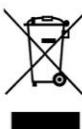
This symbol indicates that, according to the applicable regulations, the product and/or batteries must be disposed of separately from household waste. When this product reaches the end of its shelf life, you should dispose of the cells/batteries/accumulators and take them to a collection point designated by the local authorities.
Consumers must contact their local authorities or retailer for information concerning the correct disposal of old appliances and/or their batteries.
Compliance with the above guidelines will help protecting the environment.
8. TECHNICAL SUPPORT AND WARRANTY
Cecotec shall be liable to the end user or consumer for any lack of conformity that exists at the time of delivery of the product under the terms, conditions, and deadlines established by the applicable regulations.
It is recommended that repairs be carried out by qualified personnel.
If at any moment you detect any problem with your product or have any doubt, do not hesitate to contact the official Cecotec Technical Support Service at +34 963 210 728.
9. COPYRIGHT
The intellectual property rights over the texts in this manual belong to CECOTEC INNOVACIONES, S.L. All rights reserved. The contents of this publication may not, in whole or in part, be reproduced, stored in a retrieval system, transmitted, or distributed by any means (electronic, mechanical, photocopying, recording or similar) without the prior authorization of CECOTEC INNOVACIONES, S.L.
10. DECLARATION OF CONFORMITY
Cecotec Innovaciones hereby declares that this pet fountain, 09563 Pumba 2500 Refresh Smart is in conformity with the Radio Equipment Directive 2014/53/EU.
CE The full text of the EU Declaration of Conformity can be found on the following website: www.cecotec.es
FRANÇAIS
1. PIÈCES ET COMPOSANTS
Img. 1
Témoins lumineux
Betriebsanzeiger
Spia
Indicador luminoso
Lichtindicator
Product: Pumba 2500 Refresh Smart
Afmetingen: 18,5 × 24 × 17 cm
Capaciteit: 2,5 L
Voltage: 5V ==1A
Lampka LED
Kontrolky
Fig. / Img. / Rys. / Obr. 4
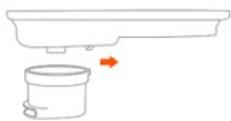
Fig. / Img. / Rys. / Obr. 5

Fig. / Img. / Rys. / Obr. 6

Fig. / Img. / Rys. / Obr. 7

Fig. / Img. / Rys. / Obr. 8

Fig. / Img. / Rys. / Obr. 9

Fig. / Img. / Rys. / Obr. 10
www.cecotec.es
- SOMMAIRE
- INSTRUCTIONS DE SÉCURITÉ
- FIG. 2
- NOTE
- BEFORE USE
- BOX CONTENT
- FIG.3
- PRODUCT ASSEMBLY
- OPERATION
- APP CONNECTION
- INDICATOR LIGHT
- ENGLISH
- SETTINGS BUTTON
- UVC LIGHT (FOR UVC VERSION AND WI-FI VERSION)
- CLEANING AND MAINTENANCE
- IMPORTANT
- TECHNICAL SPECIFICATIONS
- DISPOSAL OF OLD ELECTRICAL AND ELECTRONIC APPLIANCES
- TECHNICAL SUPPORT AND WARRANTY
- COPYRIGHT
- DECLARATION OF CONFORMITY
- FRANÇAIS
- PIÈCES ET COMPOSANTS
- IMG. 1
- TÉMOINS LUMINEUX
- BETRIEBSANZEIGER
- SPIA
- INDICADOR LUMINOSO
- LICHTINDICATOR
- LAMPKA LED
- KONTROLKY
Brand : CECOTEC
Model : Pumba 2500 Refresh Smart
Category : Vacuum Cleaner