
EW92 - Thermometer OREGON - Free user manual and instructions
Find the device manual for free EW92 OREGON in PDF.



| Product Type | Wireless indoor/outdoor thermometer with alarm and frost alert |
| Brand | OREGON |
| Model | EW92 |
| Dimensions (main unit) | 81 x 38 x 137 mm |
| Weight (main unit) | 184 g |
| Power supply (main unit) | 2 AA 1.5V batteries |
| Power supply (probe) | 2 AAA 1.5V batteries |
| Frequency | 433 MHz |
| Transmission distance | 30 m (without obstacles) |
| Measurement range (indoor) | -5 °C to 50 °C (23 °F to 122 °F) |
| Measurement range (outdoor) | -20 °C to 60 °C (-4 °F to 140 °F) |
| Resolution | 0.1 °C (0.2 °F) |
| Number of supported probes | Up to 3 |
| Functions | Indoor/outdoor temperature display, min/max 24h, frost alert, alarm, radio-controlled, backlight, °C/°F toggle |
| Display | LCD screen with reception, low battery, and channel indicators |
| Alarm | With snooze function (8 min) and automatic shut-off after 120 s |
| Frost alert | Flashing if outdoor temperature between -2 °C and 3 °C |
| Backlight | Activated by button, duration 5 seconds |
| Radio-controlled | Automatic time synchronization (DCF-77 or MSF-60) |
| Maintenance and cleaning | Do not immerse in water, clean with a soft cloth. Do not use abrasive or corrosive products. |
| Safety | Do not open the device, use only new batteries of the recommended type. Recycle used batteries. |
Frequently Asked Questions - EW92 OREGON
User questions about EW92 OREGON
0 question about this device. Answer the ones you know or ask your own.
Ask a new question about this device
Download the instructions for your Thermometer in PDF format for free! Find your manual EW92 - OREGON and take your electronic device back in hand. On this page are published all the documents necessary for the use of your device. EW92 by OREGON.
USER MANUAL EW92 OREGON
Indoor / Outdoor Thermometer
with Radio-Controlled Alarm Clock and Ice Alert
Model: EW92
USER MANUAL
Indoor / Outdoor Thermometer with Radio-Controlled Alarm Clock and Ice Alert Model: EW92
USER MANUAL
CONTENTS
Brief Introduction 2
Overview 2
Receiver 2
LCD Display 4
Sensor 4
Reception of Sensor Signal 4
Operating the Main Unit 4
Operating the Sensor 5
Reception of Radio Controlled Time Signal ....6
Signal Reception Indicator 6
Time and Calendar Manual Setting 6
Alarm Time Setting 7
Using Alarm Function 7
To Silence the Alarm 8
Reading Indoor & Outdoor Temperature Records .8
Viewing the Min. & Max. Temperature Records ...8
Using Ice Alert Function 8
Battery Replacement 9
Placement of Main Unit And Sensor .9
Precautions 10
Specifications 11
About Oregon Scientific 11
Eu-Declaration of Conformity 12
FCC statement 12
Declaration of Conformity 12
BRIEF INTRODUCTION
Thank you for your purchase of this Indoor / Outdoor Thermometer. Please read these instructions carefully and keep the manual well for future reference.
The receiver unit has a clear and easy-to-read display that shows the indoor temperature, time, the maximum & minimum temperature records in the past 24 hours as well as the outdoor temperature measured and transmitted from the remote sensors. It is able to receive and display readings from up to 3 remote sensors.
The 433 MHz technology means no wire installation is required and you can place the sensors anywhere you like within 30m (100ft) from the main (indoor) unit.
This product is designed to synchronize its date and time automatically once it is within range of the signal from the atomic clock in Germany/England.
OVERVIEW
RECEIVER
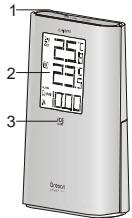
1.SNOOZE/LIGHT key:
- In normal time mode, press it once to turn on the backlight for 5 seconds.
- Press it to silence the current alarm when it is going and enter the snooze mode for 8 minutes.
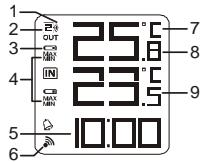
2.LCD display:
- Displays outdoor & indoor temperature, time and date.
3.Ice Alert indicator light:
- Flashes when the outdoor temperature is between -2.0°C (28°F) and 3.0°C (37°F).
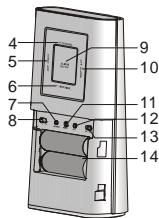
4.+CHANNEL key:
Press it once to switch among Channel 1, 2 and 3.
- Press and hold it for 2 seconds to view the channels automatically. Press it again to exit the automatic display mode.
- In time setting mode, press it to increase the setting values.
5. SET CLOCK key:
- In normal time mode, press it once to enter the normal time setting mode.
- In normal time setting mode, press it to step the setting items. Press and hold it to exit the setting mode in any step.
6.-/MIN.MAX. key:
- Press it to show the minimum and maximum temperature records in the past 24 hours.
- Press and hold it for 3 seconds to delete the minimum and maximum temperature records.
- In time setting mode, press it to decrease the setting values.
7.SENSOR key:
- Press it once to search a sensor.
- During the reception period, press and hold it for 3 seconds to stop the reception.
8. ° C / F slide switch:
- Slide it to switch between Celsius and Fahrenheit.
9.ALARM ON/OFF key:
Press it once to turn on the backlight and display the alarm time for 5 seconds.
- Press it again to turn on/off the alarm.
10. SET ALARM key:
- Press it once to turn on the backlight for 5 seconds, and at the same time to enter the alarm time setting mode.
- In alarm time setting mode, press it to step the setting items.
11.RESET key:
- Press it to return all values to default values.
- In case of malfunction, the unit may be required to reset.
12.RCC key:
- In normal time mode, press it once to receive the RC signal for reception testing.
- During the reception period, press and hold it for 8 seconds to stop the reception.
13. UK/EU slide switch:
- Slide it to select the country version between EU (Germany) and UK (England).
14.BATTERY COMPARTMENT:
- Accommodates 2 AA size batteries.
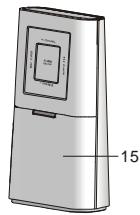
15.BATTERY DOOR
LGD DISPLAY
- Sensor signal
- Channel
- Low battery indicator
- Min. & Max. temperature
- Time
- Signal reception indicator
- ° C & ° F
- Outdoor temperature
- Indoor temperature
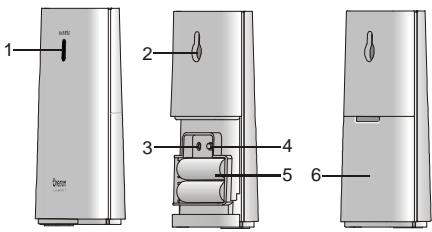
SENSOR
-
LED indicator:
-
Flashes when the remote unit transmits a reading.
2.Wall-mounting holder:
Supports the sensor on the wall.
3.RESET key:
- Press it to restart the sensor and return all values to default values.
4.CHANNEL slide switch:
- Assign the sensor to channel 1, 2 or 3.
5.BATTERY COMPARTMENT:
- Accommodates 2 AAA size batteries.
6.BATTERY DOOR
RECEPTION OF SENSOR SIGNAL
OPERATING THE MAIN UNIT
- Remove the battery door and slide "UK/EU" switch to select the desired country version.
- Insert 2 new AA size batteries as per the polarity information marked on the battery compartment.
-
Press "RESET" key to restart the clock.
-
Slide "C/°F" switch to select between Celsius and Fahrenheit.
- Replace the battery door.
- Press “+CHANNEL” key to select the desired channel.
| □→□ | Main unit is searching for the sensor(s) (the icon will be flashing) |
| □ | The sensor(s) cannot be found |
| □ | Sensor 1 has been found (the icon will be displayed, but won't flash) |
| □and "--" (Outdoor temperature Area) | The sensor(s) cannot be found after operating the main unit for 60 minutes |
Note When the sensor signal is received, the icon " 品 " will be displayed on the LCD.
OPERATING THE SENSOR
- Remove the battery door and slide "CHANNEL" switch to synchronize the channel with receiver.
-
Insert 2 new AAA size batteries as per the polarity information marked on the battery compartment.
-
Press "RESET" key to restart the clock.
- Replace the battery door.
Note
The transmission range may vary depending on many factors. You may need to experiment with various locations to get the best results.
Standard Alkaline batteries contain significant amounts of water. Because of this they will freeze in low temperatures of approximately -12°C (10°F) . Disposable Lithium batteries have a much lower threshold for temperature with an estimated freezing range of below -30°C (-22°F) .
Wireless ranges can be impacted by a variety of factors such as extremely cold temperatures. Extreme cold may temporarily reduce the effective range between the sensor and the base station. If the unit's performance fails due to low temperature, the unit will resume proper functioning as the temperature rises to within the normal temperature range (i.e. no permanent damage will occur to the unit due to low temperatures).
RECEPTION OF RADIO CONTROLLED TIME SIGNAL
The time and calendar are radio-controlled. The current time and calendar are automatically synchronized with time signal transmitted from Germany/England.
When used for the first time (after inserting batteries or pressing "RESET" key), and then after 5 minutes, the clock will start to receive the time signal. The signal reception indicator will be flashing for 7 minutes.
SIGNAL RECEPTION INDICATOR
The wave segment flashing means time signals are being received. The signal quality could be classified into 3 types:

No signal

Weak signal

Excellent signal
Note
- The unit will automatically search for the time signal at 2:00 (3:00 or 4:00 is also available if the signal is not received at 2:00), 8:00, 14:00 and 20:00 each day.
- Always place the unit away from interfering
sources such as TV set, computer, etc.
- Avoid placing the unit on or next to metal plates.
- Closed area such as airport, basement, tower block or factory is not recommended.
- Do not start reception in moving articles such as vehicles or trains.
TIME AND CALENDAR MANUAL SETTING
If you are out of reach of the Radio Controlled sensor or if the reception is not reachable, the time and calendar can be set manually. As soon as the signal of sensor is received again, the clock will automatically synchronize with the exact time and calendar.
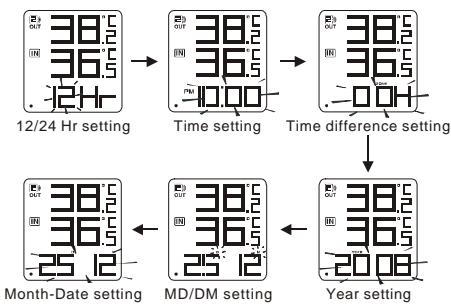
- In normal time mode, press "SET CLOCK" key once to enter the time setting mode.
- Press “+/CHANNEL” or “-/MIN.MAX.” key to change the settings.
- Press "SET CLOCK" to confirm. The setting order is: 12/24-hr format, time, +/-23 hours time difference, year, day/month format, date.
- Press "SET CLOCK" key to save and exit the setting mode.
Note
- During the setting period, press and hold “+/ CHANNEL” or “-MIN.MAX.” key to speed up the change of settings.
- Through + / - 23 hours time difference" setting, the precise time of another area will be shown.
ALARM TIME SETTING
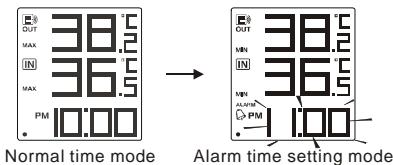
- In normal time mode, press "SET ALARM" key once to enter the alarm time setting mode.
-
Press + / CHANNEL or "-MIN.MAX." key to set hour/minute.
-
Press "SET ALARM" key to save and exit the setting mode. "Q" indicates alarm is ON.
Note
- The alarm will be automatically turned on when you set the alarm time.
- During the alarm time setting period, press and hold “+/CHANNEL” or “-MIN.MAX.” key to speed up the change of settings.
USING ALARM FUNCTION
- Set the alarm time as the above section.
- In normal time mode, press "ALARMON/OFF" key once to display the current alarm time.
- Press it again to turn alarm ON/OFF.
TO SILENCE THE ALARM
- Press "SNOOZE/LIGHT" to silence the alarm for 8 minutes. The "Q" will be flashing.
- Press "ALARM ON/OFF" key to turn the alarm off and activate it again after 24 hours.
- If no key is pressed within 120 seconds, the alarm will be turned off and be activated again after 24 hours.
READING INDOOR & OUTDOOR TEMPERATURE RECORDS
Slide "C/OF" switch to select between Celsius and Fahrenheit.
Note
- If no signals are received or the transmission is interfered, "--" will appear on the display.
- Relocate the clock or sensor in other positions to try out where your clock receives the signals best. After several trials in vain, please reset the clock thoroughly.
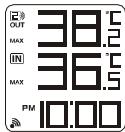
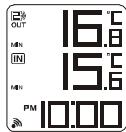
VIEWING THE MIN. & MAX. TEMPERATURE RECORDS
- In normal mode, press "MIN/MAX." key once to show the minimum indoor & outdoor temperature records in the past 24 hours.
- Press it twice to show the maximum temperature records.
- Press it once again to exit.
Note
Press and hold it for 3 seconds to delete
the minimum and maximum temperature records.
MAX. temperature records
MIN. temperature records
USING ICE ALERT FUNCTION
If the outdoor temperature range is -2.0°C 3.0°C (28.4°F 37.4°F) , the ice alert indicator light will be turned on and flash.
BATTERY REPLACEMENT
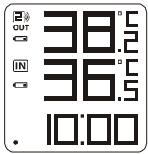
If the low battery indicator " " displays beside the outdoor temperature, it means that the battery power of sensor is not enough, and you should replace with 2 AAA size batteries at once.
While if the low battery indicator " " displays beside the indoor temperature, it indicates that you should replace batteries of the main unit with 2 new AA size batteries.
Low battery indicator
Note
Attention! Please dispose of the used unit or batteries in an ecologically safe manner.

PLACEMENT OF MAIN UNIT AND SENSOR
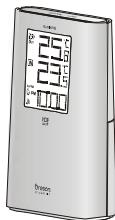
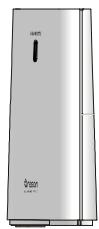
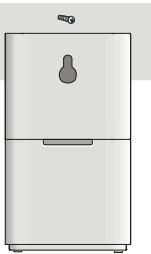
For the sensor, place the screw on the desired wall and hang the sensor by the recessed hole in the back of it or simply place it on the desktop.
For the main unit, you can just place it on the table
by itself.
PRECAUTIONS
This product is engineered to give you years of satisfactory service if you handle it carefully. Here are a few precautions:
- Do not cover the ventilation holes. Make sure items that are nearby such as newspapers, tablecloths, curtains etc cannot accidentally cover the ventilation holes.
- Do not subject the unit to excessive force, shock, dust, temperature or humidity, which may result in malfunction, shorter electronic life span, damaged battery and distorted parts.
- Placement of this product on wood surfaces with certain types of unishes, such as clear varnish, may result in damage to the unish. Consult the furniture manufacturer's care instructions for direction as to the types of objects that may safely be placed on the wood surface. Oregon Scientific shall not be responsible for any damage to wood surfaces from contact with this product.
- Do not immerse the unit in water. If you spill liquid over it, dry it immediately with a soft, lint-free cloth.
-
Do not clean the unit with abrasive or corrosive materials.
-
Do not tamper with the unit's internal components. Doing so will invalidate the warranty on the unit and may cause unnecessary damage. The unit contains no user-serviceable parts.
- Only use fresh batteries as speciued in the user's instructions. Do not mix new and old batteries.
- Due to printing limitations, the displays shown in this manual may differ from the actual display.
- The contents of this manual may not be reproduced without the permission of the manufacturer.
- Do not dispose this product as unsorted municipal waste. Collection of such waste separately for special treatment is necessary.
Note
The technical specuications for this product and the contents of the user manual are subject to change without notice.
SPECIFICATIONS
| TYPE | DESCRIPTION |
| MAIN UNIT | |
| L x W x H | 81 x 38 x 137 mm (3.19 x 1.5 x 5.39 in) |
| Weight | 184g |
| Signal frequency | 433 MHz |
| Temperature range | -5°C to 50°C (23°F to 122°F) |
| Temperature resolution | 0.1°C (0.2°F) |
| Ice alert temperature range | 3°C to -2°C (37°F to 28°F) |
| Power | 2 x AA 1.5V batteries |
| REMOTE UNIT (EW-99) | |
| L x W x H | 58 x 23 x 100 mm (2.28 x 0.9 x 3.94 in) |
| Weight | 52g |
| Signal frequency | 433 MHz |
| Number of channel | 3 |
| Transmission range | 30 m (98 ft) unobstructed |
| Temperature range | -20°C to 60°C (-4°F to 140°F) |
| Power | 2 x AAA 1.5V batteries |
ABOUT OREGON SCIENTIFIC
Visit our website (www.oregonscientific.com) to learn more about Oregon Scientific products such as digital cameras; MP3 players; children's electronic learing products and games; projection clocks; health and fitness gear; weather stations; and digital and conference phones. The website also includes contact information for our Customer Care department in case you need to reach us, as well as frequently asked questions and customer downloads.
We hope you will find all the information you need on our website, however if you're in the US and would like to contact the Oregon Scientific Customer Care department directly, please visit: http://www2.oregonscientific.com/service/default.asp
OR
Call 1-800-853-8883.
For international inquiries, please visit: www2.oregonscientific.com/about/international.asp
EU-DECLARATION OF CONFORMITY
Hereby, Oregon Scientific, declares that the Indoor / Outdoor Thermometer (Model EW92) is in compliance with the essential requirements and other relevant provisions of Directive 1999/5/EC.
A copy of the signed and dated Declaration of Conformity is available on request via our Oregon Scientific Customer Service.

C



COUNTRIES RTTE APPROVAL COMPLIED
ALL EU countries, Switzerland CH and Norway N
FCC STATEMENT
This device complies with Part 15 of the FCC Rules. Operation is subject to the following two conditions: (1) This device may not cause harmful interference, and (2) This device must accept any interference received, including interference that may cause undesired operation.
WARNING Changes or modifications not expressly approved by the party responsible for compliance could void the user's authority to operate the equipment.
NOTE This equipment has been tested and found to comply with the limits for a Class B digital device, pursuant to Part 15 of the FCC Rules. These limits are designed to provide reasonable protection against harmful interference in a residential installation. This equipment generates, uses and can radiate radio frequency energy and, if not installed and used in accordance with the instructions, may cause harmful interference to radio communications. However, there is no guarantee that interference will not occur in a particular installation. If this equipment does cause harmful interference to radio or television reception, which can be determined by turning the equipment off and on, the user is encouraged to try to correct the interference by one or more of the following measures:
- Reorient or relocate the receiving antenna.
- Increase the separation between the equipment and receiver.
- Connect the equipment into an outlet on a circuit different from that to which the receiver is connected.
- Consult the dealer or an experienced radio / TV technician for help.
DECLARATION OF CONFORMITY
The following information is not to be used as
contact for support or sales. Please call our customer service number (listed on our website at www.oregonscientific.com or on the warranty card for this product) for all inquiries instead.
We
Name: Oregon Scientific, Inc.
Address: 19861 SW 95th AVe., Tualatin,
Oregon 97062 USA
Telephone No.: 1-800-853-8883
Declare that the product
Product No.: EW92
Product Name: Indoor / Outdoor Thermometer
with Radio-Controlled Alarm
Clock and Ice Alert
Manufacturer: IPM Concepts Limited
Address: Block C, 9/F, Kaiser Estate,
Phase 1,41 Man Yue St.,
Hung Hom, Kowloon,
Hong Kong
is in conformity with Part 15 of the FCC Rules. Operation is subject to the following two conditions:
1) This device may not cause harmful interference.
2) This device must accept any interference received, including interference that may cause undesired operation.
8. Compartment Des Files :
Contient 2 piles AAA.
9. Couvercle Du Compartment Des Piles
ECRAN LCD
5. Compartment Des Piles :
-
Contient 2 piles AAA.
-
Couvercle Du Compartment Des Piles
RéCEPTION DU SIGNAL DE LA SONDE
FONCTIONNEMENT DE L'UNITE PRINCIPALE
EU-DECLARATION DE CONFORMITE
9.ALARM ON/OFF knop:
9.ALARM ON/OFF-knapp:
10. SET ALARM-knapp:
- INDOOR / OUTDOOR THERMOMETER WITH RADIO-CONTROLLED ALARM CLOCK AND ICE ALERT MODEL: EW92
- USER MANUAL
- CONTENTS
- BRIEF INTRODUCTION
- OVERVIEW
- RECEIVER
- 1.SNOOZE/LIGHT KEY
- 2.LCD DISPLAY
- 3.ICE ALERT INDICATOR LIGHT
- 4.+CHANNEL KEY
- SET CLOCK KEY
- 6.-/MIN.MAX. KEY
- 7.SENSOR KEY
- ° C / F SLIDE SWITCH
- 9.ALARM ON/OFF KEY
- SET ALARM KEY
- 11.RESET KEY
- 12.RCC KEY
- UK/EU SLIDE SWITCH
- 14.BATTERY COMPARTMENT
- 15.BATTERY DOOR
- LGD DISPLAY
- SENSOR
- RECEPTION OF SENSOR SIGNAL
- OPERATING THE MAIN UNIT
- OPERATING THE SENSOR
- NOTE
- RECEPTION OF RADIO CONTROLLED TIME SIGNAL
- SIGNAL RECEPTION INDICATOR
- TIME AND CALENDAR MANUAL SETTING
- ALARM TIME SETTING
- USING ALARM FUNCTION
- TO SILENCE THE ALARM
- READING INDOOR & OUTDOOR TEMPERATURE RECORDS
- VIEWING THE MIN. & MAX. TEMPERATURE RECORDS
- USING ICE ALERT FUNCTION
- BATTERY REPLACEMENT
- PLACEMENT OF MAIN UNIT AND SENSOR
- PRECAUTIONS
- ABOUT OREGON SCIENTIFIC
- OR
- EU-DECLARATION OF CONFORMITY
- COUNTRIES RTTE APPROVAL COMPLIED
- FCC STATEMENT
- DECLARATION OF CONFORMITY
- WE
- DECLARE THAT THE PRODUCT
- COMPARTMENT DES FILES
- COUVERCLE DU COMPARTMENT DES PILES
- ECRAN LCD
- COMPARTMENT DES PILES
- RÉCEPTION DU SIGNAL DE LA SONDE
- FONCTIONNEMENT DE L'UNITE PRINCIPALE
- EU-DECLARATION DE CONFORMITE
- 9.ALARM ON/OFF KNOP
- 9.ALARM ON/OFF-KNAPP
- SET ALARM-KNAPP
Brand : OREGON
Model : EW92
Category : Thermometer