
TP391 - Two-way radio OREGON - Free user manual and instructions
Find the device manual for free TP391 OREGON in PDF.


User questions about TP391 OREGON
0 question about this device. Answer the ones you know or ask your own.
Ask a new question about this device
Download the instructions for your Two-way radio in PDF format for free! Find your manual TP391 - OREGON and take your electronic device back in hand. On this page are published all the documents necessary for the use of your device. TP391 by OREGON.
USER MANUAL TP391 OREGON
Pair of PMR446 Two-Way
Personal Radios
Model:TP391
USER MANUAL
MANUALE D'USO
MANUEL DE L'UTILISATEUR
Safety and Care Instructions 5
Safety precautions 5
Caring for this product 5
Caution 5
Getting Started 6
Power 6
Turn the unit ON/OFF 7
Volume 8
Reset. 8
Talk to another transceiver 8
Page another transceiver 8
Keypad lock 9
Menu Options 9
Select a channel or CTCSS 10
Call tone 11
VOX level / voice delay time 11
Rogerbeep 12
Dual watch (DW) 13
Scan for a Channel / CTCSS 13
Reset 14
Troubleshooting 14
Specifications 15
About Oregon Scientific. 16
EU-Declaration of conformity. 16
INTRODUCTION
Thank you for selecting the Oregon Scientific™ TP391as your product of choice. This product is a portable, easy-to-use two-way radio transceiver that you can use to contact your family and friends at shopping malls, amusement parks, sports events, beaches, forests and so on. You can also use it as a vital communications tool in a neighborhood watch.
The transceiver has 8 channels and 38 CTCSS (Continuous Tone Coded Squelch System) codes. If someone else is using the same channel as you, you can select another channel or use the CTCSS feature. Talk with another person if you are both tuned to the same channel and/or CTCSS code.
Please note that the use of this item is subject to applicable regulations of the country where used.
KEY FEATURES
FRONT VIEW
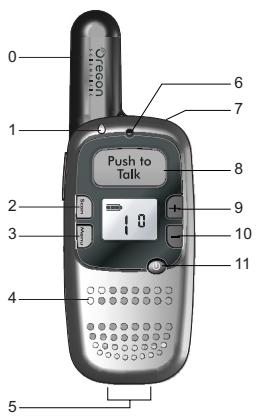
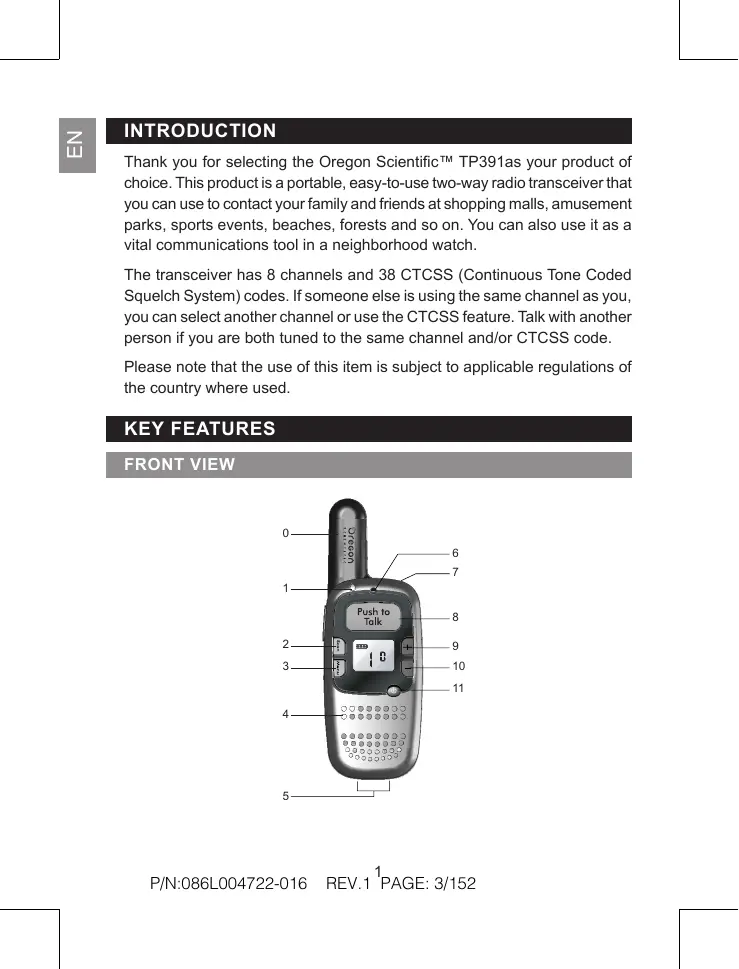
| NO. | DESCRIPTION | FUNCTION |
| 0 | Antenna | Receives and transmits signals |
| 1 | LED indicator | Lights up red when transmitting a signal |
| 2 | Scan | Auto scans for available channel / Monitors current channel for activity |
| 3 | Menu | Scrolls through menu options / Locks and unlocks the keypad |
| 4 | Speaker | Generates audible sound |
| 5 | Connection pins | Slot pins into a desktop charger docking station (docking station not included) |
| 6 | Microphone | Picks up voice sounds |
| 7 | Headset jack / charger jack | Allows use of headset for hands-free communication or use of AC adapter for charging |
| 8 | PUSH TO TALK | Push to talk / Confirms selection in Menu Mode |
| 9 | + | Increase volume / Select Channel, CTCSS, Call Tone, Mic / VOX level in Menu Mode |
| 10 | - | Decrease volume / Select Channel, CTCSS, Call Tone, Mic / VOX level in Menu Mode |
| 11 | ◎ | Press to turn the unit on or off |
EN
BACK VIEW
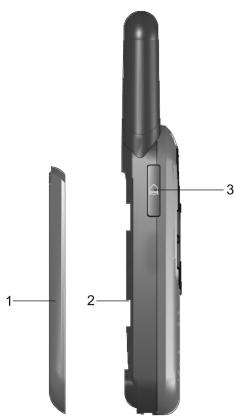
| NO. | DESCRIPTION | FUNCTION |
| 1 | Battery door | Remove to access battery compartment |
| 2 | Battery compartment | Uses lithium 3.7V-720mAh rechargeable battery |
| 3 | Sends call tone to other users of the same frequency |
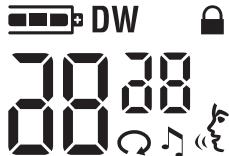
| SYMBOL | FUNCTION |
| 30(big) | Channel number: Select between 8 channels |
| 30(small) | CTCSS code: Adjust to minimize interference problems |
| DW | Dual Watch: Monitor 2 channels simultaneously |
| = | Battery indicator: Provides battery status during operation |
| √ | Call tone: Page another user |
| Keypad lock: Locks keypad to prevent accidental button activation | |
| Auto-scan: Unit is scanning Channels or CTCSS | |
| VOX: Voice activation system |
SAFETY AND CARE INSTRUCTIONS
SAFETY PRECAUTIONS
Please observe the following safety precautions when setting up and using this product.
- LCD panel – The LCD panel is made of glass, and may break if the unit is dropped or impacted.
- Heat sources – Keep the product away from heat sources such as radiators, stoves, heaters, and other heat-generating products.
- Water and moisture – Do not use the product in or near water or in high moisture areas such as a bathroom.
CARING FOR THIS PRODUCT
To ensure you receive the maximum benefit from using this product, please observe the following guidelines.
- Cleaning – Use a damp cloth. Do not use liquid cleaning agents, benzene, thinner, or aerosols.
- Repair – Do not attempt to repair the product or modify the circuitry by yourself. Contact the retailer or a qualified repairman if the product requires servicing. Only use replacement parts that are recommended by the manufacturer.
- Do not scratch hard objects against the LCD display as this may cause damage.
CAUTION
- To avoid risk of fire or injury, do not attempt to charge non-rechargeable batteries. Please turn off the unit while charging.
- Replace only batteries with the same or equivalent type recommended by the manufacturer.
- Please dispose of old, defective batteries in an environmentally friendly manner in accordance with the relevant legislation.
-
See additional battery warnings in the "Power" section of the user manual.
-
Do not dispose this product as unsorted municipal waste. Collection of such waste separately for special treatment is necessary.
- No naked flames, such as lighted candles, should be placed near the apparatus.
- To reduce the risk of electric shock, do not expose this application to rain or moisture.
GETTING STARTED
POWER
To insert the batteries:
- Slide the battery door open.
- Insert the lithium battery into the battery compartment, making sure the polarities (+ and -) match.
- Slide the back cover and clip into place.
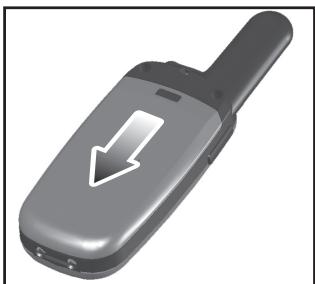
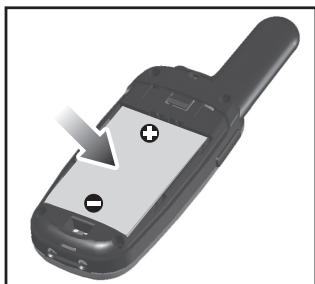
WARNING: There is a danger in which incorrectly placing the battery can cause an explosion. Always make sure the radio is switched off before installing or changing the battery. Replace only with the same or equipment type. Use ONLY with lithium 3.7V 720mAh rechargeable battery. Contact your local retailer for more information.
NOTE: will flash to indicate low battery power.
To charge the battery using the AC adapter:
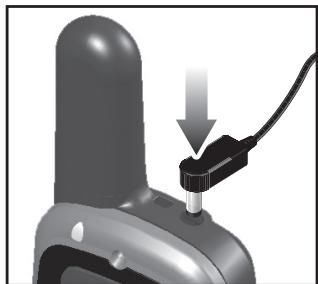
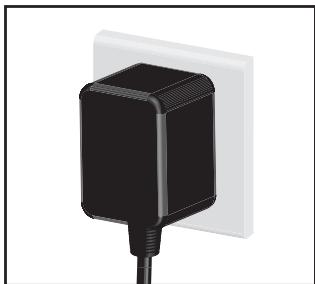
Charge the battery for 12 hours on the first charge. After that, it should take 3 or less hours to charge. The LCD backlight will be turned on when charging. The LED indicator will be turned on when battery is full.
NOTE:
- To maintain the battery life of your two-way transceiver it is recommended that you only charge the battery when needed. Overcharging the battery will reduce performance.
- For best results ensure that the unit is turned off before charging.
- Remove batteries before storing your radio for extended periods. Batteries corrode over time and may cause permanent damage to your radio.
TURN THE UNIT ON / OFF
To turn the unit ON or OFF:
Press and hold until you hear a beep and the LCD display appears or disappears.
VOLUME
To change the volume level:
Use + or - to increase or decrease volume.
RESET
To reset the unit:
Remove the batteries for two minutes and insert them again.
TALK TO ANOTHER TRANSCEIVER
For best transmission speak about 5cm away from the radio and leave a short pause before speaking once you have pressed PUSH TO TALK.
To talk to another transceiver:
- Press and hold to check if the channel is free.
- Press and hold (PUSH TO TALK) and speak into the microphone to transmit. When finished, release the button. The transceiver will automatically play received transmissions.
- Release (PUSH TO TALK) once you have finished speaking to allow other radios to respond.
NOTE: You can only communicate with another transceiver that is on the same channel and using the same CTCSS code as your transceiver.
PAGE ANOTHER TRANSCEIVER
To page all transceivers tuned to the same channel:
Press A.
NOTE: The call tone will be heard from your device and from the receiving party's unit at the same time.
KEYPAD LOCK
To avoid accidentally changing the channel and the unit's preferred settings, you can lock the keypad.
To lock or unlock the keypad:
Press and hold for 1.5 seconds. appears when the keypad is locked.
NOTE: While the keypad is on you can still use the PUSH TO TALK and keys.
MENU OPTIONS
To access the Menu Options and change settings:
- Press Menu. The transceiver will then toggle between the following configurable settings:
| SYMBOL | SETTING | DESCRIPTION |
| big) | Channel | Selects channel for transmission |
| (small) | CTCSS | Selects a CTCSS code for the current channel |
| Call tone | Selects 1 of 10 call tones | |
| VOX | Enables / disables voice-activated transmission (0-3); selects transmission delay time (1-5) | |
| DW | Dual Watch | Monitors 2 channels simultaneously |
-
Use + and - to select settings.
-
Press to confirm and move to the next setting or press
PUSH TO TALK to confirm the changes and exit the Menu Options. Settings will automatically be confirmed after 5 seconds if no key is pressed.
SELECT A CHANNEL OR CTCSS
The transmitter and receiver must be on the same channel using the same CTCSS code in order for you to communicate with another party.
This feature allows you to utilize a less often-used range of CTCSS codes within a main channel to avoid congestion on the main channel and filter out unwanted noise and static. There are 38 CTCSS codes for each main channel.
To select between 8 channels or 38 CTCSS codes:
- Press Menu once (for channel) or twice (for CTCSS code) until the corresponding channel / CTCSS number starts flashing.
- Press and hold or - to change the channel or CTCSS code.
- Press PUSH TO TALK to confirm and exit the menu. Or, press Menu to confirm and go to the next Menu Option.
NOTE: To communicate with other units that do not have CTCSS code capability, switch your unit to the same channel and set the CTCSS code to "0".
TIP: Before trying to transmit on the selected channel, press (Scan) to check the activity on that channel. If someone is already on the selected channel, try another channel that is clear. To change the basic channel, in menu mode, press + or - to move to the next higher or lower channel number.
Z
CALL TONE
To alert other radios set to the same channel as you that you want to communicate with them, you can transmit a call tone to pre-warn them.
To change the call tone:
- Press Menu 3 times until the number starts flashing.
- Press and hold + to change the tone.
- Press PUSH TO TALK to confirm and exit the menu. Or, press Menu to confirm and go to the next Menu Option.
NOTE: To page another unit, press . The selected call tone will be heard from your device and from the receiving party's unit at the same time.
The Voice Activated Transmission (VOX) function allows your voice to activate transmission automatically when the transceiver is used with an optional hands-free microphone / headset. If the unit is set to VOX level 1, 2 or 3, it will automatically detect and transmit your voice through to the selected channel. The VOX level and transmission delay time should be adjusted according to your voice loudness and personal preference.
To set up a headset:
- Press and hold to switch the radio off.
- Plug in the headset
- Press and hold to switch the radio back on again.
NOTE: This product is only compatible with Oregon Scientific headsets, please ask your local retailer for further information.
To change the VOX level:
- Press Menu 4 times until the number starts flashing.
- Press and hold + or = to change the VOX level.
- Press PUSH TO TALK to confirm and exit the menu. Or, press Menu to confirm and go to the next Menu Option.
| LCD SYMBOL | DESCRIPTION |
| 0 | VOX disabled |
| 3 | Low sensitivity – only audiably loud voices are transmitted (useful for noisy environments) |
| 2 | Normal sensitivity – ideal setting for voice-activated transmission |
| 1 | High sensitivity – detects and transmits all sounds (including background noise) |
Once the VOX level is activated you can set a delay time, which keeps the unit transmitting for 1 to 5 seconds after you have finished speaking (level 1 = 1 second and level 5 = 5 seconds).
To set the delay time:
- Press Menu 5 times until the number starts flashing.
- Follow steps 2-3 above.
ROGER BEEP
With Roger Beep, the receiving party hears a beep tone when a message has been transmitted. This avoids situations where messages are interrupted during transmission.
To disable / enable Roger Beep:
Press and hold , then press to turn ON the unit.
DUAL WATCH (DW)
The Dual Watch feature allows you to monitor more than one channel simultaneously.
To set Dual Watch:
- Press Menu 6 times until "DW" appears and the channel number starts flashing.
- Press and hold or = to select a watch channel (1-8).
- Press PUSH TO TALK to confirm and exit the menu. Or, press Menu to confirm and go to the next Menu Option. Once set, the display will toggle between 2 open channels and the unit will be able to receive transmissions from the 2 channels (your existing channel and the channel set in DW).
To disable Dual Watch:
Follow steps 2-3 above and select "0" for step 2.
SCAN FOR A CHANNEL / CTCSS
There are 2 scenarios when scanning for a channel / CTCSS is necessary:
- If you have a CTCSS code set and want to make sure that the channel is not busy.
- If you are in a fringe area and the radio is cutting in and out.
To auto-scan for a channel / CTCSS:
- Press and hold _can . The unit will go to monitor mode.
- Press and release Scan, the unit will start enter scan mode.
- Once an active channel is found the unit will stop scanning. Press PUSH TO TALK to communicate with other radios on that channel or to resume scanning.
To stop auto-scan:
Press Scan . The unit will revert back to the original channel that was set prior to scanning.
NOTE: If you activate a scan while your code is set to 0, the radio will check for any activity on each channel, regardless of the code used on that channel. If you activate a scan while the code is between 1 and 38, the radio will only check for activity on the specific channel and code combinations set on your radio.
RESET
To reset to the default settings, remove the batteries and power adapter and leave for several minutes.
TROUBLESHOOTING
See below for some common problems and their remedies. DO NOT attempt any repairs yourself. This will invalidate your warranty.
| PROBLEM | POSSIBLE CAUSES / REMEDIES |
| Can’t turn the radio on | Check the battery is correctly installed and has been fully charged |
| Can’t communicate with other radios | Check the channel and CTCSS code |
| No information is displayed on the LCD display | Reset by removing the batteries and power adapter for several minutes. This will return the unit to the default settings |
| VOX function is not working | Check the headset is correctly plugged in and is compatible with the TP391 radio |
SPECIFICATIONS
Operation frequency 446.00625 to 446.09375 MHz
Channels 8
CTCSS Codes 38 standard codes
Modulation type FM
Microphone Internal / external condenser type
Power supply 3.7V 720mAh Li-ion battery
Sensitivity <= -119 dBm
Noise squelch Auto
VOX levels 3
Call tones 10
Audio output power 125mW
Audio distortion < 5%
RX signal to noise ratio >43dB
TX RF output power 500 mW @ 4.5VDC
Dimensions (H x W x D) 120 x 42 x 20 mm (4.7 x 1.7 x 0.8 in)
Weight (without batteries) 70 grams (2.5 oz)
ABOUT OREGON SCIENTIFIC
Visit our website (www.oregonscientific.com) to learn more about Oregon Scientific products such as digital cameras; MP3 players; children's electronic learning products and games; projection clocks; health and fitness gear; weather stations; and digital and conference phones. The website also includes contact information for our Customer Care department in case you need to reach us, as well as frequently asked questions and customer downloads.
We hope you will find all the information you need on our website. However if you are in the US and would like to contact the Oregon Scientific Customer Care department directly, please visit:
http://www2.oregonscientific.com/service/default.asp
OR call 1-800-853-8883. For international inquiries, please visit:
www2.oregonscientific.com/about/international.asp
EU-DECLARATION OF CONFORMITY
Hereby, Oregon Scientific, declares that the Pair of PMR446 Two-Way Personal Radios (model: TP391) is in compliance with the essential requirements and other relevant provisions of Directive 1999/5/EC.
A copy of the signed and dated Declaration of Conformity is available on request via our Oregon Scientific Customer Service.

C€1313①
COUNTRIES RTTE APPROVAL COMPLIED
All EU countries, Switzerland CH
and Norway N