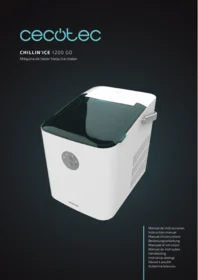
Chillin Ice 1200 Go - Washing machine CECOTEC - Free user manual and instructions
Find the device manual for free Chillin Ice 1200 Go CECOTEC in PDF.


| Product type | Portable ice maker |
| Brand | Cecotec |
| Model | Chillin Ice 1200 Go |
| Power supply | 220-240 V, 50/60 Hz |
| Power | Approximately 120 W |
| Water tank capacity | Approximately 2 liters |
| Ice basket capacity | Approximately 0.6 kg |
| Dimensions | Approximately 32 x 25 x 32 cm |
| Weight | Approximately 7 kg |
| Ice production | Cycle of approximately 6 to 8 minutes |
| Automatic shut-off | Yes, when the basket is full |
| Water level indicator | Indicator light on the panel |
| Tank maintenance | Regular cleaning with a damp cloth |
| Ice basket maintenance | Wash with clean water and dry |
| Electrical safety | Unplug before cleaning or maintenance |
| Usage safety | Do not store explosive substances nearby |
| Intended use | Household use only |
| Authorized users | Adults and children over 8 years old under supervision |
| Recycling | Compliant with the WEEE directive |
| Warranty | Legal warranty and after-sales service available |
Frequently Asked Questions - Chillin Ice 1200 Go CECOTEC
User questions about Chillin Ice 1200 Go CECOTEC
0 question about this device. Answer the ones you know or ask your own.
Ask a new question about this device
Download the instructions for your Washing machine in PDF format for free! Find your manual Chillin Ice 1200 Go - CECOTEC and take your electronic device back in hand. On this page are published all the documents necessary for the use of your device. Chillin Ice 1200 Go by CECOTEC.
USER MANUAL Chillin Ice 1200 Go CECOTEC
- Parts and components 42
- Before use 42
- Operation 43
- Cleaning and maintenance 44
- Troubleshooting 45
- Technical specifications 46
- Disposal of old electrical
and electronic appliances 47 - Technical support and warranty 47
- Copyright 47
SOMMAIRE
Read these instructions thoroughly before using the appliance. Keep this instruction manual for future reference or new users.
- All safety instructions must be closely followed when using the appliance.
- Always disconnect the appliance from the power supply if it is left unattended and before assembly, disassembly, or cleaning.
- The appliance can be used by people with reduced physical, sensory, or mental capabilities or lack of experience and knowledge if they have been given supervision or instruction concerning use of the appliance in a safe way and understand the hazards involved.
- Children must not play with the appliance.
- Strictly follow the instructions in this manual to avoid injury or damage to the appliance.
- Switch off and unplug the appliance before changing accessories or nearby parts that move during use.
- This appliance can be used by children aged 8 years and above if they have been given supervision or instruction concerning use of the appliance in a safe way and understand the hazards involved. Cleaning and user maintenance should not be carried out by children, unless they are 8 years old
or older and supervised. Keep this appliance and its power cable out of reach of children under the age of 8.
- Do not store explosive substances such as aerosol cans with flammable propellant in this appliance.
- This appliance is designed for domestic use only and is not intended for bars, restaurants, farmhouses, hotels, motels, and offices.
- Children from 3 to 8 years old are allowed to load and unload refrigeration appliances.
- To avoid food contamination, please follow the instructions below:
A. Opening the lid for a long period of time may cause a significant increase in temperature in the appliance's compartments.
B. Regularly clean the surfaces that might be in contact with food and accessible evacuation systems.
C. Clean the water tank if it hasn't been used for 48 hours.
D. If the refrigerator appliance remains empty for a long period of time, unplug it, defrost it, clean it, dry it, and leave the lid open to prevent interior mould formation.
- WARNING: when positioning the appliance, make sure that the power cable does not get trapped or damaged.
- WARNING: do not place multiple mobile sockets or mobile power supplies on the rear of the appliance.
- WARNING: use drinkable water only.
- WARNING: always keep all of the appliance's ventilation grilles unobstructed.
- WARNING: do not use mechanical devices or similar to accelerate the defrosting process other than those recommended by the manufacturer.
- WARNING: do not damage the refrigeration circuit.
- Check the power cable regularly for visible damage. If
the power cable is damaged, it must be replaced by the manufacturer, its service agent, or similarly qualified persons to avoid hazards.
- This symbol means: Warning: Risk of fire/flammable materials
- The refrigerant and insulation blowing gas are flammable. When disposing of the appliance, only dispose of it at an authorised waste-disposal facility. Do not expose the appliance to flames.
Temperature range
The appliance temperature range information can be found on its marking. It indicates the optimum room temperature for proper operation of the appliance.
| Climate range | Optimum room temperature |
| SN | From +10 °C to +32 °C |
| N | From +16 °C to +32 °C |
| ST | From +16 °C to +38 °C |
| T | From +16 °C to +43 °C |
Note
- Bearing in mind the limiting values of the room temperature range for the climates for which the cooling appliance is designed and that internal temperatures may be affected by factors such as the location of the cooling appliance, room temperature and frequency of lid opening, it may be necessary to modify the setting of any temperature-control device according to these factors.
- If the appliance is operated in an environment other than
the specified climate type (i.e. beyond the rated ambient temperature range), it may not be able to maintain the desired compartment temperatures.
INSTRUCTIONS DE SÉCURITÉ
- Transparent lid
- Ice fill sensor
- Ice collecting container
- Control panel
- Front housing
- Top cover
- Evaporator
- Ice dispenser panel
- Handle
- Back housing
- Ventilation outlet
- Ice scoop
Control panel. Fig. 2
- Power button
- Empty water tank indicator light
- Large ice cube size indicator light
- Small ice cube size indicator light
- Ice collecting container full indicator light
- Ice cube size selection button
NOTE:
The graphics in this manual are schematic representations and may not exactly match the device.
2. BEFORE USE
- This appliance is packaged in a way as to protect it during transport. Take the appliance out of its box and remove all packaging materials. You can keep the original box and other packaging elements in a safe place. This will help you prevent damage to the appliance when transporting it in the future. In case the original packaging is disposed of, make sure all packaging materials are recycled accordingly.
-
Make sure all parts and components are included and in good conditions. If there is any piece missing or in bad conditions, contact the official Cecotec Technical Support Service immediately.
-
During transport, do not tilt the appliance more than 45° or transport it upside down. This could damage the compressor and the sealant.
- Take the appliance out of the box and remove all packaging materials. Check the appliance and make sure that the power cable as well as the plug are not damaged.
- Place the appliance on a levelled and stable surface. To ensure that the ventilation system operates efficiently, make sure to leave a distance of at least 150 mm between the back of the appliance and the wall. Do not it place near ovens, radiators, or other heat sources.
- Before using the appliance for the first time, leave the lid open for at least two hours.
- Make sure that the domestic power supply matches the one indicated on the appliance.
- When the room temperature is below 15 °C, it is recommended to select the small ice cube size. When the room temperature is above 30 °C, it is recommended to select the large ice cube size.
- Do not use chemicals, acidic or alkaline liquids to make ice.
Box content
- Ice maker
- Ice scoop
- Instruction manual
3. OPERATION
Control panel
- Plug in the power cable to switch on the appliance. The appliance will enter standby mode and the large ice cube size indicator light will flash green. Press the power button to start the ice maker. The corresponding indicator light will light up for some seconds, and the appliance will start making ice cubes.
- Ice cube size selection button: press this button to select the desired ice cube size (large or small).
- Empty water tank indicator light: it lights up when the water level in the tank is insufficient. When this happens, add water into the tank and press the power button to restart the appliance.
- Ice collecting container full indicator light: it lights up when the sensor detects that the amount of ice has reached the maximum storage capacity of the container. In addition, when the sensor is activated, the appliance stops the production of ice cubes automatically. When this happens, empty the ice cubes from the container. As soon as you have removed a sufficient quantity of ice cubes, the appliance will resume production.
Operation
- Open the lid, remove the ice cubes container, and add water to the tank.
NOTE: the tank has a MAX. mark indicating the maximum water filling level. Make sure that
water never exceeds the MAX. mark on the tank. If the MAX. mark is exceeded, it will be necessary to open the drain plug at the bottom of the appliance to discharge the excess water.
NOTE: only use natural mineral and/or bottled water.
- Plug the power cable and press the power button to start the ice maker.
NOTE:
- During the first three cycles, the size and shape of the manufactured ice cubes will be small and irregular.
- When the ice collecting container is full, empty it immediately. Do not let the ice cubes to overflow.
4. CLEANING AND MAINTENANCE
Self-cleaning function
Plug in the power cable, the appliance will enter standby mode. Next, press and hold the power button for 3 seconds to activate the automatic self-cleaning function. The four indicator lights will start flashing alternately. Do not unplug the appliance during the cleaning process. Once the process is completed, the ice machine will automatically enter standby mode. Use a recommended product for descaling the machine. Once finished, repeat the process with clean water to clean any product residue that may have remained in the machine.
- Regularly clean the ice collecting container, water tank and ice dispenser panel. Before cleaning the appliance, unplug it and empty the container if any ice cubes remain. Use a diluted solution of water and a recommended product to clean both the inside of the appliance and the outside surface. Rinse all parts thoroughly before using the ice maker.
- Make sure that the ventilation outlet on the side of the appliance is not obstructed. Do not use mechanical devices or other means to accelerate the defrosting process other than those recommended by Cecotec.
- If you restart the ice machine after not having used it for a long period of time, it may not be able to pump enough water upwards as a result of air clogging. When this happens, the empty water tank indicator light will light up. To fix it, simply press the power button, the appliance will restart.
- To ensure the purity and quality of the ice, change the water in the tank at least once a day. If you are not going to use the ice machine for a long period of time, empty the water tank and clean it.
- In case the compressor does not work due to lack of water in the tank, because the container is full or because there is a power failure, it will take 3 minutes to start after restarting.
- Always use potable water before starting the ice production cycle, either at initial start-up or after a long period of inactivity.
Depending on the actual use of the appliance, the water tank filter should be cleaned regularly to prevent the water inlet from being blocked by limescale deposits. Remove the ice container and filter cover from the water tank, then clean them with clean water and a brush. Finally, put them back into place.
5. TROUBLESHOOTING
If a power failure occurs due to disconnection of the power cable, or if the power button is pressed during an ice production cycle, small pieces of ice may form and clog the ice dispenser panel. If this happens, unplug the power cable, and remove the ice chunks manually by pushing the panel slightly backwards until they fall into the container.
| Problem | Possible causes | Solution |
| The compressor makes a strange noise | The voltage is lower than recommended. | Turn the ice machine off and make sure the voltage is correct before restarting it. |
| The empty water tank indicator light is lit | 1. No water in tank.2. The pump is filled with air. | 1. Add water in the tank up to the MAX mark.2. Press the power button to restart the ice maker. |
| The indicator lights on the control panel do not light up | No power/Blown fuse. | Contact the official Cecotec Technical Support Service. |
| The ice cubes produced are too big and stuck together | There are ice residues from previous cycles in the container. | Remove the ice during standby mode. |
| The ice making cycle has run correctly, but the machine has not produced ice | 1. There is no refrigerant in the compressor.2. The compressor is damaged.3. The fan motor is damaged. | Contact the official Cecotec Technical Support Service. |
| All indicator lights flash at the same time | 1. The water tank is clogged with ice.2. The motor is damaged or jammed.3. The central shaft is damaged. | 1. Remove the ice from the bottom of the ice dispenser panel, plug the power cable back in and press the power button. After three minutes, the ice machine will restart automatically.2. Contact the official Cecotec Technical Support Service. |
| Although the ice container is full, the corresponding indicator light does not light up | 1. The ice fill sensor is damaged.2. Direct sunlight may cause the sensor to malfunction. | 1. Replace the sensor with a new one.2. Reposition the ice machine.3. Contact the official Cecotec Technical Support Service. |
- If the power cable is damaged, it must be replaced by the manufacturer, the supplier, or qualified personnel to avoid accidents.
- It is normal for the compressor and condenser surface to reach temperatures between 70 and 90 °C during operation.
- Due to the rapid freezing process, the ice cubes may turn out opaque. This phenomenon is due to air particles trapped in the water and does not affect the quality or taste of the ice.
- This appliance is not intended for use by people (including children) with reduced physical, sensory, or mental capabilities, or lack of experience and knowledge, unless they have been given supervision or instruction concerning use of the appliance by a person responsible for their safety.
- Supervise children to prevent them from playing with the appliance.
- Do not immerse the appliance in water.
6. TECHNICAL SPECIFICATIONS
Product reference: 09325
Product: Chillin'Ice 1200 Go ice maker
Voltage: 220-240 V
Frequency: 50 Hz
Power: 120 W
Rated current: 1 A
Daily ice production capacity: 12 kg/24 hours
Ice storage capacity: 1 l/600 g
Water tank capacity: 1.2 l
Refrigerant/load: R600a / 14 g
Insulation type: Cyclopentane/C5H10
Made in China | Designed in Spain
Technical specifications may change without prior notification to improve product quality.
7. DISPOSAL OF OLD ELECTRICAL AND ELECTRONIC APPLIANCES

This symbol indicates that, according to the applicable regulations, the product and/or batteries must be disposed of separately from household waste. When this product reaches the end of its shelf life, you should dispose of the cells/batteries/accumulators and take them to a collection point designated by the local authorities.
Consumers must contact their local authorities or retailer for information
concerning the correct disposal of old appliances and/or their batteries.
Compliance with the above guidelines will help protecting the environment.
8. TECHNICAL SUPPORT AND WARRANTY
Cecotec shall be liable to the end user or consumer for any lack of conformity that exists at the time of delivery of the product under the terms, conditions, and deadlines established by the applicable regulations.
It is recommended that repairs be carried out by qualified personnel.
If at any moment you detect any problem with your product or have any doubt, do not hesitate to contact the official Cecotec Technical Support Service at +34 963 210 728.
9. COPYRIGHT
The intellectual property rights over the texts in this manual belong to CECOTEC INNOVACIONES, S.L. All rights reserved. The contents of this publication may not, in whole or in part, be reproduced, stored in a retrieval system, transmitted, or distributed by any means (electronic, mechanical, photocopying, recording or similar) without the prior authorization of CECOTEC INNOVACIONES, S.L.
1. PIÈCES ET COMPOSANTS
Image 1
5. PROBLEEMOPLOSSING
- SOMMAIRE
- TEMPERATURE RANGE
- NOTE
- INSTRUCTIONS DE SÉCURITÉ
- CONTROL PANEL. FIG. 2
- BEFORE USE
- BOX CONTENT
- OPERATION
- CONTROL PANEL
- CLEANING AND MAINTENANCE
- SELF-CLEANING FUNCTION
- TROUBLESHOOTING
- TECHNICAL SPECIFICATIONS
- DISPOSAL OF OLD ELECTRICAL AND ELECTRONIC APPLIANCES
- TECHNICAL SUPPORT AND WARRANTY
- COPYRIGHT
- PIÈCES ET COMPOSANTS
- IMAGE 1
- PROBLEEMOPLOSSING
Brand : CECOTEC
Model : Chillin Ice 1200 Go
Category : Washing machine