
BACKTRACK - Hiking GPS BUSHNELL - Free user manual and instructions
Find the device manual for free BACKTRACK BUSHNELL in PDF.



| Product type | Hiking GPS |
| Brand | BUSHNELL |
| Model | BACKTRACK |
| Power | 2 AAA batteries (alkaline or lithium) |
| Number of memory locations | 3 (home, vehicle, favorite spot) |
| Navigation modes | Return to location, Digital compass |
| Digital compass | Yes, with degree display |
| GPS accuracy | ± 3-5 meters (yards) |
| Maximum displayable distance | 999 units (yards, meters, miles, or kilometers) |
| Units | Selectable: metric (m, km) or imperial (yd, mi) |
| Backlight | Yes, button activation, auto-off after 20 seconds |
| Auto-off | After 10 minutes of inactivity |
| Warranty | Limited 1 year |
| Recommended use | Pedestrian navigation, hiking |
| Warning | Do not use while driving a vehicle |
| Compliance | FCC Class B |
Frequently Asked Questions - BACKTRACK BUSHNELL
User questions about BACKTRACK BUSHNELL
0 question about this device. Answer the ones you know or ask your own.
Ask a new question about this device
Download the instructions for your Hiking GPS in PDF format for free! Find your manual BACKTRACK - BUSHNELL and take your electronic device back in hand. On this page are published all the documents necessary for the use of your device. BACKTRACK by BUSHNELL.
USER MANUAL BACKTRACK BUSHNELL
(distance changes to "0")
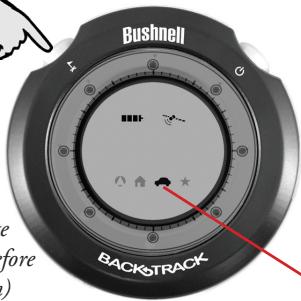
`(Make sure satellite icon stops blinking before marking a location)
1. Select a Location Icon
(House, Car or Star)
Quick Reference
2. Mark Your Location
The BackTrack will remember where that spot was, even when turned off. Be sure not to mark "over" (replace) a previous location you wanted to keep.
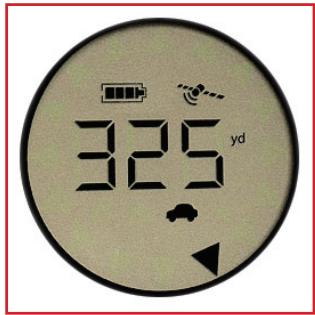
3. Return to the Location Anytime Later
(Make sure the same icon is selected-see #1)
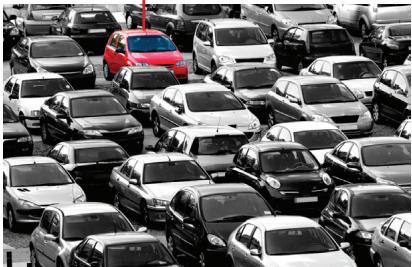
You are 325 yards from the car-walk in the direction of the arrow (distance decreases) until the display changes to "all arrows" on (full circle).
Using Your Bushnell BackTrack
Button Operation Guide:
PUSH=briefly press and release the button
HOLD=keep the button pressed down for 2 seconds
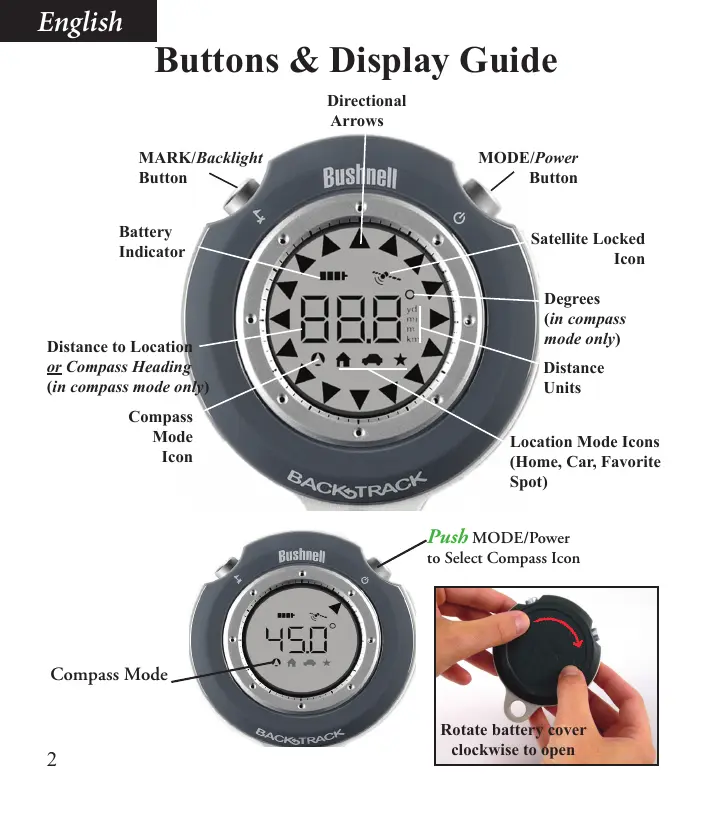
1. Twist the round battery cover on the back of the BackTrack clockwise to open it (see photo), and insert two "AAA" alkaline or lithium batteries in the direction marked inside the battery compartment. Replace the cover, rotating it counterclockwise. Replace the batteries when the display's "Battery" icon indicates low power.
2. To turn the BackTrack on, HOLD the MODE/Power button. Make sure you are outdoors with a clear view of the sky to ensure good quality GPS reception (e.g.; the unit will not work well in an indoor parking garage). The BackTrack will take a few moments to lock on to GPS satellites- the "Satellite" icon will stop flashing when this is done and the BackTrack is ready to use (satellite lock will take longer the first time the BackTrack is used, but be quicker on the next power on). To save time, turn on the BackTrack at least one or two minutes before you will be marking your first location (for example, when entering the parking lot instead of waiting until you get out of the car and then mark where you left it).
3. To use the BackTrack as a digital compass, PUSH the MODE/Power button to select the Compass mode icon (arrow in circle). In Compass mode, an arrow points North, and the display shows the direction you're facing in degrees (e.g. East=90 deg.).
4. While standing at a location you wish to mark and return to later, PUSH the MODE/Power button to select one of the three "Location" mode icons (home, car, star). For example, if you are out camping, you might use "home" to mark your campground, "car" to mark where you left your vehicle or bike, and "star" to mark a favorite scenic spot you want to find again later. If you like, think of the icons as three "location memory slots" that you can freely use for anything you want.
Note: make sure you have GPS lock (satellite icon is not flashing)
before marking a location to ensure the BackTrack functions properly.
Using Your Bushnell BackTrack
- To mark the location (store it in the BackTrack's memory under your selected Location icon), HOLD the MARK button until the distance indication changes to "0". It does not matter which direction you face when marking the location (as a stored GPS location is just a point or "dot"). When you move away from that location, an arrow points the way back to the location (general direction relative to your current position), and the display shows your distance from the location. You may now turn the BackTrack's power off by HOLDing down the MODE/Power button, or proceed to another location you want to mark. Be sure to select a different Location icon before marking this new spot, as HOLDing MARK with a previously used Location icon selected will replace that position with your current location.
- When you're ready to return to one of your previously marked locations, turn the BackTrack back on (HOLD the MODE/Power button). The BackTrack will remember the last mode and location you used, so if the last place you marked was your car in a parking lot, the BackTrack will already be showing you the direction and distance back to your car! If you want to return to a location other than the last one you marked, just PUSH the MODE/Power button to select the Location icon you used when you marked it earlier. To find your way back to the selected location, simply move in the direction the arrow points and watch for the distance to decrease-when you reach your destination, a full circle of arrows will be seen at the outer edge of the display.
Additional Features & Notes
- To change the units from English to Metric, HOLD both the MARK and MODE/ Power buttons while in any of the Location modes (not Digital Compass mode)- the distance units display changes from "yd" to "m". The BackTrack will automatically switch from yards to miles (or meters to km) for longer distances. It can display up a maximum distance of 999 miles or kilometers.
- PUSH MARK to turn on the display backlight at anytime. It will automatically turn off about 20 seconds later.
- Power automatically turns off after 10 minutes if no buttons have been pressed, or HOLD down MODE/Power to turn off manually. When the BackTrack is turned back on, it always returns to the last mode you selected, just as you left it.
- When the display shows that you are getting close to a marked location, you will often be able to just look up and see your destination at that point. 5
Warnings and Notices
GPS System & Location Accuracy Notice:
The Global Positioning System (GPS) is operated by the government of the United States, which is solely responsible for its accuracy and maintenance. The system is subject to changes which could affect the accuracy and performance of all GPS equipment. The inherent nature of the GPS system itself limits the accuracy of the distance indicated on the BackTrack's display to within about ± 3 5 meters (or yards) of the actual marked location.
Warning:
This device is intended as a supplemental handheld navigation aide only. The user assumes all responsibility associated with the use of this product. It must not be used for any purpose requiring precise measurement of location, direction, distance, velocity or topography. This device should not be used for any aircraft navigation applications.
Vehicular Use Notice:
Bushnell is committed to the safe and responsible enjoyment of the outdoors.
Do not use this product while driving. An accident can result in property damage, injury or death if the operator fails to practice prudent driving practices. It is the sole responsibility of the driver of any vehicle to operate the motor vehicle in a safe manner. Information from the GPS unit can distract the operator of a motor vehicle. It is unsafe to operate the controls of the GPS unit while operating a motor vehicle. If used in a motor vehicle, it must not be used by the operator of the motor vehicle. If it is used in a motor vehicle it must be mounted in a manner such that it does not distract the operator, does not interfere with the operator's field of view, and does not block or interfere with the air bags or other safety mechanisms of the motor vehicle. Windshields and car windows with integrated metallic materials, such as defrosters, or car window tinting films, can degrade GPS reception inside a car.
Liability Notice:
In no event shall Bushnell be liable for any incidental, special, indirect or consequential damages, whether resulting from the use, misuse, or inability to use this product or from defects in the product.
Some states do not allow the exclusion of incidental or consequential damages, so the above limitations may not apply to you.

FCC Note:
This equipment has been tested and found to comply with the limits for a Class B digital device, pursuant to Part 15 of the FCC Rules. These limits are designed to provide reasonable protection against harmful interference in a residential installation. This equipment generates, uses and can radiate radio frequency energy and, if not installed and used in accordance with the instructions, may cause harmful interference to radio communications. However, there is no guarantee that interference will not occur in a particular installation. If this equipment does cause harmful interference to radio or television reception, which can be determined by turning the equipment off and on, the user is encouraged to try to correct the interference by one or more of the following measures:
Reorient or relocate the receiving antenna.
- Increase the separation between the equipment and receiver.
- Connect the equipment into an outlet on a circuit different from that to which the receiver is connected.
- Consult the dealer or an experienced radio/TV technician for help.
Shielded interface cable must be used with the equipment in order to comply with the limits for a digital device pursuant to Subpart B of Part 15 of FCC Rules.
Specifications and designs are subject to change without any notice or obligation on the part of the manufacturer.
ONE YEAR LIMITED WARRANTY
Your Bushnell® BackTrack™ GPS unit is warranted to be free of defects in materials and workmanship for one year after the date of purchase. In the event of a defect under this warranty, we will, at our option, repair or replace the product, provided that you return the product postage prepaid. This warranty does not cover damages caused by misuse, improper handling, installation, or maintenance provided by someone other than a Bushnell Authorized Service Department.
Any return made under this warranty must be accompanied by the items listed below:
1) A check/money order in the amount of $10.00 to cover the cost of postage and handling
2) Name and address for product return
3) An explanation of the defect
4) Proof of Date Purchased
5) Product should be well packed in a sturdy outside shipping carton, to prevent damage in transit, with return postage prepaid to the address listed below:
IN U.S.A. Send To:
Bushnell Outdoor Products
Attn.: Repairs
8500 Marshall Drive
Lenexa, Kansas 66214
IN CANADA Send To:
Bushnell Outdoor Products
Attn.: Repairs
25A East Pearce Street, Unit 1
Richmond Hill, Ontario L4B 2M9
For products purchased outside the United States or Canada please contact your local dealer for applicable warranty information. In Europe you may also contact Bushnell at:
Bushnell Germany GmbH
European Service Centre
Mathias-Bruggen-Str. 80
D-50827 Köln
GERMANY
This warranty gives you specific legal rights.
You may have other rights which vary from country to country.
©2008 Bushnell Outdoor Products
Bushnell Outdoor Products
Attn.: Repairs
8500 Marshall Drive
Lenexa, Kansas 66214
Bushnell Outdoor Products
Attn.: Repairs
25A East Pearce Street, Unit 1
Richmond Hill, Ontario L4B 2M9
European Service Centre
Mathias-Bruggen-Str. 80
D-50827 Köln
GERMANY
©2008 Bushnell Outdoor Products
Bushnell Outdoor Products
Attn.: Repairs
8500 Marshall Drive
Lenexa, Kansas 66214
En CANADÁ enviar a:
Bushnell Outdoor Products
Attn.: Repairs
25A East Pearce Street, Unit 1
Richmond Hill, Ontario L4B 2M9
European Service Centre
Mathias-Bruggen-Str. 80
D-50827 Köln
GERMANY
©2008 Bushnell Outdoor Products
Bushnell Outdoor Products
Attn.: Repairs
8500 Marshall Drive
Lenexa, Kansas 66214
Bushnell Outdoor Products
Attn.: Repairs
25A East Pearce Street, Unit 1
Richmond Hill, Ontario L4B 2M9
European Service Centre
Mathias-Bruggen-Str. 80
D-50827 Köln
GERMANY
©2008 Bushnell Outdoor Products
Bushnell Outdoor Products
Attn.: Repairs
8500 Marshall Drive
Lenexa, Kansas 66214
Recapito in Canada:
Bushnell Outdoor Products
Attn.: Repairs
25A East Pearce Street, Unit 1
Richmond Hill, Ontario L4B 2M9
European Service Centre
Mathias-Bruggen-Str. 80
D-50827 Köln
GERMANY
©2008 Bushnell Outdoor Products
Guia dos Botoes & Visor

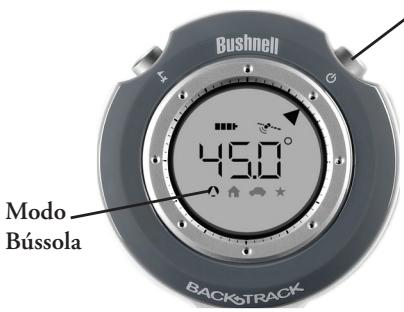
APERTAR MODO
Bushnell Outdoor Products
Attn.: Repairs
8500 Marshall Drive
Lenexa, Kansas 66214
NO CANADA REMETER PARA:
Bushnell Outdoor Products
Attn.: Repairs
25A East Pearce Street, Unit 1
Richmond Hill, Ontario L4B 2M9
European Service Centre
Mathias-Bruggen-Str. 80
D-50827 Köln
GERMANY
©2008 Bushnell Outdoor Products
Environment protection first!
1 Your appliance contains valuable materials which can be recovered or recycled.
Leave it at a local civic waste collection point.
- Select a Location Icon
- Quick Reference
- Mark Your Location
- Return to the Location → Anytime Later
- Using Your Bushnell BackTrack
- Button Operation Guide:
- Additional Features & Notes
- Warnings and Notices
- GPS System & Location Accuracy Notice:
- Warning:
- Vehicular Use Notice:
- Liability Notice:
- FCC Note:
- ONE YEAR LIMITED WARRANTY
- IN U.S.A. Send To:
- IN CANADA Send To:
- En CANADÁ enviar a:
- Recapito in Canada:
- Guia dos Botoes & Visor
- NO CANADA REMETER PARA:
- Environment protection first!
Brand : BUSHNELL
Model : BACKTRACK
Category : Hiking GPS