
T-X3 CHARGE HUB - Gaming accessory THRUSTMASTER - Free user manual and instructions
Find the device manual for free T-X3 CHARGE HUB THRUSTMASTER in PDF.



| Brand | Thrustmaster |
| Model | T-X3 Charge Hub |
| Product Type | Gaming accessory (charger and USB hub for PlayStation 3) |
| Compatibility | PlayStation 3 (all models), SIXAXIS and DUALSHOCK 3 controllers |
| Power | AC adapter 100-240 V, output 5 V DC |
| Charging connectors | 2 male connectors for PS3 controllers |
| USB hub ports | 3 USB 2.0 Hi-Speed ports |
| Main feature | Charges up to 2 controllers even with console off |
| LED indicator | Blue: on; off: off |
| Switch | On/Off to turn the charger on/off |
| Cable length | Approximately 1.5 m (estimated) |
| Weight | Approximately 200 g (estimated) |
| Dimensions (approx.) | 15 x 10 x 4 cm (estimated) |
| Maintenance and cleaning | Clean with a soft, dry cloth. Do not use liquids. |
| Safety | Do not expose to moisture, do not short-circuit, use only the supplied adapter. |
| Spare parts | AC adapter and power cable included |
| Warranty | 2 years |
| Environmental information | Recyclable, do not dispose of in household waste |
Frequently Asked Questions - T-X3 CHARGE HUB THRUSTMASTER
User questions about T-X3 CHARGE HUB THRUSTMASTER
0 question about this device. Answer the ones you know or ask your own.
Ask a new question about this device
Download the instructions for your Gaming accessory in PDF format for free! Find your manual T-X3 CHARGE HUB - THRUSTMASTER and take your electronic device back in hand. On this page are published all the documents necessary for the use of your device. T-X3 CHARGE HUB by THRUSTMASTER.
USER MANUAL T-X3 CHARGE HUB THRUSTMASTER
- 2 PS3 gamepad charging connectors
- Hub: 3 USB 2.0 ports
- DC in 5V input
- Cable slot
- On/Off switch
- LED
-
USB connector
-
DC in 5V connector
- Power adapter
- TX-3 power cable
- Power cable female connector
- Power cable male connector
WARNING
Before using this product, please read through this documentation carefully and keep it for later consultation.
- Keep the product in a dry place and do not expose it to dust or sunlight.
- Be sure to respect the polarities.
- Do not twist or pull too hard on the connectors and cables.
- Do not spill any liquid on the product and its connectors.
- Do not short-circuit this product.
- Never use any other adapter than the power adapter included with the TX-3.
- Do not disassemble this product, nor set it on fire.
- If your T-X3 will not be used for an extended period of time, power it off by setting the On/Off switch (5) to the Off position.
GETTING TO KNOW YOUR "T-X3 CHARGE HUB"
The "T-X3 CHARGE HUB" is the first PlayStation® 3 accessory allowing you to:
- recharge 2 SIXAXIS™ or DUALSHOCK®3 controllers, even when the console is powered off.
- add 3 powered USB 2.0 ports to your console.
The TX-3 is powered directly via the rear of the console and is therefore compatible in all countries, with all types of power supply (from 100 to 240V), and with all PlayStation® 3 models.
The USB hub is Hi-Speed and powered, guaranteeing 100% compatibility with all accessories which connect to a PlayStation® 3: PSP™, guitars, webcams, microphones, guns, USB keys, joysticks, gamepads, racing wheels, etc.
THE "T-X3 CHARGE HUB" LED
Use the On/Off switch (5) to power on or completely power off the TX-3.
- BLUE LED = the T-X3 is powered on.
LED OFF = the T-X3 is powered off.
INSTALLING THE "T-X3 CHARGE HUB" ON PLAYSTATION® 3
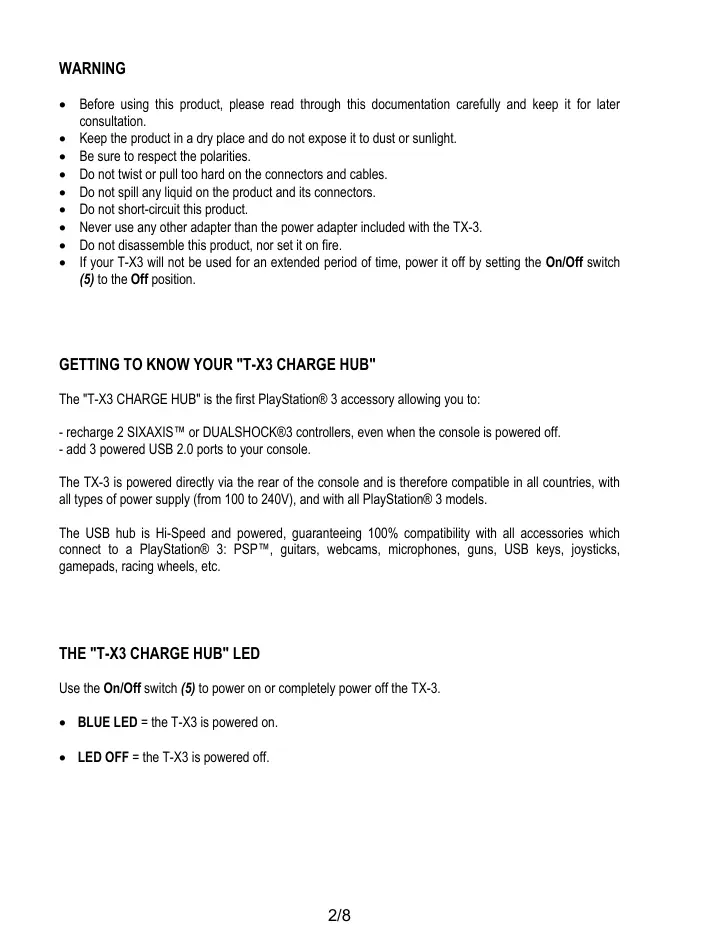
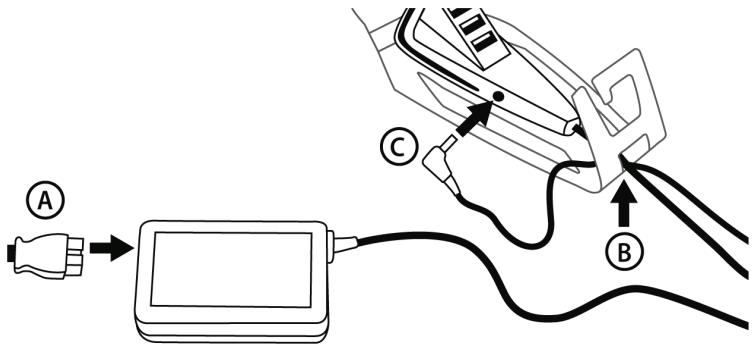
A) Connect the T-X3 power cable (10) to its power adapter (9).
B) Pass the DC in 5V connector (8) through the opening underneath the cable slot (4).
C) Plug the connector into the DC in 5V input (3) on the TX-3.
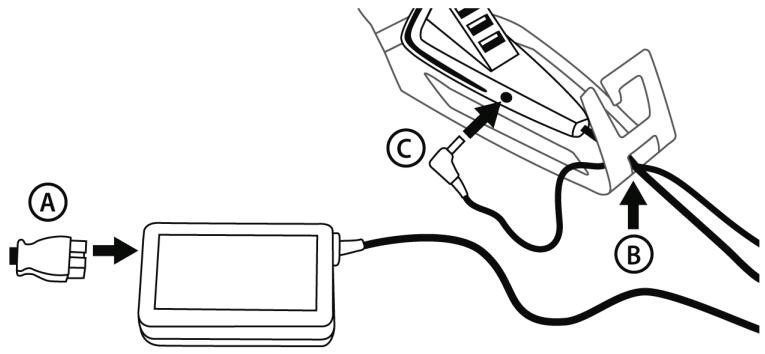
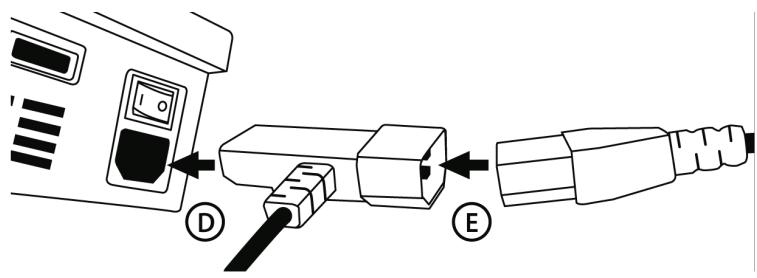
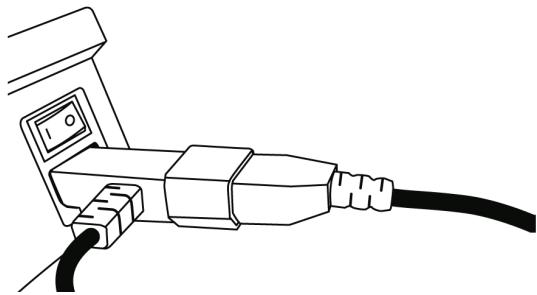
D) Plug the power cable's female connector (11) into the AC IN input at the back of your PlayStation® 3.
E) Plug your PlayStation® 3's power cable (included with the console) into the male connector (12).
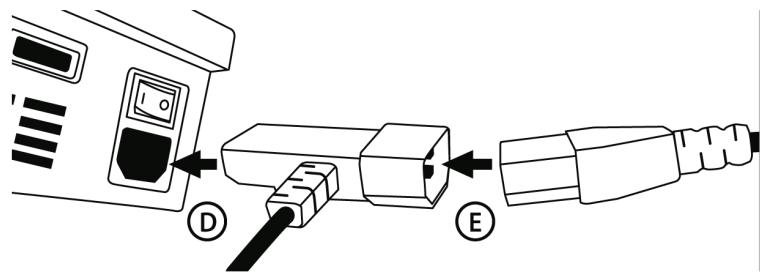
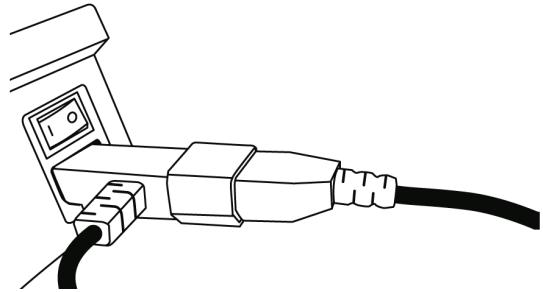
F) Plug your PlayStation® 3's power cable (included with the console) into an electrical outlet and set the "I/O" switch on the console to the "I" position.
The console's LED lights up in RED.
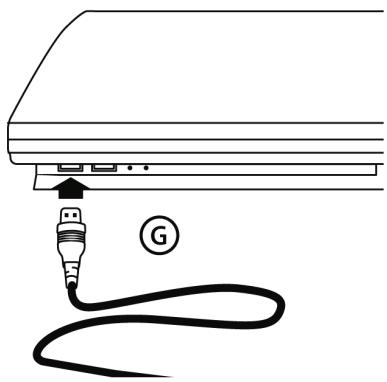
G) Connect the T-X3's USB connector (7) to one of your console's USB ports.
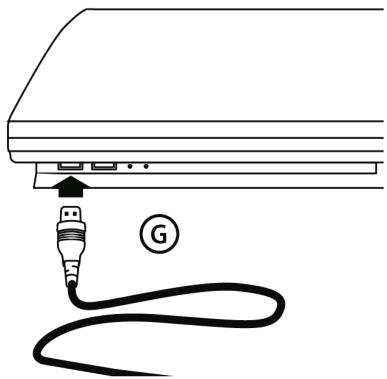
H) Set the TX-3's switch (5) to the "ON" position.
The charger's LED lights up in BLUE.
Your "T-X3 CHARGE HUB" is now ready for use!
RECHARGING A PLAYSTATION® 3 GAMEPAD ON THE TX-3 BASE
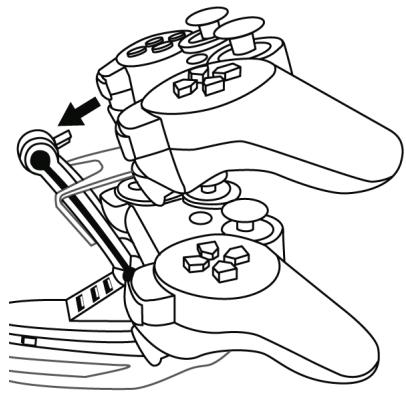
Position the gamepad on one of the 2 bases and connect its female connector to the male connector (1) on the TX-3.
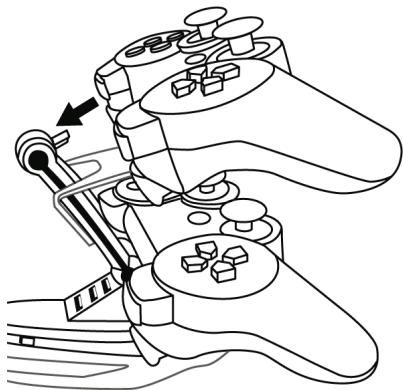
When the gamepad is recharging:
The gamepad's port indicators flash slowly.
- When the gamepad is completely charged:
The gamepad's indicators stop flashing.
Note:
Gamepads continue to recharge even when your console is powered off.
Gamepads will automatically stop recharging when the battery is full.
- When recharging on its base, the gamepad is not functional and cannot be used.
To use your gamepad, disconnect it from the base and press its PS button.
USING THE HUB (3 USB 2.0 PORTS)
Connect the PlayStation® 3 accessory (PSP™, guitars, webcams, microphones, guns, USB keys, joysticks, gamebags, racing wheels, etc.) to one of the 3 USB ports (2) on the TX-3.
If the accessory is wired, pass its cable through the cable slot (4) located at the back of the T-X3.
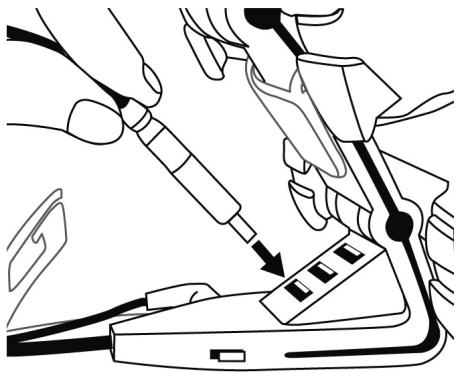
Note:
The hub and its 3 USB ports are only functional and may only be used when your console is powered on.
- The hub can only be used when the T-X3's USB connector is connected to your console (diagram G).
- You can also recharge your gamepads via the hub (using the USB charging cable included with your console). In this case, the gamepad will be functional even while it is recharging.
TECHNICAL SUPPORT
If you encounter a problem with your product, please go to http://ts.thrustmaster.com and click Technical Support. From there you will be able to access various utilities (Frequently Asked Questions (FAQ), the latest versions of drivers and software) that may help to resolve your problem. If the problem persists, you can contact the Thrustmaster products technical support service ("Technical Support"):
By email:
In order to take advantage of technical support by email, you must first register online. The information you provide will help the agents to resolve your problem more quickly. Click Registration on the left-hand side of the Technical Support page and follow the on-screen instructions. If you have already registered, fill in theUsername and Password fields and then click Login.
By telephone:
| United Kingdom | 08450800942Charges at local rate | Monday to Friday from Noon to 4pm and 5pm to 10pm Saturday from 9am to Noon and 1pm to 7pm Sunday from 9am to Noon and 1pm to 4pm |
| United States | 1-866-889-5036Free | Monday to Friday from 7am to 11am and from Noon to 5pm Saturday and Sunday from 7am to Noon (Eastern Standard Time) |
| Canada | 1-866-889-2181 Gratisuit / Free | Monday to Friday from 7am to 11am and from Noon to 5pm Saturday and Sunday from 7am to Noon (Eastern Standard Time) |
| Denmark | 80887690Free | Monday to Friday from 1pm to 5pm and 6pm to 11pm (English) Saturday from 9am to 1pm and 2pm to 8pm Sunday from 10am to 1pm and 2pm to 5pm |
| Sweden | 0200884567Free | Monday to Friday from 1pm to 5pm and 6pm to 11pm (English) Saturday from 9am to 1pm and 2pm to 8pm Sunday from 10am to 1pm and 2pm to 5pm |
| Finland | 0800 913060Free | Monday to Friday from 2pm to 6pm and 7pm to Midnight (English) Saturday from 10am to 2pm and 3pm to 9pm Sunday from 11am to 2pm and 3pm to 6pm |
WARRANTY INFORMATION
Worldwide, Guillemot Corporation S.A. ("Guillemot") warrants to the consumer that this Thrustmaster product will be free from material defects and manufacturing flaws for a period of two (2) years from the original date of purchase. Should the product appear to be defective during the warranty period, immediately contact Technical Support, who will indicate the procedure to follow. If the defect is confirmed, the product must be returned to its place of purchase (or any other location indicated by Technical Support).
Within the context of this warranty, the consumer's defective product will, at Technical Support's option, be either repaired or replaced. Where authorized by applicable law, the full liability of Guillemot and its subsidiaries (including for indirect damages) is limited to the repair or replacement of the Thrustmaster product. The consumer's legal rights with respect to legislation applicable to the sale of consumer goods are not affected by this warranty.
This warranty shall not apply: (1) if the product has been modified, opened, altered, or has suffered damage as a result of inappropriate or abusive use, negligence, an accident, normal wear, or any other cause not related to a material defect or manufacturing flaw; (2) in the event of failure to comply with the instructions provided by Technical Support; (3) to software not published by Guillemot, said software being subject to a specific warranty provided by its publisher.
Additional warranty provisions
In the United States of America and in Canada, this warranty is limited to the product's internal mechanism and external housing. Any applicable implied warranties, including warranties of merchantability and fitness for a particular purpose, are hereby limited to two (2) years from the date of purchase and are subject to the conditions set forth in this limited warranty. In no event shall Guillemot Corporation S.A. or its affiliates be liable for consequential or incidental damage resulting from the breach of any express or implied warranties. Some States/Provinces do not allow limitation on how long an implied warranty lasts or exclusion or limitation of incidental/consequential damages, so the above limitation may not apply to you. This warranty gives you specific legal rights, and you may also have other legal rights which vary from State to State or Province to Province.
COPYRIGHT
© 2008 Guillemot Corporation S.A. All rights reserved. Thrustmaster® is a registered trademark of Guillemot Corporation S.A. Playstation® is a registered trademark of Sony Computer Entertainment, Inc. All other trademarks and brand names are hereby acknowledged and are property of their respective owners. Illustrations not binding. Contents, designs and specifications are subject to change without notice and may vary from one country to another. Made in China.
ENVIRONMENTAL PROTECTION RECOMMENDATION


At the end of its working life, this product should not be disposed of with standard household waste, but rather dropped off at a collection point for the disposal of Waste Electrical and Electronic Equipment (WEEE) for recycling.
This is confirmed by the symbol found on the product, user manual or packaging.
Depending on their characteristics, the materials may be recycled. Through recycling and other forms of processing Waste Electrical and Electronic Equipment, you can make a significant contribution towards helping to protect the environment.
Please contact your local authorities for information on the collection point nearest you.
FAQs, tips and drivers available at www.thrustmaster.com
T-X3 CHARGE HUB
Compatible:Playstation ⑧ 3
INFORMATIONS RELATIVES À LA GARANTIE
LERNEN SIE IHREN "T-X3 CHARGE HUB" KENNEN
DIE "T-X3 CHARGE HUB" LED
DE "T-X3 CHARGE HUB" IN DETAIL
INFORMATIE MET BETREKKING TOT DE GARANTIE
INIZIAMO A CONOSCERE IL TUO "T-X3 CHARGE HUB"
IL LED "T-X3 CHARGE HUB"
TEXHUNECKNEXAPAKTEPNCTIKN
1.2 coeDHHNTENI DnIaIAPKIN IIRPOBOI KOHcONPS3
2. KoHcIeHTparOp: 3 USB 2.0 nopTa
3. BxOJHOH CnIHAN NOCToHHoro ToKa 5B
4. Паз ka6eЯ
5. CeteBoB BbIKIOHAteJIb
6.Индикатор
7. USB-pa3bem
- BxOHOH pa3bEM NOCToHHoro ToKa 5 B
- AanTep nTaHn
- KaebJIb nITaHnT TX-3
- He3do Ka6eIa NiTaHnIa
- Μτέκερ καδέπη πιτάνη
IpeDynpexdene
Ipc6Ba BHNMTateBHO 03AOKOMTbC DaHHbM DOKyMeHOT mpeed IcNoJIb3OBAHNEM Ia TAKCE CEBPrtc C HMM B DaHbHEWIM.
I3dJIe NcIeYET XpaHbT B CYXOM MecTe H He DOnyCKaTb BO3JeCTBn HA Hero IblIn cONHeHORCBETA.
Co6HuaTe nnonpHocTB.
He npcykaetc kcpyubnAHme nnpbEblueHne ycInna BbITrmba H bOTHOeHN pa3bEmOB Kabeenei.
He donyckaTe nonadaHn KndKoTe Ha n3dJeNe er opa3bEmbl.
He donyckaIte KOPOTKOra 3ambikaHnA 3TOrO n3dEInra.
HInKoHa He IcNoIb3yIte IIObIe IApYIe aAdantpeI, KpOme aAdantpe nITAHnI, NOCTaBIAREMOR Bmecte c TX-3.
He pa36bpaTte n3dene n He 6pocaiTe erO B orOHs.
- Ecln T-X3 He nCnoB3yTeHa npotraKeHm DOnrOTo npomEkyTka BpeMeHn, oBeCToYte erO, yctahOBv CemoeB ebKnUoyamEnb (5) B noIoxeHne Off (BbIK).
I3YUHEHME "T-X3 CHARGE HUB"
Питанов TX-3 OCUSECTBNEETC HENOCPECTBENH O Yepe3 3ADHIOO YacbKOHCOIN n, NO3OTOMY, yctpoIcTB OyIaTcR cOBMeCTMbIM BO CECT bCTPAAH CO BcEMn TmAmN 3NeKtpOniTAHn (OT 100 do 240 B) n o BCEmn MoTeJIaMn PlayStation® 3.
KoCHETHPaTOp USB BIAKOCKOPOCTbHM UcTPOIcTBOM rApaHTNpyER 100% COBMECTIMOCbTc BO CEMeKxAcccecyapAmn,TOCpIbe NOkDIOVaoTcM K PlayStation® 3: PSP™,rMaTbp,Be6-KampeBly, MInKpOdoHbI, nICToTolteBt, KIOUH USB, DIOXJTEmK, IROPBoeK KOHPTONneBp, ROHOHbIy pyni uT. d
CBETODIOI "T-X3 CHARGE HUB"
VcnoIb3yte cTeBoB BbIKIOuAteBb (5) , TTObbl BKIOUHTb IIN NIOHOCTbHO BbIKIOUHTb 3JIeKtponItanHe TX-3.
CINHNCBETOIOD T-X3BKJIUOyen
CBETOIOHOHETOPUT T-X3BbIKIoueH.
YCTAHOBKA "T-X3 CHARGE HUB" HA PLAYSTATION® 3
A) IopknIOuHTe cTeBcN KabebIb (10) T-X3 K cTeBOMy aadTepy (9).
B) 3aebnTe KOHNeKToP DC in 5 B (8)Yepe3 OTBepCTne NoI na3oM Ka6eJIa (4).
C) IopKIOHOTe KOHNKETOP KO BxOy DC in 5B (3) Ha TX-3.
D) PoiKIOUOHTe rHe3do Ka6eJIa (11) Ko BxOy AC IN Ha 3aHne yactn PlayStation® 3.
E) IopKJIIOHnTe Ka6eBn b nHTaHnA PlayStation® 3 (B KOMPNeKeT KoHcOIN) K pa3bemy (12).
F) BkIIOHHTe Ka6BeIb PiTahmra PlayStation® 3 (B KOMIIeTe KOHCoJIN) B 3eIKTpUeCKyO p03eTKu I yctAHOBITE nepeKIOHATeJI "I/O" KOHCoJIN B nIOLOXeHMe "I".
Ha KOHcONI 3aropntc KpaCbI CBeTOnIOd.
G) IopKJIIOUHTe pa3bEm USB (7) T-X3 K OJHOmy n3 nopTOB USB Ha KOHcOIN.
H) YctahOBHTe nepeKIOUOATEb TX-3 (5) B noIOJKeHe "ON" (BkI.).
Ha 3aρaHOM yctpoCTbe 3aoropTc cnHn CBeToNDIO.
Tenepb 3aprdohoe ycmpooucmeo "T-X3 CHARGE HUB" zomoo K ucnnoIb306aHuo!
3APJDAKAMIPOBOIOKHTPOJIIEPAPLAYSTATION ⑧ 3HABA3ETX-3
UctaHOBtE mTPOBoi KOHTpOJIeP Ha OJHy n3 2 Ba3 N IIOKIIIOHTe ero THe3DOBoi pa3bEm K UStbIpKbOBy Mpa3bemy (1) Ha TX-3.
Korda irpoBoi KOHTpOJIeP 3apJxAeTcA
- WARNING
- GETTING TO KNOW YOUR "T-X3 CHARGE HUB"
- THE "T-X3 CHARGE HUB" LED
- INSTALLING THE "T-X3 CHARGE HUB" ON PLAYSTATION® 3
- RECHARGING A PLAYSTATION® 3 GAMEPAD ON THE TX-3 BASE
- Note:
- USING THE HUB (3 USB 2.0 PORTS)
- TECHNICAL SUPPORT
- By email:
- WARRANTY INFORMATION
- Additional warranty provisions
- COPYRIGHT
- ENVIRONMENTAL PROTECTION RECOMMENDATION
- T-X3 CHARGE HUB
- Compatible:Playstation ⑧ 3
- INFORMATIONS RELATIVES À LA GARANTIE
- LERNEN SIE IHREN "T-X3 CHARGE HUB" KENNEN
- DIE "T-X3 CHARGE HUB" LED
- DE "T-X3 CHARGE HUB" IN DETAIL
- INFORMATIE MET BETREKKING TOT DE GARANTIE
- INIZIAMO A CONOSCERE IL TUO "T-X3 CHARGE HUB"
- IL LED "T-X3 CHARGE HUB"
- TEXHUNECKNEXAPAKTEPNCTIKN
- IpeDynpexdene
- I3YUHEHME "T-X3 CHARGE HUB"
- CBETODIOI "T-X3 CHARGE HUB"
- YCTAHOBKA "T-X3 CHARGE HUB" HA PLAYSTATION® 3
- 3APJDAKAMIPOBOIOKHTPOJIIEPAPLAYSTATION ⑧ 3HABA3ETX-3
Brand : THRUSTMASTER
Model : T-X3 CHARGE HUB
Category : Gaming accessory