
T-CHARGE QUATRO NW - Gaming accessory THRUSTMASTER - Free user manual and instructions
Find the device manual for free T-CHARGE QUATRO NW THRUSTMASTER in PDF.



| Product type | Wii Remote Charger |
| Brand | Thrustmaster |
| Model | T-CHARGE QUATRO NW |
| Number of rechargeable remotes | 2 (simultaneously) |
| Power supply | USB port (5V) from console or adapter |
| Battery type | NiMH AAA (supplied in battery pack) |
| Battery capacity | 900 mAh |
| Full charge time | 4 hours (for 2 batteries) |
| Average battery life | 12 to 15 hours depending on use |
| LED indicator | Blue: on when charging, flashing when fully charged |
| Safety | Built-in heat sensor for continuous charging |
| Compatibility | Wii Remote (Wiimote) with Thrustmaster battery pack |
| Dimensions (approx.) | 16 x 8 x 5 cm |
| Weight (approx.) | 150 g |
| Maintenance | Clean with a dry, lint-free cloth |
| Warranty | 2 years |
| Environment | Do not dispose of with household waste, recycle at WEEE collection point |
Frequently Asked Questions - T-CHARGE QUATRO NW THRUSTMASTER
User questions about T-CHARGE QUATRO NW THRUSTMASTER
0 question about this device. Answer the ones you know or ask your own.
Ask a new question about this device
Download the instructions for your Gaming accessory in PDF format for free! Find your manual T-CHARGE QUATRO NW - THRUSTMASTER and take your electronic device back in hand. On this page are published all the documents necessary for the use of your device. T-CHARGE QUATRO NW by THRUSTMASTER.
USER MANUAL T-CHARGE QUATRO NW THRUSTMASTER
USING T-CHARGE DUO NW
Replacing the Wii Remote's original batteries and battery compartment cover with the rechargeable battery holder:
- Remove your Wii Remote's original battery compartment cover and batteries. (Be sure to keep the original cover in case you need to return your Wii Remote to the manufacturer.)
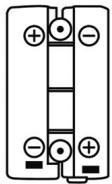
- Insert the rechargeable batteries into the battery holder, making sure to respect the polarities.
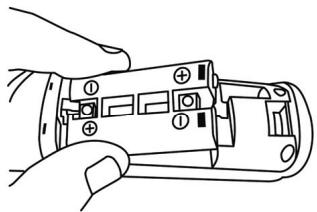
- Insert the battery holder into the Wii Remote's battery compartment.
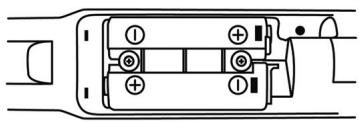
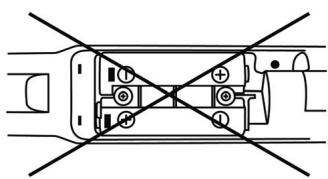
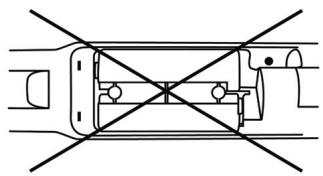
If the battery holder is properly installed and if the batteries are not completely discharged, the LEDs on the Wii Remote will flash.
If the LEDs do not flash, verify that the battery holder is properly positioned or recharge the batteries by placing the Wii Remote in the T-Charge Duo NW.
RECHARGING A WII REMOTE
- Connect the USB connector on the T-Charge Duo NW to the USB plug ( (12) ) on your Nintendo® Wii™ console or on any other device with a self-powered USB port.
- Ensure that your Nintendo® Wii™ console (or your device) is in active or standby mode. (For the Wii™: green LED = active mode, orange LED = standby mode with WiiConnect24 enabled*. For other devices: please refer to the manufacturer's documentation.)
- Place your Wii Remote in one of the two dedicated slots on the T-Charge Duo NW, making sure that the wrist strap does not interfere with the proper positioning of the contacts on the Wii Remote with the contacts on the T-Charge Duo NW.
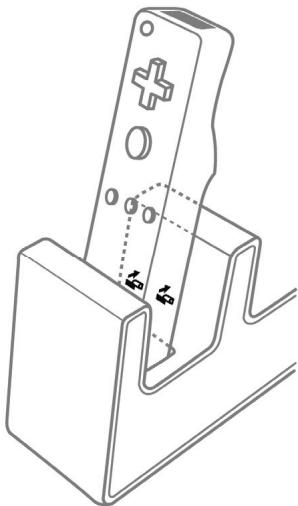
The blue LED corresponding to the occupied slot lights up. When the batteries are completely recharged, the blue LED flashes.
Full charging time for two 900 mAh batteries: 4 hours (for 1 Wii Remote). Average battery life = 12 to 15 hours, depending on the type of use.
We recommend that you always put the Wii Remote back in its slot in the T-Charge Duo NW when it is not in use.
For your security, the T-Charge Duo NW is equipped with a heat sensor, allowing you to leave it plugged in permanently.
- Please refer to your Wii™'s instructions for information on how to enable WiiConnect24 mode.
TROUBLESHOOTING
| Problem | Probable cause |
| The LED on the T-Charge Duo NW does not light up ... | · The Wii Remote is not properly positioned in the T-Charge Duo NW. · There are no batteries in the battery holder. · The polarities are not properly aligned. · You are not using AAA rechargeable batteries. · The Wii™ console or device is powered off. · The USB cable is not connected properly. · The USB port is defective. · Battery life may diminish over time. If need be, you can purchase replacement AAA NiMH rechargeable batteries from a retailer (Recommended power ≥ 900 mAh). |
Attention:
Be sure to always follow the Wii Remote's instructions for use found in your Wi^TM manual.
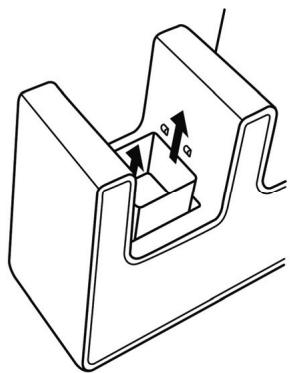
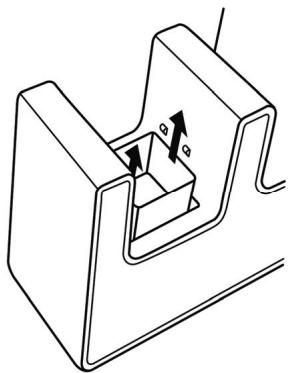
If your Wii Remote is equipped with the T-Protect NW protection system -specially designed by Thrustmaster to be compatible with the T-Charge Duo NW-, you must first remove the removable support before inserting the Wii Remote in the T-Charge Duo NW (Please refer to the diagram below).
TECHNICAL SUPPORT
If you encounter a problem with your product, please go to http://ts.thrustmaster.com and click Technical Support. From there you will be able to access various utilities (Frequently Asked Questions (FAQ), the latest versions of drivers and software) that may help to resolve your problem. If the problem persists, you can contact the Thrustmaster products technical support service ("Technical Support"):
By email:
In order to take advantage of technical support by email, you must first register online. The information you provide will help the agents to resolve your problem more quickly. Click Registration on the left-hand side of the Technical Support page and follow the on-screen instructions. If you have already registered, fill in theUsername and Password fields and then click Login.
By telephone:
| United Kingdom | 08450800942Charges at local rate | Monday to Friday from Noon to 4pm and 5pm to 10pm Saturday from 9am to Noon and 1pm to 7pm Sunday from 9am to Noon and 1pm to 4pm |
| United States | 1-866-889-5036Free | Monday to Friday from 7am to 11am and from Noon to 5pm Saturday and Sunday from 7am to Noon (Eastern Standard Time) |
| Canada | 1-866-889-2181 Gratisuit / Free | Monday to Friday from 7am to 11am and from Noon to 5pm Saturday and Sunday from 7am to Noon (Eastern Standard Time) |
| Denmark | 80887690Free | Monday to Friday from 1pm to 5pm and 6pm to 11pm (English) Saturday from 9am to 1pm and 2pm to 8pm Sunday from 10am to 1pm and 2pm to 5pm |
| Sweden | 0200884567Free | Monday to Friday from 1pm to 5pm and 6pm to 11pm (English) Saturday from 9am to 1pm and 2pm to 8pm Sunday from 10am to 1pm and 2pm to 5pm |
| Finland | 0800 913060Free | Monday to Friday from 2pm to 6pm and 7pm to Midnight (English) Saturday from 10am to 2pm and 3pm to 9pm Sunday from 11am to 2pm and 3pm to 6pm |
WARRANTY INFORMATION
Worldwide, Guillemot Corporation S.A. ("Guillemot") warrants to the consumer that this Thrustmaster product will be free from material defects and manufacturing flaws for a period of two (2) years from the original date of purchase. Should the product appear to be defective during the warranty period, immediately contact Technical Support, who will indicate the procedure to follow. If the defect is confirmed, the product must be returned to its place of purchase (or any other location indicated by Technical Support).
Within the context of this warranty, the consumer's defective product will, at Technical Support's option, be either repaired or replaced. Where authorized by applicable law, the full liability of Guillemot and its subsidiaries (including for indirect damages) is limited to the repair or replacement of the Thrustmaster product. The consumer's legal rights with respect to legislation applicable to the sale of consumer goods are not affected by this warranty.
This warranty shall not apply: (1) if the product has been modified, opened, altered, or has suffered damage as a result of inappropriate or abusive use, negligence, an accident, normal wear, or any other cause not related to a material defect or manufacturing flaw; (2) in the event of failure to comply with the instructions provided by Technical Support; (3) to software not published by Guillemot, said software being subject to a specific warranty provided by its publisher.
Additional warranty provisions
In the United States of America and in Canada, this warranty is limited to the product's internal mechanism and external housing. Any applicable implied warranties, including warranties of merchantability and fitness for a particular purpose, are hereby limited to two (2) years from the date of purchase and are subject to the conditions set forth in this limited warranty. In no event shall Guillemot Corporation S.A. or its affiliates be liable for consequential or incidental damage resulting from the breach of any express or implied warranties. Some States/Provinces do not allow limitation on how long an implied warranty lasts or exclusion or limitation of incidental/consequential damages, so the above limitation may not apply to you. This warranty gives you specific legal rights, and you may also have other legal rights which vary from State to State or Province to Province.
COPYRIGHT
© 2008 Guillemot Corporation S.A. All rights reserved. Thrustmaster® is a registered trademark of Guillemot Corporation S.A. Wii is a trademark of Nintendo Co., Ltd. All other trademarks and brand names are hereby acknowledged and are property of their respective owners. Illustrations not binding. Contents, designs and specifications are subject to change without notice and may vary from one country to another. Made in China.
ENVIRONMENTAL PROTECTION RECOMMENDATION
At the end of its working life, this product should not be disposed of with standard household waste, but rather dropped off at a collection point for the disposal of Waste Electrical and Electronic Equipment (WEEE) for recycling.
This is confirmed by the symbol found on the product, user manual or packaging.
Depending on their characteristics, the materials may be recycled. Through recycling and other forms of processing Waste Electrical and Electronic Equipment, you can make a significant contribution towards helping to protect the environment.
Please contact your local authorities for information on the collection point nearest you.
FAQs, tips and drivers available at www.thrustmaster.com
T-CHARGE DUO NW
INFORMATIONS RELATIVES À LA GARANTIE
INFORMATIE MET BETREKKING TOT DE GARANTIE
3acemumc cuiu uukamop, coombemcmeyouu zhaomomy 2he3dy.
Koeda akkymnyamopbI noJIHocmbIO 3apdAmc, 3a2Opumc cHui unUkamop.
Bcerda cneyuthe nHcTpykUHM npOn3BOUHTeY Wii Remote, npNBeHnBIM B pyKOBOCTBe noJIb3ObaTeY WiiTM.
Ecnn Bau Kootponpne Wi Remote oobopyoan CCTeMoa zaaunbT P-Protect NW, papa6botnoi hPhiPMoThrustmaster, n cobMeTmO c T-Charge Duo NW,- chaHa a ChmMte npctabky, a 3atem BCTabte Wi Remote b T-Charge Duo NW (CMOTPTE mpcyHOndane).
TEXHNUECKA NOIDEPXKA
Пи ВОЗИКНOBЕМИnpo6bIeM,СБЯЗАньIx C HNOLьТОВАHIMe KONТрОЛпЕа,ЗадИт eHa Be6- cHT http://ts.trustmaster.com И ретдгіп no Сылік eTechnical Support (rexnuecka nOdoepkka). Ha 3оу tstРанMuE cte bOCTyn k PazlIyMHbU yTINITAM (Чарто задаebмь BOPpoCb (FAQ),cambie HOBJBEBpCnДрайВерови nOprpammHOrO obcepeHnHry) - 3TO MOKTe NOMOч рeoшENIO npo6bIeM. EcIn 3TO He NOMrIo,MOXHO CB83ATbCo c cyJx60I TeMHNeCKO nOdoepKKn Thrustmaster ("Technical Support"):
IIO 3JIeKtPOHNOI NOUTe:
Tofobstpnpmbt 3aepoc BOTdEe TexnHeccko NpdepeKKn no3neKtpOnHno nOte, Heo6xOIMO zapeMCTPPOBAtc.
IpeOCTaEBNHAA IHOPOMauu NOMOeT 6bctpee peuNTb np6bemy. IpeeiDte No ccsJke Registration (peHcTpaun), KOTOPa HaxoDMTC SceBa HA CTpanHe TExnHeccko NpdepeKKn Technical Support n CneDuYte
HHTpyKUIMAM h 3kpaHe. Ecnbl bYke 3apERmCTPPOBAnb, BBeDte IMN noJIb3OBaTeRn n aponb, 3atem qIeKNHite
Login (bxOd).
INHOPMALIQAHTNI
Bo Bexc 3papanX, Kopnpaunu Guillemot Corporation S.A. (Guillemot) daer raptanHn haIeIIN Thrustmaster B tom,TO 3TN IeIeIIN He IMeHT DEEeKToB MATEPmAnOB INN pOIM3BOcCTBa HA (2) roda ot DaTbI NOKyIM. Pm 6hApkyeHn DEeKtA b TceHnRrnapTmHOrO cspKa HemeDHeHNO CBRAKteCb CO CzykBcK TeHHcKcN NOdEPKKN, KOPTOR PA3zHNCNT NocDBeoAIEHbOTcBcDECTB.Nc Ecm DEeKTo NOtBepdITcRa, 3eIeIeN Heo6XODMIO BEPYbT no MeCTY nPi0eBETOE (Inn dpyro, YkaaHHeo cnyKoB TNeHHueckoN NOdEPKKN).
ECNHmncpabnoe H3nei noanaaed nol yocbnra paparhtno, OHO 6ydt NIO 6a0meHNO, NIOO oTpeMnOHTABAO. Ipn HauHnUc pyenlmpuIezo haoKoHdAteBCTBA, HAMbONbUaOH bTeBtCTBEHNBOCT (BKINOHAR KOCBENHIE ybftIKN) KOPnpaum Guillemot n ee doepnHx npdePnTnI orpAnHueMe pemOHNT mI aHsAmEO H3ne1r Thrustmaster. OpNDcEckne npaba notOpBeHnr B OTHoumEn zakoHOaDteBCTBA, pnpimHMOr K npdoJaxm Notp6beTbcknx ToBAPOB He BnIHOt HAyakaahnHe rapaeHHNHE ob8aTeBtCTBA.
37a rapatnHa he pacnpOCTpAraHETc: (1) Ha i3dIeIN MOndiuMIOBAPHOHBE, BCKbIbTbe, DopApoTahnHe IIN NPOpeXeHNHe bPe3yIbTe tae HEPaBnPnI INr npSyBO rOpBaEJIHH, HECMOPTpNTbHOTc, HECACTHOpyCHN, HOPMaYHOBn HIOChA, INI IMeIOe IIOBoI dIeKHe, HE CBx3AHbN C KAcHEbOM MaTEpINA IIN NsTOBENHIE; (2) B cHyueh Hec6IOBqENH IINctKyuIN, BaIbHNHbTNe THe TneKcNpOdeKkO; (3) hApOprAMMbHe npoDyKtbl, pa3paOtoAHn He Guelimot, pacnpOCTpAraHETc rapatnHa/OTBeTcBHeHOCbPap3o6TbNknporpa
ABTOPCKME IIPABA
© 2008 Guillemot Corporation S.A. Bce npaba aauuunb. Thrustmaster® aepnctpobanHIM TOBAPHm 3hakom Guillemot Corporation S.A. Wijraaetoc troporob mokno Nintendo Co., Ltd. Bce aepnctnpobanHim ToBapHm 3hakm nToproboe mapk nBnhtc o6ctBeHHOCTbcooBETCByUOxHnBlaedJeBae. INIOCTpAAMMOTy e NoIHOCTbCOBETCBtOBaPbeHmIIBNMeHc. CopeKAnHe, TceKHeckee XapaKTepcHmKuYfHKInMOTy IeMHertBa 63e npdynpeHdieny O NTINAHCTbPNDA pAnlhynnb cTpaH. IVrTOBNEHO b KItae.
PEKOMEHDAUINIIO 3AUHTE OKPYXAIOUCEI CPEbl
Tocne OOKHAnHn cspca cnKbIb DAnHOe H3dEHe CneyET yTNINIOBAtb BMeCTe C 6bTobMb MYCOPOM, HO bYNHcTe C6Opa OTXoDB 3NkETPNCEXKOr N 3NkETPOHHORO 06OpYDOBHnA. DAnHOe YK3a3AHnIO nTOBtRpJaDAeTCR COOTBECTBYUOMM CMBONOM, HAHECEHNbHM HA 3dEIne, pyKOBdCTBO NOIb3OBeTAEIN IIN yNAOKBV.
B 3abccnmmocnt O cboeMT, MaTePmblb MyOT nepeBaatcbc B noBtOPhy nopepaObTKy. NIObTOpHna nepaeoBToKta OTOxOBd 3NeKtpnuCeKOrO n3NeKTPoHHOrO o6OpOBOAHa MOKET HBECTN 3HaHTteBhlb BKTAd B COxAphENHE O kpyKaouMeI cpeBd.
O6PbTNTcB B MCTNbIe oprabIb IbnAtn 3a HnFOpMaueH e O bNIXKaHem PnyKHe npHema TAKHXOTOXoB.