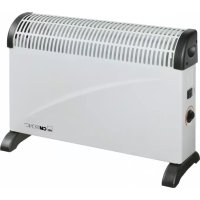
HL 2770 - Electric heater CLATRONIC - Free user manual and instructions
Find the device manual for free HL 2770 CLATRONIC in PDF.



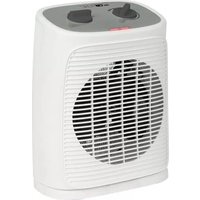
| Product type | Electric fan heater |
| Brand | CLATRONIC |
| Model | HL 2770 |
| Supply voltage | 230 V ~ 50 Hz |
| Minimum fuse protection | 10 A |
| Maximum power | 2000 W |
| Power levels | LO (low), HI (high) |
| Adjustable thermostat | Yes |
| Cold air function (fan) | Yes |
| Overheat protection | Yes |
| Safety distance to flammable objects | 1 m minimum |
| Safety distance to walls | 20 cm minimum |
| Safety distance to water | Do not use near bathtub, shower or basin |
| Recommended placement surface | Flat and heat-resistant |
| Dimensions (approx.) | 20 x 15 x 30 cm |
| Weight (approx.) | 1.5 kg |
| Cleaning | Damp cloth, appliance unplugged and cooled down |
| Warranty | 24 months |
| Intended use | Household only |
| Certifications | Compliant with European directives (EMC, low voltage) |
Frequently Asked Questions - HL 2770 CLATRONIC
User questions about HL 2770 CLATRONIC
0 question about this device. Answer the ones you know or ask your own.
Ask a new question about this device
Download the instructions for your Electric heater in PDF format for free! Find your manual HL 2770 - CLATRONIC and take your electronic device back in hand. On this page are published all the documents necessary for the use of your device. HL 2770 by CLATRONIC.
USER MANUAL HL 2770 CLATRONIC
$$ 1 = \text {W a r m e L u f t} (1 0 0 0 W) $$
$$ 2 = \text {W a r m e L u f t} (2 0 0 0 \mathrm {W}) $$
Thermostat
$$ H I = \text {H o c h s t e S t u f e} $$
1 = Air chaud (1000 W)
2 = Air chaud (2000 W)
Thermostat
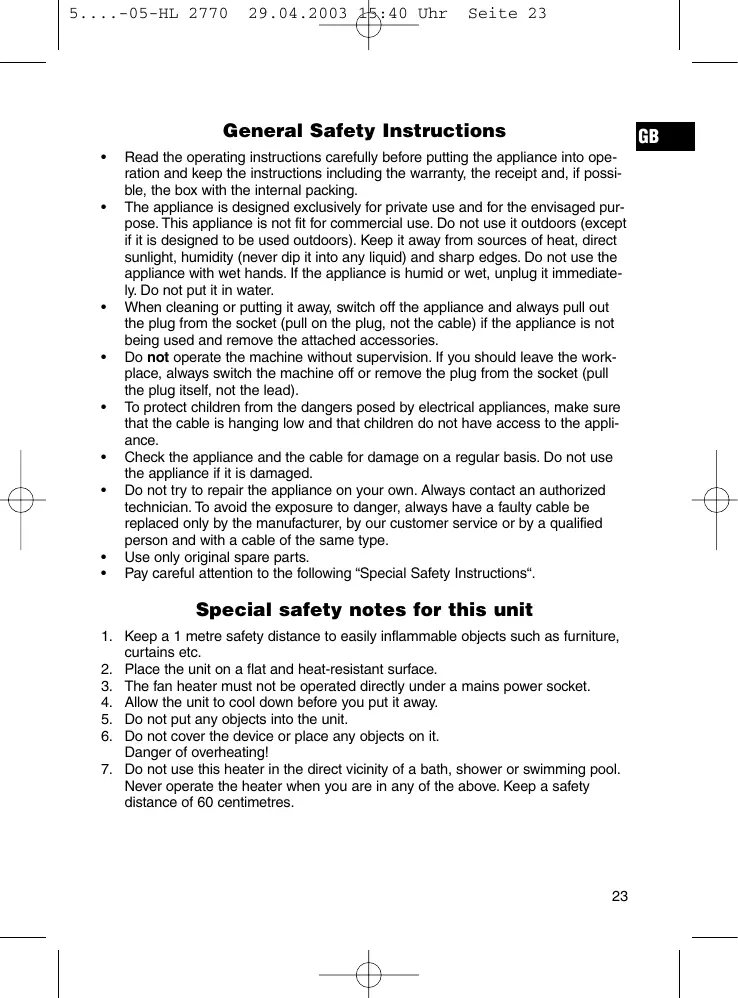
General Safety Instructions
GB
- Read the operating instructions carefully before putting the appliance into operation and keep the instructions including the warranty, the receipt and, if possible, the box with the internal packing.
- The appliance is designed exclusively for private use and for the envisaged purpose. This appliance is not fit for commercial use. Do not use it outdoors (except if it is designed to be used outdoors). Keep it away from sources of heat, direct sunlight, humidity (never dip it into any liquid) and sharp edges. Do not use the appliance with wet hands. If the appliance is humid or wet, unplug it immediately. Do not put it in water.
- When cleaning or putting it away, switch off the appliance and always pull out the plug from the socket (pull on the plug, not the cable) if the appliance is not being used and remove the attached accessories.
- Do not operate the machine without supervision. If you should leave the workplace, always switch the machine off or remove the plug from the socket (pull the plug itself, not the lead).
- To protect children from the dangers posed by electrical appliances, make sure that the cable is hanging low and that children do not have access to the appliance.
- Check the appliance and the cable for damage on a regular basis. Do not use the appliance if it is damaged.
- Do not try to repair the appliance on your own. Always contact an authorized technician. To avoid the exposure to danger, always have a faulty cable be replaced only by the manufacturer, by our customer service or by a qualified person and with a cable of the same type.
Use only original spare parts. - Pay careful attention to the following "Special Safety Instructions".
Special safety notes for this unit
- Keep a 1 metre safety distance to easily inflammable objects such as furniture, curtains etc.
- Place the unit on a flat and heat-resistant surface.
- The fan heater must not be operated directly under a mains power socket.
- Allow the unit to cool down before you put it away.
- Do not put any objects into the unit.
- Do not cover the device or place any objects on it. Danger of overheating!
- Do not use this heater in the direct vicinity of a bath, shower or swimming pool. Never operate the heater when you are in any of the above. Keep a safety distance of 60 centimetres.
GB
Initial Operation
- Only connect the machine to a properly installed safety socket, 230V / 50Hz
- Make sure that the degree of protection of the socket to which the device is connected is of at least 10 ampere!
- Place the device on any heat-resistant flat surface. Ensure that air can enter and leave unhindered. The distance from the air inlet and outlet grill to the nearest wall should be at least 20 centimetres.
- The indicator light lights up when the unit is in operation.
- After use, pull the plug out of the socket.
Function Switch
$$ \begin{array}{c c} \text {O} & = \text {O F F} \end{array} $$
$$ \clubsuit = \text {C o l d a i r} $$
$$ 1 = \text {H o t a i r} (1 0 0 0 \mathrm {W}) $$
$$ 2 = \text {H o t} $$
Thermostat
- You can set the room temperature with the temperature control.
$$ \begin{array}{l l} \text {L O} & = \text {L o w e s t l e v e l} \end{array} $$
$$ H I = \text {H i g h e s t} $$
- Turn the thermostat control knob to the highest level. The LED will light up.
- Once the desired room temperature is reached, turn the thermostat control knob slowly back until the device shuts off. The thermostat maintains the set room temperature by switching the device on and off.
Cold air operation:
If you would like to use the machine as a ventilator, move the function switch to and turn the temperature regulator to the HI position.

Overheating Protection
The device is equipped with an overheating protection that switches the device automatically off in case of overheating. Shift the function switch to "0" position and pull out plug out of the socket. Let the device cool down for about 10 minutes before using it again.
Should the overheating protection shut the device off again shortly after, there is probably a defect. Switch off the device again and pull out the plug. Let the device be checked by an authorized dealer or by our customer service (or contact your dealer).
Cleaning and Maintenance
GB
- Before cleaning the machine you should always remove the mains lead and wait until the machine has cooled down. The machine should only be cleaned with a slightly damp cloth.
- Do not use any strong detergents or solvents for cleaning.
This device has been tested according to all relevant current CE guidelines, such as electromagnetic compatibility and low voltage directives, and has been constructed in accordance with the latest safety regulations.
Subject to technical changes without prior notice!
Guarantee
The device supplied by our Company is covered by a 24 month guarantee starting on the date of purchase (receipt).
During the life of the guarantee any fault of the device or its accessories *) ascribable to material or manufacturing defects will be eliminated free of charge by repairing or, at our discretion, by replacing it. The guarantee services do not entail an extension of the life of the guarantee nor do they give rise to any right to a new guarantee!
Proof of the guarantee is provided by the proof of purchase. Without proof of purchase no free replacement or repair will be carried out.
If you wish to make a claim under the guarantee please return the entire machine in the original packaging to your dealer together with the receipt.
*) Damage to accessories does not mean automatic free replacement of the whole machine. In such cases please contact our hotline. Broken glass or breakage of plastic parts are always subject to a charge.
Defects to consumables or parts subject to wearing (e.g. motor pistons, kneading blades, drive shafts, spare remote control, spare toothbrushes, saw blades, etc.) as well as cleaning, maintenance or the replacement of said parts are not covered by the guarantee and hence are to be paid!
The guarantee lapses in case of unauthorized tampering.
After the expiry of the guarantee
After the expiry of the guarantee repairs can be carried by the competent dealer or repair service against the payment of the ensuing costs.
PL
IpeekJIIOuateJIb peKIMoB pa60TbI
O = BblKJ("AUS")
=XoIOnHbI B03DyX
1 =TenIbIy Bo3dyx (1000 W)
2 = Teɪnblɪ Bɔːdɪx (2000 W)
Tepmoctat
- Пиюшп рултора tempeatypbl yctaHOBTe xelaemyo tempeatpyВnomeueHIN.
LO = HauMeHbUm ypoBeHb
HI = HauBbIcIuIypoBeHb
- UctahOBInTe peYJInTop TepMOCTaTa Ha HAnBbICuH yPoBeH. IpiI 3aTropaETC KOnTHPOJIbHaJaMnOuKa.
- После того, Кам В пошени установитсу Нeoбхдима Temпература, Медлесно повернite ретунлар Терmoctага образно, д Тек по, пoka пибор не вьклочпс.
Tepeb TepMOCTaB 6ydt BkIIOaTb N BbIKIOaTb TENIOBEHTnJIaTOp, YTObI COxpaHHTB NOMeUeHmYCTaHOBLeHHyTo TEMpeTaTyP.
PexIM - xOIOJNbI B03dYx:
TtObIy IcN0L3O8aBt TepINIOBEHTNIJrTOp B KaueCTBe IPOCTORO BEHTNIJrTOpa UctAHOBITE NpeKJIIOHaTeIb B NOLOKeHne 念 a peryIrTO pTeMNEpaTpyB NoJIOKeHene "HI".
3auntataontpeperpebaHn
RUS
PnIbOp 6OpydoBaH 3aunTHbIM yCTpoiCTBOM, KOTOPoe aBTOMaTneCKN BbKIOuHT erO, ecJn OH nepegeTcA. B 3tOM cJyae cYctAHOBITe nepeKIOUohatBe pXmOB paBoToB b NIOLOXHeMe "0" uBbIte BUNKy n3 pO3eTKn. PpeD NObTOBbM BKIOUHeHem daiTe npIbOpBy pNIMepHO 10 MHyT oCtBuHYtB.
Ecni Ype3 KOpOTKoe Bpemr 3aunTHOE yctpoiCTBO ONTb cpa6oTaET, TO npednIOJXHTeNbHO NOBUNcI DEpEKT. BblKnIOHtne pnp60 n OTknIOHtne erO ot CETn. OTheCtne np60 Nap npOBepky B ToproByTOchky, MHeIOUy IO hAnu DnJIePcKMe PONHOMOChy, INI NaHs CepBnChbI CEHTp (ObaPATNTcB K BaWemy npOdaBu).
TapaTnI TepaTeTcpiN BCKpbITNIu3dJIeNIOCTOpOHHmIMJINUaAM.
Pocje rapaHTn
Iocne OKOHuaHna Cpoka rapaHTn, peMOHT n3dJIeN IPOIN3BOIDNTc 3a ONaIaTy, COOTBETCTBYUOUMM MaCTepCKIMM INI NpyHKtAMN CepBUNCHO O6CJyKINBaHnA.
Technische Daten
Modell: HL 2770