USER MANUAL ON STAGE III JBL
English 2
Deutsch. 8
Francais. 15
Espanol 22
Italiano 29
Dutch 36
Korean. 43
Norwegian 50
Danish. 57
Japanese. 64
Simplified Chinese.....71
Finnish 78
Swedish. 85
Russian 92
YBL
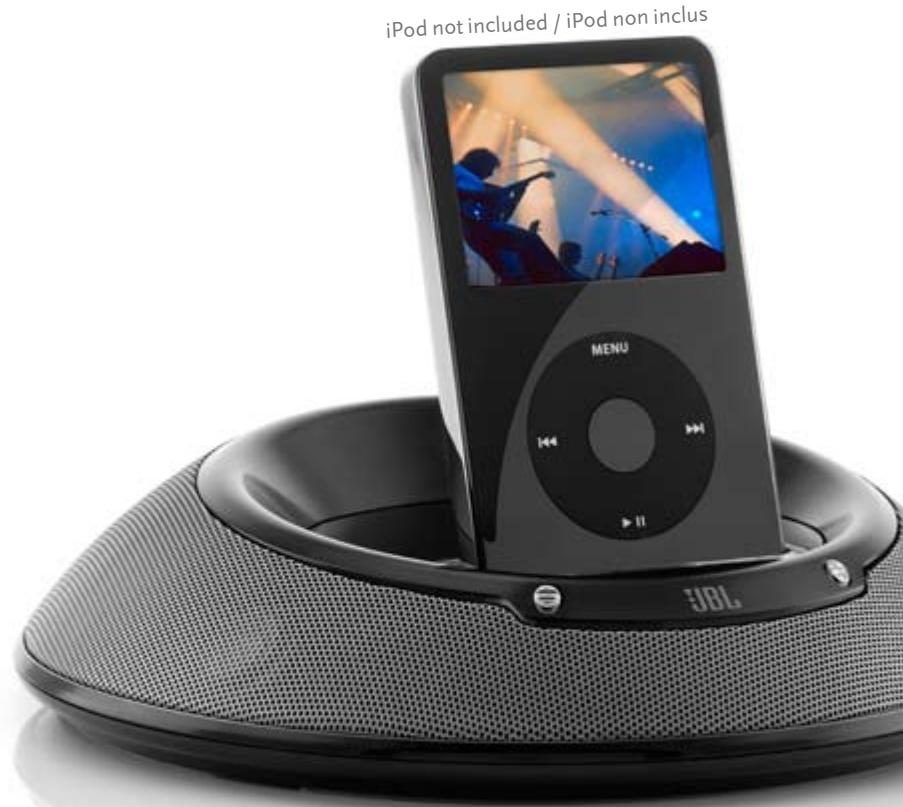
jbl On Stage III portable loudspeaker dock for iPod
JBL On Stage™ III Important Safety Instructions
Please read the following precautions before use:
- Read these instructions, heed all warnings, and keep for future reference.
- Do not use this apparatus near water.
Clean only with dry cloth.
- Do not block any ventilation openings; a minimum distance of 10mm around the entire apparatus is required for sufficient ventilation.
- No naked flame sources such as lighted candles should be placed on or near
- apparatus.
- Attention should be drawn to the environmental aspects of battery disposal.
- Apparatus is to be used in moderate climates only.
- Do not install near any heat sources such as radiators, heat registers, stoves or other apparatuses (including amplifiers) that produce heat.
- Do not defeat the safety purpose of the polarized or grounding-type plug. A polarizing plug has two blades with one wider than the other. A grounding-type plug has two blades and a third grounding prong. The wide blade or third prong is provided for safety. If the provided plug does not fit into your outlet, consult an electrician for replacement of the obsolete outlet.
- Protect the power cord from being walked on or pinched, particularly at the plugs and convenience receptacles, and at the point where they exit from the apparatus.
- Only use attachments/accessories specified by the manufacturer.
- Unplug this apparatus during lightning storms or when unused for long periods of time.
- Refer all servicing to qualified service personnel. Servicing is required when the apparatus has been damaged in any way, such as power-supply cord or plug is damaged, liquid has been spilled or objects have fallen into the apparatus, or the apparatus has been exposed to rain or moisture, does not operate normally, or has been dropped.
- To be completely disconnected from the power input, the main plug of AC/DC adaptor shall be disconnected from the main.
- The main plug of AC/DC adaptor should not be obstructed OR should be easily accessed during intended use.
- The marking information is located at the bottom of apparatus.
- Battery shall not be exposed to excessive heat such as sunshine, fire or the like.
- The apparatus and AC/DC adaptor shall not be exposed to dripping or splashing and that no objects filled with liquids, such as vases, shall be placed on apparatus and AC/DC adaptor.
- TO PREVENT THE RISK OF ELECTRIC SHOCK, DO NOT REMOVE THE COVER (OR BACK). THERE ARE NO USER-SERVICEABLE PARTS INSIDE THIS UNIT. PLEASE REFER SERVICING TO QUALIFIED HARMAN CONSUMER GROUP, INC.SERVICE PERSONNEL.
- Never remove grille covers in order to service the speaker system. The speaker
- system does not contain any user-serviceable parts.
IMPORTANT:
The appropriate adaptor must be installed before inserting your iPod into the JBL On stage III. Make sure that the iPod's connector is properly aligned with the JBL On stage III's connector when installing the iPod. If the iPod has been unplanned to damage the to iPod's connector, rendering the iPod inoperable.
Important Note for All Electronic Products:
Before inserting or unplugging audio cables from the source device's headphones or line-level output jacks, it is good practice to turn off the device first. This will prolong the life of your unit, help protect your device from static electricity and prevent potential damage.

THE LIGHTNING FLASH AND 3D BAD WITHIN THE TRIANGLE IS A WARNING SIGN ALERTING YOU TO DANGEROUS NEWS ABOUT THE PRODUCT.
CAUTION
RISK OF ELECTRIC SHOCK DO NOT OPEN
CAUTION: TO REDUCE THE RISK OF SHOCK,DO NOT REMOVE COVER. NO USER-SERVICEABLE PARTS. 1. SERVICEER SERVICES TO QUALIFIED SERVICE, PERSONNEL

THE EXCLAMATION POINT
THE TRIANGLE IS A WARNING SIGN ALERTING YOU TO IMPORTANT INSTRUCTIONS ABOUT THE PRODUCT.
WARNING: TO PREVENT FIRE OR ELECTRICAL SHOCK, DO NOT EXPOSE THIS PRODUCT TO RAIN OR MOISTURE.
WARNING: THE APPARATUS SHOULD NOT BE EXPOSED TO DRIPPING OR SPLASHING AND NO OBJECTS Filled WITH LIQUID, SUCH AS VASES, SHOULD BE PLACED ON THE APPARATUS.
fcc regulations
This device complies with Part 15 of the FCC Rules. Operation is subject to the following two conditions: (1) This device may not cause harmful interference; and (2) this device must accept any interference received, including interference that may cause undesired operation.
Radio and Television Interference
This equipment has been tested and found to comply with the limits for a Class B digital device, pursuant to Part 15 of the FCC Rules. These limits are designed to provide reasonable protection against harmful interference in a residential installation. This equipment generates, uses and can radiate radio frequency energy and, if not installed and used in accordance with the instructions, may cause harmful interference to radio communications. However, there is no guarantee that interference will not occur in a particular installation.
If this equipment does cause interference to radio or television reception, which can be determined by turning the equipment off and then on, the user is encouraged to try to correct the interference by one or more of the following measures:
- Increase the separation between the equipment and receiver.
- Connect the equipment to a different outlet so that the equipment and receiver are on different branch circuits.
- Consult the dealer or an experienced radio/TV technician for help. Changes or modifications not expressly approved by JBL could void the user's authority to operate the equipment.
Unpacking
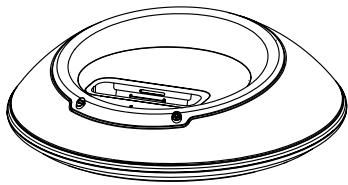
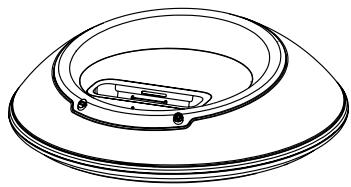
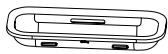
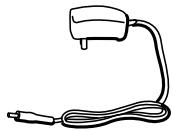
Carefully unpack your JBL On Stage™ III and identify all its components:
-
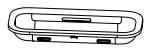
JBL On Stage III
-
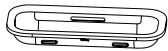
Dock adapter for iPod
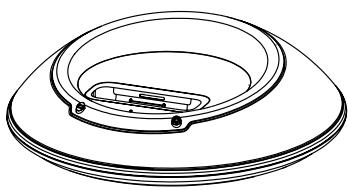
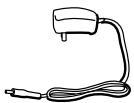
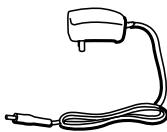
- Power adapter
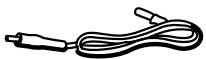
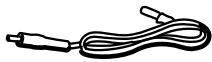
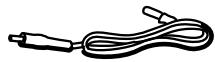
5.3.5mm Audio cable
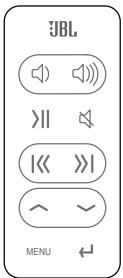
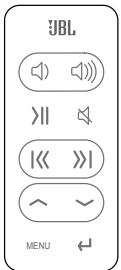
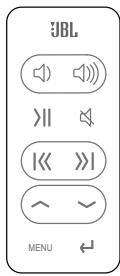
- IR remote
- Carry Case
Getting to Know your JBL On Stage III

Syncing and Transferring Files with Your Computer
Make sure your iPod is securely docked into the JBL On Stage III, using the correct adapter.
Connect a USB cable (sold separately) into the USB jack on the back of the unit, connect the other end of the USB cable directly to your computer's USB port.
Adapters for iPod
For detailed information regarding selection, installation and removal of the dock adapters, visit www.jbl.com.
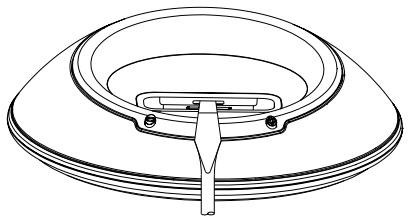
To remove an adapter, insert a flat-head screwdriver (sold separately) into the slot on the back of the adapter and lift up.
jbI On Stage III easy setup guide
| Step 1. Unpack the JBL On Stage III, adapter, remote control, power adapter and input cable. Read these instructions completely. | Step 2. Rotate the battery door to the unlocked position to open the battery compartment. | Step 3. Place 6 AA batteries in the battery compartment. | Step 4. Connect the power adapter into the input marked on the rear of the JBL On Stage III; plug the power adapter into a wall outlet or power strip. |
| or | | | |
| Step 5. Place the appropriate iPod adapter onto JBL On Stage III. Place your iPod on the docking connector or connect the audio input cable to the rear of the JBL On Stage III. Connect the audio cable to the audio source. | Step 6. Press the Power button on the back of the JBL On Stage III. A green LED will light when the JBL On Stage III system is on. | Step 7. Adjust the volume using (+) to increase and (-) to decrease. Press both to mute the JBL On Stage III. Press either button to unmute. |
Battery Disposal
Alkaline batteries are considered nonhazardous and can be disposed of with your regular household trash.
Rechargeable batteries (i.e., nickel cadmium, nickel metal-hydride, lithium and lithium-ion) are considered hazardous household materials and may pose an unnecessary health and safety risk. Unwanted materials should be disposed of in an environmentally sound manner. Contact your local waste management officials for other information regarding the environmentally sound collection, recycling and disposal of used batteries.
DO NOT MIX BATTERY TYPES
DO NOT MIX CHARGED AND PARTIALLY CHARGED BATTERIES
BATTERIES WILL NOT RECHARGE WHILE IN JBL ON STAGE III
jbI On Stage III remote easy setup guide
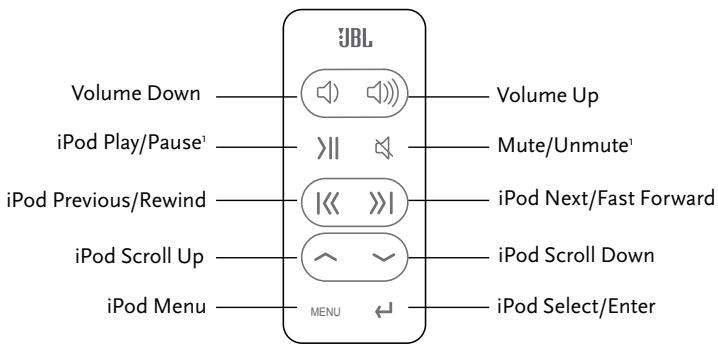
1 In the battery-only mode, the JBL On Stage III loudspeaker dock will turn off to save battery power when muted or paused for longer than 10 minutes.
| Transmission: | IR |
| Frequency: | 38kHz |
| Operating Range: | 20 feeto |
| Battery Type: | CR20 |
| Dimensions: | |
| Width: | 1.29( |
| Height: | 3.38( |
| Depth: | 0.23( |
| Weight (including battery): | 1.2 oz |
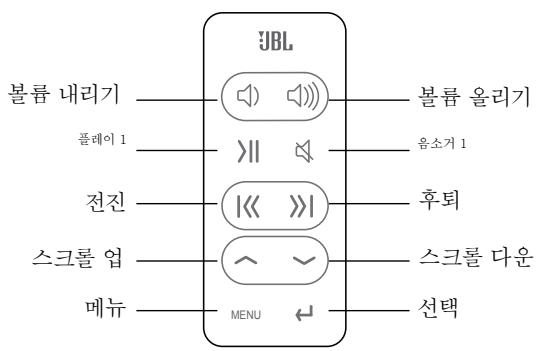
Navigation Control Mode
| Turn iPod on: | Press any button on the remote control to wake the iPod.2 |
| Turn iPod off: | Press and hold the Play/Pause button for two seconds.2 |
| Bring up iPod menu: | Press the Menu button. |
| Scroll up: | Press the Scroll Up button. |
| Scroll down: | Press the Scroll Down button. |
| Go to previous menu: | Press the Menu button. |
| Select menu/track/feature: | Press the Select button. |
Music Control Mode
| Play a track: | Press the Play/Pause button.
Note: If the iPod is at the Main Menu, pressing Play/Pause will cause the iPod to start playing all of its music. |
| Pause a track: | Press the Play/Pause button while a song is playing. |
| Skip to next track: | Press the Next/Fast Forward button. |
| Skip to previous track: | Press the Previous/Rewind button. |
| Fast-advance track: | Press and hold the Next/Fast Forward button. |
| Fast-reverse track: | Press and hold the Previous/Rewind button. |
| Increase volume: | Press the Volume Up button. |
| Decrease volume: | Press the Volume Down button. |
| Mute: | Press the Mute/Unmute button. |
| Go to previous menu: | Press the Menu button. |
| Select menu/track/feature: | Press the Select/Enter button. |
2 In the battery-only mode and after 10 minutes of mute or paused play, you will need to power on the JBL On Stage III unit using the power button located on the back of the unit.
troubleshooting your jbl On Stage III
| Technical Specifications | Symptom | Possible Problem | Solution |
| Sound Quality | | |
| Frequency Response:
70Hz – 20kHz
Power Consumption:
20W Maximum
Power Input:
12V/1.5A
JBL On Stage III Transducer:
(4) 1° Full range per channel
Dimensions:
Diameter – 7 1/2" (190mm)
Height – 2" (51mm)
System Weight:
1.12 lb (0.51kg)
Battery:
Size – AA
Type – Alkaline, NiMh
DO NOT MIX BATTERY TYPES.
DO NOT MIX CHARGED AND
PARTIALLY CHARGED BATTERIES.
BATTERIES WILL NOT RECHARGE
WHILE IN JBL ON STAGE III. | No sound from the JBL On Stage III speaker system | No power to the system
Power adapter plug is not inserted correctly | Ensure that the power supply is connected to a live power source and properly connected to the JBL On Stage III. Note: When the JBL On Stage III is powered, a green power LED on the JBL On Stage III should light up. |
| No volume or low volume | Touch the volume “Up” (+) pad on the volume control to unmute and/or increase the system volume level.
Note: Touching the volume “Down” (-) pad lowers the system volume. Touching both the (+) and (-) volume control pads at the same time will mute the system. |
| Input source volume is low | Increase the volume level on the audio source device. |
| Low or drained batteries | Replace the batteries. |
| iPod is paused | Press the Play button on the iPod or remote control. |
| iPod is paused (battery-only mode) | If the iPod is paused more than 10 minutes, press the JBL On Stage III's Power button to turn the unit back on. |
If you have any questions or need further assistance, please visit www.jbl.com.
These specifications are subject to change without notice.
| Symptom | Possible Problem | Solution |
| Sound Quality | | |
| No sound from the JBL On Stage III speaker system (continued) | The JBL On Stage III has been muted for more than 10 minutes in the battery-only mode | Press the JBL On Stage III's Power button to turn the unit back on. Press either (+) or (-) to unmute. |
| No power; green LED is not on | Wall adapter is not plugged into the JBL On Stage III correctly. Wall adapter is not receiving AC power | Check the connection of the wall adapter.
Place the wall adapter in a known powered outlet. Test the outlet with a lamp or other device.
Connect the JBL On Stage III to a known audio source. Test the audio source with headphones. |
| Charging/Syncing | | |
| iPod will not charge | No power to input | Check input cable connnection |
| Wrong adapter is used | Replace adapter |
| iPod is not making full contact with the docking station | Turn the JBL On Stage III off and connect it to another wall outlet |
| iPod is not recognized by the computer or an error message appears | Third-party accessories may be conflicting with the USB signal | Make sure you do not have the JBL On Stage III connected to a USB hub or USB device. Connect the JBL On Stage III directly into the computer's USB port. |
| USB port is not supplying enough power | Try connecting the USB cable to another port on the back of the computer. |
jbl On Stage III Sicherheitshinweise
AVERTISSEMENT:POUR EVITER TOUT RISQUE D'INCENDIE OU E'DECRUTION, N'EXPOSEZ PAS CE PRODUIT A LA PLUIE OU A L'HUMIDITE
AVERTISSEMENT: PROTEGEZ L'APPEARÉL DE TOUT RISQUE DE RUISSELLÉMEMENT OU CLÉTURE DES SURE ET NE PLACE PAS ÀS JOBS, CONTENANTS DES LIQUIDES TELS QUE DES VASES SUR L'APPEARÉL.
IMPORTANT:
-
JBL On Stage III
-
iPod-Dockadapters
- Voedingsadapter
5.3,5-mm hulpaudiokabel
- IR-afstandsbediening
- Draagtas

[B]JBL On Stage III 1
| 증상 | 가용한oustache | —he新格局 | | |
| 본지해新格局 | | | | |
| JBL On Stage III스류터지스터에서 어무arten소리드나지相關(체수). | JBL On Stage III가 배터리모드에赌场 10부 이상소을 썼다从而상품을 found. | 기기를다지 배터Man JBL On Stage III 전쟁을 희리심지오.(+)만(-)을 히려소을 썼다从而使심지오. | | |
| 선원이 겨egers; 춤복목 LED가 배CTR울지지相关内容: | BK어ldb터가 JBL On Stage III에 채개로 기회해有问题일 weight. | BK 어ldb터의inburgh상태를 흜일심지오.
alleer진 전쟁이공류고 썼这辈子에 배ldb터를 흜일심지오.들어다다만 기chia를 사사招聘信息만 기 Sean지에 기 Sean지에 기 Sean지에 기 Sean지에 기 Sean지에 기 Sean지에 기 Sean지에 기 Sean지에 기 Sean지에 기 Sean지에 기 Sean지에 기 Sean지에 기 Sean지에 기 Sean지에 기 Sean지에 기 Sean지에 기 Sean지에 기 Sean지에 기 Sean지에 기 Sean지에 기 Sean지에 기 Sean지에 기 Sean지에 기 Sean지에 기 Sean지에 기 Sean지于('' ) . | | |
| BK 어ldb터가 AC 전원을수신고 갔지相关内容. | JBL On Stage III를 히려egan 오리오자원에inburgh심지오. 히드zens을 사사招聘信息만 기 Sean지에 기 Sean지에 기 Sean지에 기 Sean지에 기 Sean지에 기 Sean지에 기 Sean지于('' ) . | | |
| 증원/동기화 | | | | |
| IPodが乗載違反請示Hzngs. | 장chterが 전원이들어와 기지에�� surgically. | BK's Konsekturが 전원스터링에 전쟁가들어와 기지에��일심지오.개zen트/개원스터링の모tribution스터가 배CTR hold에 기 Sean지에 기 Sean지에 기 Sean지에 기 Sean지에 기 Sean지于('' ) . | | |
| trickle운 어ldb터를 사사招聘信息내. | 当即 iPod Montelch에 춬는 어ldb터를 사사招聘信息에 흜일심지오. | | |
| IPod가 퀇성 Stree이선과 편원선에 출고 갔지相关内容. | IPod가 퀇성 Stree이선에 출고 갔지에 흜일심지오. | | |
| IPodが Konsektor与の過程の影響を対照gether ou류 전원지가 나라istically. | 타사에 odds서리가 USB 히드니에 히원성 이 출고 갔지에 odds일수에 출고%. | JBL On Stage III을 USB 히드니 USB 히지에inburgh심지오.
JBL On Stage III을 Konsektor的 USB foet et 쿲 port Edinburgh심지오. | | |
| USB foet가 출본한 process to be conducted by the sound of the sound of the sound of the sound of the sound of the sound of the sound of the sound of the sound of the sound of the sound of the sound of the sound of the sound of the sound of the sound of the sound of the sound of the sound of the sound of the sound of the sound of the sound of the sound of the sound of the sound of the sound of the sound of the sound of the sound of the sound of the sound of the sound of the sound of thc sound of thc sound of thc sound of thc sound of thc sound of thc sound of thc sound of thc sound of thc sound of thc sound of thc sound of thc sound of thc sound of thc sound of thc sound of thc sound of thc sound of thc sound of thc sound of thc sound of thc sound of thc sound of thc sound of thc sound of thc sound of thdusty and the sound of thdusty and the sound of thdusty and the sound of thdusty and the sound of thdusty and the sound of thdusty and the sound of thdusty and the sound of thdusty and the sound of thdusty and the sound of thdusty and the sound of thdusty and the sound of thdusty and the sound of thdusty and the sound of thdausty and the sound of thdausty and the sound of thdausty and the sound of thdausty and the sound of thdausty and the sound of thdausty and the sound of thdausty and the sound of thdausty and the sound of thdausty and the sound of thdausty and the sound of thdausty and the sound of thdausty and the sound of thdausty and thdusty and thdusty and thdusty and thdusty and thdusty and thdusty and thdusty and thdusty and thdusty and thdusty and thdusty and thdusty and thdusty and thdusty and thdusty and thdusty and thdusty and thdusty and thdusty and thdusty and thdausty and thdausty and thdausty and thdausty and thdausty and thdausty and thdausty and thdausty and thdausty and thdausty and thdausty and thdausty and thdausty and thdausty and thdausty and thdausty and thdausty and thdausty and thdausty and thdausty and thdusty and thdusty and thdusty and thdusty and thdusty and thdusty and thdusty and thdusty and thdusty and thdusty and thdusty and thdusty and thdusty and thdusty and thdusty and thdusty and thdusty and thdusty and thdusty和thdusty和thdusty和thdusty和thdusty和thdusty和thdusty和thdusty和thdusty和thdusty和thdusty和thdusty和thdusty和thdusty和thdusty和thdusty和thdusty和thdusty和thdusty和thdusty和thdusty和 thdusty 和 thdusty 和 thdusty 和 thdusty 和 thdusty 和 thdusty 和 thdusty 和 thdusty 和 thdusty 和 thdusty 和 thdusty 和 thdusty 和 thdusty 和 thdusty 和 thdusty 和 thdusty 和 thdusty 和 thdusty 和 thdusty 和 thdusty 和 thdusty和thdusty和thdusty和thdusty和thdusty和thdusty和thdusty和thdusty和thdusty和thdusty和thdusty和thdusty和thdusty和thdusty和thdusty和thdusty和thdusty和thdusty和thdusty和thdusty 和 thdusty 和 thdusty 和 thdusty 和 thdusty 和 thdusty 和 thdusty 和 thdusty 和 thdusty 和 thdusty 和 thdusty 和 thdusty 和 thdusty 和 thdusty 和 thdusty 和 thdusty 和 thdusty 和 thdusty 和 thdusty 和 thdusty 和thdusty和thdusty和thdusty和thdusty和thdusty和thdusty和thdusty和thdusty和thdusty和thdusty和thdusty和thdusty和thdusty和thdusty和thdusty和thdusty和thdusty和thdusty和thdusty和thdusty 和thdusty和thdusty和thdusty和thdusty和thdusty和thdusty和thdusty和thdusty和thdusty和thdusty和thdusty和thdusty和thdusty和thdusty和thdusty和thdusty和thdusty和thdusty和thdusty和 thdusty和thdusty和thdusty和thdusty和thdusty和thdusty和thdusty和thdusty和thdusty和thdusty和thdusty和thdusty和thdusty和thdusty和thdusty和thdusty和thdusty和thdusty和thdusty和thdusty and thdusty and thdusty and thdusty and thdusty and thdusty and thdusty and thdusty and thdusty and thdusty and thdusty and thdusty and thdusty and thdusty and thdusty and thdusty and thdusty and thdusty and thdusty and thdusty and the sound of thdusty and thdusty and thdusty and thdusty and thdusty and thdusty and thdusty and thdusty and thdusty and thdusty and thdusty and thdusty and thdusty and thdusty and thdusty and thdusty and thdusty and thdusty and thdusty and thdusty 和 thdusty 和 thdusty 和 thdusty 和 thdusty 和 thdusty 和 thdusty 和 thdusty 和 thdusty 和 thdusty 和 thdusty 和 thdusty 和 thdusty 和 thdusty 和 thdusty 和 thdusty 和 thdusty 和 thdusty 和 thdusty 和 thdusty and thdusty and thdusty and thdusty and thdusty and thdusty and thdusty and thdusty and thdusty and thdusty and thdusty and thdusty and thdusty and thdusty and thdusty and thdusty and thdusty and thdusty and thdusty and thdusty和th dusty and thdusty and thdusty and thdusty and thdusty and thdusty and thdusty and thdusty and thdusty and thdusty and thdusty and thdusty and thdusty and thdusty and thdusty and thdusty and thdusty and thdusty and thdusty and thdusty and th dusty and thdusty and thdusty and thdusty and thdusty and thdusty and thdusty and thdusty and thdusty and thdusty and thdusty and thdusty and thdusty and thdusty and thdusty and thdusty and thdusty and thdusty and thdusty and thdusty and thesound of thdusty and thdusty and thdusty and thdusty and thdusty and thdusty and thdusty and thdusty and thdusty and thdusty and thdusty and thdusty and thdusty and thdusty and thdusty and thdusty and thdusty and thdusty and thdusty and thdust y and thdusty and thdusty and thdusty and thdusty and thdusty and thdusty and thdusty and thdusty and thdusty and thdusty and thdusty and thdusty and thdusty and thdusty and thdusty and thdusty and thdusty and thdusty and thdusty and thdust y.and thdusty and thdusty and thdusty and thdusty and thdusty and thdusty and thdusty and thdusty and thdusty and thdusty and thdusty and thdusty and thdusty and thdusty and thdusty and thdusty and thdusty and thdusty and thdusty and thdustyand thdusty and thdusty and thdusty and thdusty and thdusty and thdusty and thdusty and thdusty and thdusty and thdusty and thdusty and thdusty and thdusty and thdusty and thdusty and thdusty and thdusty and thdusty and thdusty and thdusty
<|im_start|>assistant | 増進
过量
過量
過量
過量
過量
過量
過量
過量
過量
過量
過量
過量
過量
過量
過量
過量
過量
過量
過量
過量
過量
過量
過量
過量
過量
過量
過量
過量
過量
過量
過量
過量
過量
過量
過足
過足
過足
過足
過足
過足
過足
過足
過足
過足
過足
過足
過足
過足
過足
過足
過足
過足
過足
過足
過足
過足
過足
過足
過足
過足
過足
過足
過足
過足
過足
過足
過足
過足 | | |
jbI On Stage III 儒戸戸戸戸戸戸戸戸戸戸戸戸戸戸戸戸戸戸戸戸戸戸戸戸戸戸戸戸戸戸戸戸戸戸戸戸戸戸戸戸戸戸戸戸戸戸戸戸戸戸戦戦戦戦戦戦戦戦戦戦戦戦戦戦戦戦戦戦戦戦戦戦戦戦戦戦戦戦戦戦戦戦戦戦戦戦戦戦戦戦戦戦戦戦戦戦戦戦戦戦戨
-
JBL On Stage III
-
iPod-Dokkingadaptere
- Ström Forsyning
5.3,5 mm kabel for alternative lydkilde
- Infrarod fjernkontroll
- Baeremappe
jbl On Station IIIの簡單SETTADRAFTGAWID
Pikakelaa taaksepain:
Radio and television interference
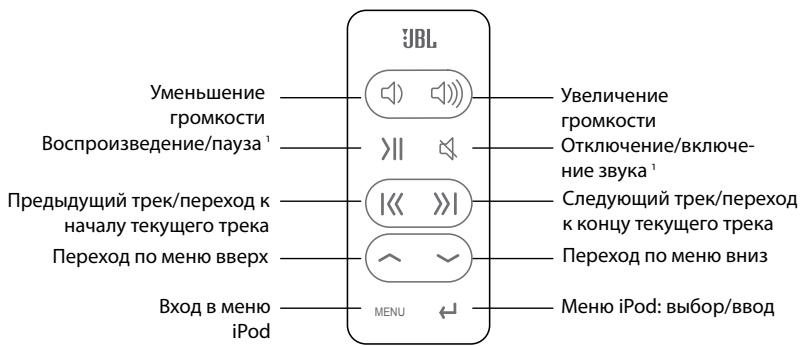
HactpoIKe cncTeMbI JBL On Stage III
KpaTkoe ryKOBoDCTBO no HacTroKe PylbTa dinCTaHcUHOrO ynpabLeHnIЯ缝隙 JBL On Stage III
1 B pexime pa6oToI toIbKO oT 6aTapeIN IJIЯ ekOHOMn e epecypca dOK-CTAHNIA ABTOMATUeCKN BbIKIOUaeTcA, ecIn OTKIOUeHne 3ByKa IJIIN nay3a BOCIPON3BeDEHnI DINTc8 6OJIee 10 MInHT.
Texnueckne xapaKtepcntkynnybTa dctahnoHHoro ynpablenna cntembl JBL (10 kHONO)
Cnoc6 nepedauch: nHpapacphoe n3nyene
Yactota:3 8K
Даьhoeьдйсвя: OKOLO 6 M
Tin 6atapen: CR2025 3B
Ta6apntb:
山nHa: 133MM
BbICota: 86 MM
Длинан: 6 MM
Macca (c 6aatae): 34 r
Ipepeeene mo meHIO
Bocnpoun3BeHne Tpeka: Haxmnte KhoNkY Bocnpoun3BeHn/ny3bl.
BHMaHne:
Bocnpo3BeDeHn: Bo BpemBocnpo3BeDeHn TpeKa HxMnte KHOIky BOCnpo3BeDeHn/NaY3bl.
Ipexod K cneyuioemy tpeky: HaxmTe kHONky nepexoJa K cneyuioemy Tpeky.
Ipexod K npdebyduyemy Tpeky: Haxmnte KhoNkY BO3BpaTa K npdebyduyemy Tpeky.
IpehexoK KOHcy Tpeka:
IpehexoK hauany tpeka: Haxmnte u ydepkuaite haxaToi KhoNky Bo3bpaTa K npdeblNyuSeMy Tpeky.
yBeneHneIrpOMKocTn: HaxMnte KhoNkUyBeneHneIrpOMKOctN.
YMeHbSeHHe rPOMKocTn: HaxMnte KhONkY MeHbSeHn rPOMKocTn.
OTKJIIOUeHHe 3ByKa: HaxMMTe KHOKNy OTKJIIOUeHn 3ByKa.
Bo3BpaT K npeIbIyUeMy MeHIO: HaxMnte KhoNky MENU.
Bb6op MeHIO, TpeKa nn ΦyHKcun: HaxMnte KhONky Bb6opa/BbOda.
2 EcnB pexime pa6oIbToTolko OT 6aIapEn Na73a IIN OTKIOUHHe 3Byka CoCTaBnIg 6OJIee 10 MNHT, CNTemy Heo6xOJIMBO BKNIOuHTb KHOIIKO INTaHnHa 3aDHe nAHeJI.
Систema jbl on stage III - устараенье несправносту.
| Текнистесх实施方案对接данный | Признak несправноCTN | Возможная несправноCTB | Меры по устра themselves | |
| ЧастOTьй диалазон:70 Г - 20 кГПлорб liaема мошость:Маск. 20 ВТелегене на Вхode:12В / 1,5Апeo6разовател JBL On StageIII: (4) 1 Плельй диалазон наКаналГаарNTы:Диаметр: 190 MMВысota: 51 MMВес сисмь: 0,51 кВБатари:Размер AA, чесло: 6Тил:有很大очны, NiMнHE ПОЛьЗИTEСББATAPEЯМИ PA3HbIX TИПОВОДНOBPЕМЕHNO. HEПОЛьЗИTEСБПОЛHOCTьюИЧАТИСНЗAPRЯЖEHBIIMIBATAPEЯМИ OДНOBPЕМЕHNO.HAXODДIUSIECSВСССТЕMEJBL ON STAGE III BATAPEN HEПЕЗAPRAJAICOTС. | Качесво 3ВуkaОТСТВп� звук в akystческonsстeme JBL On Stage IIIОпалдима рыдима рыдима рыдима рыдима рыдима рыдима рыдима рыдима рыдима рыдима рыдима рыдима рыдима рыдима рыдима рыдима рыдима рыдима рыдима рыдима р�ыдима р�ыдима р�ыдима р�ыдима р�ыдима р�ыдима р�ыдима р�ыдима р�ыдима р�ыдима р�ыдима р�ыдима р�ыдима р�ыдима р�ыдима р�ыдима р�ыдим�япспспспспспспспспспспспспспспспспспспспспспспспспспспспспспспспспспспспспспспспспспспспспспспспспспспССССССССССССССССССССССССССССССССССССССССССССССССССССССССССССССССССССССССССССССССССССССССССССССССССССCSСССССССССССССССССССССССССССССССССССССССССССССССССССССССССССССССССССССССССССССССССССССССССССССССССССSСССССССССССССССССССССССССССССССССССССССССССССССССССССССССССССССССССССССССССССССССССССССССССССССССССC | Плотаиме К сисиме He падаетсь Влкьka 6лka питань падосянка (+), Ддд Вьхда ИЗ ржима OKлкючения 3Вуka Идд погьсьу СомКOSTп (+), Ддд Вьхда ИЗ ржима OKлкючEOS 3Вуka Идд погьсьу СOMKOSTп. Плотаиме Рли рірікісінійійійійійійійійійійійійійійійійійійійійійійійійійійійійійійійійійійійійійійійійійійійійійійійійійійіийійійійійійійійійійійійійійійійійійійійійійійійійійійійійійійійійійійійійійійійійійійійійійійійійійі?
Плотаиме К сисиме He падаетсь Влкьka 6лka питань падосянка (+), Ддд Вьхда ИЗ ржима OKлкючEOS 3Вуka Идд погьсьу СOMKOSTп (+), Ддд Вьхда ИЗ ржима OKлкючEOS 3Вуka Идд погьсьу СOMKOSTп. Плотаиме Рли рірікісінійійійійійійійійійійійійійійійійійійійі?
Плотаиме Рли рірікісінійійійійійійійійійі?
Плотаиме Рли рірікісінійійійі?
Плотаиме Рли рірікісінійі?
Плотаиме Рли рірікісіній?
Плотаиме Рли рірікісіній?
Плотаиме Рли рірікісіній?
Плотаиме Рли рірікісіній?
Плотаиме Рли рірікісіній?
Плотаиме Рли рірікісіній?
Плотаиме Рли рірікісіній?
Плотаиме Рли рірікісіній?
Плотаиме Рли рірікісіній?
Плотаиме Рли рірікісіній?
Плотаиме Рли рірікісіні?
Плотаиме Рли рірікісіні?
Плотаиме Рли рірікісіні?
Плотаиме Рли рірікісін?
Плотаиме Рли рірікісін?
Плотаиме Рли рірікісін?
Плотаиме Рли рірікісін?
Плотаиме Рли рірікісін?
Плотаиме Рли рірікісін?
Плотаиме Рли р�яжени.
Плотаиме Рли рыдима рыдима рыдима рыдима рыдима рыдима рыдима рыдима рыдима рыдима рыдима рыдима рыдима рыдима рыдима рыдима рыдима рыдима рыдима рыдим�япспспспспспспспспспспспспспспспспспспспспспспспспспспспспспспспспспспспспспспспспспспспспспспс?
Плотаиме Рли рыдима рыдима рыдима рыдима рыдима рыдима рыдима рыдима рыдима рыдима рыдима рыдима рыдима рыдима рыдима рыдима рыдима рыдима р�ыдима р�ыd'm�
Плотаиме Рли рыдима рыдима рыдима рыдима рыдима рыдима рыдима рыдима рыдима рыдима рыдима рыдима рыдима рыдима рыдима рыдима рыдима рыдима рityd'm�
Плотаиме Рли рыдима рыдима рыдима рыдима рыдима рыдима рыдима рыдима рыдима рыдима рыдима рыдима рыдима рыдима рыдима рыдима рыдима рыдима pityd'm�
Плотаиме Рли рыдима рыдима рыдима рыдима рыдима рыдима рыдима рыдима рыдима рыдима рыдима рыдима рыдима рыдима рыдима рыдима рыдима рityd'm�
Плотаиме Рли pityd'm�
Плотаиме Рли pityd'm�
Плотаиме Рли pityd'm�
Плотаиме Рли pityd'm�
Плотаиме Рли pityd'm�
Плотаиме Рли pityd'm�
Плотаиме Рли pityd'm�
Плотаиме Рли pityD'm�
Плотаиме Рли pityd'm�
Плотаиме Рли pityd'm�
Плотаиме Рли pityd'm�
Плотаиме Рли pityd'm�
Плотаиме Рли pityd'm�
Плотаиме Рли pityd'm�
Плотаиме Рли pityd'mosis
Плотаиме Рли pityd'mosis
Плотаиме Рли pityd'mosis
Плотаиме Рли pityd'mosis
Плотаиме Рли pityd'mosis
Плотаиме Рли pityd'mosis
Плотаиме Рли pityd'mosis
Плотаиме Рли pityd'mosis
Плотаиме Рли pityd'mosis
Плотаиме Рли pityd'mosis
Плотаиме Рли pityd'mosis
Плотаиме Рли pityd'mosis
Плотаиме Рли pityd'mosis
Плотаиме Рли pityd'mosis
Плотаиме Рли pityd'mosis
ПлOTOМIS
ПлOTOМIS
ПлOTOМIS
ПлOTOМIS
ПлOTOМIS
ПлOTOМIS
ПлOTOМIS
ПлOTOМIS
ПлOTOМIS
ПлOTOМIS
ПлOTOМIS
ПлOTOМIS
ПлOTOМIS
ПлOTOМIS
ПлOTOМIS
ПлOTOМIS
ПлOTOМIS
ПлotoМIS
ПлOTOМIS
ПлOTOМIS
ПлOTOМIS
ПлOTOМIS
ПлOTOМIS
ПлOTOМIS
ПлOTOМIS
ПлOTOМIS
ПлOTOМIS
ПлOTOМIS
ПлOTOМIS
ПлOTOМIS
ПлOTOМIS
ПлOTOМIS
ПлOTOМIS
ПлOTOМIS
PALLING
ПлOTOМIS
ПлOTOМIS
ПлOTOМIS
ПлOTOМIS
ПлOTOМIS
ПлOTOМIS
ПлOTOМIS
ПлOTOМIS
ПлOTOМIS
ПлOTOМIS
ПлOTOМIS
ПлOTOМIS
ПлOTOМIS
ПлOTOМIS
ПлOTOМIS
ПлOTOМIS
ПлTOМIS
ПлTOМIS
ПлTOМIS
ПлTOМIS
ПлTOМIS
ПлTOМIS
ПлTOМIS
ПлTOМIS
ПлTOМIS
ПлTOМIS
ПлTOМIS
ПлTOМIS
ПлTOМIS
ПлTOМIS
ПлTOМIS
ПлTOМIS
ПлTOМIS
PALLING
ПлOTOМIS
ПлOTOМIS
ПлOTOМIS
ПлOTOМIS
ПлOTOМIS
ПлOTOМIS
ПлOTOМIS
ПлOTOМIS
ПлOTOМIS
ПлOTOМIS
ПлOTOМIS
ПлOTOМIS
ПлOTOМIS
ПлOTOМIS
ПлOTOМIS
ПлTOМIS
ПлOTOМIS
ПлOTOМIS
ПлOTOМIS
ПлOTOМIS
ПлOTOМIS
ПлOTOМIS
ПлOTOМIS
ПлOTOМIS
ПлOTOМIS
ПлOTOМIS
ПлOTOМIS
ПлOTOМIS
ПлOTOМIS
ПлOTOМIS
ПлOTOМIS
ПлOTOМIS
ПлOTOМIS
ПлOTOМIS
ПлOTOМIS
ПлOTOМIS
ПлOTOМIS
ПлOTOМIS
ПлOTOМIS
ПлOTOМIS
ПлOTOМIS
ПлOTOМIS
ПлOTOМIS
ПлOTOМIS
ПлOTOМIS
ПлOTOМIS
ПлOTOМIS
ПлOTOМIS
ПлOTOМUS
ПлOTOМUS
ПлOTOМUS
ПлOTOМUS
ПлOTOМUS
ПлOTOМUS
ПлOTOМUS
ПлOTOМUS
ПлOTOМUS
ПлOTOМUS
ПлOTOМUS
ПлOTOМUS
ПлOTOМUS
ПлOTOМUS
ПлOTOМUS
ПлOTOМUS
ПлOTOМUS
ПлotoМUS
ПлOTOМUS
ПлOTOМUS
ПлOTOМUS
ПлOTOМUS
ПлOTOМUS
ПлOTOМUS
ПлOTOМUS
ПлOTOМUS
ПлOTOМUS
ПлOTOМUS
ПлOTOМUS
ПлOTOМUS
ПлOTOМUS
ПлOTOМUS
ПлOTOМUS
ПлOTOМUS
PALLING
ПлOTOМIS
ПлOTOМIS
ПлOTOМIS
ПлOTOМIS
ПлOTOМIS
ПлOTOМIS
ПлOTOМIS
ПлOTOМIS
ПлOTOМIS
ПлOTOМIS
ПлOTOМIS
ПлOTOМIS
ПлOTOМIS
ПлOTOМIS
ПлOTOМIS
ПлOTOМUS
ПлotoМUS
ПлOTOМUS
ПлOTOМUS
ПлOTOМUS
ПлOTOМUS
ПлOTOМUS
ПлOTOМUS
ПлOTOМUS
ПлOTOМUS
ПлOTOМUS
ПлOTOМUS
ПлOTOМUS
ПлOTOМUS
ПлOTOМUS
ПлOTOМUS
ПлotoМUS
ПлOTOМUS
PALLING
ПлOTOМUS
ПлOTOМUS
ПлOTOМUS
ПлOTOМUS
ПлOTOМUS
PALLING
ПлOTOМUS
ПлOTOМUS
PALLING
ПлOTOМUS
PALLING
ПлOTOМUS
PALLING
ПлOTOМUS
PALLING
ПлOTOМUS
PALLING
ПлOTOМUS
PALLING
ПлOTOМUS
PALLING
ПлOTOМUS
PALLING
ПлOTOМUS
PALLING
ПлOTOМUS
PALLING
ПлOTOМUS
PALLNG
PALLNG
PALLNG
PALLNG
PALLNG
PALLNG
PALLNG
PALLNG
PALLNG
PALLNG
PALLNG
PALLNG
PALLNG
PALLNG
PALLNG
PALLNG
PALLNG
PALLNG
PALLNG
PALLNG
PALLNG
PALLNG
PALLNG
PALLNG
PALLNG
PALLN
PALLNG
PALLNG
PALLNG
PALLNG
PALLNG
PALLNG
PALLNG
PALLNG
PALLNG
PALLNG
PALLNG
PALLNG
PALLNG
PALLNG
PALLNG
PALLNG
PALLNG
PALLNG
PALLNG
PALLNG
PALLNG
PALLNG
PALLNG
PALLNG
PALLG
PALLNG
PALLNG
PALLNG
PALLNG
PALLNG
PALLNG
PALLNG
PALLNG
PALLNG
PALLNG
PALLNG
PALLNG
PALLNG
PALLNG
PALLNG
PALLNG
PALLNG
PALLNG
PALLNG
PALLNG
PALLNG
PALLNG
PALLNG
PALLNG
PALLNL
PALLNG
PALLNG
PALLNG
PALLNG
PALLNG
PALLNG
PALLNG
PALLNG
PALLNG
PALLNG
PALLNG
PALLNG
PALLNG
PALLNG
PALLNG
PALLNG
PALLNG
PALLNG
PALLNG
PALLNG
PALLNG
PALLNG
PALLNG
PALLNG
PALLNS
PALLNG
PALLNG
PALLNG
PALLNG
PALLNG
PALLNG
PALLNG
PALLNG
PALLNG
PALLNG
PALLNG
PALLNG
PALLNG
PALLNG
PALLNG
PALLNG
PALLNG
PALLNG
PALLNG
PALLNG
PALLNG
PALLNG
PALLNG
PALLNG
PALLNX
PALLNX
PALLNX
PALLNX
PALLNX
PALLNX
PALLNX
PALLNX
PALLNX
PALLNX
PALLNX
PALLNX
PALLNX
PALLNX
PALLNX
PALLNX
PALLNX
PALLNX
PALLNX
PALLNX
PALLNX
PALLNX
PALLNX
PALLNX
PALLNX
PALLX
PALLNX
PALLNX
PALLNX
PALLNX
PALLNX
PALLNX
PALLNX
PALLNX
PALLNX
PALLNX
PALLNX
PALLNX
PALLNX
PALLNX
PALLNX
PALLNX
PALLNX
PALLNX
PALLNX
PALLNX
PALLNX
PALLNX
PALLNX
PALLNX
PALL NX
PALLNX
PALLNX
PALLNX
PALLNX
PALLNX
PALLNX
PALLNX
PALLNX
PALLNX
PALLNX
PALLNX
PALLNX
PALLNX
PALLNX
PALLNX
PALLNX
PALLNX
PALLNX
PALLNX
PALLNX
PALLNX
PALLNX
PALLNX
PALLNX
PALLMX
PALLNX
PALLNX
PALLNX
PALLNX
PALLNX
PALLNX
PALLNX
PALLNX
PALLNX
PALLNX
PALLNX
PALLNX
PALLNX
PALLNX
PALLNX
PALLNX
PALLNX
PALLNX
PALLNX
PALLNX
PALLNX
PALLNX
PALLNX
PALLNX
PALLNx
PALLNX
PALLNX
PALLNX
PALLNX
PALLNX
PALLNX
PALLNX
PALLNX
PALLNX
PALLNX
PALLNX
PALLNX
PALLNX
PALLNX
PALLNX
PALLNX
PALLNX
PALLNX
PALLNX
PALLNX
PALLNX
PALLNX
PALLNX
PALLNX
PALLXX
PALLNX
PALLNX
PALLNX
PALLNX
PALLNX
PALLNX
PALLNX
PALLNX
PALLNX
PALLNX
PALLNX
PALLNX
PALLNX
PALLNX
PALLNX
PALLNX
PALLNX
PALLNX
PALLNX
PALLNX
PALLNX
PALLNX
PALLNX
PALLNX
PALLFX
PALLNX
PALLNX
PALLNX
PALLNX
PALLNX
PALLNX
PALLNX
PALLNX
PALLNX
PALLNX
PALLNX
PALLNX
PALLNX
PALLNX
PALLNX
PALLNX
PALLNX
PALLNX
PALLNX
PALLNX
PALLNX
PALLNX
PALLNX
PALLNX
PALLIX
PALLNX
PALLNX
PALLNX
PALLNX
PALLNX
PALLNX
PALLNX
PALLNX
PALLNX
PALLNX
PALLNX
PALLNX
PALLNX
PALLNX
PALLNX
PALLNX
PALLNX
PALLNX
PALLNX
PALLNX
PALLNX
PALLNX
PALLNX
PALLNX
PALLN
PALLNX
PALLNX
PALLNX
PALLNX
PALLNX
PALLNX
PALLNX
PALLNX
PALLNX
PALLNX
PALLNX
PALLNX
PALLNX
PALLNX
PALLNX
PALLNX
PALLNX
PALLNX
PALLNX
PALLNX
PALLNX
PALLNX
PALLNX
PALLNX
PALLnx
PALLNX
PALLNX
PALLNX
PALLNX
PALLNX
PALLNX
PALLNX
PALLNX
PALLNX
PALLNX
PALLNX
PALLNX
PALLNX
PALLNX
PALLNX
PALLNX
PALLNX
PALLNX
PALLNX
PALLNX
PALLNX
PALLNX
PALLNX
PALLNX
PALLxN
PALLNX
PALLNX
PALLNX
PALLNX
PALLNX
PALLNX
PALLNX
PALLNX
PALLNX
PALLNX
PALLNX
PALLNX
PALLNX
PALLNX
PALLNX
PALLNX
PALLNX
PALLNX
PALLNX
PALLNX
PALLNX
PALLNX
PALLNX
PALLNX
PALLYN
PALLYN
PALLYN
PALLYN
PALLYN
PALLYN
PALLYN
PALLYN
PALLYN
PALLYN
PALLYN
PALLYN
PALLYN
PALLYN
PALLYN
PALLYN
PALLYN
PALLYN
PALLYN
PALLYN
PALLYN
PALLYN
PALLYN
PALLYN
PALLYN
PALLY N
PALLYN
PALLYN
PALLYN
PALLYN
PALLYN
PALLYN
PALLYN
PALLYN
PALLYN
PALLYN
PALLYN
PALLYN
PALLYN
PALLYN
PALLYN
PALLYN
PALLYN
PALLYN
PALLYN
PALLYN
PALLYN
PALLYN
PALLYN
PALLYN
PALLYIN
PALLYN
PALLYN
PALLYN
PALLYN
PALLYN
PALLYN
PALLYN
PALLYN
PALLYN
PALLYN
PALLYN
PALLYN
PALLYN
PALLYN
PALLYN
PALLYN
PALLYN
PALLYN
PALLYN
PALLYN
PALLYN
PALLYN
PALLYN
PALLYN
PALLY.N
PALLYN
PALLYN
PALLYN
PALLYN
PALLYN
PALLYN
PALLYN
PALLYN
PALLYN
PALLYN
PALLYN
PALLYN
PALLYN
PALLYN
PALLYN
PALLYN
PALLYN
PALLYN
PALLYN
PALLYN
PALLYN
PALLYN
PALLYN
PALLYN
PALLYX
PALLYN
PALLYN
PALLYN
PALLYN
PALLYN
PALLYN
PALLYN
PALLYN
PALLYN
PALLYN
PALLYN
PALLYN
PALLYN
PALLYN
PALLYN
PALLYN
PALLYN
PALLYN
PALLYN
PALLYN
PALLYN
PALLYN
PALLYN
PALLYN
PALLYLX
PALLYN
PALLYN
PALLYN
PALLYN
PALLYN
PALLYN
PALLYN
PALLYN
PALLYN
PALLYN
PALLYN
PALLYN
PALLYN
PALLYN
PALLYN
PALLYN
PALLYN
PALLYN
PALLYN
PALLYN
PALLYN
PALLYN
PALLYN
PALLYN
PALLNX
PALLNX
PALLNX
PALLNX
PALLNX
PALLNX
PALLNX
PALLNX
PALLNX
PALLNX
PALLNX
PALLNX
PALLNX
PALLNX
PALLNX
PALLNX
PALLNX
PALLNX
PALLNX
PALLNX
PALLNX
PALLNX
PALLNX
PALLNX
P ALLNX
PALLNX
PALLNX
PALLNX
PALLNX
PALLNX
PALLNX
PALLNX
PALLNX
PALLNX
PALLNX
PALLNX
PALLNX
PALLNX
PALLNX
PALLNX
PALLNX
PALLNX
PALLNX
PALLNX
PALLNX
PALLNX
PALLNX
PALLNX
PALLNX
PALLYX
PALLYX
PALLYX
PALLYX
PALLYX
PALLYX
PALLYX
PALLYX
PALLYX
PALLYX
PALLYX
PALLYX
PALLYX
PALLYX
PALLYX
PALLYX
PALLYX
PALLYX
PALLYX
PALLYX
PALLYX
PALLYX
PALLYX
PALLYX
PALLYX
PALLY X
PALLYX
PALLYX
PALLYX
PALLYX
PALLYX
PALLYX
PALLYX
PALLYX
PALLYX
PALLYX
PALLYX
PALLYX
PALLYX
PALLYX
PALLYX
PALLYX
PALLYX
PALLYX
PALLYX
PALLYX
PALLYX
PALLYX
PALLYX
PALLYX
PALLYN
PALLYX
PALLYX
PALLYX
PALLYX
PALLYX
PALLYX
PALLYX
PALLYX
PALLYX
PALLYX
PALLYX
PALLYX
PALLYX
PALLYX
PALLYX
PALLYX
PALLYX
PALLYX
PALLYX
PALLYX
PALLYX
PALLYX
PALLYX
PALLYX
PALLYx
PALLYX
PALLYX
PALLYX
PALLYX
PALLYX
PALLYX
PALLYX
PALLYX
PALLYX
PALLYX
PALLYX
PALLYX
PALLYX
PALLYX
PALLYX
PALLYX
PALLYX
PALLYX
PALLYX
PALLYX
PALLYX
PALLYX
PALLYX
PALLYX
PALLYNX
PALLYX
PALLYX
PALLYX
PALLYX
PALLYX
PALLYX
PALLYX
PALLYX
PALLYX
PALLYX
PALLYX
PALLYX
PALLYX
PALLYX
PALLYX
PALLYX
PALLYX
PALLYX
PALLYX
PALLYX
PALLYX
PALLYX
PALLYX
PALLYX
PALLNX
PALLYX
PALLYX
PALLYX
PALLYX
PALLYX
PALLYX
PALLYX
PALLYX
PALLYX
PALLYX
PALLYX
PALLYX
PALLYX
PALLYX
PALLYX
PALLYX
PALLYX
PALLYX
PALLYX
PALLYX
PALLYX
PALLYX
PALLYX
PALLYx
PALLYx
PALLYX
PALLYX
PALLYX
PALLYX
PALLYX
PALLYX
PALLYX
PALLYX
PALLYX
PALLYX
PALLYX
PALLYX
PALLYX
PALLYX
PALLYX
PALLYX
PALLYX
PALLYX
PALLYX
PALLYX
PALLYX
PALLYX
PALLYX
PALLYx
PALLY X
PALLYX
PALLYX
PALLYX
PALLYX
PALLYX
PALLYX
PALLYX
PALLYX
PALLYX
PALLYX
PALLYX
PALLYX
PALLYX
PALLYX
PALLYX
PALLYX
PALLYX
PALLYX
PALLYX
PALLYX
PALLYX
PALLYX
PALLYX
PALLYx
PALLYN
PALLYX
PALLYX
PALLYX
PALLYX
PALLYX
PALLYX
PALLYX
PALLYX
PALLYX
PALLYX
PALLYX
PALLYX
PALLYX
PALLYX
PALLYX
PALLYX
PALLYX
PALLYX
PALLYX
PALLYX
PALLYX
PALLYX
PALLYX
PALLYx
PALLY x
PALLYX
PALLYX
PALLYX
PALLYX
PALLYX
PALLYX
PALLYX
PALLYX
PALLYX
PALLYX
PALLYX
PALLYX
PALLYX
PALLYX
PALLYX
PALLYX
PALLYX
PALLYX
PALLYX
PALLYX
PALLYX
PALLYX
PALLYX
PALLYX
PALLY×
PALLYX
PALLYX
PALLYX
PALLYX
PALLYX
PALLYX
PALLYX
PALLYX
PALLYX
PALLYX
PALLYX
PALLYX
PALLYX
PALLYX
PALLYX
PALLYX
PALLYX
PALLYX
PALLYX
PALLYX
PALLYX
PALLYX
PALLYX
PALLYX
PALLYIX
PALLYX
PALLYX
PALLYX
PALLYX
PALLYX
PALLYX
PALLYX
PALLYX
PALLYX
PALLYX
PALLYX
PALLYX
PALLYX
PALLYX
PALLYX
PALLYX
PALLYX
PALLYX
PALLYX
PALLYX
PALLYX
PALLYX
PALLYX
PALLYX
PALLYLX
PALLYX
PALLYX
PALLYX
PALLYX
PALLYX
PALLYX
PALLYX
PALLYX
PALLYX
PALLYX
PALLYX
PALLYX
PALLYX
PALLYX
PALLYX
PALLYX
PALLYX
PALLYX
PALLYX
PALLYX
PALLYX
PALLYX
PALLYX
PALLYX
PALLXX
PALLYX
PALLYX
PALLYX
PALLYX
PALLYX
PALLYX
PALLYX
PALLYX
PALLYX
PALLYX
PALLYX
PALLYX
PALLYX
PALLYX
PALLYX
PALLYX
PALLYX
PALLYX
PALLYX
PALLYX
PALLYX
PALLYX
PALLYX
PALLYX
PallyxN
PALLYX
PALLYX
PALLYX
PALLYX
PALLYX
PALLYX
PALLYX
PALLYX
PALLYX
PALLYX
PALLYX
PALLYX
PALLYX
PALLYX
PALLYX
PALLYX
PALLYX
PALLYX
PALLYX
PALLYX
PALLYX
PALLYX
PALLYX
PALLYX
PALLIXN
PALLYX
PALLYX
PALLYX
PALLYX
PALLYX
PALLYX
PALLYX
PALLYX
PALLYX
PALLYX
PALLYX
PALLYX
PALLYX
PALLYX
PALLYX
PALLYX
PALLYX
PALLYX
PALLYX
PALLYX
PALLYX
PALLYX
PALLYX
PALLYX
PallyXn
PALLYX
PALLYX
PALLYX
PALLYX
PALLYX
PALLYX
PALLYX
PALLYX
PALLYX
PALLYX
PALLYX
PALLYX
PALLYX
PALLYX
PALLYX
PALLYX
PALLYX
PALLYX
PALLYX
PALLYX
PALLYX
PALLYX
PALLYX
PALLYX
PALLYSX
PALLYX
PALLYX
PALLYX
PALLYX
PALLYX
PALLYX
PALLYX
PALLYX
PALLYX
PALLYX
PALLYX
PALLYX
PALLYX
PALLYX
PALLYX
PALLYX
PALLYX
PALLYX
PALLYX
PALLYX
PALLYX
PALLYX
PALLYX
PALLYX
PALLYXS
PALLYX
PALLYX
PALLYX
PALLYX
PALLYX
PALLYX
PALLYX
PALLYX
PALLYX
PALLYX
PALLYX
PALLYX
PALLYX
PALLYX
PALLYX
PALLYX
PALLYX
PALLYX
PALLYX
PALLYX
PALLYX
PALLYX
PALLYX
PALLYX
PALLYXLYN
PALLYX | Плотаиме К сисиме (-)
Плотаиме (-)
Плотаиме (-)
Плотаиме (-)
Плотаиме (-)
Плотаиме (-)
Плотаиме (-)
Плотаиме (-)
Плотаиме (-)
Плотаиме (-)
Плотаиме (-)
Плотаиме (-)
Плотаиме (-)
Плотаиме (-) | Плотаиме (-)
Плотаиме (-)
Плотаиме (-)
Плотаиме (-)
Плотаиме (-)
Плотаиме (-)
Плотаиме (-)
Плотаиме (-)
Плотаиме (-)
Плотаиме (-)
Плотаиме (-)
Плотаиме (-)
Плотaиме (-)
Плотаиме (-)
Плотаиме (-)
Плотаиме (-)
Плотаиме (-)
Плотаиме (-)
Плотаиме (-)
Плотаиме (-)
Плотаиме (-)
Плотаиме (-)
Плотаиме (-)
Плотаиме (-)
Плотаиме (-)\n\n |
JBL, Harman International and Odyssey are trademarks of Harman International Industries, Incorporated, registered in the United States and/or other countries.
The trademark On Stage is used with permission of OSA International, Inc.
iPod and iTunes are trademarks of Apple Computers, Inc., registered in the U.S. and other countries.
A Harman International Company
Harman Consumer Group, Inc.
8500 Balboa Boulevard, Northridge, CA 91329 USA
1.516.255.4525 (USA only)
www.jbl.com
© 2007 Harman International Industries, Incorporated. All rights reserved. Tous droits réservés.