Cecofry Duolevel 10000 - Deep fryer CECOTEC - Free user manual and instructions
Find the device manual for free Cecofry Duolevel 10000 CECOTEC in PDF.


| Product type | Oil-free fryer (air fryer) |
| Brand | Cecotec |
| Model | Cecofry Duolevel 10000 |
| Total capacity | 8 L (2 x 4 L) |
| Power | 1800 W |
| Supply voltage | 220-240 V ~ 50/60 Hz |
| Temperature range | 80 °C to 200 °C |
| Timer | 0 to 60 minutes |
| Dimensions (L x W x H) | 35 x 35 x 40 cm |
| Weight | 6 kg |
| Main functions | Frying, grilling, roasting, reheating |
| Cooking levels | Double level (Duolevel) |
| Bowl material | Non-stick, dishwasher safe |
| Maintenance and cleaning | Removable basket and bowl, dishwasher safe |
| Safety | Automatic shutdown, overheat protection |
| Spare parts and repairability | Available on Cecotec website |
| Included accessories | 2 individual baskets, recipe booklet |
| Warranty | 2 years |
Frequently Asked Questions - Cecofry Duolevel 10000 CECOTEC
User questions about Cecofry Duolevel 10000 CECOTEC
0 question about this device. Answer the ones you know or ask your own.
Ask a new question about this device
Download the instructions for your Deep fryer in PDF format for free! Find your manual Cecofry Duolevel 10000 - CECOTEC and take your electronic device back in hand. On this page are published all the documents necessary for the use of your device. Cecofry Duolevel 10000 by CECOTEC.
USER MANUAL Cecofry Duolevel 10000 CECOTEC
- Parts and components 15
- Before use 16
- Operation 16
- Cleaning and maintenance 22
- Troubleshooting 23
- Copyright 25
SOMMAIRE
EU01_109329 CECOFRY DUOLEVEL 10000
EN • The coding in this manual is generic and applies to all code variants of the appliance.
- Air fryer main body
- Control panel
- Knob
- Air outlet
- Non-stick baskets
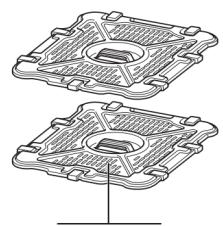
- Non-stick crisper plates (one for each basket)
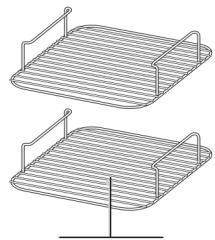
- Stackable racks (one for each basket)
Control panel
Fig. 2
- Power touch icon
- "1" touch icon
- Sync function touch icon
- "2" touch icon
- Match function touch icon
- Temperature touch icon
- Time touch icon
- START/PAUSE touch icon
- Preset menus
a. Frozen chips
b. Vegetables
c. Turnovers
d. Dessert
e. Chicken wings / thighs
f. Steak
g. DIY (manual function)
h. Dehydration
i. Fermentation
j. Fish
- Display
NOTE:
The graphics in this manual are schematic representations and may not exactly match the product.
2. BEFORE USE
- This appliance comes in a packaging designed to protect it during transport. Take the appliance out of its box and remove all packaging materials. You can keep the original box and other packaging materials in a safe place to prevent damage to the appliance if you need to transport it in the future. If you wish to dispose of the original packaging, make sure all items are recycled properly.
- Check that all parts and components are included and in good condition. If any of them are missing or damaged, please contact the Cecotec's Official Technical Support Service immediately.
- Do not remove the product's serial number in order to keep proper traceability in case you need technical assistance.
- Remove and discard all packaging material, stickers and adhesive tape from the device.
- Remove all accessories from the box and read this manual carefully. Pay special attention to the operating instructions, warnings and safety indications to avoid injuries or damage to property.
- Wash the baskets, crisper plates and racks with hot water and a little soap. Then rinse all parts thoroughly and dry them well.
Box content
- Air fryer
- Rack x2
- Instruction manual
3. OPERATION
Using the air fryer
- Place the air fryer on a flat, stable, and heat-resistant surface, away from any possible splashing water or heat source.
- Place the baskets in the air fryer correctly.
- Do not place any objects on top of the product to avoid interrupting the air flow.
- Connect the power cable to an earthed outlet, the power touch icon will illuminate.
- Remove the basket(s) from the air fryer carefully.
- Put the ingredients.
- Use the control panel as follows:
ENGLISH
NOTE: never exceed the MAX indicator on the basket. The final result and the integrity of the machine could be affected.
TIP: to ensure perfect cooking results, it is recommended that you avoid overfilling the surface of the basket with food, otherwise the food will not be cooked evenly.
Power icon ⏻
Press this icon to switch the appliance on/off or to cancel all functions.
"1" touch icon
Controls the upper basket.
"2" touch icon
Controls the lower basket.
Temperature touch icon
Press this button and then turn the knob to set the cooking temperature before or during cooking.
Time touch icon Ⓛ
Press it and then turn the knob to set the desired cooking time. This can be done before or during cooking.
Sync function SYNC
This function allows both baskets to be synchronized so that they finish at the same time, even though each has a different cooking time. In that case, the display will show "Hold" indicating that one zone will be cooking, while the other zone will be on hold until the times are synchronized.
- Place the ingredients in the baskets, then insert them into the air fryer.
- Select cell 1 and choose the desired menu by turning the selector. Then press the temperature touch icon and turn the dial to choose the desired temperature. Then press the time touch icon and turn the selector to choose the time.
- Select cell 2 and choose the desired menu by turning the selector. Then press the temperature touch icon and turn the dial to choose the desired temperature. Then press the time touch icon and turn the selector to choose the time.
Note: You can select a different default program for basket 2.
- Press the Sync function touch icon and then press the Start/Pause touch icon to start the longest cooking time. The other basket will show "Hold". It will start when both have the same amount of time remaining.
NOTE: If you decide that the food in one of the baskets has finished cooking before the end of the cooking time, you can stop it. To do this, select that basket and press the Start/Pause touch icon.
- When cooking is finished, the appliance will beep and "COOL" will appear on the display for 60 seconds.
- Remove the ingredients by tipping them over or using tongs/silicone-tipped utensils.
Match function MATCH
Press this icon to automatically adapt the settings of basket 2 to the settings selected for basket 1 so that you can cook a larger quantity of the same food, or cook different foods using the same menu, temperature and time.
- Place the ingredients in the baskets, then insert them into the air fryer.
- Select cell 1 and choose the desired menu by turning the selector. Then press the temperature touch icon and turn the dial to choose the desired temperature. Then press the time touch icon and turn the selector to choose the time.
- Press the Match function icon to copy the settings from basket 1 to basket 2. After that, press the Start/Pause touch icon to start cooking in both baskets.
- When cooking is finished, the appliance will beep, and the display will show "COOL" for 60 seconds.
- Remove the ingredients by tipping them over or using tongs/silicone-tipped utensils.
NOTE: If you use the Sync or Match function to open one of the baskets, the other one will stop automatically so that cooking will continue to finish at the same time. It will be resumed when it is reinserted.
START/PAUSE touch icon ▷ ||
After turning the selector to select the desired function, start cooking by pressing the Start/Pause touch icon. Similarly, press this icon to stop cooking.
End of cooking time in one basket (when both are running) End of cooking time in one basket (when both are running)
- Select the flask whose cooking is to be stopped.
ENGLISH
- Press the Start/Pause touch icon to end cooking.
- When cooking is finished, the appliance will beep, and the display will show "COOL" for 60 seconds.
Pausing the cooking process
Cooking will stop automatically when one of the baskets is removed. It will be resumed when it is reinserted.
Starting both baskets at the same time but having them finish cooking at different times.
- Select cell 1 and then select the desired menu by turning the selector. Then press the temperature touch icon and turn the dial to choose the desired temperature.
- Then press the time touch icon and turn the selector to choose the desired time.
- Select cell 2 and repeat steps 1 and 2.
- After that, press the Start/Pause touch icon to start cooking in both baskets.
NOTE: If you decide that the food in one of the baskets has finished cooking before the end of the cooking time, you can stop it. To do this, select that basket and press the Start/Pause touch icon. - When cooking is finished, the appliance will beep, and the display will show "COOL" for 60 seconds.
- Remove the ingredients by tipping them over or using tongs/silicone-tipped utensils.
Standby mode
After 10 minutes without interaction with the control panel, the unit will enter standby mode.
Preset programmes
| Name of the function | Symbol | Default temp. (°C) | Default time (min) | Time range | Temperature range |
| Frozen chips |  | 200 | 25 | 1 ~ 60 min | 160 °C ~ 210 °C |
| Vegetables |  | 200 | 20 | 1 ~ 60 min | 140 °C ~ 210 °C |
| Turnovers |  | 190 | 20 | 1 ~ 40 min | 160 °C ~ 210 °C |
| Desserts |  | 180 | 25 | 1 ~ 60 min | 120 °C ~ 210 °C |
| Chicken drumsticks |  | 200 | 23 | 1 ~ 60 min | 100 °C ~ 210 °C |
| Steaks |  | 210 | 13 | 1 ~ 30 min | 170 °C ~ 210 °C |
| Dehydrate |  | 55 | 6 h | 1 h ~ 24 h | 35 °C ~ 100 °C |
| Ferment |  | 80 | 8 h | 1 h ~ 24 h | 35 °C ~ 100 °C |
| Fish |  | 180 | 20 | 1 ~ 60 min | 150° C ~ 210 °C |
| Manual |  | 210 | 20 | 1 - 60 min | 35 °C ~ 210 °C |
ENGLISH
Double shelf
Using the stackable racks, up to 4 recipes can be prepared at the same time, 2 per basket.
- Place the ingredients in the basket on the non-stick crisper plate.
- Place the stackable racks on top and add the other food on them.
- Then, insert the baskets into the air fryer.
NOTE: Please note that when cooking on a double rack, cooking times should be slightly longer as there is a larger amount of food inside the basket. On the other hand, the food on top of the stacking rack will cook faster. When cooked, use silicone-tipped tongs/utensils to remove it and allow the food underneath to continue cooking if necessary. Do not remove the grille, since will be hot.
Tips
- For best results, always place vegetables in the lower half of the baskets on the crisper plate and proteins in the upper half using the stackable racks. Follow this recommendation also for double-shelf cooking.
- For even browning, make sure the ingredients are arranged in an even layer, without overlapping. If the ingredients overlap, be sure to stir them regularly during the set cooking time.
- The time and temperature can be adjusted at any time during the cooking process. Simply select the basket you wish to adjust, press the temperature or time icon and set these values with the selector.
- To adapt recipes for a traditional oven, reduce the temperature by 5^ C. Check food frequently to avoid overcooking.
- It is possible that the air fryer's fan may cause some very light foods to shift (e.g., thin cuts of apple, to dehydrate it). To avoid this, make thicker cuts.
- The crisper plates lift the ingredients in the baskets so that air can circulate underneath and around them, resulting in even and crispy results.
- After selecting the desired menu, you can press the Start/Pause touch icon to start cooking. The air fryer will start at the default time and temperature.
- For best results with vegetables and potatoes, you can add a little oil.
- Check the progress during cooking and remove the food when it has reached the desired browning level.
- Remove food at the end of the cooking time to prevent overcooking.
4. CLEANING AND MAINTENANCE
- The baskets, crisper plates and racks are the only parts that can be washed in the dishwasher. However, to prolong the life of the accessories, we recommend washing them by hand. Do not put the air fryer body in the dishwasher.
- Clean the air fryer after every use. Unplug it from the power socket and wait for it to cool down completely before cleaning.
- If food remains stuck to the racks or baskets, place them in a sink with warm, soapy water and let them soak.
- Air fryer body: Clean the air fryer body and control panel with a damp cloth. Do not immerse the air fryer body in any liquid or put it in the dishwasher.
- Periodically wipe the inside of the air fryer with a damp cloth to remove any grease or spatter. Make sure the air fryer is unplugged and completely cool before cleaning the inside of the air fryer.
- Check that the heating element is free of food debris. If necessary, clean it gently with a dry cloth or soft brush, always with the air fryer unplugged and cool.
WARNINGS:
- Never immerse the main body in water or any other liquid.
- Do not use metallic scouring pads, abrasive cleaning agents or hard brushes, as they may damage the non-stick coating.
5. TROUBLESHOOTING
| Problem | Possible cause | Possible solution |
| The air fryer does not turn on. | It is not plugged in correctly. | Make sure that the plug is properly connected to the power socket. |
| Food is not cooked properly. | Wrong cooking time or temperature. | Refer to the recommended function table or adjust the temperature and time according to the type and quantity of food. |
| The basket is too full. | Cook food in smaller batches to ensure even cooking. | |
| Food not placed correctly. | Make sure that the food is evenly distributed in the basket, without crowding. | |
| Some food items need to be turned over during the cooking process. | For some foods (such as French fries or nuggets), it is necessary to flip them halfway through cooking so that they brown evenly. | |
| The food is burnt on the outside and raw on the inside. | The temperature is too high. | Reduce the temperature and increase the cooking time slightly. |
| Food too thick. | Cut food into smaller or finer pieces to ensure thorough cooking. | |
| White smoke comes out of the air fryer. | Excess fat in the basket. | Drain excess fat from the basket. In cooking with fatty foods, it may be necessary to drain the fat accumulated during the process. |
| Food residue burned in the fryer. | Clean the fryer regularly to avoid the accumulation of burnt residues. | |
| Dark smoke or a burning smell. | Food burning. | Turn off the air fryer immediately. Check if the food has burned and reduce the time or temperature for future cooking. |
| Food residues burned inside. | Thoroughly clean the air fryer, including the interior and heating element, to remove any burnt residue. | |
| The air fryer makes a lot of noise. | The air fryer is not on a stable surface. | Place the air fryer on a stable, flat surface. |
| The basket does not slide smoothly. | Food or grease residues on the rails. | Clean the rails and edges of the basket and fryer to remove any debris that may hinder sliding. |
| The basket is not placed correctly. | Ensure that the basket is correctly aligned and locked into position. | |
| Smell of new plastic the first few times. | This is normal in the first few uses. | This odour usually disappears after the first few uses. You can do a preheating cycle with lemon or vinegar to help remove it. |
ENGLISH
6. COPYRIGHT
The intellectual property rights over the texts in this manual belong to CECOTEC INNOVACIONES, S.L. All rights reserved. The contents of this publication may not, in whole or in part, be reproduced, stored in a retrieval system, transmitted, or distributed by any means (electronic, mechanical, photocopying, recording or similar) without the prior authorization of CECOTEC INNOVACIONES, S.L.
1. PIÈCES ET COMPOSANTS
Appareil
Img. 1
Dokunmatik simge "1"
Dokunmatik simge "2"
Match Function MATCH
6
7
Fig./Img./Abb./Afb./Rys.1

Fig./Img./Abb./Afb./Rys. 2
www.cecotec.es
- SOMMAIRE
- Control panel
- Fig. 2
- NOTE:
- BEFORE USE
- Box content
- OPERATION
- Using the air fryer
- ENGLISH
- Power icon ⏻
- "1" touch icon
- "2" touch icon
- Temperature touch icon
- Time touch icon Ⓛ
- Sync function SYNC
- Match function MATCH
- START/PAUSE touch icon ▷ ||
- Pausing the cooking process
- Starting both baskets at the same time but having them finish cooking at different times.
- Standby mode
- Double shelf
- Tips
- CLEANING AND MAINTENANCE
- WARNINGS:
- TROUBLESHOOTING
- COPYRIGHT
- PIÈCES ET COMPOSANTS
- Appareil
- Dokunmatik simge "1"
- Dokunmatik simge "2"
Brand : CECOTEC
Model : Cecofry Duolevel 10000
Category : Deep fryer