Mambo Touch Con Jarra Habana Pro - Kitchen appliance CECOTEC - Free user manual and instructions
Find the device manual for free Mambo Touch Con Jarra Habana Pro CECOTEC in PDF.


| Product Type | Multifunction food processor |
| Brand | Cecotec |
| Model | Mambo Touch Con Jarra Habana Pro |
| Dimensions (L x W x H) | 30 x 25 x 35 cm |
| Weight | 4.5 kg |
| Power supply | 220-240 V ~ 50/60 Hz |
| Power | 1200 W |
| Bowl capacity | 1.5 L |
| Bowl material | Stainless steel |
| Touch screen | Yes, color |
| Automatic programs | 15 preset programs |
| Main functions | Blend, chop, steam, simmer, knead, whisk |
| Variable speed | 10 speeds + pulse |
| Adjustable temperature | From 30°C to 130°C |
| Timer | Up to 99 minutes |
| Included accessories | Main bowl, lid, steam basket, spatula, recipe book |
| Care and cleaning | Bowl and accessories dishwasher safe |
| Safety | Safety lock, automatic shut-off in case of overheating |
| Spare parts and repairability | Parts available on Cecotec website, repairability index 8/10 |
| Warranty | 2 years |
Frequently Asked Questions - Mambo Touch Con Jarra Habana Pro CECOTEC
User questions about Mambo Touch Con Jarra Habana Pro CECOTEC
0 question about this device. Answer the ones you know or ask your own.
Ask a new question about this device
Download the instructions for your Kitchen appliance in PDF format for free! Find your manual Mambo Touch Con Jarra Habana Pro - CECOTEC and take your electronic device back in hand. On this page are published all the documents necessary for the use of your device. Mambo Touch Con Jarra Habana Pro by CECOTEC.
USER MANUAL Mambo Touch Con Jarra Habana Pro CECOTEC
cecòtec
Safety instructions 8
-
Parts and components 73
-
Before use 73
-
Operation 74
-
Functions and recommendations 77
-
Operation 79
-
Cleaning and maintenance 84
-
Troubleshooting 85
-
Recycling of electrical and electronic equipment 86
-
Copyright 87
-
Declaration of Conformity 87
SOMMAIRE
EN · The coding in this manual is generic and applies to all code variants of the appliance.
Read the following instructions carefully before using the appliance. Keep this instruction manual for future reference or new users.
- When using electrical and electronic appliances, basic precautions must always be followed to reduce the risk of fire, electrical shock, and injury.
- Make sure that the mains voltage matches the voltage requirements specified in the technical specifications of the appliance.
- We recommend that the room where you intend to use the appliance is equipped with a working kitchen hood or is well ventilated.
- Use the appliance only for the purposes described in this manual. Improper or incorrect use may pose a hazard to both the appliance and the user.
- Do not use the appliance outdoors.
- Check the power cord regularly for visible damage. If the cord is damaged, it must be repaired by Cecotec's Official Technical Support Service to avoid any hazard.
- Switch off the appliance and unplug it from the mains when not in use or when cleaning, before changing accessories, disassembling, or assembling the appliance. Allow it to cool down completely before attaching or removing parts and before cleaning the appliance.
- Do not twist, bend, pull, or damage the power cord. Protect it from sharp edges and heat sources. Do not allow the cable to touch hot surfaces. Do not let the cord hang over the edge of the working surface or worktop.
- Do not remove the cover of the appliance when boiling water or during operation.
- Do not use extension cords, unless advised by a qualified electrician. Using the wrong type of extension cord could cause damage to the appliance or injuries to the user.
- The appliance should not be used in potentially dangerous locations, such as flammable, explosive, chemical-laden, or
wet atmospheres.
- Place the appliance on an even, heat-resistant surface. Do not place the appliance near heat sources, places with high humidity levels, or near flammable materials. Keep a minimum safety distance from the edge of the worktop to prevent it from falling.
- Be careful when handling the product's blades upon changing accessories, cleaning, and emptying the jar.
- Do not immerse the cord, plug, or any other non-removable part of the appliance in water or any other liquid or expose electrical connections to water.
- Make sure your hands are completely dry before handling the plug or switching on the appliance.
- Check the condition of the main body, jar, steamer, and other components and accessories for damage. If you detect any damage, refrain from using the appliance and contact Cecotec's official Technical Support Service.
- Make sure the blades are properly mounted, with the sealing ring in place, before using the appliance.
- Do not leave the appliance plugged into an unattended mains socket.
This symbol means: "Caution, hot surface". Do not touch the surface of the appliance when in operation, as it will become hot when in use. Use some type of protection to touch or move it. - Do not exceed the jar's "max." mark (1.8 L for speed cooking or 2.3 L for speed-0 cooking) for mixing.
- If the product stops working unexpectedly, switch it off, unplug it from the mains immediately, and contact Cecotec's official Technical Support Service.
- To prevent steam from suddenly escaping or spillage, make sure the lid is properly placed in its position before operating
the device and do not remove it until the device stops. You can only cook without a lid if you cook on speed 0. Do not touch the interior of the appliance while in operation.
- After cooking with temperature settings, wait at least 3 minutes until the appliance has completely cooled down before removing the lid.
- When cooking at a temperature, do not block the measuring cup; leave it unlocked or avoid placing it to facilitate steam release.
- When using the steamer, follow the below indications:
- Make sure the steamer and the jar are properly fixed.
- When using it at high speed, use it only with its lid in the correct place.
- Do not expose any body part to the steam produced during operation.
- Make sure the vents on the product's back are not covered or blocked to avoid the appliance from damaging.
- Cleaning and maintenance must be carried out according to this instruction manual to make sure the appliance operates properly.
- Do not attempt to repair the appliance yourself.
- The hole on the product's lid can only be covered with the measuring cup. Do not use clothing or other objects.
- This appliance is designed for domestic use only and is not intended for bars, restaurants, farmhouses, hotels, motels, and offices.
- This appliance can be used by children aged 8 and above if they have been given supervision or instruction concerning the use of the appliance in a safe way and understand the hazards involved.
-
Keep this appliance and its power cord out of reach of children under the age of 8.
-
Cleaning and maintenance of the appliance must not be carried out by children, unless they are 8 years old or older and are supervised.
- This product can be used by children and people with reduced physical, sensory, or mental capabilities or lack of experience and knowledge, as long as they have been given supervision or instruction concerning the use of the appliance in a safe way and understand the hazards involved.
- Supervise children to ensure that they do not play with the product. Close supervision is necessary when the appliance is being used by or near children.
INSTRUCTIONS DE SÉCURITÉ
Advertencias
https://cecotec.es/es/information/declaration-of-conformity
1. PARTS AND COMPONENTS
Fig. 1
- Main body
- Stainless-steel jar
- Jar cover
- Measuring jug
- Steamer body
- Steamer tray
- Steamer cover
- Basket
- Butterfly whisk
- Spatula
- MamboMix Spoon
- Blades
- Accessories bracket
- Sealing ring
- Power switch
- Fixing bracket
2. BEFORE USE
- This food processor comes in a package designed to protect it during transport. Unpack the appliance and keep the original packaging box and other packaging materials in a safe place. It will help prevent any damage if the product needs to be transported in the future. In case the original packaging is disposed of, make sure all packaging materials are recycled accordingly.
- Check that all parts and components are included and in good condition. If any of them are missing or damaged, please contact Cecotec's Official Technical Support Service immediately.
Box content
- Mambo Touch food processor
- Stainless-steel jar
- Habana Easy jug (only Mambo Touch with Habana Jug)
- Blades
- MamboMix Spoon
- Boiling Basket
ENGLISH
- Butterfly whisk
- 2-level steamer
- Spatula
- Instruction manual
-
App manual
-
Clean the jar and other accessories thoroughly with hot water, detergent, and a non-abrasive sponge.
- Place the food processor on a flat, stable surface. Maintain a minimum distance of 110 mm between the socket outlet and the wall, surrounding furniture, and your food processor.
- Use a damp cloth to clean the main body and wipe it dry.
Warning
Do not place the food processor on any surface that it is not heat resistant.
3. OPERATION
Assembling the stainless-steel jug
- Place the jar in the main body, matching the mark on the jar with the front of the main body if not correctly placed and try to start cooking. The display will show the warning A2. Fig. 2
- There are capacity marks on the side of the jar. The jar's maximum usable capacity is 2.3 L when using the food processor at speed 0 and 1.8 L when using the food processor at a speed between 1 and 10, or with one of the pre-set functions.
Assembling the hinged cover
- Place the cover on the jar matching the markings on the jar and the cover, press the cover around the jar's rim and turn the cover clockwise to secure it. If the lid is not correctly positioned when the speed is not 0, the warning A1 will appear on the display. Fig. 3
- When you open the lid, you can leave it in the folding position; just turn the lid counterclockwise until it is fixed in the support. This way you can open the lid without removing it completely. Fig. 4
Assembling the accessory and fixing bracket
- Make sure the accessory bracket's sealing gasket is properly installed. When installing it on the jar you must take into account that the bracket must be placed a certain way. Make sure it fits correctly. Fig. 5.
- Hold and install the accessory bracket making sure it is correctly fitted and turn it clockwise. Fig. 6.
- Fit the fixing bracket to the bottom of the jar and turn it clockwise to secure the accessories bracket to the jar. Fig. 7
Blade assembly
- Once the accessory bracket is installed and secured, place the blades in it and, pressing down, rotate counter-clockwise. Fig. 8 and make sure that they move slightly upwards again, thus locking into their safety housing. It is very important to ensure they are properly housed and secured. In order to make sure, once in place, stretch them very gently and check that they are not easily removable.
- To remove them, press and turn clockwise. The blades are very sharp. Use extreme caution when handling them.
Warnings
- Use a cloth to cover the blades unit before handling them to avoid injuries.
- Assemble the fixing bracket and the sealing ring properly to avoid food or liquids being cooked from splattering.
Tip
Setting speed 1 may be helpful when removing the blades until you are familiar with the removal system.
Assembling the MamboMix spoon
Remove the blades and attach the MamboMix the same way you attached the blades. It can be used for kneading, or stirring and mixing without cutting the food. Do not use it for a speed higher than 3, otherwise it will generate high vibration in the food processor and cause hazards. Fig. 9
Warnings
It is possible for some food to get between the wall of the jar and the MamboMix spoon. If this happens, the motor will stop operating as a safety method. Use the spatula to mix and remove the stuck food for the food processor to resume the cooking process.
Assembling the measuring cup
- The measuring cup is used as a cover accessory to avoid splashing and reduce heat loss during cooking. In addition, it is marked with a ml measurement scale
- To place it in the lid, make sure the clamping tabs fit correctly into the lid and turn clockwise. Fig. 10
Note
- Use the measuring cup and not any other accessory or object to prevent splashing and reduce heat loss in the jar.
- When cooking with temperature setting, place the measuring cup in the cover's gap without locking it in place. This way, steam will be safely released.
ENGLISH
Spatula
The spatula is the only component to be used to stir the food in the jar.
Do not use for mixing in the jar when the blades, butterfly-whisk attachment, or MamboMix is in operation.
Warning
Remove food from the jar only when the food processor's motor is at a standstill.
Basket
The basket allows you to stew soft foods, like pasta or noodles, and cook side dishes, like rice or potatoes
Assembling the butterfly whisk
- This accessory is installed on the upper part of the blade assembly. Its main function is to whip cream, egg whites, or similar ingredients. In addition, this accessory helps mix food without being chopped by the blades and removes lumps.
- Install the butterfly whisk on the blades unit by matching the shaft's centre with the butterfly's gap and push it down.
- To make sure the butterfly is properly fixed, when placing it, it must emit a "click" sound. Once assembled, gently pull and check you cannot easily remove it. Fig. 11
Warning
- Do not operate the food processor unless the accessory is fixed in its place.
- Do not operate it with speeds over 4.
- Do not use the butterfly at the same time as the spatula.
- Do not pour food into the jar while it is operating with this accessory to avoid damage or blockage.
Assembling the steamer
- The steamer consists of 3 parts: Steamer body, tray, and lid.
- Place the ingredients you wish to cook in the steamer, put the lid on and fit the steamer correctly on the jar.
- If you place the steamer on the jar with the lid on, make sure you remove the measuring cup if you have one, and fit it correctly.
- You can also use the steamer without the lid to better optimise the steam and improve your cooking results, as long as you cook on speed 0. Fig. 12
Warning
- Do not touch or get close to the steamer to avoid burns.
- Do not cover the steamer's holes with any cloth or object. Steam may come out from the edge or other parts causing risk of burns.
- Allow steam to be released through the cover's middle gap and sides; this way, steam circulation will be improved, allowing a more even cooking of foods.
4. FUNCTIONS AND RECOMMENDATIONS
- Chop: Chops all kinds of ingredients, from meat or fish to fruit or vegetables. Perfect cuts assured.
- Mince: Mince vegetables, meat, spices and crush ice easily in just a few seconds. Perfect for processing raw ingredients.
- Mash: Prepare sauces and creams with perfect texture. Mashes cold or hot ingredients just by adjusting speed and time to each food type.
- Grind: Perfect ground level for all your recipes. Grinds coffee, seeds, rice and dry nuts. It also allows preparing homemade flour.
- Pulverise: Pulverise any type of ingredient until it reaches the finest texture. Prepare icing sugar or vanilla sugar for confectionery recipes.
- Grate: Introduce ingredients in the jar, do not exceed halfway the jar, and set speed 10 for some seconds. Perfect results.
- Blend: Blend perfect mixtures in the simplest way. Prepare delicious milkshakes, sponge cake dough, pancakes, crepes, beat eggs and more.
- Whip: Whip cream or egg whites until stiff thanks to its butterfly whisk. This is the ideas function to turn into a professional cook.
- Emulsify: This function allows preparing dips, dressings and different types of mayonnaise easily. Just introduce ingredients in the jar, Mambo will do the rest. Emulsifies evenly for you to finish off your dishes as desired.
- Mix: Performs homogeneous mixtures with its 10 Mambo speeds. Perfect doughs obtained in the simplest way.
- Cook: Cook all types of dishes, such as stews, chicken with almonds or ratatouille, all of them perfectly textured.
- Stir: Stirs food as it cooks it to ensure even heating and to achieve professional textures. Cook delicious risottos, pasta salads, custard or prepare hot chocolate.
- Steam: This function is ideal for steaming the healthiest recipes. It allows saving time thanks to its 2-level steamer, as you can cook more than 1 dish at once.
- Poach: Progressive and little-by-little cooking, with absolute control over temperature and time. Perfectly poached without paying attention to the clock. Perfect for obtaining soft, juicy results.
- Comfit: Process ingredients at low temperatures and obtain irresistible results. This technique is ideal for cooking all types of foodstuffs, especially meat, hard fish and all kinds of poultry.
- Knead: Kneads perfect doughs in one whole piece. Kneading has never been as easy as with the exclusive MamboMix spoon. It does not cut dough, instead it stretches it out for
ENGLISH
perfect results. Enjoy homemade bread and pizzas at any time.
- Boil: Pour enough water into the jar as to cover all the ingredients, set 120^ C and heating power 10, and then choose the desired cooking time depending on the ingredients.
- Keep warm: Keep your dishes hot until they are served. After cooking your dishes, just set the food processor at 60 °C for liquid dishes or 60 °C for solid dishes for the desired amount of time.
- Precision cooking: This function is the widest and most general function out of all. It allows cooking any type of dish with absolute control over power.
- Ferment: Use this function to prepare excellent doughs. It finishes off bread or confectionery recipes in little time, making dough rise quickly just by keeping it in the cup at 50 °C and speed 0.
- Bain Marie: Prepare perfect flans and tender vegetables. To cook in a bain-marie, fill the jar with water up to 2 litres, set the food processor without speed, at a temperature of 120^ and heating power 10. When the water boils, turn the heat setting down to 9 and insert the mould until the base touches the water.
- Turbo: Process hard ingredients in the most effective way. Do not fill the jar over halfway to achieve maximum performance.
- SlowMambo: The best risottos and traditional stews with its exclusive MamboMix spoon and SlowMambo motion. This unique Mambo motion allows stirring and mixing recipes as if it was done with a real spoon.
- Juice: Prepare lemonade, juices and multi-fruit shakes in just a few seconds.
- Browning: Browning some ingredients, such as garlic and meat before cooking, enriches dishes and enhances their end flavour. Brown food to taste, adjusting power and time.
- Reheat: mambo allows reheating cooked food. If it is cold, from the day before, or frozen, heat it up at 87 °C and heating power 7, and it will be ready in a few minutes.
- Yoghurt: prepare homemade yoghurts easily. Just out all the ingredients in the jar and Mambo will do the rest for you. It keeps the mixture at ferment temperature so that the next morning yoghurt is ready to cool and eat.
- Basket: it can be used to steam food inside the jar, and allows preparing up to 4 dishes at once. It also can be used to allow better evaporation of food or liquids, instead of the measuring cup.
- Simmer: the traditional stews that require long-lasting cooking processes can be now done with Mambo. Slow cooking, long hours, the best flavours.
- Zero speed: cooking without speed setting allows you to cook without the cover and to stir it when desired. You can taste food as you cook it, as if it was cooked in a conventional pot or pan.
- Stew Function (A): achieve traditional results thanks to the stew mode, which will alternate between different speeds to achieve the best results.
- Pizza Function (B): get a dough with a professional finish. Just put the ingredients in the jug and Mambo does the rest.
- Smoothie-Maker Function (C): make homemade smoothies easily. Just put the ingredients
in the jar and Mambo does the rest.
- Chopper Function (D): conveniently chop vegetables, meat, spices, or ice in a matter of seconds with the best results.
- Auto-Cleaning Function (E): with the self-cleaning function, cleaning Mambo will be easier than ever.
- ScreenBlock function: if you want to lock the screen functions, press the padlock icon at the top left of the main screen. To unlock, touching the screen or pressing the selection button will light up an icon and you can swipe on the screen to unlock.
- Timer Function: use this function if you want to programme a countdown without setting temperature or speed (to let the food ferment, cool down, or rest depending on the recipe).
5. OPERATION
- Control panel. Fig. 13
- Timer
- RPM
- Temperature
- Heat output
- Wi-Fi
- Turbo and default functions A, B, C, D, E
- Scale
- Start/Pause/Select
- Settings
- Manual cooking
- Guided recipes
Start/Pause/Select
- Connect the plug to a mains socket and operate the power switch to switch on Mambo.
- Once connected and after entering the desired parameters, press this button to operate your Mambo food processor.
- By pressing this button during the cooking process, the food processor pauses and enters standby mode (you can open the lid, remove the jar, etc., but you must place it properly before you resume cooking). If it is pressed again, it starts up again.
- If no settings are entered, your Mambo food processor will switch to standby mode after 10 minutes of inactivity.
- It is also a knob to set time, speed, temperature and heating power. To do so, you have to choose the setting you want to change and turn the selector dial clockwise to increase the parameters and counter-clockwise to decrease them.
- The pre-set functions are selected from the turbo icon by turning the selector dial to choose them and pressing it to confirm them:
ENGLISH
- Stew Function (A): in this mode, the food processor offers the best cooking results by alternating between speed 1 and speed 0; you can also set temperature, heating power, and time to your liking.
- Pizza Function (B): in this mode, the food processor sets the optimum speed for the best kneading, and you can also set the time to your own liking.
- Smoothie-Maker Function (C): in this mode the food processor sets the optimum speed for the best smoothie results. The default setting is 2 minutes, but you can change it if you wish.
- Chopper Function (D): in this mode, the food processor automatically sets different and optimal speeds to achieve the best results when chopping your ingredients. The default setting is 2 minutes, but you can change it if you wish.
- Auto-Cleaning Function (E): in this mode, the food processor will heat the water up to 70 degrees and then perform two cleaning cycles.
Warning
- After a few minutes, the food processor will enter standby mode. To restart it, press the Start button.
- Once the setting has been confirmed, it will take a few seconds for the Mambo food processor to start operating. The same will happen when you pause or end a function: it will take a few seconds before you can unlock the system and open the cover and/or remove the jar from the food processor.
Timer
- The TFT display shows the time indicator (hours: minutes: seconds).
- Press on the hours/minutes/seconds based on the time you want to set and it will start flashing. Turn the knob to set the desired time.
- If you press on the timer during the cooking process, the food processor will start the countdown directly.
- When the countdown ends, the food processor will emit a series of beeps.
Speed
- Press this icon in standby mode or during the cooking process. The appliance will enter speed-setting mode. The signal on the TFT display will flash. It will then be possible to adjust the speed. Turn the knob clockwise to choose the desired speed.
- The speed range is from 0 to 10.
- If the timer has not been set, the food processor will operate with the pre-set times:
- Heating (without blending): max. 12 hours.
- Blending (speed 1-4): max 1 hour.
- Beat (speed 5-10): max. 5 mins.
- There is a speed transfer in the structure, so it is normal to hear a faint noise before the engine starts running and in the shift between speeds 5 and 6.
Temperature
- Press this icon in standby mode or during the heating process. The appliance enters the temperature setting mode. The signal on the TFT display will flash. It will then be possible to adjust the temperature. Turn the knob to select the desired temperature.
- Temperature range: 37-120°C.
Heat output
Press this button in Standby mode or during the cooking process. The appliance will enter speed-setting mode. The signal on the TFT display will flash. It will then be possible to adjust the heating power. Turn the knob to select the desired heating power.
The heating-power range is from 1 to 10.
It will not work if the heating power is selected but the temperature is not. It is recommended to follow the default settings when choosing different temperature levels.
ScreenBlock
Activating the ScreenBlock function (child lock): if you want to lock the display functions, press the padlock icon at the top left of the main display. A POP UP will then appear asking if you want to lock the display. To unlock, touching the screen or pressing the selection button will light up an icon indicating "Swipe up to unlock" (as with smartphones) and you will be able to swipe up on the screen to unlock.
Timer
To start the stopwatch function, go to the manual-cooking screen and press the timer icon, enter the desired value, and leave speed, temperature, and heating power parameters at "0". Then, press the selection button to confirm. A POP UP will appear warning that values are at "0". If we wish to continue, confirm for the countdown to begin.
Scale
- Electronic scales can help control the amount of ingredients more conveniently.
- 0000 will be shown on the TFT display. You can add ingredients based on your needs.
- The maximum weight is 5000g.
Warning
To use the scale, it is necessary to unlock the jug's lid.
Turbo
- Press this button during standby mode to activate pre-set functions or to activate Turbo mode.
- The preconfigured functions range from A to E.
ENGLISH
Warning
- The maximum time of the Turbo function is 5 seconds.
- Do not use this function with the MamboMix accessory or the butterfly whisk.
Wi-Fi
- The Mambo Touch and Mambo Touch Habana food processors are equipped with an application for mobile devices that connects via Wi-Fi network and allows full control of the cooking process.
- Review the pairing guide and how the app works by scanning the following QR code.

Warnings
- Do not attempt to open the cover while the blades are operating, as the jar's content could spill out.
- The food processor has a safety mechanism that prevents the lid from getting opened or the jar from getting removed when the motor is running. Once you have finished mashing, wait at least 10 seconds before opening the lid.
- When the food processor is operated at any speed over 6, and at temperatures over 60 °C, make sure the measuring cup is placed correctly to avoid food from splashing.
- Do not activate the mashing function with more than 1.8 L of liquids or hot ingredients.
- When operating functions with temperature, do not lock the measuring cup to allow steam to be released.
Guided Recipes
This icon is located at the top-left section. You can search for a recipe on the screen to make it step by step: add the recipes you like the most to the Favourites section and download them so you can continue cooking step by step even when you do not have Wi-Fi connection.
To make a guided step-by-step recipe, select a recipe, tap on it, and you will see the ingredients and the steps to follow. Press "Cook" to start the step-by-step. If there is a step you want to skip or go back to confirm that all ingredients have been entered, you can do this with the help of the "Done" and "Skip" icons.
If you wish to interrupt the recipe before it is finished, click on the End icon at the top right section.
After finishing the recipe, you can add your own Notes to the recipe and make a review.
Warnings
In both guided cooking and manual cooking, it is not necessary to stay on the indicated
display. You can move across the different processor displays and cooking will be shown in the minimized window to know at all times how the cooking goes.
To download a recipe, click on the down arrow icon: the recipe will be automatically downloaded and saved.
Settings
This icon is located on the top left-hand side; on this screen you can link/unlink the device from the Wi-Fi network, manage user data, configure the language, manage recipe storage, and update your robot.
Connecting to a Wi-Fi network
If your processor is not connected to the internet, tap on "Mambo" and you will be redirected to the display to select the desired Wi-Fi network, enter your password and wait until the "Connected" message appears.
User management
In this section you can change your user password and log out.
If you have not logged in before, it will show 'Log in'.
Storage
This is where downloaded recipes are stored and where you can see the available storage. Tap on “Manage storage” if you want to see the recipes downloaded or delete any.
Language
In this section you can select the language of your choice. After selecting the language, the device will restart automatically.
Suggested speed and capacity for each accessory
| Accessory | Imagen | Function | RPM | Capacity | Operating time |
| Multifunction stainless steel blades |  | Cut (+) | 5 | 1.8 L maximum, food size must be 1-2 cm before operation | 1 minute. |
| Cut (++) | 10 | 1.8 L max, | 1 minute. | ||
| MamboMix Spoon |  | Kneading dough for bread, pizza, etc. | 2-3 | 800 g of dough max | 5-20 minutes |
| Kneading dough for spaghetti | 3 | 600 g of dough max | 3 minutes | ||
| Butterfly whisk | 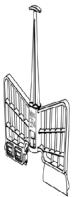 | Mix | 1-3 | 2 L max. | 30 minutes |
| Whisk egg whites or cream | 4 | 2 L max. | 10 minutes | ||
| Food steamer |  | Steamed vegetables | N/A | 3.5 L max | 15 minutes |
| Steamed meat | N/A | 3.5 L max | 20-30 minutes |
Warning
Do not assemble or use the MamboMix spoon and the basket at the same time.
6. CLEANING AND MAINTENANCE
- The stainless-steel jar is dishwasher safe. To wash it in the dishwasher, remove the blades or the MamboMix spoon, as well as their bracket.
- Turn off and unplug the food processor from the power supply and allow it to cool down before cleaning it.
- Clean the food processor after each use.
- Clean the butterfly whisk, blades, MamboMix, blade bracket, Habana Easy jug (Mambo
Touch with Habana Jug only), and other accessories with warm, soapy water after use. Rinse and dry thoroughly.
- Wipe the main body with a clean damp cloth. If food residue remains, dampen the cloth in warm soapy water before wiping it. Never immerse the main body in water or other liquids.
- In order to maintain the good performance of your food processor, check and clean the removable bottom part of the jar after each use. Wipe it with a soft damp cloth and dry it thoroughly before using it again.
-
If the food processor is not going to be used for a long time, unplug it from the power supply and store it in a cool and safe place.
-
TROUBLESHOOTING
| Warning code | Description | Possible cause | Possible solution |
| A1 warning | Locking system. | The jar or the jar's cover are not fixed properly. | Re-assemble the jar and jar cover, make sure all the parts are assembled properly and tightly and try operating it again. |
| A2 warning | Incorrectly positioned jar. | The jar is not in its correct position or connection of the temperature sensor at the jar base is damaged. | Re-assemble the jar and make sure it is fixed properly. |
| A3 warning | Content exceeded. | There is too much food inside the jar. | Remove some food from inside the jar or cut the food to smaller pieces and restart the food processor. |
| A4 warning | The temperature is too high. | There is no or very little food in the jar and the set temperature is too high for too much time. | Add food in the jar. |
| A5 warning | The motor's temperature is too high. | The food processor has been operating with too much food for a lot of time. | Stop operating the food processor and allow it to cool down before restarting it again. |
| A7 warning | The change in speed could not be done successfully. | Speed change between low level (1-5) and high level (6-10) was blocked. | Remove the jar, turn the fixing bracket manually and place the jar again in place. Restart the food processor. |
| A8 warning | Wrong NTC sensor reading. | The temperature sensor is not working properly. | Contact the Cecotec Technical Support Service. |
| A12 warning | Maximum weight exceeded. | The maximum measurement value has been exceeded. | Remove weight from the scale until it reaches a value below 4.999 g. |
| A13 warning | Calibration error. | Scale calibration failed. | Repeat the process. If the problem persists, please contact Cecotec's Technical Support. |
| Stuck jar. | The jar release system does not work. | Restart the food processor and wait a few seconds. If the problem persists, there is a manual release lever on the bottom of the main body. Pull this lever to release the jar lock. |
8. RECYCLING OF ELECTRICAL AND ELECTRONIC EQUIPMENT
This symbol indicates that, according to the applicable regulations, the product and/or batteries must be disposed of separately from household waste. When this product reaches the end of its shelf life, you should dispose of the batteries/accumulators and take them to a collection point
designated by the local authorities.
Consumers must contact their local authorities or retailer for information concerning the correct disposal of old appliances and/or their batteries.
Compliance with the above guidelines will help to protect the environment.
9. COPYRIGHT
The intellectual property rights over the texts in this manual belong to CECOTEC INNOVACIONES, S.L. All rights reserved. The content of this publication may not, either in part or in its entirety, be reproduced, stored in a retrieval system, transmitted or distributed by any means (electronic, mechanical, photocopying, recording or similar) without prior authorisation from CECOTEC INNOVACIONES, S.L.
10. DECLARATION OF CONFORMITY
CE Cecotec Innovaciones hereby declares that these two food processors, model A90_EU01_120290 Mambo Touch with Habana Pro Jar, are in conformity with the Radio Equipment Directive 2014/53/EU.
The full text of the EU Declaration of Conformity can be found on the following website: https://cecotec.es/es/information/declaration-of-conformity
1. PIÈCES ET COMPOSANTS
Img. 1
Avertissements
Warnungen
Avvertenze
Advertências
https://cecotec.pt/pt/information/declaration-of-conformity
1. ONDERDELEN EN COMPONENTEN
Fig. 1
Waarschuwingen
Ostrzeżenie
Upozornění
https://cecotec.es/es/information/declaration-of-conformity
1. PARÇALAR VE BILEŞENLER
Şekil 1
Uyarılar
Προειδοποιήσεις
https://cecotec.es/es/information/declaration-of-conformity
1. PECES I COMPONENTS
Fig. 1
Advertisements
Figyelmeztetések
یوت حملا
Fig./Img./Abb./Afb./Rys. 2
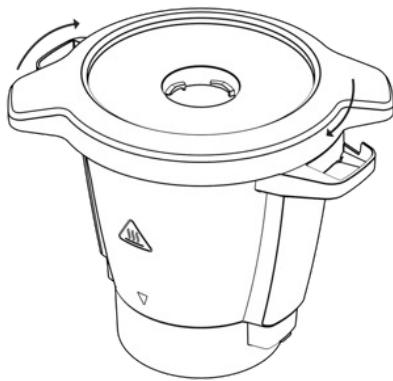
Fig./Img./Abb./Afb./Rys. 3
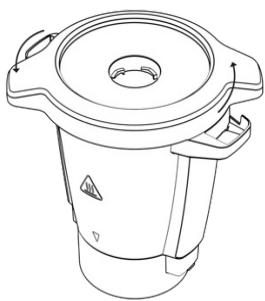

Fig./Img./Abb./Afb./Rys. 4

Fig./Img./Abb./Afb./Rys. 5

Fig./Img./Abb./Afb./ Rys. 6

Fig./Img./Abb./Afb./Rys. 7
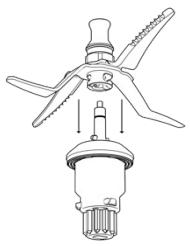

Fig./Img./Abb./Afb./Rys. 8


Fig./Img./Abb./Afb./Rys. 9

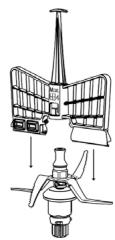
Fig./Img./Abb./Afb./Rys. 10

Fig./Img./Abb./Afb./Rys. 11

Fig./Img./Abb./Afb./Rys. 12

Fig./Img./Abb./Afb./Rys. 13
www.cecotec.es

- SOMMAIRE
- INSTRUCTIONS DE SÉCURITÉ
- Advertencias
- PARTS AND COMPONENTS
- Fig. 1
- BEFORE USE
- Box content
- ENGLISH
- Warning
- OPERATION
- Assembling the stainless-steel jug
- Assembling the hinged cover
- Assembling the accessory and fixing bracket
- Blade assembly
- Warnings
- Tip
- Assembling the MamboMix spoon
- Assembling the measuring cup
- Note
- Spatula
- Basket
- Assembling the butterfly whisk
- Assembling the steamer
- FUNCTIONS AND RECOMMENDATIONS
- OPERATION
- Start/Pause/Select
- Timer
- Speed
- Temperature
- Heat output
- ScreenBlock
- Scale
- Turbo
- Wi-Fi
- Guided Recipes
- Settings
- Connecting to a Wi-Fi network
- User management
- Storage
- Language
- CLEANING AND MAINTENANCE
- RECYCLING OF ELECTRICAL AND ELECTRONIC EQUIPMENT
- COPYRIGHT
- DECLARATION OF CONFORMITY
- PIÈCES ET COMPOSANTS
- Img. 1
- Avertissements
- Warnungen
- Avvertenze
- Advertências
- ONDERDELEN EN COMPONENTEN
- Waarschuwingen
- Ostrzeżenie
- Upozornění
- PARÇALAR VE BILEŞENLER
- Şekil 1
- Uyarılar
- Προειδοποιήσεις
- PECES I COMPONENTS
- Advertisements
- Figyelmeztetések
Brand : CECOTEC
Model : Mambo Touch Con Jarra Habana Pro
Category : Kitchen appliance