
JX 10 - Wireless Earbuds JABRA - Free user manual and instructions
Find the device manual for free JX 10 JABRA in PDF.



| Product type | Bluetooth wireless headset |
| Brand | JABRA |
| Model | JX 10 |
| Weight | Less than 10 g |
| Dimensions (approx.) | 5 x 2 x 1 cm |
| Bluetooth version | 1.2 |
| Bluetooth profiles | Headset and hands-free |
| Talk time | Up to 6 hours |
| Standby time | Up to 200 hours |
| Battery type | Rechargeable (Li-ion) |
| Charging | AC power adapter, USB cable, desktop or car charger (not supplied) |
| LED indicators | Blue (pairing, call, standby); Red/green (battery charging) |
| Main functions | Answer/end call, reject call, voice dialing, last number redial, call waiting/hold |
| Bluetooth range | Approximately 10 meters |
| Operating temperature | Between -10°C and 45°C |
| Care and cleaning | Turn off and store carefully; avoid extreme temperatures and liquids |
| Warranty | 2 years (parts and labor) |
| Certifications | CE marking, Bluetooth |
| Default PIN code | 0000 |
| Included accessories | USB cable, power adapter, earpiece, desktop charger (depending on version) |
Frequently Asked Questions - JX 10 JABRA
User questions about JX 10 JABRA
0 question about this device. Answer the ones you know or ask your own.
Ask a new question about this device
Download the instructions for your Wireless Earbuds in PDF format for free! Find your manual JX 10 - JABRA and take your electronic device back in hand. On this page are published all the documents necessary for the use of your device. JX 10 by JABRA.
USER MANUAL JX 10 JABRA
© 2005 GN Netcom A/S. All rights reserved. Jabra is a registered trademark, wholly owned by GN Netcom Inc., and MiniGels is a trademark of GN Netcom Inc. in the USA, and these trademarks may be registered in other countries. US and foreign patents pending. Design and specifications subject to change without notice. The Bluetooth® word mark and logos are owned by the Bluetooth SIG, Inc. and any use of such marks by the companies in the GN Netcom Group is under license.
www.jabra.com

2 Year Warranty
C
Bluetooth
Jabra JX 10

RELEASE YOUR JABRA
Jabra
User manual
Bluetooth Headset
Jabra
EMEA Customer Contact Details:
Phone Numbers:
Belgique/Belgie 0080072252272
Danmark 70252272
- Charge your headset 3
- Turn your headset on and off. 4
- Pair it with your phone 4
- Wear it how you like it 4
- How to.. 5
6.What the lights mean 6 - Troubleshooting & FAQ 6
- Need more help? 6
- Taking care of your headset 7
10.Warranty 7 - Certification and safety approvals 8
- Glossary 8
Thank you
Thank you for purchasing the Jabra JX10 Bluetooth® Headset. We hope you enjoy it! This instruction manual will get you started and ready to make the most of your headset.
Remember, driving comes first, not the call!
Using a mobile phone while driving can distract you and increase the likelihood of an accident. If driving conditions demand it (such as bad weather, high traffic density, presence of children in the car, difficult road conditions), pull off the road and park before making or answering calls. Also, try to keep conversations short and do not make notes or read documents.
Always drive safely and follow local laws.
About your Jabra JX10
-
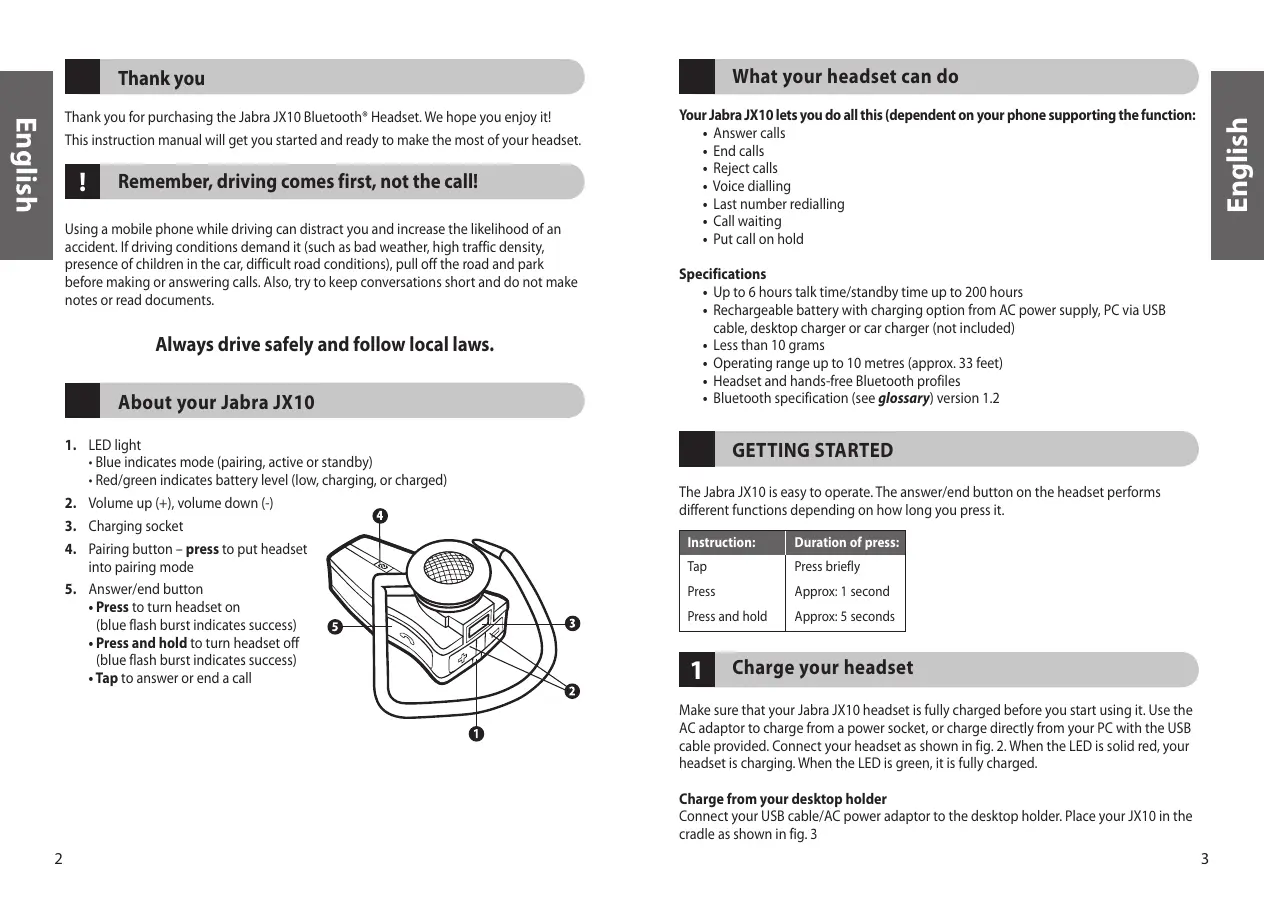
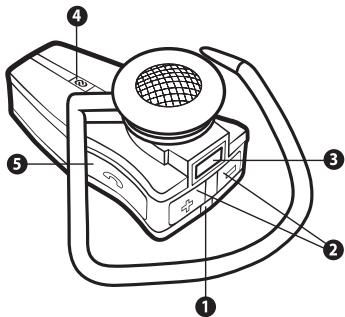
LED light
-
Blue indicates mode (pairing, active or standby)
Red/green indicates battery level (low, charging, or charged) -
Volume up (+), volume down (-)
- Charging socket
- Pairing button - press to put headset into pairing mode
-
Answer/end button
-
Press to turn headset on (blue flash burst indicates success)
- Press and hold to turn headset off (blue flash burst indicates success)
- Tap to answer or end a call
What your headset can do
Your Jabra JX10 lets you do all this (dependent on your phone supporting the function:
- Answer calls
End calls
Reject calls
Voice dialling - Last number redialling
Call waiting
Put call on hold
Specifications
- Up to 6 hours talk time/standby time up to 200 hours
- Rechargeable battery with charging option from AC power supply, PC via USB cable, desktop charger or car charger (not included)
Less than 10 grams - Operating range up to 10 metres (approx. 33 feet)
- Headset and hands-free Bluetooth profiles
- Bluetooth specification (see glossary) version 1.2
GETTING STARTED
The Jabra JX10 is easy to operate. The answer/end button on the headset performs different functions depending on how long you press it.
| Instruction: | Duration of press: |
| Tap | Press briefly |
| Press | Approx: 1 second |
| Press and hold | Approx: 5 seconds |
1 Charge your headset
Make sure that your Jabra JX10 headset is fully charged before you start using it. Use the AC adaptor to charge from a power socket, or charge directly from your PC with the USB cable provided. Connect your headset as shown in fig. 2. When the LED is solid red, your headset is charging. When the LED is green, it is fully charged.
Charge from your desktop holder
Connect your USB cable/AC power adaptor to the desktop holder. Place your JX10 in the cradle as shown in fig. 3
2 Turning your headset on and off
Press the answer/end button to turn on your headset.
- Press and hold the answer/end button to turn off your headset.
3 Pair it with your phone
Before you use your Jabra JX10, you need to pair it with your mobile phone.
- Put the headset in pairing mode
Make sure the headset is on.
- Press the pairing button marked .
- Set your Bluetooth phone to 'discover' the Jabra JX10
Follow your phone's instruction guide. This usually involves going to a 'setup,' 'connect' or 'Bluetooth' menu on your phone and selecting the option to 'discover' or 'add' a Bluetooth device. * (See example from a typical mobile phone in fig. 6).
- Your phone will find the Jabra JX10
Your phone then asks if you want to pair with it. Accept by pressing 'Yes' or 'OK' on the phone and confirm with the passkey or PIN = 0000 (4 zeros).
Your phone will confirm when pairing is complete. In case of unsuccessful pairing, repeat steps 1 to 3.
4 Wear it how you like it
The Jabra JX10 is ready to wear on your right ear. If you prefer the left, gently remove the earhook and rotate to fit left ear. (See fig. 4)
For optimal performance, wear the Jabra JX10 and your mobile phone on the same side of your body or within line of sight. In general, you will get better performance when there are no obstructions between your headset and your mobile phone.
5 How to...
Answer a call
- Tap the answer/end button on your headset to answer a call.
End a call
- Tap the answer/end button to end an active call.
Make a call
- When you make a call from your mobile phone, the call will (subject to phone settings) automatically transfer to your headset. If your phone does not allow this feature, tap on the Jabra JX10's answer/end button to transfer the call to the headset.
Reject a call*
- Press the answer/end button when the phone rings to reject an incoming call. Depending on your phone settings, the person who called you will either be forwarded to your voice mail or hear a busy signal.
Activate voice dialing*
- Tap the answer/end button. For best results, record the voice-dialling tag through your headset. Please consult your phone's user manual for more information about using this feature.
Redial last number*
- Press the answer/end button.
Adjust sound and volume
- Press the volume up or down (+ or -) to adjust the volume. (Show fig 1).
Call waiting and placing a call on hold*
This lets you put a call on hold during a conversation and answer a waiting call.
- Press the answer/end button once to put the active call on hold and answer the waiting call.
- Press the answer/end button to switch between the two calls.
-
Tap the answer/end button to end the active conversation.
-
Functions marked with * are dependent on your phone supporting these features. Check your phone's user manual for further information.
6 What the lights mean
What you see
Flashing blue light
Flashing blue light
Flashing red light
Solid red light
Solid green light
Solid blue light
What is the mean about your headset
Flashing every second: active on a call
Flashing every three seconds: in standby mode
Running low on battery
Charging
Fully charged
In pairing mode - see section 3
7 Troubleshooting & FAQ
I hear crackling noises
For the best audio quality, always wear your headset on the same side of the body as your mobile phone.
I cannot hear anything in my headset
- Increase the volume on the headset.
- Ensure that the headset is paired with the phone.
- Make sure that the phone is connected to the headset – if it does not connect either from the phone's Bluetooth menu or by tapping the answer/end button, follow the pairing procedure (see section 3).
I have pairing problems even though my phone indicates otherwise
You may have deleted your headset pairing connection in your mobile phone.
Follow the pairing instructions in section 3.
Will the Jabra JX10 work with other Bluetooth equipment?
The Jabra JX10 is designed to work with Bluetooth mobile phones. It can also work with other Bluetooth devices that are compliant with Bluetooth version 1.1 or 1.2 and support a headset and/or hands-free profile.
8 Need more help?
See the inside cover for your country's support details.
9 Taking care of your headset
Always store the Jabra JX10 with the power off and safely protected
- Avoid storage at extreme temperatures (above 45ircC / 113ircF - including direct sunlight or below -10ircC / 14ircF ). This can shorten battery life and may affect operation. High temperatures may also degrade performance.
- Do not expose the Jabra JX10 to rain or other liquids.
10 Warranty
Jabra (GN Netcom) warrants this product against all defects in material and workmanship for a period of two years from the date of original purchase. The conditions of this warranty and our responsibilities under this warranty are as follows:
- The warranty is limited to the original purchaser.
- A copy of your receipt or other proof of purchase is required
- The warranty is void if the serial number, date code label or product label is removed, or if the product has been subject to physical abuse, improper installation, modification, or repair by unauthorized third parties.
- The responsibility of Jabra (GN Netcom) products shall be limited to the repair or replacement of the product at its sole discretion.
- Any implied warranty on Jabra (GN Netcom) products is limited to two years from the date of purchase on all parts, including any cords and connectors.
- Specifically exempt from any warranty are limited-life consumable components subject to normal wear and tear, such as microphone windscreens, ear cushions, decorative finishes, batteries, and other accessories.
- Jabra (GN Netcom) is not liable for any incidental or consequential damages arising from the use or misuse of any Jabra (GN Netcom) product.
- This warranty gives you specific rights and you may have other rights which vary from area to area.
- Unless otherwise instructed in the User Manual, the user may not, under any circumstances, attempt to perform service, adjustments or repairs on this unit, whether in or out of warranty. It must be returned to the purchase point, factory or authorized service agency for all such work.
- Jabra (GN Netcom) will not assume any responsibility for any loss or damage incurred in shipping. Any repair work on Jabra (GN Netcom) products by unauthorized third parties voids any warranty.
11
Certification and safety approvals
CE
This product is CE marked according to the provisions of the R & TTE Directive (99/5/EC).
Hereby, GN Netcom, declares that this product is in compliance with the essential requirements and other relevant provisions of Directive 1999/5/EC.
For further information please consult http://www.jabra.com
Within the EU this device is intended to be used in Austria, Belgium, Cyprus, Czech Republic, Denmark, Estonia, Finland, France, Germany, Greece, Hungary, Ireland, Italy, Latvia, Lithuania, Luxembourg, Malta, Poland, Portugal, Slovakia, Slovenia, Spain, Sweden, The Netherlands, United Kingdom, and within EFTA in Iceland, Norway and Switzerland
Bluetooth
The Bluetooth® word mark and logos are owned by the Bluetooth SIG, Inc. and any use of such marks by GN Netcom is under license. Other trademarks and trade names are those of their respective owners.
12
Glossary
1 Bluetooth is a radio technology that connects devices, such as mobile phones and headsets, without wires or cords over a short distance (approx. 30 feet). Get more information at www/bluetooth.com.
2 Bluetooth profiles are the different ways that Bluetooth devices communicate with other devices. Bluetooth phones support either the headset profile, the hands-free profile or both. In order to support a certain profile, a phone manufacturer must implement certain mandatory features within the phone's software.
3 Pairing creates a unique and encrypted link between two Bluetooth devices and lets them communicate with each other. Bluetooth devices will not work if the devices have not been paired.
4 Passkey or PIN is a code that you enter on your mobile phone to pair it with your Jabra JX10. This makes your phone and the Jabra JX10 recognize each other and automatically work together.
5 Standby mode is when the Jabra JX10 is passively waiting for a call. When you 'end' a call on your mobile phone, the headset goes into standby mode.

Dispose of the product according to local standards and regulations. www.jabra.com/weee
François
Merci 10
Voice dialing activeren*
- Phone Numbers:
- Thank you
- Remember, driving comes first, not the call!
- Always drive safely and follow local laws.
- About your Jabra JX10
- What your headset can do
- Your Jabra JX10 lets you do all this (dependent on your phone supporting the function:
- Specifications
- GETTING STARTED
- Charge your headset
- Charge from your desktop holder
- Turning your headset on and off
- Pair it with your phone
- Wear it how you like it
- How to...
- What the lights mean
- What you see
- What is the mean about your headset
- Troubleshooting & FAQ
- I hear crackling noises
- I cannot hear anything in my headset
- I have pairing problems even though my phone indicates otherwise
- Will the Jabra JX10 work with other Bluetooth equipment?
- Need more help?
- Taking care of your headset
- Warranty
- 11
- Certification and safety approvals
- CE
- Bluetooth
- 12
- Glossary
- François
- Voice dialing activeren*
Brand : JABRA
Model : JX 10
Category : Wireless Earbuds