
UP-A1 - Docking Station ONKYO - Free user manual and instructions
Find the device manual for free UP-A1 ONKYO in PDF.



| Product Type | Docking station for iPod/iPhone |
| Brand | ONKYO |
| Model | UP-A1 |
| Weight | 170 g |
| Power Supply | Via the Universal Port connector of an Onkyo AV receiver |
| iPod/iPhone Compatibility | iPod touch (1st and 2nd generation), iPod classic, iPod (4th and 5th generation), iPod nano (1st to 4th generation), iPod mini, all iPhone models |
| Main Functions | Music playback from an iPod/iPhone, charging of the connected device |
| Connectivity | Dock connector for iPod/iPhone, Universal Port connector for AV receiver |
| Maintenance | Wipe with a soft, dry cloth; use a slightly damp cloth with mild detergent for stubborn stains |
| Safety | Do not expose to water or moisture; do not open the casing; entrust any repair to a qualified technician |
| Repairability | Refer to a qualified technician in case of damage or malfunction |
| Included Accessories | Rotating adapter for adjusting the iPod/iPhone |
| Special Features | Adjustable rotating adapter to close the gap between the iPod/iPhone and the dock |
Frequently Asked Questions - UP-A1 ONKYO
User questions about UP-A1 ONKYO
0 question about this device. Answer the ones you know or ask your own.
Ask a new question about this device
Download the instructions for your Docking Station in PDF format for free! Find your manual UP-A1 - ONKYO and take your electronic device back in hand. On this page are published all the documents necessary for the use of your device. UP-A1 by ONKYO.
USER MANUAL UP-A1 ONKYO
Thank you for purchasing an Onkyo product. Please read this manual carefully before making any connections or using this product. By following these instructions, you'll get the best audio performance and the most listening pleasure from your Onkyo product. Keep this manual for future reference.
WARNING:
TO REDUCE THE RISK OF FIRE OR ELECTRIC SHOCK,DO NOT EXPOSE THIS APPARATUS TO RAIN OR MOISTURE.
CAUTION:
TO REDUCE THE RISK OF ELECTRIC SHOCK,DO NOT REMOVE COVER (OR BACK).NO USER-SERVICEABLE PARTS INSIDE. REFER SERVICING TO QUALIFIED SERVICE PERSONNEL.




The lightning flash with arrowhead symbol, within an equilateral triangle, is intended to alert the user to the presence of uninsulated "dangerous voltage" within the product's enclosure that may be of sufficient magnitude to constitute a risk of electric shock to persons.

The exclamation point within an equilateral triangle is intended to alert the user to the presence of important operating and maintenance (servicing) instructions in the literature accompanying the appliance.
Important Safety Instructions
- Read these instructions.
- Keep these instructions.
- Heed all warnings.
- Follow all instructions.
- Do not use this apparatus near water.
- Clean only with dry cloth.
- Do not install near any heat sources such as radiators, heat registers, stoves, or other apparatus that produce heat.
- Protect the connection cord from being walked on.
- Unplug this apparatus during lightning storms or when unused for long periods of time.
-
Refer all servicing to qualified service personnel. Servicing is required when the apparatus has been damaged in any way, such as connection cord is damaged, liquid has been spilled or objects have fallen into the apparatus, the apparatus has been exposed to rain or moisture, does not operate normally, or has been dropped.
-
Damage Requiring Service
Unplug the apparatus from the AV receiver/amplifier and refer servicing to qualified service personnel under the following conditions:
A. When the connection cord is damaged,
B. If liquid has been spilled, or objects have fallen into the apparatus,
C. If the apparatus has been exposed to rain or water,
D. If the apparatus does not operate normally by following the operating instructions. Adjust only those controls that are covered by the operating instructions as an improper adjustment of other controls may result in damage and will often require extensive work by a qualified technician to restore the apparatus to its normal operation,
E. If the apparatus has been dropped or damaged in any way, and
F. When the apparatus exhibits a distinct change in performance this indicates a need for service.
Precautions
- Care—Occasionally you should dust the unit all over with a soft cloth. For stubborn stains, use a soft cloth dampened with a weak solution of mild detergent and water. Dry the unit immediately afterwards with a clean cloth. Don't use abrasive cloths, thinners, alcohol, or other chemical solvents, because they may damage the finish or remove the panel lettering.
- Never Touch this Unit with Wet Hands—Never handle this unit or its connection cord while your hands are wet or damp. If water or any other liquid gets inside this unit, have it checked by your Onkyo dealer.
For U.S.models
FCC Information for User
CAUTION:
The user changes or modifications not expressly approved by the party responsible for compliance could void the user's authority to operate the equipment.
NOTE:
This equipment has been tested and found to comply with the limits for a Class B digital device, pursuant to Part 15 of the FCC Rules. These limits are designed to provide reasonable protection against harmful interference in a residential installation.
This equipment generates, uses and can radiate radio frequency energy and, if not installed and used in accordance with the instructions, may cause harmful interference to radio communications. However, there is no guarantee that interference will not occur in a particular installation. If this equipment does cause harmful interference to radio or television reception, which can be determined by turning the equipment off and on, the user is encouraged to try to correct the interference by one or more of the following measures:
- Reorient or relocate the receiving antenna.
- Increase the separation between the equipment and receiver.
- Connect the equipment into an outlet on a circuit different from that to which the receiver is connected.
- Consult the dealer or an experienced radio/TV technician for help.
For Canadian Models
For models having a power cord with a polarized plug:
CAUTION:
TO PREVENT ELECTRIC SHOCK, MATCH WIDE BLADE OF PLUG TO WIDE SLOT, FULLY INSERT.
Modèle canadien
Declaration of Conformity
We. ONKYO EUROPE ELECTRONICS GmbH LIEGNITZERSTRASSE 6, 82194 GROEBENZELL, GERMANY

declare in own responsibility, that the ONKYO product described in this instruction manual is in compliance with the corresponding technical standards such as EN60065, EN55013, EN55020 and EN61000-3-2, -3-3.
GROEBENZELL, GERMANY
ONKYO EUROPE ELECTRONICS GmbH
About the UP-A1
With the UP-A1 connected to an Onkyo Universal Port-capable AV receiver, you can enjoy the music stored on your iPod ^1 or iPhone ^2 simply by inserting it into the UP-A1. And, you can charge your iPod or iPhone while listening to your music.
Notes:
- Before using the UP-A1, update your iPod or iPhone with the latest software, available from the Apple Web site at: www.apple.com
For the latest information on the UP-A1, see the Onkyo Web site at: www.onkyo.com - The instructions in this manual apply to the iPod and iPhone as of December 2008, and may change with future upgrades to the iPod or iPhone software.
Compatible iPod/iPhone models
All iPhone models
- iPod touch (2nd generation)
- iPod touch (1st generation)
- iPod classic
- iPod (5th generation)
- iPod (4th generation)
- iPod nano (4th generation)
- iPod nano (3rd generation)
- iPod nano (2nd generation)
- iPod nano (1st generation)
- iPod mini
Getting to Know the UP-A1
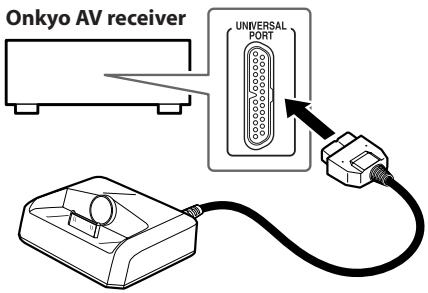
Connecting the UP-A1
Connect the UP-A1 to the Universal Port on your Onkyo AV receiver as shown on the right.
About Operation
Functionality depends on your iPod or iPhone model and generation and your AV receiver model and generation.
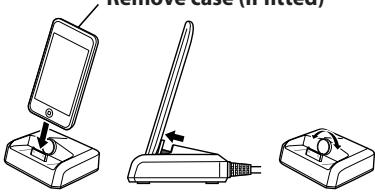
Putting Your iPod/iPhone in the UP-A1
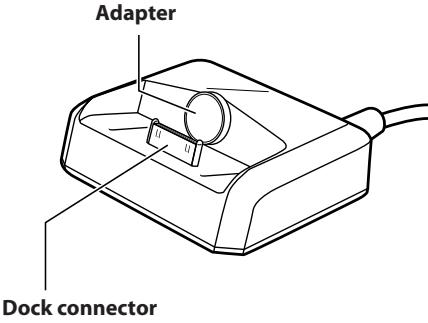
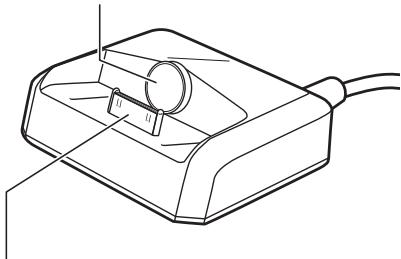
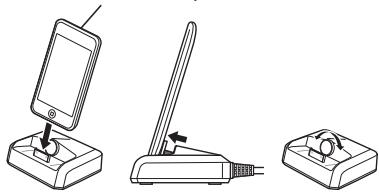
Align your iPod or iPhone with the UP-A1's dock connector and push it down so that it's fully seated. If there's a gap between the back of your iPod or iPhone and the adapter, turn the adapter counterclockwise to close the gap. Turning the adapter counterclockwise moves it forward. Turning it clockwise moves it backward.
Remove case (if fitted)
Notes:
- Remove the case, if fitted, from your iPod or iPhone before inserting it into the UP-A1. Otherwise, a poor connection may result in no sound or remote control issues.
- To prevent damage to the dock connector, don't twist your iPod or iPhone when inserting or removing it, and be careful not to knock over the UP-A1 while your iPod or iPhone is inserted.
- Don't use the UP-A1 with any other iPod or iPhone accessories, such as FM transmitters and microphones, because they may cause a malfunction.
Troubleshooting
There's no sound
Make sure your iPod or iPhone is playing.
- Make sure your iPod or iPhone is inserted properly in the UP-A1.
- Make sure your AV receiver is turned on, the correct input source is selected, and the volume is turned up.
- Make sure all plugs are pushed in all the way.
FM/AM radio is noisy
- If there's any noise when listening to FM/AM radio on your tuner or receiver, try moving the antenna cable away from the UP-A1 and iPod or iPhone. Also, keep the antenna cable away from other cables.
Specifications
Weight: 170 g
Dimensions (W x H x D): 83 x 33 x 74 mm
Dimensions (L x H x P): 83 x 33 x 74mm
Dimensioni (L x A x P): 83 x 33 x 74mm
3HaKOMCTBO C yCTpoNCTBOM UP-A1
AanTep
Pa3bEmdoK-CTaHcnn
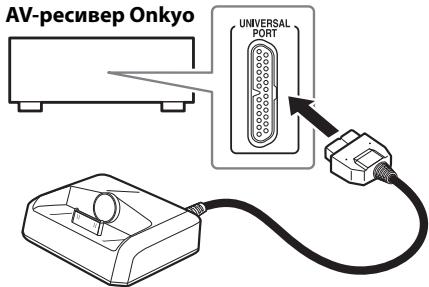
IopKIOUeHne UP-A1
PoiKlouHTe UP-A1 K yHnBepcaIbHOMy nopTu ha AVpeCnBepe Onkyo, kak noka3aHo cnpaba.
3Kcnnyataun
Функюнавь-boе BOZMOЖOCHTN yctpoICTBa 3abicat OT модени n okолегия iPod Ии iPhone, a TAKKE модени n okолегия AV-peсвета.
YctaHOBka iPod/iPhone B UP-A1
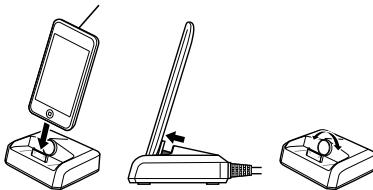
COBmctnte iPod nii iPhone c pa3bemom DokcTAnuHn UP-A1 n HaxMNTe erO BnU3 do KOnca. EcnI MeKdy 3aadnei CTeNKo iPod nii iPhone n aadTepom ectb 3aOp, NopeBHnTe aadTep npotNB uacoboi cTpeKNn Jny UctpaHEnna 3aOpA. PnN nobopote aadTepra nptOBu CTOpeKNn OH bYdBnIgaeTcBnepe. PnN nobopote no cacoboi cTpeKNo H nepeMeMaTaTc H3aJd.
CHIMITE qexon (ecn OH nCnoIb3yeTc)
Ppumeyanua:
- Пеку установков iPod ил iPhone B UP-A1,Симпente с Hero чхон (сменионьзун.TВпротьном сныае Наджhoe соединенMuKOT pRbECTN K OTCYTCTBNO 38Укы плpoбLEMAM CДИSTAHUNHbIM UYPaBJIeHmE.
- Tó6bI n36eKaTb NOBpeKdEHNpa3bEma DOKCTAHnI, He NobopaunBaiTe iPod nnI iPhone BO BPEMaEROyCTAHOBKnIINIBBeNeHEnI, IN HeDonyckaIte naDEHnU P-A1 BO BPEMa yCTAHOBKn iPod nnIPhone.
He cnpoIb3yIte UP-A1 cKaKIMn-ll6o DpyrMMnpnHaadJeXHcTmM iPod nII nIPhone, HaprMpemFM-nepeaTtNkAMn INn Mnkpofohamn,POCKOJIbKy 3TO MOKeT npINBeCTn K hapyuEHHo pa60tbl.
Ponck nyctpaheHne HncnpabHocte
OTcyTCTByeT 3Byk
- YbEaIteScb, yTo iPod nIIn iPhone haxoIITcBpeXIMe BocpOn3BeDeHIN.
- Y6eɪntεcb,ут oPod mɪn iPhone Ṭaɪm
- оБразом BCTablen B UP-A1.
- Y6eMntEcb, TcO AV-pecMBep BKNUChEN, BbIbpaH NHyKbH bNtOCHNk BXoDHOrO CnHrHa, nYCTAHOBJIENA Heo6XoDMaIraT rPOMKObTc.
- y6eIntecb, yTO BCE BUNKIN BCTaJIeHbI DO KOHua.
Помени bo Вретma пиема FM/AM-pa dinocurhana
- PnB O3HKnHOBeHnn KaKnx-Jn60 NOMex BO BVPm npocnyuBaHn FM/AM-paIoucUHana c NMOOsbIO TIOHEp aHnpeCnBepa, noBtaiTeCb nepemecTbKa6eJb aHTHe bdaIbeOT UP-A1 n iPod ndn iPhone. IpeMeCTte TaKke aHTHe b Ka6eJb daJIbe OT dpyrnx Ka6enei.
Texnueckne xapaKtepcntuKN
Bec: 170 r
Pa3mepb(UxBxΓ): 83×33×74MM
This warranty is valid only in Japan.
$$ \therefore \angle 1 = \angle 2 + \angle 3 $$
$$ \therefore \bigtriangleup {A B C} \cong \bigtriangleup {C D E F}, $$
$$ \dots \text {i f} j = \text {w i t h} j \leq 1 \text {i s o l o w} j \leq n - 1. 0 $$
$$ \therefore \Delta = \frac {1}{2} \Delta + \Delta + \Delta + \Delta + \Delta + \Delta + \Delta + \Delta + \Delta + \Delta + \Delta + \Delta + \Delta + \Delta + \Delta + \Delta + \Delta + \Delta + \Delta + \Delta + \Delta + \Delta + \Delta + \Delta + \Delta + \Delta + \Delta + \Delta + \Delta + \Delta + \Delta + \Delta + \Delta + \Delta + $$
$$ \left. \int_ {0} ^ {1} \frac {1}{x} f (x) d x + \int_ {1} ^ {2} \frac {1}{x} f (x) d x + \int_ {2} ^ {\infty} \frac {1}{x} f (x) d x + \int_ {\infty} ^ {\infty} \frac {1}{x} f (x) d x\right) = 0 $$
$$ \therefore \exists j \geqslant 1, \exists i \leqslant 1, \exists j \geqslant 1, \exists j \geqslant 1, \exists j \geqslant 1, \exists j \geqslant 1, \exists j \geqslant 1, \exists j \geqslant 1, \exists j \geqslant 1, \exists j \geqslant 1, $$
$$ \therefore \Delta_ {1} = \Delta_ {2} = \Delta_ {3} = \dots = \Delta_ {n} $$
$$ \begin{array}{l} i i j k l m n o p q r s t \ \therefore \Delta A B C \sim \Delta A D E \ \end{array} $$
$$ \begin{array}{l} j l a n d i s i g h t h e l a w. i l l. i l l a l l j o p l y p a l l j o p l y i l o w g e q 1. 1 \ b _ {j} g _ {i} j l _ {k} w _ {l} k _ {m} j l _ {n} j _ {o} g _ {p} i l _ {q} \dots \dots \dots \dots \dots \dots \dots \dots \dots \dots \dots \dots \dots \dots \dots \dots \ j a n s \left[ 1, 3, 5, j a n s, j b l, j l \right] + j a n s l j a n s l j a n s p i r s l j a n s p i r s l j a n s p i r s l j a n s p i r s l j a n s p i r s l j a n s p i r s l j a n s p i r s l j a n s p i r s l j a n s p i r s l j a n s p i r s l j a n s p i r s l j a n s p i r \ j _ {i} j _ {j} j _ {k} b _ {j} b _ {k} a _ {j} a _ {k} b _ {j} a _ {j} a _ {k} \ \end{array} $$
$$ \begin{array}{l} \text {J u s i t y} \ \text {J u s i t y} \ \text {J u s i t y} \ \text {J u s i t y} \ \text {J u s i t y} \ \text {J u s i t y} \ \text {J u s i t y} \ \text {J u s i t y} \ \text {J u s i t y} \ \text {J u s i t y} \ 1 0 k y o \end{array} $$
:
$$ \therefore \lim _ {x \to 0} \frac {\log_ {1 0} x}{\log_ {2 0} 2} = \frac {\log_ {1 0} x}{\log_ {2 0} 2} $$
$$ \therefore a, b, c, d, f, g, h, i, j, k $$
:
$$ \therefore (a _ {i} + b _ {j}) \neq a _ {i} + b _ {j} $$
$$ \therefore \lim _ {x \to 0} \frac {\log_ {1 0} {x}}{\log_ {2 0} {2}} = \frac {\log_ {1 0} {1}}{\log_ {2 0} {3}} $$
$$ \therefore \lim _ {x \to 0} \left| f (x) \right| = \lim _ {x \to 0} \left| f (x) \right| = \lim _ {x \to 0} \left| f (x) \right| = \lim _ {x \to 0} \left| f (x) \right| $$


y
a a a a a a a a a a a a a a a a a a a a a a a a a a a


- 1.
iJaiJIJIJIJIJI.11
$$ \therefore \dot {u} _ {j} $$
$$ \sim \vee \times \rr \times \wedge r $$
$$ : (\mathrm {x} \times \mathrm {x} \times \mathrm {x} \times \mathrm {x}) \times \mathrm {x} \times \mathrm {x} $$
()
120 = 50^
iPhone jj iPod jj j j j j j j j j j j j j j j j j j j j j j j j j j j j j j j
JUP-A1 2
-
-
-
-
-
-
-
-
-
-
-
-
- 1.
-
-
-
-
-
-
-
-
-
-
-
jipod jy
jlll jll l l l l l l l l l l l l l l l l l l l l l l l l l l l l l l l l l l l l l l
iPhone jipod jupuUP-A1
JUP-A1 1
FM jj j j j j j j iiPhone j j j iPod
1
ONKYO CORPORATION
Sales & Product Planning Div.: 2-1, Nisshin-cho, Neyagawa-shi, OSAKA 572-8540, JAPAN
Tel: 072-831-8023 Fax: 072-831-8124
18 Park Way, Upper Saddle River, N.J. 07458, U.S.A.
Tel: 201-785-2600 Fax: 201-785-2650 http://www.us.onkyo.com/
ONKYO EUROPE ELECTRONICS GmbH
Liegnitzerstrasse 6, 82194 Groebenzell, GERMANY
Tel: +49-8142-4401-0 Fax: +49-8142-4401-555 http://www.eu.onkyo.com/
ONKYO EUROPE UK Office
Suite 1, Gregories Court, Gregories Road, Beaconsfield, Buckinghamshire, HP9 1HQ
UNITED KINGDOM Tel: +44-(0)1494-681515 Fax: +44(0)-1494-680452
ONKYO CHINA LIMITED
Unit 1&12, 9/F, Ever Gain PlazaTower 1, 88, Container Port Road, Kwai Chung,
N.T., HONG KONG Tel: 852-2429-3118 Fax: 852-2428-9039
http://www.ch.onkyo.com/

10906-2
- WARNING:
- CAUTION:
- Important Safety Instructions
- Precautions
- For U.S.models
- FCC Information for User
- NOTE:
- For Canadian Models
- Modèle canadien
- Declaration of Conformity
- About the UP-A1
- Notes:
- Compatible iPod/iPhone models
- Getting to Know the UP-A1
- Connecting the UP-A1
- About Operation
- Putting Your iPod/iPhone in the UP-A1
- Remove case (if fitted)
- Troubleshooting
- There's no sound
- FM/AM radio is noisy
- Specifications
- 3HaKOMCTBO C yCTpoNCTBOM UP-A1
- IopKIOUeHne UP-A1
- 3Kcnnyataun
- YctaHOBka iPod/iPhone B UP-A1
- CHIMITE qexon (ecn OH nCnoIb3yeTc)
- Ppumeyanua:
- Ponck nyctpaheHne HncnpabHocte
- OTcyTCTByeT 3Byk
- Помени bo Вретma пиема FM/AM-pa dinocurhana
- Texnueckne xapaKtepcntuKN
- ()
- = 50^ °
- ONKYO CORPORATION
- ONKYO EUROPE ELECTRONICS GmbH
- ONKYO EUROPE UK Office
- ONKYO CHINA LIMITED
Brand : ONKYO
Model : UP-A1
Category : Docking Station