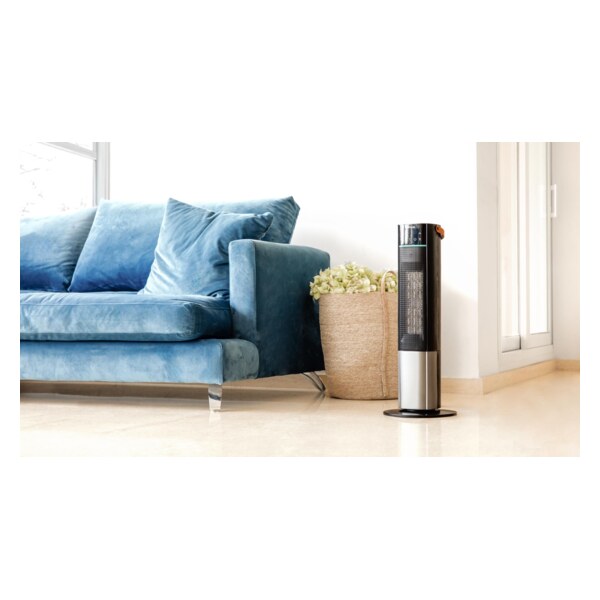
ReadyWarm 2070 Max Ceramic Rotate Smart - Fan heater CECOTEC - Free user manual and instructions
Find the device manual for free ReadyWarm 2070 Max Ceramic Rotate Smart CECOTEC in PDF.


| Product Type | Fan Heater |
| Brand | Cecotec |
| Model | ReadyWarm 2070 Max Ceramic Rotate Smart |
| Heating Technology | PTC Ceramic |
| Power (W) | 2000 W |
| Operating Modes | Heating (2 levels), cool ventilation |
| Adjustable Thermostat | Yes |
| Oscillation | Yes (rotating) |
| Recommended Heating Area | Up to 25 m² |
| Dimensions (W x D x H) | 20 x 15 x 25 cm |
| Weight | 1.2 kg |
| Power Supply | 220-240 V ~ 50 Hz |
| Noise Level | < 45 dB |
| Safety Features | Overheat protection, automatic shut-off in case of tipping |
| Power Cord | 1.5 m |
| Maintenance and Cleaning | Clean the air intake grille with a vacuum cleaner |
| Spare Parts | Available from Cecotec after-sales service |
| Repairability | Repairable by a qualified professional |
| Warranty | 2 years |
| Certifications | CE |
| Color | White and gray |
Frequently Asked Questions - ReadyWarm 2070 Max Ceramic Rotate Smart CECOTEC
User questions about ReadyWarm 2070 Max Ceramic Rotate Smart CECOTEC
0 question about this device. Answer the ones you know or ask your own.
Ask a new question about this device
Download the instructions for your Fan heater in PDF format for free! Find your manual ReadyWarm 2070 Max Ceramic Rotate Smart - CECOTEC and take your electronic device back in hand. On this page are published all the documents necessary for the use of your device. ReadyWarm 2070 Max Ceramic Rotate Smart by CECOTEC.
USER MANUAL ReadyWarm 2070 Max Ceramic Rotate Smart CECOTEC
natural_image
Modern cylindrical smart air conditioner tower with black and silver casing, standing against a solid teal background (no visible text or symbols)ES: Este producto no es adecuado para calefacción primaria. Este producto está indicado únicamente en lugares abrigados o para una utilización puntual. / EN: This product is not suitable for primary heating purposes. This product is only suitable for well insulated spaces or occasional use / FR: Cet appareil ne convient pas pour une utilisation en tant que chauffage primaire. Cet appareil a été conçu seulement pour être utilisé dans des espaces intérieurs ou pour une utilisation momentanée / DE: Dieses Produkt ist nicht für als Hauptheizgerät geeignet. Dieses Produkt ist nur für geschützten Orten oder zur gelegentlichen Verwendung geeignet / IT: Questo apparecchio non è adatto a scopi di riscaldamento primario. Il suo utilizzo è indicato solo in luoghi riparati o per uso occasionale / PT: Este produto não é adequado para ser utilizado como aquecimento primário. Destina-se a uma utilização ocasional e apenas em locais abrigados / NL: Dit product is niet geschikt voor primaire verwarming. Dit product is alleen geschikt voor gebruik op beschutte plaatsen of voor occasioneel gebruik / PL: Ten produkt nie nadaje się do pierwotnego ogrzewania. Ten produkt jest wskazany tylko do miejsc ostonietych lub do okazjonalnego użytku / CZ: Tento produkt není vhodný pro primární vytápění. Tento produkt je vhodný pouze na chráněných místech nebo pro příležitostné použitíá
Manual de instrucciones Instruction manual
- Parts and components 33
- Before use 33
- Operation 34
- Cleaning and maintenance 35
- Troubleshooting 36
- Technical specifications 36
- Disposal of old electrical and electronic appliances 38
- Technical support and warranty 39
- Copyright 39
SOMMAIRE
Read these instructions thoroughly before using the device. Keep this instruction manual for future reference or new users.
- Make sure the voltage of your mains supply matches the voltage requirements specified in the rating label of the appliance.
- This device is designed for domestic use only and is not intended for bars, restaurants, farmhouses, hotels, motels, and offices.
- If the power cable is damaged, it must be replaced by the Technical Support Service of Cecotec or similar qualified personnel to avoid risks.
- This symbol means "do not cover".

WARNING: to avoid overheating, do not cover the appliance.
- The heating appliance must not be placed immediately below a socket outlet.
- Do not use the heating appliance in the immediate vicinity of a bath, shower, or swimming pool.
- Do not use this heating appliance if it has been dropped.
- Do not use if there are visible signs of damage to the heating appliance.
- Use this heating appliance on a horizontal and stable surface, or fix it to the wall, as applicable.
- Keep the device out of the reach of children under 3 years old, unless constantly supervised.
- Children between 3 and 8 years old should only switch the appliance on or off when it has been placed in its normal, intended operating position and if they have been given supervision or instruction concerning the use of the appliance in a safe way and understand the hazards involved. Children between 3 and 8 years old should not plug in, adjust, and clean the appliance and should not carry out maintenance tasks.
- WARNING: some of the product's parts may become very hot and cause burns. Particular attention should be paid when children and/or vulnerable people are present.
- WARNING: do not use this heating device in small rooms that are occupied by people who cannot leave the room by themselves, unless permanent supervision is provided.
- WARNING: to reduce the risk of fire, keep textiles, curtains, or other flammable material at least 1 m away from the air outlet.
- Do not insert or allow objects to enter through the ventilation slots, as this may result in electric shock, fire, or damage to the appliance.
- Do not immerse the cable, plug, or any other non-removable part of the appliance in water or any other liquid. Do not expose the electrical connections to water. Always make
sure that your hands are dry before operating or adjusting any switches on the product or touching the plug and socket.
- Never leave the device unattended during use.
- One of the most common causes of overheating is the building up of debris or fluff in the appliance. Be sure to clean these accumulations periodically by vacuuming the vents and grilles.
- Do not place the appliance on carpets, and do not place the cable under carpets. Position the cord in such a way as to avoid obstructing passage and cause tripping hazards.
- Do not store it until it cools down. Store it in a cool, dry place when not in use.
- When using, maintain a minimum distance of 50 cm between the window and the wall.
INSTRUCTIONS DE SÉCURITÉ
- Status display
- Decrease temperature
- Mode selection
- Timer
- On/Off
- Oscillation function
- Increase temperature
- Safety lock
Fig. 3
- On/Off
- Mode selection
- Decrease temperature
- Timer
- Safety lock
- Oscillation function
- Increase temperature
- Temperature-setting icon
2. BEFORE USE
- This appliance is packaged in a way as to protect it during transport. Take the device out of its box and remove all packaging materials. You can keep the original box and other packaging elements in a safe place. This will help you prevent damage to the device when transporting it in the future. In case the original packaging is disposed of, make sure all packaging materials are recycled accordingly.
ENGLISH
- Make sure all parts and components are included and in good conditions. If there is any piece missing or in bad conditions, contact the official Cecotec Technical Support Service immediately.
Box content
- Heater
- Remote control
- Instruction manual
3. OPERATION
Assembly
Fig. 4
- Step 1: take the device and accessories out of the box. Assemble the two semi-circular pieces of the base by inserting the 4 clips of one into the holes of the other.
- Step 2: with the main body upside down, install the base by inserting its 4 clips into the holes of the main body. Then, rotate the base counterclockwise so that it stays in the correct position.
- Step 3: to remove the base, press the locking clip by hand. After releasing the locking clip, turn the base clockwise to remove it.
Icon functions
- Press the power icon once to start the fan in low mode. The display will show the current temperature. Press the icon again to turn the fan off after a 15-second countdown.
- With the fan on, press the heating mode selector icon to toggle between Low, High and ECO mode.
ECO Mode: the temperature will be automatically adjusted according to the ambient temperature. - Press the oscillation mode activation icon to make the fan rotate from left to right in a range of 65^ . Press the icon again to stop the oscillation.
- Use the temperature up/down icons to adjust their value within a range of 16-32°C.
- Once the temperature value has been set, the display will flash for 5 seconds. After this time, the current room temperature value will be displayed.
- Once the room temperature reaches the set value, the device will stop working. When the room temperature is lower than the set temperature, the appliance will switch on again.
- Press the timer icon as many times as desired to set the operating time of the appliance
within a range of 1 to 24 hours.
- Once the timer value has been set, the display will flash for 5 seconds. After this time, the current temperature value will be displayed, and an "H" icon will be shown.
- Once the set time is reached, the device will stop working.
- To cancel the timer, press the timer setting icon until it reaches 0. The "H" icon will disappear.
- Press the lock icon for 3 seconds to activate the security lock. Once activated, a padlock icon will be displayed on the display and the device will not respond when icons are pressed.
To deactivate the lock mode, press the icon again for 3 seconds.
Other functions
Memory
Each time the appliance is switched on, it will remember the last setting chosen.
Standby
When there is no interaction with the device for more than 30 seconds the brightness of the display will decrease by 50%. After 180 seconds, the display will turn off.
Anti-tilt protection
In the event of the device tilting over, it will automatically turn off. Place it on a flat stable surface and then turn it on again.
Replacing batteries
Fig. 5
The remote control requires a lithium button battery (CR2025/2032). If the remote control does not respond, replace the battery as follows:
- Put the remote-control upside down and slide tab A to the right.
- Pull out the battery compartment B.
- Insert a battery of the same type and make sure the positive side is at the top.
4. CLEANING AND MAINTENANCE
Caution: turn off the appliance and unplug it from the mains before cleaning or performing any maintenance.
Cleaning the surface
- Clean the appliance with a soft, dampened cloth.
- Do not use chemical solvents (such as benzene, alcohol, or petrol) as they may cause irreversible damage. Make sure that no water enters the control panel or holes in the structure.
- Do not operate the appliance until it is completely dry.
ENGLISH
- Place the appliance in its original box or cover it to protect it from dust. Store it in a cool and dry place.
5. TROUBLESHOOTING
Do not repair or disassemble the device yourself, unauthorised repair attempts will void the warranty and may cause personal injury.
| Problem | Possible cause | Solution |
| There is no power supply | 1. The power cord is not connected.2. No power comes out of the socket.3. The power switch on the back of the heater is in the off position. | 1. Install the power cord.2. Check that the socket is turned on.3. Make sure the power switch on the back of the heater is in the on position. |
| SmellThe appliance produces an unusual odour | 1. The appliance is new. When using the appliance for the first time, the motor fan may emit a slight odour. The smell will disappear within the first week of use. | No action required. |
| Strong vibrations and noises | 1. The appliance is not placed on a flat surface.2. The unit may be damaged. | 1. Place it on a flat surface. An anti-vibration mat can be placed underneath.2. If the heater is damaged, stop using it and contact the Technical Support Service of Cecotec. |
If the problem persists after trying the above solutions, please contact Cecotec's official Technical Support Service.
6. TECHNICAL SPECIFICATIONS
Product reference: 08280
Product: ReadyWarm 2070 Max Ceramic Rotate
Power: 2000 W
Voltage: 220 -240 V
Frequency: 50/60 Hz
| Name of the model: 08280_ReadyWarm 2070 Max Ceramic Rotate | |||||
| Product | Symbol | Value | Unit | Product | Unit |
| Heating power | Type of heat input, for electrical storage.Local heaters only (select one) | ||||
| Rated heat output | P_nom | 2.0 | kW | manual control of the heating load, with integrated thermostat | [NO] |
| Minimum heat output(illustrative) | P_min | 1.3 | kW | manual control of the heat load with feedback of ambient and/or outdoor temperature | [NO] |
| Heating power maximum constant | P_max,c | 2.0 | kW | electronic heat load control with feedback of ambient and/or outdoor temperature | [NO] |
| Auxiliary energy consumption | Fan assisted heat output | [NO] | |||
| At rated heat output | el_max | 0.000 | kW | Type of heat output/ambient temperature control (select one) | |
| At minimum heat output | el_min | 0.000 | kW | single-stage heat output and no ambient temperature control | [NO] |
| In standby mode | el_SB | 0.000 | kW | Two or more manual stages, no room temperature control | [NO] |
| with mechanical thermostat for room temperature control | [NO] | ||||
| with electronic room temperature control | [YES] | ||||
| electronic room temperature control and daily timer | [NO] | ||||
| electronic room temperature control and weekly timer | [NO] | ||||
| Other control options (multiple selection possible) | |||||
| ambient temperature control, with presence detection | [NO] | ||||
| room temperature monitoring, with open window detection | [NO] | ||||
| with distance control option | [NO] | ||||
| with adaptive start-up control | [NO] | ||||
| with working time limitation | [NO] | ||||
| with black bulb sensor | [NO] | ||||
| Contact information: | Cecotec innovaciones SL., Av. Reyes Católicos, 60, 46910, Alfafar, Valencia (Spain) | ||||
Technical specifications may change without prior notification to improve product quality.
Made in China | Designed in Spain
7. DISPOSAL OF OLD ELECTRICAL AND ELECTRONIC APPLIANCES

This symbol indicates that, according to the applicable regulations, the product and/or battery must be disposed of separately from household waste. When this product reaches the end of its shelf life, you should dispose of the cells/batteries/accumulators and take them to a collection point designated by the local authorities.
Consumers must contact their local authorities or retailer for information concerning the correct disposal of old appliances and/or their batteries.
Compliance with the above guidelines will help protecting the environment.
8. TECHNICAL SUPPORT AND WARRANTY
Cecotec shall be liable to the end user or consumer for any lack of conformity that exists at the time of delivery of the product under the terms, conditions, and deadlines established by the applicable regulations.
It is recommended that repairs be carried out by qualified personnel.
If at any moment you detect any problem with your product or have any doubt, do not hesitate to contact the official Cecotec Technical Support Service at +34 963 210 728.
9. COPYRIGHT
The intellectual property rights over the texts in this manual belong to CECOTEC INNOVACIONES, S.L. All rights reserved. The contents of this publication may not, in whole or in part, be reproduced, stored in a retrieval system, transmitted, or distributed by any means (electronic, mechanical, photocopying, recording or similar) without the prior authorization of CECOTEC INNOVACIONES, S.L.
FRANÇAIS
1. PIÈCES ET COMPOSANTS
Img. 1
5. PROBLEEMOPLOSSING
Product: ReadyWarm 2070 Max Ceramic Rotate
Vermogen: 2000 W
Voltage: 220-240 V
Frequentie: 50/60 Hz
natural_image
Simple line drawing of a device with an arrow pointing to a labeled point A (no text or symbols beyond the label)
natural_image
Line drawing of a device with a labeled component 'B' and an arrow pointing to it (no text or symbols beyond label)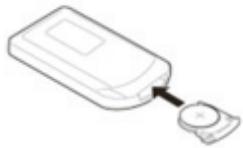
natural_image
Simple line drawing of a device with a circular button connected to it (no text or symbols)Fig./Img./Abb./Afb./Rys. 5
www.cecotec.es

- SOMMAIRE
- INSTRUCTIONS DE SÉCURITÉ
- Fig. 3
- BEFORE USE
- ENGLISH
- Box content
- OPERATION
- Assembly
- Fig. 4
- Icon functions
- Other functions
- Memory
- Standby
- Anti-tilt protection
- Replacing batteries
- CLEANING AND MAINTENANCE
- Cleaning the surface
- TROUBLESHOOTING
- TECHNICAL SPECIFICATIONS
- DISPOSAL OF OLD ELECTRICAL AND ELECTRONIC APPLIANCES
- TECHNICAL SUPPORT AND WARRANTY
- COPYRIGHT
- FRANÇAIS
- PIÈCES ET COMPOSANTS
- Img. 1
- PROBLEEMOPLOSSING
Brand : CECOTEC
Model : ReadyWarm 2070 Max Ceramic Rotate Smart
Category : Fan heater