
D4 - Auxiliary heating ZIBRO - Free user manual and instructions
Find the device manual for free D4 ZIBRO in PDF.



| Product type | Portable dehumidifier |
| Brand | ZIBRO |
| Model | D4 |
| Technology | Peltier thermoelectric module (without compressor) |
| Mains voltage | 230 V / 50 Hz |
| Power consumption | 65 W |
| Electric current | 12 Vdc / 5 A |
| Dehumidification capacity | 0.7 L/24h (at 32°C, 80% RH) |
| Maximum recommended airflow | 25 m³/h (airflow) |
| Number of speeds | 1 |
| Operating temperature | 15 to 32 °C |
| Water tank capacity | 1 L |
| Noise level | < 48 dB(A) |
| Dimensions (W x D x H) | 168 x 295 x 160 mm |
| Weight | 2.5 kg |
| Fuse | 250 V, T2.5 A |
| Warranty | 2 years |
| Included accessories | AC/DC adapter (220-240 V / 13 V), power cord |
| Maintenance and cleaning | Clean the surface with a soft cloth; dust the air intake grilles with a brush. Do not immerse or use chemicals. |
| Safety | Do not use an extension cord; do not open the appliance (no user-serviceable parts); unplug before cleaning; keep out of reach of children. |
| Spare parts and repairability | Contact the distributor or authorized after-sales service for any repair or defective part. |
| General information | Indoor use only; place on a flat, stable surface; close windows for maximum efficiency. |
Frequently Asked Questions - D4 ZIBRO
User questions about D4 ZIBRO
0 question about this device. Answer the ones you know or ask your own.
Ask a new question about this device
Download the instructions for your Auxiliary heating in PDF format for free! Find your manual D4 - ZIBRO and take your electronic device back in hand. On this page are published all the documents necessary for the use of your device. D4 by ZIBRO.
USER MANUAL D4 ZIBRO
For safety reasons, please read this manual carefully before operating. Persons who are not familiar with this manual must not use this air conditioner. We strongly recommend keeping this manual in a safe place for future reference.
| A. Do not use a damaged cable. | G. Do not immerse in water. |
| B. Do not clamp or bend the cable. | H. Do not spill. |
| C. Do not place unevenly. | I. Do not insert anything. |
| D. Do not place in front of an open window. | J. Do not use an extension cord. |
| E. Do not bring in contact with chemicals. | K. Keep out of the reach of children. |
| F. Do not place near a heat source. | L. Do not repair. |

H
#
SICUREZZA
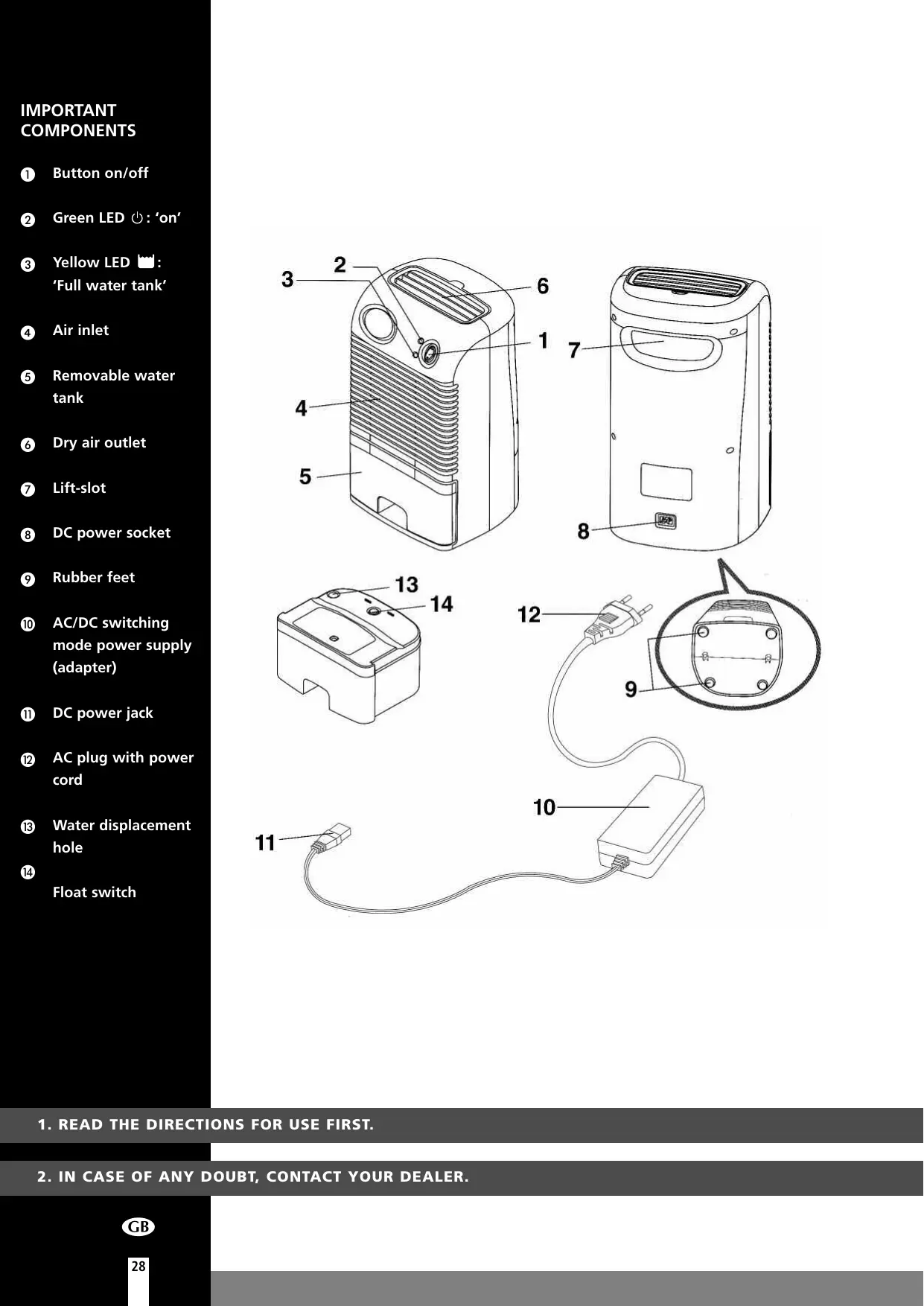
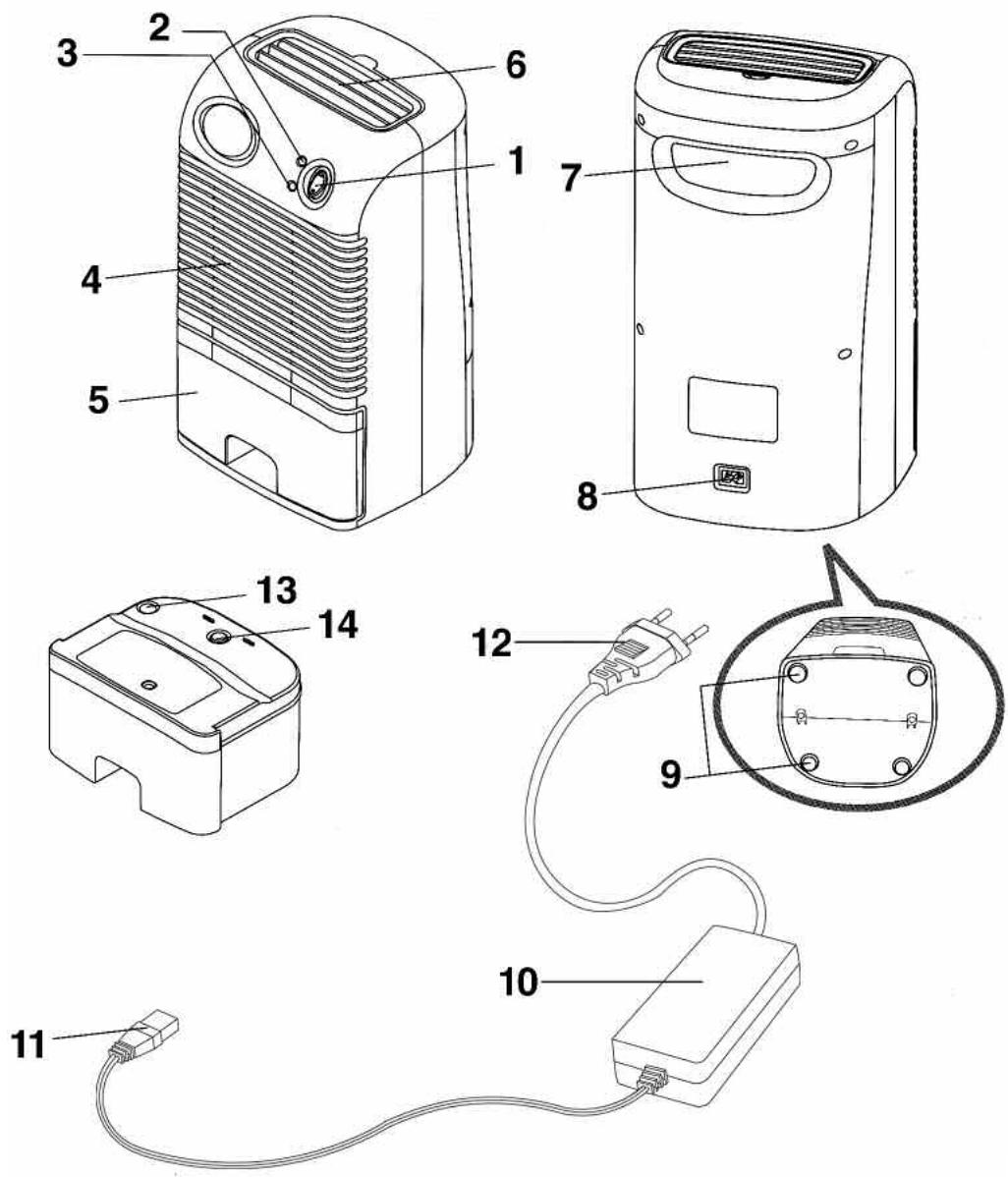
Button on/off
GreenLED 心 ^ 'on'
③ Yellow LED 'Full water tank'
Air inlet
Removable water tank
6 Dry air outlet
Lift-slot
DC power socket
Rubber feet
10 AC/DC switching mode power supply (adapter)
DC power jack
AC plug with power cord
13 Water displacement hole
14 Float switch
- READ THE DIRECTIONS FOR USE FIRST.
- IN CASE OF ANY DOUBT, CONTACT YOUR DEALER.
Dear Sir, Madam,
Congratulations on the purchase of your Zibro mini-dehumidifier. This dehumidifier is extremely easy to operate and move. You have acquired a high quality product that will provide you with many years of pleasure, on condition that you use it responsibly. The Zibro mini-dehumidifier uses Peltier technology (no compressor) which makes it light and quiet. It is perfect for small rooms as an alternative for chemical substances to remove moisture. Poor ventilation causes musty odour and fungus in wardrobes, larder, etc. The Zibro eliminates this problem by keeping them free of unwanted moisture. Reading these instructions for use before operating your Zibro will optimise its life span. We wish you comfort with your Zibro.
Yours sincerely,
PVG International b.v.
Customer service department
A SAFETY
Install the device only when it complies with local regulations, by-laws and standards. The unit is only suitable for use in dry locations, indoors. Check the mains voltage and frequency. This unit is only suitable for sockets, connection voltage 220-240 V. / 50 Hz.
GENERAL
- To obtain optimum performance from your dehumidifier, do not place it near a radiator or any other heat source.
- Ensure that all windows are closed in order to achieve maximum efficiency.
- The capacity of the dehumidifier depends on the temperature and the humidity in the room. At lower temperatures, less moisture will be removed.
- Ensure that the screen filter is kept clean. This prevents unnecessary power consumption and guarantees optimum efficiency.
- If the power supply has been interrupted, the defumidifier will restart after three minutes. The automatic delay protects the compressor.

IMPORTANT
The plug must always be easily accessible when the unit is connected. Read these instructions carefully and follow the instructions.
Before connecting the unit, check the following:
- The voltage supply must correspond with the mains voltage stated on the rating label.
- The socket and power supply must be suitable for the current stated on the rating label.
- The plug on the cable of the device must fit into the wall socket.
The device must be placed on a flat and stable surface.
The electricity supply to the device must be checked by a recognised professional if you have any doubts regarding the compatibility.
- This device is manufactured according to CE safety standards. Nevertheless, you must take care, as with any other electrical device.
- Do not cover the air inlet and outlet grill.
- Empty the water reservoir before moving the unit.
- Never allow the device to come into contact with chemicals.
- Never spray the unit with or submerge in water
- Do not insert objects into the openings of the unit.
- Always remove the plug from the electric power supply before cleaning or replacing the unit or components of the unit.
- Never use an extension cable to connect the device to the electric power supply.
- For safety reasons take care when children are in the surrounding of the device, as with any other electrical device.
- Have any repairs only carried out by a recognised service engineer or your supplier. Follow the instructions for use and maintenance as indicated in the user manual of this device.
Always remove the plug of the unit from the wall socket when it is not in use.
- A damaged power cord or plug must always be replaced by a recognised electrician or your supplier.

ATTENTION!
- Never use the device with a damaged power cord, plug, cabinet or control panel. Never trap the power cord or allow it to come into contact with sharp edges.
- Failing to follow the instructions may lead to nullification of the guarantee on this device.
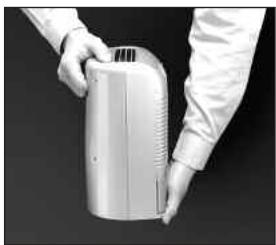
Fig. 1
- Avoid using the AC/DC switching mode power supply in wet or damp place, and position it in areas where the air ventilation is good.
- If the unit has been properly connected and no power is flowing, have the AC/DC switching mode power supply checked by a qualified electrician to ensure that the fuses inside the switching mode power supply are not faulty.
Always keep the unit at an up-right position to avoid water leakage. - The thumb should be placed at the top centre of the unit while lifting by the lift-slot (7), to avoid tilting. At the same time, the other hand should be holding the base to secure the unit. [as Fig. 1]
- Do not use the dehumidifier in combination with an other power source then the one enclosed, to prevent damage to the unit and dangerous situations.


WARNING
- To avoid electric shock. Do not open. There are no user serviceable parts inside.
- Any repair work must be done by qualified technician appointed by our distributors.
- Specifications are subject to change for improvement without prior notice.
B CONNECTION
1 After removing the packaging materials, there should be 2 items:
a. Zibro Dehumidifier
b. AC/DC switching mode power supply (220/240 V / 13V)
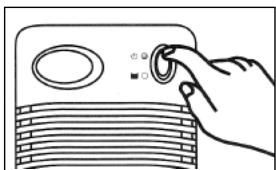
Fig. 2
Plug the DC power jack (11) of the switching mode power supply to the DC power socket (8), then connect the AC plug (12) of the switching mode power supply to the appropriate main socket.
C CONTROLS
Press the button (1) to position , the Zibro will begin to operate. The green LED will be turned on. Listen and feel for the air blowing from dry air outlet. [as Fig.2]
2 To switch off the unit, press button (1) to 'off' position, the Zibro will be turned off. [as Fig.3]
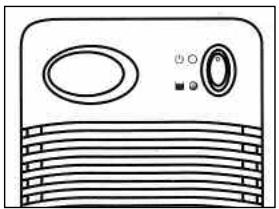
Fig. 4
D REMOVABLE WATER TANK
When the water tank is full, with approximately 1 litre of water collected, the unit will be switched off automatically and the "Yellow" LED (3) will be on [as Fig.4].
1 To remove the water tank, first switch off the Zibro Dehumidifier, press button (1) to the 'off' position.
2 Then, remove the water tank from the unit and pour the water out to the toilet or bathroom. Put the water tank back into the unit.
3 To continue dehumidifying, press the button (1) to position again.
E CLEANING
Before cleaning the unit, turn off the Zibro and unplug the AC plug from the main socket first. Use a piece of soft cloth to clean the surface of the product or use a brush to wipe the dust off the grills of the air inlet (4).
F SPECIFICATIONS
To be used as indication, subject to modifications
| Model | D4 | |
| Power supply | Vac / Hz / f | 230 / 50 / 1 |
| Power consumption | W | 65 |
| Current | Vdc / A | 12 / 5 |
| Dehumidification * | L / 24h | 0.7 |
| Air flow max. | m³/h | 25 |
| Fan speeds | 1 | |
| Operating temperature | °C | 15-32 |
| Water container capacity | L | 1 |
| Cooling element | Thermo-electric Peltier module | |
| Noise level | dB (A) | <48 |
| Dimensions (b x d x h) | mm | 168x295x160 |
| Weight | kg | 2.5 |
| Fuse rating | 250V, T2.5A | |
- Moisture removal at 32°C, 80%RH
G CONDITIONS OF WARRANTY
There is a two-year warranty on your dehumidifier from the date of purchase. All material or manufacturing defects will be repaired free of charge.
The following applies:
- All claims for compensation, including consequential damage, will not be entertained.
- Any repairs or replacement of components during the warranty period will not result in an extension of the warranty period.
- The warranty will expire if any alterations have been made, not genuine components have been fitted or if the dehumidifier has been repaired by a third party.
- Components subject to normal wear and tear, such as the air filter, are not covered by the warranty.
- The warranty is only valid on presentation of the original, unaltered, and date-stamped purchase receipt.
- The warranty does not cover damage caused by actions that deviate from those as described in the user's manual or by neglect.
- Transportation costs and the risks involved during the transportation of the dehumidifier or components shall always be for the account of the purchaser.
To prevent unnecessary expenses, we recommend that you always carefully read the user's manual first. If this does not provide a solution, take the dehumidifier to your distributor for repair.

Waste electrical products should not be disposed with household waste. Please recycle where facilities exist. Check with your local authority or retailer for recycling advice.
COMPONENTISTICA DI BASE
Holloway Bank, Wednesbury
West Midlands WS10 OAW
tel.: +44 121 506 1818
fax: +44 121 505 1744
email: gases@lister.co.uk
ITALIA
PVG Italy SRL
Via Niccolò Copernico 5
50051 CASTELFIORENTINO (FI)
tel: +39 571 628 500
fax: +39 571 628 504
email: pvgitaly@zibro.com
N NORGE
Sunwind -Gylling A/S
Rudsetta 71-75 / P.O. Box 64
N-1309 RUD
tel: +4767171370
fax: +47 67 17 13 80
email: pvgint@zibro.com
NEDERLAND
PVG International B.V.
P.O.Box 96
5340 AB OSS
tel: +31 412 694 694
fax: +31 412 622 893
email: pvgnl@zibro.com
PORTUGAL
Gardena, Lda
Brand : ZIBRO
Model : D4
Category : Auxiliary heating