
BLOOD PRESSURE MONITOR MD 42780 - Blood pressure monitor MEDION - Free user manual and instructions
Find the device manual for free BLOOD PRESSURE MONITOR MD 42780 MEDION in PDF.


| Product type | Electronic wrist blood pressure monitor |
| Brand | MEDION |
| Model | MD 42780 |
| Measuring principle | Oscillometric |
| Blood pressure measuring range | 20 - 280 mm Hg |
| Pulse measuring range | 40 - 180 pulses/min. |
| Blood pressure accuracy | ±3 mm Hg |
| Pulse accuracy | ±5% |
| Memory | 90 results with date and time |
| Compatible wrist circumference | 135 to 220 mm |
| Dimensions (unit) | ~79 x 72 x 71 mm |
| Weight (without batteries) | ~120 g |
| Power supply | 2 AAA 1.5 V alkaline batteries |
| Display | LCD |
| Deflation | Automatic pressure release valve |
| Operating temperature | 5 °C to 45 °C |
| Operating humidity | 40% to 85% RH |
| Storage temperature | -10 °C to 60 °C |
| Storage humidity | 10% to 95% RH |
| Supplied accessories | Storage case, 2 AAA batteries |
| Maintenance | Soft, slightly damp cloth, do not immerse |
| Safety | Do not open or repair yourself |
| Recommended use | For ages 14 and up, private use, non-medical |
Frequently Asked Questions - BLOOD PRESSURE MONITOR MD 42780 MEDION
User questions about BLOOD PRESSURE MONITOR MD 42780 MEDION
0 question about this device. Answer the ones you know or ask your own.
Ask a new question about this device
Download the instructions for your Blood pressure monitor in PDF format for free! Find your manual BLOOD PRESSURE MONITOR MD 42780 - MEDION and take your electronic device back in hand. On this page are published all the documents necessary for the use of your device. BLOOD PRESSURE MONITOR MD 42780 by MEDION.
USER MANUAL BLOOD PRESSURE MONITOR MD 42780 MEDION
Safety instructions 2
Information about blood pressure and measuring blood pressure 5
What is blood pressure? 5
Measuring blood pressure 6
General view 10
The unit 10
Accessories 10
The display 11
Before use 12
Inserting batteries 12
Setting the date and time 13
Measuring blood pressure 14
Attaching the wrist sleeve 14
Preparing for the measurement 15
Measuring 15
Memory function 17
An error display appears 19
Technical data 20
SAFETY INSTRUCTIONS
for using this unit correctly
The unit is suitable for healthy persons above 14 years of age. Use the unit for comparative measurements, particularly during sporting activities.
Do NOT use the unit for medical diagnosis. The unit is intended solely for private use and is not a replacement for medical procedures.

Read these instructions carefully and only use the unit as described here. If you give the unit away, please also pass on these instructions.
Keep battery-operated units away from children
The unit is battery-operated. If swallowed, batteries may endanger life. For these reasons, keep the unit out of reach of children. If a battery is swallowed, please obtain immediate medical assistance.
Using the product correctly
Leaking batteries may damage the unit. You should therefore remove the batteries if the unit will be out of use for a longer period of time. Only start the air supply once the unit is attached correctly to the arm.
Only start the air supply once the sleeve is attached correctly to the wrist. Never press the START button if the sleeve is not attached.

Never try to open and/or repair the appliance yourself. Do not make any changes to settings inside the unit using your own tools. Contact our Service Centre if the unit is defective.
This unit consists of precision parts and must therefore not be exposed to
- extreme changes in temperature
- damp (including dripping water and splashes)
- direct sunlight
- shock
dust.
Never immerse the unit in water.
Do not bend the fixed part of the sleeve.
Do not drop the unit and do not load objects on top of it.
If the unit is stored near to freezing point, leave it to warm up to room temperature before use.
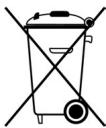
Dispose of batteries carefully
Do not dispose of used batteries in the household rubbish!
Batteries should be deposited at a collection point for used batteries.
Notes on maintenance
It is recommended that you check the usability of the unit every three years at least.
Signs used in the operating instructions and on the unit:
Caution! Please take note of the accompanying documents (operating instructions).
Application part of type BF


GB
Cleaning
You can clean the casing of the blood pressure computer and the sleeve carefully using a soft, slightly damp cloth. Do not apply any pressure during cleaning.
Do not bend the preshaped sleeve outwards. The sleeve must be neither washed nor dry cleaned.
Never use thinners, alcohol or petrol as cleaning materials.
INFORMATION ABOUT BLOOD PRESSURE AND MEASURING BLOOD PRESSURE
The consequences of too high blood pressure are one of the main causes of death today. Many people are unaware that their blood pressure is too high. This blood pressure measuring unit helps you to take regular, comparative measurements. (Individual, irregular measurements are not very meaningful; see below.)
GB
What is blood pressure?
Blood pressure is a measurement of the force that the heart has to exert to pump the blood through the circulatory system and vital organs in the body. The higher the pressure, the harder the heart has to work.
Blood pressure can be higher than usual if parts of the circulatory system are restricted, diseased or abnormal in other ways. High blood pressure can cause damage to vital organs including the brain and heart.
Normal and high blood pressure
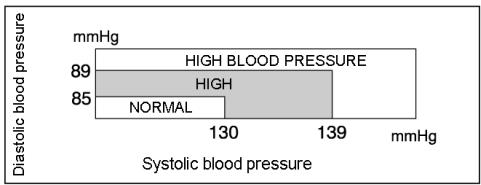
The guidelines for normal and high blood pressure (diastolic and systolic value) have been defined by the World Health Organization "WHO" as shown in the following table.
Measuring blood pressure
Everybody's blood pressure changes constantly. Fluctuations may be caused by mental and physical factors (such as fear, exertion, smoking, caffeine and stress). Blood pressure can also be affected by the time of day, time of year and temperature.
The following diagram shows typical blood pressure fluctuations in the course of a working day:
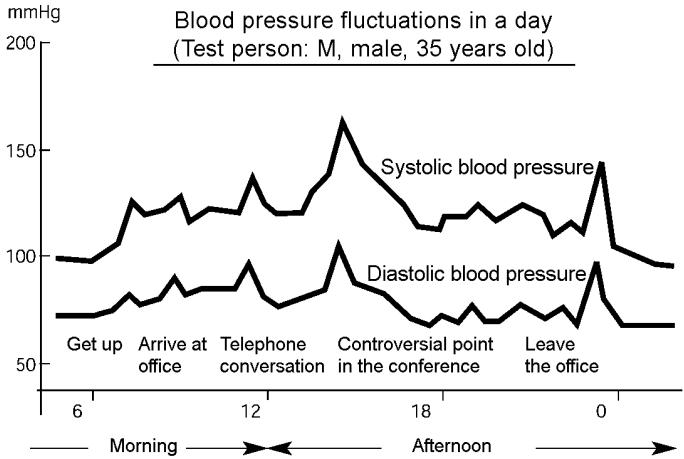
As this figure shows, you should not become depressed or too pleased about individual, selective measurements.
Important notes on correct measurement
With the help of your unit, you can create a clear overview of your blood pressure by measuring it regularly.
Note the following points so that the values give a realistic image of your blood pressure:
Measure your blood pressure several times a day, but always at the same time of day.
Measure your pressure when you are relaxed. Try to rest for fifteen minutes before measuring your blood pressure.
GB
□ You should wait an hour after a large meal before measuring your blood pressure.
- Do not smoke or drink alcohol before measuring your blood pressure.
- Do not undertake any physical activity an hour before measuring your blood pressure.
- Do not measure your blood pressure if you are under stress or are tense.
Measure your blood pressure at normal body temperature, but not if you are too hot or cold.
Wait for approx. 5 minutes if you want to measure your blood pressure again.
Have a doctor diagnose your measurements
After you take your measurements, a doctor should interpret the values and diagnose them. The doctor will tell you which blood pressure level is normal for you, and which peculiarities you should report if they occur.

Do not implement any therapeutic measures without having spoken to a doctor first. NEVER take medicine in particular as a result of the measured values without asking a doctor for advice!
Attention is advised for the following persons: Persons with high blood pressure, diabetes, liver disease, hardened arteries, poor circulation and so on.
The unit's measuring technology
Your blood measuring unit contains high quality technical components and materials for measuring pressure, processing the signals and displaying the values on a liquid crystal display. It also measures and displays your pulse frequency.
The unit measures blood pressure indirectly using a sleeve around the wrist. Inflating the sleeve presses the arteries together so that no more blood can flow through them. If the pressure in the sleeve is then reduced, this creates a relation between the sleeve pressure and the blood pressure.
The unit has electronic step valves that can detect even slight changes during the measurement, which can be evened out using the sleeve pressure. By reducing the pressure step-by-step, fluctuations in the sleeve are recorded by the unit and included in the assessment. If no fluctuations are recorded for a step, the air pressure is reduced. Existing fluctuations are assessed at the corresponding step level until they can be determined precisely.
Arm and wrist measurement
Blood pressure measured at the wrist can differ from the pressure measured at the upper arm, for example because the strength of the arteries in the wrist and upper arm may differ.
In many cases, the difference for healthy persons can be ± 10 mmHg of the systolic and diastolic blood pressure.
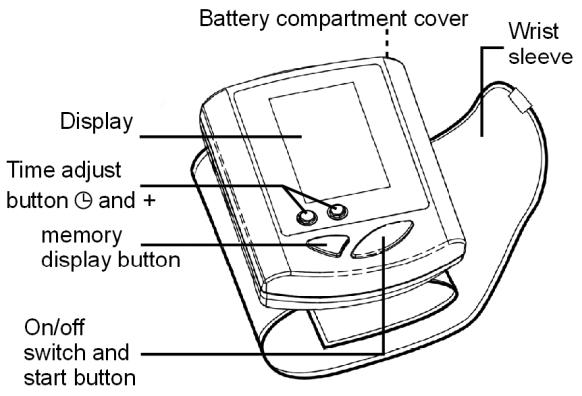
The unit
Accessories
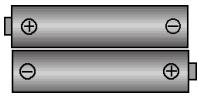
2 alkali batteries, 1.5 V type
"AAA" LR03
Storage case
GB
Signs:
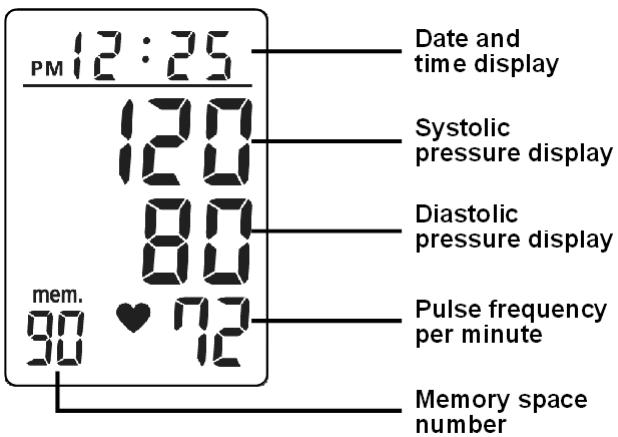
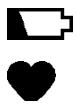
The change battery sign appears if the batteries need to be changed.
The pulse sign appears when the pulse is displayed.
The memory sign indicates the number of the memory space. You can save up to 90 measurements including the date and time in the unit's memory.
The error sign appears if there is an operation or unit error.
mem.
EE
The battery compartment is located at the back of the unit.
- Push the cover upwards.
- Insert the two 1.5 V alkali type "AAA" batteries supplied as shown. Pay attention to the polarity (the negative terminal faces the spring).
- Replace the cover on the battery compartment.
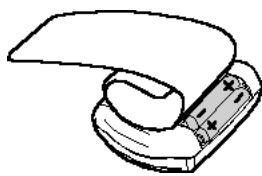
Changing batteries

Change the batteries when the battery change sign is displayed.
You should also change the batteries if nothing appears on the display when you turn the unit on.
Always change both batteries together as a pair.

As the supplied batteries are intended for checking, they may expire sooner than commercially-available batteries.

Notes on disposal
Batteries are special waste. Do not dispose of them in the household rubbish!
Setting the date and time
You can adjust the time by pressing the time adjust button. The month flashes on the display.
Change the month by pressing the ^+ button. Each time you press the button the month moves on one. After number 12 (December), 1 (January) appears again.
Press the time adjust button (or wait approx. 10 seconds) to access the next setting. The day flashes.
Set the date using the ^+ button.
Press the time adjust button
(or wait approx. 10 seconds) to access the next setting. The hour display flashes.
□ AM: If "AM" is displayed in front of the time, then you are in the morning hours (0:00 to 11:59).
PM: If "PM" is displayed in front of the time, then you are in the afternoon/evening hours (12:00:00 PM to 23:59).
Set the hours using the ^+ button.
Press the time adjust button (or wait approx. 10 seconds) to access the next setting. The minute display flashes.
Set the minutes using the ^+ button.
Press the time adjust button (or wait approx. 10 seconds) to confirm the setting.
After running through all settings, the unit returns to normal mode.
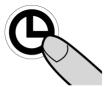
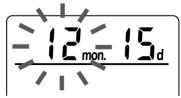

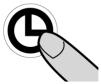


GB
MEASURING BLOOD PRESSURE
Attaching the wrist sleeve
Remove your watch, jewellery etc. and roll up your sleeve. The unit has to be placed directly on your skin to provide a correct measurement.
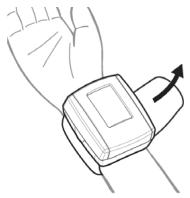
- Attach the wrist sleeve in such a way that it is approx. 1cm away from the palm of your left hand (see fig. B). Ensure that no articles of clothing are trapped in the sleeve.
- Hold the lower part of the sleeve as shown in fig. C. Pull down and wrap it around and upwards, so that there is no gap between the sleeve and your wrist.
- Your thumb holds the sleeve cover as you wrap it around and upwards. Wrap the sleeve according to the shape of your wrist. The result of the measurement is not affected if the sleeve is not straight.
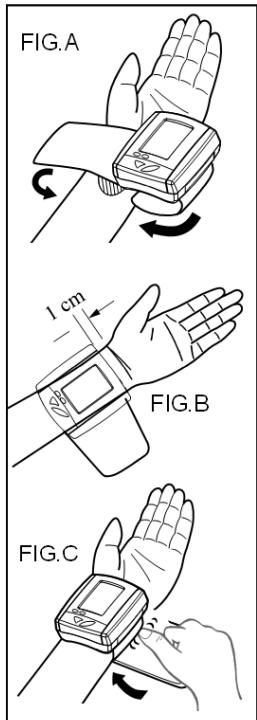
If the sleeve cannot be attached to your left arm and if it is not possible to measure your left arm, use your right one. Attach the sleeve as shown in the figure on the right-hand side.
GB
Preparing for the measurement
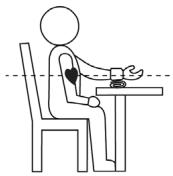
Place your elbow on the table or something to lean on and hold your arm so that the wrist sleeve is at heart height. In doing so, support your lower arm on the storage box or on a folded towel or similar.
To measure your blood pressure, sit comfortably on a
chair, take 5 or 6 deep breaths and relax.
Measuring
Press the on/off button.
All lights on the display light up when you press the on/off button. You can use this test to check that the display is complete. This process takes approx. 2 seconds.
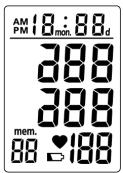
The image opposite appears after this display test. The unit is ready for measuring. The "0" flashes and the unit automatically starts to inflate the sleeve.
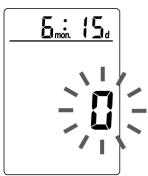

Do not move the sleeve, or your arm or hand muscles while your blood pressure is being measured, and do not speak.
The unit first inflates the sleeve to approx. 180 mm-Hg. The measuring process begins once the correct sleeve pressure has been reached; the value falls.
If you want to cancel the measurement, switch the unit off. The sleeve deflates.
Ending the measurement
The sleeve deflates when the measurement is complete. The systolic and diastolic blood pressure and the pulse with the pulse sign appear in the
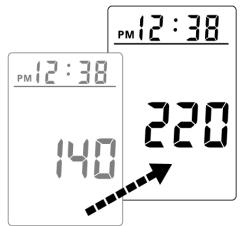
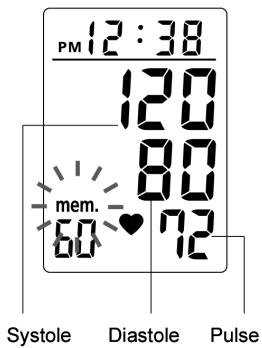
display. The "mem" memory sign flashes and the memory number appears.
The measurement values are transferred automatically to the memory. You do not need to press the M button.
Errors inflating the sleeve?
If the sleeve pressure is too low, the unit interrupts the measuring process and inflates the sleeve
again until sufficient sleeve pressure is reached for the measurement.
If the sleeve remains permanently inflated, remove the sleeve from the wrist and contact the Service Centre.
The sleeve cannot be inflated if the USB cable is plugged in.
Switching off the unit
Press the on/off button to switch off the unit. The display will go out.
If you forget to switch off the unit, it switches off automatically approx. 1 minute after the last button was pressed.
Memory function
Measurement values (blood pressure and pulse) are stored automatically in the memory together with the date and time once the measurement is complete.

Displaying memory values
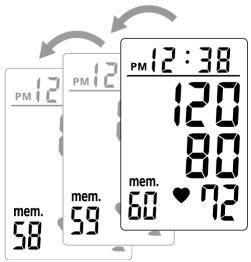
To display the saved measurement values press the memory button M (= "Memory"). It does not matter whether the unit is on or off. The first value displayed is the one that was last measured (such as memory space 60).
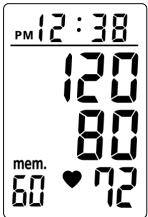
Press the M button again to display the previous memory values (59, 58, 57 etc.). The time and date change every 2 seconds during the display.
Deleting thememory contents
If you press the M memory button for 5 seconds, you delete all recordings in the memory.
The data is also deleted if you remove the batteries. The saved data remains stored if you press the on/off button.
AN ERROR DISPLAY APPEARS
| Display | Error/cause | Troubleshooting |
| The display remains dark | The unit is not on. The batteries are too weak. The batteries were not inserted correctly. | Check that the batteries have the correct polarity. If necessary, replace the batteries. |
| Display "EE" | You spoke or moved while measuring your blood pressure. The sleeve is not attached correctly. You did not hold the unit up to heart height. | Remain quiet for the duration of the measurement. Attach the sleeve carefully. Keep your arm and the unit at heart height |
| Display "E2" | You moved while you were measuring your blood pressure. | Remain quiet for the duration of the measurement (do not move or speak). |
| The batteries are dead. | Replace the batteries with new alkali type AAA batteries. |
GB
TECHNICAL DATA
Model: K350 MD42780
Principles of measurement: oscillometric
Display: LCD
Measuring range: 20 - 280 mmHg (blood pressure)
40 - 180 pulse/min. (pulse frequency)
Measuring accuracy: ±3 mmHg (pressure display)
Ventilation: automatic escape valve
Power supply: high-capacity or alkali batteries:
2 × 1.5 ~V = type AAA/LR03
Memory: 90 measurement results
Operating temperature: 5^ C to 45^ C
max. 40 to 85% relat. humidity.
Storage temperature: -10°C to 60°C
max. 10 to 95% relat. humidity.
Sleeve: for wrist circumference
135-220mm circumference
Size(unit of measure): approx. (79× 72× 71)mm
Weight: approx. 120g (excluding batteries)
Manufactured in 2004
TABLE DE MATIERES
A napot is a ^+ gombbal allitsa be.