MD 15231 - Sphygmomanometer MEDION - Free user manual and instructions
Find the device manual for free MD 15231 MEDION in PDF.


| Product Type | Blood Pressure Monitor (Wrist) |
| Brand | MEDION (health+) |
| Model | MD 15231 |
| Measurement Method | Oscillometric |
| Blood Pressure Range | 30 – 250 mmHg |
| Pulse Range | 40 – 180 beats/min |
| Pressure Accuracy | ±3 mmHg |
| Power Supply | 2 x 1.5V batteries (AAA/LR03 alkaline) |
| Display | LCD (date, time, BP, pulse, color indicator) |
| Memory | 2 units x 60 measurements each (120 total) |
| Sleeve Size (Wrist Circumference) | 14 – 19.5 cm |
| Weight (without batteries) | Approx. 108 g |
| Operating Temperature | +5°C to +40°C |
| Operating Humidity | < 80% RH |
| Storage Temperature | -20°C to +55°C |
| Storage Humidity | < 95% RH |
| Intended Users | Healthy adults (14 years and older) |
| Special Features | Irregular heartbeat detection, blood pressure classification indicator (color) |
| Cleaning | Wipe with soft, lint-free cloth (no solvents) |
| Warranty | 3 years |
| Safety Standards | CE0197, EN 1060-1/3, EU Medical Device Directive 93/42/EEC |
| Repair | Only by authorized service center; do not open device |
Frequently Asked Questions - MD 15231 MEDION
User questions about MD 15231 MEDION
0 question about this device. Answer the ones you know or ask your own.
Ask a new question about this device
Download the instructions for your Sphygmomanometer in PDF format for free! Find your manual MD 15231 - MEDION and take your electronic device back in hand. On this page are published all the documents necessary for the use of your device. MD 15231 by MEDION.
USER MANUAL MD 15231 MEDION
Congratulations on choosing to buy a health+ product. By doing so you now have the assurance and peace of mind that comes with purchasing a product made by one of Europe's leading manufacturers.
All products brought to you by health+ are manufactured to the highest standards of performance and safety, and, as part of our philosophy of customer service and satisfaction, are backed by our comprehensive 3 Year Warranty.
Please fill in and return the Warranty Card to the address provided.
General information 2
- Please read these operating instructions thoroughly and follow them and the safety notes in particular before using the appliance for the first time!
- Anything done to or with this appliance may only be undertaken as described in the operating instructions.
- If you pass on your device to someone else, always include the operating instructions.
Safety instructions 3
- This device is not intended to be used by individuals with limited physical, sensory or intellectual abilities or limited experience, and/or a lack of knowledge (including children), unless they are being supervised by an individual responsible for their safety or receive instructions from them concerning how the device must be used.
- Children should be supervised in order to ensure that they do not play with the device.
- Keep the device and its accessories out of reach of small children.
- Keep the packing materials, such as foil away from children. The danger of suffocation could arise in the case of misuse.
- The device is suitable for healthy adults. Use the unit for comparative measurements, particularly during sporting activities. Do NOT use the unit for medical diagnosis. It can not replace medical intervention.
- Only start the air supply (ON/OFF button) once the unit is attached correctly.
- Do not drop the unit and do not place objects on top of it.
-
Never immerse the unit in water. Do not expose it to water or moisture!
-
Do not use the device under extreme temperature conditions!
- Do not bend the fixed part of the sleeve!
Batteries and Proper Treatment
Batteries may contain combustible materials. By misuse, this may cause battery leakage, heat, explosion or ignition, bringing about injury or damage to the device.
Please observe strictly the following matters:
- The unit is battery-operated. Batteries may endanger life if swallowed. For these reasons, keep the unit out of reach of children. If a battery is swallowed, please obtain immediate medical assistance.
- Clean the battery and device contacts, if necessary, before inserting batteries.
- Do not charge batteries (except rechargeable batteries).
- Do not forcibly discharge batteries.
- Do not short-circuit batteries.
- Do not heat or dispose off in fire.
- Do not disassemble or deform batteries. Your hands and fingers may be injured, or the liquid of the battery may get into your eyes or adhere to your skin. If this happens, rinse with a large quantity of water immediately and consult a doctor.
-
Do not expose batteries to strong impact by dropping or throwing the batteries.
-
Do not reverse the positive (+) and negative (-) terminals to avoid short-circuit.
- Do not mix used and new or different types of batteries together.
- Remove the used batteries promptly from the device.
- Remove the batteries from your device if it is not to be used for a long period.
- Replace all batteries with new batteries of the same type at the same time.
Disposal
- Your device is packaged to protect it against damage during transportation. The packaging is manufactured from materials that can be sent to a specialist recycling facility and disposed of in an environmentally-friendly way.
- At the end of its life, the appliance must not be disposed of in household rubbish.
- Do not dispose of used batteries in the household rubbish! They must be deposited at a collection point for used batteries.
Repair
- Leave all repairs of your device to authorized and qualified personnel only.
- Never try to open and/or repair the unit yourself. Repairs may only be undertaken by our Service Centre or other appropriate specialist workshop.
About this device 4
Purpose of use
The device is used to measure blood pressure at the wrist. It is suitable for healthy people above 14 years of age and can be used to make comparative measurements – especially during sporting activities.
The memories are stored in two units, and each unit can store 60 memories at most.
This device is only suitable for using in dry, internal rooms.
This device is intended for personal use only. It is not
intended to commercial use in a heavy industry
environment. Use under extreme environmental conditions
can result in damage to your device.
If the values obtained give you cause to be concerned about your health, take medical advice. Do not change your treatment/dosage of medication as a result of the values unless you have discussed this with your doctor!
Blood pressure values
When interpreting the values measured, please note that there can be differences in the values measured at the wrist and arm. However, because the values measured at the upper arm and wrist undergoes the same changes the values measured at the wrist can be used for comparative measurements.
The blood pressure measurement device displays blood pressure (systolic and diastolic values), pulse, date and time. The following summary can help you to assess the values you measure.
Classification of blood pressure in mmHg

heatmap
| Diastolic value | Systolic value | Zone | | --------------- | -------------- | ----------------- | | 90 | 130 | High pressure zone | | 85 | 140 | Prehypertension | | Normal zone | - | Normal zone |The classification of blood pressure values is based on a definition and classification by the WORLD HEALTH ORGANISATION from 1999. The WHO defines high blood
pressure as values above 140 mmHg (systolic value) and 90 mmHg (diastolic value).
The new blood pressure classification indicator visually indicates user's blood pressure category,
| Blood pressure classification | systolic mmHg | diastolic mmHg | Colour-indicator |
| Low < 90 < 50 Green | |||
| Normal 91 - 129 51 - 84 Green | |||
| High-Normal 130 - 139 85 - 89 Green | |||
| Hypertension stage I | 140 – 159 90 – 99 Yellow | ||
| Hypertension stage II | 160 – 179 100 – 109 Orange | ||
| Hypertension stage III | >180 >110 Red | ||
Overview and Display 5

- Colour indicator
- Battery icon, the battery icon appears if the batteries need to be changed.
- Time
- Date (M month; D day)
- M: Memory button: save measured blood values, set date and time,
- Power button: Start measurement, confirm date and time setting.

- Memory sign
- Number of measurement (01 – 60) 01 last measurement, 02 previous measurement, etc.
- Blood pressure classification
- Pulse sign
- Pulse frequency per minute
- Diastolic pressure display Display of the memory unit (U1/U2)
- Systolic pressure display,
- Irregular heartbeat indication
Getting started 6
Inserting the batteries
- Remove the cover of the battery compartment in the direction of the arrow.
- Insert two 1.5V batteries size AAA/LR03 (alkaline). Pay attention to the polarity (the negative terminal faces the spring).
- Close the battery compartment.
Replace the batteries
• if the battery icon appears on the display,
- if the display remains blank after pressing the ON/OFF button.
Replace all batteries with new batteries of the same type at the same time. Do not mix used and new or different types of batteries together.
Rechargeable batteries are not suitable for the operation of this device.
Setting the date and time
- Press the buttons ⏻ and M at the same time. The current month flashes.
- Press the M button repeatedly to set the current month.
- Press the ⏻ button. The day flashes.
- Press the M button repeatedly to set the current day.
- Press the ⏻ button. The hour flashes.
- Press the M button repeatedly to set the current hour.
- Press the ⏻ button. The minutes flash.
- Press the M button repeatedly to set the current minutes.
Date and time have been set. The flashing bar disappears after 10 seconds.
- Press the ⏻ button to finish the date and time setting.
The device closes the setting mode automatically after one minute.
Usage 7
- Attach the wrist sleeve in such a way that it is approx. 5 – 10 mm away from the palm of your left hand (see fig. B). Ensure that no articles of clothing are trapped in the sleeve.
- Hold the lower part of the sleeve as shown in fig. C. Pull down and wrap it around and upwards, so that there is no gap between the sleeve and your wrist.
- Use your thumb to hold the sleeve cover while you wrap it upwards.
- Wrap the sleeve according to the shape of your wrist. If the sleeve is not firmly attached the pressure will increase and the wrist will become numb. Correct measurement is then no longer possible.
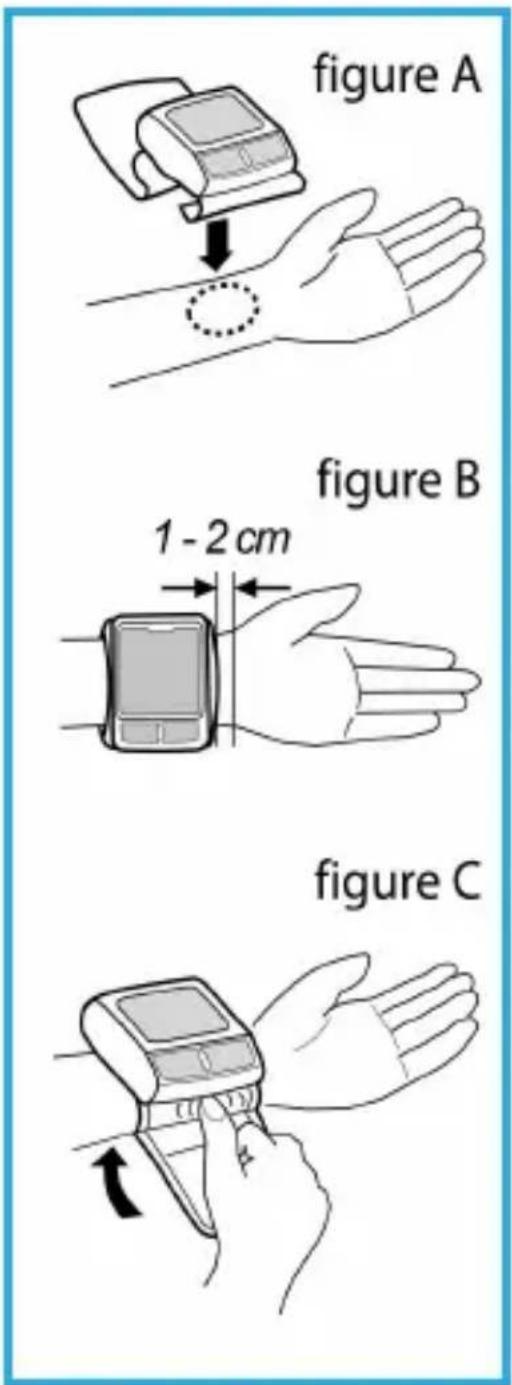
If the sleeve cannot be attached to your left arm and if it is not possible to measure your left arm, use your right one. Attach the sleeve as shown in fig. D.

Correct measurement 8
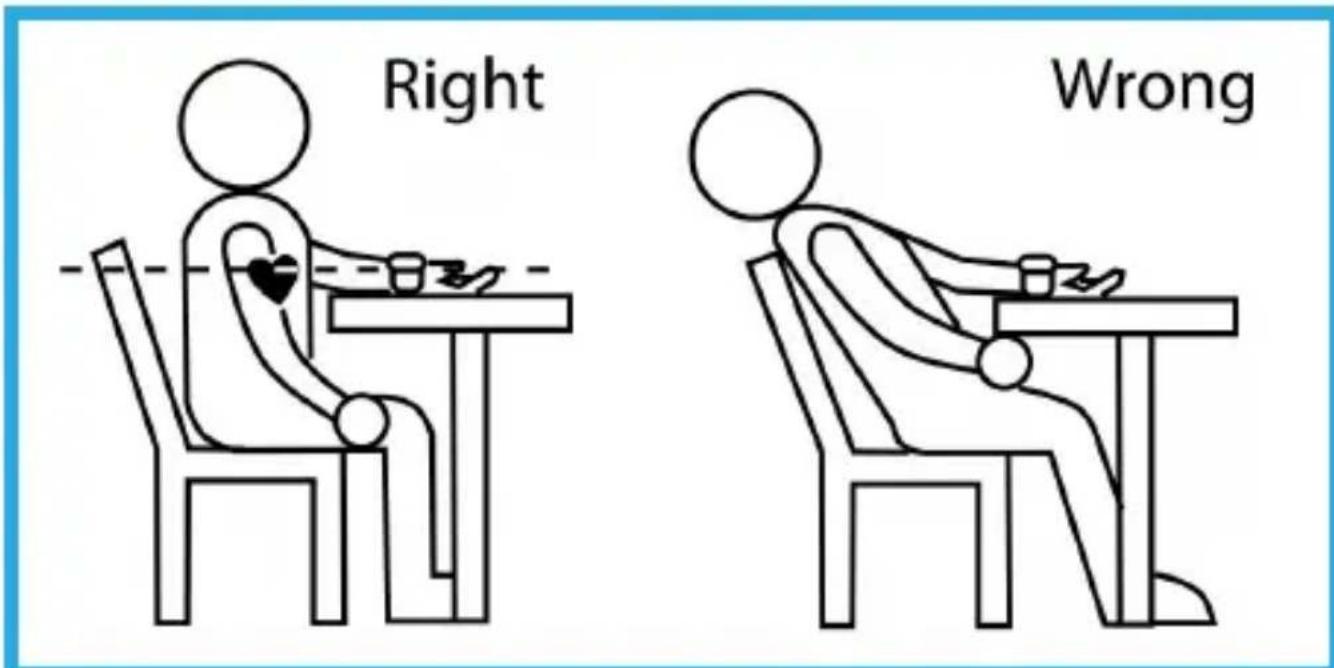
Place your elbow on the table or other supporting surface, and hold your arm so that the wrist sleeve is at heart height. In doing so, support your lower arm on the storage box or on a folded towel or similar.
To measure your blood pressure, sit comfortably on a chair, take 5 or 6 deep breaths and relax.
Always measure your blood pressure at the same time each day! It is important to measure your blood pressure at home and at the same time each day so that the blood pressure, which can change over the course of a day, is recorded properly.
Inform your doctor of the values measured so that he can give you medical advice.
Blood pressure measured at the wrist can vary from that measured at the upper arm. The values may be slightly different because of the different measurement positions and the strength of the blood vessels in the wrist and upper arm. In many cases, the difference for healthy people can be ±10 mmHg of the systolic and diastolic blood pressure.
Attention is advised for the following types of person: People with high blood pressure, diabetes, liver disease, hardened arteries, poor circulation.
Carrying out measurements
- Attach the wrist sleeve to your wrist as described above.
- Press the ⏻ button.
All indicators are displayed for a few seconds on the screen; then the screen shows the time and the most recently selected memory unit (U1/U2).
- You can modify the current memory unit by pressing the button M.
If you have already stored measurements in this unit the display shows the latest values.
During measurement do not move the sleeve or your arm or hand muscles.
A few seconds later the monitor starts searching the zero point. When the air pressure is stable the monitor begins to measure automatically.
- If you want to stop the measurement, press the button. The air is released from the sleeve.

If you want to repeat a measurement you should wait at least five minutes. The air must be completely removed from the sleeve.
Automatic Measurement
Measurement starts automatically; the device pumps up the sleeve. If the sleeve pressure is too low the device pauses and pumps up the sleeve again until it reaches a sleeve pressure that is appropriate for the measurement.
The device also measures your pulse. The value displayed will fall during measurement.
The sleeve deflates when the measurement is complete. The systolic and diastolic blood pressure and the pulse with the pulse icon appear in the display.
Indication of an irregular heartbeat (arrhythmia)
The pulse normally beats evenly (rhythmically). The symbol will appear in the display if the device perceives irregularities in the rhythm of the pulse.

Repeat the measurement in this case.
There can be different causes of irregularities in the rhythm of the pulse. Please consult your doctor if your pulse is arrhythmic in the long term.
If you want to repeat a measurement you should wait at least five minutes. The air must be completely removed from the sleeve.
Memory unit 9
Reading the stored values
The device has two memory units U1 and U2. Up to 60 measurements can be saved in each unit. You can also display the average values of the saved measurements.
- The device should not be in measure mode. Switch it off if necessary.
- Press the button M to enter the memory mode. On the display appear the memory sign, the memory unit and the number of measurements, which have been stored in this unit.
- You can modify the current memory unit by pressing the ⏻ button.
- Press the button M to display the stored values.
- The measured values are displayed in reverse order. With each press of the button M the previous results appear.
- Press the ⏻ button to exit the memory.
The saved values remain saved when the device is switched of with the ⏻ button.
Deleting memory
- Press the button M to enter the memory mode.
On the display appear the memory sign, the memory unit and the number of measurements, which have been stored in this unit. - Select the memory unit you want to delete by pressing the ⏻ button.
- Press the button M for more than 2 seconds.
A control tone signalizes the deletion. On the display appear two bars.
The values of the selected memory unit are deleted.
Cleaning and maintenance 10
Notes on maintenance
It is recommended that you check the usability of the unit every three years.
Cleaning and storage
Clean the device with a soft, lint-free cloth. Do not use any solvents, corrosive or gaseous cleaning agents.
Store and transport the device in the storage box supplied. Do not bend the preshaped sleeve outwards. The sleeve should neither be washed nor dry cleaned.
If the appliance is not going to be used for long periods, remove the batteries.
Error messages 11
Defect Possible cause and solution
| The batteries are dead | Replace both batteries with 2 new 1.5V, LR03/ AAA batteries | |
| Er 0 | Pressure system is unstable before measurement | Take the measurement again. Don’t move and don’t speak during the measurement. |
| Er 1 | Systolic pressure detect fail | |
| Er 2 | Diastolic pressure detect fail | |
| Er 3 | Pneumatic system blocked or cuff is too tight during inflation. | Place the cuff correctly and try again. |
| Er 4 | Pneumatic system leakage or cuff is too loose during inflation |
Defect Possible cause and solution
| Er 5 | Inflation above 300 mmHg | Take the measurement again after a 5 minute break. Contact the service centre if the error is indicated repeatedly over a long period of time. |
| Er 6 | Over 3 minutes while pressure above 15 mmHg | |
| Er 7 | EEPROM accessing error | |
| Er 8 | Device parameter check error | |
| Er 9 | MCU self-verity error | |
| Er A | Span error |
If you detect failures on the display or wrong measurements, remove the batteries and replace them after 1 minute.
Technical Data 12
Measurement method: oscillometric
Measuring range: Blood pressure: 30 \~ 250 mmHg Pulse: 40 \~ 180 beats/min.
Power supply: 2 x 1.5 V batteries size LR03/AAA (alkaline)
Display: LCD
Memory space: 2 x 60 measurement results
Pressure built up: automatically by pump
Air release: automatically via one-way valve
Measuring accuracy +/- 3 mmHg pressure indicator
Operating temperature: +5 \~ +40 °C air humidity < 80 %
Storage temperature: -20 \~ +55 °C, air humidity < 95 %
Weight: ca. 108 g (excluding batteries)
Sleeve size: 14 \~ 19.5 cm
Subject to technical changes.
The product meets the requirements of the guideline 93/42/EWG for medical devices.
The device corresponds with standards EN 1060-1: 1995 and EN 1060-3: 1997 for non-invasive blood pressure measuring devices.

Type B
The device was manufactured in 2008.
CE0197
The serial number is arranged inside the battery compartment.
Appendix 13
Table 201
| Guidelines and manufacturer's declaration – electromagnetic emissions |
| Model MD 15231 is designed for operation in an environment as described below: The customer or user of Model MD 15231 should ensure that it is operated in such an environment. |
| Interference emission measurements | In line with | Electromagnetic environment guidelines |
| HF emissions according to CISPR 11 | Group 1 | Model MD 15231 uses HF energy exclusively for its internal operation. Therefore its HF emission is very low and it is unlikely that nearby electronic devices should suffer interference. |
| Interference emission measurements | In line with | Electromagnetic environment – guidelines |
| HF emissions according to CISPR 11 | Class B | Model MD 15231 is intended for use in all premises including residential areas and those that are directly connected to public supply networks that also supply buildings that are used for residential purposes. |
| Emission of harmonics according to IEC 61000-3-2 | Not applicable | |
| Emission of voltage fluctuations/flicker according to IEC 61000-3-3 | Not applicable |
Table 202
| Guidelines and manufacturer's declaration – electromagnetic interference immunity |
| Model MD 15231 is intended for operation in an electromagnetic environment as described below: The customer or user of Model MD 15231 should ensure that it is operated in such an environment |
| Interference immunity tests | IEC 60601-test level | Pass level Electromagnetic environment – guidelines | |
| Electrostatic discharge (ESD) according to IEC 61000-4-2 | ±6 kV contact discharge ±8 kV air discharge | N±8 kV Air discharge | Floors should be of wood or concrete or laid with ceramic tiles. If the floor is covered with synthetic material, the relative humidity should be at least 30%. |
| Fast, transient electrical interference/ bursts according to IEC 61000-4-4 | ±2 kV for supply lines ±1 kV for input and output lines | Not applicable | The quality of the power supply should match that of a typical business or hospital environment. |
| Voltage surges according to IEC 61000-4-5 | ±1 kV bipolar voltage ±2 kV unipolar voltage | Not applicable | The quality of the power supply should match that of a typical business or hospital environment. |
| Interference immunity tests | IEC 60601- test level | Pass level | Electromagnetic environment – guidelines |
| Voltage drop-outs, short-term breaks and drops in supply voltage according to IEC 61000-4-11 | <5% UT1)40% UT2)70% UT3)<5% UT4) | Not applicable | The quality of the power supply should match that of a typical business or hospital environment. If the user of Model MD 15231 requires continued operation even if power supply drop-outs occur, we recommend supplying Model MD 15231 from an uninterruptible power supply or a battery. |
| Magnetic field at the power frequency (50/60 Hz) according to IEC 61000-4-8 | 3 A/m Not | applicable | Magnetic fields at the mains frequency should match the typical values found in business or hospital environments. |
| Note: VT is the main AC voltage before application of the test level.1)(>95% drop in VT) for 1⁄2 period2)(60% drop in VT) for 5 periods3)(30% drop in VT) for 25 periods4)(>95% drop in VT) for 5 s | |||
Table 204
| Guidelines and manufacturer's declaration – electromagnetic stability |
| Model MD 15231 is designed for operation in an electromagnetic environment as described below: The customer or user of Model MD 15231 should ensure that it is operated in such an environment. |
| Electromagnetic environment – guidelinesPortable and mobile should not be used closer to the [appliance or system] than the protection distance calculated using the equation applicable for the emission frequency. |
| Interference immunity tests | IEC 60601-test level | Pass level | Recommended protection distance: |
| Conducted HF interference according to IEC 61000-4-6 | 3 Veff 150 kHz to 80 MHz | 3 Veff | d = 1,171/V * |
| Radiated HF interference according to IEC 61000-4-3 | 3 V/m80 MHz to 2,5 GHz | 3 V/m | d = 1,17m/V * 80 MHz to 800 MHz |
| d = 2,33m/V * 800 MHz to 2,5 GHz | |||
Where P is the transmitter's nominal output in Watt (W) according to the information provided by the manufacturer of the transmitter and d is the recommended protection distance in metres (m).The field strength at all frequencies of stationary transmitters is, according to an on-site inspectiona, below the pass levelb. Interference may be experienced in the vicinity of appliances marked with the following symbol  | |||
| NOTE 1: The higher applies at 80 MHz and 800 MHz.NOTE 2: These guidelines may not apply to all situations. The radiation of electromagnetic waves is influenced by absorption and reflection from buildings, objects and people. |
| aThe field strength of stationary transmitters, such as base stations for radio telephones and terrestrial mobile services, amateur stations, AM and FM radio and television transmitters cannot be determined precisely in theoretical terms. In order to determine the electromagnetic environment resulting from stationary HF transmitters we recommend an on-site inspection. If the field determined at the location of Model MD 15231 exceeds the pass level stated above the Model MD 15231 must be checked for normal operation at each point of use. If unusual performance characteristics are observed, it may be necessary to undertake additional measures such as realigning or moving Model MD 15231.bNot applicable in the frequency range from 150 kHz to 80 MHz. |
Table 206
| Recommended protective distances between portable and mobile HF telecommunication devices and the [DEVICE or SYSTEM] |
| Model MD 15231 is intended for operation in an electromagnetic environment in which the HF interference is controlled. The customer or user of Model MD 15231 can help to avoid electromagnetic interference by adhering to the minimum distance between portable and mobile HF telecommunication devices (transmitters) and the Model MD 15231 – depending on the output of the communication device as shown below. |
| Nominal output of transmitter W | Protective distance depending on the transmission frequency m | |||
| 150 kHz to 80 MHz150 kHz to 80 MHz | 80 MHz to 800 MHzd = 1.2 √P | 800 MHz to 2.5 GHzd = 2.3 √P | ||
| outside the ISM bands | within the ISM bands | |||
| 0.01 | N/A | N/A | 0.12 | |
| 0.1 | N/A | N/A | 0.38 | |
| 1 | N/A | N/A | 1.2 | |
| 10 | N/A | N/A | 3.8 | |
| 100 | N/A | N/A | 12 | |
For transmitters whose nominal output is not listed in the above table, the distance can be determined using the equation in the relevant column, where P is the transmitter's maximum nominal output in Watt (W) as specified in the information provided by the transmitter's manufacturer.
NOTE 1 The higher frequency range applies at 80 MHz and 800 MHz.
NOTE 2 The ISM frequency bands (for industrial, scientific and medical applications) between 150 kHz and 80 MHz are 6.765 MHz to 6.795 MHz; 13.553 MHz to 13.567 MHz; 26.957 MHz to 27.283 MHz and 40.66 MHz to 40.70 MHz.
NOTE 3 The pass levels in the ISM frequency bands between 150 kHz and 80 MHz and in the frequency range from 80 MHz and 2.5 GHz are intended to reduce the probability that mobile/portable communication devices might cause interference if they are accidentally brought into the patient area. For this reason the additional 10/3 factor is applied when calculating the recommended protection distances in these frequency ranges.
NOTE 4 These guidelines may not apply to all situations. The radiation of electromagnetic waves is influenced by absorption and reflection from buildings, objects and people.



- General information 2
- Safety instructions 3
- Batteries and Proper Treatment
- Disposal
- Repair
- About this device 4
- Purpose of use
- Blood pressure values
- Overview and Display 5
- Getting started 6
- Inserting the batteries
- Replace the batteries
- Setting the date and time
- Usage 7
- Correct measurement 8
- Carrying out measurements
- Automatic Measurement
- Indication of an irregular heartbeat (arrhythmia)
- Memory unit 9
- Reading the stored values
- Deleting memory
- Cleaning and maintenance 10
- Notes on maintenance
- Cleaning and storage
- Error messages 11
- Technical Data 12
- CE0197
- Appendix 13
Brand : MEDION
Model : MD 15231
Category : Sphygmomanometer