
MD 13400 - Sphygmomanometer MEDION - Free user manual and instructions
Find the device manual for free MD 13400 MEDION in PDF.


| Product Type | Upper Arm Blood Pressure Monitor |
| Model | MD 13400 |
| Brand | Medion |
| Dimensions (approx.) | 120 mm x 100 mm x 60 mm |
| Weight (approx.) | 300 g (without batteries) |
| Power Supply | 4 x AA batteries (1.5V) or AC adapter (DC 6V, 600mA) |
| Measurement Method | Oscillometric |
| Measurement Range | Systolic: 60-260 mmHg, Diastolic: 40-200 mmHg, Pulse: 40-180 bpm |
| Accuracy | Blood pressure: ±3 mmHg, Pulse: ±5% |
| Cuff Size | 22-32 cm (standard adult) |
| Memory | 90 measurements for 2 users |
| Key Functions | Auto inflation and deflation, irregular heartbeat detection, WHO indicator, average reading |
| Display | Large LCD with date and time |
| Auto Off | After 1 minute of inactivity |
| Cleaning | Wipe with soft dry cloth; do not use solvents |
| Safety | CE, FDA compliant; low battery indicator |
| Spare Parts | Replacement cuff available (model: MEDION MF 13400) |
| Reparability | Contact Medion service center; do not disassemble |
| General Information | For indoor use only. Not for infant use. Consult physician. |
Frequently Asked Questions - MD 13400 MEDION
User questions about MD 13400 MEDION
0 question about this device. Answer the ones you know or ask your own.
Ask a new question about this device
Download the instructions for your Sphygmomanometer in PDF format for free! Find your manual MD 13400 - MEDION and take your electronic device back in hand. On this page are published all the documents necessary for the use of your device. MD 13400 by MEDION.
USER MANUAL MD 13400 MEDION
Blood pressure monitor
User's Guide

After Sales Support
Now you have purchased a Health+® product you can rest assured in the knowledge that as well as your 3 years parts and labour warranty you have the added peace of mind of dedicated helplines and web support:

Contents
Introduction......2
Safety instructions ....3
About this device ....6
What is blood pressure? ....7
Notes on measurement 12
Initial operation 15
Setting the device 18
Putting on the sleeve 20
Correct measurement 21
User settings 25
Cleaning and care 30
Waste disposal 31
Error messages 32
Technical data 34
Notes......36
Introduction
Congratulations on choosing to buy a health+ product. By doing so you now have the assurance and peace of mind that comes with purchasing a product made by one of Europe's leading manufacturers.
All products brought to you by health+ are manufactured to the highest standards of performance and safety, and, as part of our philosophy of customer service and satisfaction, are backed by our comprehensive 3 Year Warranty.
Please fill in and return the Warranty Card to the address provided.
We hope you will enjoy using your purchase for many years to come.
Safety instructions
General
- This device is not intended for use by people (including children) with reduced physical, sensory or mental abilities or for those without experience and/or knowledge, unless they are supervised by a person responsible for their safety or they have been instructed in its use.
• Children should be supervised to ensure they do not play with this device. - Keep plastic packaging out of the reach of children. There is a risk of suffocation.
- The device is suitable for healthy adults. Use the device for comparative measurements, particularly during sporting activities. Do NOT use the device for medical diagnosis. It cannot replace medical intervention.
- Keep the device and its accessories out of reach of children.
-
Do not start the air supply (with the ⏻ button) until the device is attached correctly to the arm.
-
Do not drop the device and do not place objects on top of it.
- Never immerse the device in water. Do not expose it to water or moisture!
- Do not use the device under extreme temperature conditions.
- Do not bend the fixed part of the sleeve!
Safe handling of batteries
Batteries may contain combustible materials. If not handled correctly, batteries can leak, become very hot, ignite or even explode, which could damage your device and/or your health. It is very important that you follow the instructions below:
- Keep batteries away from children. If batteries are mistakenly swallowed, consult your doctor immediately.
- Before inserting the batteries, check that the contacts in the device and on the batteries are clean and, if necessary, clean them.
-
Never charge batteries (unless it is expressly specified). Risk of explosion!
-
Never short-circuit the batteries.
- Do not dismantle or deform the batteries. You could injure your hands or fingers or battery fluid could come into contact with your eyes or skin. If this happens, rinse the affected areas immediately with a large amount of clean water and contact your doctor immediately.
- Never expose the batteries to excessive heat (such as direct sunlight, fire or similar).
• Always observe the correct polarity. Make sure that the plus (+) and minus (-) poles are correctly inserted to avoid short circuits.
- Remove spent batteries from the device immediately.
- Remove the batteries from the device if you do not intend to use it for an extended period.
- Replace all of the old batteries in a device with new batteries of the same type.
Repairs
Please contact the Medion Service Centre if you have technical problems with your device.
Never try to open or repair the device yourself. If there is a fault, contact the Medion Service Centre or another suitable specialist workshop in order to avoid any risks.
About this device
The consequences of having too high blood pressure are a major cause of death these days. Many people are unaware that their blood pressure is too high.
This blood pressure monitor helps you to take regular, comparative measurements.
Proper use
The device is used to measure blood pressure at the wrist and can save 60 measurement values in each of two memory spaces. It is suitable for healthy people and can be used to make comparative measurements – especially during sporting activities.
This device is intended for use in dry, indoor areas only. The device is only intended for private use and not for industrial or commercial use. Using the device under extreme environmental conditions may result in damage to the device.
Helpline No. UK/Northern Ireland 0871 37 61 020
Rep. of Ireland 1-800-992-508
Web Support www.medion.co.uk
Model Number: 13400
What is blood pressure?
Blood pressure is a measurement of the force that the heart has to exert to pump the blood through the circulatory system and vital organs in the body. The higher the pressure, the harder the heart has to work.
Systolic and diastolic values
With every heartbeat, blood pressure fluctuates between a maximum value (systolic), when the heart pumps blood into the circulatory system and a minimum value when the heart fills up with blood again (diastolic). The average of these values is the average blood pressure.
Blood pressure can be higher than usual if parts of the circulatory system are restricted, diseased or abnormal in other ways. High blood pressure can cause damage to vital organs including the brain and heart.
Measuring range
The blood pressure monitor shows you the blood pressure (SYS. = systolic and
DIA. = diastolic value), pulse and the time and date on the display. Blood pressure is measured in mmHg (millimetres of mercury).
The classification of blood pressure values is based on the definition and classification by the WHO (World Health organisation) from 1999. The WHO defines high blood pressure as values above 140 mmHg (systolic value) and 90 mmHg (diastolic value).
Your blood pressure monitor is fitted with a colour indicator that makes it easier to assess the measured values.
The following summary can help you to assess the values you measure:
Blood pressure classification according to WHO in mmHg

heatmap
| Region | Value | |---|---| | ① | 85 | | ② | 90 | | ③ | 90 |1 Normal range
2 Borderline
3 High blood pressure range
| Range Systolic | mmHg | Diastolic mmHg | Indicator |
| Low blood pressure | < 90 < 50 Green | ||
| Normal blood pres- sure | 91–129 51–84 Green | ||
| Borderline 130 | -139 85–89 Green | ||
| High blood pressure I | 140–159 90–99 Yellow | ||
| High blood pressure II | 160–179 100–109 Orange | ||
| High blood pressure III | >180 >110 Red |
How does the blood pressure monitor work?
Your blood pressure monitor contains high quality components for measuring the pressure and to display the values on the display. It also measures and displays your pulse frequency.
The device measures blood pressure indirectly using a sleeve around the wrist. Inflating the sleeve presses the arteries together so that no more blood can flow through them. If the pressure in the sleeve is then reduced, this creates a relationship between the sleeve pressure and the blood pressure.
The device has electronic step valves that can detect even slight changes during the measurement, which can be evened out using the sleeve pressure. By reducing the pressure step-by-step, fl uctuations in the sleeve are recorded by the device and included in the assessment. If no fl uctuations are recorded for a step, the air pressure is reduced. Existing fl uctuations are assessed at the corresponding step level until they can be determined precisely.
Notes on measurement
If the values obtained give you cause to be concerned about your health, take medical advice. Do not change your treatment/dosage of medication as a result of the values unless you have discussed this with your doctor!
By using your device, you can get a clear overview of your blood pressure by measuring it regularly and using clear records. Everybody's blood pressure changes constantly.
Fluctuations may be caused by mental and physical factors (such as fear, exertion, smoking, caff eine and stress). Blood pressure can also be affected by the time of day, time of year and temperature.
In addition, arrhythmia (irregular heartbeat) can lead to imprecise results. In this case, discuss with your doctor whether you should be using this device.
Note the following points so that the values give a realistic representation of your blood pressure:
• Always measure your blood pressure at the same time of the day.
- Measure your blood pressure when you are relaxed. Try to rest for fifteen minutes before measuring your blood pressure. You should wait an hour after a large meal before measuring your blood pressure.
- Do not smoke or drink alcohol before measuring your blood pressure.
- Do not undertake any physical activity an hour before measuring your blood pressure.
- Do not measure your blood pressure if you are under stress or are tense.
- Measure your blood pressure at normal body temperature, but not if you are too hot or cold.
- Wait for approx. 5 minutes if you want to measure your blood pressure again.
- Please ensure that you always measure your blood pressure under the same conditions! Also note the information about maintaining the correct posture during measurement on page 21. Different measurement conditions can lead to different measurement factors and, therefore, to markedly different values.
If you have recorded a value that differs greatly from your normal blood pressure measurement, you should carry out a new measurement after a short period of time in order to exclude the factors listed above that can lead to an incorrect measurement.
Initial operation
Overview of the equipment

1 User button
2 Clock button
3 ON/OFF button
4 Battery compartment
5 Sleeve
6 Save button
7 WHO colour indicator
8 Display
Display

1 AVG: Display of the average blood pressure
2 Battery indicator
3 M: Display of stored values
4 Systolic blood pressure value
5 Diastolic blood pressure value
6 Pulse measurement
7 Pulse display with arrhythmia detection
8 User selection
9 Display of blood pressure ranges
10 Pump operation display
11 Date and time display
Inserting batteries
Remove the cover of the battery compartment at the notch in the direction of the arrow.
Insert two 1.5 V R03/LR03/AAA batteries. Pay attention in the process to the polarity information in the battery compartment (the negative terminal faces the spring).
▶ Close the battery compartment again.
Replace the batteries:
- when the battery symbol on the display is only half shown and the error message E6 is displayed.
- when the display remains blank after pressing the ⏻ button.

Always change both batteries! Never use new and old batteries together or different types of batteries.
Rechargeable batteries are not suitable for operating this device.
Setting the device
After you have inserted the batteries, the device will change into setting mode.
The year fl ashes on the display.
Press the M button until the correct year is displayed.
Confirm your selection with the clock button Ⓤ and the display will change to the month setting.
Press the M button until the correct month is displayed.
Confirm your selection with the clock button and the display will change to the day setting.
Press the M button until the correct day is displayed.
Confirm your selection with the clock button and the display will change to the hour setting.
Press the M button until the current time is displayed.
Confirm your selection with the clock button Ⓤ and the display will change to the minute setting.
Press the M button until the correct time is displayed.
Confirm your selection with the clock button and now the current time and date will appear on the display.
Switch off the device by pressing the ON/OFF button
You can call up the setting mode at any time.
Press the clock button, the current time and date will appear on the display.
Press the clock button and hold it down for 3 seconds.
The year fl ashes on the display.
Putting on the sleeve
Remove clothing from your lower left arm.
Attach the wrist sleeve in such a way that it is approx. 0.5 –1 cm away from the palm of your hand.
Wrap the sleeve tightly around your wrist so that there is no gap between the sleeve and your wrist.
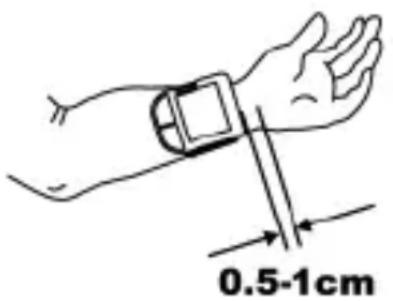
Wrap the sleeve according to the shape of your wrist. If the sleeve is not firmly attached, the pressure will increase and the wrist will become numb. Correct measurement is then no longer possible.
If the sleeve cannot be attached to your left arm and therefore it is not possible to measure your left arm, use your right one instead.
Correctmeasurement
To measure your blood pressure, sit comfortably on a chair, take 5 or 6 deep breaths and relax.
Place your Ibow on a table or other supporting surface, and hold your arm so that the wrist sleeve is at heart height. In doing so, support your lower arm on a storage box or on a folded towel or similar.

natural_image
Line drawing of a person sitting at a table with hands resting on the cup, wearing a heart symbol on the arm (no text or symbols present)You can also hold your left arm at heart height in front of your chest and support it using your right arm.
Always measure your blood pressure at the same time each day!
It is important to measure your blood pressure at home and at the same time each day so that the blood pressure, which can change over the course of a day, is recorded properly.
Inform your doctor of the values measured so that you can receive medical advice based on an evaluation of these measurements.
Blood pressure measured at the wrist can vary from that measured at the upper arm. The values may be slightly different because of the different measurement positions and the strength of the blood vessels in the wrist and upper arm.
In many cases, the difference for healthy people can be ±10 mmHg of the systolic and diastolic blood pressure.
Attention is advised for the following types of person: People with high blood pressure, diabetes, liver disease, hardened arteries or poor circulation. In these cases, consult your doctor before using this device to monitor your blood pressure.
▶ Attach the wrist sleeve to your wrist as described above.
Sit down comfortably and breath in and out slowly for 5 to 10 minutes.
Press the clock button.
The battery symbol, the blinking ventilation symbol and the selected user are shown on the display.
Do not move the sleeve, your arm or hand muscles during measurement.
After a few seconds, the device will pump up the sleeve. When the sleeve pressure is stable, the device will start measuring automatically.
If you want to stop the measurement, press the ON/OFF button ⏻The sleeve defl ates.
If you want to repeat a measurement, you should wait at least five minutes. The sleeve must be fully deflated.
Automatic measurement
If the sleeve pressure is too low, the device stops measuring and inflates the sleeve again until sufficient sleeve pressure is reached for the measurement. Measurement starts when the correct sleeve pressure has been reached. The device also measures your pulse. The value displayed will fall during measurement.
The sleeve deflates when the measurement is complete. The systolic and diastolic blood pressure as well as the pulse and the pulse symbol appear on the display.
The data is automatically saved to the selected user.
Arrhythmia detection
Normally, the pulse beats with a regular rhythm (rhythmically). When the device detects an abnormal pulse rhythm, the symbol appears on the display.
In this case, repeat the measurement.
Abnormal pulse rhythms can have different causes. If the pulse is constantly arrhythmic, please consult your doctor.
Helpline No. UK/Northern Ireland 0871 37 61 020
Rep. of Ireland 1-800-992-508
Web Support www.medion.co.uk
Model Number: 13400
User settings
The blood pressure monitor has two memory spaces, which allow two different users to save up to 60 measurements each. The device calculates the average value from the last three measurements.
Select user
Press the clock button or user button to switch the device on. The current time and date, as well as the currently selected user, will be shown on the display.
If necessary, press the user button again to switch between the two memory spaces.
Press the ON/OFF button to switch off the device.

Note
Please be aware that when there are two users that the currently selected user will remain active until a new user has been selected.
Retrieve values
Press the user button to switch on the device.
Press the user button again to select the desired user.
Press the M button, the average measurement will be shown on the display. This is indicated on the display with AVG.
Press the M button again in order to display the results of the last measurement.
▶ Press the ON/OFF button to switch off the device.
Deleting memory values
You can delete individually saved measurements or all of the measurements for each user.
Press the ON/OFF button to switch on the device.
Press the user button again to select the desired user.
Press the M button, the average measurement will be shown on the display.
▶ Select the value to be deleted with the M button.
Press and hold down the M button for approx. 3 seconds. CL and two lines will be shown on the display.

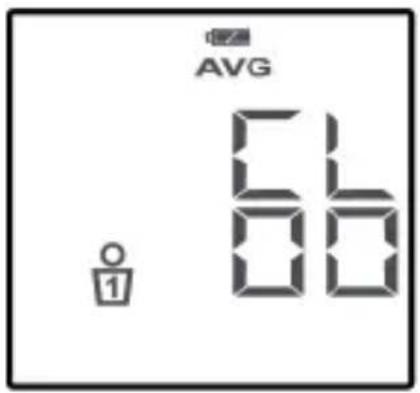
Press the user button, CL and 00 will be shown on the display. The value has now been deleted.

In order to delete all of the saved values for the selected user, repeate the first three steps until the average measurement is shown on the display. This is indicated on the display by AVG.
Press and hold down the M button for approx. 3 seconds. CL and two lines will be shown on the display.
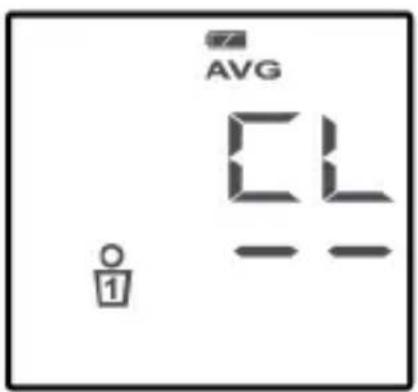
Press the user button, CL and 00 will be shown on the display. All of the saved values for the selected user have now been deleted.
Cleaning and care
Notes on maintenance
It is recommended that you check the measuring accuracy of the device at least every three years.
Pharmacies sometimes hold campaign days for checking blood pressure monitors.
Cleaning/storage
Only use a dry, soft cloth to clean the device. Do not use chemical solutions and cleaning products because these may damage the device's surface and/or inscriptions.
Store and transport the device in the storage box supplied.
Do not bend the preshaped sleeve outwards. The sleeve should neither be washed nor dry cleaned.
If the device is not going to be used for long periods, remove the batteries.
Waste disposal

Packaging
Your device has been packaged to protect it from damage in transit. The packaging is made of environmentally friendly material which can be recycled.

Device
At the end of its service life, the device should not be disposed of with the household rubbish. Please enquire about the options for environmentally friendly disposal.

Batteries
Do not dispose of used batteries in the household rubbish! They should be taken to a collection point for used batteries.
Error messages
If there are errors messages or incorrect measurement values displayed, remove the batteries and insert them again after about one minute.
| Error | Possible causes and | solutions |
| Display is blank | The batteries are dead. | Replace both batteries with new 1.5 V R03/LR03/AAA batteries. |
| E 1 The sleeve is not fitted correctly | Check the fitting of the sleeve and carry out a new measurement. | |
| E 2 You moved while you were measuring your blood pressure. | Sit still and carry out a new measurement. | |
| Error Possible causes and | solutions | |
| E 3 The sleeve is not attached correctly. | Fit the sleeve correctly and carry out a new measurement. | |
| E 4 An error has occurred in the measurement | Carry out a new measurement. | |
| E 5 Sleeve pressure above 300 mmHg | Check the fitting of the sleeve and carry out a new measurement. | |
| E 6 Batteries are too weak | Replace both batteries with new 1.5 V R03/LR03/AAA batteries. | |
Technical data
Measurement method: Oscillometric
Measuring range
Blood pressure: 30 \~ 280 mmHg
Pulse: 40 \~ 180 beats/min.
Power supply: 2 x 1.5 V batteries
R03/LR03/AAA
Display:
LCD
Memory spaces: 2 x 60 measurement results
Pressure build up: Pressure built up automatically by pump
Air release: Air released automatically via a one-way valve
Measuring accuracy
Blood pressure: +/- 3mmHg
pressure
it
Pulse: +/- 5% of value displayed
Temperatures
Operating temperature: +10 \~ +40 °C,
at
humidit
30–85%
Storage temperature: -20 +60ircC ,
at
humidit
10–95%
Sleeve size: 13.5 \~ 19.5cm
Subject to technical modifi cations.
Notes
The product meets the requirements of the guideline 93/42/EEC for medical devices.
The device corresponds to standards for non-invasive blood pressure monitors
EN 1060-1:1995+A2:2009 and
EN 1060-3:1997+A2:2009.
The device meets the requirements of electromagnetic compatibility EN 60601-1-2:2007. If you have questions about electromagnetic compatibility or the values measured, or would like to view the full declarations of conformity, please contact our customer service department. The helpline number is shown in the footer of this page.

The device is classified in accordance with type BF ("protection against electric shock").

Year of manufacture: 2011

Manufacturer in accordance with guidelines for medical products:
MEDION AG, 45307 Essen, Germany
C€0197
The serial number of the device can be found in the battery compartment.
Status: 04/2011
health+
Blood pressure monitor
FAULT REPORT CARD
Name ____
Address
Daytime Tel No ____
Model Number MD 13400 / MSN 5003 7678
Fault Description
09/11
health+
Blood pressure monitor
In order to deal with your enquiry as quickly and efficiently as possible, we ask you to contact our service hotline on the number detailed below.
UK IRELAND HELPLINE NO 0871 37 61 020
(Costs 7 p/min from a BT landline; mobile costs may be higher)
REP. IRELAND HELPLINE NO 1 800 992 508 (free phone)
To contact us by email please visit the "Service and Support" section of our website at www.medion.co.uk
Medion Electronics Ltd.
120 Faraday Park
Faraday Road
Dorcan
Swindon SN3 5JF
Wiltshire, UK
health+
Blood pressure monitor
WARRANTY CARD
Congratulations! You have made an excellent choice with the purchase of this quality product. Our commitment to quality also includes our service. Should you, contrary to expectations, experience defects due to manufacturing faults during private use within 36 months of the date of purchase we shall be liable for warranty in accordance with statutory warranty regulations provided that:
- The device was not put to use other than the intended
- was not overloaded
- was not used with the wrong accessories
- repairs were not carried out by any other than the intended workshop
The warranty certificate is only valid in connection with an acceptable proof of purchase.
Please keep both in a safe place. This warranty does not affect your statutory rights.
This purchase is guaranteed for a period of three years beginning on the day of purchase. Keep your purchase receipt safe as proof of date of purchase. The guarantee can only be extended for the duration of any repair required.
During the warranty period defective devices can be returned to the service address stated on the back cover of this document by first calling the service hotline number provided to arrange collection by an approved freight agent at no cost to you. We will at our discretion, either repair or exchange the device in accordance with warranty legislation.
Please enclose the following when sending your product in for repair:
- Proof of purchase (receipt).
- This warranty certificate with the fault report from overleaf complete with your name, contact details and fault description
If an acceptable proof of purchase is not enclosed the repair will be charged in all cases. After the warranty has expired defective devices can still be sent to the address stated below. Any repairs outside of the warranty period will be charged and can only be undertaken once payment has been received.
Ensure that the product is sent well packed as no responsibility can be accepted for items lost or damaged in transit.
This warranty does not affect your statutory right.



- Blood pressure monitor
- User's Guide
- After Sales Support
- Contents
- Introduction
- Safety instructions
- General
- Safe handling of batteries
- Repairs
- About this device
- Proper use
- What is blood pressure?
- Systolic and diastolic values
- Measuring range
- Blood pressure classification according to WHO in mmHg
- How does the blood pressure monitor work?
- Notes on measurement
- Initial operation
- Overview of the equipment
- Display
- Inserting batteries
- Setting the device
- Putting on the sleeve
- Correctmeasurement
- Automatic measurement
- Arrhythmia detection
- User settings
- Select user
- Note
- Retrieve values
- Deleting memory values
- Cleaning and care
- Notes on maintenance
- Cleaning/storage
- Waste disposal
- Packaging
- Device
- Batteries
- Error messages
- Technical data
- Measuring accuracy
- Temperatures
- Notes
- C€0197
- FAULT REPORT CARD
- health+
- WARRANTY CARD
Brand : MEDION
Model : MD 13400
Category : Sphygmomanometer