
KAOSS PAD QUAD - Audio Effects KORG - Free user manual and instructions
Find the device manual for free KAOSS PAD QUAD KORG in PDF.



User questions about KAOSS PAD QUAD KORG
0 question about this device. Answer the ones you know or ask your own.
Ask a new question about this device
Download the instructions for your Audio Effects in PDF format for free! Find your manual KAOSS PAD QUAD - KORG and take your electronic device back in hand. On this page are published all the documents necessary for the use of your device. KAOSS PAD QUAD by KORG.
USER MANUAL KAOSS PAD QUAD KORG
Using the unit in the following locations can result in a malfunction.
In direct sunlight
- Locations of extreme temperature or humidity
- Excessively dusty or dirty locations
- Locations of excessive vibration
- Close to magnetic fields
Power supply
Please connect the designated AC adapter to an AC outlet of the correct voltage. Do not connect it to an AC outlet of voltage other than that for which your unit is intended.
Interference with other electrical devices
Radios and televisions placed nearby may experience reception interference. Operate this unit at a suitable distance from radios and televisions.
Handling
To avoid breakage, do not apply excessive force to the switches or controls.
Care
If the exterior becomes dirty, wipe it with a clean, dry cloth. Do not use liquid cleaners such as benzene or thinner, or cleaning compounds or flammable polishes.
Keep this manual
After reading this manual, please keep it for later reference.
Keeping foreign matter out of your equipment
Never set any container with liquid in it near this equipment. If liquid gets into the equipment, it could cause a breakdown, fire, or electrical shock.
Be careful not to let metal objects get into the equipment. If something does slip into the equipment, unplug the AC adapter from the wall outlet. Then contact your nearest Korg dealer or the store where the equipment was purchased.
THE FCC REGULATION WARNING (for USA)
This equipment has been tested and found to comply with the limits for a Class B digital device, pursuant to Part 15 of the FCC Rules. These limits are designed to provide reasonable protection against harmful interference in a residential installation. This equipment generates, uses, and can radiate radio frequency energy and, if not installed and used in accordance with the instructions, may cause harmful interference to radio communications. However, there is no guarantee that interference will not occur in a particular installation. If this equipment does cause harmful interference to radio or television reception, which can be determined by turning the equipment off and on, the user is encouraged to try to correct the interference by one or more of the following measures:
Reorient or relocate the receiving antenna.
Increase the separation between the equipment and receiver.
Connect the equipment into an outlet on a circuit different from that to which the receiver is connected.
Consult the dealer or an experienced radio/TV technician for help.
Unauthorized changes or modification to this system can void the user's authority to operate this equipment.

Notice regarding disposal (EU only)
When this "crossed-out wheeled bin" symbol is displayed on the product, owner's manual, battery, or battery package, it signifies that when you wish to dispose of this

product, manual, package or battery you must do so in an approved manner. Do not discard this product, manual, package or
battery along with ordinary household waste. Disposing in the correct manner will prevent harm to human health and potential damage to the environment. Since the correct method of disposal will depend on the applicable laws and regulations in your locality, please contact your local administrative body for details. If the battery contains heavy metals in excess of the regulated amount, a chemical symbol is displayed below the "crossed-out wheeled bin" symbol on the battery or battery package.
Introduction
Thank you for purchasing the Korg KAOSS PAD QUAD dynamic effect processor. To enjoy the KAOSS PAD QUAD to the fullest potential, please read this manual carefully and use the KAOSS PAD QUAD only as directed.
Main features
Create custom KAOSS effects combinations
You can combine up to four different effects to create your custom KAOSS effect combinations, with literally hundreds of possibilities. Since switching is as easy as hitting a button and touching the touch pad, you can also swap effects as often as desired as the song progresses.
Total control and smooth playability
Simply touch, tap or rub your finger across the surface of the touch pad, and you will be in total control of the effects.
Flexible Looping
In addition to the normal Looper function, the KAOSS PAD QUAD features a Reverse Looper, and a Loop Slicer that slices recorded samples and then loops them automatically between manually adjusted points. You can switch the type of the Looper during playback. These newly-designed Looper effects increase the variety of performance possibilities.
New Vinyl Break effect
The Vinyl Break effect simulates how a turntable platter slows down gradually before stopping. The effect also simulates Scratch play on a turntable. These turntable effects can be useful for DJ performances.
Tap Tempo and Auto BPM
The KAOSS PAD QUAD's Auto BPM circuit derives tempo information from any audio source and can sync effects to play in time. You can also tap the Tap button along with the beat to sync with the music's BPM.
Freeze function
Pressing the FREEZE button while touching the pad will memorize your position on the pad, allowing you to remove your finger and keep the effect(s) playing. Since each effect module features its own FREEZE button, the looper can play a phrase repeatedly using the same "frozen" effect, while you control other effects via the touch pad. Creative freedom is all yours. Turning an effect on or off, or changing the effect within one of the four banks, will call up the effect with the "frozen" position on the pad.
Getting ready
Connections
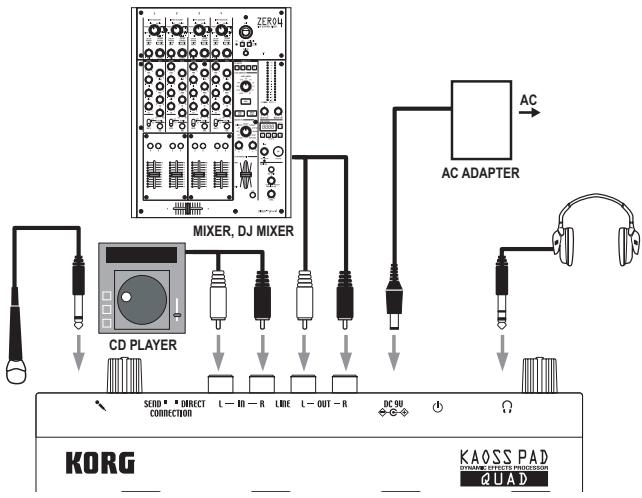
Connecting your monitor amp or mixer to the output jacks
Connect the KAOSS PAD QUAD's LINE OUT jacks to your mixer or powered monitors (amplified speakers).
If you're using headphones, connect them to the PHONES jack.
TIP The KAOSS PAD QUAD's sound will still be output from the LINE OUT jacks even if headphones are connected.
Connecting your mic or audio source to the input jacks
If you're using a mic, connect it to the MIC jack.
If you want to connect a sampler or other audio source device, connect its output jacks to the KAOSS PAD QUAD's LINE IN jacks.
Always connect devices to your KAOSS PAD QUAD with the power turned off. Careless operation can damage your speaker system or cause other issues.
If you are not using a mic, turn the MIC VOLUME knob all the way down.
Connecting the KAOSS PAD QUAD to send/return jacks You can use the KAOSS PAD QUAD as an external effect unit by connecting it to the send and return jacks of a mixer. For this connection, set the CONNECTION switch to SEND.
DIRECT: Both input and effect sounds will be output from the KAOSS PAD QUAD. When you are not touching the touch pad, the input sound will be output as is. "Controlling the effect depth ( p.7) "
SEND: Only the effect sound (not the input sound) will be output from the KAOSS PAD QUAD.
TIP For more information on the send and return jacks, refer to the owner's manual for the device that you are connecting.
TIP When you are using the KAOSS PAD QUAD as an external effects unit, the return level may be lower than expected. In such cases, adjust the input level on the KAOSS PAD QUAD. "Adjusting the volume ( p.6) "
Operation
Using the power switch
- Connect the KAOSS PAD QUAD to your other equipment as shown in the diagrams on the preceding pages, and connect the AC adapter to an electrical outlet.
Never use any AC adapter other than the one that's included. - Press the Power button to turn the KAOSS PAD QUAD on. The display will light up.
To turn the KAOSS PAD QUAD off, press and hold down the Power button until the display indicators turn off.
The settings will not be retained after the power is turned off.
Auto Power Off
The KAOSS PAD QUAD features an Auto Power Off function, which turns the unit off automatically if the unit is left unused for approximately four hours.
TIP If any sound is being input, this function will not kick in.
Disabling the Auto Power Off function
Follow the steps below to disable the Auto Power Off function.
- Turn the KAOSS PAD QUAD on while pressing and holding down the 1DELAY button.
The unit will indicate the current settings on the display. - Rotate the BPM knob to select "dis" on the display.
- Press the TAP button to store this setting. The unit will automatically restart.
- To enable the Auto Power Off function, turn the KAOSS PAD QUAD on while pressing and holding down the 1DELAY button. Rotate the BPM knob to select "Ena" on the display, then press the TAP button.
TIP If you turn the unit off without pressing the TAP button in the steps above, the changes to the setting
will not be applied.
TIP The initial factory setting is "Ena" for the Auto Power Off function.
Adjusting the volume
- Use the INPUT VOLUME knob to adjust the input level.
Adjust the level as high as possible without making the peak indicator light up red when audio is input from the connected equipment. If you are using the mic jack, adjust the MIC VOLUME knob as appropriate for the sensitivity of the mic, so that the sound is not distorted. - If you are listening through headphones, use the PHONES VOLUME knob to adjust the headphone level.
TIP The PHONES VOLUME knob does not affect the level at the LINE OUT jack.
Selecting an effect
The KAOSS PAD QUAD features four effect modules (1-4). You can assign a different effect to each of these four models.
Touching the touch pad will cause all selected effects to be applied to the sound. You can also continue applying the effects by pressing the FREEZE button. "Freeze ( p.7)"
TIP Effects are applied in ascending order of the effect modules (1 to 4).
- Select an effect by pressing the corresponding Effect Type button. The selected Effect Type button indicator will light up.
- To turn the effect off, press the illuminated Effect Type button. The Effect Type button indicator will go dark and the corresponding effect turns off.
- To switch to a different effect for an effect module, press the corresponding Effect Type button. A different effect will be selected for that effect module.
TIP Some combinations of certain effects may distort the sound.
Controlling the effect depth
Use the FX DEPTH knob to adjust the depth of the effect. Rotating the knob all the way to the left will turn the effect off. Rotating the knob all the way to the right will maximize the effect depth.

During performance, if you rotate the FX DEPTH knob all the way to the left or release your fingers from the touch pad, the effect sound will continue until its delay or reverb sound decays and dissipates.
Using the touch pad
You can control the sound by using your finger to rub or tap the touch pad.
TIP Affix the included protective sheet to the touch pad before using it.
Touch pad care
Never press the touch pad with excessive force, or place heavy objects on it. It may crack or break if handled roughly. Press the touch pad only with your finger, since rubbing or pressing the touch pad with a sharp object will scratch it. To clean the touch pad, wipe it lightly with a soft dry cloth. Do not use solvents such as thinner, since this may cause deformation.
Freeze
If you press the FREEZE button, the KAOSS PAD QUAD will remember the current touch pad position at the time you press the button, and will continue to apply the same effects.
You can use the Freeze function for each effect module. Even if you switch the effects inside the effect modules, the unit remembers the touch pad position.
- While your finger is on the touch pad, press the FREEZE button. The effect sound being used at that point will be retained.
TIP Touching the touch pad will not change
the sound of the "frozen" effect modules. However, the sound of "non-frozen" effect modules will change.
- Press the FREEZE button again to cancel the Freeze function.
TIP If you press the FREEZE button again immediately after you cancel the Freeze function, the same touch pad position information will be recalled.
Touch pad LED
The touch pad LED lights up in different patterns depending on the selected effects, the Freeze or BPM setting, and operation of the touch pad.
Adjusting the brightness of the touch pad LED
- While pressing and holding down the LPF button, turn on the power to the KAOSS PAD QUAD.
The touch pad LED will light up, and the brightness value will appear on the display. The higher the value, the brighter the LED. - Rotate the BPM knob to adjust the brightness.
- Press the TAP button to store the setting. The unit automatically restarts.
TIP If you turn the unit off without pressing the TAP button as described in the step above, changes to the setting will not be applied.
TIP The initial factory setting is maximum brightness.
Specifying the BPM
What is BPM?
BPM (Beats Per Minute) is the tempo of the song expressed as the number of beats (quarter notes) that occur in one minute. A higher BPM value means a faster tempo.
TIP When you turn on the KAOSS PAD QUAD, the BPM will be set to 120.0.
Manually setting the BPM
Use the BPM knob to adjust the BPM value.
TIP The Auto BPM is automatically turned off.
Using Tap Tempo to set the BPM
If you're not certain of the BPM value of a song, you can set the BPM by pressing the TAP button in rhythm with the beat of the song.
Press the TAP button three or more times in rhythm with the beat of the song. The KAOSS PAD QUAD will detect the interval at which you press the button, the corresponding BPM value will appear in the display, and that BPM value will be set.
Auto BPM detection
The KAOSS PAD QUAD can set the BPM value automatically by detecting the beat of the song. If the song's BPM changes, the KAOSS PAD QUAD's BPM value will change in sync.
- Press and hold down the TAP button to turn on Auto BPM detection. The AUTO indicator will light up. The BPM of the incoming audio source will be detected automatically.
If the KAOSS PAD QUAD is unable to detect the BPM
Press the TAP button several times in time with the beat of the song; the KAOSS PAD QUAD will automatically detect the BPM using the beat you manually tapped as a guideline. Because of the way that the Auto BPM function operates, it may erroneously detect a value that is 1/2 or 2/3 of the correct BPM value, or small deviations may arise. In such cases, you can use the TAP button to make compensations. If you press the TAP button while Auto BPM detection is active, the value you specify by tapping will become the center value of the BPM range.
TIP It's not possible to detect the BPM value from music that does not have a clear sense of beat. The detectable BPM range is from 80 to 160.
Turning off Auto BPM
Press and hold down the TAP button until the AUTO indicator goes dark. The Auto BPM function will turn off, and the unit will use the BPM value obtained at the point you turned off the function.
Effects guide
1. Looper category
LOOPER
The Looper samples (records) a phrase and plays it back repeatedly. You can add some variety to a song by looping a phrase while changing the length of the phrase by rubbing the touch pad up and down with your finger.
TIP When your finger touches the touch pad, recording will start. As soon as a phrase is recorded, the phrase will play repeatedly.
REV LOOPER (REVERSE LOOPER)
As you touch the touch pad with your finger, a phrase will play in reverse. You can play a phrase repeatedly while changing the length of the phrase by rubbing the touch pad up and down with your finger.
TIP The Looper always records the input audio, and starts looping as soon as you touch the touch pad.
LOOP SLICER
A sampled phrase of one measure can be sliced into parts of various length. You can assign these parts onto the x axis of the touch pad, then play the desired parts repeatedly.
TIP The Looper always records the input audio, and starts looping as soon as you touch the touch pad.
GRAIN SHIFTER
The looper samples a sound for a short period of time on a certain cycle, and plays it repeatedly. This effect is useful for sounds that change their tone frequently.
VINYL BREAK
This effect simulates the sound heard when a turntable is stopped. Rubbing the touch pad will simulate the scratch technique.
2. Mod category
DIST (DISTORTION)
This effect distorts the input sound. Distortion will add an edginess to the sound.
DECIMATOR
This effect reduces the sampling frequency or data bit length, creating a gritty and rough cheap sampler sound.
DUCKING COMP
This compressor effect responds to the bass range of the input sound. It emphasizes off-beats, creating a well-framed sound.
TIP The effect may be subtle under certain circumstances.
FLANGER
This effect adds a substantial swell and rolling pitch. It is very effective with sounds that contain a lot of harmonics.
PHASER
This effect offsets the phase of the sound, creating a swell.
3. Filter category
LPF
This filter cuts the treble and boosts the bass.
HPF
This filter cuts the bass and boosts the treble.
BPF+
This filter emphasizes a certain band based on the current touch pad position.
JET
This filter creates an effect of the high swishing whine of a jet plane.
PITCH SHIFTER
This filter changes the pitch of the input sound.
4. Delay/Rev category
1DELAY
This effect delays the input sound and plays just one delay sound.
DELAY
This is a standard stereo delay effect.
TAPE ECHO
This effect simulates a tape echo, which reproduces distortion or tonal changes on magnetic tapes.
REVERB
This effect simulates the ambient reverberation of a hall.
DELAY REVERB
This effect combines the DELAY and REVERB effects. First the DELAY effect is applied, followed by the REVERB effect.
Specifications
| Main controllers | Touch pad, EFFECT TYPE button, FX DEPTH knob |
| Connectors | LINE OUT L/R (RCA jacks), LINE IN L/R (RCA jacks), MIC IN (unbalanced 6.3 mm phone jack), HEADPHONES (6.3 mm stereo phone jack) |
| Power supply | DC9V ◆-G- |
| Dimensions and weight | 185 (W) x 213 (D) x 44 (H) mm, 754g 7.28" x 8.39" x 1.73", 1.66 lbs. |
| Operating temperature | 0-+40 °C (non-condensing) |
| Included items | AC adapter, protective sheet for touch pad |
- Specifications and appearance are subject to change without notice for improvement.
Parts of the KAOSS PAD QUAD
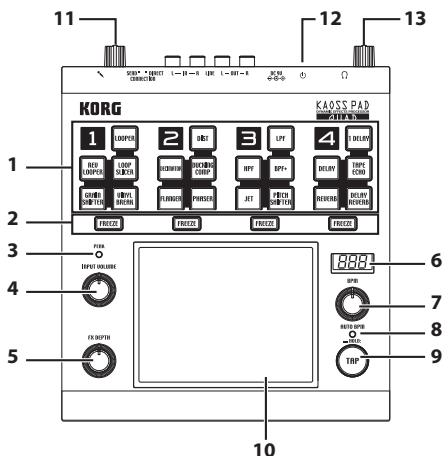
- Effect type button
- FREEZE button
- Peak indicator
- INPUT VOLUME knob
- FX DEPTH knob
- Display
- BPM knob
- AUTO indicator
- TAP button
- Touch pad
11.MIC VOLUME knob - Power button
13.PONES VOLUME knob
Précautions
Emplacement
| FX Category | FX Name | Assign X | Assign Y | BPM Sync | |
| 1 | LOOPER | LOOPER | - | Looper beat | o |
| REV LOOPER | - | Looper beat | o | ||
| LOOP SLICER | Slice Position | Looper beat | o | ||
| GRAIN SHIFTER | LFO Sync Note | Duration | o | ||
| VINYL BREAK | Stop Speed | Scratch | x | ||
| 2 | MOD | DIST | Tone | Gain | x |
| DECIMATOR | Sample Rate | Bit Depth | x | ||
| DUCKING COMP | Ratio | Threshold | x | ||
| FLANGER | LFO Speed | Feedback | x | ||
| PHASER | LFO Speed | Resonance | x | ||
| 3 | FILTER | LPF | Cutoff frequency | Resonance | x |
| HPF | Cutoff frequency | Resonance | x | ||
| BPF+ | Cutoff frequency | Resonance | x | ||
| JET | Delay time | Feedback | x | ||
| PITCH SHIFTER | Pitch | Mix Balance | x | ||
| 4 | DELAY/REVERB | 1 DELAY | Delay time | Pan | o |
| DELAY | Delay time | Delay Depth | o | ||
| TAPE ECHO | Delay time | Delay Depth | o | ||
| REVERB | Reverb time | Reverb Depth | x | ||
| DELAY REVERB | Delay/Reverb time | Delay/Reverb Depth | o |
SIGNAL PATH

IMPORTANT NOTICE TO CONSUMERS
This product has been manufactured according to strict specifications and voltage requirements that are applicable in the country in which it is intended that this product should be used. If you have purchased this product via the internet, through mail order, and/or via a telephone sale, you must verify that this product is intended to be used in the country in which you reside.
WARNING: Use of this product in any country other than that for which it is intended could be dangerous and could invalidate the manufacturer's or distributor's warranty.
Please also retain your receipt as proof of purchase otherwise your product may be disqualified from the manufacturer's or distributor's warranty.