
K5000BB - Tablet LEXIBOOK - Free user manual and instructions
Find the device manual for free K5000BB LEXIBOOK in PDF.

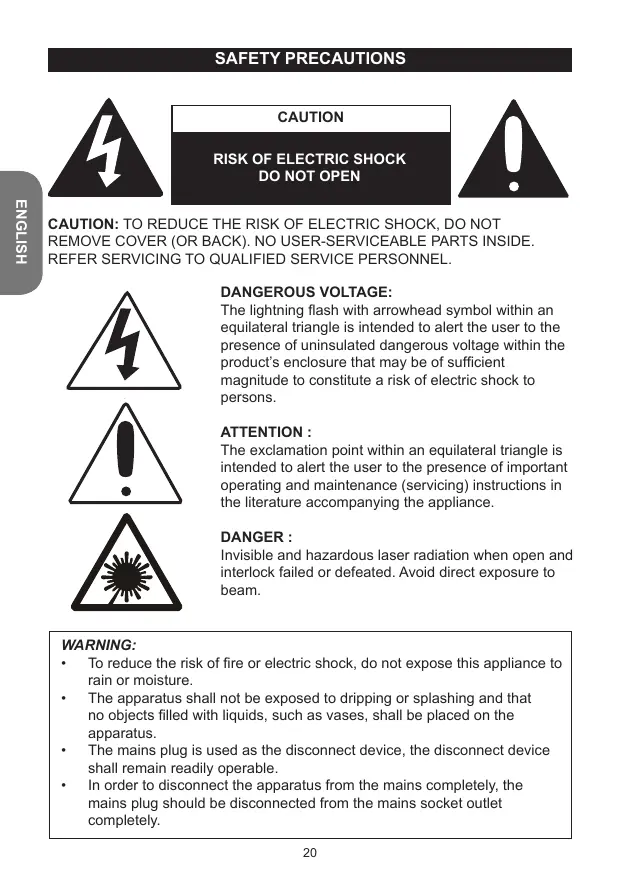


| Product Type | Multimedia tablet with CD karaoke player |
| Brand | LEXIBOOK |
| Model | K5000BB |
| Dimensions | 18.5 × 20.3 × 19 cm |
| Weight | 1.8 kg |
| Power Supply | AC 230 V ~ 50 Hz or 8 LR14/C batteries (not included) |
| Power Consumption | 2 × 1 W (audio output) |
| Screen Type | Not applicable (CD player with video output for TV) |
| Main Functions | CD/CD+G playback, karaoke with 2 microphone inputs, programming up to 20 tracks, repeat, forward/backward search functions, TV and speaker connection |
| Connectivity | RCA audio outputs (L/R), RCA video output, microphone inputs 1 and 2 |
| Care and Cleaning | Unplug before cleaning; use a soft dry cloth; for plastic parts, mild soap on a damp cloth |
| Safety | Do not expose to water or humidity; risk of electric shock; invisible laser radiation (do not open); do not place liquid-filled objects on the device |
| Spare Parts and Repairability | AC adapter and cables provided; batteries not included; no user-serviceable parts; refer to qualified personnel |
| General Information | 1-year warranty; made in China; designed and developed in Europe; consumer service: 0892 23 27 26 (€0.34 incl. VAT/min) |
Frequently Asked Questions - K5000BB LEXIBOOK
User questions about K5000BB LEXIBOOK
0 question about this device. Answer the ones you know or ask your own.
Ask a new question about this device
Download the instructions for your Tablet in PDF format for free! Find your manual K5000BB - LEXIBOOK and take your electronic device back in hand. On this page are published all the documents necessary for the use of your device. K5000BB by LEXIBOOK.
USER MANUAL K5000BB LEXIBOOK
LECTEUR CD KARAOKE PORTABLE PORTABLE KARAOKE CD PLAYER
MODE D'EMPLOI OWNER'S MANUAL
MISE EN GARDE
RISQUE D'ÉLECTROCUTION NE PAS OUVRIR

MISE EN GARDE: AFIN DE RÉDUIRE LES RISQUES D'ÉLECTROCUTION, NE PAS ENLEVER LE COUVERCLE (NI L'ARRÊRÉ). NE CONTIENT AUCUNE PIECE POUVANT ÉTRE RÉPARÉE NI REMPLACÉE PAR L'UTILISATEUR. CONFIER TOUTE RÉPARATION À UN TECHNIÇEN QUALIFIÉ.
CLASS 1 LASER PRODUCT
CLASSE 1 - PRODUIT LASER
CE PRODUIT LASER EST DE CLASSE 1. L'UTILISATION DE COMMANDES OU DE REGLAGES AINSI QUE L'EXECUTION DE PROCEDURES AUTRES QUE CELLES SPECIFIÉES DANS CE DOCUMENT PEUVENT ENTRainer UNE EXPOSITION A DES RADIATIONS DANGEREUSES.
INSTRUCTIONS RELATIVES A LA SECURITE
LIRE LES INSTRUCTIONS SUIVANTES AVANT TOUTE UTILISATION DE L'APPAREIL.
© 2010 Mattel, Inc. All Rights Reserved.
LEXIBOOK S.A.
2, avenue de Scandinavie,
91953 Courtaboeuf Cedex,
France
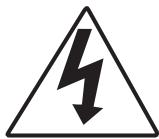
The lightning flash with arrowhead symbol within an equilateral triangle is intended to alert the user to the presence of uninsulated dangerous voltage within the product's enclosure that may be of sufficient magnitude to constitute a risk of electric shock to persons.

ATTENTION :
The exclamation point within an equilateral triangle is intended to alert the user to the presence of important operating and maintenance (servicing) instructions in the literature accompanying the appliance.

DANGER:
Invisible and hazardous laser radiation when open and interlock failed or defeated. Avoid direct exposure to beam.
WARNING:
- To reduce the risk of fire or electric shock, do not expose this appliance to rain or moisture.
- The apparatus shall not be exposed to dripping or splashing and that no objects filled with liquids, such as vases, shall be placed on the apparatus.
- The mains plug is used as the disconnect device, the disconnect device shall remain readily operable.
- In order to disconnect the apparatus from the mains completely, the mains plug should be disconnected from the mains socket outlet completely.
SURGE PROTECTORS:
It is recommended to use a surge protector for AC connection. Lightning and power surges ARE NOT covered under warranty for this product.
LASER SAFETY:
This unit employs an optical laser beam system in the CD mechanism, designed with built in safeguards. Do not attempt to disassemble, refer to qualified service personnel. Exposure to this invisible laser light beam may be harmful to the human eye.

THIS IS A CLASS-1 LASER PRODUCT. USE OF CONTROLS, OR ADJUSTMENTS OR PROCEDURES OTHER THAN THOSE SPECIFIED HEREIN, MAY RESULT IN HAZARDOUS LASER LIGHT BEAM EXPOSURE.
Invisible laser radiation when open and interlock failed or defeated. Avoid direct exposure to laser beam.
SAFETY INSTRUCTIONS
PLEASE READ BEFORE OPERATING THIS EQUIPMENT.
Before using the unit, be sure to read all operating instructions carefully. Please note that these are general precautions and may not pertain to your unit.
- Read these instructions.
- Keep these instructions.
- Heed all warnings.
- Follow all instructions.
- Do not use this product near water and moisture, for example: near a bathtub, washbowl, kitchen sink or laundry tub; in a wet basement; or near a swimming pool. No objects such as vases should be placed on the unit.
- Unplug this product from the wall outlet before cleaning. Do not use liquid cleaners or aerosol cleaners. It may damage the screen. Use a dry cloth for cleaning only.
-
Slots and openings in the cabinet and in the back or bottom are provided for ventilation, to ensure reliable operation of the product and to protect it from overheating. These openings must not be blocked or covered. The openings should never be blocked by placing the product on a bed, sofa, rug or other similar surface. This product should never be placed near or over a radiator or heat source. This product should not be placed in a built-in installation such as a bookcase or rack unless proper ventilation is provided or the manufacturer's instructions have been adhered to.
-
Do not install near any heat sources such as radiators, heat registers, stoves, or other apparatus (including amplifiers) that produce heat.
- Do not defeat the safety purpose of the polarized or grounding type plug. A polarized plug has two blades with one wider than the other. A grounding type plug has two blades and a third grounding prong. The wide blade or the third prong is provided for your safety. If the provided plug does not fit into your outlet, consult an electrician for replacement of the obsolete outlet.
- Protect the power cord from being walked on or pinched particularly at plugs, convenience receptacles, and the point where they exit from the apparatus.
- Only use attachments/accessories specified by the manufacturer.
- Unplug this apparatus during lightning storms or when unused for long periods of time.
- Refer all servicing to qualified service personnel. Servicing is required when the apparatus has been damaged in any way, such as power-supply cord or plug is damaged, liquid has been spilled or objects have fallen into the apparatus; and/or the apparatus has been exposed to rain or moisture and does not operate normally, or has been dropped.
- This product should be operated only from the type of power source indicated on the marking label. If you are not sure of the type of power supply to your home, consult your appliance dealer or local power company. For products intended to operate from battery power, or other sources, refer to the operating instructions.
- Do not overload wall outlets and extension cords as this can result in a risk of fire or electric shock. Use only power source as indicated.
- Never push objects of any kind into this product through openings as they may touch dangerous voltage points or short out parts that could result in fire or electric shock. Never spill or spray any type of liquid on the product.
- Do not attempt to service this product yourself as opening or removing covers may expose you to dangerous voltage or other hazards. Refer all servicing to qualified service personnel.
- Use replacement parts as specified by the manufacturer.
- Upon completion of any service or repairs to this product, ask the service technician to perform safety checks to determine that the product is in proper operating condition.
UNPACKING THE DEVICE
When unpacking, ensure that the following elements are included:
1 x portable karaoke CD player
1 x microphone
1 x AC cable
1xAV cable
1 x instruction manual
Note: Remove the shipping protector located inside the CD door before using the unit.
WARNING: All packaging materials, such as tape, plastic sheets, wire ties and tags are not part of this product and should be discarded.
POWER SOURCES
The portable karaoke CD player operates on AC 230 ~ 240V, 50Hz or with 8 x LR14/C size --- batteries (not included).
AC operation
- Check that the unit is switched off.
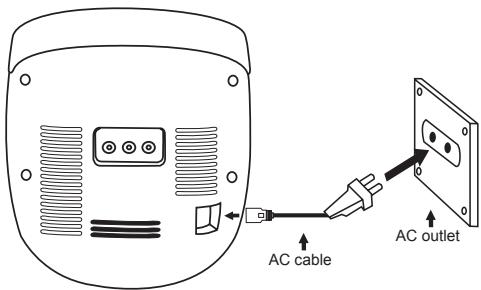
- Insert the small end of the AC cable into the AC IN socket at the back of the unit.
- Plug the other end of the AC cable into any convenient AC 230V 50Hz power outlet.
NOTE:
Only use the adapter supplied with the product. Do not use other adapter.
- The socket-outlet shall be installed near the equipment and shall be easily accessible.
Batteries installation
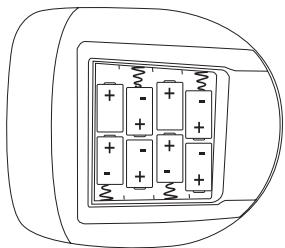
- To install the batteries, open the battery compartment located at the bottom of the unit by pressing on the arrows and then sliding it off in the direction indicated.
- Insert 8 × LR14/C = = size batteries (not included) observing the polarity indicated in the battery compartment, and as per the diagram shown below.
- Replace the battery compartment cover.
Note: The AC power cable must be disconnected from the AC socket on the rear of the unit in order for the product to operate on battery power.
Non-rechargeable batteries are not to be recharged. Rechargeable batteries are to be removed from the product before being charged. Rechargeable batteries are only to be charged under adult supervision. Different types of batteries or new and used batteries are not to be mixed. Only batteries of the same or equivalent type as recommended are to be used. Batteries are to be inserted with the correct polarity. Exhausted batteries are to be removed from the product. The supply terminals are not to be short circuited. Do not throw batteries into a fire. Remove the batteries if you are not going to use the unit for a long period of time.
WARNING: Malfunction or loss of memory may be caused by strong frequency interference or electrostatic discharge. Should any abnormal function occur, remove the batteries and insert them again, or unplug the AC cable from the mains socket and plug it back in.
CARE AND MAINTENANCE
Caring for discs
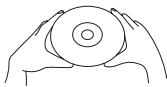
- Treat the disc carefully. Handle the disc only by its edges. Never allow your fingers to come in contact with the shiny, unprinted side of the disc.
-
Do not attach adhesive tape, stickers, etc. to the disc label.
-
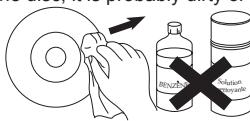
Clean the disc periodically with a soft, lint-free, dry cloth. Never use detergents or abrasive cleaners to clean the disc. If necessary, use a CD cleaning kit.
If a disc skips or gets stuck on a section of the disc, it is probably dirty or damaged (scratched).
- When cleaning the disc, wipe in straight lines from the centre of the disc to the outer edge of the disc. Never wipe in circular motions.
This unit is designed to play only compact discs bearing the identification logo as shown here. Other discs may not conform to the CD standard and may not play properly.
-
Discs should be stored in their cases after each use to avoid damage.
-
Do not expose discs to direct sunlight, high temperatures or dust, etc.
Prolonged exposure or extreme temperatures can warp the disc.
- Do not stick or write anything on either side of the disc. Sharp writing instruments, or ink, may damage the surface.

Cleaning the unit
- To prevent fire or shock hazard, disconnect your unit from the AC power source when cleaning.
- If the cabinet becomes dusty, wipe it with a soft, dry dust cloth. Do not use any wax, polish sprays or abrasive cleaners on the cabinet.
- Never allow any water or other liquids to get inside the unit while cleaning.
LOCATION OF CONTROLS
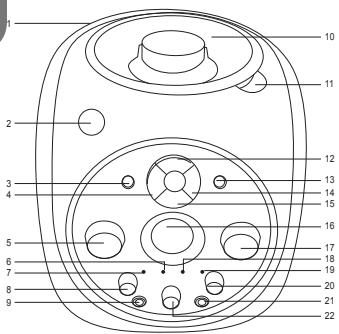
Front
- Carrying handle
- POWER button
- REPEAT button
- REW/SKIP button
- VOLUME control
- Play indicator
- Power indicator
- BALANCE control
- Microphone jack 1
- CD door
- CD OPEN tab
- PLAY/PAUSE button
13.PROGRAMME button - F. FWD/SKIP button
- STOP button
- Display
- MICROPHONE VOLUME control
- Repeat indicator
- Programme indicator
- ECHO control
- Microphone jack 2
- AVR (Auto Voice) control
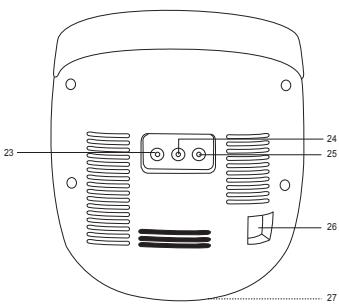
Back
- Video out jack
- Audio out (right) jack
- Audio out (left) jack
- AC IN jack
- Battery compartment (bottom of unit)
CD OPERATION
To insert and play a CD
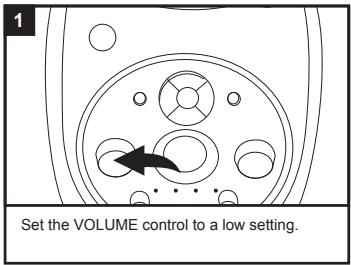
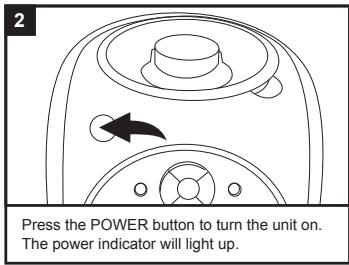
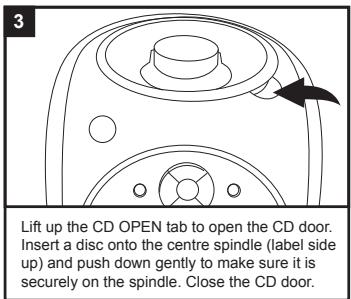
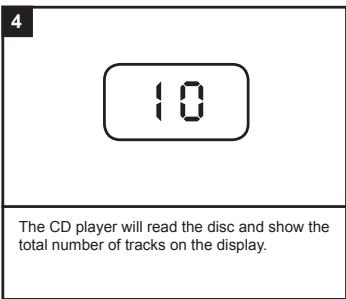
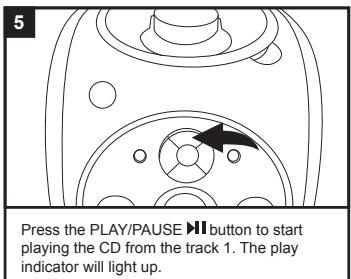
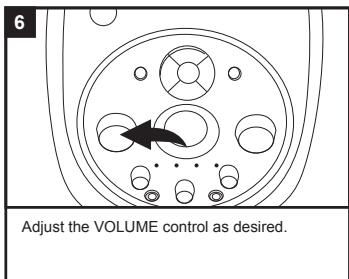
Adjust the BALANCE control as desired.
Turn to the left to decrease the left speaker's volume and right to decrease the right speaker.
To skip forward or backward through the tracks, press and release the F. FWD/SKIP or REW/SKIP button. To select the previous track, press twice. CD only
To fast forward or rewind through a track, press and hold F. FWD/SKIP or REW/SKIP button.
Press the PLAY/PAUSE button to pause play at any time. Press it again to continue playing.
Press the STOP button to stop the disc at any time.
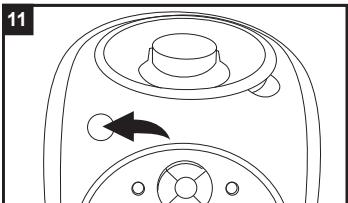
To turn the unit off, press the POWER button.
CD playback notes:
The unit can play standard CDs or 3" singles.
If a disc is inserted incorrectly, dirty or damaged, it will not play.
As each track is played, the track number is shown on the display.
- To prevent damage to the disc, never open the CD door while the disc is rotating. Wait for the disc to stop before opening the CD door. Never touch the lens when the CD door is open.
- Do not use the carrying handle when playing a CD. The CD should only be used on a steady surface.
- Although this unit can read CD-R and CD-RW discs, in addition to normal CDs, the playability of those discs may be affected by the type of software that was used to create the discs, as well as the blank media you are using. 100% playability cannot be guaranteed. This is not an indication of a problem with this unit.
To repeatedly play 1 track
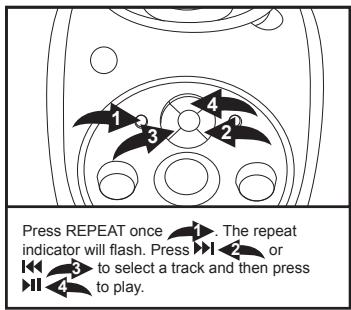
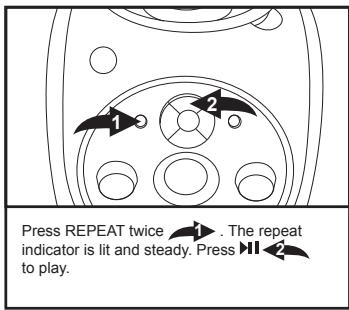
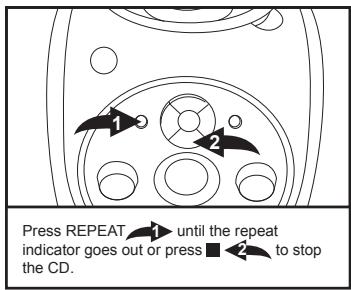
CD PROGRAMMED PLAY
To programme the memory (up to 20 tracks)
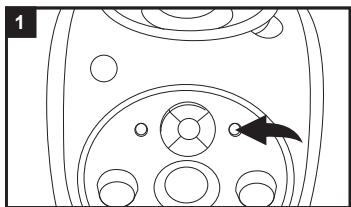
While in CD stop mode, press PROG. The programme indicator will flash.
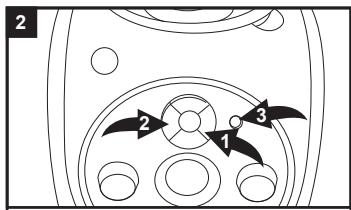
Press SKIP 1 or 2 to select a track and then press PROG 3. Repeat this step to programme up to 20 tracks.
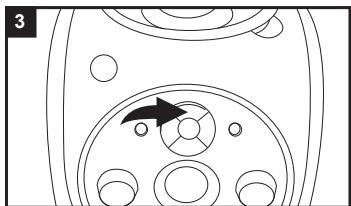
Press to start playing the programmed list.
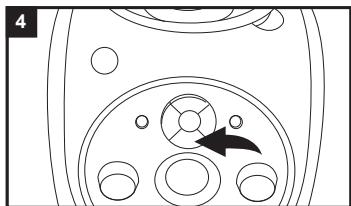
Press to stop the disc at any time.
You can use or to skip through your programmed tracks.
Press while in the Stop mode to clear the programmed tracks.
You can press REPEAT twice during play to repeat all of your programmed tracks. The unit will keep playing until you press
KARAOKE FUNCTION
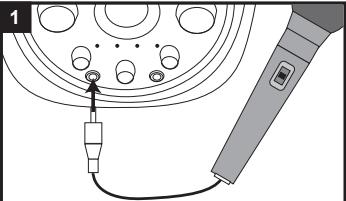
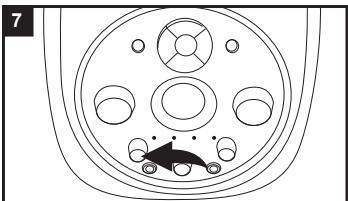
Connect the microphone jack to the microphone 1 or 2 socket on the karaoke player. Make sure the VOLUME control is turned to a low setting.
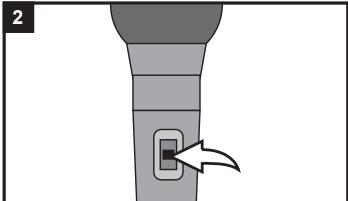
Slide the microphone switch to the ON position. To turn the microphone off, simply slide the switch to the OFF position.
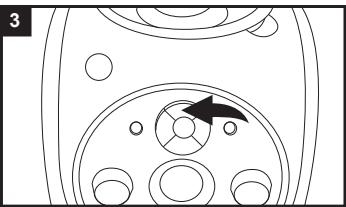
Press to start playing the CD. Note: All CD functions such as fast forward, rewind, pause, repeat and programming work as normal when using the karaoke function.
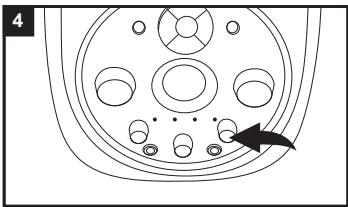
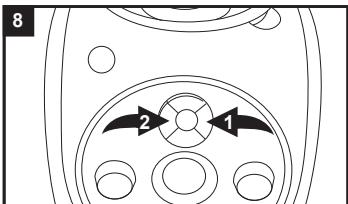
Rotate the ECHO control left to decrease the echo and right to increase it.
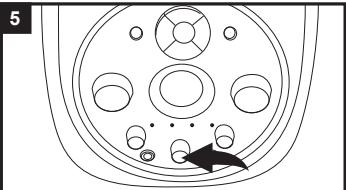
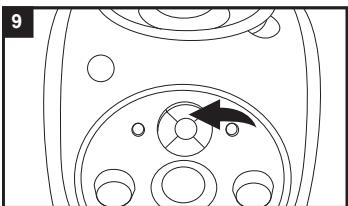
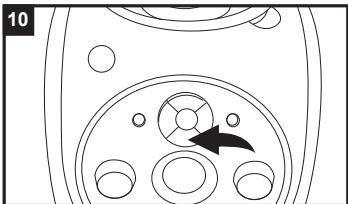
If you are using a multiplex CD you can adjust the AVC (Auto Voice Control) by turning the dial to change the volume level of the singer. If you turn the control to the left, you can mute the CD singer so that when you start singing only your voice can be heard. If you turn it to the right, the vocal tracks will play at the normal volume.
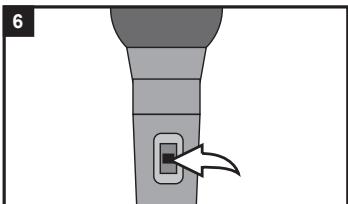
When you have finished using the karaoke, remember to turn the microphone off by sliding the switch to the OFF position.
Note:
- To avoid feedback noise such as a screeching sound, keep the microphone away from the speaker or reduce the volume level until the noise disappears.
- If you are using a multiplex CD, make sure the BALANCE control is set to the centre position so you can hear both the vocal and music tracks at an equal level.
CONNECTING TO YOUR TV AND OTHER SPEAKERS
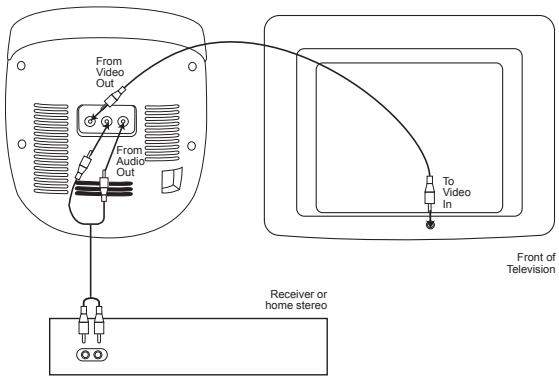
You can connect your karaoke machine to the TV and play special CD+G (Graphics) discs so you read the lyrics onscreen. You can also connect your karaoke player to other types of speakers.
Check your special karaoke compact disc has the CD+G mark on it.

Using your TV screen and karaoke machine speakers
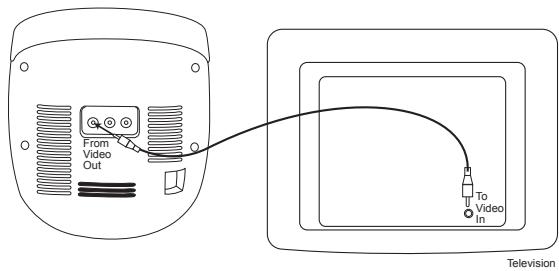
Connect the video jacks (yellow RCA plugs) to the karaoke player and TV. Note: Your TV player must have an RCA type Video Input jack. You cannot connect it to the TV's aerial terminal.
Using your TV screen and speakers
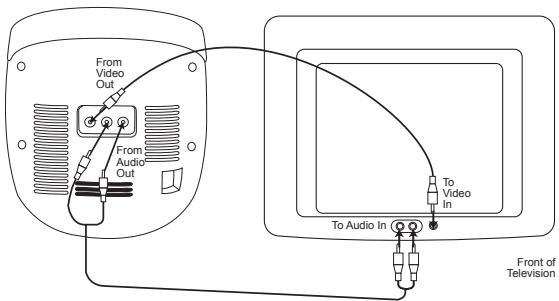
To use the speakers on your TV instead of your karaoke machine, connect the audio jacks (red and white RCA plugs) to your karaoke player and TV.
Note: If you have a mono TV set with only one audio in jack, you may need to buy a 'Y' adapter (stereo to mono) from your local electronics accessories store to combine the left and right stereo channels into a mono channel.
Using your TV screen and home stereo speakers
TROUBLESHOOTING GUIDE
| SYMPTOM | CAUSE | SOLUTION |
| Compact Disc Player | ||
| CD will not play. | Disc inserted incorrectly. | Insert disc with label side up. |
| Disc is dirty, scratched or has moisture on it. | Wipe disc with a soft, clean cloth. | |
| AC power cable not connected or batteries are low. | Check the AC power cable connection or insert new batteries. | |
| CD skips while playing. | CD compartment not closed. | Close CD compartment. |
| Disc inserted incorrectly. | Insert disc with label side up. | |
| Disc is dirty, scratched or has moisture on it. | Wipe disc with a soft, clean cloth. | |
| No sound. | AC power cable not connected or batteries are low. | Check the AC power cable connection or insert new batteries. |
| Volume is too low. | Turn up the volume. | |
| Karaoke | ||
| Some vocals can be heard when Auto Voice Control is muted. | You can hear the backup vocals. | This is normal, only the main vocal(s) are to be reduced. |
| Feedback happens when singing. | The microphone(s) are too close to the unit or the microphone volume is too high. | Move the microphone(s) away from the unit or decrease the microphone volume. |
| I cannot hear myself on the microphone. | The microphone is not securely plugged in or turned on. | Check the microphone cable is plugged in correctly and that the switch on the microphone is turned to ON. |
| The volume is too low. | Turn up the MICROPHONE VOLUME control. | |
| Words do not appear on the TV screen. | Using a non-CD+G disc. | Check the logo matches the CD+G disc displayed in this manual. If it doesn't have the logo, change to a CD that has the CD+G logo. |
| Video cable is incorrectly connected to TV. | Check connection. | |
| Source is not selected on TV. | Change TV source to match the location of the karaoke connection (i.e.VIDEO 1). | |
SPECIFICATIONS
General
Power supply. AC 230-240V, 50Hz, or DC 12V = (1.5V = LR14/C size batteries x 8, not included)
Speaker 2x2W,8Ohms
Output power. 2x1W
Dimensions. 7.25 (W) x 8 (L) x 7.5 (H) inches
Weight 4lbs
CD section
Disc diameter. 4.72" (120mm) 3.15" (80mm) Single CD
Optical source. Semiconductor laser
MAINTENANCE
To prevent fire or shock hazard, disconnect your unit from the AC power source when cleaning. The finish on your unit may be cleaned with a dust cloth and cared for as other furniture. Use a soft, clean cloth moistened with plain, lukewarm water to clean the exterior of the unit. Use caution when cleaning and wiping the plastic parts. Mild soap and a damp cloth may be used on the front panel.
WARRANTY
This product is covered by our 1-year warranty.
For any claim under the warranty or after sale service, please contact your distributor and present a valid proof of purchase. Our warranty covers any manufacturing material and workmanship defect, with the exception of any deterioration arising from the non-observation of the instruction manual or from any careless action implemented on this item (such as dismantling, exposition to heat and humidity, etc.). It is recommended to keep the packaging for any further reference.
In a bid to keep improving our services, we could implement modification on the colours and the details of the product shown on the packaging.
NOTE: Please keep this instruction manual, it contains important information.
Reference: K5000BB
Designed and developed in Europe - Made in China
© 2010 LEXIBOOK®
© 2010 Mattel, Inc. All Rights Reserved.
United Kingdom & Ireland
For any further information, please call Helpline: 0808 1003015
www.lexibook.com

This product is not a toy.

Environmental Protection
Unwanted electrical appliances can be recycled and should not be discarded along with regular household waste! Please actively support the conservation of resources and help protect the environment by returning this appliance to a collection centre (if available).

PRECAUCION
RIESGO DE DESCARGA ELECTRICA NO ABRIR

PRECAUCION: PARA REDUCIR EL RIESGO DE DESCARGA ELECTRICA, NO RETIRE LA CUBIERTA (O PARTE TRASERA). NO HAY PIEZAS EN EL INTERIOR SUSCEPTIBLES DE SER MANIPULADAS POR EL USUARIO. EN CASO DE AVERIA, SOLICITE ASISTENCIA TECNICA DE PERSONAL CUALIFICADO.
©2010 Mattel, Inc. All Rights Reserved.
Espana
CLASS 1 LASER PRODUCT
ESTE É UM PRODUTO A LASER DE CLASSE 1. A UTILIZÇÃO DE CONTROLOS, AJUSTES OU PROCEDIMENTOS PARA ALEM DOS AQUI ESPECIFICADOS PODE DAR ORIGEM A UMA EXPOSÇÃO PERIGOSA AO RAIO LASER.
INSTRUÇÖNES DE SEGURANÇA
POR FAVOR, LEIA ANTES DE UTILIZAR ESTE EQUIPAMENTO.
©2010 Mattel, Inc. All Rights Reserved.
Portugal
AJAGUIAR
CLASS 1 LASER PRODUCT
PRODOTTO LASER CLASSE 1
SI TRATTA DI UN PRODOTTO LASER DI CLASSE 1. L'UTILIZZO DI
CONTROLLI O REGOLAZIONI O PROCEDURE DIVERSE DA QUELLE QUI
SPECIFICATE PUO PROVOCARE ESPOSITIONE PERICOLOSA AI RAGGI
LASER.
©2010 Mattel, Inc. All Rights Reserved.
www.lexibook.com

CLASS 1 LASER PRODUCT
©2010 Mattel, Inc. All Rights Reserved.
Environmental Protection
Unwanted electrical appliances can be recycled and should not be discarded along with regular household waste! Please actively support the conservation of resources and help protect the environment by returning this appliance to a collection centre (if available).

CAUTION
RISK OF ELECTRIC SHOCK DO NOT OPEN

LET OP: OM HET RISICO VAN EEN ELEKTRISCHE SCHOK TE
VERMINDEREN, VERWIJDER DE BEHUIZING (ACHTERKANT) NIET. IN
HET APPARAAT ZITTEN GEEN ONDERDELEN DIE DOOR DE GEBRUKER
GEREPAREERD ZOUDEN KUNNEN WORDEN. LAAT REPARATIONS
UITVOEREN DOOR GEKWALIFICIERD PERSONEEL.
CLASS 1 LASER PRODUCT
KLASSE 1 LASERPRODUCT
DIT IS EEN KLASSE-1 LASERPRODUCT. ANDERE BEDIENGIN, AANPASSINGEN OF WERKWIJZEN DAN HIERIN BESCHREVEN, KAN BLOOTSTELLING AAN DE SCHADELIJKE LASERSTRAAL TOT GEVOLG HEBBEN.
VEILIGHEIDSINSTRUCTIES
GELIEVE TE LEZEN ALVORENS DIT APPARAAT TE GEBRUIKEN.
©2010 Mattel, Inc. All Rights Reserved.
www.lexibook.com

Milieubescherming
- LECTEUR CD KARAOKE PORTABLE PORTABLE KARAOKE CD PLAYER
- MODE D'EMPLOI OWNER'S MANUAL
- MISE EN GARDE
- RISQUE D'ÉLECTROCUTION NE PAS OUVRIR
- CLASSE 1 - PRODUIT LASER
- INSTRUCTIONS RELATIVES A LA SECURITE
- LIRE LES INSTRUCTIONS SUIVANTES AVANT TOUTE UTILISATION DE L'APPAREIL.
- ATTENTION :
- DANGER:
- WARNING:
- SURGE PROTECTORS:
- LASER SAFETY:
- SAFETY INSTRUCTIONS
- PLEASE READ BEFORE OPERATING THIS EQUIPMENT.
- UNPACKING THE DEVICE
- POWER SOURCES
- AC operation
- NOTE:
- Batteries installation
- CARE AND MAINTENANCE
- Caring for discs
- Cleaning the unit
- LOCATION OF CONTROLS
- Front
- Back
- CD OPERATION
- To insert and play a CD
- CD playback notes:
- To repeatedly play 1 track
- CD PROGRAMMED PLAY
- To programme the memory (up to 20 tracks)
- KARAOKE FUNCTION
- CONNECTING TO YOUR TV AND OTHER SPEAKERS
- Using your TV screen and speakers
- Using your TV screen and home stereo speakers
- SPECIFICATIONS
- General
- CD section
- MAINTENANCE
- WARRANTY
- Environmental Protection
- PRECAUCION
- RIESGO DE DESCARGA ELECTRICA NO ABRIR
- INSTRUÇÖNES DE SEGURANÇA
- POR FAVOR, LEIA ANTES DE UTILIZAR ESTE EQUIPAMENTO.
- CAUTION
- RISK OF ELECTRIC SHOCK DO NOT OPEN
- CLASS 1 LASER PRODUCT
- VEILIGHEIDSINSTRUCTIES
- GELIEVE TE LEZEN ALVORENS DIT APPARAAT TE GEBRUIKEN.
- Milieubescherming
Brand : LEXIBOOK
Model : K5000BB
Category : Tablet