
SMP300 - Tablet LEXIBOOK - Free user manual and instructions
Find the device manual for free SMP300 LEXIBOOK in PDF.


User questions about SMP300 LEXIBOOK
0 question about this device. Answer the ones you know or ask your own.
Ask a new question about this device
Download the instructions for your Tablet in PDF format for free! Find your manual SMP300 - LEXIBOOK and take your electronic device back in hand. On this page are published all the documents necessary for the use of your device. SMP300 by LEXIBOOK.
USER MANUAL SMP300 LEXIBOOK
Copyright © Lexibook 2003
Copyright © Lexibook 2003
ADAPTATEUR SECTEUR
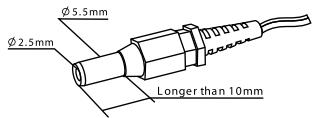
Suggested Dimensions
Sortie:DC3V
Courant: >150mA
Congratulations on purchasing this Lexibook® SMP300 alarm clock and weather station, with its two exclusive features : measurement of atmospheric pressure, projection of time and weather forecasts. We recommend you reading this manual thoroughly to ensure you make the most of your unit. Please keep it for future reference.
GETTING STARTED
Before you start using the alarm clock for the first time : 1. Remove the protective film from the display screen.
2. Remove the plastic strap from the AG13 batteries located at the back of the unit. This will turn the station on (batteries are supplied with this product).
3. If you want to use the projection feature, connect the unit to the main electricity supply with the AC adapter (if supplied). If you can't or don't wish to use the adapter you can insert two AA (R6) batteries in the compartment at the back of the unit. Use a screwdriver to open it.
SETTING THE CLOCK
- Press and hold both [MODE] and [SET] buttons for two seconds until the year digits flash, then press [] or [] to set the year.
- Press [MAX/MIN/LIGHT] to confirm and to switch to the next setting.
- Proceed as above to make the following settings :
a. Month
b. Day
c. Weekday
d. Hours
e. Minutes
Note : when setting the time, it is shown in a 12-hour format, where PM stands for afternoon and AM for morning (ex : 5:00 PM = 17:00).
SETTING THE ALARM
-
Press and hold both [ALARM] and [SET] for two seconds until the digits flash, then press [] or [] to set it.
-
Press [MAX/MIN/LIGHT] to confirm and to switch to the next setting.
- Proceed as above to make the following settings :
a. Hours
b. Minutes
usil6u3
Notes :
- This indicator (()) will show when the alarm is active. Press [ALARM] to activate or de-activate the alarm function.
- Auto-Snooze function : the alarm will go off for 1 minute, then it will stop and go off again five minutes later. This process is repeated three times. When the Auto-Snooze function is active, the Zz indicator will flash.
- Press any button to stop the alarm.
BAROMETER
- The atmospheric pressure can be displayed in various units, mb, hPa or inHg. Mb (« millibars ») or hPa (« hectopascals ») are equivalent to European units, 1 mb = 1 hPa. inHg (« inches of mercury ») are the American standard. The measurements and display will range between 840 and 1050 mb/hPA or 24.80 to 31 inHg.
- Press once on [PRESSURE MEMORY/UNIT] to display the pressure measurement for the past hour. Press twice to read the display of the measurement taken two hours ago, and so forth for the past 8 hours.
- The recorded atmospheric changes for the past 8 hours are displayed in a visually clear bar chart.
- Press and hold [PRESSURE MEMORY/UNIT] for two seconds to switch the pressure units from mb/hPa to inHg.
- The arrow located on the side indicates the pressure trend : rising, steady, falling.
WEATHER FORECASTING
The unit's detection of atmospheric pressure changes enables one to predict the probable weather conditions for the forthcoming 12 hours. The following icons will be displayed :
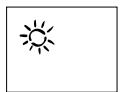
Sunny

Partly Cloudy

Cloudy
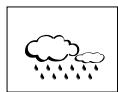
Rainy
Lexibook® does not guarantee in any way the accuracy of weather predictions.
HYGROMETER
The indoor relative humidity is measured and displayed within a range of 30% to 90% .
The relative humidity within a home will affect the comfort level of its occupants, as well as their respiratory system. The comfort zone is found between 30% and 65% of relative humidity.
THERMOMETER
The temperature is measured and displayed within a range of 0^ (32^) to 50^ (122^) .
- Press [ ^ C / ^ F] to switch the displayed temperature from degrees Celsius to degrees Fahrenheit.
- Press and hold [MAX/MIN/LIGHT] for two seconds to check the maximum/minimum temperatures recorded.
ALARM CLOCK PROJECTOR
- Press [MAX/MIN/LIGHT] to project the time and weather forecast to a distant surface. Use the [FOCUS] knob at the back of the unit to adjust the sharpness of the projection. The maximum distance recommended is 3 meters (9 feet). In order for the projection to operate, make sure you have connected the unit to
the main electricity supply via the adapter or that you have inserted 2 AA/LR6 batteries in their compartment (see below).
- For best results, the projection angle should not exceed 90^ in a clockwise direction.
BATTERY REPLACEMENT
English
This alarm clock uses two AG13/LR44 batteries and an AC adapter (or two AA/LR6 batteries) or equivalent.
- Remove the battery cover at the back of the unit using a screwdriver.
- Insert the batteries, taking care to follow their polarity directions.
- Replace the cover using a screwdriver.
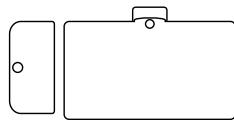
Battery cover
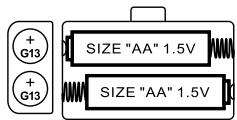
Battery compartment
Warning:
- It is preferable to replace the batteries in the unit every year.
- DO NOT mix new and old batteries or batteries of different types.
- If battery leakage occurs and comes in to contact with the skin or eyes, wash immediately with plenty of water.
- Batteries should be handled under adult supervision.
SAVE NATURE! Ensure batteries are disposed of safely according to the battery manufacturers' instructions.
OPTIONAL ADAPTOR
- Optional AC/DC adapter can be used instead of 2 × AA batteries by inserting the plug into the DC jack located at the back of the projector clock.
- Another series of projector clock with adapters may be available with this option.
- AC/DC adapter rating:
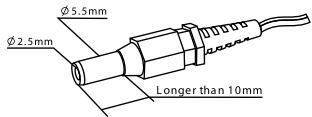
Suggested Dimensions
Output: DC 3V
Current: >150mA
Plug inner: positive pole (+ve), 2.5mm
Plug outer: negative pole (-ve), 5.5mm
RESET
Should an error occur, press [RESET] on the bottom of the unit with a pointed object to resume normal operation.
GENERAL CARE
- Never place the projection clock in areas subject to vibrations and shocks as this may damage it and cause inaccurate readings.
- Avoid exposure to sudden changes in temperature such as direct sunlight, extreme cold and wet or moist conditions.
- When cleaning the display and casing, only use a soft damp cloth. Do not use solvents or scouring agents as they may mark the LCD and casing.
- Do not drop the alarm clock or immerse in water.
- Do not attempt to make any repairs to the alarm clock yourself. Return it to the original retailer for repair.
m = 311
WARRANTY
This product is covered by our two-year warranty. For warranty or after-sales service, please return the product to the retailer with proof of purchase. Our warranty covers material or production defects attributable to the manufacturer and excludes any damage arising from the disrespect of the instructions for use or any inappropriate handling of the unit (such as dismantling, exposure to heat or moisture, etc.). Freephone Helpline: 0808 100 3015 FAX: +44 (0)1730 269147 Internet site: http://www.lexibook.co.uk
Copyright © Lexibook 2003
esaaee
Espanol
Copyright © Lexibook 2003
WEERSVOORSPELLINGEN
Copyright © Lexibook 2003
Nederlandds
5
Copyright © Lexibook 2003
Copyright © Lexibook 2003
Portugues
sennuod
Copyright © Lexibook 2003