
First Tablet MFC150GB - Tablet LEXIBOOK - Free user manual and instructions
Find the device manual for free First Tablet MFC150GB LEXIBOOK in PDF.


| Product Type | Tablet |
| Screen | 7-inch TFT LCD, 800x480 pixels |
| Operating System | Google Android 2.1 |
| Processor | 600 MHz |
| Storage | 4 GB internal, expandable via Micro SD/TransFlash card up to 16 GB (card sold separately) |
| RAM | DDRII 256 MB |
| Wi-Fi | 802.11 b/g built-in |
| Audio | Built-in mono speaker |
| Connectors | 1 USB 2.0 port (mini B and type A), 1 Micro SD card slot, 1 headphone jack (3.5 mm) |
| Supported Image Formats | JPEG, BMP, GIF |
| Supported Music Format | MP3 |
| Battery | Lithium rechargeable, 4000 mAh, 3.7 V |
| Battery Life | Average 4 hours |
| Power Adapter | Input: 100-240 V, Output: 5 V 2 A |
| Dimensions | 195 x 120 x 12 mm |
| Weight | 342 g |
| Languages | English, Spanish, French |
| Warranty | 1 year |
| What's in the Box | Lexibook First Tablet, USB cable, AC adaptor, instruction manual |
| Cleaning | Use a soft, dry cloth; do not use liquid cleaners. For exterior, use a damp cloth with mild soap if needed. |
| Battery Replacement | Replace only with same or equivalent type; require screwdriver to open back shell |
| Safety | Not a toy; adult supervision required; do not expose to moisture; avoid dropping; keep away from magnetic fields |
Frequently Asked Questions - First Tablet MFC150GB LEXIBOOK
User questions about First Tablet MFC150GB LEXIBOOK
0 question about this device. Answer the ones you know or ask your own.
Ask a new question about this device
Download the instructions for your Tablet in PDF format for free! Find your manual First Tablet MFC150GB - LEXIBOOK and take your electronic device back in hand. On this page are published all the documents necessary for the use of your device. First Tablet MFC150GB by LEXIBOOK.
USER MANUAL First Tablet MFC150GB LEXIBOOK
natural_image
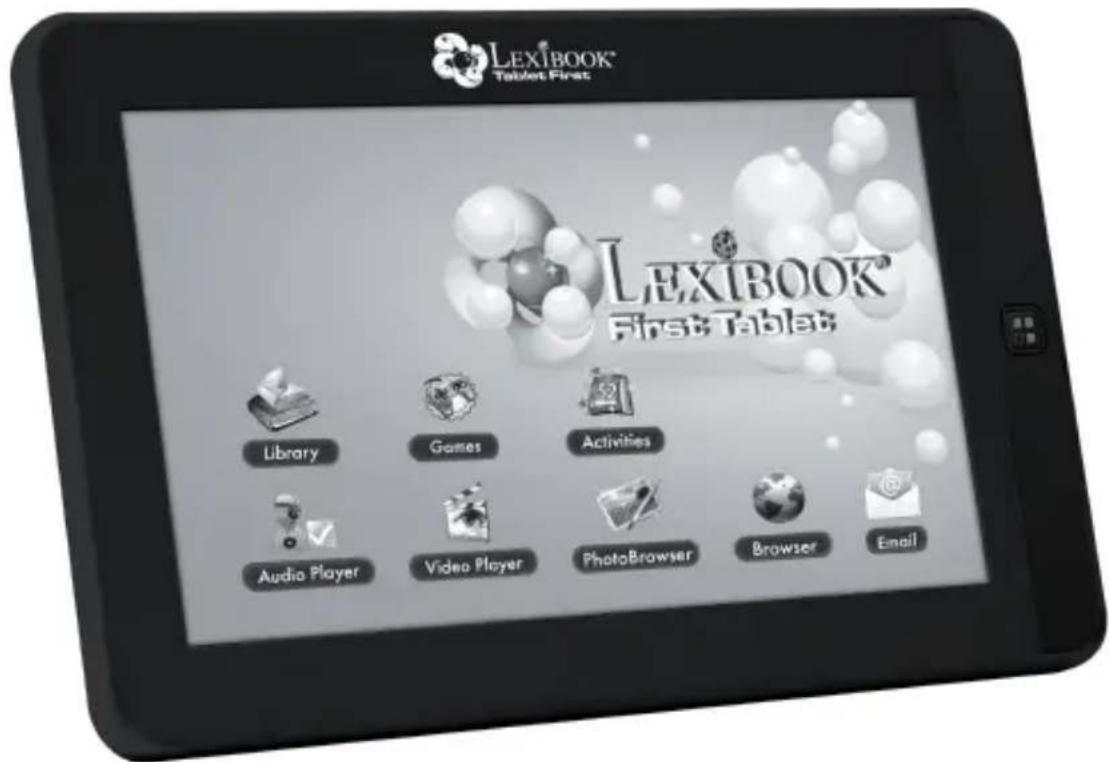
Abstract 3D rendering of a central sphere with surrounding spheres, no text or symbols presentLEXIBOOK®
First Tablet
www.lexibook.com
INSTRUCTION MANUAL
LEXIBOOK®
MFC150GB
Introduction
Thank you for purchasing the new Lexibook® First Tablet. It is strongly recommended that you read the following instructions to find all the necessary information regarding the functions of the Lexibook® First Tablet MFC150GB. Please take note of all the enclosed instructions and safety precautions.
Safety Instructions

natural_image
Black triangular warning symbol with a lightning bolt inside, indicating electrical hazard (no text)CAUTION
RISK OF ELECTRIC SHOCK DO NOT OPEN

natural_image
Black triangular warning symbol with exclamation mark (no text or numbers)CAUTION: TO REDUCE THE RISK OF ELECTRIC SHOCK. NO USER SERVICEABLE PARTS INSIDE. REFER SERVICING TO QUALIFIED SERVICE PERSONNEL.
The graphic symbols on the back cover of the set mean the following:

DANGEROUS VOLTAGE:
The lightning flash with arrowhead symbol within an equilateral triangle is intended to alert the user to the presence of uninsulated “dangerous voltage” within the product’s enclosure that may be of sufficient magnitude to constitute a risk of electric shock to persons.

ATTENTION:
The exclamation point within an equilateral triangle is intended to alert the user to the presence of important operating and maintenance (servicing) instructions in the literature accompanying the appliance.
WARNING:
• To reduce the risk of fire or electric shock, do not expose this appliance to rain or moisture.
- The apparatus shall not be exposed to dripping or splashing and that no objects filled with liquids, such as vases, shall be placed on the apparatus.
- The mains plug is used as the disconnect device, the disconnect device shall remain readily operable.
- In order to disconnect the apparatus from the mains completely, the mains plug should be disconnected from the mains socket outlet completely.
Important Safety Instructions
WARNING: THIS PRODUCT IS NOT A TOY, ADULT SUPERVISION IS REQUIRED.
- Read these instructions.
- Keep these instructions.
- Heed all warnings.
- Follow all instructions.
- Do not use the product on your lap for more than 30 minutes, with at least a 5-minute break.
- Do not use this unit near water.
- Clean only with a dry cloth.
-
Do not block any ventilation openings. Install in accordance with manufacturer's instructions.
-
To avoid overheating, do not leave the product in a non-ventilated space (e.g. a schoolbag) when it is turned on.
-
Do not install near any heat sources such as radiators, heat registers, stoves or other apparatus (including amplifiers) that produce heat.
-
Do not defeat the safety purpose of the polarized or grounding-type plug. A polarized plug has two blades with one wider than the other. A grounding-type plug has two blades and a third grounding prong. The wide blade or the third prong is provided for your safety. If the provided plug does not fit into your outlet, consult an electrician for replacement of the obsolete outlet.
-
Protect the power cord from being walked on or pinched particularly at plugs, convenience receptacles, and the point where they exit from the unit.
-
Only use attachments/accessories specified by the manufacturer.
-
Unplug this unit during lightning storms or when unused for long periods of time.
-
Refer all servicing to qualified service personnel. Servicing is required when the unit has been damaged in any way, such as the following: the power-supply cord or plug has been damaged; liquid has been spilled or objects have fallen into the unit; and/or the unit has been exposed to rain or moisture, does not operate normally, has changed its performance or has been dropped.
-
Do not overload wall outlet. Use only power source as indicated.
-
Use replacement parts as specified by the manufacturer.
-
Upon completion of any service or repairs to this product, ask the service technician to perform safety checks.
-
Keep the device away from metallic objects (coins, keys...). Do not leave it near magnetic fields that could cause data loss or damage the device.
-
Do not drop the device. Do not expose it to mechanical shock, friction or impact. When transporting the device, put it in a protective cover.
-
Protect the device from humidity and rain. If it gets wet, wipe it immediately.
-
Do not touch the power cord when your hand are wet and do not pull on the charger to unplug it.
-
In order to prevent data loss, remember to keep a backup (data or paper) of the information recorded on the device.
-
To prevent interference, do not use the device next to other electronic devices, artificial pacemaker or near medical equipment.
-
Shut off the device in locations that are susceptible to explosions and when travelling by airplane.
-
Do not use the product near inflammable or explosive sources.
-
Keep the device out of direct sunlight and away from other sources of extreme heat or cold.
-
Do not attempt to disassemble the device; it would no longer be covered by the warranty.
-
Do not place sharp objects directly in contact with the surface and do not spray cleaning products directly on the screen.
-
Do not push hard on the screen and do not place objects on top of it. This can cause tears in the screen.
Epilepsy Warning
Please read prior to any use of a video game by yourself or by your child.
Some people are susceptible to epileptic seizures or loss of consciousness when exposed to certain kinds of flashing lights or elements common in our everyday environment. These individuals may suffer a seizure when they watch certain televised images or when they play certain video games. These phenomena can occur even if the person has no previous medical history or has never suffered an epileptic seizure. If you or a family member has ever displayed symptoms related to epilepsy (seizure or loss of consciousness) in the presence of stimulation in the form of light, please consult your physician before using. We advise parents to be attentive to their children while they play video games. If you or your child experience the following symptoms: dizziness, altered vision, eye or muscle twitches, loss of consciousness, disorientation, involuntary movements or convulsions, immediately stop playing and consult a physician.
General Precautions When Using Video Games
- Do not stand too close to the screen. Play at a safe distance from the television screen and as far as the connecting cord allows.
- It is preferable to play video games on a small screen. Avoid playing when tired or when needing sleep.
- Make sure to play in a well lit room.
- When in use, take breaks of ten to fifteen minutes every hour.
Packaging Contents
When unpacking, ensure that the following elements are included:
1 Lexibook® First Tablet MFC150GB_01
1 USB cable
1 AC adaptor
1 instruction manual
WARNING: All packaging materials, such as tape, plastic sheets, wire ties and tags are not part of this toy and should be discarded for your child's safety.
Start-Up Guide
This section presents the Lexibook® First Tablet MFC150GB. For more information on the product, its functions and its use, please consult the owner's manual available and accessible on your device's home page (« Help » icon).
Button Functions
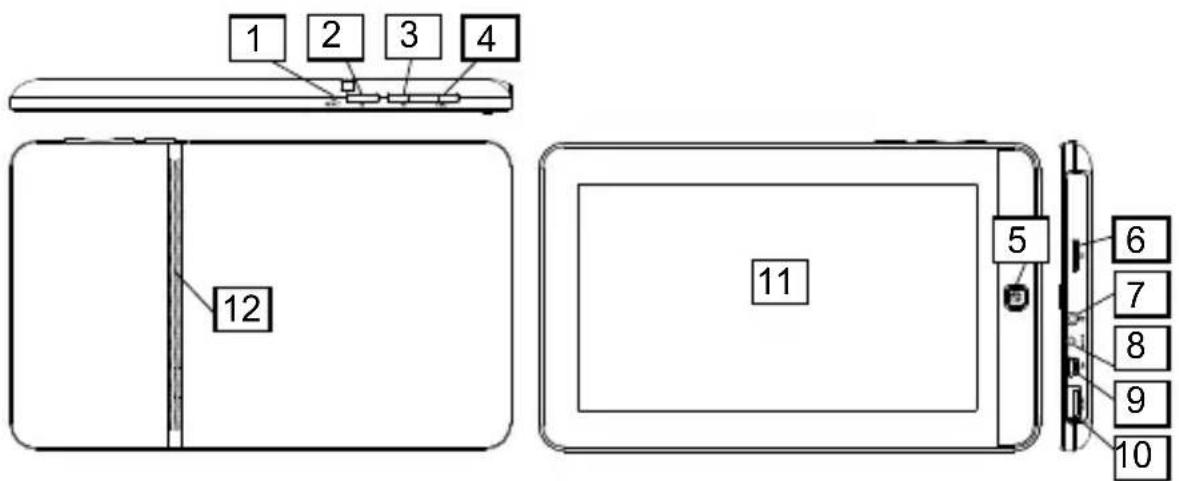
- Reset button to restart the product.
- Power button to turn the device on and off.
- Menu button (M) to access the home page.
- ESC button to return to the previous menu or to modify screen settings.
- Home button to access the home page.
-
Micro SD/TransFlash (TF) card reader.
-
Headphone input (3.5mm)
- DC input
- Mini USB port
- USB port
- Touch screen
- Speaker
Turning the Device On and Off
NOTE: For optimal touch screen performance, remove the protective film before using your device.
- To turn your Lexibook® tablet on, press the Power button (2) located on the right side of the device for 3 seconds.
- Wait while the Google Android 2.1 operating system starts up. After a wait of a few seconds, the home page (desktop) is displayed on the screen.
- To turn your Lexibook® tablet off, shut all applications in use and press the Power button (2) for 3 seconds.
Note: The device automatically locks after a few minutes of inactivity. To unlock it, press the Power button. Two symbols appear on the screen. Keep your finger pressed on one of the two symbols and slide it in the direction indicated by the arrow.
Setting the Touch Screen
During first use, you must set the touch screen sensitivity level. Follow the instructions displayed on the screen.
Headphones connection
On the right side of the unit is a headphones socket (7), suitable for any normal earphones fitted with a 3.5mm jack plug. When the headphones are in use, the speakers are turned off.
CAUTION: too high volume, especially when using headphones, can damage your hearing. For this reason, please turn the volume down before connecting the headphones.
Micro SD/TransFlash (TF) Card Reader
To store additional files, you can insert a Micro SD/TransFlash card (up to 16GB, card sold separately) in the built-in reader located on the right side of the device (7).
- Insert a micro SD/TransFlash (TF) card in the reader according to the correct orientation (the card's metallic connectors are facing down).
- To remove the card from the reader, press on the card then release. Next grasp the card and gently remove it from the reader.
Charging the built-in battery
The Lexibook® tablet is equipped with a built-in rechargeable lithium battery that provides power when you don't have access to an AC outlet.
IMPORTANT: The battery must be charged for at least 8 to 12 hours before using it for the first time.
- To recharge the battery, plug in the mains DC adaptor (included) into the Lexibook® tablet's DC input and the other end of the mains adaptor to a power outlet.
- The battery charging icon stays on while the device recharges and indicates the level of charging. Note: You can use the device while it is charging. It is possible that it will take longer to fully recharge the battery.
- When the battery is fully charged (icon completely green) you can unplug the device's mains adaptor and then the power plug.
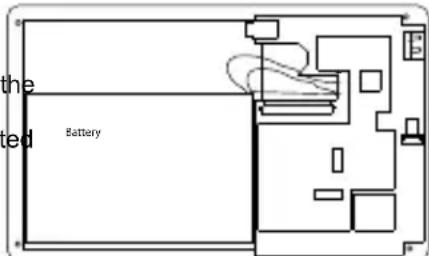
To change the battery:
- Turn off the device.
- Using a screwdriver, remove the screws located at the back of the device and remove the device's rear shell.
- Remove the used battery and replace it according to the indicated polarity and according to the facing diagram.
- Then replace the rear shell and tighten the screws.
Note:
- Only use the unit in combination with the adaptor supplied. Do not use a different adaptor to power the tablet.
- Whenever possible, keep the AC adaptor plugged into the laptop and an electrical outlet to recharge the battery.
• Always wait at least 5 seconds after having turned off the device before restarting it. Shutting off and immediately turning on the device can damage the electrical circuits.
- The power outlet to which the device is plugged in must be installed near the equipment and must always be readily accessible.
The battery life may vary based on usage patterns of the device. Do not expose the battery to temperatures below 0^ C ( 32^ F) or above 60^ C ( 140^ F). This may adversely affect the battery pack.
The lithium battery is intended for use only with this tablet. Do not disassemble the battery. Do not dispose of the battery in fire or water. To avoid risk of fire, burns or damage to your battery, do not allow a metal object to touch the battery contacts. Handle a damaged or leaking battery with extreme care. If you come in contact with the electrolyte, wash the exposed area with soap and water. If it contacts the eye, flush the eye with water for 15 minutes and seek medical attention. Do not charge the lithium battery pack if the ambient temperature exceeds 45^ C ( 113^ F). To obtain a replacement battery, contact your local dealer. Do not expose the battery to high storage temperatures (above 60^ C, 140^ F). When discarding a battery pack, contact your local waste disposal provider regarding local restrictions on the disposal or recycling of batteries. Only use the supplied AC Adaptor for charging.
WARNING: Danger of explosion if battery is incorrectly replaced. Replace only with same or equivalent type recommended by the manufacturer. Discard used batteries according to the manufacturer's instructions or local laws.
WARNING: Malfunction or loss of memory may be caused by strong frequency interference or electrostatic discharge. Should any abnormal function occur, reset the unit or unplug the AC/DC adaptor from the mains socket and plug it in again.
Specifications
Screen TFT LCD 7 inches
Screen Resolution 800x480 pixels
O.S. Google Android 2.1
CPU 600MHz
Storage 4GB – Micro SD/TransFlash (TF) cards compatible
RAM DDRII 256MB
Wifi 802.11 b/g (built-in)
Audio Built-in Mono speaker
Connectors 1 USB 2.0 port (with mini B connection and type A), 1 Micro SD card slot, 1 headphone jack
Supported image format JPEG, BMP, GIF
Supported music format MP3
Battery Lithium battery (included) - 4000mAh, 3.7V
Adaptor specifications Input: 100V-240V Output: 5V 2A
Battery life 4 hrs (average)
Dimensions 195 x 120 x 12 mm
Weight 342g
Languages English – Spanish - French
Maintenance and Warranty
To prevent fire or shock hazard, disconnect your unit from the AC power source when cleaning. The finish on your unit may be cleaned with a dust cloth and cared for as other furniture. Use a soft, clean cloth moistened with plain, lukewarm water to clean the exterior of the unit. Use caution when cleaning and wiping the plastic parts. Mild soap and a damp cloth may be used on the front panel.
This product is covered by our 1-year warranty.
For any claim under the warranty or after sale service, please contact your distributor and present a valid proof of purchase. Our warranty covers any manufacturing material and workmanship defect, with the exception of any deterioration arising from the non-observance of the instruction manual or from any careless action implemented on this item (such as dismantling, exposition to heat and humidity, etc.). It is recommended to keep the packaging for any further reference.
In a bid to keep improving our services, we could implement modification on the colours and the details of the product shown on the packaging.
NOTE: Please keep this instruction manual, it contains important information.
Reference: MFC150GB_01
Designed and developed in Europe – Made in China
© 2011 LEXIBOOK®
France
LEXIBOOK SA
Customer Service Department: 0 892 23 27 26 (0.34€ / min)
www.lexibook.com
United Kingdom & Ireland
For any further information, please call 0808 100 3015
www.lexibook.com

This product is not a toy.

WARNING: Prolonged use at full power of this product might damage the ear of the user
Environmental Protection:
Unwanted electrical appliances can be recycled and should not be discarded along with regular household waste! Please actively support the conservation of resources and help protect the environment by returning this appliance a collection centre (if available).
MFC150GB_01IM1191
Conformity Declaration
We, Lexibook® S.A.
Declare under our sole responsibility that the following product:
Kind of product: Tablet
Type designation: MFC150GB_01
Is in compliance with the following standards:
EN 55022: 2006+A1:2007
EN 61000-3-2: 2006
EN 61000-3-3: 2008
EN 55024: 1998+A1:2001+A2:2003
EN 300 328 V1.7.1
EN 301 489-1 V1.8.1
EN 301 489-17 V2.1.1
EN 50371: 2002
EN 60950-1: 2006+A11: 2009
EN50332-2:2003
We hereby declare that the abovementioned product is in compliance with the EMC Directive (2004/108/EC), with the Low Voltage Directive (2006/95/EC) and with the R&TTE Directive (1999/5/EC) of the European Commission.
Yiu Wai Man
Product Development Manager
06/15/2011 (Hong Kong)
C €1622 Ⓞ
YOUR OPINION MATTERS / VOTRE AVIS COMPTE
The Ground Truth image displays a single, solid horizontal line. According to Rule 2 (UNDERSCORE & LINE RULES), this is a stylistic or background line, not a placeholder underscore. Therefore, the OCR result must ignore it and output nothing or only meaningful text. The provided OCR content is "____", which consists of four underscores. This is an incorrect interpretation of the line as a placeholder, violating the rule that stylistic lines must be ignored. The OCR has hallucinated underscores where none should exist based on the GT's visual context. Hence, the OCR result is inconsistent with the Ground Truth.
- LEXIBOOK®
- First Tablet
- Introduction
- Safety Instructions
- CAUTION
- RISK OF ELECTRIC SHOCK DO NOT OPEN
- DANGEROUS VOLTAGE:
- ATTENTION:
- WARNING:
- Important Safety Instructions
- Epilepsy Warning
- General Precautions When Using Video Games
- Packaging Contents
- When unpacking, ensure that the following elements are included:
- Start-Up Guide
- Button Functions
- Turning the Device On and Off
- Setting the Touch Screen
- Headphones connection
- Micro SD/TransFlash (TF) Card Reader
- Charging the built-in battery
- IMPORTANT: The battery must be charged for at least 8 to 12 hours before using it for the first time.
- To change the battery:
- Note:
- Specifications
- Maintenance and Warranty
- France
- United Kingdom & Ireland
- Environmental Protection:
- Conformity Declaration
- YOUR OPINION MATTERS / VOTRE AVIS COMPTE
Brand : LEXIBOOK
Model : First Tablet MFC150GB
Category : Tablet