
GT2000PI - Board game LEXIBOOK - Free user manual and instructions
Find the device manual for free GT2000PI LEXIBOOK in PDF.


| Product type | Electronic board game |
| Model | GT2000PI |
| Brand | LEXIBOOK |
| Power supply | 3 AA/LR6 1.5 V batteries (not included) |
| Number of players | 1 or 2 |
| Game modes | Battleship, Radar Mission, Artillery Operation, Red Alert |
| Box contents | Game board, 10 plastic ships, 200 white pegs, 70 red pegs, vertical partition, user manual |
| Recommended age | From 3 years (contains small parts) |
| Main material | Plastic |
| Screen | LCD |
| Sound effects | Yes |
| Warranty | 2 years |
| Maintenance | Clean with a slightly damp cloth, no detergent |
| Precautions | Do not expose to heat or humidity, do not disassemble |
| Repairability | Warranty covering manufacturing defects, contact dealer for service |
| Manufacturer | LEXIBOOK S.A., France |
| Country of manufacture | China |
| Reference | GT2000PI |
| Auto-off | Yes, after 5 minutes of inactivity |
| Adjustable sound level | Yes (low/high volume) |
Frequently Asked Questions - GT2000PI LEXIBOOK
User questions about GT2000PI LEXIBOOK
0 question about this device. Answer the ones you know or ask your own.
Ask a new question about this device
Download the instructions for your Board game in PDF format for free! Find your manual GT2000PI - LEXIBOOK and take your electronic device back in hand. On this page are published all the documents necessary for the use of your device. GT2000PI by LEXIBOOK.
USER MANUAL GT2000PI LEXIBOOK
PIRATES OF THE OCEANS
THE SEA BATTLE
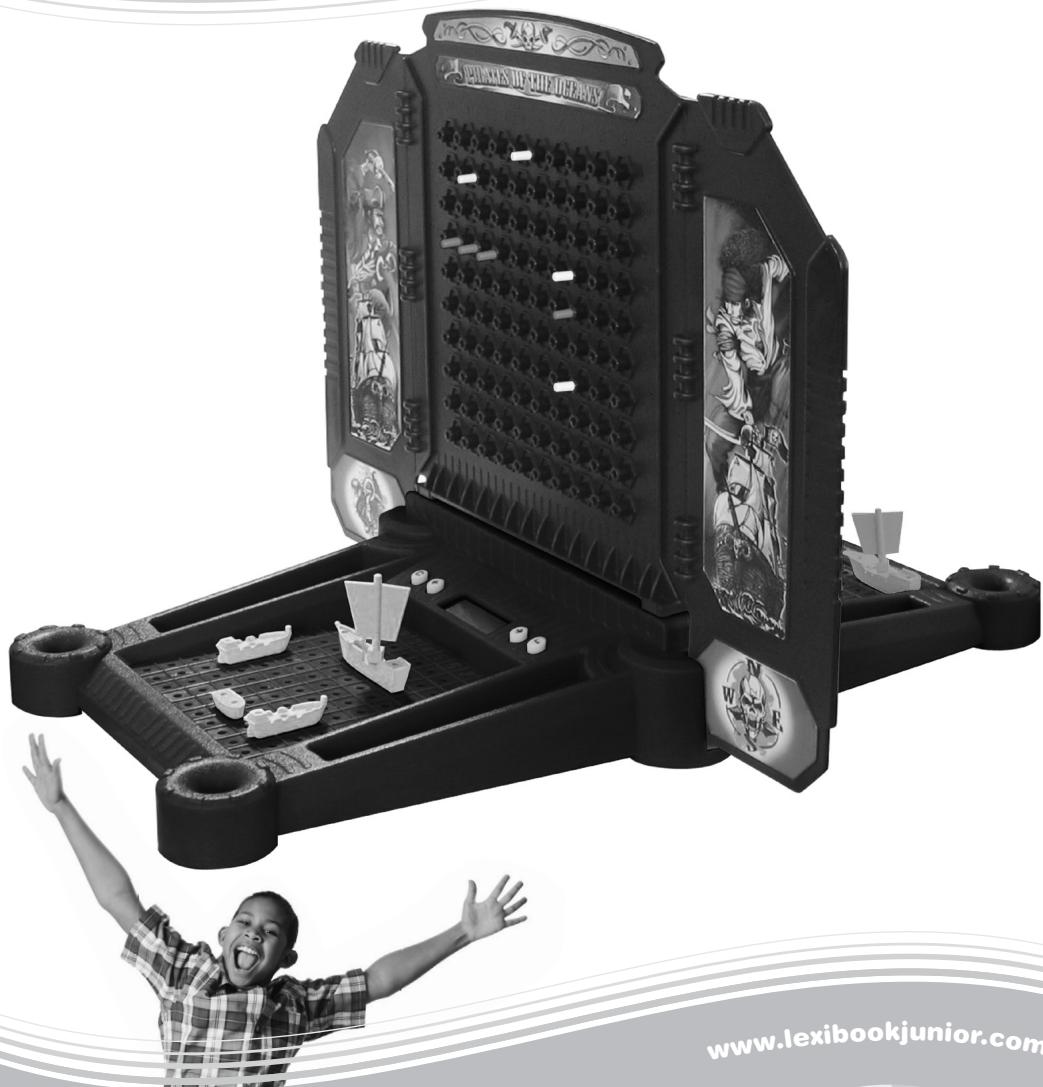
INSTRUCTION MANUAL
MODE D'EMPLOI
www.lexibookjunior.com
LEXIBOOK
juniors
GT2000PI


1. À L'INTÉRIEUR DE CET EMBALLAGE
One instruction manual
WARNING: All packaging materials, such as tape, plastic sheets, wire ties and tags are not part of this toy and should be discarded for your child's safety.
2. GETTING STARTED
- Use a screwdriver to insert 3 × AA batteries (not included) in the battery compartment located under the base of the product.
- Slide the barrier onto the base unit so that it is positioned between the 2 control consoles of the base.
- Assign the 10 plastic ships, 5 to each player.

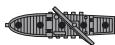
(5-dotship) = 1 per player.


(4-dotship) = 1 per player.


(3-dotship) = 2 per player.


(2-dotship) = 1 per player.
- Split the 200 white pegs and the 70 red pegs between the 2 players, and store them in the corresponding storage compartments.
3. DEMO
When the game unit is switched off, press the 1 and 0 buttons simultaneously to launch the demo. To stop the demo, press and hold 0 .
4. OBJECTIVE OF THE GAME
In this ultimate challenge, your goal is to discover all the locations of your enemy's ships and sink them before he can destroy yours. The game is played on 4 grids, two for each player. On the lower grid, you arrange your ships and record the shots by the opponent. On the upper grid, you record your shots on the enemy's ships.
5. START-UP SEQUENCE
- Press the ON/OFF button to turn the game on. Press and hold to switch it off. The game will automatically power off if unused for 5 minutes.
-
Select 1 or 2-player mode. In 1-player mode, you play against the computer. When this icon is blinking on the LCD screen, press ENTER to confirm. To select 2-player mode, press ← or →. When this icon is blinking on the LCD screen, press ENTER to confirm.
-
Use the or key to select one of the 4 different battles available:

Sea Battle
Radar Commander

Gunner Strike

Red Alert
Press to confirm. For more details on the different battles, please refer to section "GAME BATTLES" on page 12.
- Press to toggle the volume level between high and low.
Before the battle begins, you must arrange a number of ships secretly on the lower grid (fleet grid). The grids where the key is located belong to player 1. Each vessel occupies a number of consecutive squares on the grid. They can be arranged vertically (letters A to J) or horizontally (numbers 0 to 9). They cannot be arranged diagonally or overlap. The number of squares for each ship varies according to the type of ship:
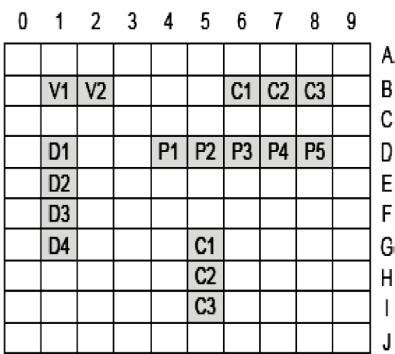
5 squares as per the following example P1, P2, P3, P4, P5.
4 squares as per the following example D1, D2, D3, D4.
3 squares each as per the following example C1, C2, C3.
2 squares as per the following example V1, V2.
7. SAVING THE COORDINATES OF YOUR SHIPS
- The screen displays the maximum number of ships that you can choose.

- Use the or key to select the first vessel that you wish to save.
(2 cases)

(3 cases)


(4-dotship)

(5 cases)
-
Press ENTER to confirm. Then, save the coordinates of one end of the vessel. "A0" appears on screen and the letter 'A' will be blinking. To change and select another letter, use the or key, then press ENTER. Now, the number '0' is blinking. Follow the same method you used to save the letter, and select the number corresponding to the extremity of the vessel to be located. Press ENTER to save it.
-
At last, save the coordinates of the other end of the vessel. A sound effect will confirm that the vessel has been properly saved.
-
The screen will now indicate which vessels you can still save. Choose the next ship and save its coordinates as you did in steps 3 and 4. You can press to cancel the selection of the previous vessel. Press again to cancel the previous vessel and so on.
-
You can choose to use only 1, 2, 3 or 4 vessels. To do so, press the button after having saved the coordinates of at least one vessel. Why is it interesting to play with less than 5 ships? If you play with less than 5 vessels you can use different strategies to hide your ships and search for your opponent's ships.
-
Once you saved the coordinates of all 5 ships or you press , the game will move automatically to the next stage:
-
In 1-player mode, the game will start automatically.
- In 2-player mode, it is the turn of player 2 to save the coordinates of his fleet. The game will automatically start when the two fleets have been saved.
Note: player 2 must save the same number of vessels as player 1.
8. GAME BATTLES
Here is a description of each game battle:

Sea Battle Mode
Both players must guess where the vessels of their opponent are and destroy them. The first player to destroy the last vessel of his opponent's fleet wins. To fire, enter the target coordinates the same way as you did for your own vessels (see chapter 7).

Radar Commander Mode
This mode is similar to the Sea Battle. However, when a shot is fired and missed, the LCD screen will display a number that indicates the distance to the nearest target. In that way you can guess where an opponent's vessel is located, and if you place your shots clevery you can directly determine your next target.

Gunner Strike Mode
This mode is similar to the Sea Battle, but the selection of the coordinates of the target is different. First select the letter corresponding to the target followed by . Then the numbers 1 to 10 appear on the LCD screen. You must be fast and accurately press at the right time, and select the correct number of the coordinate where you want to fire. This game mode not only tests your strategic gameplay, but also your reaction time.

Red Alert Mode
This is a mix of the 3 previous modes. This game play is similar to the Sea Battle, but the selection of the coordinates is identical as in Gunner Strike Mode. Also, when the shots you fired miss the target, the LCD screen will indicate the distance to the nearest target (like in Radar Commander Mode).
9. GAME FLOW
- After the ships have been positioned and their coordinates saved, the battle begins in a series of rounds. In each round, each player (or the computer in 1-player mode) has a turn.
- Select the first target squares in the opponents' grid that you want to fire at. To fire, enter the coordinates as you did to save the position of your vessels (see chapter 7).
- If your shot does not reach any target, use the white peg markers on the barrier to remember the shots already made. You will hear the sound of the shot falling into the water, and the screen will display the following animated
graphic:
A sound effect indicates when you target the same position twice. You can also correct the coordinates by pressing CANCEL ( ) before pressing ENTER.
4. If your shot hits one of the opponent's vessels, you will hear a detonation. The game will display an explosion on the screen. Use the red peg markers on the barrier to memorize the positions of the target squares hit.
- The game also displays the coordinates of your opponent's shots. To display the last coordinates that your opponent fired, press simultaneously and . When the opponent hits your ships, you can mark each coordinate with a red marker directly on top of your ship.
- When you hit the last part of your opponent's vessel, it will be completely destroyed. An animation and various sound effects will illustrate the sinking!
Hint: You think that all the parts of your opponent's vessel have been hit but it is not destroyed? Then, that means your opponent has 2 vessels located next to each other.
- The first player to destroy all of his opponent's vessels wins!
- Press to start a new game at anytime.
BATTERY INFORMATION
Your game "Pirates of the oceans - Sea Battle" works with 3 x 1.5V --- type AA alkaline batteries.
- Using a screwdriver, open the battery compartment cover located at the back of the unit.
- Install the 3 × AA batteries observing the polarity indicated at the bottom of the battery compartment, and as per the diagram shown opposite.
- Close the battery compartment and tighten the screw. When new batteries are inserted, use a sharp object (the tip of a paper clip for example) to press the RESET button located at the back of the game.
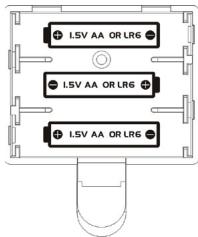
Do not use rechargeable batteries. Non-rechargeable batteries are not to be recharged. Rechargeable batteries are to be removed from the toy before being charged. Rechargeable batteries are only to be charged under adult supervision. Different types of batteries or new and used batteries are not to be mixed. Only batteries of the same or equivalent type as recommended are to be used. Batteries are to be inserted with the correct polarity. Exhausted batteries are to be removed from the toy. The supply terminals are not to be short circuited. Do not throw batteries into a fire. Remove the batteries if you are not going to use the game for a long period of time. WARNING: If the unit malfunctions or receives an electrostatic shock, press the RESET key. If this proves ineffective, remove the batteries and insert them again.
MAINTENANCE AND WARRANTY
Only use a soft, slightly damp cloth to clean the unit. Do not use detergent. Do not to expose the unit to direct sunlight or any other heat source. Do not immerse the unit in water. Do not dismantle or drop the unit. Do not try to twist or bend the unit. If the unit malfunctions, try to change the batteries first. If this proves to be ineffective, read the instruction manual again.
NOTE: please keep this instruction manual, it contains important information.
This product is covered by our 2-year warranty. For any claim under the warranty or after sale service, please contact your distributor and present a valid proof of purchase. Our warranty covers any manufacturing material and workmanship defect, with the exception of any deterioration arising from the non-observation of the instruction manual or from any careless action implemented on this item (such as dismantling, exposition to heat and humidity, etc.). It is recommended to keep the packaging for any further reference. Not suitable for children under 36 months old, as it contains small detachable elements which could be swallowed. In a bid to keep improving our services, we could implement modification on the colours and the details of the product shown on the packaging.
Reference: GT2000PI
Designed and developed in Europe - Made in China
Environmental Protection:
Unwanted electrical appliances can be recycled and should not be discarded along with regular household waste! Please actively support the conservation of resources and help protect the environment by returning this appliance to a collection centre (if available).

1. EN EL INTERIOR DE LA CAJA
6. PARA CONFIGURAR DETU FLOTA
MANUTENÇÂO / GARANTIA
©2007 Lexibook®
IM Ref. Code: GT2000PIIM0137