 ManualGo.com
4190D - Cordless drill MAKITA - Free user manual and instructions
Find the device manual for free 4190D MAKITA in PDF.



Download the instructions for your Cordless drill in PDF format for free! Find your manual 4190D - MAKITA and take your electronic device back in hand. On this page are published all the documents necessary for the use of your device. 4190D by MAKITA.
USER MANUAL 4190D MAKITA
| 4190D (illust) ('100. 3. | LD EN
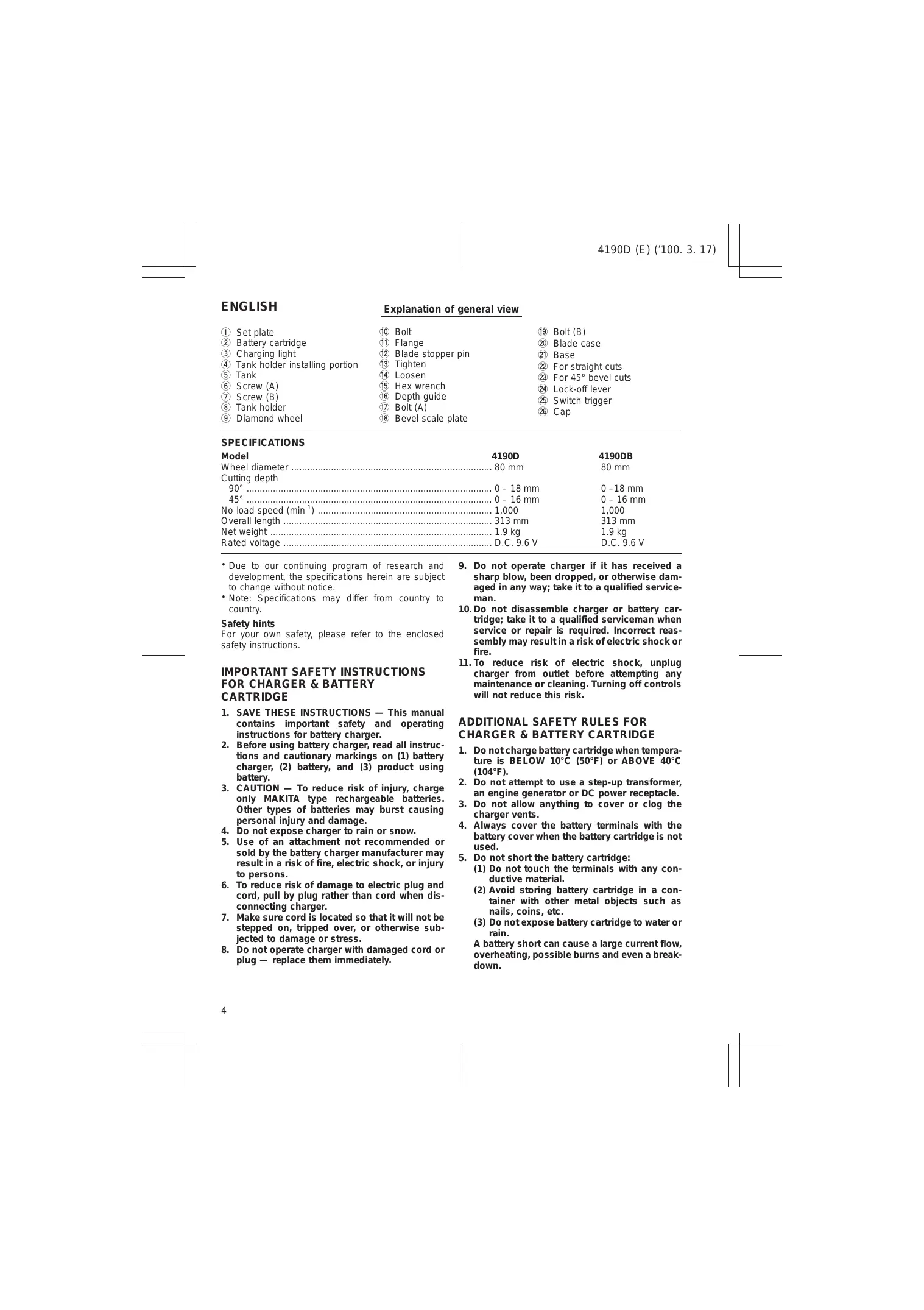
4190D (E) (100. 3. 17) ENGLISH Explanation of general view D Set plate d Bolt % Bolt (B) D Flange & Blade case 1 Blade stopper pin 2 Base 43 Tighten 2 For straight cuts d# Loosen 2 For 45° bevel cuts $ hex wrench 2% Lock-off lever 46 Depth guide à Switch tri D BA # Switch trigger Bevel scale plate % Cap SPECIFICATIONS Model Wheel diameter Cutting depth 90° 45° No load speed (min? Overall length …. Net weight Rated voltage 4190DB 80 mm + Due to our continuing program of research and development, the specifications herein are subject to change without notice + Note: Specifications may differ from country to country. Safety hints For your own safety, please refer to the enclosed safety instructions.
contains important safety and operating instructions for battery charger.
2. Before using battery charger, read all instruc-
tions and cautionary markings on (1) battery charger, (2) battery, and (3) product using battery.
3. CAUTION — To reduce risk of injury, charge
only MAKITA type rechargeable batteries. Other types of batteries may burst causing personal injury and damage. . Do not expose charger to rain or snow. . Use of an attachment not recommended or sold by the battery charger manufacturer may result in a risk of fire, electric shock, or injury to persons.
6. To reduce risk of damage to electric plug and
cord, pull by plug rather than cord when dis- connecting charger.
7. Make sure cord is located so that it will not be
stepped on, tripped over, or otherwise sub- jected to damage or stress.
8. Do not operate charger with damaged cord or
plug — replace them immediately.
9. Do not operate charger if it has received a
sharp blow, been dropped, or otherwise dam- aged in any way; take it to a qualified service- man.
10. Do not disassemble charger or battery car-
tridge; take it to a qualified serviceman when service or repair is required. Incorrect reas- sembly may resultin a risk of electric shock or fire. 11.To reduce risk of electric shock, unplug charger from outlet before attempting any maintenance or cleaning. Turning off controls will not reduce this risk.
ture is BELOW 10°C (50°F) or ABOVE 40°C (104°F).
2. Do not attempt to use a step-up transformer,
an engine generator or DC power receptacle.
3. Do not allow anything to cover or clog the
4. Always cover the battery terminals with the
battery cover when the battery cartridge is not used.
5. Do not short the battery cartridge:
(1) Do not touch the terminals with any con- ductive material. (2) Avoid storing battery cartridge in a con- tainer with other metal objects such as nails, coins, etc. (3) Do not expose battery cartridge to water or rain. A battery short can cause a large current flow, overheating, possible burns and even a break- down.
6. Do not store the machine and battery cartridge
in locations where the temperature may reach or exceed 50°C (122°F).
7. Do not incinerate the battery cartridge even if
itis severely damaged or is completely worn out. The battery cartridge can explode in a fire. Be careful not to drop, Shake or strike battery. . Do not charge inside a box or container of any kind. The battery must be placed in a well ventilated area during charging.
1. Be aware that this is always in an operating
condition, because it does not have to be plugged into an electrical outlet.
2. Check the wheel carefully for cracks or dam-
age before operation. Replace cracked or damaged wheel immediately. . Use only flanges specified for this machine. . Be careful not to damage the spindle, flanges {especially the installing surface) or bolt. Dam- age to these parts could result in wheel break- age.
5. Hold the machine firmly.
6. Keep hands away from rotating parts.
7. Make sure the wheel is not contacting the
workpiece before the switch is turned on.
8. Wait until the wheel attains full speed before
9. Stop operation immediately if you notice any-
10. Do not attempt to lock the trigger in the “ON”
11. Never attempt to cut with the machine held
upside down in a vise. This can lead to serious accidents, because it is extremely dangerous. (Fig. 1) 12.Before setting the machine down after com- pleting a cut, be sure that the wheel has come to a complete stop. SAVE THESE INSTRUCTIONS.
- Always switch off the machine before insertion or removal of the battery cartridge + To remove the battery cartridge, pull out the set plate on the machine and grasp both sides of the cartridge while withdrawing it from the machine
- To insert the battery cartridge, align the tongue on the battery cartridge with the groove in the housing and slip it into place. Snap the set plate back into place. Be sure to close the set plate fully before Using the machine
- Do not use force when inserting the battery car- tridge. If the cartridge does not slide in easily, it is not being inserted correctiy 4190D (E) (100. 3. 15) Charging For 4190D (Fig. 3)
1. Plug the battery charger into your power source.
2. Insert the battery cartridge so that the plus and
minus terminals on the battery cartridge are on the same sides as their respective markings on the battery charger. Insert the cartridge fully into the port s0 that it rests on the charger port floor.
3. When the battery cartridge is inserted, the charg-
ing light color will flash in red color and charging will begin . When charging is completed, the charging light goes out. The charging time is as follows: Battery 7000, 7100, 7120, 9000, 9100, 91004, 9120: approx. 60 minutes.
5. If you leave the battery cartridge in the charger
after the charging cycle is complete, the charger will switch into its “trickle charge (maintenance charge)” mode
6. After charging, remove the battery cartridge from
the charger and unplug the charger from the power source.
Capacity Number of Battery type (man) cells 9000 1,300 8 CAUTION:
- The battery charger is for charging Makita battery cartridge. Never use it for other purposes or for other manufacturer's batteries. + When you charge a new battery cartridge or à battery cartridge which has notbeen used for a long period of time, it may not accept a full charge. This is à normal condition and does not indicate à problem. You can recharge the battery cartridge fully after discharging it completely and recharging à couple of times.
- When you charge à battery cartridge from a just- operated machine or à battery cartridge which has been left in a location exposed to direct sunlight or heat for à long time, let it cool off. Then re-insert it and try to charge it once more. + When you charge a new battery cartridge or à battery cartridge which has notbeen used for a long period, sometimes the charging light will go out Soon. If this occurs, remove the battery cartridge and re-insert it. If the charging light goes out within one minute even after repeating this procedure à couple of times, the battery cartridge is dead Replace it with à new one.
For 4190DB (Fig. 4) Plug the battery charger into your power source. Insert the battery cartidge so thatthe plus and minus terminals on the battery cartridge are on the same sides as their respective markings on the battery charger. Insert the cartridge fully into the port so that itrests on the charger port floor. When the battery cartridge is inserted, the charging light will come on and charging will begin. The charg- ing light will keep lighting up steadily during charging. When charging is completed, the charging light goes out. The charging time is approx. 100 minutes After charging, unplug the charger from the power source. Capacity Number of Battery type (mAh) cells 9033 2,200 8 CAUTION “If you charge a battery cartridge from à just- operated machine or à battery cartridge which has been left in a location exposed to direct sunlight for à long time, the charging light may flash in red color. If this occurs, wait for à while. Charging will begin after the battery cartridge cools. + Any of the following conditions indicates damage to the charger and/or battery cartidge. Ask your Makita Authorized or Factory Service Center to check them.
1) The charging light does not light up or flash (red)
when the battery is inserted in the charger port.
2) Charging is not completed at even more than
three hours after red light comes ON at start of charging Trickle charge (Maintenance charge) If you leave the battery cartridge in the charger to prevent spontaneous discharging after full charge, the charger will switch into its "trickle charge (main- tenance charge)" mode and keep the battery car- tridge fresh and fully charged Tips for maintaining maximum battery life
1. Charge the battery cartridge before completely
discharged Always Stop machine operation and charge the battery cartridge when you notice less machine power.
2. Never recharge a fully charged battery cartridge
Overcharging shortens the battery service life.
3. Charge the battery cartridge with room tempera-
ture at 10°C - 40°C (50°F - 104°F). Let a hot battery cartridge cool down before charging it. Installing water supply Atach the tank holder on the tank. The tank holder should be attached around the portion shown with the dotted line. Tighten the screw (A) to the extentthatthe tank can still tum within the tank holder. (Fig. 5) Atiach the tank holder onto the motor housing. Tighten the screw (B) securely. (Fig. 6)
4190D (E) (100. 3. 15) Connect the cap on the end of the polyvinyl tube to the mouth of the tank. Turn the tank clockwise when making the connection. Then tighten the screw (A) securely to secure the tank. (Fig. 7) CAUTION: If you find the polyvinyl tube is bent like à V” or has been strained excessively after installing the water supply, loosen the screw (B) and adjustthe position of the tank to alleviate the bent, pinched or strained condition: Installing or removing diamond wheel (Fig. 8 & 9) Important: Always be sure that the machine is switched off and the battery cartridge is removed before installing or removing the wheel. To install the wheel, first loosen the bolt with the hex wrench and remove the bolt and the flange. Then mount the wheel, the flange and the bolt. The wheel should be mounted with the Makita name on the flange side. Press the blade stopper pin and insert it through the hole in the wheel so that the wheel cannot revolve. Use the hex wrench to tighten the bolt securely. To remove the wheel, follow the installation procedure in reverse. CAUTION:
- When installing the wheel, be sure to tighten the bolt securely. + Use only the Makita hex wrench to install or remove the wheel. Hex wrench storage (Fig. 10) When not in use, the hex wrench can be convenientiy stored Adjusting depth of cut (Fig. 11) Loosen the bolt (A) on the depth guide with the hex wrench and move the base up or down. Atthe desired depth of cut, secure the base by tightening the bolt (a) Bevel cutting (Fig. 12) Loosen the bolt (A) on the depth guide and the bolt(B) on the bevel scale plate with the hex wrench. Set for the desired angle (0 - 45°) by titing accordingly, then tighten the bolts (A) and (B) securely. CAUTION: After adjusting depth of cut and bevel cuttng angle, be sure to tighten the bolts (A) and (B) securely. Sighting (Fig. 13) For straight cuts, align the edge of the base with your cutting line on the workpiece. F or 45° bevel cuts, älign the notch in the front of the base with it CAUTION: When making bevel cuts, view the cutting line on the workpiece through the window in the blade case in order to cut more accurately. If you have difficulty seeing it because of the water tank, adjust the posi- tion of the tank by tting it backward slightly.
Switch action (Fig. 14) CAUTION: Before inserting the battery cartridge into the machine, always check to see that the switch trigger actuates properly and returns to the “OFF” position when released. To prevent the trigger from being accidentally pulled, à lock-off lever is provided. To start the machine, slide the lock-off lever in the direction of the arrow and pull the trigger. Release the trigger to stop. Water supply (Fig. 15) Remove the cap on the tank and fill through the hole Recap the tank. Be sure that the water cock is turned off when filing the tank with water. CAUTION: When filing the tank with water, be careful not to let the machine get wet. Operation (Fig. 16) Hold the machine firmiy. Set the base plate on the workpiece to be cut without the wheel making any contact. Then tum the machine on and wait until the wheel attains full speed. Feed water to the wheel by adjusting the water cock to obtain a gente flow of water. Move the machine forward over the workpiece surface, keeping it flat and advancing smoothly until the cutting is completed. Keep your cutting line straight and your speed of advance uniform For fine, clean cuts, cut slowly. (When cutting glass plate 5 mm thick, cut at about 250 mm/min. When cutting tile 10 mm thick, cut at about 300 mm/min.) Also slow down as you complete à cut to avoid breaking or cracking the workpiece being cut. CAUTION: *Be sure to hold the workpiece fimiy down on à stable bench or table during operation. Do not twist or force the machine in the cut, or the motor may be overloaded or the workpiece may break. Do not use the machine with the wheel in an upward or sideways position. When cuting glass plate, it is recommended to attach à rubber plate (optional accessory) on the base of the machine to prevent the workpiece surface from being scratched + The wheel for Model 4190D/DB is à wet-type wheel for glass and tile applications. Be sure to feed water to the wheel during operation Ifthe cutting action of the wheel begins to diminish, dress the cutting edge of the wheel using an old discarded coarse grit bench grinder wheel or con- crete block. Dress by pressing lightiy on the outer edge of the wheel 4190D (E) (100. 3. 17) Cutting performance The following reference table indicates the approxi- mate cutting capacity from à single battery charge Work |, Cutting length (90°) piece |Thikness Zi50D | 4190D8 3 mm 5m ëm Glass 5 mm 2m 3m Ceramic [5 mm am 6m tie 10 mm 35m 55m CAUTION: Ifthe machine is operated continuously until the battery cartridge has discharged, allow the machine to rest for 15 minutes before proceeding with à fresh battery. MAINTENANCE CAUTION: Always be sure that the machine is switched off and the battery cartridge is removed before carrying out any work on the machine. After use Brush off accumulation of dust on the base To maintain product safety and reliabilty, repairs, maintenance or adjustment should be carried out by à Makita Authorized Service Center. GUARANTEE We guarantee Makita machines in accordance with statutory/country-specific regulations. Damage attrib- utable to normal wear and tear, overload or improper handling will be excluded from the guarantee. In case of complaint, please send the machine, undismantied, with the enclosed GUARANTEE CERTIFICATE, to your dealer or the Makita Service Center.