
U130 - Netbook MSI - Free user manual and instructions
Find the device manual for free U130 MSI in PDF.



| Brand | MSI |
| Model | U130 |
| Product Type | Netbook |
| Screen | 10.1 inches |
| Processor | Intel Atom |
| RAM Memory | 1 GB |
| Hard Drive | 160 GB |
| Operating System | Windows |
| Weight | 1.3 kg |
| Dimensions (L x W x H) | 260 x 180 x 30 mm |
| Power Supply | AC Adapter |
| Main Functions | System recovery via F3 key, driver CD, USB key or SD card |
| Maintenance and Cleaning | Back up important data before any system recovery |
| Security | Do not turn off the device during system recovery; use the AC adapter |
| Spare Parts and Repairability | Contact the regional distributor or an authorized service center |
| General Information | Warranty void if default settings are modified |
Frequently Asked Questions - U130 MSI
User questions about U130 MSI
0 question about this device. Answer the ones you know or ask your own.
Ask a new question about this device
Download the instructions for your Netbook in PDF format for free! Find your manual U130 - MSI and take your electronic device back in hand. On this page are published all the documents necessary for the use of your device. U130 by MSI.
USER MANUAL U130 MSI
System Recovery Manual
Table of Contents
English 4 繁體中文 14 简体中文 24 Deutsch 34 Français 44 Pycckn 54 Espanol 64 Italiano 74 Türkce 84 Magyar 94 Čeština 104 Polski 114 YkpaIHcbka 124 Portugués 134
Hakundae 144 Dutch 154 Български 164 Dansk 174 Suomi 184 Slovensky 194 Româna 204 Srpski 214 Hrvatski 224 Svenska 234 Slovenščina 244 Bosanski 254 Eesti keeles 264 Norsk 274 Bahasa Indonesia 284 Inu 294
Portugues do Brasil 304 Lietuviškai 314 Latviski 324 日本語 334 Tieng Viet 344 Elambdavikα 354 364 374 384
English
System Recovery Manual
Introductions
Purposes for Using the System Recovery Function
This Recovery Manual provides instructions and illustrations on how to recover the system of the notebook users purchased to the manufactory default settings.
The purposes for using the System Recovery Function may include:
- Restore the system back to the initial status of original manufacturer's default settings.
- When some errors have occurred to the operating system in use.
- When the operating system is affected by virus, and is not able to work normally.
Please be noticed that it is always recommended to read this manual carefully before proceeding the System Recovery Function.
Precautions for Using the System Recovery Function
The following precautions should be observed before proceeding with the System Recovery Function:
- If your hard drive and system encounter non-recoverable problems, please use the F3 Hotkey recovery from the Hard Drive first to perform the System Recovery Function.
- Before using the System Recovery Function, please backup the important data saved on your system drive to other storage devices.
- If a USB flash drive or an SD card is used for performing the Recovery Function, please note that it is always necessary to backup the data saved in the USB flash drive or memory card to other storage devices.
- If the System Recovery Function is not able to proceed with any method provided in this Recovery Manual, it is strongly recommended to contact the authorized local distributor or service center for further assistance. Note that any improper attempt to change the default settings of the notebook may cause the warranty to be void.
Getting Started
This System Recovery Manual provides users with three methods to perform the System Recovery Function.
They are:
- Recover the system with the F3 Hotkey on the keyboard of the notebook.
- Recover the system with the Driver CD that comes with the package.
- Recover the system with a personal USB flash drive or an SD card.
Users are recommended to read this section from start to finish first, and then may go directly to the specific method that is selected by users to perform the System Recovery Function to restore the system back to its factory default settings.
Recover the system with the F3 Hotkey
If the hard drive and system encounter non-recoverable problems, it is always recommended to perform the System Recovery Function with the F3 Hotkey from the Hard Drive first.
Follow the instructions below to continue:
- Restart the notebook.
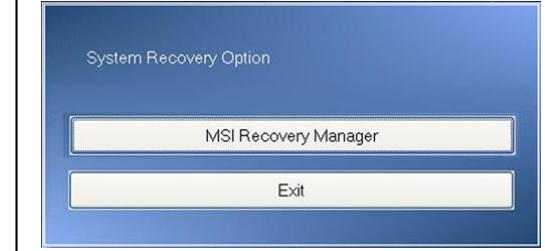
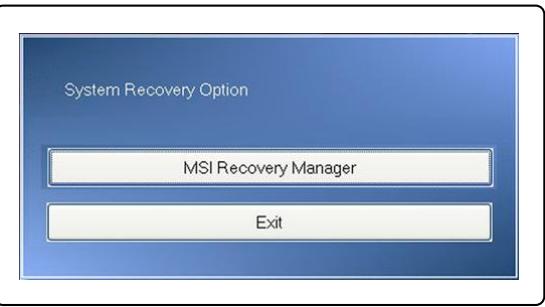
- Press the F3 hotkey on the keyboard when the following message appears on the display
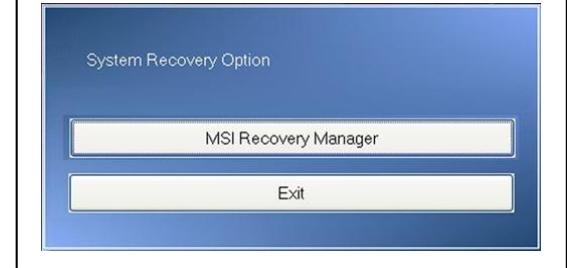
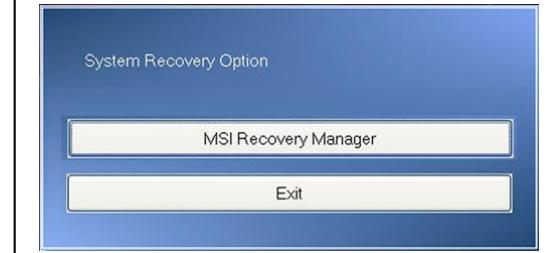
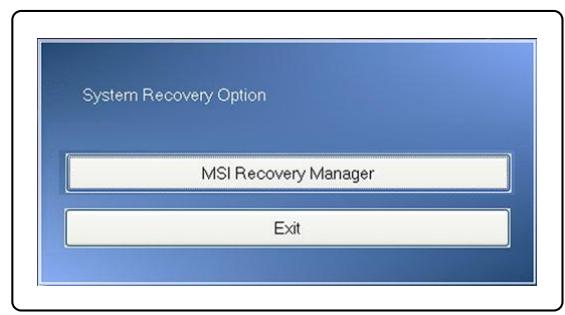
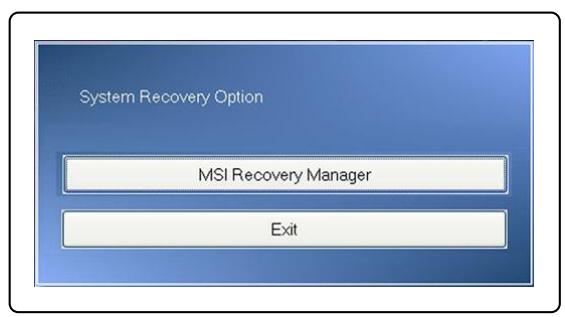
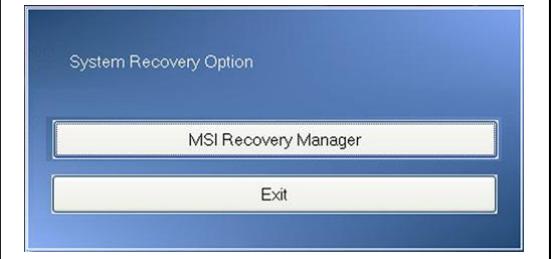
- Select [MSI Recovery Manager] to start the System Recovery Function; or select [EXIT] to restart the system
2
Press DEL key to run Setup
Press F11 to run Boot Menu
Press Tab to show POST screen
Press F3 key to run Recovery

System Recovery Option
MSI Recovery Manager
Exit
- Press [OK] to continue proceeding the System Recovery Function.
- Press [Cancel] to stop proceeding the System Recovery Function at any time.
- The System Recovery Function is in proceeding now.
- When the following window appears, the system has been recovered successfully.
- Press [OK] to reboot the system and access the Windows operating system as usual.
4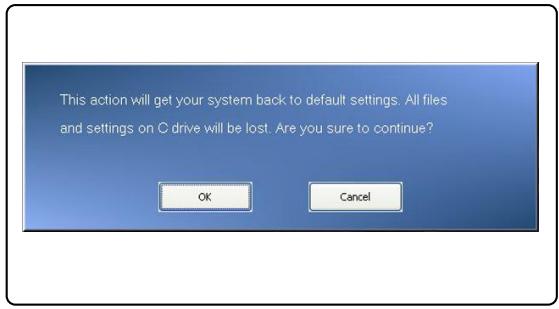
5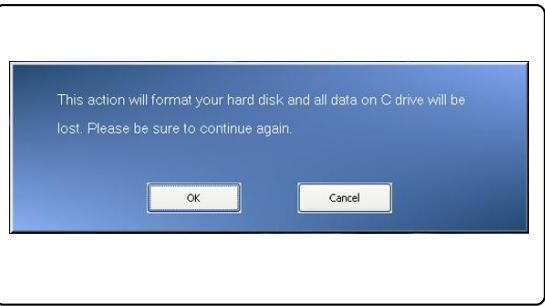
6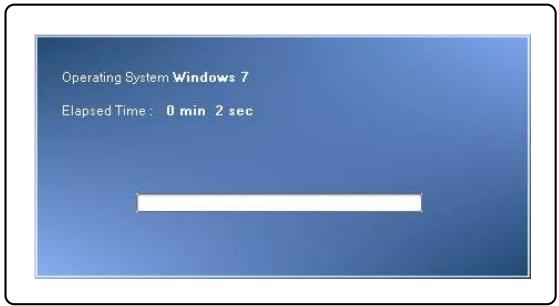
7 8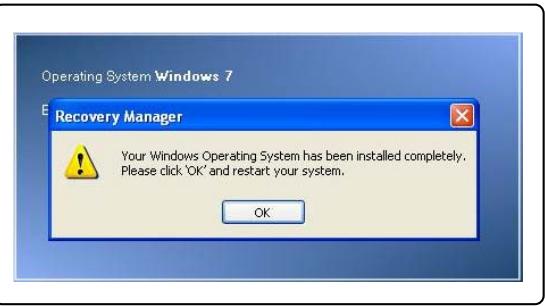
Recover the system with the Driver CD
If your notebook is equipped with an optical disk drive device or an external one, you may perform the System Recovery Function with the Driver CD that comes with the package. Follow the instructions below to continue:
- Insert the Driver CD into the optical disk drive, and then restart the notebook by pressing the Power button.
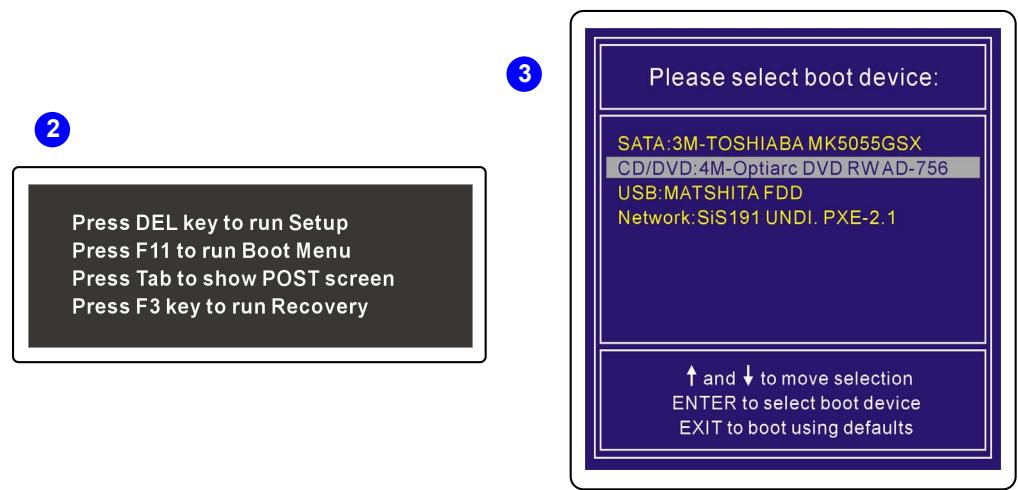
- Press the F11 hotkey on the keyboard of the notebook when the following message appears on the display.
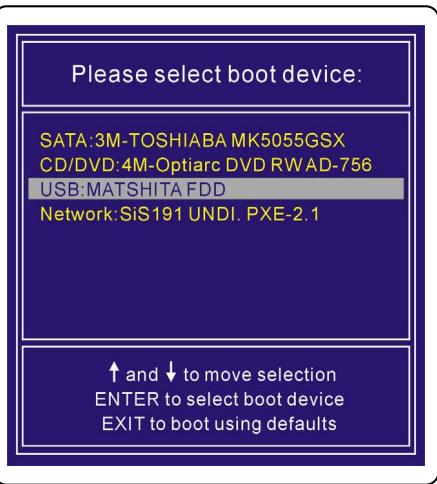
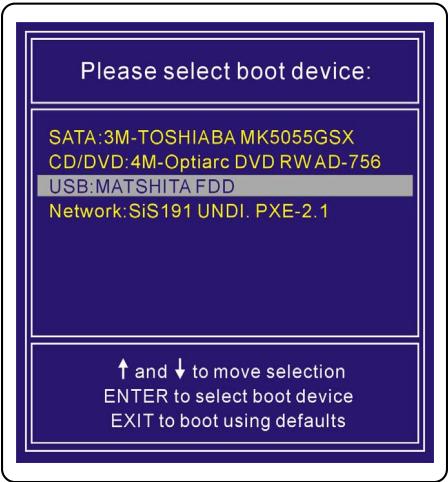
- Select the [CD/DVD] device as the boot device, and press [Enter] to confirm the selection. Then, press any key to reconfirm the selection when the prompt message [Press any key to boot from CD or DVD...] appears.
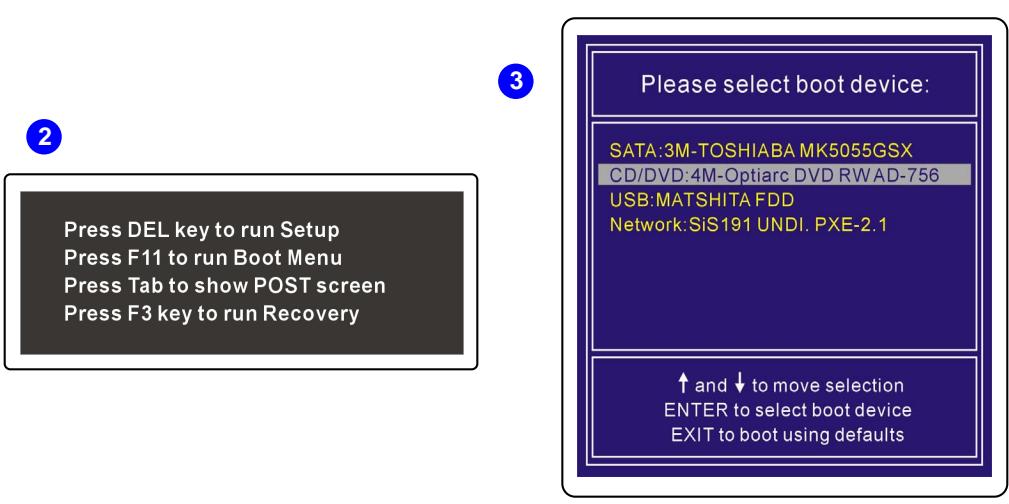
- The Language Menu appears. Select the language you prefer by clicking the given icon with the mouse connected to the notebook; or select [EXIT] to restart the system.
- Then, select [Restore the system to factory default] to start the System Recovery Function process; or select [EXIT] to restart the system.
- The system recovery process will format your hard disk drive partition; make sure that the important data has been backed up before continuing the process. Click [OK] to continue; click [Cancel] to stop the system recovery process.
- AC power is required while proceeding with the System Recovery Function. Ensure that the AC power is connected to the notebook before moving forward to the next step.
4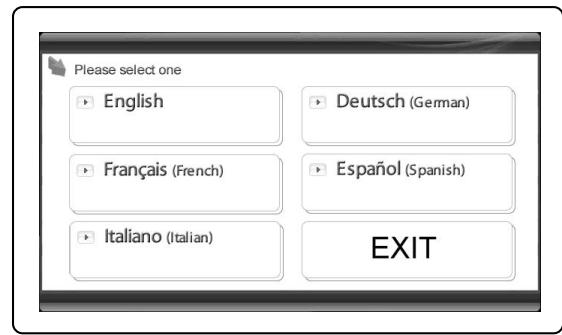
5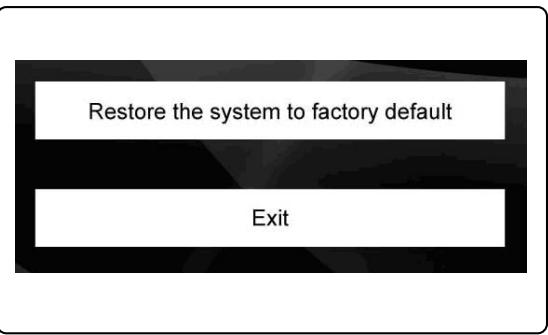
6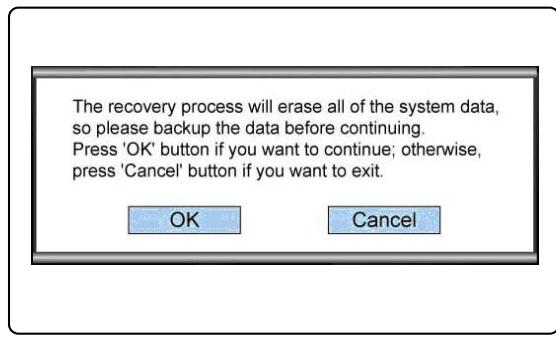
7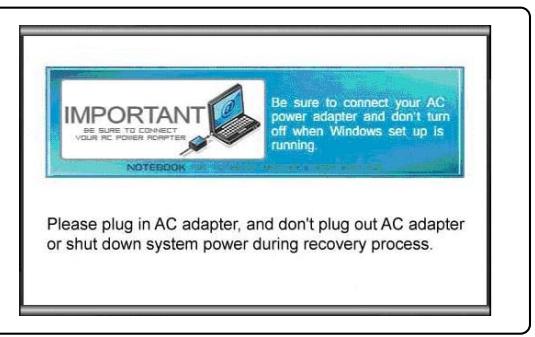
- Be aware that you should not turn off the system power during the process of performing the System Recovery Function, or it may cause some unknown damage to the system.
- When the system recovery process is finished, please click [OK] to restart the system. Now, your system is restored to its factory default settings.
- If the system recovery function is not able to be performed successfully, it is always recommended to contact the authorized local distributor or the service center for further assistance.
- If the recovery process is interrupted or fails, please repeat the recovery procedure from the beginning.
8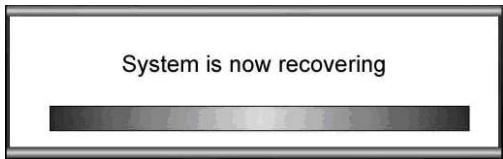
9 10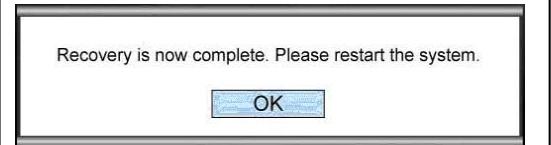
The system recovery file does not exist, and it might have been already removed. If this is the first time you use this system, please contact your local distributor for further help.
Recover the system with a USB flash drive or a SD card
If your notebook is not equipped with any optical disk drive, you may perform the System Recovery Function with a personal USB flash drive or a SD card. Follow the instructions below to continue:
- Make sure that you have the Driver CD that comes with the package and a personal USB flash drive or SD card with you.
(a) The minimum capacity of the USB flash drive or SD card is 256MB. (b) The USB flash drive or SD card must not be bootable. If it is bootable, format it first in NTFS or FAT32. (c) It is not required to delete all personal data files stored on the USB flash drive or SD card that will be used for the System Recovery Function.
However, it is still recommended to back up the data stored on the USB flash drive or SD card to another storage device.
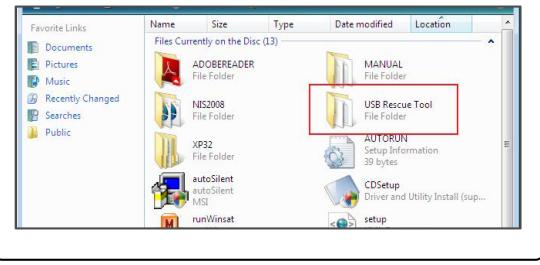
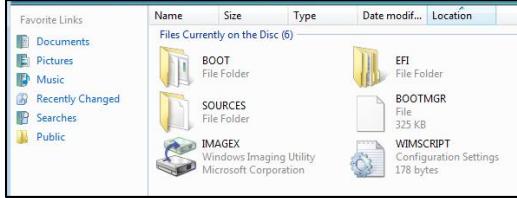
- Find a computer equipped with an optical disk drive. Insert the Driver CD into the optical disk drive, and locate the folder named [USB Rescue Tool] on the Driver CD.
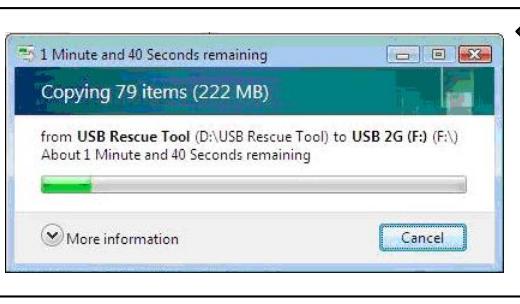
- Browse the folder named [USB Rescue Tool], and copy all the data files in the folder to the USB flash drive or SD card.
- Restart the system and press the F11 hotkey on the notebook keyboard when the following message appears on the display.
- Select the [USB] device as the boot device, and press [Enter] to confirm the selection.
- Refer to the instructions of "Recover the system with the Driver CD" to continue the process.
- If any failure occurs while proceeding with the System Recovery Function using a USB flash drive or SD card, it is recommended to try the previous steps again with another USB flash drive or SD card.
2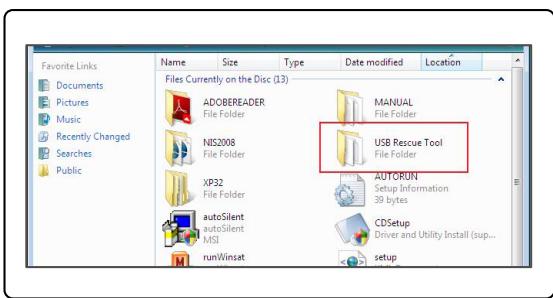
3
4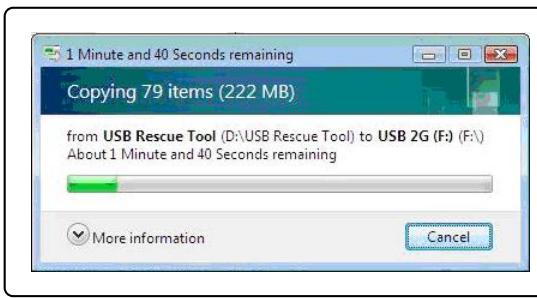
3
3
Press DEL key to run Setup. Press F11 to run Boot Menu. Press Tab to show POST screen. Press F3 key to run Recovery.
5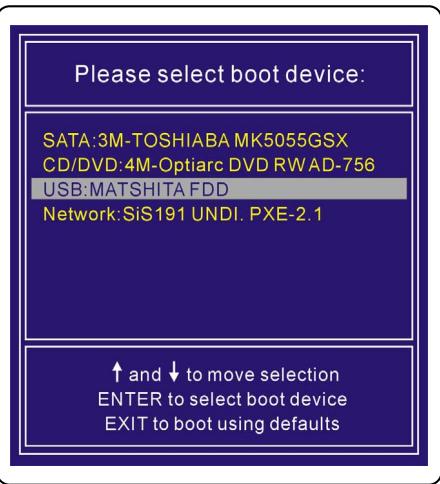
Traditional Chinese
System Recovery Manual
Introduction
Purpose of Using the System Recovery Function
Press DEL key to run Setup
Press F11 to run Boot Menu
Press Tab to show POST screen
Press F3 key to run Recovery

System Recovery Option
MSI Recovery Manager
Exit
The system recovery file does not exist, and it might be already removed. If this is the first time you use this system, please contact your local distributor for further help.
Press DEL key to run Setup Press F11 to run Boot Menu Press Tab to show POST screen Press F3 key to run Recovery
5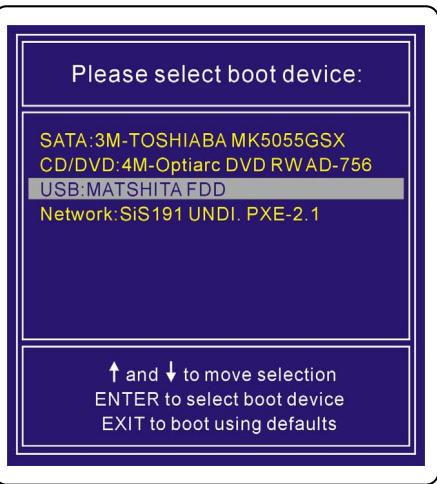
Simplified Chinese
System Recovery Manual
Introduction
Purpose of Using the System Recovery Function
Press DEL key to run Setup
Press F11 to run Boot Menu
Press Tab to show POST screen
Press F3 key to run Recovery

System Recovery Option
MSI Recovery Manager
Exit
The system recovery file does not exist, and it might be already removed. If this is the first time you use this system, please contact your local distributor for further help.
Press DEL key to run Setup Press F11 to run Boot Menu Press Tab to show POST screen Press F3 key to run Recovery
5
German
Press DEL key to run Setup. Press F11 to run Boot Menu. Press Tab to show POST screen. Press F3 key to run Recovery.

The system recovery file does not exist, and it might be already removed. If this is the first time you use this system, please contact your local distributor for further help.
Press DEL key to run Setup. Press F11 to run Boot Menu. Press Tab to show POST screen. Press F3 key to run Recovery.
3
The system recovery file does not exist, and it might be already removed. If this is the first time you use this system, please contact your local distributor for further help.
Press DEL key to run Setup. Press F11 to run Boot Menu. Press Tab to show POST screen. Press F3 key to run Recovery.
Russian
System Recovery Guide
System Recovery
Level 2 and above
Purpose of System Recovery Function
This system recovery guide contains instructions and illustrations for restoring factory settings of the system for end users.
The system recovery function can be used in the following cases:
Restoring initial factory settings of the system. In case of detecting errors of the operating system during use. In case of infection of the operating system with a virus and the impossibility of its normal operation.
Before using the system recovery function, it is recommended that you carefully read this manual.
Precautions for using the system recovery function
Before using the system recovery function, you should take the following precautions:
- If serious problems occur with the hard disk or system, first perform system recovery from the hard disk using the F3 quick recovery function.
- Before using the system recovery function, create backup copies of important information stored on the system disk on other storage devices.
- If the system recovery function uses a USB flash drive or SD card, always create a backup copy of data on other storage devices, including the data on the USB flash drive or SD card.
- If the system recovery function cannot be performed by any of the methods described in this
manual, it is strongly recommended that you contact your local official distributor or service center for further consultation. Note that any unauthorized attempt to change the settings established in the computer by default may void the warranty.
Preparing to work
This manual on system recovery provides three methods for performing the system recovery function.
They are:
- System recovery using the F3 key on the computer keyboard.
- System recovery using the compact disc with drivers, which is supplied in the package.
- System recovery using a user's USB flash drive or SD card.
Press DEL key to run Setup Press F11 to run Boot Menu Press Tab to show POST screen Press F3 key to run Recovery
3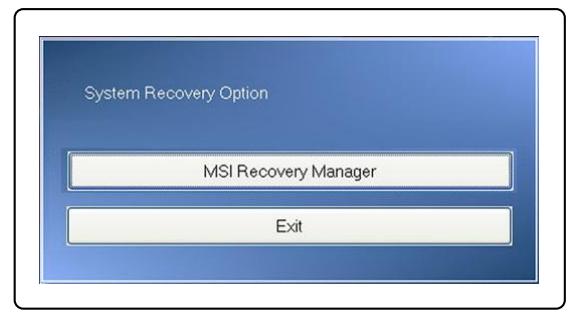
4. To continue the system recovery, press [OK]. 5. At any moment, to stop the recovery process, you can press [Cancel]. 6. After pressing the [OK] button, the system recovery function starts. 7. When the system recovery completes successfully, the corresponding message will be displayed. 8. Press [OK] to restart the system and enter the Windows operating system in the normal way.
4
5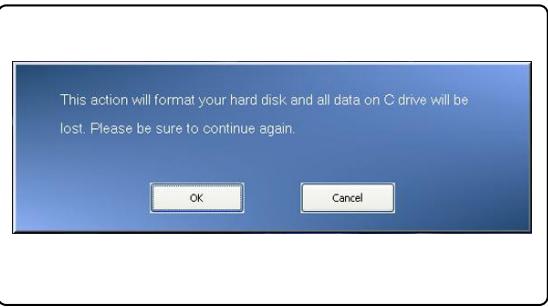
6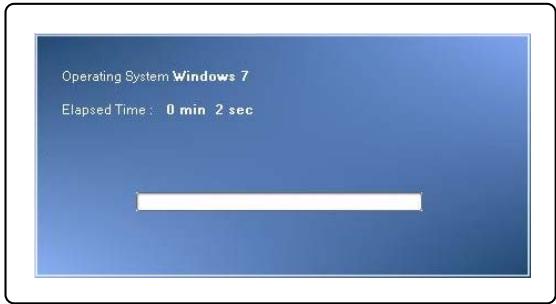
7 8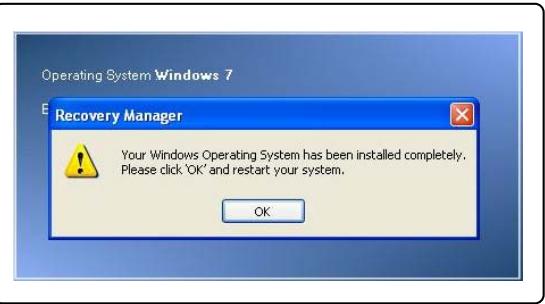
System recovery using the recovery disc with drivers
If the laptop is equipped with an optical disc drive or an external optical disc drive is used, the system recovery function can be performed using the recovery disc with drivers, which is supplied with the package. To continue, follow the instructions below:
- Insert the recovery disc with drivers into the optical disc drive, and then restart the laptop by pressing the power button.
- Press the F11 key on the laptop keyboard when the corresponding message is displayed on the screen.
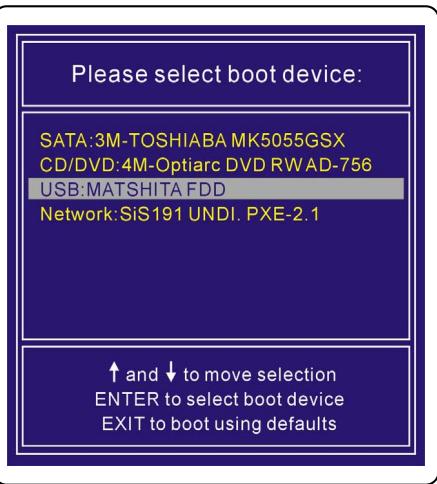
- Select the [CD/DVD] device (CD/DVD drive) as the boot device, press the [Enter] key to confirm the selection, and then, after the prompt [Press any key to boot from CD or DVD...] is displayed, press any key to confirm the boot from the CD or DVD.

Press DEL key to run Setup Press F11 to run Boot Menu Press Tab to show POST screen Press F3 key to run Recovery

Please select boot device:
SATA:3M-TOSHIBA MK5055GSX
CD/DVD:4M-Optiarc DVD RW AD-756
USB:MATSHITA FDD
Network:SiS191 UNDI. PXE-2.1
up and to move selection
ENTER to select boot device
EXIT to boot using defaults
- Display Language (Language). Select the language by pressing the arrow keys, then press Enter. If you want to exit, select [EXIT] to restart the system.
- Then select [Restore the system to factory default] to start the system restore function; or [EXIT] to restart the system.
- During the system restore process, the partition on the hard disk will be formatted; before proceeding, make sure you have backed up all important information. To cancel the restore process, press [Cancel].
- When using the system restore function, you must use AC power. Before proceeding to the next step, make sure the notebook is connected to AC power.
4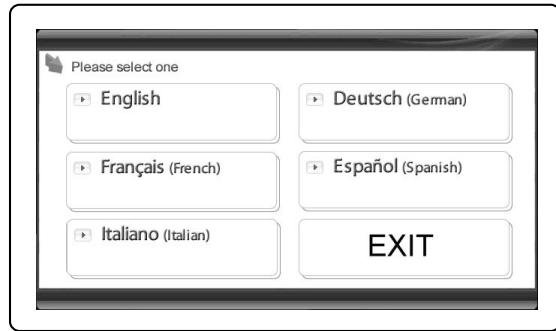
5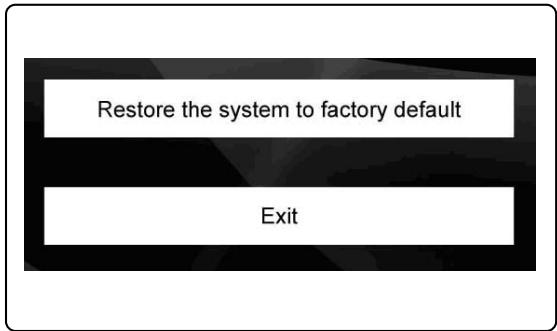
6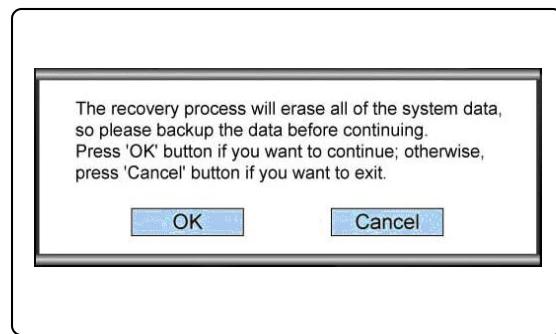
7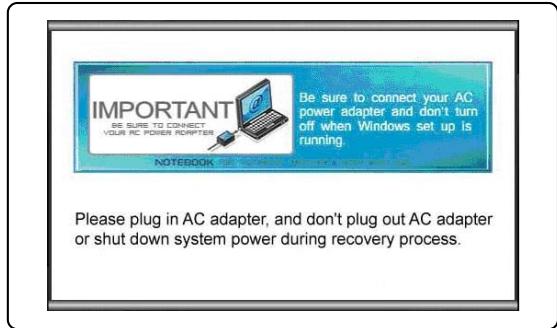
- During the execution of the system restore function, do not disconnect the system power, as this may lead to unpredictable system damage.
- After the system restore process is completed, press [OK] to restart the system. The factory default settings will be restored.
- If the system recovery is not performed properly, the user is strongly recommended to contact the authorized local distributor or service center.
- If the recovery process is interrupted and fails, repeat the recovery process from the beginning.
The system recovery file does not exist, and it might be already removed. If this is the first time you use this system, please contact your local distributor for further help.
System recovery using a USB flash drive or SD card.
If the laptop is not equipped with an optical disc drive, you can perform the system recovery function using a USB flash drive or SD card. Follow the instructions below:
- Make sure you have the driver CD supplied with the computer, and a USB flash drive or SD card. (a) A USB flash drive or SD card with a capacity of at least 256 MB is required; (b) The USB flash drive or SD card must not be bootable. If the device appears to be bootable, format it first in NTFS or FAT32 format. (c) If the USB flash drive or SD card will be used to perform the system recovery function, it is not required to delete all data stored on them. However, it is recommended to save backup copies of data stored on the USB flash drive or SD card to another storage device.
- A computer equipped with an optical disc drive is required. Insert the driver CD into the optical disc drive and find the folder named [USB Rescue Tool] (Emergency USB Recovery).
- Open the folder named [USB Rescue Tool] (Emergency USB Recovery) and copy all data files to the USB flash drive or SD card.
- Restart the system and press the F11 key on the laptop keyboard when the following message appears on the screen.
- Select the [USB] device as the boot device and press the [Enter] key to confirm.
- Follow the procedure described in the instructions "System Recovery with the Driver CD".
- It is recommended to repeat the previous operations using another USB flash drive or SD card when performing system recovery functions with a USB flash drive or SD card.
2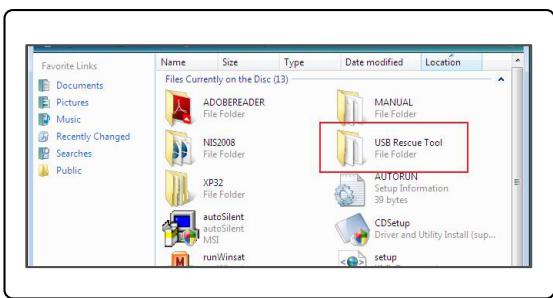
3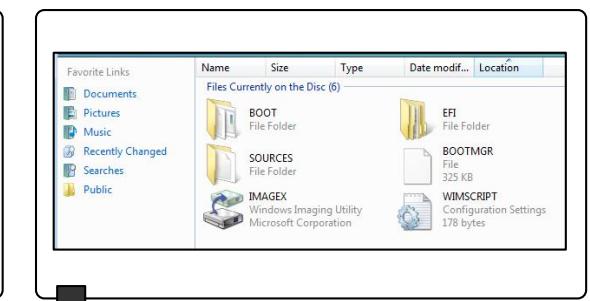
4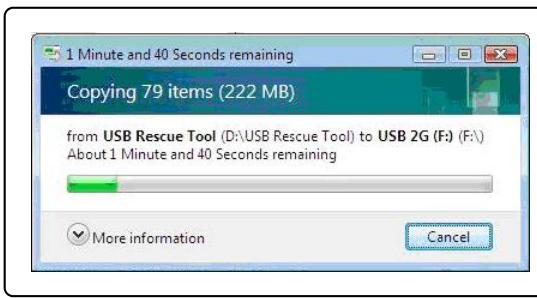
3
:
Press DEL key to run Setup Press F11 to run Boot Menu Press Tab to show POST screen Press F3 key to run Recovery
5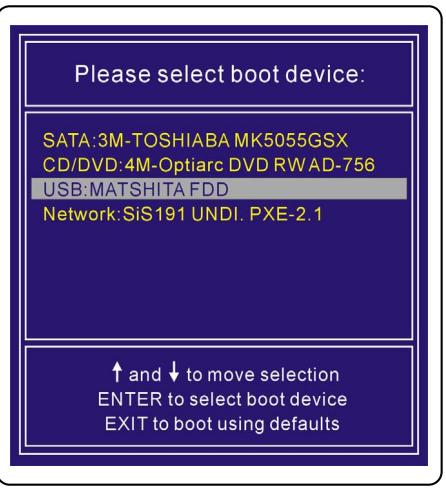
Spanish
Press DEL key to run Setup Press F11 to run Boot Menu Press Tab to show POST screen Press F3 key to run Recovery
3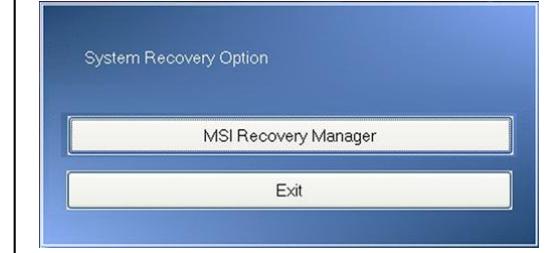
The system recovery file does not exist, and it might be already removed. If this is the first time you use this system, please contact your local distributor for further help.
Press DEL key to run Setup Press F11 to run Boot Menu Press Tab to show POST screen Press F3 key to run Recovery
5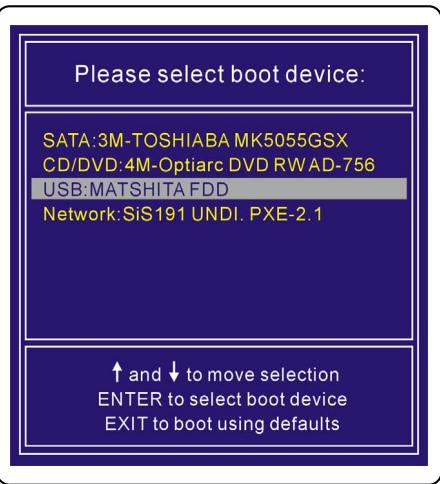
Italian
Press DEL key to run Setup
Press F11 to run Boot Menu
Press Tab to show POST screen
Press F3 key to run Recovery

System Recovery Option
MSI Recovery Manager
Exit
The system recovery file does not exist, and it might be already removed. If this is the first time you use this system, please contact your local distributor for further help.
System recovery using a USB flash drive or an SD card
Press DEL key to run Setup Press F11 to run Boot Menu Press Tab to show POST screen Press F3 key to run Recovery
3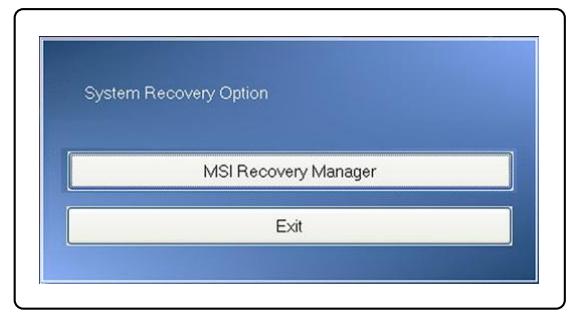
The system recovery file does not exist, and it might be already removed. If this is the first time you use this system, please contact your local distributor for further help.
Press DEL key to run Setup Press F11 to run Boot Menu Press Tab to show POST screen Press F3 key to run Recovery
5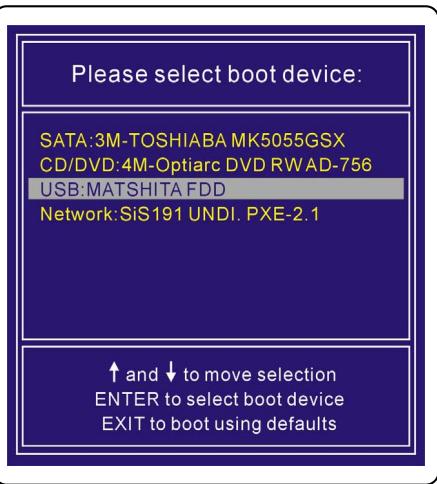
Press DEL key to run Setup. Press F11 to run Boot Menu. Press Tab to show POST screen. Press F3 key to run Recovery.
3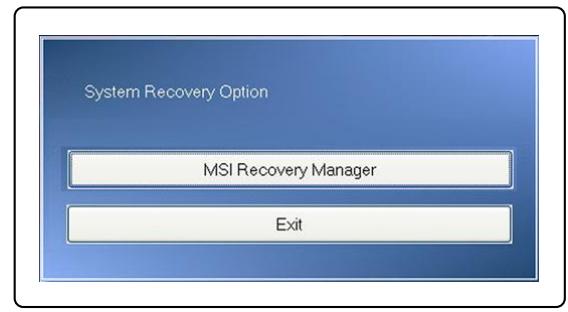
The system recovery file does not exist, and it might have already been removed. If this is the first time you use this system, please contact your local distributor for further help.
Press DEL key to run Setup. Press F11 to run Boot Menu. Press Tab to show POST screen. Press F3 key to run Recovery.
5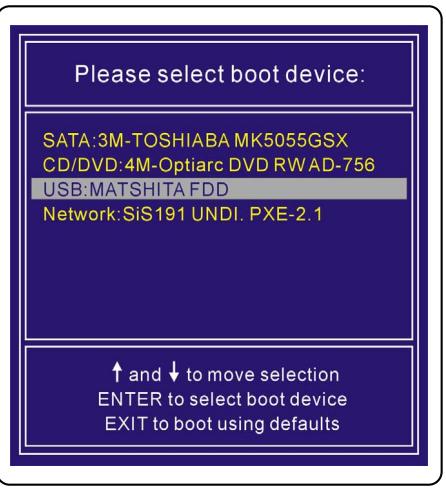
Czech
Press DEL key to run Setup. Press F11 to run Boot Menu. Press Tab to show POST screen. Press F3 key to run Recovery.
3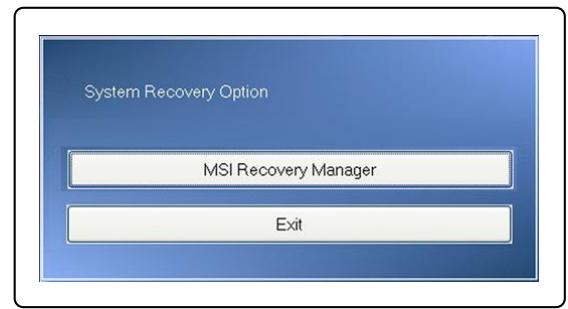
Press DEL key to run Setup. Press F11 to run Boot Menu. Press Tab to show POST screen. Press F3 key to run Recovery.
2
Please select boot device:
SATA:3M-TOSHIBA MK5055GSX CD/DVD:4M-Optiarc DVD RWAD-7 USB:MATSHITA FDD
Network:SiS191 UNDI.PXE-2.1
and to move selection
ENTER to select boot device
EXIT to boot using defaults
The system recovery file does not exist, and it might be already removed. If this is the first time you use this system, please contact your local distributor for further help.
Press DEL key to run Setup Press F11 to run Boot Menu Press Tab to show POST screen Press F3 key to run Recovery
Polish
Press DEL key to run Setup Press F11 to run Boot Menu Press Tab to show POST screen Press F3 key to run Recovery

The system recovery file does not exist, and it might be already removed. If this is the first time you use this system, please contact your local distributor for further help.
Press DEL key to run Setup Press F11 to run Boot Menu Press Tab to show POST screen Press F3 key to run Recovery
5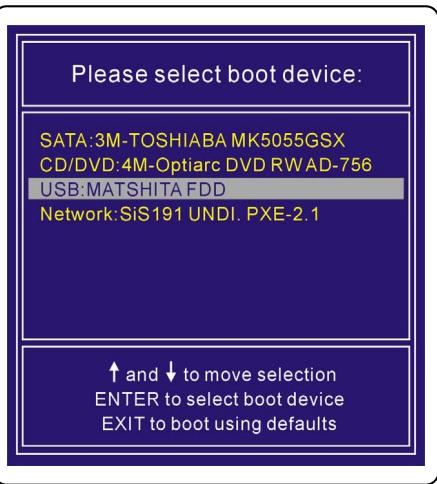
Ukrainian
Recovery Guide.
Introduction
Purpose of system recovery functions
This guide provides instructions and clearly shows how to restore the factory system settings of the laptop.
Purpose of system recovery functions:
Restoring factory system settings. Fixing OS errors that occurred during operation. Restoring the system in case of virus infection.
Before using the system recovery function, it is recommended to carefully read the user manual.
Precautions for using the system recovery function
When using the system recovery function, please pay attention to the following precautions:
1. If a failure occurs on the hard disk system and cannot be fixed, first use the system recovery function on the hard disk by pressing the hotkey "F3" during startup. 2. Before using the system recovery function, create backup copies of all important data stored on the system disk on other storage devices. 3. If the system recovery uses a USB flash drive or SD card, first create backup copies of data stored on such devices on other storage devices. 4. If you cannot use the system recovery function in the manner described in the recovery manual, it is strongly recommended to contact an authorized
regional distributor or service center. Any incorrect attempt to modify the settings of the portable computer without authorization may lead to loss of warranty.
The system recovery file does not exist, and it might be already removed. If this is the first time you use this system, please contact your local distributor for further help.
Press DEL key to run Setup Press F11 to run Boot Menu Press Tab to show POST screen Press F3 key to run Recovery
5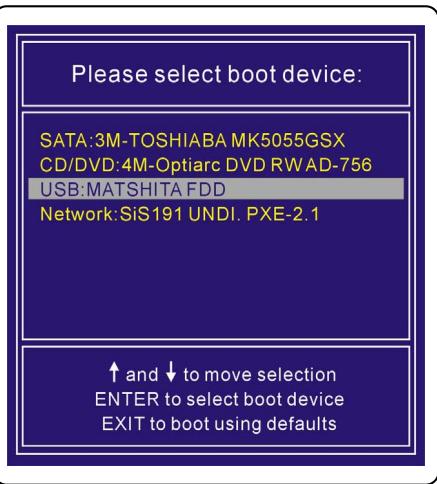
Portugués
Press DEL key to run Setup
Press F11 to run Boot Menu
Press Tab to show POST screen
Press F3 key to run Recovery

System Recovery Option
MSI Recovery Manager
Exit
The system recovery file does not exist, and it might be already removed. If this is the first time you use this system, please contact your local distributor for further help.
Press DEL key to run Setup Press F11 to run Boot Menu Press Tab to show POST screen Press F3 key to run Recovery
5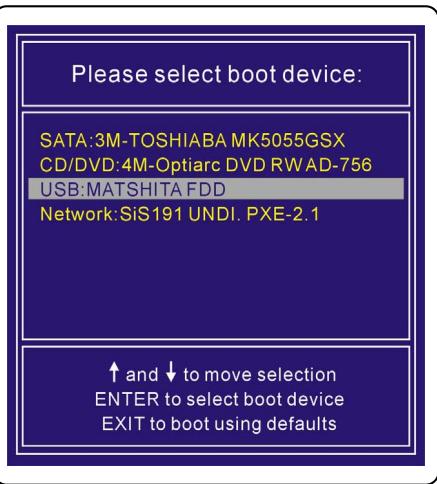
2 Press DEL key to run Setup Press F11 to run Boot Menu Press Tab to show POST screen Press F3 key to run Recovery 3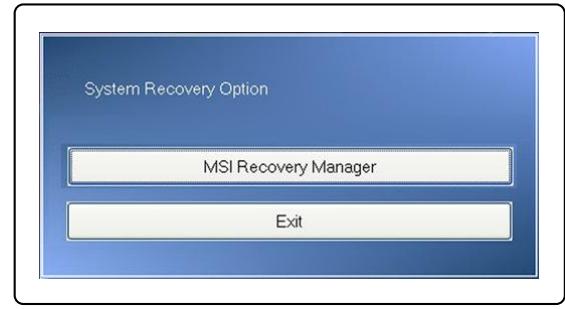
Press DEL key to run Setup Press F11 to run Boot Menu Press Tab to show POST screen Press F3 key to run Recovery
3
Please select boot device:
SATA:3M-TOSHIABAMK5055GSX
CD/DVD: 4M-Optiarc DVD RW AD-756
USB: MATSHITA FDD
Network: SiS191 UNDI, PXE-2.1
up and to move selection
ENTER to select boot device
EXIT to boot using defaults
The system recovery file does not exist, and it might be already removed. If this is the first time you use this system, please contact your local distributor for further help.
Press DEL key to run Setup, Press F11 to run Boot Menu, Press Tab to show POST screen, Press F3 key to run Recovery
5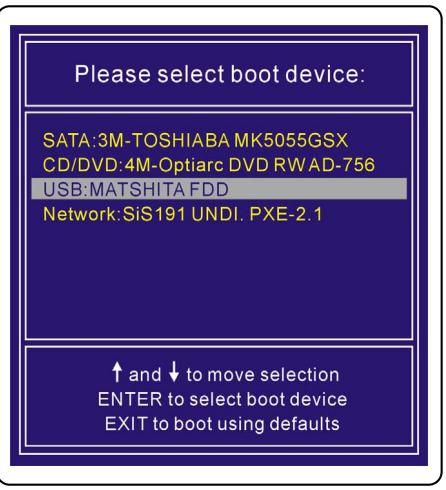
Dutch
System Recovery Manual
Introduction
Press DEL key to run Setup, Press F11 to run Boot Menu, Press Tab to show POST screen, Press F3 key to run Recovery
3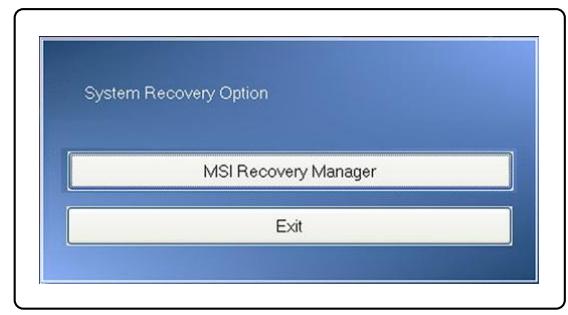
The system recovery file does not exist, and it might be already removed. If this is the first time you use this system, please contact your local distributor for further help.
Press DEL key to run Setup. Press F11 to run Boot Menu. Press Tab to show POST screen. Press F3 key to run Recovery.
5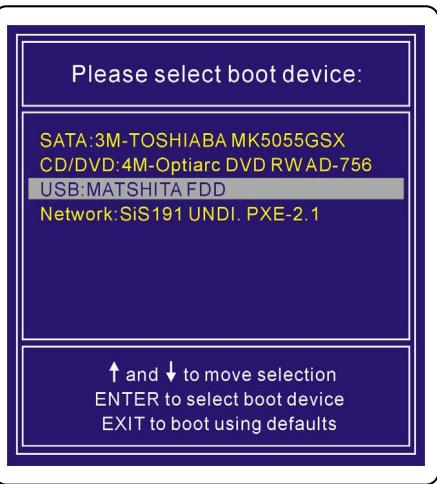
Bulgarian
System Recovery Guide
Recovery
Introduction
Instructions for using the System Recovery function
This Recovery Guide provides instructions and illustrations on how users can restore the system on their computer to its factory settings.
The instructions for using the System Recovery function include:
Restoring the system to the original factory settings of the manufacturer. ♣ This will erase all data and reinstall the operating system. When the operating system is infected with a virus and is not able to work normally.
We recommend that you read the contents of this guide carefully before using the System Recovery function.
Precautions when using the System Recovery function
You must follow the following precautions before using the System Recovery function.
- If your hard disk and system have been infected and cannot be restored, please use the F3 recovery key from the hard disk first to activate the System Recovery function.
- Before using the System Recovery function, archive important information stored on your system disk to another storage device.
- If you use a USB flash drive or SD card to perform system recovery, please note that it may be necessary to back up the information stored on the USB flash drive or SD card to other storage devices.
- If the system recovery function cannot be performed using the methods described in this manual, we recommend that you contact the manufacturer or an authorized distributor or service center. Please note that any incorrect attempt to change the factory settings of the notebook may lead to the cancellation of the warranty.
Start
The system recovery utility provides users with three methods for performing the system recovery function.
They are:
- Restoring the system using the recovery keys on the notebook keyboard.
- Restoring the system using the supplied recovery CD.
- Restoring the system using a personal USB flash drive or SD card.
We recommend that users first read this section from beginning to end and then proceed to the selection of a specific method for performing the system recovery function, in order to restore the system and return it to its factory settings.
Restoring the system using the recovery keys
If the hard disk and system have been affected by unresolved problems, we recommend that you activate the system recovery function first using the recovery keys on the hard disk.
To proceed, follow the instructions below:
- Restart the notebook.
- Press the [F3] key or [F3] key to enter the system recovery function.
- Select [MSI Recovery Manager] to start the system recovery function; Or select [EXIT] to exit the system recovery function.
2
Press DEL key to run Setup Press F11 to run Boot Menu Press Tab to show POST screen Press F3 key to run Recovery
3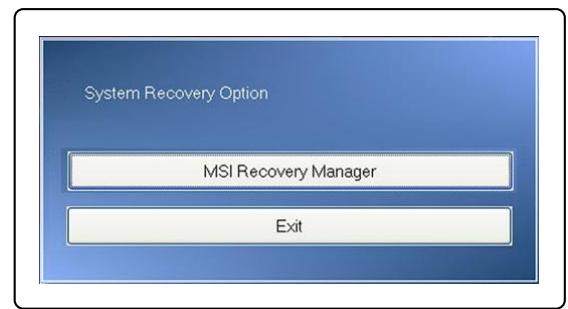
- Press [OK] to continue the system recovery function.
- Press [Cancel] to stop the system recovery function at any time.
- The system recovery function is in progress.
- The following progress is displayed when the system is successfully recovered.
- Press [OK] to restart the system and boot into the Windows operating system.
4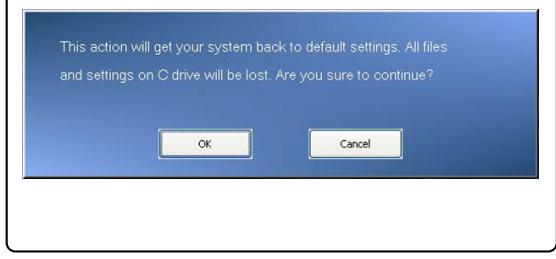
5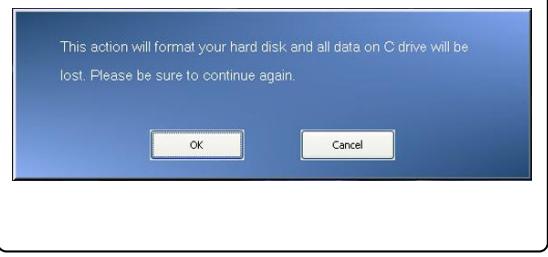
6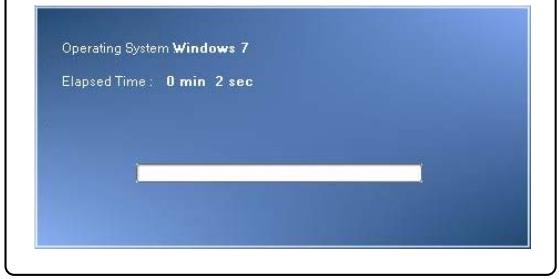
System Restore via the CD
If your computer does not have an optical disk drive for such a drive, you can use the system restore function through the external CD drive. To proceed, follow the instructions below:
- Insert the CD drive into the optical disk drive and then restart the computer by pressing the power button.
- Press the F11 key on the computer's keyboard when the startup screen appears.
- Select [CD/DVD] using the arrow keys and press [Enter] to confirm the selection, then press any key when the prompt [Press any key to boot from CD or DVD...] appears.
- A language menu appears. Select your preferred language by clicking on the corresponding icon with the mouse connected to the computer, or select [EXIT] to restart the system.
- Then select [Restore the system to factory default] to start the system restore function, or select [EXIT] to restart the system.
- The system restore process will format the partition on your hard drive; make sure all important information is archived before continuing. Press [OK] to continue or [Cancel] to stop the system restore process.
- To complete the system restore function, AC power is required. Make sure the AC adapter is connected to the computer before proceeding to the next step.
- Make sure that you do not turn off the system during the system recovery process, as this may lead to unknown system damage.
- When the system recovery process is complete, press [OK] to restart the system. Now, your system has been restored to the original factory settings.
- If the system recovery function cannot be executed successfully, we recommend that you contact your local distributor or service center.
- If the recovery process was interrupted or cannot be completed, restart the recovery procedure from the beginning.
The system recovery file does not exist, and it might be already removed. If this is the first time you use this system, please contact your local distributor for further help.
System recovery via USB flash drive or SD card
If your notebook is not equipped with an optical disc drive, you can perform the system recovery function with the help of a USB flash drive or SD card. To proceed, follow the instructions below:
- Make sure you have the driver CD, as well as a personal USB flash drive or SD card.
(a) A minimum memory of 256MB is required for the USB flash drive or SD card. (b) The USB flash drive or SD card does not need to be bootable. If the device is bootable, format it first with NTFS or FAT32. (c) It is not necessary to delete all the files stored on the USB flash drive or SD card that you will use for the system recovery function. However, we recommend that you archive the information stored on the USB flash drive or SD card to another storage device.
- Use a computer with an optical disc drive. Place the driver CD into the optical disc drive and find the folder [USB Rescue Tool], which is located on the driver CD.
- Find the folder [USB Rescue Tool] and copy all files from the folder to the USB flash drive or SD card.
- Restart the system and press the F11 key on the notebook keyboard when the boot screen appears on the display.
- Select [USB] device as the boot device and press [Enter] to confirm your choice.
- Refer to the instructions in the section "Installing the system via the CD driver" to continue the process.
- If an error occurs during the system recovery via USB flash drive or SD card, we recommend that you try the previous steps again, using a different USB flash drive or SD card.
2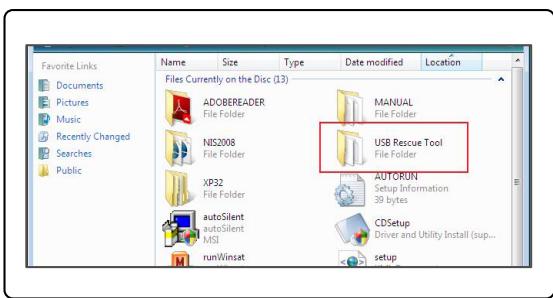
3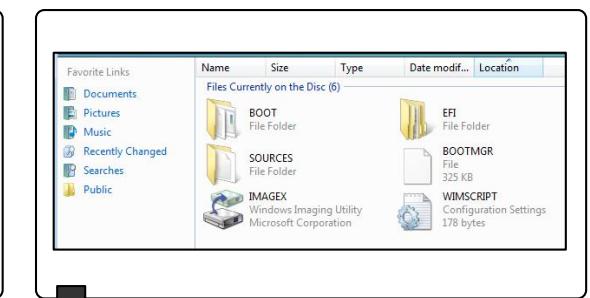
4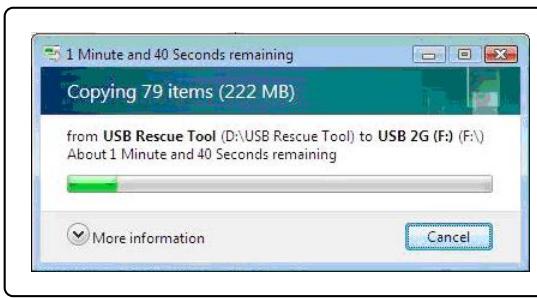
3
3
Press DEL key to run Setup Press F11 to run Boot Menu Press Tab to show POST screen Press F3 key to run Recovery
5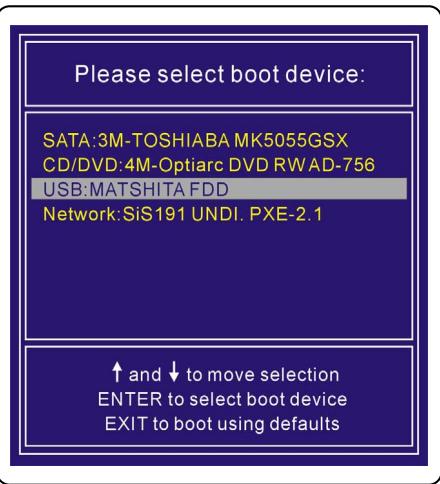
Dansk
Press DEL key to run Setup Press F11 to run Boot Menu Press Tab to show POST screen Press F3 key to run Recovery
3
Press DEL key to run Setup Press F11 to run Boot Menu Press Tab to show POST screen Press F3 key to run Recovery
3
The system recovery file does not exist, and it might be already removed. If this is the first time you use this system, please contact your local distributor for further help.
Press DEL key to run Setup Press F11 to run Boot Menu Press Tab to show POST screen Press F3 key to run Recovery
5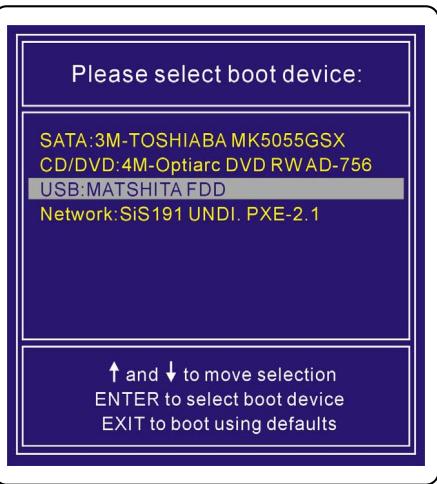
Suomi
Press DEL key to run Setup Press F11 to run Boot Menu Press Tab to show POST screen Press F3 key to run Recovery

The system recovery file does not exist, and it might be already removed. If this is the first time you use this system, please contact your local distributor for further help.
System recovery using USB flash drive or SD card
Press DEL key to run Setup Press F11 to run Boot Menu Press Tab to show POST screen Press F3 key to run Recovery
5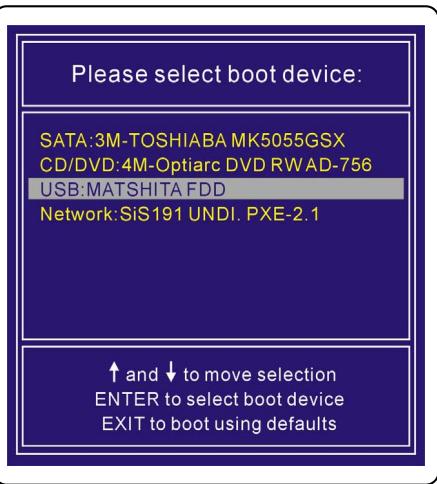
Slovak
Press DEL key to run Setup Press F11 to run Boot Menu Press Tab to show POST screen Press F3 key to run Recovery
3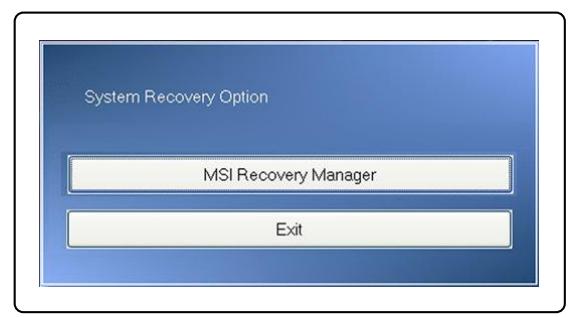
Press DEL key to run Setup Press F11 to run Boot Menu Press Tab to show POST screen Press F3 key to run Recovery
2
Please select boot device:
SATA: 3M-TOSHIBA MK5055GSX
CD/DVD: 4M-Optiarc DVD RW AD-756
USB: MATSHITA FDD
Network: SiS191 UNDI, PXE-2.1
up and to move selection
ENTER to select boot device
EXIT to boot using defaults
The system recovery file does not exist, and it might be already removed. If this is the first time you use this system, please contact your local distributor for further help.
Press DEL key to run Setup, Press F11 to run Boot Menu, Press Tab to show POST screen, Press F3 key to run Recovery
Up and Down to move selection, ENTER to select boot device, EXIT to boot using defaults
Româna
Press DEL key to run Setup, Press F11 to run Boot Menu, Press Tab to show POST screen, Press F3 key to run Recovery
3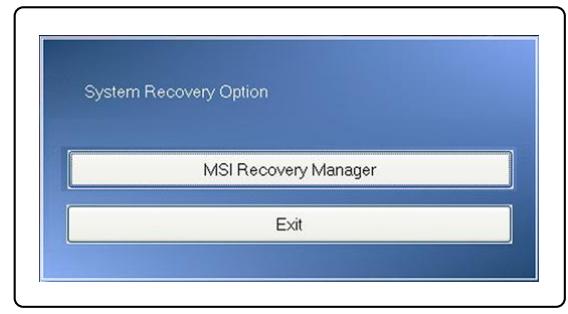
Press DEL key to run Setup, Press F11 to run Boot Menu, Press Tab to show POST screen, Press F3 key to run Recovery
3
Please select boot device:
SATA:3M-TOSHIBA MK5055GSX CD/DVD:4M-Optiarc DVD RW AD-7 USB:MATSHITA FDD
Network:SiS191 UNDI. PXE-2.1
and to move selection
ENTER to select boot device
EXIT to boot using defaults
The system recovery file does not exist, and it might be already removed. If this is the first time you use this system, please contact your local distributor for further help.
Press DEL key to run Setup Press F11 to run Boot Menu Press Tab to show POST screen Press F3 key to run Recovery
Up and Down arrows to move selection ENTER to select boot device EXIT to boot using defaults
Serbian
System Recovery Instructions
Introduction
Press DEL key to run Setup Press F11 to run Boot Menu Press Tab to show POST screen Press F3 key to run Recovery

- Press [OK] to continue with the system recovery function.
- Press [Cancel] to abort the system recovery function at any time.
- The system restore function is now being executed.
- When the next window appears, the system has been successfully restored.
- Press [OK] to restart the system and access the Windows operating system as usual.
4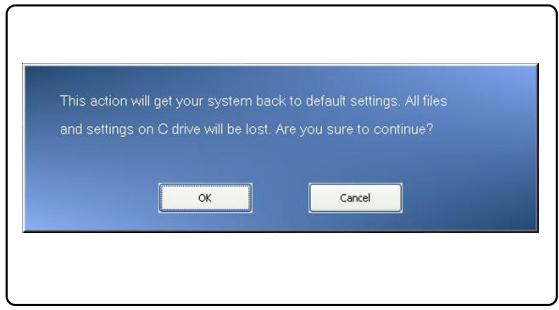
5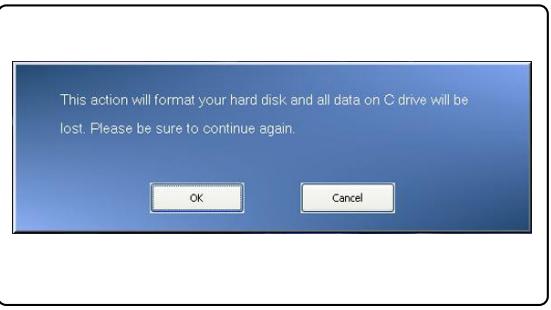
6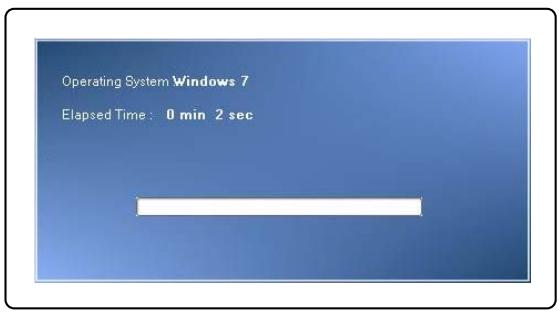
7 8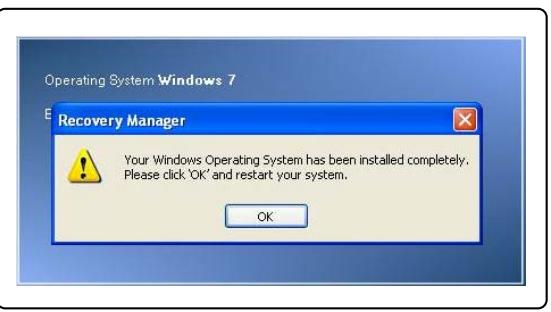
Restoring the system using the driver CD
If your laptop is equipped with an internal or external optical drive, you can perform a system restore using the driver CD that came with the package. To continue, follow the instructions below:
- Insert the driver CD into the optical drive, then restart the laptop by pressing the power button.
- Press the F11 function key when the following message appears on the screen.
- Select [CD/DVD] as the boot device for the system and press [Enter] to confirm the selection, then press any key to confirm again when the message [Press any key to boot from CD or DVD...] appears.
Press DEL key to run Setup Press F11 to run Boot Menu Press Tab to show POST screen Press F3 key to run Recovery
2
Please select boot device:
SATA: 3M-TOSHIBA MK5055GSX
CD/DVD: 4M-Optiarc DVD RW AD-756
USB: MATSHITA FDD
Network: SiS191 UNDI, PXE-2.1
up and to move selection
ENTER to select boot device
EXIT to boot using defaults
- A menu for language selection will appear. Select the desired language by clicking the icon with the mouse connected to the laptop, or select [EXIT] to restart the system.
- After that, select [Restore the system to factory default] to start the system restore function, or select [EXIT] to restart the system.
- The system restore process will format your hard disk partition; make sure you have backed up important data before continuing. Click [OK] to continue; click [Cancel] to stop the system restore process.
- AC power is required when performing the system restore function. Before proceeding to the next step, make sure the AC power is connected.
4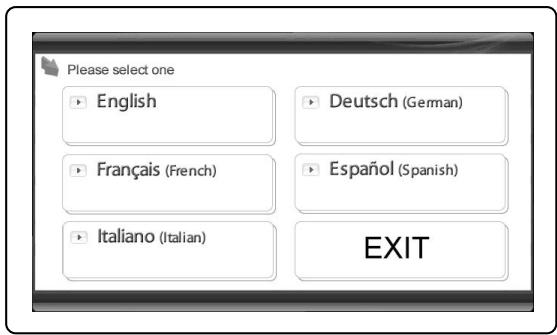
5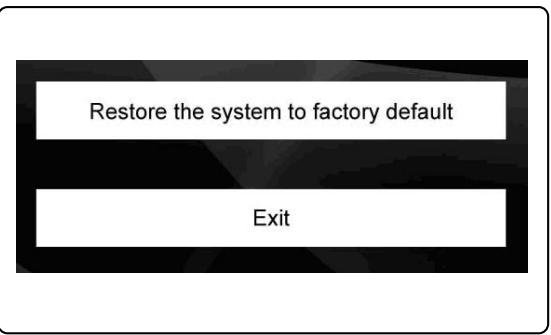
6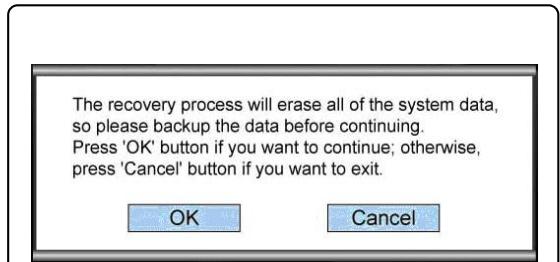
7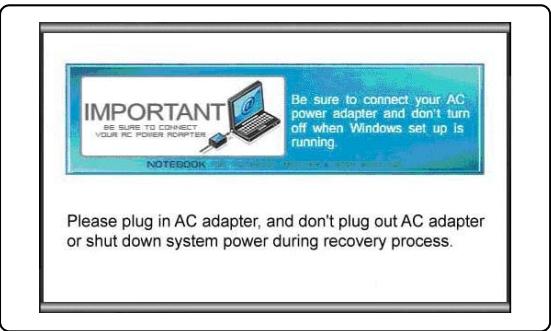
The system recovery file does not exist, and it might be already removed. If this is the first time you use this system, please contact your local distributor for further help.
Recovering the system using a USB flash drive or SD card
(a) The minimum required capacity of the USB flash drive or SD card is 256MB; (b) The USB flash drive or SD card must not have the ability to boot the system. If it is determined that the device is used for booting the system, please format the device in NTFS or FAT32 first. (c) Different levels of the 10000000000000000000000000000000000000000000000000000000000000000000000000000000000000000000000000000 (2) The 15,368,497,526,637,726,837,937,113,123,133,143,153,163,173,183,193,213,223,233,243,253,263,273,283,293,313,323,333,343,353,363,373,383,393,413,423,433,443,453,463,473,483,493,513,523,533,543,553,563,573,583,593,603,613,623,633,643,653,663,673,683,693,713,723,733,743,753,763,773,783,793,813,823,833,843,853,863,873,883,893,913,923,933,943,953,963,973,983,993
- Find a computer equipped with an optical drive. Insert the driver CD into the optical drive and locate the folder named [USB Rescue Tool] on the driver CD.
- Open the folder named [USB Rescue Tool] and copy all files in the folder to the USB flash drive or SD card.
- Restart the system and press the function key F11 on the laptop keyboard when the following message appears on the screen.
- Select [USB] as the boot device and press [Enter] to confirm the selection.
- Follow the instructions in "Recovering the system using the driver CD" to continue the process.
- In case of any error during the system recovery using the USB flash drive or SD card, it is recommended to repeat the previous steps with another USB flash drive or SD card.
2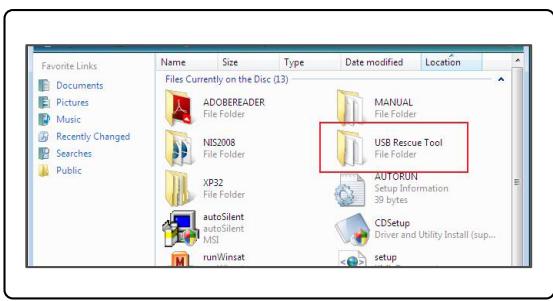
3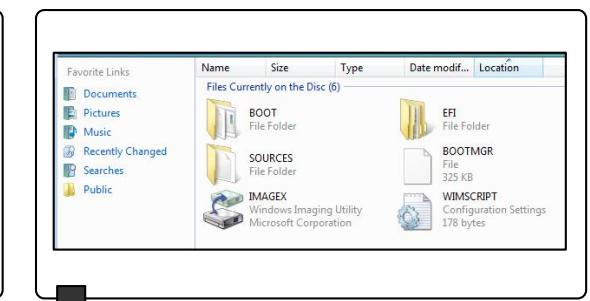
4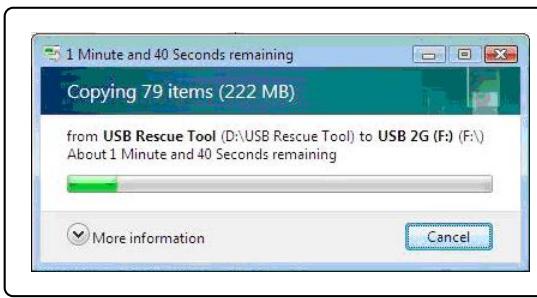
3
Press DEL key to run Setup. Press F11 to run Boot Menu. Press Tab to show POST screen. Press F3 key to run Recovery.
Croatian
Press DEL key to run Setup. Press F11 to run Boot Menu. Press Tab to show POST screen. Press F3 key to run Recovery.

The system recovery file does not exist, and it might be already removed. If this is the first time you use this system, please contact your local distributor for further help.
System recovery using a personal USB flash drive or SD card
Press DEL key to run Setup. Press F11 to run Boot Menu. Press Tab to show POST screen. Press F3 key to run Recovery.
Swedish
Manual for
system recovery
Introduction
Press DEL key to run Setup. Press F11 to run Boot Menu. Press Tab to show POST screen. Press F3 key to run Recovery.
3
System Recovery Option
MSI Recovery Manager
Exit
The system recovery file does not exist, and it might be already removed. If this is the first time you use this system, please contact your local distributor for further help.
Press DEL key to run Setup Press F11 to run Boot Menu Press Tab to show POST screen Press F3 key to run Recovery
5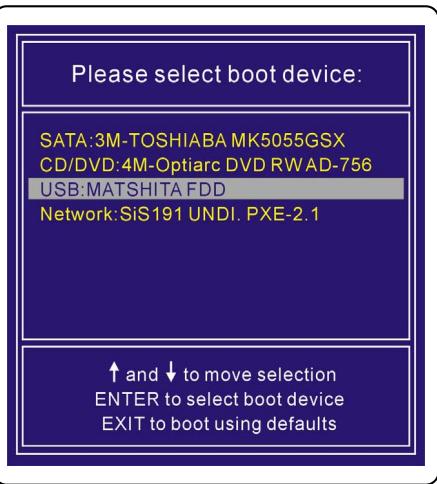
Slovenskina
Press DEL key to run Setup Press F11 to run Boot Menu Press Tab to show POST screen Press F3 key to run Recovery
3
The system recovery file does not exist, and it might be already removed. If this is the first time you use this system, please contact your local distributor for further help.
Press DEL key to run Setup Press F11 to run Boot Menu Press Tab to show POST screen Press F3 key to run Recovery
5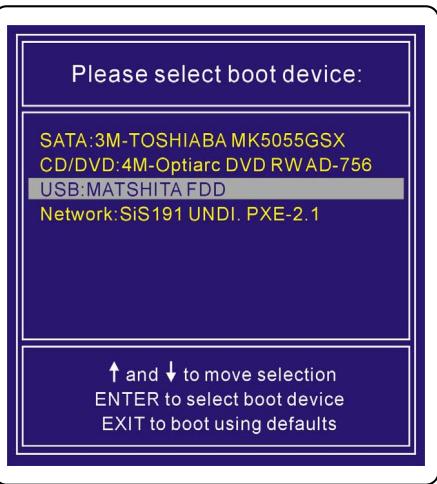
Bosanski
Press DEL key to run Setup Press F11 to run Boot Menu Press Tab to show POST screen Press F3 key to run Recovery
3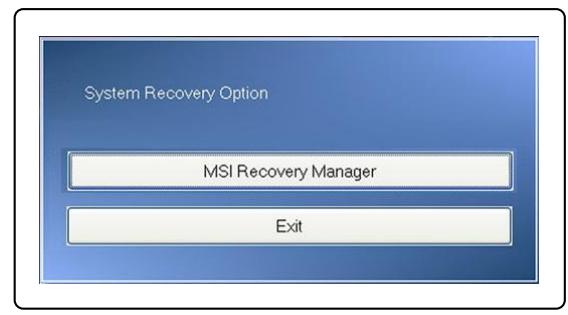
- Press [OK] to continue with the SYSTEM recovery function.
- Press [Cancel] to abort the SYSTEM recovery function at any time.
- The system recovery function is now being executed.
- When the following window appears, the SYSTEM has been successfully recovered.
- Press [OK] to restart the system and access the Windows operating system as usual.
4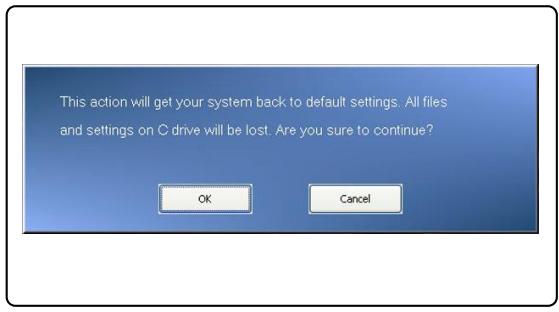
5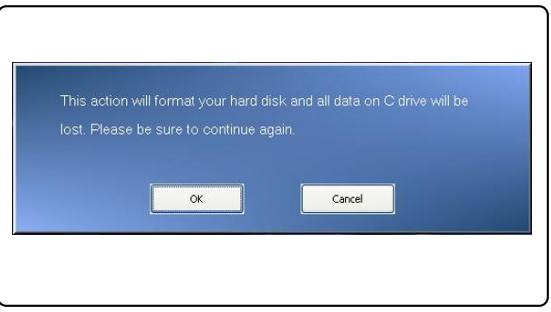
6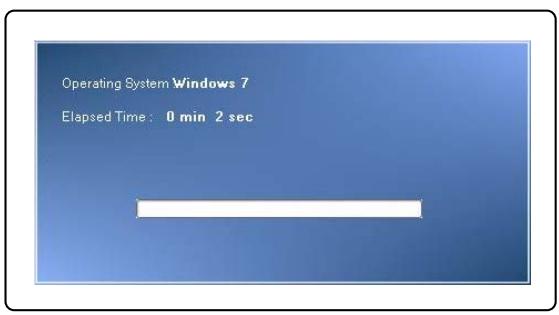
7 8
System recovery using the Driver CD
If your laptop is equipped with an internal or external optical drive, you can perform system recovery using the Driver CD supplied with the computer. To continue, follow the instructions below:
- Insert the Driver CD into the optical drive and then restart the laptop by pressing the power button.
- Press the F11 function key on the laptop keyboard when the following message appears on the screen.
- Select [CD/DVD] as the boot device and press [Enter] to confirm the selection, then press any key to confirm again when the message [Press any key to boot from CD or DVD...] appears.
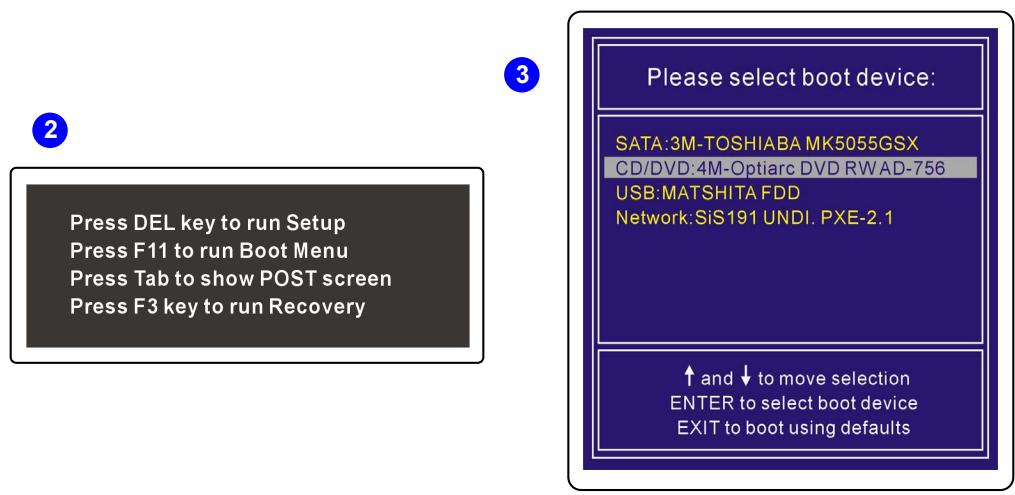
- A language selection menu will appear. Select the desired language by clicking the icon with the mouse connected to the laptop, or select [EXIT] to restart the system.
- After that, select [Restore the system to factory default] to start the system recovery function, or select [EXIT] to restart the system.
- The recovery process will format your hard disk partition; make sure you have backed up important data before continuing. Click [OK] to continue; click [Cancel] to stop the recovery process.
- AC power is required when performing the system recovery function. Before proceeding to the next step, make sure the AC adapter is connected.
4
5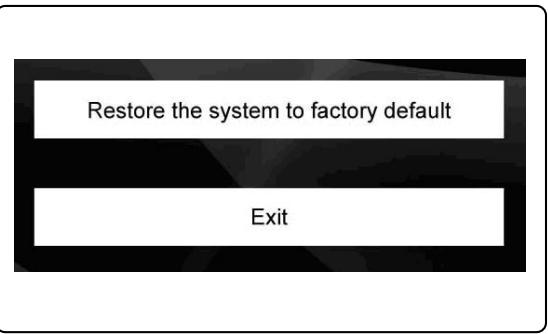
6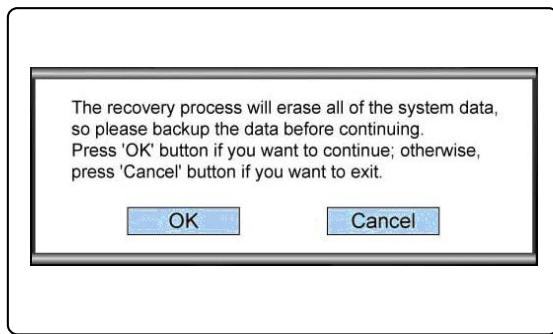
7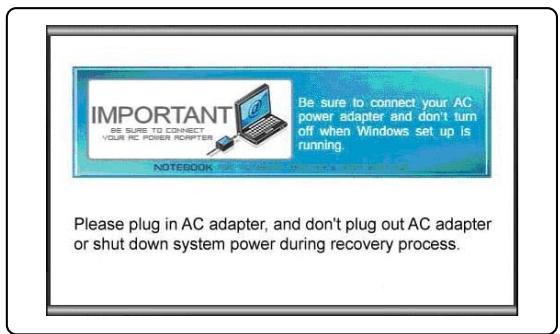
The system recovery file does not exist, and it might be already removed. If this is the first time you use this system, please contact your local distributor for further help.
System recovery using a personal USB flash drive or SD card
If your laptop is not equipped with an optical drive, you can perform system recovery using a personal USB flash drive or SD card. To continue, follow the instructions below:
- Make sure you have the driver CD that came with the computer and a USB flash drive or SD card on hand.
(a) The minimum required capacity of the USB flash drive or SD card is 256MB; (b) The USB flash drive or SD card must not have boot capability. If the device is found to be bootable, please format it to NTFS or FAT32 first. (c) It is necessary to delete all personal data stored on the USB flash drive or SD card that will be used for system recovery.
However, we recommend that you back up the data stored on the USB flash drive or SD card to another storage device.
- Find a computer equipped with an optical drive. Insert the driver CD into the optical drive and locate the folder named [USB Rescue Tool] on the driver CD.
- Open the folder named [USB Rescue Tool] and copy all the data files in the folder to the USB flash drive or SD card.
- Restart the system and press the F11 function key on the laptop keyboard when the following message appears on the screen.
- Select the [USB] device as the boot device and press [Enter] to confirm the selection.
- Follow the instructions in "System Recovery Using the Driver CD" to continue the process.
- If any error occurs during the system recovery function using the USB flash drive or SD card, it is recommended that you repeat the previous steps with another USB flash drive or SD card.
2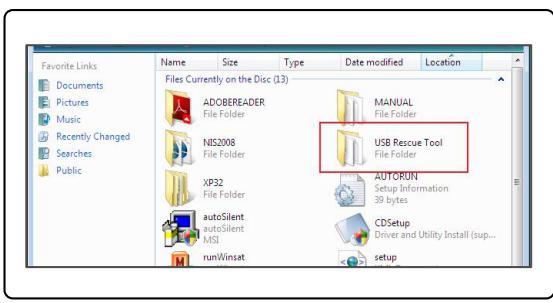
3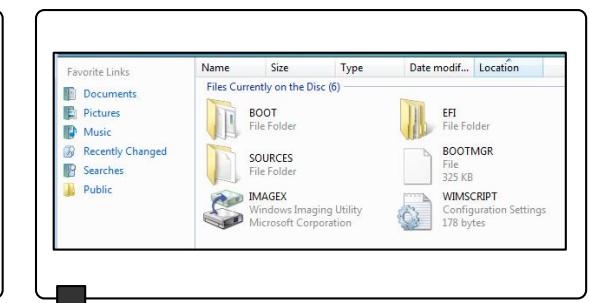
4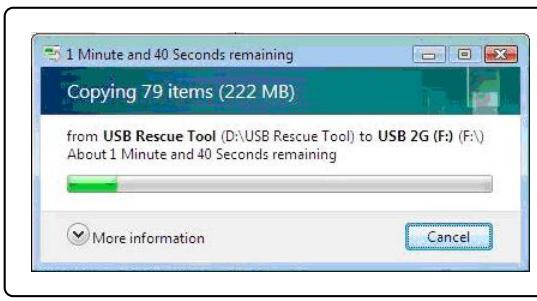
3
3
Press DEL key to run Setup Press F11 to run Boot Menu Press Tab to show POST screen Press F3 key to run Recovery
5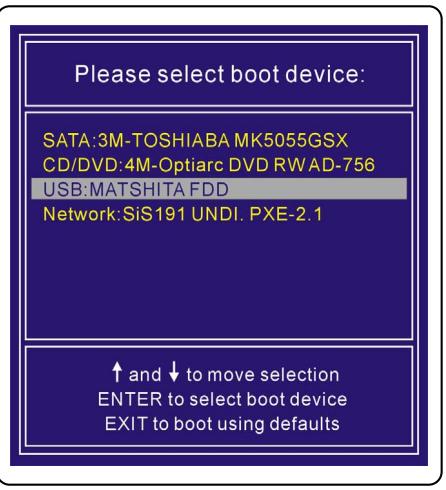
Press DEL key to run Setup
Press F11 to run Boot Menu
Press Tab to show POST screen
Press F3 key to run Recovery
3
System Recovery Option
MSI Recovery Manager
Exit
The system recovery file does not exist, and it might be already removed. If this is the first time you use this system, please contact your local distributor for further help.
Press DEL key to run Setup Press F11 to run Boot Menu Press Tab to show POST screen Press F3 key to run Recovery
Norsk
The system recovery file does not exist, and it might be already removed. If this is the first time you use this system, please contact your local distributor for further help.
Press DEL key to run Setup Press F11 to run Boot Menu Press Tab to show POST screen Press F3 key to run Recovery
5
Bahasa Indonesia
System Recovery Guide
Introduction
Purpose of Using the System Recovery Function
Press DEL key to run Setup. Press F11 to run Boot Menu. Press Tab to show POST screen. Press F3 key to run Recovery.
3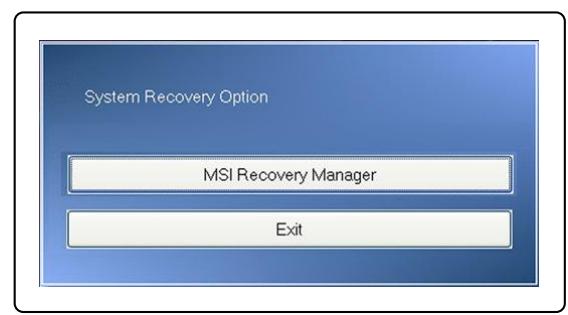
- Press [OK] to continue running the System Recovery Function.
- Press [Cancel] to stop the System Recovery Function at any time.
- The System Recovery Function is running.
- When the following window is displayed, the SYSTEM has been successfully recovered.
- Press [OK] to restart the system and boot the Windows operating system as usual.
4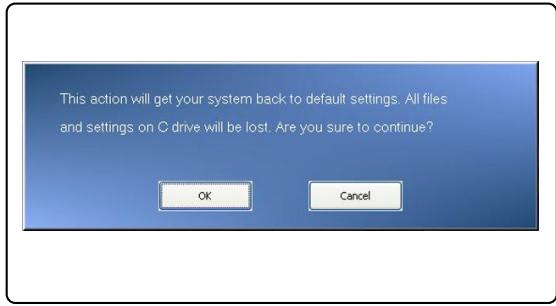
5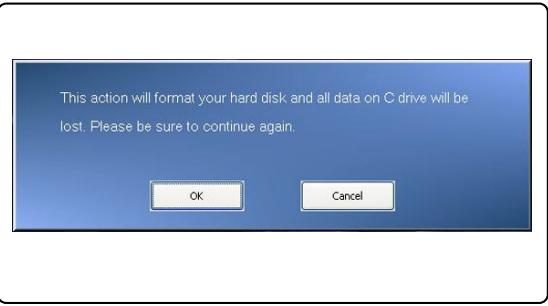
6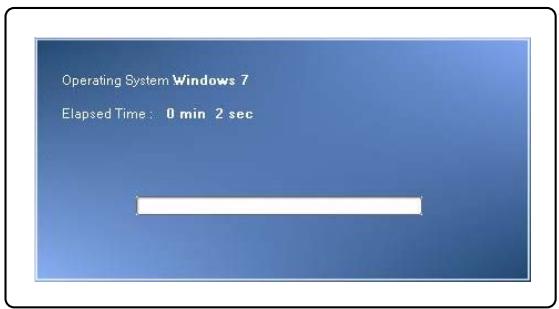
7 8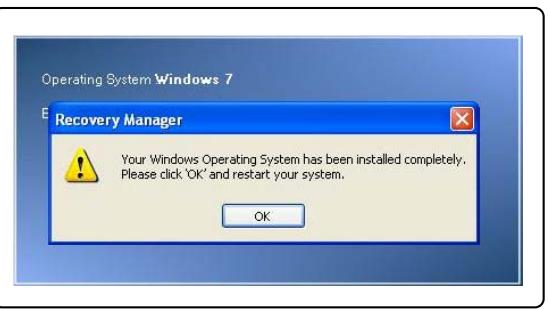
The system recovery file does not exist, and it might be already removed. If this is the first time you use this system, please contact your local distributor for further help.
Restore systemd for USB flash or SD card
Press DEL key to run Setup Press F11 to run Boot Menu Press Tab to show POST screen Press F3 key to run Recovery
5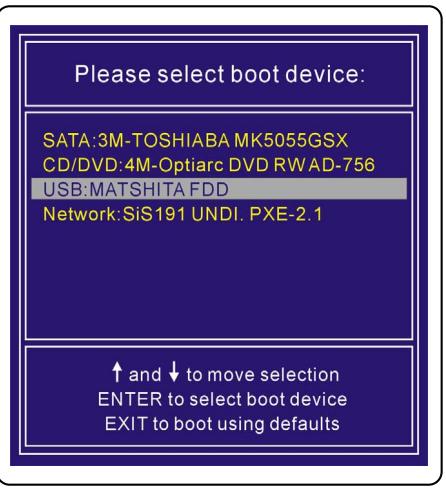

unin
yannunwnnnnnsu
Press DEL key to run Setup Press F11 to run Boot Menu Press Tab to show POST screen Press F3 key to run Recovery
3
System Recovery Option
MSI Recovery Manager
Exit
2 Press DEL key to run Setup Press F11 to run Boot Menu Press Tab to show POST screen Press F3 key to run Recovery
Please select boot device:
SATA:3M-TOSHIABA MK5055GSX
CD/DVD:4M-Optiarc DVD RWAD-756
USB:MATSHITA FDD
Network: SiS191 UNDI, PXE-2.1
up and to move selection
ENTER to select boot device
EXIT to boot using defaults
- 7
4
5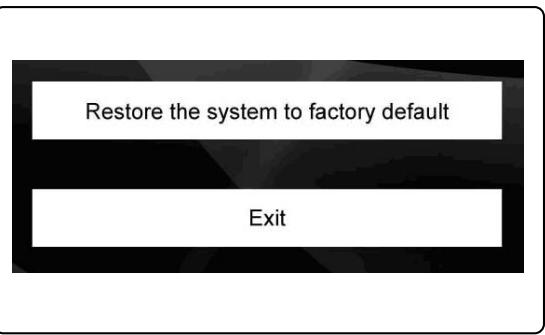
6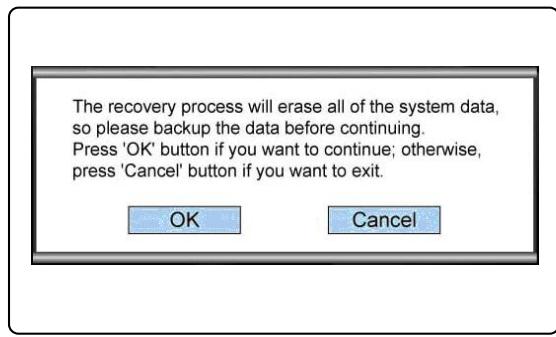
7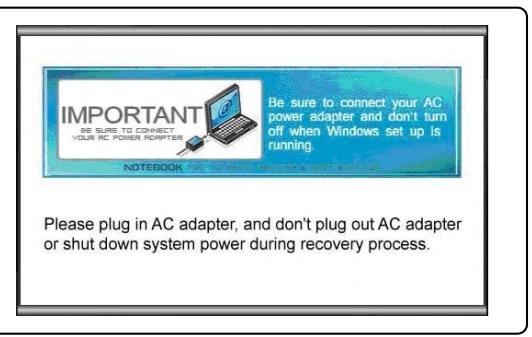
8.
Recovery is now complete. Please restart the system.
OK
The system recovery file does not exist, and it might be already removed. If this is the first time you use this system, please contact your local distributor for further help.
- 1 (a) USB flash drive with SD card 256MB (b) USB flash drive with SD card (c) USB flash drive with SD card
- 5. Run [USB Rescue Tool] (with USB flash drive), and follow the instructions to create a USB flash drive with SD card.
- Select [USB] and press [Enter] (or) to continue.
- If the message "No CD 153a" appears, please check the connection.
- Connect the USB flash drive with SD card to the computer and follow the instructions.
2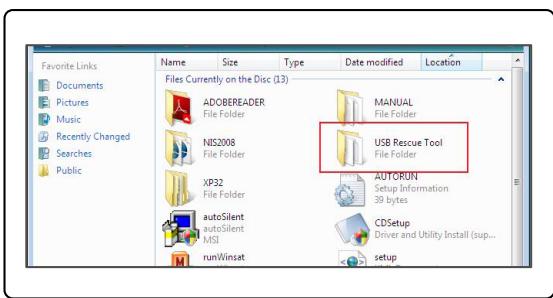
3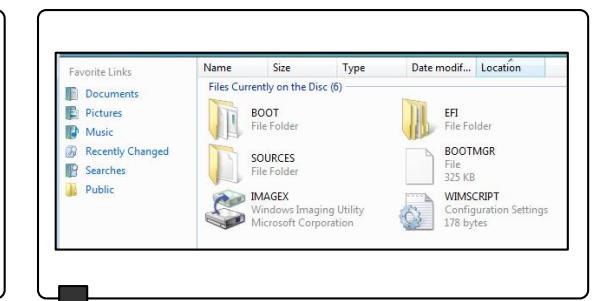
4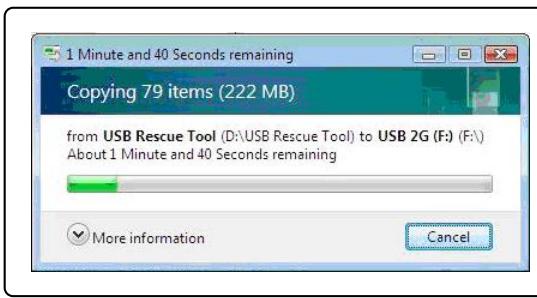
3
Press DEL key to run Setup. Press F11 to run Boot Menu. Press Tab to show POST screen. Press F3 key to run Recovery.
5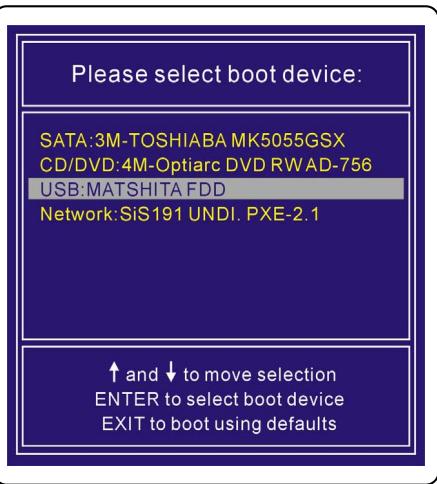
Brazilian Portuguese
Press DEL key to run Setup. Press F11 to run Boot Menu. Press Tab to show POST screen. Press F3 key to run Recovery.
3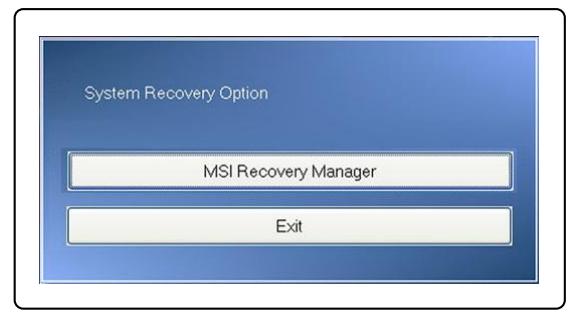
The system recovery file does not exist, and it might be already removed. If this is the first time you use this system, please contact your local distributor for further help.
Press DEL key to run Setup. Press F11 to run Boot Menu. Press Tab to show POST screen. Press F3 key to run Recovery.
Lithuanian
Press DEL key to run Setup. Press F11 to run Boot Menu. Press Tab to show POST screen. Press F3 key to run Recovery.

The system recovery file does not exist, and it might be already removed. If this is the first time you use this system, please contact your local distributor for further help.
System recovery using USB device or SD card.
Press DEL key to run Setup. Press F11 to run Boot Menu. Press Tab to show POST screen. Press F3 key to run Recovery.
Latvian
Press DEL key to run Setup.
Press F11 to run Boot Menu.
Press Tab to show POST screen.
Press F3 key to run Recovery.
3
System Recovery Option
MSI Recovery Manager
Exit
The system recovery file does not exist, and it might be already removed. If this is the first time you use this system, please contact your local distributor for further help.
System recovery using a USB flash drive or SD card
Press DEL key to run Setup. Press F11 to run Boot Menu. Press Tab to show POST screen. Press F3 key to run Recovery.
5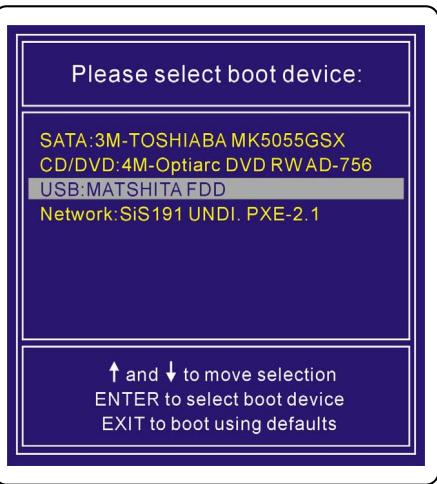
Japanese
System Recovery Manual
Preface
Purpose of Using the System Recovery Function
Press DEL key to run Setup Press F11 to run Boot Menu Press Tab to show POST screen Press F3 key to run Recovery
3
System Recovery Option
MSI Recovery Manager
Exit
Press DEL key to run Setup Press F11 to run Boot Menu Press Tab to show POST screen Press F3 key to run Recovery
3
Please select boot device:
SATA:3M-TOSHIABAMK5055GSX
CD/DVD:4M-Optiarc DVD RWAD-756
USB:MATSHITA FDD
Network:SiS191 UNDI. PXE-2.1
up and to move selection
ENTER to select boot device
EXIT to boot using defaults
The system recovery file does not exist, and it might be already removed. If this is the first time you use this system, please contact your local distributor for further help.
Press DEL key to run Setup Press F11 to run Boot Menu Press Tab to show POST screen Press F3 key to run Recovery
5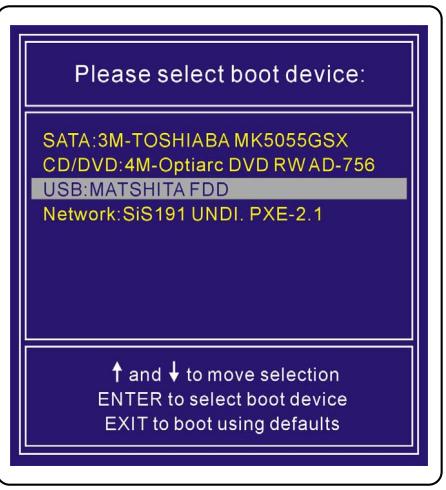
Vietnamese
System Recovery User Manual
Introduction
Purpose of using the system recovery function
Press DEL key to run Setup Press F11 to run Boot Menu Press Tab to show POST screen Press F3 key to run Recovery
3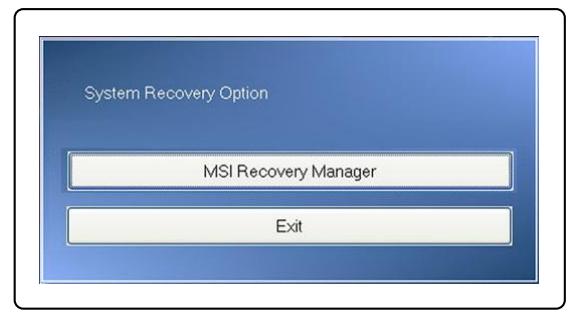
- Press [OK] to continue performing the system recovery function.
- Press [Cancel] to stop performing the system recovery function at any time.
- The system recovery function is currently active.
- When the following window appears, the system has been restored successfully.
- Press [OK] to restart the system and access the Windows operating system as usual.
4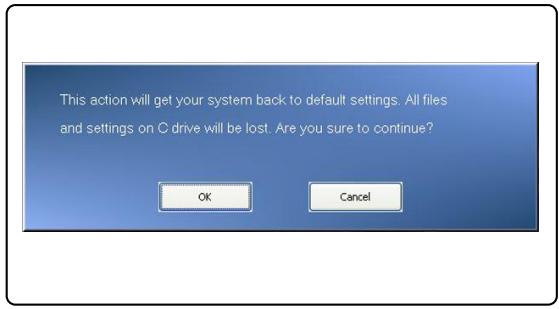
5
6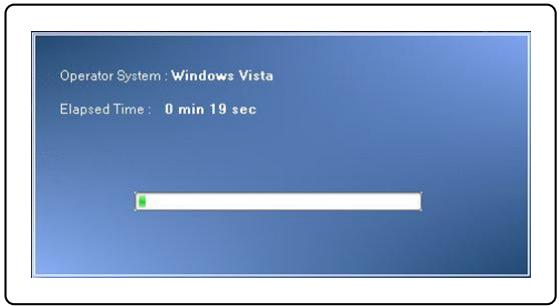
7 8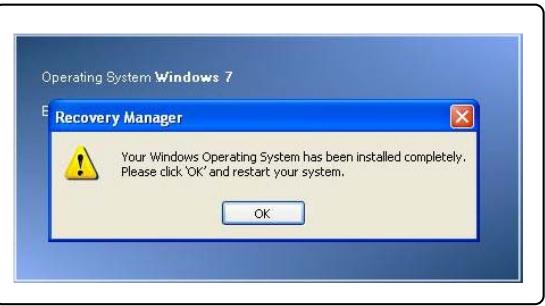
System Recovery via the Driver CD
If your laptop is equipped with an optical drive or an external optical drive, you can perform the system recovery function via the Driver CD included with the product package. Follow the instructions below to continue:
Press DEL key to run Setup Press F11 to run Boot Menu Press Tab to show POST screen Press F3 key to run Recovery
3
Please select boot device:
SATA:3M-TOSHIBA MK5055GSX
CD/DVD:4M-Optiarc DVD RWAD-756
USB:MATSHITA FDD
Network:SiS191 UNDI. PXE-2.1
Use the up and down arrow keys to move the selection.
Press ENTER to select the boot device.
Press EXIT to boot using the default settings.
- Display Language menu. Select your preferred language by clicking the corresponding flag with the mouse connected to the laptop; or select [EXIT] to restart the system.
- After that, select [Restore the system to factory default] to enable the system recovery function; or select [EXIT] to restart the system.
- The system recovery process will format the hard disk partition; ensure you have backed up important data before continuing. Click [OK] to continue; click [Cancel] to stop the system recovery process.
- It is mandatory to use the AC adapter while performing the system recovery function. Ensure the AC adapter is connected to the laptop before proceeding to the next step.
4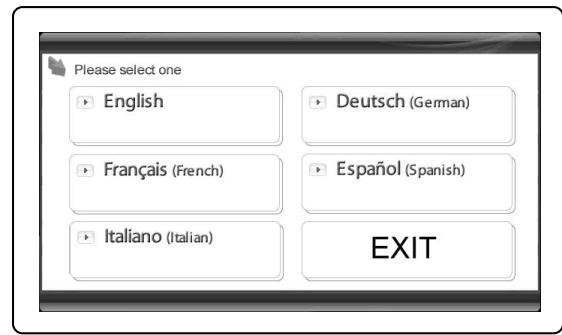
5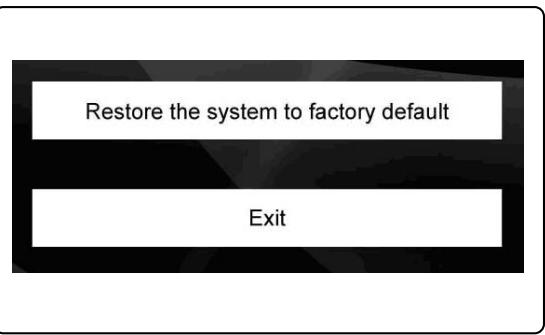
6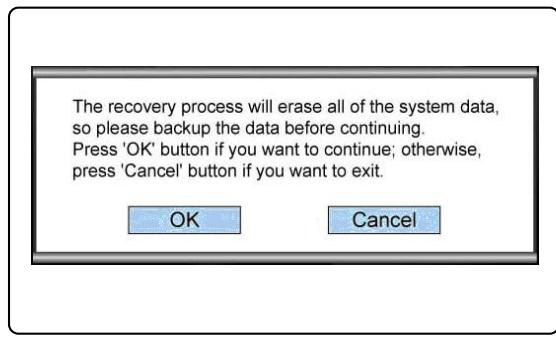
7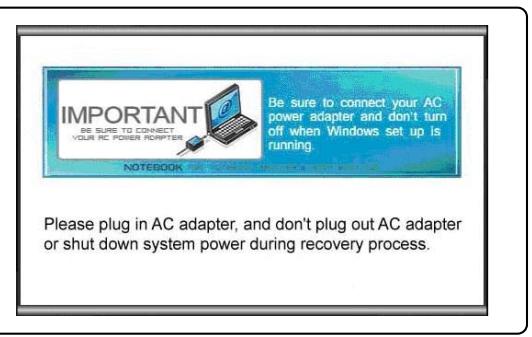
- Note that you must not turn off the system during the system recovery process; otherwise, it may cause some unknown damage to the system.
- When the system recovery process is complete, click [OK] to restart the system. Your system has now been restored to the factory default settings.
- If you cannot successfully perform the system recovery function, you must contact your distributor or local authorized service center for further assistance.
- If the recovery process is interrupted or fails, please repeat the recovery process from the beginning.
8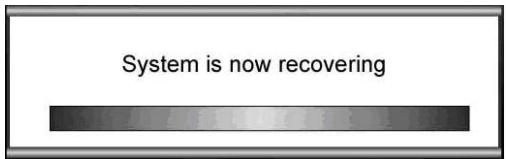
9 10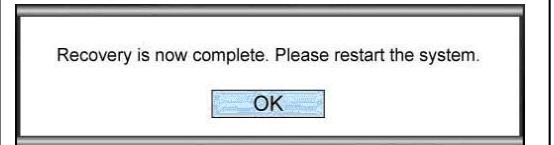
The system recovery file does not exist, and it might be already removed. If this is the first time you use this system, please contact your local distributor for further help.
System recovery via USB flash drive or SD card
If your laptop is not equipped with any optical drive, you can perform the system recovery function via a personal USB flash drive or SD card. Follow the instructions below to continue:
- Make sure you have the Driver CD that came with the product and have a personal USB flash drive or SD card ready. (a) It is mandatory to use a USB flash drive or SD card with a minimum capacity of 256MB; (b) The USB flash drive or SD card must not be a bootable device. If they are found to be bootable devices, please format the device as NTFS or FAT32. (c) It is not necessary to delete all personal data files stored on the USB flash drive or SD card that will be used to perform the system recovery function. However, you should still back up the data stored on the USB flash drive or SD card to another storage device.
- Use a computer with an optical drive. Insert the Driver CD into the optical drive and look for the folder named [USB Rescue Tool] on the Driver CD.
- Browse through the folder named [USB Rescue Tool] and copy the data files in the folder to the USB flash drive or SD card.
- Restart the system and press the F11 key on the laptop keyboard when the following message appears on the screen.
- Select [USB] as the boot device and press [Enter] to confirm your selection.
- Refer to the instructions on "System recovery via Driver CD" to continue the process.
- If any error occurs while performing the system recovery function via a USB flash drive or SD card, you should repeat the steps using another USB flash drive or SD card.
2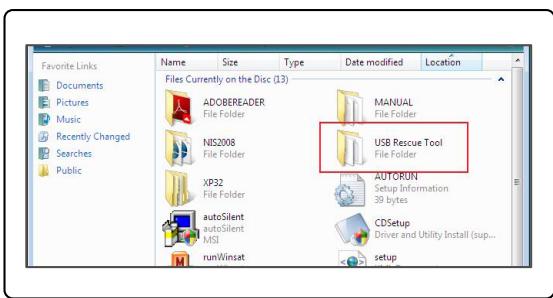
3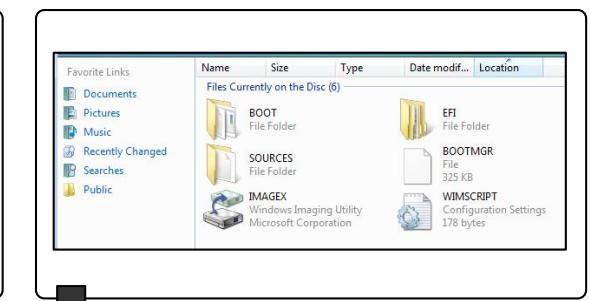
4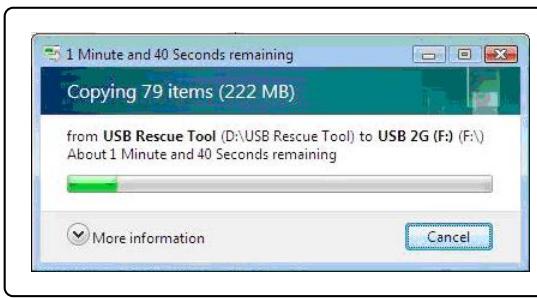
3
3
Press DEL key to run Setup Press F11 to run Boot Menu Press Tab to show POST screen Press F3 key to run Recovery
5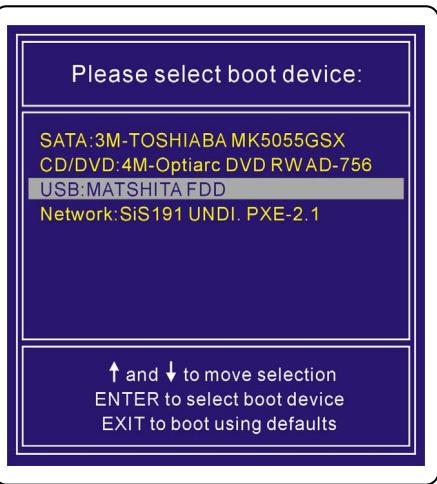
Ελληνικά
Εγχειρίδιο επαναφοράς συστήματος
Εισαγωγές
Προτάσεις χρήσης της λειτουργίας επαναφοράς του συστήματος
Αυτό το εγχειρίδιο επαναφοράς παρέχει οδηγίες και εικόνες σχετικά με τον τρόπο επαναφοράς του συστήματος του φορητού υπολογιστή στην προεπιλεγμένη εργοστασιακή κατάσταση.
Αναφέρονται οι λόγοι για τη χρήση της λειτουργίας επαναφοράς συστήματος. Μπορεί να χρειαστούν τα εξής:
♣ Επαναφορά του συστήματος στην αρχική κατάσταση των αρχικών προεπιλεγμένων ρυθμίσεων του κατασκευαστή. ♣ Διατηρούνται ορισμένα αρχεία στο λειτουργικό σύστημα του χρήστη. ♣ Όταν το λειτουργικό σύστημα δεν λειτουργεί σωστά και δεν είναι δυνατή η κανονική λειτουργία.
Please make sure to read this manual carefully before using the system recovery function.
Precautions for using the system recovery function
The following precautions must be observed before proceeding to the system recovery function:
The system recovery file does not exist, and it might be already removed. If this is the first time you use this system, please contact your local distributor for further help.
Press DEL key to run Setup Press F11 to run Boot Menu Press Tab to show POST screen Press F3 key to run Recovery
5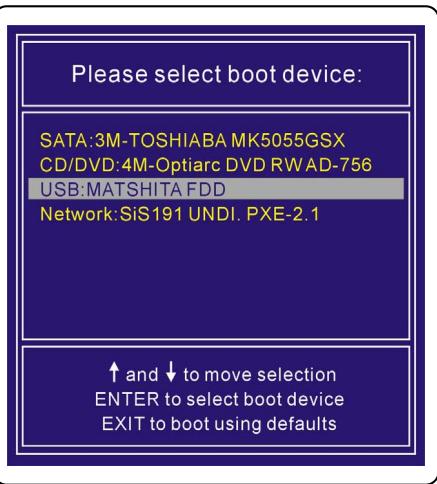

P
a 1 a
Cuiol
J 1
j 1
20 20
a 1
Press DEL key to run Setup
Press F11 to run Boot Menu
Press Tab to show POST screen
Press F3 key to run Recovery
3
System Recovery Option
MSI Recovery Manager
Exit
.4
..()[Cancel] 5
.6
.7
11111111111111111111111111111111111111 00000000000000000000000000000000000000000000000
4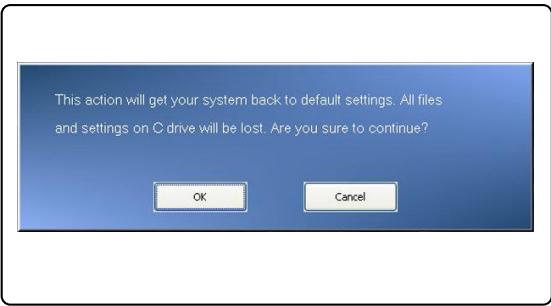
5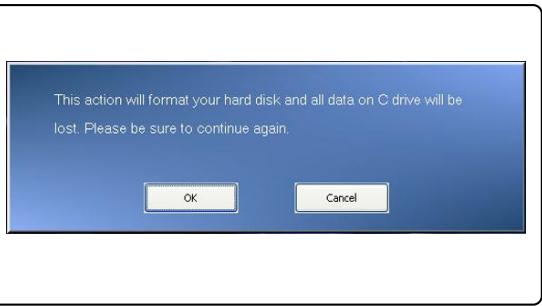
6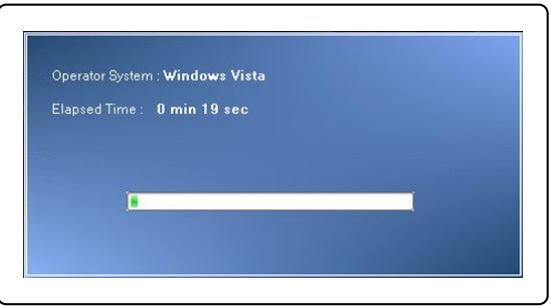
7 8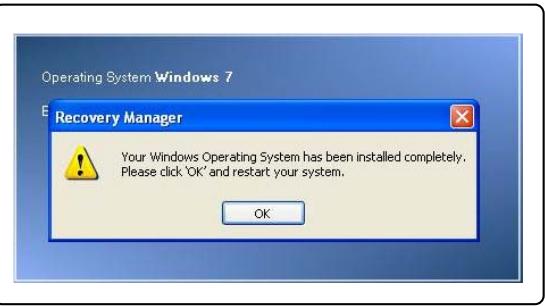
: 1
.1
F114s, jyj yj 2
J 3
DVD CD (s) [Press any key to boot from CD or DVD...]
. 1

Press DEL key to run Setup Press F11 to run Boot Menu Press Tab to show POST screen Press F3 key to run Recovery

Please select boot device:
SATA:3M-TOSHIABAMK5055GSX
CD/DVD:4M-Optiac DVD RWAD-756
USB:MATSHITA FDD
Network: SiS191 UNDI, PXE-2.1
up and to move selection
ENTER to select boot device
EXIT to boot using defaults
Ld 15 (R) [Restore the system to factory default]
The system recovery file does not exist, and it might be already removed. If this is the first time you use this system, please contact your local distributor for further help.
SD 1 USB
1 1
1
SD 1 SD 1 USB 1 1 1 1 1 1 1 1 1 1 1 1 CD 45 Jdla jjabal .1
256 SD USB
FAT32 NTFS bI aI aI aI aI aI aI aI aI aI aI aI aI aI aI aI aI aI aI aI aI aI aI aI aI aI aI aI aI aI aI aI aI aI aI aI aI aI aI aI aI aI aI aI aI aI aI aI aI aI aI
SD 15 USB
a 14 a 14 a 14 a 14 a 14 a 14 a 14 a 14 a 14 a 14 a 14 a 14 a 14 a 14 a 14 a 14 a 14 a 14 a 14 a 14 a 14 a 14 a 14 a 14 a 14 a 14
CD (USB Rescue Tool) [USB Rescue Tool]
SD 1 USB (USB Rescue Tool)
[Enter] 1 [USB] .5
.6
[1] [2] [3]
2
Press DEL key to run Setup
Press F11 to run Boot Menu
Press Tab to show POST screen
Press F3 key to run Recovery

System Recovery Option
MSI Recovery Manager
Exit
() [Cancel] 5
.6
Aill oJ 7
Lallll lai 10 10 10 10 10 10 10 10 10 10 10 10 10 10 10 10 10 10 10 10 10 10 10 10 10 10 10 10 10 10 10
4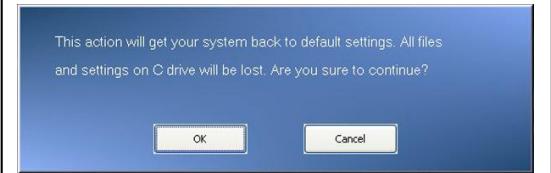
5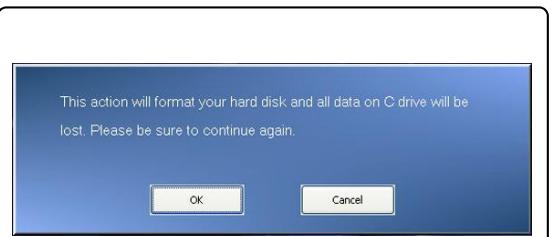
6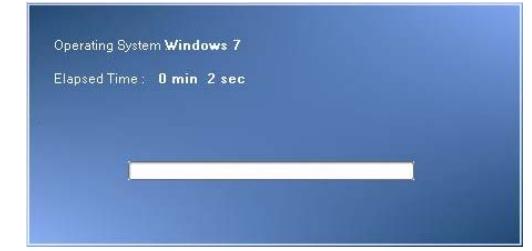
7 8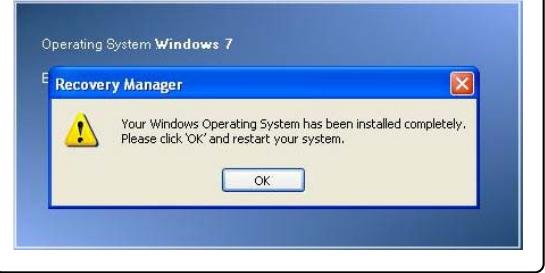
ailll lglllllllllgblgblg 11 jaiiiai iie b
jie 1 (C) [EXIT] jie biaol aill jio CD/DVD] jiai
..(..DVD 1 a a a a a a a a a a a a a a a a a a a a a a a a a a a a a a a a a a a a a a a a a a a a

Press DEL key to run Setup Press F11 to run Boot Menu Press Tab to show POST sc Press F3 key to run Recove

Please select boot device:
SATA:3M-TOSHIABA MK5055GSX
CD/DVD: 4M-Optiac DVD RWAD-756
USB: MATSHITA FDD
Network: SiS191 UNDI. PXE-2.1
up and to move selection
ENTER to select boot device
EXIT to boot using defaults
j 4
(204
y 5
aill (z) [EXIT]
jai jaiaii 1
ailll lalil aie (clll) [Cancel]le jj jn (jfo) [OK]le
1 7
Aiiit
4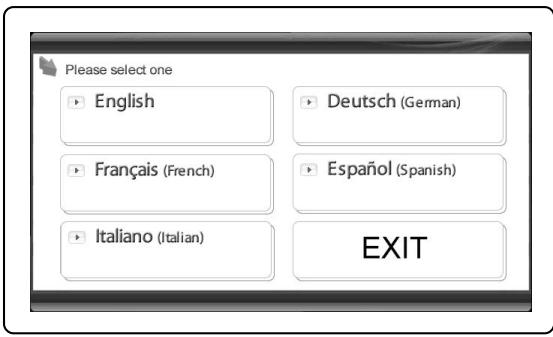
5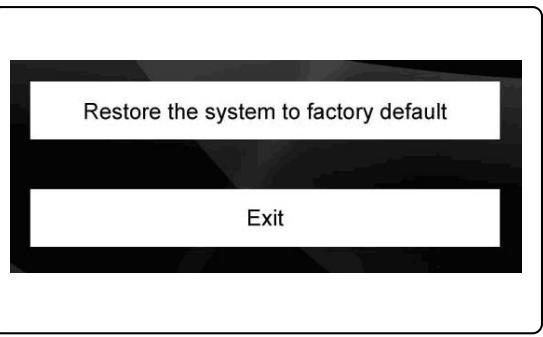
6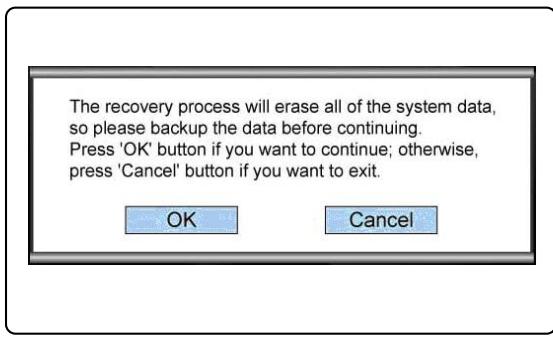
7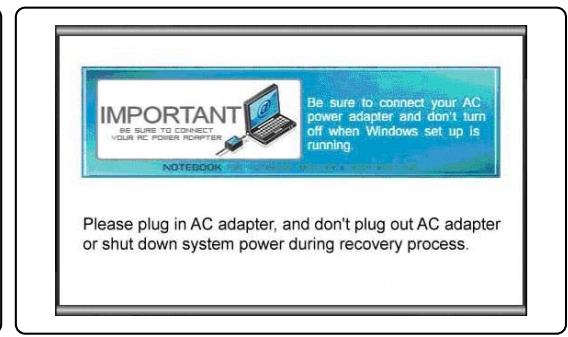
A
8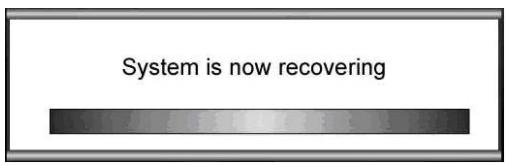
9 10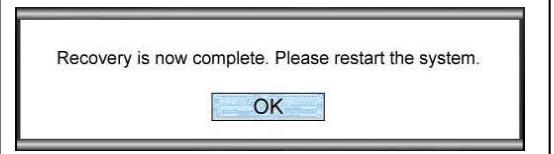
The system recovery file does not exist, and it might be already removed. If this is the first time you use this system, please contact your local distributor for further help.
.FAT32 NTFS
Jalalall aljg (USB [USB Rescue Tool]
.5
Aailll lSll ("jaiilal aaii jaiilai iaiil" "Recover the system with the Driver CD"
10.7
.5D 1


3


Press DEL key to run Setup Press F11 to run Boot Menu Press Tab to show POST screen Press F3 key to run Recovery
X12n
nyn nnu nnun uunnn
:
1
.
y
F3 7777777777777777777777
.2
F3 nwn np by np nynn nnn
F3 y nynn nn nnnn nn nnnn nn nnnn nn nnnn nn nnnn nn
.
y
.1
F3 2
n,197;nnn nn n (MSI nnnn [MSI Recovery Manager] nnnn .3
wnnn nn nn nn nn nn (nn) [EXIT] nwnn
2
Press DEL key to run Setup Press F11 to run Boot Menu Press Tab to show POST screen Press F3 key to run Recovery
3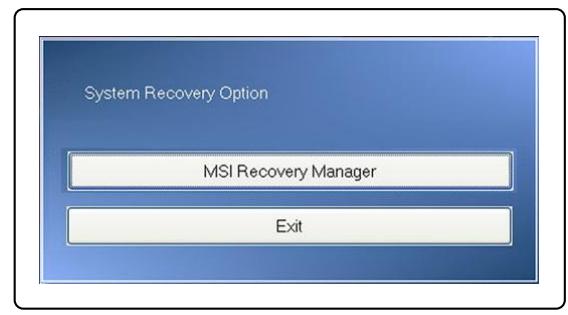
Press DEL key to run Setup Press F11 to run Boot Menu Press Tab to show POST screen Press F3 key to run Recovery

Please select boot device:
SATA:3M-TOSHIABAMK5055GSX
CD/DVD:4M-Optiarc DVD RWAD-756
USB:MATSHITA FDD
Network:SiS191 UNDI. PXE-2.1
up and to move selection
ENTER to select boot device
EXIT to boot using defaults
.010110
.11
8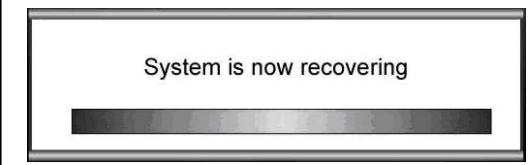
9 10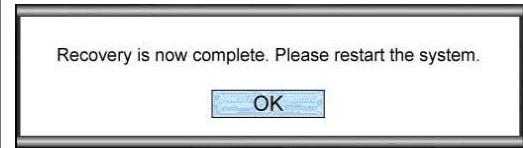
The system recovery file does not exist, and it might be already removed. If this is the first time you use this system, please contact your local distributor for further help.
SD card or USB flash drive
. SD card or USB flash drive
y
. SD card or USB flash drive
Minimum 256MB or more SD card or USB flash drive (N)
1. Insert the SD card or USB flash drive into the computer (c)
.FAT32 or NTFS
SD card or USB flash drive (x)
Insert the SD card or USB flash drive
m (USB nnnn [USB Rescue Tool]
USB flash drive (USB nnnn) [USB Rescue Tool]
SD card
4
Press (0) [Enter] to select, then press [USB] to confirm. 5
6
Insert the USB flash drive into the SD card slot. (Note: This text is garbled and may be incomplete.)
Insert the SD card into the USB flash drive.
2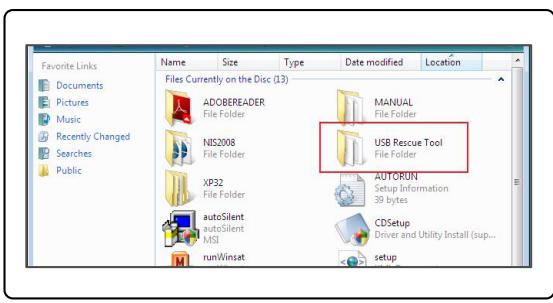
3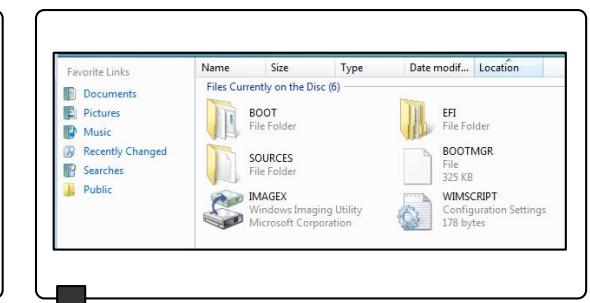
4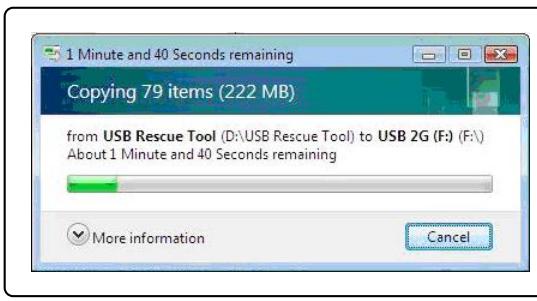
3
3
Press DEL key to run Setup. Press F11 to run Boot Menu. Press Tab to show POST screen. Press F3 key to run Recovery.
5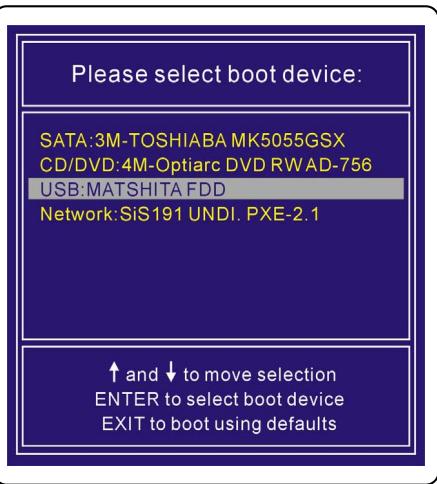
- SYSTEM RECOVERY MANUAL
- TABLE OF CONTENTS
- ENGLISH
- INTRODUCTIONS
- PURPOSES FOR USING THE SYSTEM RECOVERY FUNCTION
- PRECAUTIONS FOR USING THE SYSTEM RECOVERY FUNCTION
- GETTING STARTED
- THEY ARE
- RECOVER THE SYSTEM WITH THE F3 HOTKEY
- RECOVER THE SYSTEM WITH THE DRIVER CD
- RECOVER THE SYSTEM WITH A USB FLASH DRIVE OR A SD CARD
- TRADITIONAL CHINESE
- INTRODUCTION
- PURPOSE OF USING THE SYSTEM RECOVERY FUNCTION
- SIMPLIFIED CHINESE
- GERMAN
- RUSSIAN
- LEVEL 2 AND ABOVE
- PURPOSE OF SYSTEM RECOVERY FUNCTION
- PREPARING TO WORK
- SYSTEM RECOVERY USING THE RECOVERY DISC WITH DRIVERS
- SYSTEM RECOVERY USING A USB FLASH DRIVE OR SD CARD
- SPANISH
- ITALIAN
- SYSTEM RECOVERY USING A USB FLASH DRIVE OR AN SD CARD
- CZECH
- POLISH
- UKRAINIAN
- PURPOSE OF SYSTEM RECOVERY FUNCTIONS
- PORTUGUÉS
- DUTCH
- BULGARIAN
- INSTRUCTIONS FOR USING THE SYSTEM RECOVERY FUNCTION
- PRECAUTIONS WHEN USING THE SYSTEM RECOVERY FUNCTION
- START
- RESTORING THE SYSTEM USING THE RECOVERY KEYS
- SYSTEM RESTORE VIA THE CD
- SYSTEM RECOVERY VIA USB FLASH DRIVE OR SD CARD
- DANSK
- SUOMI
- SYSTEM RECOVERY USING USB FLASH DRIVE OR SD CARD
- SLOVAK
- ROMÂNA
- SERBIAN
- SYSTEM RECOVERY INSTRUCTIONS
- RESTORING THE SYSTEM USING THE DRIVER CD
- RECOVERING THE SYSTEM USING A USB FLASH DRIVE OR SD CARD
- CROATIAN
- SYSTEM RECOVERY USING A PERSONAL USB FLASH DRIVE OR SD CARD
- SWEDISH
- SLOVENSKINA
- BOSANSKI
- SYSTEM RECOVERY USING THE DRIVER CD
- NORSK
- BAHASA INDONESIA
- RESTORE SYSTEMD FOR USB FLASH OR SD CARD
- UNIN
- YANNUNWNNNNNSU
- PLEASE SELECT BOOT DEVICE
- BRAZILIAN PORTUGUESE
- LITHUANIAN
- SYSTEM RECOVERY USING USB DEVICE OR SD CARD
- LATVIAN
- JAPANESE
- PREFACE
- VIETNAMESE
- SYSTEM RECOVERY VIA THE DRIVER CD
- ΕΛΛΗΝΙΚΆ
- ΕΙΣΑΓΩΓΈΣ
- ΠΡΟΤΆΣΕΙΣ ΧΡΉΣΗΣ ΤΗΣ ΛΕΙΤΟΥΡΓΊΑΣ ΕΠΑΝΑΦΟΡΆΣ ΤΟΥ ΣΥΣΤΉΜΑΤΟΣ
- P
- SD 1 USB
- X12N
- NYN NNU NNUN UUNNN
- F3 NWN NP BY NP NYNN NNN
- SD CARD OR USB FLASH DRIVE
Brand : MSI
Model : U130
Category : Netbook