
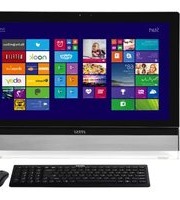
Pro 20EX 8GL - Desktop computer MSI - Free user manual and instructions
Find the device manual for free Pro 20EX 8GL MSI in PDF.


Pick your language and provide your email: we'll send you a specifically translated version.
| Product Type | All-in-One Desktop Computer |
| Brand | MSI |
| Model | Pro 20EX 8GL |
| Display | 19.5-inch LED-backlit LCD, 1600 x 900 resolution |
| Processor | Intel Celeron J4005 dual-core |
| Graphics | Intel UHD Graphics 600 |
| Memory | 4GB DDR4 SODIMM (upgradable to 16GB) |
| Storage | 500GB 2.5-inch SATA HDD |
| Optical Drive | None (slim design) |
| Audio | 2 x 2W built-in speakers |
| Webcam | 1MP front camera with microphone |
| Wireless Connectivity | Wi-Fi 5 (802.11ac), Bluetooth 4.2 |
| Ports | 2 x USB 3.1 Gen1, 2 x USB 2.0, HDMI out, RJ-45, headset/microphone combo jack |
| Card Reader | 3-in-1 (SD, SDHC, MS) |
| Operating System | Windows 10 Pro |
| Power Supply | 90W external power adapter |
| Dimensions (with stand) | 482 x 379 x 42 mm |
| Weight | 4.8 kg |
| Color | Black |
| Mounting Interface | VESA 100 x 100 mm |
| Security Features | Kensington lock slot |
| Included Accessories | Wireless keyboard and mouse |
| Energy Efficiency | Energy Star certified |
Frequently Asked Questions - Pro 20EX 8GL MSI
How do I reset the BIOS password on my MSI Pro 20EX 8GL?
To reset the BIOS password, open the case, locate the CMOS battery on the motherboard, remove it for about 1 minute, then reinsert it. This will clear all BIOS settings, including the password.
Can I upgrade the RAM on this all-in-one PC?
Yes, the MSI Pro 20EX 8GL has two DDR4 SODIMM slots. You can replace the existing 4GB module with up to 16GB (2 x 8GB). Refer to the manual for a visual guide.
How should I clean the touchscreen?
Use a soft, lint-free cloth slightly dampened with water. Do not apply any liquid directly to the screen. Avoid abrasive cleaners, as they may damage the anti-glare coating.
Why is my computer running slowly and how can I fix it?
Slow performance is often caused by too many startup programs or a nearly full hard drive. Close unused programs, disable unnecessary startup items via Task Manager, and run Disk Cleanup to free up space. Upgrading to an SSD provides a significant speed boost.
How can I connect a second monitor?
Your MSI Pro 20EX 8GL has an HDMI output port. Connect a second monitor using an HDMI cable. Press Windows + P and choose one of the display modes: Duplicate, Extend, or Second screen only.
How do I access the system recovery options?
Restart the computer, then press F11 repeatedly before the Windows logo appears. This opens the Advanced Boot Options menu, where you can choose System Recovery, Safe Mode, or reset this PC.
Can I replace the internal hard drive?
Yes, the 2.5-inch SATA HDD is accessible from the service compartment on the back. Power off the system, remove the screws, slide out the drive cage, and disconnect/replace the drive. Ensure the new drive is formatted with the correct file system (NTFS).
How do I enable Wi-Fi if it is disabled?
Press F10 (or the function key with an antenna icon) to toggle the wireless adapter. Alternatively, go to Device Manager, find the Wi-Fi adapter, and make sure it is enabled. If the driver is missing, download it from the MSI support website.
What should I do to protect my PC from power surges?
Use a surge protector or an uninterruptible power supply (UPS) between your PC and the wall outlet. Avoid connecting the power adapter directly to a non-grounded outlet. For extra safety, unplug the device during thunderstorms.
Does this model come with an optical disc drive?
No, the MSI Pro 20EX 8GL is a thin all-in-one design without a built-in DVD/Blu-ray drive. If you need optical media, you can connect an external USB drive, as the system supports boot from USB.
User questions about Pro 20EX 8GL MSI
0 question about this device. Answer the ones you know or ask your own.
Ask a new question about this device
No questions yet. Be the first to ask one.
Download the instructions for your Desktop computer in PDF format for free! Find your manual Pro 20EX 8GL - MSI and take your electronic device back in hand. On this page are published all the documents necessary for the use of your device. Pro 20EX 8GL by MSI.
USER MANUAL Pro 20EX 8GL MSI
Manual assistant
Powered by Anthropic
Waiting for your message
Product information
Brand : MSI
Model : Pro 20EX 8GL
Category : Desktop computer