
TRAVELPILOT SOUND DOCKING - Audio Dock BLAUPUNKT - Free user manual and instructions
Find the device manual for free TRAVELPILOT SOUND DOCKING BLAUPUNKT in PDF.
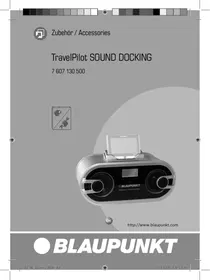



| Product Type | Audio docking station with RDS radio, time display and alarm function |
| Brand | BLAUPUNKT |
| Model | TRAVELPILOT SOUND DOCKING |
| Power Supply | Mains power adapter 100-240 V~, 50/60 Hz, output 12 V / 3 A |
| Power Consumption | Not specified |
| Batteries | 1 CR2025 battery for clock/alarm (backup battery compartment) |
| Display | Digital screen for time, radio frequency and volume |
| Main Functions | FM RDS radio, alarm, charging TravelPilot battery, adaptation for TravelPilot 300/500/700, bass and treble adjustment (via remote control) |
| Connectivity | ANTENNA jack (FM antenna), AUX jack (audio input), AUDIO INPUT and VIDEO IN jacks, AUDIO OUTPUT jack, headphones jack, DC POWER jack |
| Speakers | 2 integrated speakers with bass-reflex port |
| Remote Control | Included, requires CR2025 battery (remove safety strip before use) |
| TravelPilot Compatibility | TravelPilot 300, 500 and 700 with dedicated adapter (A for TP300, B for TP500/700) |
| Maintenance and Cleaning | Clean with a soft, dry cloth; do not use abrasive products or solvents |
| Safety | Do not expose to humidity, water or heat sources; use only the supplied power adapter; do not open the casing |
| Spare Parts and Repairability | Contact Blaupunkt after-sales service; use original parts for the power adapter or cable |
| General Information | Manufacturer warranty valid in the EU; see www.blaupunkt.de for terms |
Frequently Asked Questions - TRAVELPILOT SOUND DOCKING BLAUPUNKT
User questions about TRAVELPILOT SOUND DOCKING BLAUPUNKT
0 question about this device. Answer the ones you know or ask your own.
Ask a new question about this device
Download the instructions for your Audio Dock in PDF format for free! Find your manual TRAVELPILOT SOUND DOCKING - BLAUPUNKT and take your electronic device back in hand. On this page are published all the documents necessary for the use of your device. TRAVELPILOT SOUND DOCKING by BLAUPUNKT.
USER MANUAL TRAVELPILOT SOUND DOCKING BLAUPUNKT
FRENCH 15
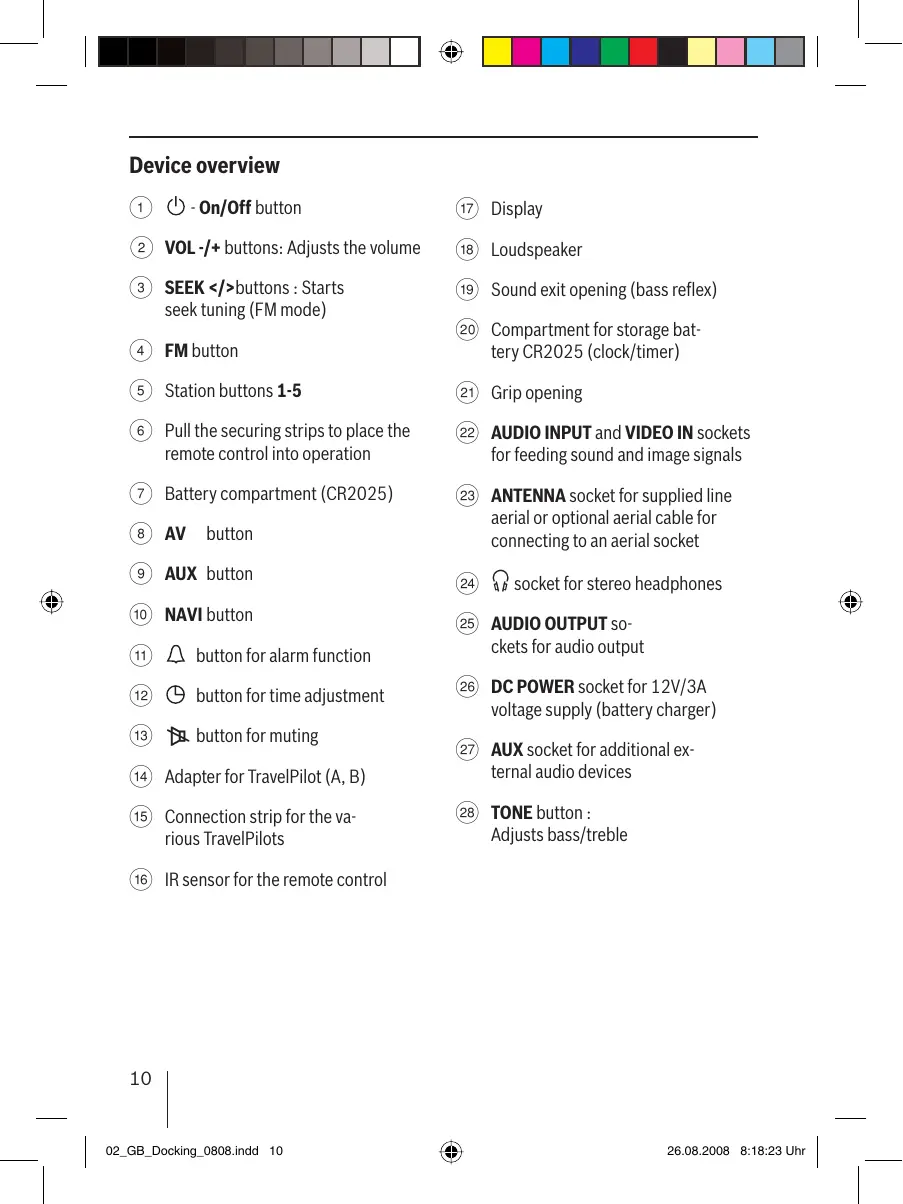
① On/Off button ② VOL-/+ buttons: Adjusts the volume ③ SEEK</> buttons: Starts seek tuning (FM mode) ④ FM button ⑤ Station buttons 1-5 ⑥ Pull the securing strips to place the remote control into operation ⑦ Battery compartment (CR2025) ⑧ AV button AUX button ⑩ NAVI button ⑪ button for alarm function ⑫ button for time adjustment ⑬ button for muting ⑭ Adapter for TravelPilot (A, B) ⑮ Connection strip for the various TravelPilots ⑯ IR sensor for the remote control
17 Display 18 Loudspeaker Sound exit opening (bass reflex) 20 Compartment for storage battery CR2025 (clock/timer) Grip opening 22 AUDIO INPUT and VIDEO IN sockets for feeding sound and image signals 23 ANTENNA socket for supplied line aerial or optional aerial cable for connecting to an aerial socket 24 socket for stereo headphones 25 AUDIO OUTPUT sockets for audio output DC POWER socket for 12V/3A voltage supply (battery charger) 27 AUX socket for additional external audio devices 28 TONE button: Adjusts bass/treble
ENGLISH
We provide a manufacturer's warranty for our products purchased within the European Union. You can view the warranty terms at www.blaupunkt.de or request them directly from:
Blaupunkt GmbH
Hotline
Robert Bosch Str. 200
D-31139 Hildesheim
Safety notes
Securely setting up the TravelPilot Sound Docking
Place the system on a firm, level surface. The system is not designed to be operated in rooms with high humidity (e.g. bathrooms).
Ensure that
- children do not play with TravelPilot Sound Docking without supervision. Children cannot always correctly identify possible dangers.
- The packaging material, e.g. films, is kept away from children. Misuse may lead to the risk of suffocation.
- No direct heat sources (e.g. heating systems, electrical stoves) impact the system;
- The contact with moisture, water or splash water is avoided;
- No open fire sources are close to the system.
- The mains adapter or the mains cables or plugs attached to it are neither scorched nor damaged. Replace the defective mains cable/adapter with original parts. They may not be repaired in any case.
- Whether the housing of the TravelPilot Sound Docking is damaged or liquids entered it. Have the TravelPilot Sound Docking first checked by the customer service.
Power supply
- Do not open the housing of the mains adapter. Danger from electric shock exists if the housing is open.
- Operate the mains adapter only with earthed sockets with 100-240 VAC, 50/60 Hz.
- Use only the enclosed mains adapter and mains connecting cable.
Cabling
- Route the cable so that nobody can step on it or stumble over it.
- Do not place any objects on the cables since they could be damaged.
Operation
Use as directed
The device is designed for the stationary connection of the TravelPilot 300 / 500 and 700. It features a built-in RDS radio with clock and alarm function. In addition, the battery is charged in the TravelPilot to be connected. Various connections at the rear allow its variable use.
Connection
Connect the supplied mains adapter with the device. Next, connect the mains cable with the adapter and then connect it with an outlet (100-240 VAC, 50/60 Hz).
All operating functions can be performed via the remote control or at the device (except for bass/ treble).
Switching the device on/off
To switch on the device,
Press the On/Off button ① for longer than 2 seconds.
To switch off the device,
Press the On/Off button ① again for longer than 2 seconds
Standby mode
Briefly press the On/Off button ① - The display illumination goes out and the clock function is visible.
Changing time settings
Setting the time
To set the clock, the device must be in Standby mode.
Press the button 12 - until the hour display flashes. Press the buttons ③ to set the hours. Press the button 12 again - until the minute display flashes. Press the buttons ③ to set the minutes. After approx. 5 seconds, the adjusted time appears.
In operation, the time can be displayed by pressing the button 12.
Setting the alarm time
To set the alarm time, the device must be in Standby mode.
Press button 12 until the hour display flashes. Press the < SEEK> buttons ③ to set the hours. Press the button again until the minute display flashes. Press the buttons ③ to set the minutes. After approximately 5 seconds, the regular time display appears again.
Adjusting the volume
Note
- The device plays the audio source with the volume you previously listened to. Always set the device to a moderate volume.
Briefly press the VOL-/+ button ② to adjust the volume in increments of 00-20.
The current volume is shown on the display and used for all audio sources.
Sound settings
Adjusting bass and treble
Settings can be performed only on the remote control.
To change the setting, press the TONE button 28. Briefly press the VOL-/+ button ② to adjust the bass level from -3 to +3. Briefly press the TONE button (28) to switch from bass to treble setting. Briefly press the VOL-/+ button ② to adjust the treble from -3 to +3. After approximately 6 seconds or pressing the TONE button (28), the menu item is exited.
Mute
To mute the device,
Briefly press the Mute button (13).
The display shows
To cancel the mute function,
press the Mute button 13 again.
Tuner mode
This device can be used to receive radio stations in the FM frequency range and adjust and store FM radio stations.
Tuning into a station
There are three ways of tuning into a station:
- Tuning into stations automatically (station seek tuning) Tuning into stations manually
- Selecting stored stations
Station seek tuning (up/down)
Press the button ③ up or down until the seek tuning starts.
The tuner searches for the next receivable station in the waveband.
Tuning into stations manually
Briefly press the <SEEK> button (3) up or down to change the frequency in 50-kHz increments.
Selecting stored stations
Press one of the station buttons 1-5 (5).
The stored station is called up, provided that it can be received at the current location.
The frequency of the station or the station name appears on the display.
Storing stations
After tuning into a station, it can be stored as follows:
Press one of the station buttons 1-5 repeatedly until, e.g. "P1", appears flashing on the display.
Mono-Stereo switching
Press the FM button ④ for longer than 1 second. - MONO display Press the FM button 4 for longer than 1 second. - "AUTO" display (automatic switching of Mono/Stereo).
Operation with TravelPilot
TravelPilot adapter
Depending on the TravelPilot type, adapt the adapter 14 (A for TP 300 or B for TP 500/700) (see Installation Adapter).
Switching on the TravelPilot,
by pressing the On/Off button ① on the TravelPilot or the remote control. by pressing the button NAVI⑩, AUX⑨ or AV⑧.
Switching off the TravelPilot,
by pressing the On/Off button ① on the TravelPilot or the remote control, or by pressing the FM button 4.
Switching audio sources
Press the NAVI button (10). The audio signals of the TravelPilot are now also played back via the docking station. Press the AV button ⑧. - The video signal of the VIDEO IN socket (22) is played back via the TravelPilot if it is set to "My VIDEOS". - The audio signals of the video are played back via the AUDIO-INPUT socket (22) of the docking station.
Rear sockets
AUX
External devices can be connected to it.
Press the AUX button ③. The AUX signals of the AUX-IN socket are played back via the docking station.
AUDIO INPUT
The signals of the AUDIO-INPUT sockets (22) are played back via the docking station.
VIDEO IN
See Operation with TravelPilot
AUDIO OUTPUT
External devices can be connected to it.
Socket for stereo headphones
When using the stereo headphones, the loud-speakers of the docking station are switched off.
ANTENNA
Socket for supplied line aerial or optional aerial cable for connecting to an aerial socket
DC POWER
Connection for the supplied power supply.
Compartment for storage battery
The battery type CR2025 ensures that the clock continues to operate upon separation from mains.
To replace the battery, turn the cap in the direction of the arrow. Remove the battery and insert the new one with the minus side first.
Recycling and disposal
Please use the return and collection systems available to dispose of the product.
Subject to changes!
Set station manually
Briefly press up or down on the < SEEK> key ③ to change the frequency in steps of 50kHz
Select stored station
Press one of the station keys 1-5⑤.
Press to switch ON/OFF ①
The device is switched on and the operation is visible.
Setting the clock
Clock setting
To set the clock, the device must be in standby mode.
Press the rotary knob ① until the hour display flashes. Press the buttons ③ to set the hours. Press the rotary knob ① briefly - the minute display flashes. Press the buttons ③ to set the minutes. - After about 5 seconds the set time is displayed.
Connecting the TravelPilot
Depending on the type of TravelPilot, connect the plug (14) A for TP 300 or B for TP 500/700) (see connection diagram).
Switching on the TravelPilot
Switch on the TravelPilot or the radio with the ON/OFF button 1, then press the NAVI 10, AUX 9 or AV8 button.
Switching off the TravelPilot
Switch off the TravelPilot or the radio with the ON/OFF button ①, then press TPOFM.
Audio source switching
Press the NAVI 10 button. The audio signals of the TravelPilot are also transmitted via the Docking Station. Press the AV⑧ button. The video signal of the VIDEOIN 22 input is transmitted via the TravelPilot when it is set to "VIDEOS". The audio signals of the video are transmitted via the AUDIO-INPUT 22 input of the Docking Station.
Inputs on the rear
AUX
External devices can be connected.
Connect the power supply to ③. The signals from the AUX-IN 27 sockets are transmitted through the Docking Station.
AUDIO INPUT
The signals from the AUDIO-INPUT 22 sockets are transmitted through the Docking Station.
VIDEO IN
See TravelPilot function.
AUDIO OUTPUT
External devices can be connected.
Support for stereo headphones
Directional control (forward/backward)
Please note the following:
Do not leave children unattended near the Docking Station for TravelPilot navigators. They may not always recognize danger. Do not give children packaging materials, for example foil. There is a risk of suffocation if handled incorrectly with packaging. Do not expose the device to heat sources (for example radiators or electric heaters). - Avoid contact of the device with water or spray. - Do not install the device near open flames. Do not use a power adapter or power cable with damaged or worn contacts. Replace damaged adapter/cable with original new ones.
Never repair the cable or adapter yourself. Do not connect the Docking Station for TravelPilot navigators if its housing is damaged or if liquid has entered. Have the Docking Station for TravelPilot navigators checked by a service center.
Question
Do not open the housing of the power adapter. There is a risk of electric shock if the housing is opened. Connect the power adapter only to a socket with a voltage of 100-240 V~, 50/60 Hz with a protective contact. - Use only the power adapter and power cable included in the delivery.
Cable
Route the cable in such a way as to exclude the possibility of stepping on it. Do not place objects on the cable, otherwise you may damage it.
Operation
Intended use
The device is intended for stationary charging of TravelPilot 300/500 and 700 car navigators. The device has a built-in hands-free function, clock, and alarm. Additionally, the battery of the docked navigator is charged. Various mounts on the rear panel provide versatile use of the device.
Charging
Connect the power adapter included in the delivery package to the device. Then
connect the power cable with the adapter and then plug it into a wall outlet (AC 100-240 V~, 50/60 Hz).
All available functions can be activated by pressing the button on the device (except Bass/Treble).
Turning the device on/off
To turn on the device,
press and hold the power button ① for more than 2 seconds.
To turn off the device,
press and hold the power button ① again for more than 2 seconds.
Standby mode
Press the ON/OFF button briefly. The display backlight will turn off and the device will turn on.
Change the settings.
Time setting
To set the time, the device must be in standby mode.
Press button 12 until the hour indicator starts flashing. Press the hour setting button. Press the ON/OFF button briefly again until the minute indicator starts flashing. Press the minute setting button. Approximately 5 seconds later, the setting is saved.
The time display can be turned on before operation by pressing button ⑫.
Alarm setting
To set the alarm, the device must be in standby mode.
Press button 12 until the hour indicator starts flashing. Press the hour setting button. Press the ON/OFF button briefly again until the minute indicator starts flashing. Press the minute setting button. Approximately 5 seconds later, the setting is saved.
Volume adjustment
Note
- The device automatically adjusts the volume during playback. The volume is adjusted automatically according to the audio source. Always set a moderate volume level.
Press the VOL+ or VOL- button briefly to set the desired volume from 0 to 20.
The current volume level is displayed on the display and is effective for all audio sources.
Sound settings
Setting low and high frequencies
The setting can only be performed from the standby mode.
To change the setting, press the TONE button ②. Briefly press the VOL-/+ ② button to set the desired low frequency level to a value from -3 to +3.
Briefly press the TONE button 28. The low/high frequency setting is displayed. Briefly press the VOL-/+ ② button to set the desired high frequency level to a value from -3 to +3. Approximately 6 seconds after the last press of the TONE button (item 28), the menu will close.
Muting the sound
To mute the sound on the device,
briefly press the Mute button 13.
The display shows
To unmute the sound,
briefly press the Mute button 13 again.
Radio mode
With this device, you can receive radio stations in the FM frequency range (UKW), as well as tune in to UKW radio stations and save them.
Station tuning
There are three ways to tune in to stations:
- Automatic station tuning (station search)
- Selecting saved stations in manual mode
Tuning (forward/backward)
Press and hold the $ ③ button forward or backward until the desired station is found.
The station is tuned in the water flow direction according to the received station.
Setting stations in manual mode
Briefly press the $ ③ button forward or backward to change the frequency in 50 kHz steps.
Selecting saved stations
Press one of the station buttons 1-5⑤.
The saved station is called up if the vehicle is in the reception area.
The frequency or station name is displayed on the display.
Memorizing stations
After setting any station, you can save the setting as follows:
Press and hold one of the station buttons 1-5⑤ until the display, for example, "P1", flashes.
Switching mono/stereo
Press and hold the FM 4 button for more than 1 second. - The indicator shows MONO. Press and hold the FM 4 button for more than 1 second. - The indicator shows STEREO (automatic switching mono/stereo).
Pa60Ta c aBTOHaBHraTopoM TravelPilot
Aaantep TravelPilot
B 3aBnCmOCTH OT MOeAIN aBTOHaBnIgATopAp TravelPilot yCTaHOBnTb COOTBETCTBYIOuIN aAaITep 已 A DAA TP 300 mN B dA TP 500/700 (cm."YCTaHOBka aAaITepa").
ABTOHABRAtopTravelPilotBkLIOucaTcA:
TIPIN HaKaTHNI KHTIKN BKA./BbIKA. ①HaabTOHaBnArTope HnITyIbTe dy. ПИΝΗΚΑΤΗΝΚΟΥΙΝΑΝΙ - ⑩ , AUX - ⑨ ένη AV - ⑧ .
ABTOHABRaTop TravelPilot
BbIKIouaETc8:
ПИн Нжати КНOTКИ BKA./BblKA. -①Ha aTOHabnIaTope HnIyIbTe DY. ПИЗHAЖКТУKHOTКINFM.
Tepekluoyehne aydnohctouHHKOB
Haxmite KHTIKY NAVI10. AynoocnHaC aBTOHaBnTaTopa TravelPilot 6ydt TAKKe TEpeDaBaTbCn Ha DOK-CTaHcNIO. HaxMMTe KhoTky AV 8. BnAeOCHHaH BxOda VIDEOIN 22)6yAETTpepeDaBaTbCa Ha aBTOHaBnAraTop,ecm OH bIpaH KaueCTBe "My VIDEOS". AydnochHaBnDaeo6yAdTpeBaBatcyepe3BXoA AUDIO-INPUT-22HaDOK-CTAHIIO.
THe3da Ha 3aDHe TnHeI
BxoA AUX
K Hemy MoryT 6bIb TIOAKIOUeHbI AOIOAHHTeAbHbIyCTpOICTBa.
HaxMMTe KHOITky AUX- ③ CnHnAUXcTHe3daAUX-IN-(27)6yDetpepeDaBaTbcyaape3doK-CTaHcIHO.
AUDIO INPUT
Replacement element TITAN
TITAN element: TITCR2025, which ensures operation of the device without interruption of power supply.
Before replacement, check the cover for voltage distribution. Remove the TITAN element and install a new one, observing polarity.
Recycling and disposal
Recycling of old equipment: follow the local regulations for collection and recycling of secondary raw materials.
Rad's TravelPilot-om
TravelPilot-adapter
When using TravelPilot, apply the adapter (A for TP 300 or B for TP 500/700) (see adapter installation).
Switching on TravelPilot,


- FRENCH
- ENGLISH
- SAFETY NOTES
- SECURELY SETTING UP THE TRAVELPILOT SOUND DOCKING
- ENSURE THAT
- POWER SUPPLY
- CABLING
- OPERATION
- USE AS DIRECTED
- CONNECTION
- SWITCHING THE DEVICE ON/OFF
- TO SWITCH ON THE DEVICE
- TO SWITCH OFF THE DEVICE
- STANDBY MODE
- CHANGING TIME SETTINGS
- SETTING THE TIME
- SETTING THE ALARM TIME
- ADJUSTING THE VOLUME
- NOTE
- SOUND SETTINGS
- ADJUSTING BASS AND TREBLE
- MUTE
- TO MUTE THE DEVICE
- TO CANCEL THE MUTE FUNCTION
- TUNER MODE
- TUNING INTO A STATION
- STATION SEEK TUNING (UP/DOWN)
- TUNING INTO STATIONS MANUALLY
- SELECTING STORED STATIONS
- STORING STATIONS
- MONO-STEREO SWITCHING
- OPERATION WITH TRAVELPILOT
- TRAVELPILOT ADAPTER
- SWITCHING ON THE TRAVELPILOT
- SWITCHING OFF THE TRAVELPILOT
- SWITCHING AUDIO SOURCES
- REAR SOCKETS
- AUX
- AUDIO INPUT
- VIDEO IN
- AUDIO OUTPUT
- SOCKET FOR STEREO HEADPHONES
- ANTENNA
- DC POWER
- COMPARTMENT FOR STORAGE BATTERY
- RECYCLING AND DISPOSAL
- SET STATION MANUALLY
- SELECT STORED STATION
- SETTING THE CLOCK
- CLOCK SETTING
- CONNECTING THE TRAVELPILOT
- AUDIO SOURCE SWITCHING
- INPUTS ON THE REAR
- SUPPORT FOR STEREO HEADPHONES
- DIRECTIONAL CONTROL (FORWARD/BACKWARD)
- PLEASE NOTE THE FOLLOWING
- QUESTION
- CABLE
- INTENDED USE
- CHARGING
- TURNING THE DEVICE ON/OFF
- TO TURN ON THE DEVICE
- TO TURN OFF THE DEVICE
- CHANGE THE SETTINGS
- TIME SETTING
- ALARM SETTING
- VOLUME ADJUSTMENT
- SETTING LOW AND HIGH FREQUENCIES
- MUTING THE SOUND
- TO MUTE THE SOUND ON THE DEVICE
- TO UNMUTE THE SOUND
- RADIO MODE
- STATION TUNING
- TUNING (FORWARD/BACKWARD)
- SETTING STATIONS IN MANUAL MODE
- SELECTING SAVED STATIONS
- MEMORIZING STATIONS
- SWITCHING MONO/STEREO
- PA60TA C ABTOHABHRATOPOM TRAVELPILOT
- AAANTEP TRAVELPILOT
- ABTOHABRATOPTRAVELPILOTBKLIOUCATCA
- ABTOHABRATOP TRAVELPILOT
- BBIKIOUAETC
- TEPEKLUOYEHNE AYDNOHCTOUHHKOB
- THE3DA HA 3ADHE TNHEI
- BXOA AUX
- REPLACEMENT ELEMENT TITAN
- RAD'S TRAVELPILOT-OM
- TRAVELPILOT-ADAPTER
- SWITCHING ON TRAVELPILOT
Brand : BLAUPUNKT
Model : TRAVELPILOT SOUND DOCKING
Category : Audio Dock