
Smart'N Light KH6418 - Toaster KRUPS - Free user manual and instructions
Find the device manual for free Smart'N Light KH6418 KRUPS in PDF.


| Product Type | Toaster |
| Brand | Krups |
| Model | Smart'N Light KH6418 |
| Power | 1000 W |
| Number of Slots | 2 |
| Browning Control | Yes, adjustable with 6 settings |
| Functions | Reheat, Defrost, Cancel |
| Lift & Look | Yes, without interrupting cycle |
| Auto Shut-off | Yes |
| Cool-Touch Exterior | Yes |
| Crumb Tray | Removable for easy cleaning |
| Material | Stainless steel and plastic |
| Dimensions (approx.) | 30 x 18 x 20 cm |
| Weight | 1.5 kg |
| Colors Available | White, Black, Silver (may vary) |
| Warranty | 2 years |
Frequently Asked Questions - Smart'N Light KH6418 KRUPS
User questions about Smart'N Light KH6418 KRUPS
0 question about this device. Answer the ones you know or ask your own.
Ask a new question about this device
Download the instructions for your Toaster in PDF format for free! Find your manual Smart'N Light KH6418 - KRUPS and take your electronic device back in hand. On this page are published all the documents necessary for the use of your device. Smart'N Light KH6418 by KRUPS.
USER MANUAL Smart'N Light KH6418 KRUPS




SAFETY INSTRUCTIONS IMPORTANT SAFEGUARDS:
■ This appliance is not intended to be operated using an external timer or separate remote control system. ■ This appliance is intended to be used in household only. It is not intended to be used in following applications, and the guarantee will not apply for:
-staff kitchen areas in shops, offices and other working environments; - farm houses; -by clients in hotels, motels and other residential type environments; - bed and breakfast type environments.
■ This appliance is not intended for use by persons (including children) with reduced physical, sensory or mental capabilities, or lack of experience and knowledge, unless they have been given supervision or instruction concerning
use of the appliance by a person responsible for their safety.
■ Children must be supervised to ensure that they do not play with the appliance. ■ If the supply cord is damaged, it must be replaced by the manufacturer, its service agent or similar qualified persons in order to avoid a hazard.
- Bread can burn, therefore the appliance must not be used near or below curtains and other combustible materials such as curtains, drapes or wood (shelving, cupboards...) it should be attended when in use.
■ This appliance can be used by children aged from 8 years and above and persons with reduced physical, sensory or mental capabilities or lack of experience and knowledge if they have been given supervision or instruction concerning use of the appliance in a safe way and understand the hazards
involved. Children shall not play with the appliance. Cleaning and user maintenance shall not be made by children unless they are older than 8 and supervised.
- Keep the appliance and its cord out of reach of children less than 8 years. ■ Use a dust cloth on parts that come into contact with bread. ■ Make sure you dispose of any crumbs regularly by emptying the crumb-tray which is on the lower part of the toaster.
The temperature of the accessible surfaces may be high when the appliance is in operation.
Do not touch the hot surfaces of the appliance (depending on model).
For your safety, this appliance conforms with applicable standards and regulations (Directives on low voltage, electromagnetic compatibility, materials in contact with foodstuffs, environment, etc.) In accordance with the CSC notice of 2/12/04, this product features a mechanical design allowing the bread ejection mechanism to be detached from the power cutoff element. - Check that the electricity supply voltage corresponds to the voltage indicated on the appliance (ac current only).
■ Given the many standards in effect, if this toaster is used in a country other than the country where it was purchased, have it checked by an approved service centre (see enclosed after sales service information). - Check that the electricity installation is sufficient to supply the power required by this appliance. ■ Always plug the toaster into an earthed socket. ■ Use extension leads which are in good condition, with an earthed connection, and with a minimum rating of 10A.
TO PREVENT ANY ACCIDENTS
When using electrical appliances, basic safety precautions should always be followed:
DO
■ Carefully read and follow all the instructions for use.
■ Close supervision is necessary when the toaster is used by or near children or certain disabled persons who are not familiar with these instructions and should only use this toaster under surveillance of a responsible adult. ■ The toaster must always be used in the upright position, never on its side or tilted forwards or backwards.
Before each use, make sure that the crumb tray is fitted correctly.
Regularly remove crumbs from the crumb tray.
The bread control lever must be in the “Up” position before plugging in or unplugging the appliance. Unplug the appliance if it shows any working abnormalities. Unplug from the power socket when not in use during and before cleaning. Allow to cool down before cleaning or storing. To unplug, remove the plug from the wall socket (when the toasting cycle is finished). If the bread jams in the slots after toasting and the elements do not switch off, unplug the plug immediately and wait for the appliance to cool before attempting to remove the bread. Bread can burn, therefore do not use this appliance near any flammable materials such as curtains, under shelving or under wall cupboards. Use on a flat, stable heat-resistant work surface, away from any contact with water and never use underneath a built-in kitchen alcove.
DO NOT
- Do not let the toaster operate unattended, particularly when toasting for the first time or when settings have been changed. Do not store the cord or the plug between the slots in the appliance.
Do not unplug the appliance by pulling on the cord. Do not move or carry the appliance during use. Do not leave the appliance within the reach of children. Do not use outdoors. Avoid humid environments.
Do not use the appliance for any other use other than that for which it was designed. Do not touch the metal parts or hot surfaces of the appliance when it is working. Oversized foods, metal foil packages, or utensils (spoon, knife, etc.) must not be inserted into a toaster as they may cause an electric shock or fire. Do not use accessory attachments that are not recommended by the manufacturer as this may be dangerous. To protect yourself against electrical shock, do not immerse the cord, plugs, or appliance in water or other liquids.
Do not toast breads that may melt (with frosting), sink or fall into the toaster; do not toast food that may fall between the grills (for example: rolls, croutons, blinis, etc.), this could cause damage to the appliance or become a fire hazard.
Do not try to toast very thick slices of bread that could become stuck in the toasting slots.
Do not use this appliance if:
it has a damaged cord.
the appliance has been dropped and has visible damage or does not operate properly. In any of these instances, the appliance must be sent to your local approved aftersales service centre to avoid any risk of danger. Refer to the guarantee enclosed.
- Do not let the cord hang over the edge of the worktop or come into contact with hot surfaces. Do not place on or near a gas burner, electric ring/hob, or near a heated oven.
Do not cover this appliance while in use.
Do not put paper towels, cardboard or plastic in, on or under the toaster.
If flames were to arise from parts of the toaster, never attempt to extinguish them with water. Unplug the appliance and smother the flames with a damp cloth.
- Do not attempt to dislodge food once the toasting cycle is engaged.
- Do not use this appliance as a source of heating or drying.
■ Do not use the toaster for cooking, grilling or defrosting frozen food other than bread products. ■ Do not use the appliance to toast bread and warm croissants (or similar products) at the same time (depending on model). ■ The metal frame can become very hot. Do not touch it! Use an oven glove or tongs (depending on model). ■ The bun warmer metal part can become very hot when toaster is working. Do not touch it (fig 33) - Do not use any abrasive cleaning agents (no soda-based scouring products, no scouring pads...), no metallic utensils, metal scouring pads etc. ■ For appliances with a metallic finish: Do not use any cleaning products designed for metals: use a soft cloth with a window or glass cleaner.
SAVE THESE INSTRUCTIONS

Environment protection first!
Your appliance contains valuable materials which can be recovered or recycled. Leave it at a local civic waste collection point.
EN
DESCRIPTION
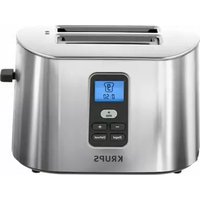
A Heat Insulated casing B Crumb tray C Cord storage D Toasting lever E Display F STOP(CANCEL) button
G Browning toasting button (1-7 Selection)
H Re-Heat button
I Defrost button
J Memory button
K Bun Warmer
BEFORE FIRST USE I
■ Remove all packaging and other accessories inside as well as outside of the appliance (Fig. 1-2). ■ Unwind the cord from under the toaster. Plug the toaster into the wall (Fig. 3). Select the maximum browning setting without inserting any bread, then press the lever down. Repeat the toasting sequence 3 times to remove the “new” smell.
USING THE TOASTER II
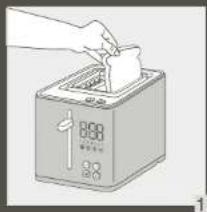
- Insert the slices of bread (Fig. 10). Do not use slices which are too large or too thick as that can block the toasting mechanism. ■ Select the desired toasting setting (Fig. 11). For best toasting results, always toast two slices of bread.
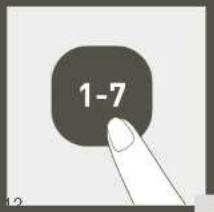
- Choose between 7 different degrees of browning by setting the selector to the appropriate position (Fig. 11-12). Position 1 = lightly toasted Position 7 = very well toasted
When using with a new bread, you may have to experiment to find your preferred toasting setting, as the toasting result depends upon the type of bread and the degree of moisture. Therefore, if you have a brand new loaf a higher setting will be needed than when the same loaf loses freshness.
Generally, a higher browning setting is required for darker breads than white breads. When toasting only 1 slice of bread, lower the browning setting for best result.
Bun warmer to warm up rolls, pastries and bagels (please use the setting 1 to reheat).
Caution:
Relatively dry slices of bread, or bread that has already been toasted once, will brown much more quickly and may under certain circumstances catch fire. Therefore, set the heat control to a lower setting and do not leave the toaster unattended.
■ Fully push down the toasting lever, which will then lock into position (Fig. 13). The appliance will begin to operate and the STOP(CANCEL) button will illuminate. The toasting lever will only lock if the toaster is plugged in. ■ After toasting cycle is complete, the toast will automatically be raised (Fig. 14). ■ To make it easier to remove the bread you can lift the toaster lever up (Fig. 15). ■ To stop the toasting cycle, press the STOP(CANCEL) button (Fig. 21).
Note:
Should a slice of bread become trapped in the toasting well, unplug the power cord, let the appliance cool down and then carefully free the toast without touching the heating elements.
ADDITIONAL FUNCTIONS III, IV
FAVORITE function
This toaster has a memory feature (Fig 16-20).
There are 2 memory buttons to save your favorite toasting settings to provide one-touch recall of your programmed favorite settings. ■ To program the FAV button, choose your desired combination of setting(s) and hold the FAV button for 2 seconds. The LED display will flash to confirm saved settings.
■ Simply select your FAV button, push the toasting lever down, and the toasting cycle programmed will automatically display and toast to your customized setting.
- You can replace a new setting if you want to change to a new FAV toasting memory. To press and hold 1 or 2(FAV button) about 2 seconds until the code 1 or 2 displayed on the screen.
Reheating function
The toaster has reheating feature. It can reheat sliced bread without over toast (Fig. 23-24).
The reheating time is constant about 30 seconds; and it's not related with toasting level.
■ Press the reheat button after you put in the sliced bread to toaster, and then push down the toasting lever to start. ■ REHEAT button light and STOP button light will be on.
DEFROST function
The toaster has a pre-programmed defrosting feature. Toasting frozen bread takes longer than toasting bread which is not frozen (Fig. 25-26).
- Insert one or two frozen slices of bread or toast in the toaster.
■ Select the desired toasting level and lower the toast lever (please see the USING THE TOASTER paragraph).
■ Press the DEFROST button. The STOP (CANCEL) button and DEFROST button will be on.
CLEANING V
Before pulling out the crumb tray, allow the toaster to cool for at least ten minutes after completion of the preceding toasting operation (Fig. 27-28).
Unplug the toaster before cleaning.
Remove the crumb tray by pulling it out. Clean the toaster regularly (Fig. 30).
Never immerse the appliance in water or put it under running water.
Never use an abrasive sponge to clean the toaster. Clean it with a damp cloth and wipe it with a soft, dry cloth (Fig. 29).
Wipe using a damp cloth then return the crumb tray to its place (Fig. 30-31).
Never use the toaster without the crumb tray.
REPAIR SERVICE
| PROBLEM SOLUTION | |
| The toaster does not work. | Ensure the plug is properly connected to the socket.If the toaster is still not working, take it to an approved KRUPS service center. |
| The bread is stuck in the appliance. | Unplug the appliance and leave it to cool. Remove the bread carefully. Be careful not to damage the heating elements when removing the bread. Never use a metallic object to remove the bread. |
| The bread is too brown or not brown enough. | Check the setting level selected. Select a lower level if your bread is too brown, or a higher level if it is not brown enough.Ensure the freezing buttons have not been selected. |
| The bread pops out almost immediately and is not toasted. | Ensure the handle has been lowered to the bottom.If the bread still does not stay in the toaster, bring your appliance to an approved KRUPS service center. |
| Smoke is coming out of the toaster. | It is possible that the toasting level selected is too high. Press the CANCEL (STOP) button to stop the toasting cycle and unplug the appliance. |
| The cord is damaged. If the | cord on the appliance is damaged, it must be replaced in an approved KRUPS service center. |
DISPOSAL
The packaging comprises exclusively environmentally-friendly materials which should be disposed of according to the local recycling arrangements. Disposal methods for the appliance itself can be found at the appropriate department of the local authority in your area.

Environment protection first!
Your appliance contains a lot of recoverable or recyclable material.
When disposing of it, take it to a local civic waste collection point.
KRUPS INTERNATIONAL LIMITED GUARANTEE
www.krups.com
This product is repairable by KRUPS during and after the guarantee period. Accessories, consumables and end-user replaceable parts can be purchased, if locally available, as described on the KRUPS internet site www.krups.com
The Guarantee:
This product is guaranteed by KRUPS (company address and details included in the country list of the KRUPS International Guarantee) against any manufacturing defect in materials or workmanship for a period of 2 years starting from the initial date of purchase or delivery date.
The international manufacturer's guarantee by KRUPS is an extra benefit which does not affect consumer's Statutory Rights.
The international manufacturer's guarantee covers all costs related to restoring the proven defective product so that it conforms to its original specifications, through the repair or replacement of any defective part and the necessary labour. At KRUPS's choice, a replacement product may be provided instead of repairing a defective product. KRUPS's sole obligation and your exclusive resolution under this guarantee are limited to such repair or replacement.
Conditions & Exclusions:
The international KRUPS guarantee only applies within the guarantee period and for those countries listed in the country list attached and is valid only on presentation of a proof of purchase. The product can be taken directly in person to an authorised service centre or must be adequately packaged and returned, by recorded delivery (or equivalent method of postage), to a KRUPS authorised service centre. Full address details for each country's authorised service centres are listed on KRUPS website (www.krups.com) or by calling the appropriate telephone number as set out in the country list to request the appropriate postal address.
KRUPS shall not be obliged to repair or replace any product which is not accompanied by a valid proof of purchase.
This guarantee will not cover any damage which occurs as a result of misuse, negligence, failure to follow KRUPS instructions, use on current or voltage other than as stamped on the product, or a modification or unauthorised repair of the product. It also does not
cover normal wear and tear, maintenance or replacement of consumable parts, or the following:
- using the wrong type of water or consumable – damage as a result of lightning or power surges
- scaling (any de-scaling must be carried out according to the instructions for use)
– damages or poor results due to wrong voltage or frequency – professional or commercial use
- ingress of water, dust or insects into the product (excluding appliances with features specifically designed for insects)
– mechanical damages, overloading - accidents including fire, flood, thunderbolt, etc – damage to any glass or porcelain ware in the product
This guarantee does not apply to any product that has been tampered with, or to damages incurred through improper use and care, faulty packaging by the owner or mishandling by any carrier.
In order to offer the best possible after-sales service and constantly improve customer satisfaction, KRUPS may send a satisfaction survey to all customers who have had their product repaired or exchanged in a KRUPS authorised service centre.
The international KRUPS guarantee applies only for products purchased in one of the countries listed, and used for domestic purposes only in one of the countries listed on the Country List. Where a product purchased in one listed country and then used in another listed country:
a) The international KRUPS guarantee does not apply in case of non conformity of the purchased product with the local standards, such as voltage, frequency, power plugs, or other local technical specifications. b) The repair process for products purchased outside the country of use may require a longer time if the product is not locally sold by KRUPS. c) In cases where the product is not repairable in the new country, the international KRUPS guarantee is limited to a replacement by a similar product or an alternative product at similar cost, where possible.
Consumer Statutory Rights:
This international KRUPS guarantee does not affect the statutory rights a consumer may have or those rights that cannot be excluded or limited, nor rights against the retailer from which the consumer purchased the product. This guarantee gives a consumer specific legal rights, and the consumer may also have other legal rights which vary from State to State or Country to Country. The consumer may assert any such rights at his sole discretion.
For Australia only:
Our goods come with guarantees that cannot be excluded under the Australian Consumer Law. You are entitled to a replacement or refund for a major failure and compensation for any other reasonably foreseeable loss or damage. You are also entitled to have the goods repaired or replaced if the goods fail to be of acceptable quality and the failure does not amount to a major failure.
*** Please keep this document for your reference should you wish to make a claim under the guarantee.
SAFETY INSTRUCTIONS
IMPORTANT SAFETY MEASURES:
- SAFETY INSTRUCTIONS IMPORTANT SAFEGUARDS
- TO PREVENT ANY ACCIDENTS
- DO
- DO NOT
- SAVE THESE INSTRUCTIONS
- ENVIRONMENT PROTECTION FIRST
- DESCRIPTION
- BEFORE FIRST USE I
- USING THE TOASTER II
- CAUTION
- NOTE
- ADDITIONAL FUNCTIONS III, IV
- FAVORITE FUNCTION
- REHEATING FUNCTION
- DEFROST FUNCTION
- CLEANING V
- REPAIR SERVICE
- DISPOSAL
- KRUPS INTERNATIONAL LIMITED GUARANTEE
- THE GUARANTEE
- CONDITIONS & EXCLUSIONS
- CONSUMER STATUTORY RIGHTS
- FOR AUSTRALIA ONLY
- SAFETY INSTRUCTIONS
- IMPORTANT SAFETY MEASURES
Brand : KRUPS
Model : Smart'N Light KH6418
Category : Toaster