
SDC485/00 - Pacifiers and bottles PHILIPS AVENT - Free user manual and instructions
Find the device manual for free SDC485/00 PHILIPS AVENT in PDF.



User questions about SDC485/00 PHILIPS AVENT
0 question about this device. Answer the ones you know or ask your own.
Ask a new question about this device
Download the instructions for your Pacifiers and bottles in PDF format for free! Find your manual SDC485/00 - PHILIPS AVENT and take your electronic device back in hand. On this page are published all the documents necessary for the use of your device. SDC485/00 by PHILIPS AVENT.
USER MANUAL SDC485/00 PHILIPS AVENT
All rights reserved.
SCD485_SCD486_WEU_UM_V3.0
C€0168

3140 035 26793



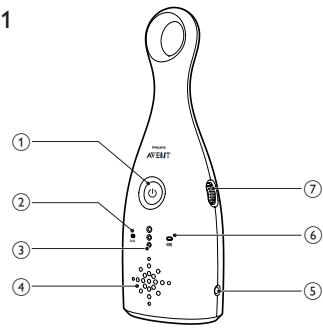
Fig.1
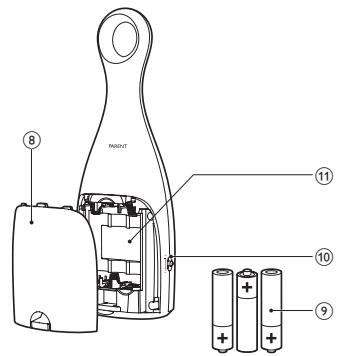
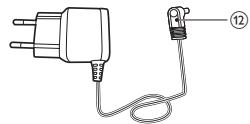
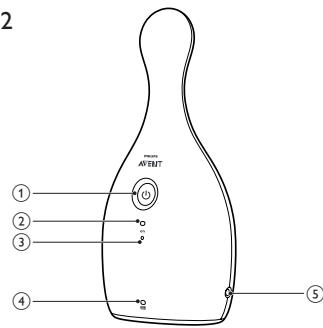
Fig.2
PHILIPS
Philips Consumer Lifestyle
DOC-SCD484/485/486
Year in which the CE mark is affixed / Année au cours
EC DECLARATION OF CONFORMITY
(DECLARATION DE CONFORMITE CE)
We / Nous, PHILIPS CONSUMER LIFESTYLE B.V.
Declare under our responsibility that the electrical product(s):
SCD484/SCD485/SCD486
(Type version or model, referrerce ou modele)
Baby Monitor
To which this declaration relates is in conformity with the following harmonized standards:
Following the provisions of
1999/5/EC (R&TTE Directive)
Directiv
e R&T
TE 1999
5/CE)
2009/125/EC (ErP Directive)
- EC/278/2009
-EC/1275/2008
The Notified Body BABT,0168
(a effectue) (description of intervention).
description de l'intervention)
And issued the certificate, NC16188 i01
Drachten, The Netherlands, Sept.30, 2011

(place, date / lieu, date)
Congratulations on your purchase and welcome to Philips AVENT! To fully benefit from the support that Philips AVENT offers, register your product at www.philips.com/AVENT.
Philips AVENT is dedicated to producing caring and reliable products that give parents the reassurance they need when looking after the health and safety of their baby. This Philips AVENT baby monitor provides the essential reassurance of an ultra clear sound connection to your baby, so you will always know when your baby needs you. Adjustable channel settings, intuitive sound activated lights, sound and light indicators for link, range and low battery ensure you are always connected. SCD486 contains two battery-operated parent units so you can easily monitor your baby from multiple places in and around your home.
2 Important
Read this user manual carefully before you use the baby monitor and save the user manual for future reference.
WARNING: To prevent strangulation with the power cord, always keep the baby unit and the power cord out of baby's reach, at least 1 meter/3.5 feet away. Do not use extension cords.
Caution: Risk of explosion, electric shock, short circuit, or leakage
- The baby monitor shall not be exposed to dripping or splashing and no objects filled with liquids, such as vases, shall be placed on the baby monitor.
- Where the mains plug is used as the disconnect device, the disconnect device shall remain readily operable.
- Before you connect the baby monitor to the mains, make sure that the voltage indicated on the adapters of the baby monitor corresponds to the local mains voltage.
- Use the supplied adapters to connect the baby monitor to the mains.
- To prevent electric shock, do not open the housing of the baby unit or parent unit except for the battery compartments.
Make sure that your hands are dry when you insert or replace batteries. -
To prevent battery explosion or leakage, which can damage the baby monitor and cause burns and skin or eye irritation:
-
insert batteries in the right direction (+/-),
remove batteries if you are not going to use the product for more than 30 days, - keep batteries away from excessive heat such as sunshine, fire or the like,
-
remove batteries as soon as they run out of power.
-
To prevent batteries from heating up or releasing toxic materials, hydrogen, or oxygen, do not short circuit or mutilate batteries.
Adult supervision
This baby monitor is intended as an aid. It is not a substitute for responsible and proper adult supervision and should not be used as such.
- Never place the baby unit inside the baby bed or playpen.
- To prevent overheating, do not cover the baby monitor with a towel, blanket, or any other items.
- When your baby monitor uses a power outlet, make sure that you can easily access the power outlet.
- For their safety, do not allow children to play with the baby monitor.
- To handle damaged or leaked batteries, wear protective gloves to protect your skin.
- Your baby monitor transmits over a frequency that is used by many household products and other baby monitors. Your conversation may be heard by another product that operates on the same frequency.
Cleaning and Maintenance
- Do not immerse the parent unit or baby unit in water, and do not clean them under the tap.
- Do not use cleaning spray or liquid cleaners.
Unplug the parent unit and baby unit if they are connected to a power outlet. - Clean the parent unit and baby unit with a damp cloth.
Clean the adapters with a dry cloth.
This baby monitor has no other user serviceable parts.
Storage precautions
Use and store the baby monitor between 10^ C ( 50^ F ) and 35^ C ( 95^ F ). Keep the baby monitor out of direct sunlight.
If you store batteries in a fridge or freezer, protect them from condensation during storage and defrosting. Before you use the batteries, let them return to room temperature.
Replacement
If you replace the adapters, use the type of adapters specified in this user manual.
If you replace the batteries, use the type of batteries specified in this user manual. Replace all the batteries in the unit at the same time.
Electromagnetic fields (EMF)
This Philips AVENT baby monitor complies with all standards regarding electromagnetic fields (EMF). If handled properly and according to the instructions in this user manual, this baby monitor is safe to use based on scientific evidence available today.
Recycling the product

Your baby monitor is designed and manufactured with high quality materials and components, which can be recycled and reused.

Help the environment by disposing of your product and packaging responsibly. The crossed-out wheel bin symbol means that your baby monitor is governed by the European Directive 2002/96/EC, which means that the product and batteries must not be disposed of in the domestic waste as they contain substances which can be damaging to the environment and health. Please use designated collection points or recycling facilities when disposing of the baby monitor or batteries.
3 Overview
SSW-2350US for Panama and Mexico; SSW-2350WEU (2-pin plug) for Dubai and other Western European countries.
Parent unit (Fig. 1)
(1)
Press to turn the parent unit on or off
(2) link
In green: The parent unit is linked to the baby unit.
- In red flashing: The parent unit is searching for the baby unit.
③ Sound level lights
- Indicate the level of sound in your baby's room
④ Speaker
⑤ Connector for the supplied AC/DC adapter
(6)
In green: The parent unit is turned on.
In red flashing: The batteries are low in power.
⑦ + volume -
- Turn to change the volume up/down
- Turn down fully to mute the volume
⑧ Lid of battery compartment
9 Three 1.5 V R6 AA batteries (not included)
10 1 channel 2
- Switch to Channel 1 or Channel 2
11 Battery compartment
⑫ AC/DC adapter
Input: 100-240V AC
Output: 6.0V DC, 300 mA
Model number: SSW-2350AU for Australia and New Zealand; SSW-2350PEU for Chile; SSW-2350UK (3-pin plug) for United Kingdom, Dubai, and Ireland;
Baby unit (Fig. 2)
① 0
Press to turn the baby unit on or off
(2) on
In green: The baby unit is turned on.
③ Microphone
(4)
In green: The baby unit is running on batteries.
In red flashing: The batteries are low in power.
⑤ Connector for the supplied AC/DC adapter
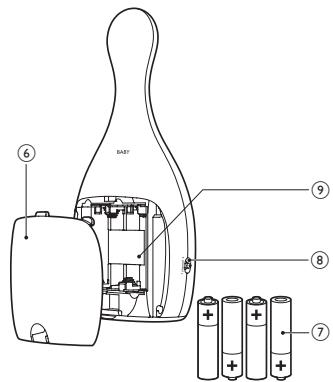
(6) Lid of battery compartment
(7) Four 1.5 V R6 AA batteries (not included)
⑧ 1 channel 2
- Switch to Channel 1 or Channel 2
Battery compartment
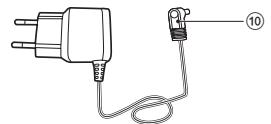
10 AC/DC adapter, with the same type as the one for the parent unit
4 Get started
You can connect the parent unit or the baby unit to the mains or insert batteries to operate it. For added reassurance, insert batteries to guarantee a backup in case of power supply failure. If you use rechargeable batteries, make sure that you charge them separately.
To set up the baby unit:
1 Before you connect the baby unit to the mains socket, remove the lid of the battery compartment.
2 Insert four 1.5V R6 AA batteries with the correct polarity (+/-) as indicated.
3 Reattach the lid.
4 Connect a supplied adapter to the baby unit and to the mains socket.
To set up the parent unit:
1 Follow the same procedure as you do to set up the baby unit.
5 Use your baby monitor
1 Press on the parent/baby unit.
The parent/baby unit turns on, and all indicators on the parent/baby unit light up briefly.
2 Keep the baby unit and the power cord at least 1 metre/3.5 feet away from your baby.
3 Use the parent unit in the operating range.
4 Set the parent unit and the baby unit to the same channel, either Channel 1 or Channel 2.
The link indicator flashes red and the parent unit starts to search for the baby unit.
When link is established, the link indicator lights up green.
If no link is established, the link indicator flashes red. The parent unit beeps from time to time.
5 To change the volume on your parent unit, turn volume up or down.
- To mute the volume, turn volume down fully. When the volume is muted, the sound level lights operate as normal.

Tip
- Your baby monitor is specially designed to conceal the antenna in the top part of the parent unit. To avoid obstructions that may reduce the operating range, hold the parent unit at the base when carrying it.
- When the parent unit is out of range of the baby unit, the parent unit beeps from time to time. The link indicator on the parent unit flashes red.
- The battery indicator flashes red and a beep tone occurs 30 minutes before the batteries run out of power. When the batteries are completely empty, the parent unit automatically switches off and loses the link with the baby unit.
Operating range
Outdoors: up to 150 metres/500 feet
Indoors: up to 50 metres/150 feet
This monitor is designed to operate at its best within a 150m range, suitable for most household environments. The operating range and quality of the connection varies depending on the number of obstructions, like walls or buildings, in between the two units.
Link an additional parent unit
You can use multiple additional parent units with your baby monitor. Follow the simple two steps to link extra units.

Note
- Use the parent unit in the operating range of the baby monitor.
1 Press on the additional parent unit.
The parent unit turns on, and all indicators on the parent unit light up briefly.
2 Set the parent unit and the baby unit to the same channel, Channel 1 or Channel 2.
When link is established, the link indicator lights up green.
6 Guarantee and service
If you need service or information or if you have a problem, please visit the Philips AVENT website at www.philips.com/AVENT welcome or contact the Philips Consumer Care Centre in your country. You can find the phone number of the Philips Consumer Care Centre in the worldwide guarantee leaflet. If there is no Philips Consumer Care Centre in your country, please visit the local Philips dealer.
7 Troubleshooting
If you don't find the solution you need in this section, you can get support at www.philips.com/AVENT or contact the Philips Consumer Care Center in your country.
| Problems | Possible causes | Solutions |
| My parent/baby unit doesn't switch on. | The unit is not connected to the power supply. | Connect the unit to a power supply. |
| The batteries are empty or inserted incorrectly. | Replace the batteries and make sure that they are correctly inserted. | |
| I cannot establish a connection. | The parent and baby units are set to different channels. | Set the units to the same channel. |
| The units are out of range. | Move the units closer (see 'Operating range' on page 9). | |
| The parent unit makes a high pitched noise. | The units are too close. | Move the parent unit farther away from the baby unit. |
| Lower the volume of the parent unit. | ||
| I get interference. I can only hear intermittently. | The parent unit picks up signals from other appliances or baby monitors. | Move the parent unit away from other electrical appliances, like microwaves or telephones. |
| Change the units to the other channel. | ||
| The units are out of range. | Move the units closer. | |
| The parent and baby units are set to different channels. | Set the units to the same channel. | |
| The batteries for the parent and/or baby are running low. | Connect the parent and/or baby units to a power supply. Replace the batteries. | |
| I cannot hear anything through my parent unit. | The volume of parent unit is set too low or is muted. | Increase the volume of parent unit. |
| The units are out of range. | Move the units closer. | |
| The operating range of mine is less than 150 metres/500 feet. | Environmental obstructions affect the operating range. | Move the units closer. |
| The batteries in the parent unit run low quickly. | The volume is set too high and the unit consumes more power. | Decrease the volume. |

Tip
- Product information is subject to change without prior notice.
1 Indledning
Please keep this warranty card together with your proof of purchase for use when claiming.
AUSTRALIA Philips Consumer Lifestyle Consumer Care: 1300 363 391 Website: www.philips.com/support
NEW ZEALAND Philips Consumer Lifestyle Consumer Care: 0800 658 224 Website: www.philips.com/support
PHILIPS
Philips Electronics Australia Limited and Philips New Zealand Limited Warranty against Defects
In this warranty:
We or us means Philips Electronics Australia Limited ACN 008 445 743 or Philips New Zealand Limited (Company Number 1723), and our contact details are set out at the end of this warranty;
You means the purchaser or the original end-user of the Goods;
Supplier means the authorised distributor or retailer of the Goods that sold you to the Goods in Australia or New Zealand; and
Goods means the product or equipment which was accompanied by this warranty and purchased in Australia or New Zealand.
If you require assistance with the operation of the product, its features or specifications please call the Philips Consumer Care Centre on 1300 363 391 in Australia or 0800 658 224 in New Zealand.
Australia: Our Goods come with guarantees that cannot be excluded under the Australian Consumer Law. You are entitled to a replacement or refund for a major failure and for compensation for any other reasonably foreseeable loss or damage. You are also entitled to have the Goods repaired or replaced if the goods fail to be of acceptable quality and the failure does not amount to a major failure. This is not a complete statement of your legal rights as a consumer.
New Zealand: Our Goods come with guarantees that cannot be excluded under the Consumer Guarantees Act 1993. This guarantee applies in addition to the conditions and guarantees implied by that legislation.
Additional Warranty:
In addition to the rights and remedies that you have under the Australian Consumer Law, Consumer Guarantees Act of New Zealand or any other applicable law, we provide the following warranty against defects:
-
If, during the first 2 years from their date of purchase from the Supplier (Warranty Period), the Goods prove defective by reason of improper workmanship or materials and none of your statutory rights or remedies apply, we will repair or replace the Goods without charge.
-
We do not have to repair or replace the Goods under this Additional Warranty if the Goods have been used for a commercial purpose; misused, improperly or inappropriately installed, operated or repaired; abused; damaged; or not maintained in accordance with the manufacturer's instructions.
-
Even when we do not have to repair or replace the Goods, we may decide to do so anyway. In some cases, we may decide to substitute the Goods with a similar alternative product of our choosing. All such decisions are at our absolute discretion.
-
All such repaired, replaced or substituted Goods continue to receive the benefit of this Additional Warranty for the time remaining on the original Warranty Period.
-
This Additional Warranty is limited to repair, replacement or substitution only. As far as the law permits, we will not be liable for any loss or damage caused to property or persons arising from any cause whatsoever.
-
In order to claim under this Additional Warranty you must telephone us on 1300 363 391 in Australia or 0800 658 224 in New Zealand within the Warranty Period. You will be asked for details of the Goods, a description of the defect and your personal details. Upon accepting your claim, we shall assist you with either returning the Goods to the Supplier for replacement or to the most convenient Philips Authorised Service Centre for your Goods to be repaired. In some case we may require that you return to the Goods to us (at the address below) for repair, replacement or substitution.
-
All returned Goods must be accompanied by satisfactory proof of purchase which clearly indicates the name and address of the Supplier, the date and place of purchase and identifies product. It is best to provide a legible and unmodified receipt or sales invoice.
-
You must bear any expense for return of the Goods or otherwise associated with making your claim under this Additional Warranty.
-
This warranty is only valid and enforceable in Australia and New Zealand.
Contact us or the place of purchase for further details.
Philips Electronics Australia Limited
Level 1,65 Epping Rd,
North Ryde, SYDNEY NSW 2113
Consumer Care: 1300 363 391
E-mail: pceinfo.australia@philips.com
Website: www.philips.com/support
Philips New Zealand Limited
Level 2, 1 Nugent St,
Grafton,AUCKLAND,1023
Consumer Care: 0800 658 224
Email: pceinfo.australia@philips.com
Website: www.philips.com/support