
FR-1B - Digital Accordion ROLAND - Free user manual and instructions
Find the device manual for free FR-1B ROLAND in PDF.


| Product type | Digital accordion |
| Brand | Roland |
| Model | FR-1B |
| Right-hand keyboard | 26 keys (piano style) or 62 buttons (chromatic) |
| Left-hand keyboard | Bass and chord buttons (standard system) |
| Sounds | Accordion, orchestra, organ |
| Right-hand registers | 8 accordion registrations + orchestral/organ sounds |
| Bass registers | 3 registers |
| Power supply | Roland PSB-1U AC adaptor (included) or 8 Ni-MH AA batteries (not included) |
| Battery life | Approx. 5.5 hours (Ni-MH 2100 mAh batteries) |
| Connectors | DC IN, MIDI IN/OUT, OUTPUT L/Mono and R/Mono, PHONES |
| Included accessories | AC adaptor, shoulder straps, earpieces, jack cable |
| Built-in metronome | Yes, with time signature and tempo adjustment |
| Demo songs | 8 songs |
| SONG function | Right/left hand training with 4 internal songs |
| MIDI mode | MIDI data transmission/reception |
| Dimensions (approx.) | Approx. 400 x 200 x 400 mm (estimated) |
| Weight (approx.) | Approx. 5.5 kg (estimated) |
| Maintenance | Clean with a soft dry cloth; do not use solvents |
| Safety | Do not open, use only the included adaptor, avoid shocks and moisture |
Frequently Asked Questions - FR-1B ROLAND
User questions about FR-1B ROLAND
0 question about this device. Answer the ones you know or ask your own.
Ask a new question about this device
Download the instructions for your Digital Accordion in PDF format for free! Find your manual FR-1B - ROLAND and take your electronic device back in hand. On this page are published all the documents necessary for the use of your device. FR-1B by ROLAND.
USER MANUAL FR-1B ROLAND
This product complies with the requirements of European Directive EMC 89/336/EEC.
This equipment has been tested and found to comply with the limits for a Class B digital device, pursuant to Part 15 of the FCC Rules. These limits are designed to provide reasonable protection against harmful interference in a residential installation. This equipment generates, uses, and can radiate radio frequency energy and, if not installed and used in accordance with the instructions, may cause harmful interference to radio communications. However, there is no guarantee that interference will not occur in a particular installation. If this equipment does cause harmful interference to radio or television reception, which can be determined by turning the equipment off and on, the user is encouraged to try to correct the interference by one or more of the following measures:
Reorient or relocate the receiving antenna.
- Increase the separation between the equipment and receiver.
- Connect the equipment into an outlet on a circuit different from that to which the receiver is connected.
- Consult the dealer or an experienced radio/TV technician for help.
This device complies with Part 15 of the FCC Rules. Operation is subject to the following two conditions:
(1) This device may not cause harmful interference, and
(2) This device must accept any interference received, including interference that may cause undesired operation.
Unauthorized changes or modification to this system can void the users authority to operate this equipment.
This equipment requires shielded interface cables in order to meet FCC class B Limit.
For Canada
NOTICE
This Class B digital apparatus meets all requirements of the Canadian Interference-Caising Equipment Regulations.
AVIS
IMPORTANT: THE WIRES IN THIS MAINS LEAD ARE COLOURED IN ACCORDANCE WITH THE FOLLOWING CODE.
BLUE: NEUTRAL
BROWN: LIVE
As the colours of the wires in the mains lead of this apparatus may not correspond with the coloured markings identifying the terminals in your plug, proceed as follows:
The wire which is coloured BLUE must be connected to the terminal which is marked with the letter N or coloured BLACK.
The wire which is coloured BROWN must be connected to the terminal which is marked with the letter L or coloured RED.
Under no circumstances must either of the above wires be connected to the earth terminal of a three pin plug.

This product must be disposed of separately at your local waste recycling centre.
Do not dispose of in household waste bin.
The technology used in the FR-1 is covered by U.S. Patent No. 6.946.594.
Roland
FR-1

Quick Start
Thank you for purchasing the Roland FR-1 V-Accordion. The FR-1 is an amazingly versatile electronic instrument that can emulate the sounds of a vast array of accordions. The major advantage of the FR-1 is that it allows you to change sounds without changing instruments. Apart from the financial benefit (the FR-1 costs only a fraction of all emulated originals), this also means that you can use your familiar playing style and techniques while covering a host of different musical genres.
Please keep this document in a safe place for future reference. Be sure to also read the owner's manual on the supplied CD-ROM, because it contains a lot more information than is discussed in this Quick Start document.
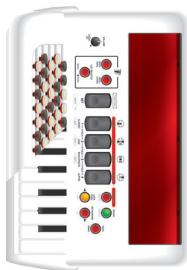
This Quick Start guide applies to two instruments:
FR-1 (the keyboard version)
FR-1 (the button version)
USING THE UNIT SAFELY
INSTRUCTIONS FOR THE PREVENTION OF FIRE, ELECTRIC SHOCK, OR INJURY TO PERSONS
About WARNING and CAUTION Notices
| ▲WARNING | Used for instructions intended to alert the user to the risk of death or severe injury should the unit be used improperly. |
| ▲CAUTION | Used for instructions intended to alert the user to the risk of injury or material damage should the unit be used improperly. * Material damage refers to damage or other adverse effects caused with respect to the home and all its furnishings, as well to domestic animals or pets. |
About the Symbols
| A | The △symbol alerts the user to important instructions or warnings. The specific meaning of the symbol is determined by the design contained within the triangle. In the case of the symbol at left, it is used for general cautions, warnings, or alerts to danger. |
| ◎ | The ⊙symbol alerts the user to items that must never be carried out (are forbidden). The specific thing that must not be done is indicated by the design contained within the circle. In the case of the symbol at left, it means that the unit must never be disassembled. |
| ◆ | The ●symbol alerts the user to things that must be carried out. The specific thing that must be done is indicated by the design contained within the circle. In the case of the symbol at left, it means that the power-cord plug must be unplugged from the outlet. |
ALWAYS OBSERVE THE FOLLOWING
WARNING
- Before using this instrument, read the instructions below and the Owner's Manual.

- Do not open (or modify in any way) the unit or its AC adaptor.

- Do not attempt to repair the FR-1 or replace parts within it (except when this manual provides specific instructions directing you to do so). Refer all servicing to your retailer, the nearest Roland Service Center or an authorized Roland distributor, as listed on the "Information" page.

- Never use or store the FR-1 in places that are:


- Subject to temperature extremes (e.g., direct sunlight in an enclosed vehicle, near a heating duct, on top of heat-generating equipment); or are
- Damp (e.g., baths, washrooms, on wet floors); or are
- Humid; or are
- Exposed to rain; or are
- Dusty; or are
- Subject to high levels of vibration.
Make sure you always have the FR-1 placed so it is level and sure to remain stable. Never place it on stands that could wobble, or on inclined surfaces. When not in use, do not place the FR-1 vertically due to instability. If placed in the vertical position on the floor/stage, ensure that it leans against a stable vertical surface e.g. a wall or a heavy musical instrument.
- Be sure to use only the AC adaptor supplied with the unit. Also, make sure the line voltage at the installation matches the input voltage specified on the AC adaptor's body. Other AC adaptors may use a different polarity, or be designed for a different voltage, so their use could result in damage, malfunction, or electric shock.
- Use only the attached power-supply cord. Also, the supplied power cord must not be used with any other device.

WARNING
- Do not excessively twist or bend the adaptor cord, nor place heavy objects on it. Doing so can damage the cord, producing severed elements and short circuits. Damaged cords are fire and shock

This instrument, either alone or in combination with an amplifier and headphones or speakers, may be capable of producing sound levels that could cause permanent hearing loss. Do not operate for a long period of time at a high volume level or at a level that is uncomfortable. If you experience any hearing loss or ringing in the ears, you should immediately stop using the FR-1 and consult an audiologist.
- Do not allow any objects (e.g., flammable material, coins, pins); or liquids of any kind (water, soft drinks, etc.) to penetrate the FR-1.

- Immediately turn the power off, remove the adaptor from the outlet and request servicing by your retailer, the nearest Roland Service Center or an authorized Roland distributor, as listed on the "Information" page when:


The AC adaptor's cord or plug has been damaged; or
- Objects have fallen into or liquid has been spilled onto the FR-1; or
- The unit has been exposed to rain (or otherwise has become wet); or
- The FR-1 does not appear to operate normally or exhibits a marked change in performance.
- In households with small children, an adult should provide supervision until the child is capable of following all rules essential for the safe operation of the FR-1.

- Protect the FR-1 from strong impact. (Do not drop it!)
- Do not force the adaptor to share an outlet with an unreasonable number of other devices. Be especially careful when using extension cords—the total power used by all devices you have connected to the extension cord's outlet must never exceed the power rating (watts/amperes) for the extension cord. Excessive loads can cause the insulation on the cord to heat up and eventually melt through.
- Before using the FR-1 in a foreign country, consult with your retailer, the nearest Roland Service Center or an authorized Roland distributor, as listed on the "Information" page.
- Batteries must never be heated, taken apart, or thrown into fire or water.
DO NOT play a CD-ROM disc on a conventional audio CD player. The resulting sound may be of a level that could cause permanent hearing loss. Damage to speakers or other system components may result.
- Never expose rechargeable Ni-MH batteries to excessive heat, such as sunshine, fire, or the like.


CAUTION
- The FR-1 and the adaptor should be located so that their location or position does not interfere with its proper ventilation.
Always grasp only the plug on the AC adaptor cord when plugging into or unplugging from, an outlet or this unit. - At regular intervals, you should unplug the AC adaptor and clean it by using a dry cloth to wipe all dust and other accumulations away from its prongs. Also, disconnect the power plug from the power outlet whenever the FR-1 is to remain unused for an extended period of time. Any accumulation of dust between the power plug and the power outlet can result in poor insulation and lead to fire.
- Try to prevent cords and cables from becoming entangled. Also, all cords and cables should be placed so they are out of the reach of children.
- Never climb on top of, nor place heavy objects on the FR-1.
- Never handle the adaptor or its plugs with wet hands when plugging into or unplugging from, an outlet or this unit.
- Before moving the FR-1, disconnect the AC adaptor and all cords coming from external devices.


- Before cleaning the FR-1, turn off the power and unplug the adaptor from the outlet.
-
Whenever you suspect the possibility of lightning in your area, disconnect the adaptor from the outlet.
-
If used improperly, batteries may explode or leak and cause damage or injury. In the interest of safety, please read and observe the following precautions.
-
Carefully follow the installation instructions for batteries, and make sure you observe the correct polarity.
- Avoid using new batteries together with used ones. In addition, avoid mixing different types of batteries.
- Remove the batteries whenever the unit is to remain unused for an extended period of time.
- If a battery has leaked, use a soft piece of cloth or paper towel to wipe all remnants of the discharge from the battery compartment. Then install new batteries. To avoid inflammation of the skin, make sure that none of the battery discharge gets onto your hands or skin. Exercise the utmost caution so that none of the discharge gets near your eyes. Immediately rinse the affected area with running water if any of the discharge has entered the eyes.
-
Never keep batteries together with metallic objects such as ballpoint pens, necklaces, hairpins, etc.
-
Used batteries must be disposed of in compliance with whatever regulations for their safe disposal that may be observed in the region in which you live.
- Keep any screws, reference caps, the hexagonal wrench and other small parts you may remove in a safe place out of children's reach, so there is no chance of them being swallowed accidentally.


1. Important notes
Power supply
- Do not connect the FR-1 to same electrical outlet that is being used by an electrical appliance that is controlled by an inverter (such as a refrigerator, washing machine, microwave oven, or air conditioner), or that contains a motor. Depending on the way in which the electrical appliance is used, power supply noise may cause this unit to malfunction or may produce audible noise. If it is not practical to use a separate electrical outlet, connect a power supply noise filter between this unit and the electrical outlet.
- The AC adaptor will begin to generate heat after long hours of consecutive use. This is normal, and is not a cause for concern.
- The use of an AC adaptor is recommended as the unit's power consumption is relatively high. Should you prefer to use batteries, please use the rechargeable Ni-MH type.
- When installing or replacing batteries, always turn off the power on this unit and disconnect any other devices you may have connected. This way, you can prevent malfunction and/or damage to speakers or other devices.
- Before connecting this unit to other devices, turn off the power to all units. This will help prevent malfunctions and/or damage to speakers or other devices.
- This device may interfere with radio and television reception. Do not use this device in the vicinity of such receivers.
- Noise may be produced if wireless communications devices, such as cell phones, are operated in the vicinity of the FR-1. Such noise could occur when receiving or initiating a call, or while conversing. Should you experience such problems, you should relocate such wireless devices so they are at a greater distance from this unit, or switch them off.
Placement
- Do not expose the FR-1 to direct sunlight, place it near devices that radiate heat, leave it inside an enclosed vehicle, or otherwise subject it to temperature extremes. Excessive heat can deform or discolor the unit.
- When moved from one location to another where the temperature and/or humidity is very different, water droplets (condensation) may form inside the FR-1. Damage or malfunction may result if you attempt to use the FR-1 in this condition. Therefore, before using the FR-1, you must allow it to stand for several hours, until the condensation has completely evaporated.
- Do not allow objects to remain on top of the keyboard. This can be the cause of malfunction, such as keys ceasing to produce sound.
Maintenance
-
For everyday cleaning wipe the FR-1 with a soft, dry cloth or one that has been slightly dampened with water. To remove stubborn dirt, use a cloth impregnated with a mild, non-abrasive detergent. Afterwards, be sure to wipe the unit thoroughly with a soft, dry cloth.
-
Never use benzine, thinners, alcohol or solvents of any kind, to avoid the possibility of discoloration and/or deformation.
Additional precautions
- Please be aware that the contents of memory can be irretrievably lost as a result of a malfunction, or the improper operation of the unit. To protect yourself against the risk of loosing important data, we recommend that you periodically save a backup copy of important data you have stored in the unit's memory (see the owner's manual).
- Please be aware that all data contained in the unit's memory may be lost when the unit is sent for repairs. Important data should always be backed up, or written down on paper (when possible). During repairs, due care is taken to avoid the loss of data. However, in certain cases (such as when circuitry related to memory itself is out of order), we regret that it may not be possible to restore the data, and Roland assumes no liability concerning such loss of data.
- Unfortunately, it may be impossible to restore the contents of data that was stored in the FR-1 memory once it has been lost. Roland Corporation assumes no liability concerning such loss of data.
- Use a reasonable amount of care when using the FR-1's buttons, sliders, or other controls; and when using its jacks and connectors. Rough handling can lead to malfunctions.
- When connecting / disconnecting all cables, grasp the connector itself—never pull on the cable. This way you will avoid causing shorts, or damage to the cable's internal elements.
- To avoid disturbing your neighbors, try to keep the FR-1's volume at reasonable levels. You may prefer to use headphones, so you do not need to be concerned about those around you (especially when it is late at night).
- When you need to transport the unit, package it in the box (including padding) that it came in, if possible. Otherwise, you will need to use equivalent packaging materials.
- Avoid touching or scratching the shiny underside (encoded surface) of the disc. Damaged or dirty CD-ROM discs may not be read properly. Keep your discs clean using a commercially available CD cleaner.
-
To prevent malfunction and/or damage to speakers or other devices, always turn down the volume, and turn off the power on all devices before making any connections.
-
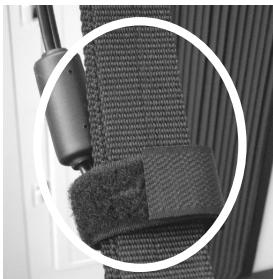
To prevent an inadvertent disruption of power to your unit (should the plug be pulled out accidentally), and to avoid applying undue stress to the AC adaptor jack, anchor the power cord using the cable strip, as shown in the illustration.
- Once the connections have been completed (see p. 11), turn on power to your various devices in the order specified. By turning on devices in the wrong order, you risk causing malfunction and/or damage to speakers and other devices.
- This unit is equipped with a protection circuit. A brief interval (a few seconds) after power up is required before the unit will operate normally.
Expected battery life under continuous use: rechargeable Ni-MH batteries (2100mA): ± 5.5 hours. This figure will vary depending on the actual conditions of use. - In the interest of product improvement, the specifications and/or appearance of this unit are subject to change without prior notice.
- No data for the music that is played will be output from MIDI OUT.
Precautions for optional batteries
- The temperature range for use of the batteries depends on the battery type being used. Please see the documentation that came with the batteries.
- Do not use or store batteries at high temperature, such as in strong direct sunlight, in cars during hot weather or directly in front of heaters. This may cause battery fluid leakage, impaired performance and shorten the batteries' service life.
- Do not splash fresh or saltwater on a battery or allow the terminals to become damp. This may cause heat generation and formation of rust on the battery and its terminals.
- If newly purchased batteries exhibit rust, generate heat or seem abnormal in any other way, do not use them. Take them back to your dealer.
- Keep the batteries out of reach of babies or small children.
- Be sure to carefully instruct any person on the proper way of handling a battery.
-
Never dispose of the battery in a fire. Never heat it. Doing so may melt the insulation, damage the gas release vents or protective devices, cause combustion through chemical reaction with generated hydrogen, ejection of battery fluid, bursting or fire.
-
Do not use batteries with the positive (+) and negative (-) terminals reversed, as this may drain the batteries or cause abnormal chemical reactions.
- Do no strike or drop the batteries. Strong impact can cause leakage of battery fluid, heat generation, bursting or fire.
- Never try to connect several batteries in parallel as this may cause leakage of battery fluid, heat generation, bursting or fire.
- Do not alter or remove protective mechanisms or other parts. Never disassemble the batteries.
- If any fluid from a battery comes in contact with the eyes, flush the eyes immediately, washing them thoroughly with clean water from a tap or other source and consult a doctor. Strong alkaline fluid can damage the eyes and lead to permanent loss of eyesight.
- If skin or clothing comes in contact with any fluid from the battery, wash the area immediately with clean water from a tap. Battery fluid can cause skin damage.
- When a battery is no longer usable, dispose of it in accordance with all applicable local laws and regulations.
- If a battery leaks fluid, changes color or shape or changes in any other way, do not use it, otherwise it may cause heat generation, bursting or fire.
Battery handling
Incorrect handling of batteries, rechargeable batteries, or a battery charger can cause leakage, overheating, fire, or explosion. Before use, you must read and strictly observe all of the precautions that accompany the batteries, rechargeable batteries, or battery charger. When using rechargeable batteries and a charger, use only the combination of rechargeable batteries and charger specified by the battery manufacturer.
Strap holder precaution
- Never unscrew the strap holder rings to avoid damaging the FR-1's plastic housing, which eventually compromises overall stability and safety.
2. Panel descriptions
Treble control panel
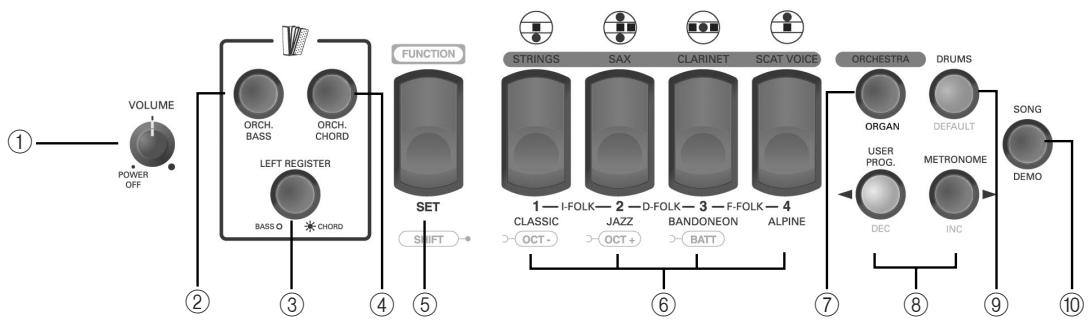
① VOLUME knob
This knob allows you to set the V-Accordion's overall volume. Turn it all the way to the left ("POWER OFF") to switch the FR-1 off. Turn it towards the right to switch it on.
② ORCH BASS button
This button is used to switch the ORCHESTRAL BASS section on and off.
③ LEFT REGISTER button
This button is used to assign the 3 Bass registers to the BASS (light off) or CHORD section (light on). See page 16 for details.
④ ORCH CHORD button
This button is used to switch the ORCHESTRAL CHORD section on and off.
⑤ FUNCTION/SET register
This register has three functions: after pressing SET (it flashes in blue), you can use the Treble registers to select one of the following Sets. The Sets have been programmed at the factory and cannot be changed.
By pressing and holding FUNCTION/SET, you gain access to "hidden" parameters
and MIDI functions. Press it together with register 1 or 2 to change octaves. Press it together with register 3 to check the battery status.
⑥ Treble registers (1 8)
The Treble section provides the following 4 switches ("registers") that allow you to select 8 different accordion footages.
| Treble registers | |||
| 1a | Bassoon | 3a | Clarinet |
| 1b | Bandon | 3b | Musette |
| 2a | Master | 4a | Piccolo |
| 2b | Organ | 4b | Oboe |
Each register 1 4 allows you to select two registrations. When you select an accordion registration, the corresponding register lights green.
When you select Set 3+4, "F FOLK", the footages change as follows. This is not
printed on the front panel, so please refer to the table below:
Treble registers (Set 7 = 3 + 4 )
1a

Bassoon
3a

Valse
1b

Jazzy
3b

Gus
2a

Arnold
4a

Musette
2b

4 Voix
4b

5 Musette
Registers 1 4 can be used to select the following orchestral sounds (various musical instruments that are not related to the accordion):
Orchestral registers (ORCHESTRA lights)
| 1 | Strings | 3 | Clarinet |
| 2 | Sax | 4 | Scat Voice |
And finally, registers 1 4 allow you to select the following organ sounds:
Organ registers (ORCHESTRA) flashes)
| 1 | Full | 3 | R & B |
| 2 | Jazz | 4 | Perc |
Pressing the register of the selected sound again will change the speed of the Rotary effect (fast or slow).
⑦ ORCHESTRA/ORGAN button
Press this button once (it lights) to be able to select an orchestral sound for the treble keyboard (or buttons). Press it again (it flashes) if you want to play an organ sound with your right hand.
Press it yet again to return to the accordion sounds (the button goes dark).
Note: The Treble section can be assigned one accordion sound, OR one orchestral sound, OR one organ sound. Combinations (accordion + orchestral, for example) are not available.
⑧ USER PROG/DEC and METRONOME/INC buttons
The USER PROG button allows you to activate/switch off the FR-1's memory function. In FUNCTION mode, this button is used to decrease the value of the selected parameter.
The METRONOME button is used to switch the FR-1's metronome on and off (see p. 17). In FUNCTION mode, this button is used to increase the value of the selected parameter.
DRUMS/DEFAULT button
This button is used to switch the DRUMS function on and off. While FUNCTION mode is active, this button allows you to recall the factory setting for the selected parameter.
⑩ SONG/DEMO button
This button allows you to switch to SONG mode where you can practice your left- or right-hand playing using one of the 4 internal songs (the FR-1 plays the part of the other hand).
Press and hold this button to listen to the FR-1's 8 demo songs.
Bass control panel
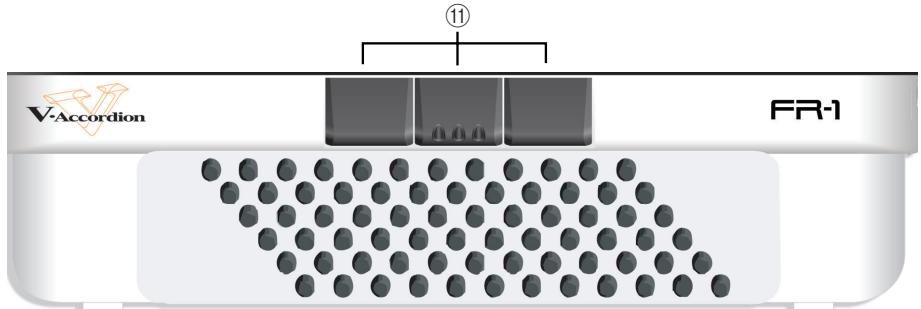
Bass registers
These registers allow you to select the desired bass (and chord) mix. They include the following accordion footages:
| Bass registers | |
| 1 | 8'/4'/2' |
| 2 | 16'/8'/8-4'/4'/2' |
| 3 | 16'/2' |
Connection panel
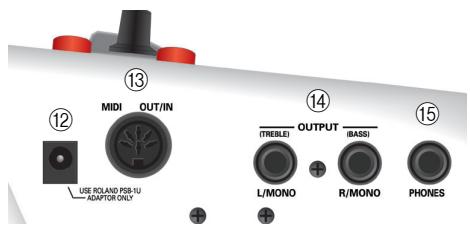
⑫ DC IN socket
This is where you can connect the supplied power adaptor (PSB-1U). Note that you can also purchase 8 optional batteries and use the FR-1 without the adaptor.
⑬ MIDI OUT/IN socket
This socket can be used to receive or transmit MIDI data. Its function depends on the setting of the "MIDI OUT/IN" parameter (see the owner's manual for details).
14 OUTPUT L/MONO (TREBLE) & R/MONO (BASS) sockets
These sockets can be connected to an amplifier, a mixing console or a wireless system.
15 PHONES socket
This is where you can connect the supplied earphones or optional stereo headphones (Roland RH-A30, RH-200s or RH-300). Doing so does not mute the OUTPUT sockets.
Note: When using the supplied earphones, do not set the volume too high (i.e. past "12 o'clock") to avoid distortion.
3. Setting up
Connections
The FR-1 has a compartment for 8 optional rechargeable Ni-MH (AA-type) batteries. Consider purchasing such batteries when performing on stage.
Using the OUTPUT sockets
The FR-1 needs to be connected to an amplification system. If you are using optional batteries and need to connect the FR-1 to a PA system or mixer, we recommend using a wireless system to avoid having to use excessively long signal cables.
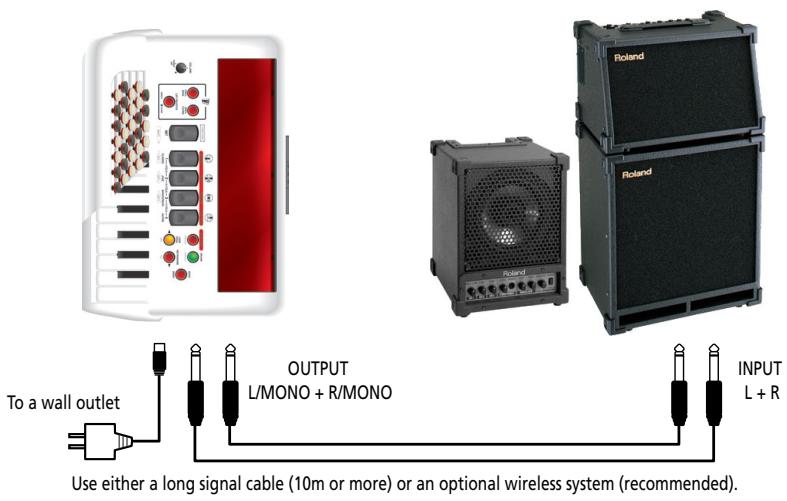
You can also use the supplied earphones or a pair of optional headphones (Roland RH-30A, RH-200, RH-200S or RH-300).
Note: To prevent malfunction and/or damage to speakers or other devices, always turn down the volume, and turn off the power on all devices before making any connections.
Note: When using the supplied earphones, do not set the volume too high (i.e. past "12 o'clock") to avoid distortion.
Attaching the straps
(1) Unpack the straps.
(2) Put the FR-1 on a stable surface. The connection panel must face down.
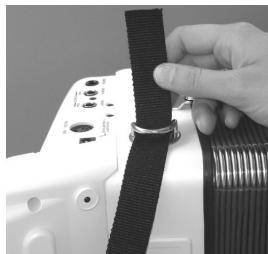
(3) Slide the upper end of one strap through the holder ring (see the illustration). The upper end is the part with the Velcro portion
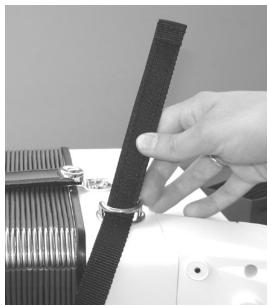
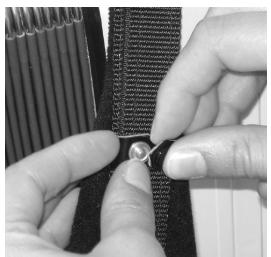
(4) Fasten the strap's upper part to the Velcro layer below it.
(5) Close the security clip to ensure that the strap cannot come loose.
(6) Repeat steps (3)~(5) for the other strap.
The upper strap ends should look as follows:
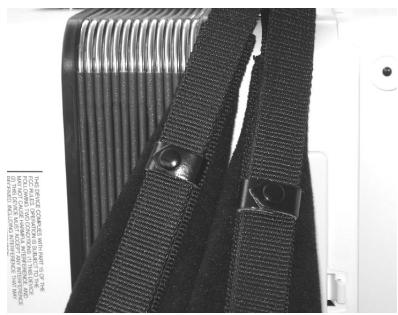
(7) Turn the FR-1 around (with the connection panel on the left side, see below).
(8) Slide the lower end of one strap through the holder ring as shown.
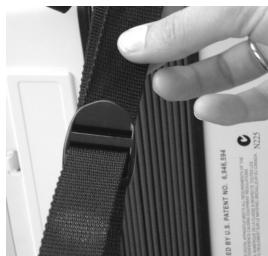
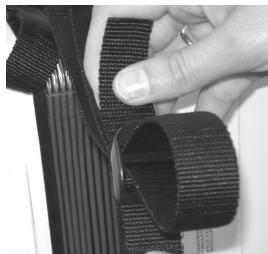
(9) Slide the strap end through the upper eyelet of its plastic buckle (see the illustration).
(10) Turn the strap end around and insert it into the lower eyelet, then pull it tight.
(11) Slide the plastic clip over the loose and long lower strap ends to secure the strap.
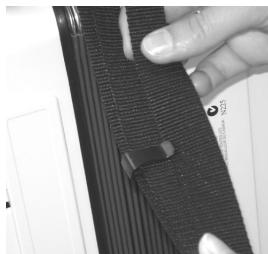
Note: You may want to adjust the length first to suit your preference.
(12) Repeat steps (8)~(11) for the other lower strap end.
Switching the power on and off
Note: Once the connections have been completed, turn on the power to your various devices in the order specified.
Note: If you decide to use rechargeable AA batteries, see the owner's manual for details.
(1) Connect the supplied adaptor to the FR-1's DC IN socket.
(2) Connect the adaptor to a wall outlet that meets the specifications (see the owner's manual).
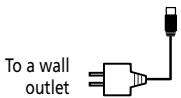

The adaptor should only be connected to a power source of the type marked on its label.
(3) Turn down the output volume of the receiving audio device. You can also simply switch it off.
(4) Connect the FR-1's OUTPUT sockets to the external audio device using one or two 1 / 4'' guitar cables. (One 1 / 4'' cable is supplied with the FR-1.) Note: You can also connect headphones to the PHONES socket, in which case you do not need to establish an audio connection.
(5) Turn the FR-1's [VOLUME] knob ① from the "POWER OFF" position towards the right.
(6) Switch on the receiving audio device.
(7) Start playing.
Note: This unit is equipped with a protection circuit. A brief interval (a few seconds) after power up is required before the unit will operate normally.
-To switch off your system
(8) Turn down the output volume of the receiving audio device or switch it off.
(9) Turn the FR-1's [VOLUME] knob ① all the way to the left ("POWER OFF").
Listening to the demo songs
The FR-1 contains a series of demo songs that illustrate its wide variety of sounds and applications. Here is how to listen to the demo songs:
(1) Switch on the FR-1. See "Switching the power on and off" on p. 13.
(2) Press and hold the SONG/DEMO button (it lights yellow). Playback starts automatically with the first demo song (there are 8 demo songs in all). At the end of the first song, the FR-1 starts playing songs 2, 3 etc. You can also directly jump to the song you're interested in:
(3) Use the USER PROG/DEC and METRONOME/INC buttons to select the demo song you want to listen to.
| # | Song Title* | Performed by |
| 01 | Bal Musette | Ludovic Beier |
| 02 | Dreaming of Organ | Ludovic Beier |
| 03 | Swingin' The Blues | Ludovic Beier |
| 04 | Forro de Janeiro | Ludovic Beier |
| 05 | Tango Dancers | Ludovic Beier |
| 06 | Eastern Wind | Ludovic Beier |
| 07 | Sax On The Phone | Ludovic Beier |
| 08 | O Sole Mio | Sergio Scappini |
[ ] Copyright © Roland Europe Spa. All rights reserved. Unauthorized use of the demo songs for purposes other than private enjoyment is a violation of applicable laws. The performance data of the demo songs are not transmitted via MIDI.
(4) Use the volume knob ① to change the volume if it is too loud or too soft. Note: During demo song playback, the FR-1's keyboards cannot be used.
(5) Press SONG/DEMO 10 again to leave demo song mode.
Touring the FR-1's sections
Treble section
The Treble section can be played using the 26-key "piano" keyboard or the 62 treble buttons. The sound it produces is determined by the register (1 4) you pressed last. This section can be used as "accordion" or to play an orchestral or organ sound.
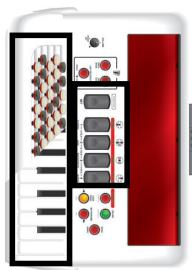
(1) Connect the FR-1 to an amplifier and switch it on. See p. 11.
(2) Grab the FR-1, press a Treble register and start playing on the keyboard. Though the FR-1 is an electronic musical instrument, it only produces sound when you move the bellows.
(3) Press the SET register ⑤ (it flashes blue).
(4) Check whether the ORCHESTRA/ORGAN button is dark. If it isn't, press it once or twice.
(5) Press one of the registers 1 4 to select a Set memory. Additional Set memories can be selected by pressing registers 1 + 2,2 + 3 or 3 + 4 simultaneously.
The SET button goes dark.
Note: If you don't press any register while the SET register flashes in blue, it will go dark again after a while. If you pressed the SET register by accident, press it again so that it goes dark.
Note: See also the note about Set "3+4" on page 8.
(6) Play a few notes to audition the sound.
(7) Press one of the registers 1 4 to select another registration.
(8) Press the same register again to select the "b" sound.
Press it yet again to revert to the "a" sound. Each time you press a different register, the FR-1 will automatically select the "a" sound.
(9) If you think the sound is too loud or too soft, you can change the setting of the [VOLUME] knob ①.
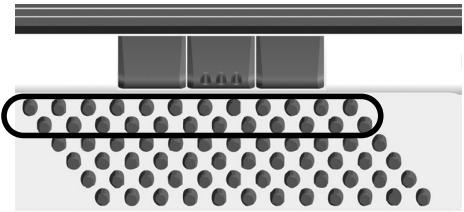
Bass section
The buttons in this section allow you to play both bass notes and chords. The "real" bass notes are assigned to the two highlighted rows. The remaining buttons are used to play chords.
The overall sound the Bass section produces is determined by the register you activated last. This section can be used as "accordion", to play orchestral sounds, or both.
(1) Connect the FR-1 and switch it on. See page 11.
(2) Grab the FR-1, press a register and start playing on the Bass (button) keyboard. When you only use the accordion sounds (i.e. while the ORCH BASS ② and ORCH CHORD ④ buttons are dark), the bass and chord buttons use the same register, because they belong to the same accordion section.
(3) If you think the sound is too loud or too soft, you can change the setting of the volume knob ①.
Using the orchestral sounds
Your FR-1 contains PCM sounds (samples) of various instruments that are not related to accordion sounds. Those sounds allow you to expand your musical endeavours.
In addition, there is an Organ function for the Treble keyboard, which can be used instead of the orchestral (or accordion) section.
Orchestral sounds for the Treble section
Note: Only one orchestral sound can be selected at any one time.
(1) Press the ORCHESTRA/ORGAN ⑦ button once or twice until it lights red.
(2) Press one of the registers 1 4 once or twice (it lights red).
(3) Play a few notes on the Treble keyboard.
Switching off the Orchestra part
To return to a state where the Treble accordion section sounds:
(4) Press the ORCHESTRA button twice (it goes dark).
Organ sounds for the Treble section
Note: Only one organ sound can be selected at any one time.
(1) Press the ORCHESTRA/ORGAN button once or twice until it flashes.
(2) Press one of the registers 1 4 (it lights red).
See page 9 for the available sounds.
(3) Play a few notes on the Treble keyboard to audition the organ sound.
(4) Press the lit register again to change the speed of the Rotary effect (modulation) that is added to the selected organ sound.
Switching off the organ part
To return to a state where the Treble accordion section sounds:
(5) Press the ORCHESTRA button again (it goes dark).
Orchestral sounds for the Bass section
The orchestral bass part can be used instead of the Bass section (thus replacing the accordion sound assigned to the bass rows).
(1) Press the ORCH BASS ② button (it must light).
(2) Check whether the LEFT REGISTER ③ button is dark. If it is not, press it.
(3) Use the Bass registers to select the desired sound.
ORCH BASS sounds
| 1 | Acoustic |
| 2 | Bowed |
| 3* | Fingered* |
Switching off the Orchestra Bass part
(4) Press the ORCH BASS button again to return to normal Bass mode.
Orchestral sounds for the Chord section
The orchestral chord part can replace the accordion sound played by the chord rows of the button keyboard.
(1) Press the ORCH CHORD ④ button (it lights).
(2) Check whether the LEFT REGISTER ③ button lights. If it doesn't, press it.
(3) Use the Bass registers to select the desired sound.
| ORCH CHORD sounds | |
| 1 | St. Strings |
| 2 | Chorus Organ |
| 3* | Steel Guitar* |
While ORCH CHORD mode is active, you can assign a different accordion register to the bass rows by pressing LEFT REGISTER (it must be dark) and the desired Bass register.
Switching off the ORCH CHORD part
(4) Press the ORCH CHORD button again to return to normal Chord mode.
4. Other practical functions
Using the metronome
Your FR-1 contains a metronome that may come in handy when you are practising new pieces, or during your accordion classes.
Setting the time signature
To set the time signature, proceed as follows:
(1) Before changing this value, it might be a good idea to switch the metronome on by pressing the METRONOME/INC ⑧ button (it lights).
(2) Press and hold the SET register until it starts flashing. The Treble keyboard can now be used to select the desired function.
(3) Press the G#2 key or button number "10". The SET ⑤ register flashes rapidly, and the Treble keyboard can once again be used to play notes.
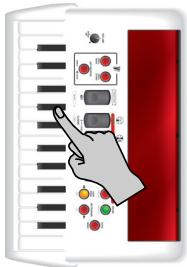
(4) Use registers 1 4 6 to select one of the following settings.
| Metronome time signature | |||
| 1 | 2/4 | 3● | 4/4 |
| 2 | 3/4 | 5 | 6/8 |
Alternatively, use the DEC or INC ⑧ button to select a setting that cannot be set by pressing one of the registers.
Note: Press the DRUMS/DEFAULT ⑨ button or register ③ to return to the factory setting of the currently selected parameter.
(5) Press the SET ⑤ register once (so that it flashes slowly) and proceed with the next parameter.
(Press the SET register twice to leave the FR-1's FUNCTION mode.)
Setting the tempo
We'll assume that you are still in "FUNCTION" mode (SET ⑤ flashes slowly). To set this parameter at a later stage, press and hold the SET register until it starts flashing slowly.
(1) Press the G2 key (i.e. the lowest G) or button "9". See the owner's manual for the location.
The SET register now flashes rapidly, and the Treble keyboard can once again be used to play notes.
Note: You can also select this parameter by pressing and holding the METRONOME/INC ⑧ button.
(2) Use registers 1 4 ⑥ to select one of the following suggested values.
| Metronome tempo | |
| 1 | Adagio (72 BPM) |
| 2• | Moderato (120 BPM) |
| 3 | Allegro (144 BPM) |
| 4 | Presto (192 BPM) |
Alternatively, use the DEC or INC ⑧ button to decrease or increase the value in steps of "1".
You can also press and hold these buttons to quickly select a significantly higher or lower value. The setting range is = 20 250
Note: Press the DRUMS/DEFAULT ⑨ button or register ② to return to the factory setting of the currently selected parameter.
(3) Press the SET ⑤ register twice to leave the FR-1's FUNCTION mode.
Using the metronome
After setting the metronome parameters to your liking, you can start using the metronome:
(4) Press the METRONOME/INC ⑧ button (it lights) to start the metronome.
(5) Press it again to switch the metronome back off.
Treble Mode (only on the model with button-type keyboard)
Like for the accordion instrument itself, there are different varieties of chromatic (button-type) instruments, with different Treble button layouts. Your FR-1 can simulate them. Here is how to select the desired setting:
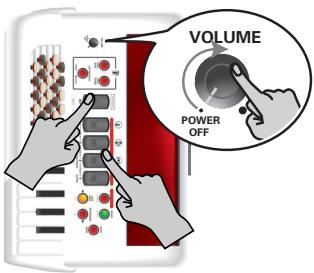
(1) Switch off the FR-1 by turning the volume ① knob all the way to the left ("POWER OFF").
(2) Hold down SET and one of the following registers while switching the FR-1 back on to select the desired setting.
1
C-Griff Europe
2
C-Griff 2
3
B-Griff Bajan
1
B-Griff Fin
1
D-Griff 1
2
D-Griff 2
(3) Start playing.
(See the owner's manual on the supplied CD-ROM for the locations of the notes.)
The FR-1 is supplied with additional white and black buttons. The white buttons come in two varieties: normal buttons and knurled buttons. The latter are usually used to indicate the "C" and "F" notes.
Roland
FR-1

Schnellstart
DRUMS/DEFAULT-Taster
⑨ Bouton DRUMS/DEFAULT
| Sons ORCH BASS | |
| 1 | Acoustic |
| 2 | Bowed |
| 3* | Fingered* |
Désactiver la partie Orchestra Bass
Registri Treble (Set 7 = 3 + 4
| 1a | Bassoon | 3a | Sw Valse |
| 1b | Jazzy | 3b | Mr Gus |
| 2a | Arnold | 4a | Av Musette |
| 2b | 4 Voix | 4b | SOS Musette |
Pulsante DRUMS/DEFAULT
| 1 | Acoustic |
| 2 | Bowed |
| 3* | Fingered* |
14 OUTPUT L/MONO (TREBLE) & R/MONO (BASS)-connectors
Royal Cape Park, Unit 24
Londonderry Road, Ottery 7800
Cape Town, SOUTH AFRICA
TEL: (021) 799 4900
ASIA
CHINA
Roland Shanghai Electronics
Co.,Ltd.
5F.No.1500 Pingliang Road
Shanghai 200090, CHINA
TEL: (021) 5580-0800
Roland Shanghai Electronics
Co., Ltd.
(BEIJING OFFICE)
10F.No.183 Section Anhuaxili
Chaoyang District Beijing
100011 CHINA
TEL: (010) 6426-5050
HONG KONG
Tom Lee Music Co., Ltd.
Service Division
22-32 Pun Shan Street, Tsuen
Wan, New Territories,
HONG KONG
TEL: 24150911
Parsons Music Ltd.
8th Floor, Railway Plaza, 39
Chatham Road South, T.S.T.
Kowloon, HONG KONG
TEL:23331863
INDIA
Rivera Digieuc (India) Pvt. Ltd. 411, Nirman Kendra
Mahalaxmi Flats Compound
Off. Dr. Edwin Moses Road,
Mumbai-400011, INDIA
TEL: (022) 2493 9051
INDONESIA
PT Citra IntiRama
Suoi NhaC Company, Ltd
370 Cach Mang Thang Tam St.
Dist.3, Ho Chi Minh City,
VIET NAM
TEL: 9316540
PHILIPPINES
G.A. Yupangco & Co. Inc.
339 Gil J. Puyat Avenue
Makati, Metro Manila 1200,
PHILIPPINES
TEL: (02) 899 9801
SINGAPORE
SWEE LEE MUSIC
COMPANY PTE. LTD.
150 Sims Drive,
SINGAPORE 387381
TEL:6846-3676
TAIWAN
ROLAND TAIWAN
ENTERPRISE CO.,LTD.
Room 5, 9fl. No. 112 Chung
Shan N.Road Sec.2, Taipei,
TAIWAN, R.O.C
TEL: (02) 2561 3339
THAILAND
Theera Music Co., Ltd.
100-108 Soi Vermg
Nakornkasem, New
Road,Sumpantawongse,
Bangkok 10100 THAILAND
TEL: (02) 224-8821
AUSTRALIA/
NEW ZEALAND
AUSTRALIA/
NEW ZEALAND
Roland Corporation
Australia Pty., Ltd.
38 Campbell Avenue
Dee Why West. NSW 2099
AUSTRALIA
For Australia
Tel: (02) 9982 8266
For New Zealand
Tel: (09) 3098 715
CENTRAL/LATIN
AMERICA
ARGENTINA
Instrumentos Musicales S.A.
Av.Santa Fe 2055
(1123) Buenos Aires
ARGENTINA
TEL: (011) 4508-2700
BARBADOS
A&B Music Supplies LTD
12 Webster Industrial Park
Wildley, St.Michael, Barbados TEL:246)430-1100
BRAZIL
Roland Brasil Ltda.
Rua San Jose, 780 Sala B
Parque Industrial San Jose
Cotia - Sao Paulo - SP, BRAZIL
TEL: (011) 4615 5666
CHILE
Comercial Fancy II S.A.
Rut.: 96.919.420-1
Nataniel Cox #739, 4th Floor
Santiago - Centro, CHILE
TEL: (02) 688-9540
COLOMBIA
Centro Musical Ltda.
Cra 43 B No 25 A 41 Bododega 9
Medellin, Colombia
TEL: (574)3812529
COSTA RICA
JUAN Bansbach Instrumentos
Musicales
Ave.1.Calle 11, Apartado
10237,
San Jose, COSTA RICA
TEL: 258-0211
CURACAO
Zeelandia Music Center Inc.
Orionweg 30
Curacao, Netherland Antilles
TEL: (305) 5926866
DOMINICAN REPUBLIC
Instrumentos Fernando Giraldez
Martinique F.W.I.
Department of Mathematics, University of Paris
TEL:596596715222
MEXICO
Casa Veerkamp, s.a. de c.v.
Av. Toluca No. 323, Col. Olivar
Altamira D'Este Calle Principal
A. Ermiston, 1st ed.
Boulevard Andrews, Albrook,
Panama City, REP. DE
PANAMA
TEL: 315-0101
PARAGUAY
Distribuidora De
Instrumentos Musicales
J.E. Olear y ESQ. Manduvira
Asuncion PARAGUAY
TEL: (595) 21 492147
PERU
Audionet
155, New National Road
Patras 26442, GREECE
TEL:2610435400
HUNGARY
Roland East Europe Ltd.
Warehouse Area DEPO' Pf.83
H-2046 Torokbalint,
HUNGARY
TEL: (23) 511011
IRELAND
Roland Ireland
G2 Calmount Park, Calmount
Avenue, Dublin 12
Republic of IRELAND
TEL: (01) 4294444
ITALY
Roland Italy S. p. A.
Danvik Center 28, 2 tr.
S-131 30 Nacka SWEDEN
TEL: (0)8702 00 20
SWITZERLAND
Roland (Switzerland) AG
Atlantic Close, Swansea
Enterprise Park, SWANSEA
SA7 9FJ,
UNITED KINGDOM
TEL: (01792) 702701
MIDDLE EAST
BAHRAIN
Moon Stores
No.1231&1249 Rumaytha
Building Road 3931, Manama
339BAHRAIN
TEL: 17 813 942
IRAN
MOCO INC.
No.41 Nike St., Dr.Shariyati Ave.,
Roberove Cerahe Mirdamac
Tehran, IRAN
TEL: (021)-2285-4169
ISRAEL
Halilit P. Greenspoon & Sons
Ltd.
8 Retzif Ha'alia Hashnia St.
Tel-Aviv-Yafo ISRAEL
TEL: (03) 6823666
JORDAN
Al-Yousifi Service Center
P.O.Box 126 (Safat) 13002
KUWAIT
TEL: 00 965 802929
LEBANON
Chahine S.A.L.
George Zeidan St., Chahine
Bldg., Achrafieh, P.O.Box: 16-
5857
Beirut,LEBANON
TEL: (01) 20-1441
OMAN
TALENTZ CENTRE LLC.
Malatan House No.1
Al Noor Street, Ruwi
SULTANATE OF OMAN
TEL:24783443
QATAR
Al Emadi Co. (Badie Studio &
Stores)
P.O.Box 62Doha,QATAR
TEL: 4423-554
SAUDI ARABIA
aDawliah Universal
Electronics APL
Behind Pizza Inn
Prince Turkey Street
aDawliah Building.
POBOX2154
Alkhobar 31952
SAUDI ARABIA
TEL: (03) 8643601
SYRIA
Technical Light & Sound
Center
Rawda, Abdul Qader Jazairi St.
Bldg.No.21,P.O.BOX 13520,
Damascus, SYRIA
TEL: (011) 223-5384
TURKEY
ZUHAL DIS TICARET A.S.
Galip Dede Cad. No.37
Beyoglu - Istanbul / TURKEY
TEL: (0212) 249 85 10
U.A.E.
Zak Electronics & Musical
Instruments Co. L.L.C
Zabeel Road, Al Sherooq Bldg.,
No.14, Ground Floor, Dubai,
U.A.E.
TEL: (04) 3360715
NORTH AMERICA
CANADA
Roland Canada Ltd.
(Head Office)
5480 Parkwood Way
Richmond B.C.,V6V 2M4
CANADA
TEL: (604) 270 6626
Roland Canada Ltd.
(Toronto Office)
170 Admiraliral Boulevard
Mississauga On L5T 2N6
CANADA
TEL: (905) 362 9707
U.S.A.
Roland Corporation U.S.
5100 S. Eastern Avenue
Los Angeles, CA 90040-2938
U.S.A.
TEL: (323) 890 3700
Roland


- NOTICE
- AVIS
- ROLAND
- FR-1
- USING THE UNIT SAFELY
- INSTRUCTIONS FOR THE PREVENTION OF FIRE, ELECTRIC SHOCK, OR INJURY TO PERSONS
- ALWAYS OBSERVE THE FOLLOWING
- WARNING
- CAUTION
- IMPORTANT NOTES
- POWER SUPPLY
- PLACEMENT
- MAINTENANCE
- ADDITIONAL PRECAUTIONS
- PRECAUTIONS FOR OPTIONAL BATTERIES
- BATTERY HANDLING
- STRAP HOLDER PRECAUTION
- PANEL DESCRIPTIONS
- TREBLE CONTROL PANEL
- TREBLE REGISTERS (SET 7 = 3 + 4 )
- ⑦ ORCHESTRA/ORGAN BUTTON
- ⑧ USER PROG/DEC AND METRONOME/INC BUTTONS
- DRUMS/DEFAULT BUTTON
- ⑩ SONG/DEMO BUTTON
- BASS CONTROL PANEL
- BASS REGISTERS
- CONNECTION PANEL
- ⑫ DC IN SOCKET
- ⑬ MIDI OUT/IN SOCKET
- 14 OUTPUT L/MONO (TREBLE) & R/MONO (BASS) SOCKETS
- 15 PHONES SOCKET
- SETTING UP
- CONNECTIONS
- USING THE OUTPUT SOCKETS
- ATTACHING THE STRAPS
- SWITCHING THE POWER ON AND OFF
- LISTENING TO THE DEMO SONGS
- TOURING THE FR-1'S SECTIONS
- TREBLE SECTION
- USING THE ORCHESTRAL SOUNDS
- ORCHESTRAL SOUNDS FOR THE TREBLE SECTION
- SWITCHING OFF THE ORCHESTRA PART
- ORGAN SOUNDS FOR THE TREBLE SECTION
- SWITCHING OFF THE ORGAN PART
- ORCHESTRAL SOUNDS FOR THE BASS SECTION
- SWITCHING OFF THE ORCHESTRA BASS PART
- ORCHESTRAL SOUNDS FOR THE CHORD SECTION
- SWITCHING OFF THE ORCH CHORD PART
- OTHER PRACTICAL FUNCTIONS
- USING THE METRONOME
- SETTING THE TIME SIGNATURE
- SETTING THE TEMPO
- TREBLE MODE (ONLY ON THE MODEL WITH BUTTON-TYPE KEYBOARD)
- DRUMS/DEFAULT-TASTER
- ⑨ BOUTON DRUMS/DEFAULT
- DÉSACTIVER LA PARTIE ORCHESTRA BASS
- PULSANTE DRUMS/DEFAULT
- 14 OUTPUT L/MONO (TREBLE) & R/MONO (BASS)-CONNECTORS
- ASIA
- CHINA
- HONG KONG
- INDIA
- INDONESIA
- PHILIPPINES
- SINGAPORE
- TAIWAN
- THAILAND
- AUSTRALIA
- NEW ZEALAND
- CENTRAL/LATIN
- AMERICA
- ARGENTINA
- BARBADOS
- BRAZIL
- CHILE
- COLOMBIA
- COSTA RICA
- CURACAO
- DOMINICAN REPUBLIC
- MEXICO
- PARAGUAY
- PERU
- HUNGARY
- IRELAND
- ITALY
- SWITZERLAND
- MIDDLE EAST
- BAHRAIN
- IRAN
- ISRAEL
- JORDAN
- LEBANON
- OMAN
- QATAR
- SAUDI ARABIA
- SYRIA
- TURKEY
- U.A.E
- NORTH AMERICA
- CANADA
- U.S.A
Brand : ROLAND
Model : FR-1B
Category : Digital Accordion