USER MANUAL BC-100 FAGOR
Before using the scales for the first time, read this manual carefully to guarantee correct functioning and extend the life of the appliance.
2.PRODUCT DEFINITION (FIG.1)
- Bowl
- Platform
- I/O button
- Kg/g/Lb button
- Tare button
- Display
- Battery compartment
Interference suppression: The interference of this appliance has been suppressed in accordance with interference suppression standards.
Electromagnetic compatibility: This appliance complies with the CEM standards of electromagnetic compatibility.
3. TECHNICAL CHARACTERISTICS
- Maximum weight capacity: 5kg / 11lb
- Division: 2g/0,05 oz
- Convertible kg/g/lb
- Power source: One 9V alkaline battery
4. ICON DISPLAY (FIG. 2)
a) Battery low indicator
b) Negative tare
c) Tare function active
d) Zero weight/tare inactive
e) Weight displayed in kg
f) Weight displayed in gr
g) Option for other units
h) Weight displayed in lb
5. ADJUSTMENT
A. Insert the 9V alkaline battery in the battery compartment (7) on the underside of the scales.
B. Place the scales on a dry, flat, solid surface, making sure they are firmly positioned. Then place the bowl on the platform (2).
6. FUNCTIONING
- Press the button to switch on the scales.
- The display will come on, showing all the icons.
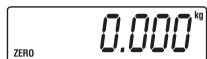
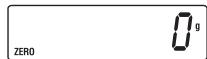
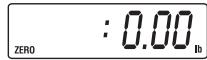
- Press the (kg / L) button to select the unit of weight: kilos, grams or pounds.
a) weight in kg
b) weight in gr
c) weight in lb
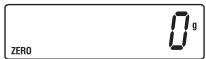
- Make sure the scales show a weight of zero before weighing. If they do not show zero, press the tare button (5).
- The scales are now ready for use. Always place the article to be weighed in the centre of the bowl.
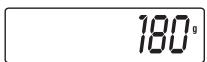
- Wait for the display to become stable. The display reading will show the correct weight of the article, e.g.
- TARE function
You can continue to weigh further articles without removing the article you have already weighed from the bowl. Just press the button once before placing the additional article in the bowl, to set the bare function to zero
8. REPLACE BATTERY INDICATOR
When the battery needs replacing, the following message will appear on the display:
10
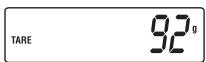
on the display. (While the tare function is activated, the word "TARE" will appear at the side of the display.)
Then place the additional article on the scales. The display will show only the net weight of the article that has been added, e.g.
- When you begin to remove the articles from the scales, the display will begin to show the negative value of the articles removed, as shown below:
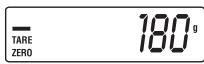
Note: the limit for the bare function is 0.8% of the total capacity of the scales before adjustment.
When the total tare weight exceeds 0.8% of the total capacity, the total capacity will be reduced by the corresponding weight when the scales are tared. For a weight of 100g, for example, which exceeds 0.8% of 5kg (=40g) , the total capacity (previously 5kg) will now be reduced to 4900g (5000g-100g).
- Automatic switch-off
When you have finished weighing the articles, press the button to switch off the scales.
They will also switch off automatically if they are left inactive for around 2 minutes.
7. WARNING: DO NOT OVERLOAD THE SCALES
If you exceed the load capacity, the following warning will appear on the display:
HHHH
When this happens, follow the adjustment instructions.
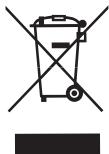
Remember that batteries are not household waste. Spent batteries must be disposed of in the special containers provided.
9. MAINTENANCE, CLEANING AND CORRECT USE
- The scales are a high-precision appliance and therefore extremely sensitive and delicate. Be careful to prevent any falls or knocks which could seriously damage their accuracy and functioning.
- When using the scales, press the buttons gently to activate the functions. Do not press them too hard or use any sharp objects.
- Use a soft, dry cloth to clean the scales (this will also prevent the bowl from slipping). Do not use strong chemical solutions such as alcohol or benzene.
- Avoid exposing the scales to a high ambient temperature, e.g. ovens or flames, as this will cause rapid deterioration.
-
Do not expose the scales to environments with strong electromagnetic fields, such as cordless telephones, computers, transformers, etc. as this will interfere with the correct functioning of the electronic and precision system.
-
Always use the scales on a hard, flat surface. Do not stand them on rugs or carpets.
- Do not insert any foreign objects into the openings in the scales.
- Remove the battery from the appliance if it is likely to be out of use for some time.
- Do not attempt to open the scales to repair them. This will annul the guarantee.
- If the scales do not work when they are switched on, check there is a battery inserted or if the battery has run down. Insert or replace the battery and consult your supplier if necessary.
- If an error appears on the display and the scales will not switch on, remove the battery for around 3 seconds and then insert it again to remove the temporary error.
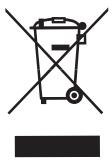
At the end of its working life, the product must not be disposed of as urban waste. It must be taken to a special local authority differentiated waste collection centre or to a
dealer providing this service.
Disposing of a household appliance separately avoids possible negative consequences for the environment and health deriving from inappropriate disposal and enables the constituent materials to be recovered to obtain significant savings in energy and resources. As a reminder of the need to dispose of household appliances separately, the product is marked with a crossed-out wheeled dustbin.
FR
1. INTRODUCTION
2. DEFINITION DU PRODUIT (FIG. 1)
- Bol
- Plate-forme
- Touche I/O
- Touche Kg/g/Livres
- Touchetare
- Écran
- Compartment pile



