
BC-200 - Kitchen scale FAGOR - Free user manual and instructions
Find the device manual for free BC-200 FAGOR in PDF.


| Product type | Kitchen scale |
| Brand | FAGOR |
| Model | BC-200 |
| Maximum capacity | 5 kg |
| Division | 2 g |
| Power supply | 9V alkaline battery (not included) |
| Measurement units | Kilograms (kg), Pounds (lb), Grams (g) |
| Main functions | Weighing, tare, timer with alarm, temperature sensor |
| Display | LCD screen with icons |
| Keys | I/O (on/off), O/T (tare), Kg/Lb (unit selector), ▲/▼ (timer selector) |
| Automatic shut-off | After 1 minute of inactivity |
| Temperature sensor | Built-in, measures ambient temperature |
| Care and cleaning | Clean with a soft, dry cloth. Do not immerse. |
| Safety precautions | Do not overload (Err if exceeded), avoid electromagnetic fields, keep away from heat sources |
| Intended use | Household use only |
| Disposal | Do not dispose of with household waste. Drop off at an approved collection point. |
Frequently Asked Questions - BC-200 FAGOR
User questions about BC-200 FAGOR
0 question about this device. Answer the ones you know or ask your own.
Ask a new question about this device
Download the instructions for your Kitchen scale in PDF format for free! Find your manual BC-200 - FAGOR and take your electronic device back in hand. On this page are published all the documents necessary for the use of your device. BC-200 by FAGOR.
USER MANUAL BC-200 FAGOR
The manufacturer reserves the right to modify the models described in this User's Manual.
natural_image
Illustration of a kitchen stainless steel counter with digital display and control buttons (no text or symbols on the device itself)BALANZA DE COCINA / BALANÇA DE COZINHA / KITCHEN SCALES /
BALANCE CULINAIRE / KÜCHENWAAGE / BILANCIA DA CUCINA / ZYΓAPIA
KOYZINAŠ / KONYHAI MÉRLEG / KUCHYŇSKÁ VÁHA / KUCHYNSKÁ VÁHA /
Before using the scales for the first time, read this manual carefully in order to use them correctly and keep them in good condition. Keep the instructions for later reference.
2. PRODUCT DEFINITION (FIG. 1)
- Bowl
- Platform
- I/O button
- O/T button / ▲ button
- Timer
- Kg/lb button - ▼ button
- Display
- Battery compartment
Interference suppression: The interference of this appliance has been suppressed in accordance with interference suppression standards.
Electromagnetic compatibility: This appliance complies with the CEM standards of electromagnetic compatibility.
3. TECHNICAL CHARACTERISTICS
- Maximum capacity: 5 kg
- Division: 2gr
- 9V battery (not included)
4. ICON DISPLAY (FIG. 2)
a) Timer/alarm
b) Tare function active
c) Negative tare value
d) Zero weight /tare inactive
e) Weight displayed in kg
f) Weight displayed in lb
g) Weight displayed in gr
h) Temperature displayed in °C
5. ADJUSTMENT
- Remove the lid from the battery compartment (8) on the underside of the scales and insert a 9V battery.
- Place the scales on a flat, solid surface, making sure they are firmly positioned. Then place the bowl on the platform (2).
6. FUNCTIONING
- Press on the 🔗 button to connect the scales.
- The screen will be activated displaying all the icons. (Fig. 2).
Kg/Lb
- Press the Kg/lb button ⬇ to select the unit of measurement, in lb or en Kg. Note: When the scales are switched on the unit used previously will appear.
- Depending on whether grams or pounds have been selected, the screen will display the following:
a) in kilograms
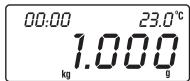
b) in lb.
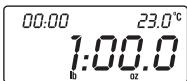
- The scales are now ready for use. Place the object to be weighed in the centre of the bowl. When the digits on the display remain fixed, you can make the reading. The display reading is as follows:
This means 65 gr

- Make sure that the scales show "zero" weight before starting to weigh. If not, press the tare button to reset (4).
- If the scales are not used, they will automatically switch off after 1 minute. You can also switch them off manually by pressing the button.
7. WARNING: DO NOT OVERLOAD THE SCALES
If the load capacity is exceed by 1%, the scales may be damaged and the following warning will appear on the display:
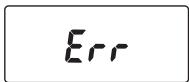
8. BATTERY LOW INDICATOR
When the battery needs replacing, the following message will appear on the display:

When this happens, follow the adjustment instructions.

Remember that batteries are not household waste. Spent batteries must be disposed of in the special containers provided.
9. USING THE TARE BUTTON (4)
- Adjust the scales as described above.
- Weigh the first article. If you wish to add further articles, press 🔍 to set the scales to 0:

- You can now place any additional articles to be weighed in the bowl, repeating these last two steps if you wish. The net
weight of the additional article will appear on the display:

- If you remove an article from the bowl, a negative value (-) will appear. This represents the weight of the article you have removed. Press the 📂 button again each time you remove an article, to set the reading to 0 again:

NOTE: When you activate the scales for the first time, if no reading appears or if the reading does not stabilise at 0, you can also press the ⚙ button.
10. ALARM TIMER
a. Switch on the scales by pressing the button.
b. Press the 🔒 button. A bell (💡) will appear at the top left of the display.
c. Press ▲ or ▼ to programme the desired time lapse. Each time ▲ or ▼ is pressed, the time interval will increase or decrease by 10 seconds.
d. Press the 🔒 button again to start the countdown.
e. When the timer reaches "00:00", the alarm buzzer will sound. The buzzer will sound 30 times and then automatically switch off.
f. To stop the alarm buzzer, press the button to switch off the scales.
g. To stop the countdown, press the button. To reprogramme it, press it again.
11. TEMPERATURE SENSOR AND INDICATOR (h)
The temperature sensor functions automatically when the scales are switched on. It detects the ambient temperature and shows the real temperature on the display.
12. MAINTENANCE AND CLEANING
- These scales are a precision instrument. Make sure they receive no knocks. Do not store the scales with a weight on them for long periods.
2 Always press the buttons gently. Do not use any sharp objects such as ballpoint pens to press them down. - If nothing appears on the screen when you switch on the scales using the button, check the battery is inserted and correctly connected. If this is the case, the battery may have run down. Replace it with a new one.
- Do not chemical solvents or abrasive substances to clean the scales. The use of a soft, dry cloth is recommended for cleaning the outer surface of the scales. DO NOT SUBMERGE THE SCALES IN WATER.
- Always keep the scales away from heat sources, e.g. ovens, as this could deteriorate the buttons and damage the appliance.
- When the scales are in use, keep them away from any electromagnetic interference (EMI), i.e. mobile phones, as this would affect their accuracy.
- Remove the battery if the scales are likely to be out of use for some time.
- These scales are for domestic use only.
13. INFORMATION FOR THE CORRECT DISPOSAL OF ELECTRICAL AND ELECTRONIC APPLIANCES

At the end of its working life, the product must not be disposed of as urban waste. It must be taken to a special local authority differentiated waste collection centre or to
a dealer providing this service. Disposing of a household appliance separately avoids possible negative consequences for the environment and health deriving from inappropriate disposal and enables the constituent materials to be recovered to obtain significant savings in energy and resources.
To remind you that you must collaborate with a selective collection scheme, the symbol shown appears on the product warning you not to dispose of it in traditional refuse containers.
For further information, contact your local authority or the shop where you bought the product.
FR
1. INTRODUCTION
2. DEFINITION DU PRODUIT (FIG. 1)
- PRODUCT DEFINITION (FIG. 1)
- TECHNICAL CHARACTERISTICS
- ICON DISPLAY (FIG. 2)
- ADJUSTMENT
- FUNCTIONING
- WARNING: DO NOT OVERLOAD THE SCALES
- BATTERY LOW INDICATOR
- USING THE TARE BUTTON (4)
- ALARM TIMER
- TEMPERATURE SENSOR AND INDICATOR (h)
- MAINTENANCE AND CLEANING
- INFORMATION FOR THE CORRECT DISPOSAL OF ELECTRICAL AND ELECTRONIC APPLIANCES
- FR
- INTRODUCTION
- DEFINITION DU PRODUIT (FIG. 1)
Brand : FAGOR
Model : BC-200
Category : Kitchen scale