
OneBlade QP2531 - Beard trimmer PHILIPS - Free user manual and instructions
Find the device manual for free OneBlade QP2531 PHILIPS in PDF.


| Product Type | Beard Trimmer |
| Model | QP2531 |
| Brand | Philips |
| Dimensions (H x W x D) | 15.0 x 5.0 x 3.5 cm |
| Weight | 200 g |
| Power Source | Rechargeable Lithium-Ion Battery |
| Charging Time | 1 hour |
| Usage Time | 45 minutes |
| Battery Indicator | LED charge indicator |
| Blade Type | Dual-sided stainless steel |
| Cutting Length Ranges | 1 – 5 mm (5 steps with adjustable comb) |
| Main Functions | Trimming, edging, shaving |
| Wet & Dry Use | Yes, waterproof (IPX7) |
| Maintenance | Rinse under running water; replace blade every 4 months |
| Safety Features | Blade stops if too much pressure applied |
| Spare Parts Available | Replacement blades (QP2520), combs |
| Warranty | 2 years |
Frequently Asked Questions - OneBlade QP2531 PHILIPS
User questions about OneBlade QP2531 PHILIPS
0 question about this device. Answer the ones you know or ask your own.
Ask a new question about this device
Download the instructions for your Beard trimmer in PDF format for free! Find your manual OneBlade QP2531 - PHILIPS and take your electronic device back in hand. On this page are published all the documents necessary for the use of your device. OneBlade QP2531 by PHILIPS.
USER MANUAL OneBlade QP2531 PHILIPS
QP2531, QP2530, QP2522, QP2521, QP2520
natural_image
PHILIPS OneBlade digital brush with power button (no text or symbols on body)
natural_image
Illustration of an open book with a grid and arrow indicating rotation (no text or symbols)
English 6
Čeština 23
Crnogorski 39
Eesti 54
Hrvatski 70
Latviešu 86
Lietuviškai 102
Magyar 118
Polski 136
Română 154
Shqip 171
Slovenščina 186
Slovensky 202
Български 219
Македонски 237
Русский 253
Українська 270
Қазақша 286
Introduction
Congratulations on your purchase and welcome to Philips! To fully benefit from the support that Philips offers, register your product at www.philips.com/welcome.
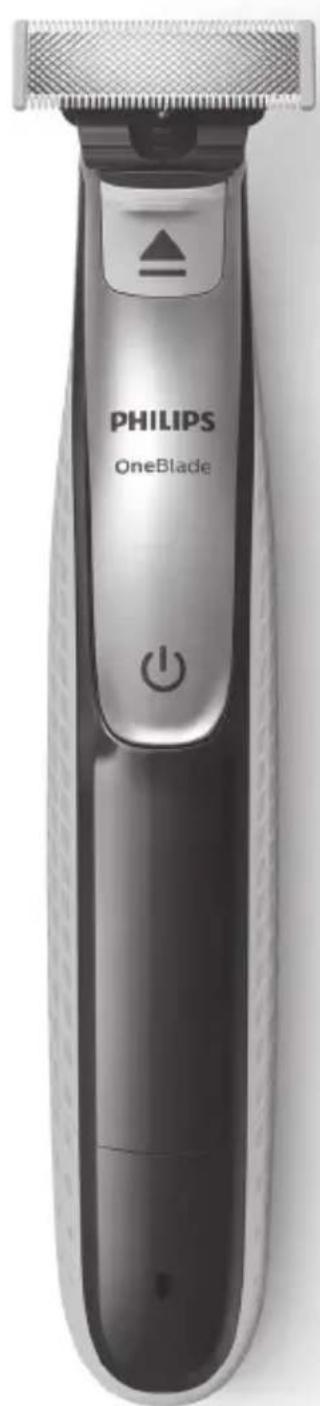
General description (Fig. 1)
1 Protection cap
2 Blade
3 Blade release slide
4 On/off button
5 Battery status indicator (QP2531, QP2530 only)
6 Small plug
7 Battery charge indicator (QP2522, QP2521, QP2520 only)
8 Supply unit (QP2531, QP2530: adapter type HQ850. QP2522, QP2521, QP2520: adapter type A00390.)
9 Replacement blade (QP2531, QP2522 only)
10 Click-on stubble comb 5mm
11 Click-on stubble comb 3mm (QP2531, QP2530, QP2520 only)
12 Click-on stubble comb 2mm (QP2531, QP2530 only)
13 Click- on stubble comb 1mm
Important safety information
Read this important information carefully before you use the appliance and its accessories and save it for future reference. The accessories supplied may vary for different products.
Danger

natural_image
Prohibition sign showing a faucet without raindrops, enclosed in a circle (no text)- Keep the supply unit dry.
Warning
- To charge the battery, only use the detachable supply unit provided with the appliance. For the type number of the original supply unit, please see 'General description' in the manual.
- The supply unit contains a transformer. Do not cut off the supply unit to replace it with another plug, as this causes a hazardous situation.
- This appliance can be used by children aged from 8 years and above and persons with reduced physical, sensory or mental capabilities or lack of experience and knowledge if they have been given supervision or instruction concerning use of the appliance in a safe way and understand the hazards involved. Children shall not play with the appliance. Cleaning and user maintenance shall not be made by children without supervision.
- Always unplug the appliance before you clean it under the tap.
- Always check the appliance before you use it. Do not use the appliance if it is damaged, as this may cause injury. Always replace a damaged part with one of the original type.
- Do not open the appliance to replace the rechargeable battery.
Caution

natural_image
Prohibition sign showing a faucet without spraying water, enclosed in a circle (no text)- Never immerse the charging stand in water and do not rinse it under the tap.
- Do not use the supply unit in or near wall sockets that contain an electric air freshener to prevent irreparable damage to the supply unit.
- Only use this appliance for its intended purpose as shown in the user manual.
- For hygienic reasons, the appliance should only be used by one person.
- Never use water hotter than 60°C to rinse the appliance.
- Never use compressed air, scouring pads, abrasive cleaning agents or aggressive liquids such as petrol or acetone to clean the appliance.
Electromagnetic fields (EMF)
This Philips appliance complies with all applicable standards and regulations regarding exposure to electromagnetic fields.
General
- This appliance is waterproof. It is suitable for use in the bath or shower and for cleaning under the tap. For safety reasons, the appliance can therefore only be used without cord.
- The supply unit is suitable for mains voltages ranging from 100 to 240 volts.
- The supply unit transforms 100-240 volts to a safe low voltage of less than 24 volts.
- Maximum noise level: Lc = 75 dB(A).
Charging
Note: This appliance can only be used without cord.
QP2531, QP2530: Charging normally takes approx. 4 hours.
QP2522, QP2521, QP2520: Charging normally takes approx. 8 hours.
A fully charged appliance has an operating time of up to 60 minutes (QP2531, QP2530) or 45 minutes (QP2522, QP2521, QP2520).
Charge the appliance before you use it for the first time and when the battery charge indicator indicates that the battery is almost empty.
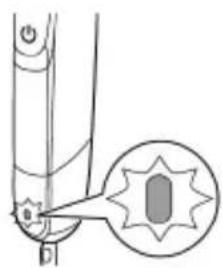
Battery status indicator QP2531, QP2530:

natural_image
Diagram of a mechanical component with a highlighted circular detail (no text or symbols)When the battery status indicator flashes orange, the battery is almost empty.
natural_image
Pure mechanical diagram showing a lever and pivot point without any text or symbolsWhen the appliance is charging, the battery status indicator light flashes green.

natural_image
Pure mechanical diagram showing a lever and pivot point without any text or symbolsWhen the battery is fully charged, the battery status indicator lights up green continuously. Approx. 30 minutes after the battery is fully charged or when you disconnect the appliance from the mains, the light of the battery status indicator switches off automatically.
Battery charge indicator QP2522, QP2521, QP2520:
The battery status is indicated by the performance of the appliance. When the appliance starts working more slowly, the battery is almost empty and needs to be charged for optimal performance.
Charging with the supply unit
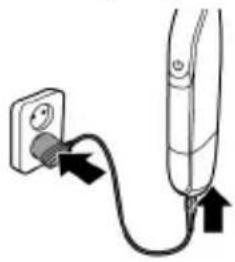
natural_image
Simple line drawing of a plug and cable with arrows indicating connection (no text or symbols)1 Insert the small plug into the appliance and put the supply unit in the wall socket.
2 QP2522, QP2521, QP2520 only: The battery charge indicator on the adapter lights up continuously, when the appliance is connected to the mains.
3 After charging, remove the supply unit from the wall socket and pull the small plug out of the appliance.
Using the appliance
You can use the appliance to trim, edge or shave facial hair (beard, moustache and sideburns). Shave for a smooth result, trim to obtain a certain length and edge to create perfect edges and sharp lines. This appliance is not intended for shaving,
12 English

natural_image
Illustration of a person applying facial care to the lower face using a medical or cosmetic tool (no text or symbols present)edging or trimming hairs on lower body parts or scalp hair. Take your time when you first start to use the appliance. You have to acquire practice with the appliance.
Note: This appliance can only be used without cord.

natural_image
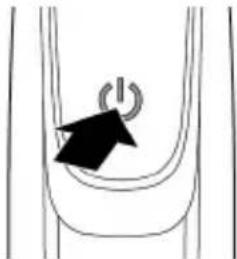
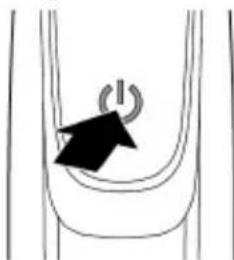
Simple line drawing of a curved pipe with a black arrow pointing to a circular symbol (no text or labels)1 To switch on the appliance, press the on/off button once.
2 To switch off the appliance, press the on/off button once.
Shaving
Warning: Before you use the appliance, always check the blade for damage or wear. If the blade is damaged or worn, do not use the appliance, as injury may occur. Replace a damaged blade before you use the appliance (see chapter ‘Replacement’).
Shaving tips and tricks
- Make sure that the blade is in full contact with the skin by placing it flat on the skin.
- For the best result, move the appliance against the grain.
- Make long strokes while pressing lightly.
- You can use the appliance dry or wet with gel or foam. You can even use the appliance in the shower.
- Shaving a clean beard and face gives the best results.
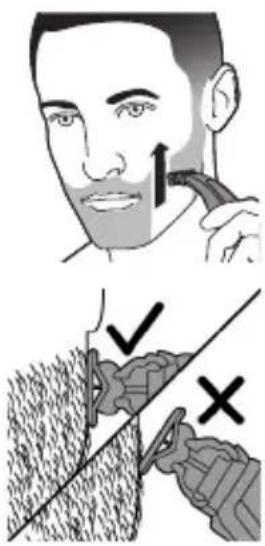
Edging
Shaving
1 Switch on the appliance.
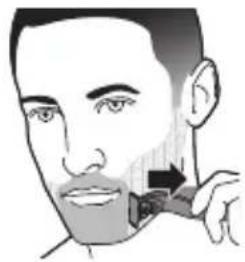
2 Place the blade on the skin and move the appliance up or against the grain in long strokes while you press it lightly.
Note: Make sure you hold the surface of the blade flat against your skin.
3 Switch off and clean the appliance after every use (see 'Cleaning and maintenance').

You can also use both edges of the blade to create sharp lines and perfect edges. Hold the appliance in such a way that the blade is perpendicular to the skin and one of its edges touches the skin. This allows more precise detailing of sideburns and the area around the mouth and nose.
1 To create sharp edges and lines, you can use either edge of the blade.
2 Switch on the appliance.
3 Place the edge of the blade perpendicular onto the skin.

natural_image
Illustration of a person's face with a toothbrush applying product to the lower lip (no text or symbols)Trimming
- Make straight strokes while applying gentle pressure.
4 Switch off and clean the appliance after every use (see 'Cleaning and maintenance').
Trimming combs
The click-on stubble combs allow you to trim hair to different lengths.
- QP2531, QP2530 come with 4 click-on stubble combs: 5mm, 3mm, 2mm and 1mm.
- QP2520 comes with 3 click-on stubble combs: 5mm, 3mm and 1mm.
- QP2522, QP2521 come with 2 click-on stubble combs: 5mm and 1mm.
Start with the 5mm comb to acquire practice with this appliance.
The indication on each comb corresponds to the hair length in millimeters.
Trimming tips

natural_image
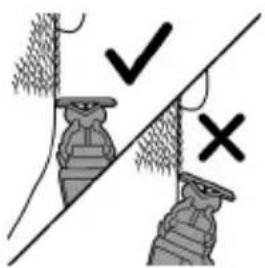
Diagram showing two mechanical components with checkmark and cross symbols, no readable text or labels- Always make sure that the tips of the click-on stubble comb point in the direction in which you move the appliance.
- Make sure that the flat part of the comb is always in full contact with the skin to obtain an even trimming result.
- Since hair grows in different directions, you need to move the appliance in different directions as well (upward, downward or across).
- Trimming is easier when the skin and hair are dry.

natural_image
Diagram of a mechanical device with a lever and handle (no text or symbols)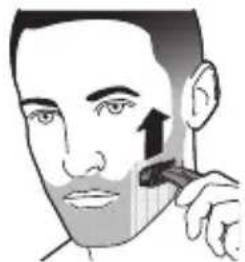
natural_image
Illustration of a person applying a toothbrush to their face (no text or symbols)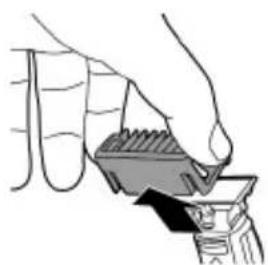
natural_image
Illustration of a hand holding a small container with liquid, no text or symbols presentTrimming with comb
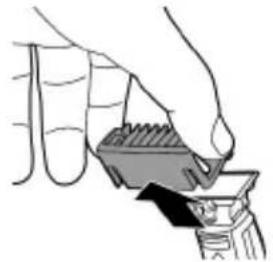
1 Place the comb onto the blade, with the teeth of the comb pointing upwards.
Note: Always trim in the direction of the teeth of the comb. This will give you the best results.
2 Switch on the appliance.
3 Place the comb onto the skin and move the appliance in the direction of the teeth of the comb.
Note: For the best result, move it against the grain.
4 Switch off and clean the appliance after every use (see 'Cleaning and maintenance').
5 To remove the comb, hold it on both sides and pull it off the blade.
Cleaning and maintenance
Clean the appliance after every use.
Caution: Never use compressed air, scouring pads, abrasive cleaning agents or aggressive liquids such as petrol or acetone to clean the appliance.
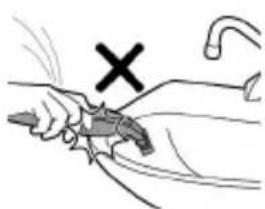
natural_image
Illustration of a hand holding a tool with a cross mark and curved handle (no text or symbols)Caution: Do not tap the appliance against a surface to remove water from it, as this may cause damage. Replace the blade if it is damaged.
Cleaning the appliance

natural_image
Illustration of a hand holding a container with liquid, no text or symbols present1 Remove the comb from the blade. Always turn the appliance off before putting on or taking off combs.

natural_image
Illustration of a hand holding a small object with a dropper, emitting light (no text or symbols)2 If a lot of hairs have accumulated on the comb, first blow them off.

natural_image
Simple line drawing of a spray gun spraying water onto a surface, with no text or symbols present.3 If a lot of hairs have accumulated on the appliance, first blow them off.

natural_image
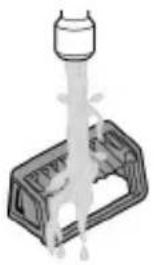
Illustration of a hand holding a spray bottle with liquid, no text or symbols present4 Switch on the appliance and rinse the blade with lukewarm water.
Caution: Do not dry the blade with a towel or a tissue as this may cause damage.

natural_image
Illustration of a laboratory apparatus with a pipette and tubing (no text or symbols)5 Rinse the combs with lukewarm water. 6 Carefully shake off excess water and let all parts air dry completely.
Note: The blade is fragile. Handle it carefully. Replace the blade if it is damaged.
Storage

natural_image
Illustration of a person's head with a curved object above their head, showing a downward arrow (no text or symbols)Always attach the protection cap on the blade to protect the blade from damage during travelling or storage.
We advise you to let the appliance and its attachments dry before you store them for the next use.
1 Place the protection cap onto the edge of the blade.

natural_image
Simple line drawing of a camera with an arrow indicating rotation (no text or symbols)2 Close the protection cap.
Replacement
Usage indicator

natural_image
Illustration of a hairdryer with a magnified inset showing the blade structure (no text or symbols)For optimal cutting and gliding performance, we advise you to replace the blade every 4 months, when it no longer provides the shaving or trimming results you expect.
The blade is equipped with a usage indicator. A green bar will gradually appear on the blade as you use it. When it is highly visible, it is recommended to replace your blade for the best OneBlade experience. Always replace the blade with original Philips blade.
Depending on your usage behavior, the exact lifetime of the blade could be longer or shorter.
Similar to a manual blade, the blade becomes blunt over time, which results in increased hair pulling and reduced cutting performance.
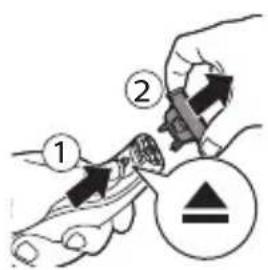
Replacing the blade

1 Switch off the appliance.
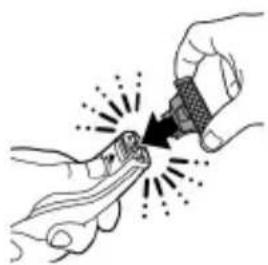
2 Push the blade release slide upwards carefully, and hold the blade on both sides to remove the blade. This will prevent the blade from flying off the handle.
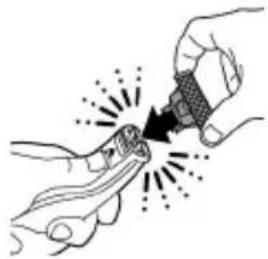
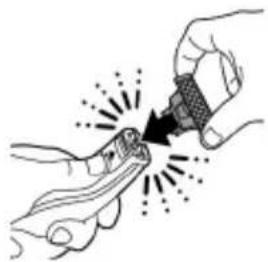
natural_image
Illustration of hands using a tool to adjust or install a mechanical component (no text or symbols visible)3 Hold the new blade on its sides and press it onto the handle ('click').
Note: When you hear a click, the new blade is placed correctly and ready for use.
Ordering accessories
To buy accessories or spare parts, visit www.shop.philips.com/service or go to your Philips dealer. You can also contact the Philips Consumer Care Center in your country (see the international warranty leaflet for contact details).
The following parts are available:
- QP210 Blade 1-pack
- QP220 Blade 2-pack
Recycling

- This symbol means that this product shall not be disposed of with normal household waste (2012/19/EU).

- This symbol means that this product contains a built-in rechargeable battery which shall not be disposed of with normal household waste (2006/66/EC). Please take your product to an official collection point or a Philips service center to have a professional remove the rechargeable battery.
- Follow your country's rules for the separate collection of electrical and electronic products and rechargeable batteries. Correct disposal helps prevent negative consequences for the environment and human health.
Removing the rechargeable battery
Only remove the rechargeable battery when you discard the product.
Before you remove the battery, make sure that the product is disconnected from the wall socket and that the battery is completely empty.
Take any necessary safety precautions when you handle tools to open the product and when you dispose of the rechargeable battery.
1 Disconnect the appliance from the mains and let the appliance run until the motor stops.
2 Remove the blade from the appliance.
3 Remove the bottom of the appliance by bending it downwards and pull it off.

natural_image
Illustration of hands holding a small object with a curved arrow indicating motion (no text or symbols)
4 Take out the battery compartment by separating the bottom part from the top part.

5 Separate the battery section from the bottom part.
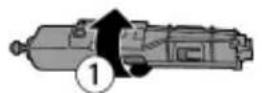
6 Lift the battery out of the inner body with the screwdriver. The battery is connected with double-sided tape.
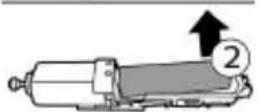
Warning: Be careful, the battery strips are very sharp.
Warranty and support
If you need information or support, please visit www.philips.com/support or read the international warranty leaflet.
Guarantee restrictions
The blade is not covered by the terms of the international guarantee because it is subject to wear.
Troubleshooting
This chapter summarizes the most common problems you could encounter with the appliance. If you are unable to solve the problem with the information below, visit www.philips.com/support for a list of frequently asked questions or contact the Consumer Care Center in your country.
Problem Possible cause Solution
| The appliance does not charge when it is connected to the mains. | The appliance has to be switched off when you charge it. | Switch off the appliance. |
| I cannot switch on the appliance when it is connected to the mains. | You cannot use the appliance when it is charging. You can only use the appliance without cord. | Disconnect the appliance from the mains before use. |
| The appliance does not work anymore. | The rechargeable battery is empty. | Charge the appliance (see chapter ‘Charging’).QP2630, QP2530: During charging, the battery charge indicator flashes.QP2630, QP2520: During charging, the charge indicator on the adapter lights up. If the battery charge indicator does not flash or light up, check whether there is a power failure or if the wall socket is live. If there is no power failure and the wall socket is live but the battery charge indicator still does not flash or light up, take the appliance to your dealer or a Philips service center. |
| The blade is blocked by dirt. | Switch on the appliance and rinse the blade under the tap with warm water. | |
| Hold the blade in a cup with warm water (60°C and no hotter) for approx.30 seconds. |
22 English
Problem Possible cause Solution
| The appliance doesn't cut hairs anymore. | The blade is placed on the handle incorrectly. | Push the blade onto the appliance until you hear a click. |
| The blade is damaged or worn. | Replace the blade with a new one. See chapter ‘Replacement’. | |
| The appliance makes a strange noise. | The blade is damaged or worn. | Replace the blade with a new one. See chapter ‘Replacement’. |
| The blade is placed onto the handle incorrectly. | Remove and reattach the blade. Push it onto the appliance until you hear a click. | |
| The blade is blocked by dirt. | Remove the blade and clean it thoroughly. | |
| The appliance doesn't function optimally anymore. | The blade is blocked by dirt. | Remove the blade and clean it thoroughly. |
| The blade is subject to wear and therefore its performance decreases over time. | Replace the blade with a new one. See chapter ‘Replacement’. | |
| The blade is a delicate part of the appliance and can easily be damaged. If the blade is damaged, it may not function optimally anymore. | Replace the blade with a new one. See chapter ‘Replacement’. |
Úvod
natural_image
Prohibition sign showing a faucet with a diagonal line and raindrops (no text)natural_image
Prohibition sign showing a faucet with a diagonal line and a showerhead, enclosed in a circle (no text)natural_image
Diagram of a mechanical component with a highlighted circular feature and arrow, no text or symbols presentnatural_image
Pure mechanical diagram showing a lever and pivot point without any text or symbolsnatural_image
Pure mechanical diagram showing a lever and pivot point without any text or symbolsnatural_image
Simple line drawing of a plug connected to a vertical tube with arrows indicating cable (no text or symbols)natural_image
Illustration of a person using a medical or diagnostic tool to address face area (no text or symbols present)natural_image
Simple line drawing of a curved pipe with a black arrow pointing to a circular symbol (no text or labels)Tvarování

natural_image
Hand holding a mechanical component with directional arrows indicating force or movement (no text or symbols)natural_image
Illustration of a person applying a toothbrush to their face (no text or symbols present)natural_image
Diagram of a handheld device with a black housing and arrow indicating a component (no text or symbols)natural_image
Illustration of a person applying a toothbrush to their face (no text or symbols)2 Zapněte přístroj.
natural_image
Illustration of a hand holding a small object with a dark arrow pointing downward (no text or symbols)natural_image
Illustration of a hand holding a tool with a cross mark above, no text or symbols presentnatural_image
Illustration of a hand holding a small object with a shaded area, no text or symbols presentnatural_image
Line drawing of a hand holding a device with sound waves, no text or symbols presentnatural_image
Simple line drawing of a spray gun spraying liquid onto a surface (no text or symbols)natural_image
Two-step illustration showing a hand pouring liquid from a bottle into a container, with no text or symbols present.natural_image
Simple line drawing of a chair with a seat and a curved arm, no text or symbols presentnatural_image
Simple line drawing of a camera lens with an arrow indicating rotation (no text or symbols)Výměna
Indikace výměny

natural_image
Illustration of a hairdryer with a magnified inset showing the blade and crown (no text or symbols)1 Přístroj vypněte.
natural_image
Illustration of hands using a tool to interact with a small object, no text or symbols presentnatural_image
Illustration of a hand holding a small object with a black arrow indicating motion (no text or symbols)Congratulations on your purchase and welcome to Philips! To fully benefit from the support that Philips offers, register your product at www.philips.com/welcome.
Opšti opis (Sl. 1)
1 Zaštitni poklopac
2 Oštrica
3 Klizni prekidač za oštricu
4 Dugme za uključivanje/isključivanje
5 Indikator statusa baterije (samo modeli QP2531 i QP2530)
6 Mali utikač
7 Indikator napunjenosti baterije (samo modeli QP2522, QP2521 i QP2520)
8 Jedinica za napajanje (QP2531, QP2530: tip adaptera HQ850. QP2522, QP2521, QP2520: tip adaptera A00390.)
9 Rezervna oštrica (samo modeli QP2531 i QP2522)
10 Češalj za čekinjast izgled od 5 mm koji se skida
11 Češalj za čekinjast izgled od 3 mm koji se skida (samo modeli QP2531, QP2530 i QP2520)
12 Češalj za čekinjast izgled od 2 mm koji se skida (samo modeli QP2531 i QP2530)
13 Češalj za čekinjast izgled od 1 mm koji se skida
natural_image
Prohibition sign showing a faucet without raindrops, enclosed in a circle (no text)natural_image
Prohibition sign showing a faucet without raindrops, enclosed in a circle (no text)natural_image
Diagram of a mechanical component with a highlighted circular feature (no text or symbols)Kad indikator napunjenosti baterije trepće narandžastom bojom, baterija je skoro prazna.

natural_image
Pure mechanical diagram showing a lever and gear assembly without any text or symbolsDok se aparat puni, indikator napunjenosti baterije trepće zelenom bojom.

natural_image
Pure mechanical diagram showing a lever and pivot point without any text or symbolsKad se baterija skroz napuni, indikator napunjenosti baterije počinje da svijetli zelenom bojom neprekidno.
Oko 30 minuta nakon što se baterija potpuno isprazni ili kada isključite aparat sa napajanja, lampica indikatora statusa baterije se automatski isključuje.
Indikator napunjenosti baterije za modele QP2522, QP2521 i QP2520:
Performanse aparata ukazuju na status baterije. Kada aparat počne da radi dosta sporije, baterija je skoro prazna i neophodno je punjenje da bi se postigle optimalne performanse.
natural_image
Simple line drawing of a plug and plug connecting a cable to a cylindrical device (no text or symbols)natural_image
Illustration of a person using a medical or diagnostic tool to address face area (no text or symbols present)natural_image
Simple line drawing of a curved object with an arrow pointing to a circular symbol (no text or labels)natural_image
Illustration showing a hairbrush cutting a tooth with an arrow indicating the brush tip (no text or symbols present)natural_image
Illustration of a hand using a tool to lift a small object (no text or symbols visible)5 Da biste skinuli češalj, uhvatite ga s obje strane i svucite sa šečiva.
natural_image
Illustration of a hand holding a tool with a cross mark and hook, no text or symbols presentČišćenje aparata

natural_image
Illustration of a hand holding a small container with liquid, no text or symbols present1 Skinite češalj sa oštrice. Uvek isključite aparat pre stavljanja ili skidanja češljeva.

natural_image
Illustration of a hand holding a small object with a dropper, emitting particles from above (no text or symbols)natural_image
Three-step illustration showing a spray gun, a hand holding a spray bottle, and a spray can with liquid (no text or symbols)3 Ako se na aparatu nakupilo puno dlačica, prvo ih oduvajte.
4 Zatim uključite aparat i isperite oštricu mlazom mlake vode.
natural_image
Simple line drawing of a person holding a chair with a curved arm, no text or symbols presentnatural_image
Simple line drawing of a camera lens with an arrow indicating rotation (no text or symbols)Replacement
natural_image
Illustration of a hairdryer with a magnified inset showing the blade and crown (no text or symbols)Radi optimalnog rezanja i klizanja preporučujemo zamjenu šečiva na svaka 4 mjeseca, kada više ne pruža očekivano dejstvo brijanja ili trimovanja.
Šečivo ima indikator korišćenja. Tokom korišćenja šečiva na njemu se postepeno pojavljuje zelena traka. Kad postane veoma vidljiva, preporučuje se zamjena šečiva radi maksimalne efikasnosti aparata OneBlade. Šečivo uvijek zamijenite originalnim šečivom kompanije Philips.
Radni vijek šečiva može biti duži ili kraći, što zavisi od načina upotrebe. Slično običnom brijaču, šečivo se vremenom tupi, što dovodi do češćeg čupanja dlaka i manje efikasnog rezanja.
Zamjena šečiva
1 Isključite aparat.
2 Pažljivo povucite klizač za oslobadanje šečiva naviše i uhvatite šečivo s obje strane da biste ga skinuli. To će spriječiti spadanje šečiva sa drške.
natural_image
Illustration of hands using a tool to apply material to a small object, with no visible text or symbols.3 Uhvatite novo šečivo s obje strane i pritisnite ga na dršku (uz škljocanje).
Napomena: Kad se začuje škljocanje, novo šečivo je leglo na svoje mjesto i spremno je za upotrebu.
natural_image
Illustration of a hand holding a small object with a black arrow indicating motion (no text or symbols)4 Izvadite odjeljak baterije razdvajajući donji dio od gornjeg.

natural_image
Prohibition sign showing a faucet without raindrops, enclosed in a circle (no text)natural_image
Prohibition sign of a faucet without any text or symbolsnatural_image
Diagram of a mechanical joint or bracket with an inset showing a circular feature (no text or symbols)natural_image
Pure mechanical diagram showing a lever and pivot point without any text or symbolsnatural_image
Pure mechanical diagram showing a lever and pivot point without any text or symbolsnatural_image
Simple line drawing of a plug and plug connecting a cable to a cylindrical device (no text or symbols)natural_image
Illustration of a person applying facial contour to the lower face with a medical device (no text or symbols)natural_image
Simple line drawing of a curved pipe with a black arrow pointing to a circular symbol (no text or labels)natural_image
Diagram of a handheld device with a handle and lever mechanism (no text or symbols)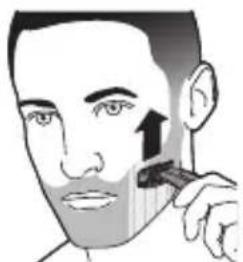
natural_image
Illustration of a person applying a toothpaste to their face (no text or symbols present)natural_image
Illustration of a hand using a tool to lift a small object (no text or symbols visible)natural_image
Illustration of a hand holding a tool with a cross mark and hook, no text or symbols presentnatural_image
Illustration of a hand holding a container with liquid, no text or symbols presentnatural_image
Illustration of a hand holding a small object with a dropper, emitting particles from above (no text or symbols)natural_image
Three-step illustration showing a spray gun, a hand holding a spray can, and a spray bottle on a tray (no text or symbols)natural_image
Simple line drawing of a person holding a hat with a downward arrow indicating motion (no text or symbols)natural_image
Simple line drawing of a hand holding a device with a curved arrow indicating rotation (no text or symbols)Osade vahetamine
natural_image
Illustration of a spray gun with a magnified inset showing the lens (no text or symbols)natural_image
Illustration of hands using a tool to adjust or install a component, with no visible text or symbolsnatural_image
Illustration of two hands holding a small object with a black arrow indicating motion (no text or symbols)natural_image
Prohibition sign with a faucet and diagonal line, no text or symbols present- Održavajte jedinicu za napajanje suhom.
Upozorenje
natural_image
Prohibition sign of a faucet without any text or symbols- Nikada ne uranjajte stalak za punjenje u vodu i ne ispirite ga pod pipom.
- Ne koristite jedinicu napajanja u ili blizu zidnih utičnica koje sadrže električni ovlaživač zraka da spriječite nepopravljivu štetu jedinice napajanja.
- Aparat koristite isključivo za svrhu kojoj je namijenjen, kao što je prikazano u korisničkom priručniku.
- Iz higijenskih razloga, aparat bi trebala koristiti samo jedna osoba.
- Nikada ne koristite vodu topliju od 60 °C za ispiranje aparata.
- Za čišćenje aparata nikada nemojte upotrebljavati zračni mlaz, spužvice za ribanje, abrazivna sredstva za čišćenje ili agresivne tekućine poput benzina ili acetona.
Elektromagnetska polja (EMF)
natural_image
Diagram of a mechanical joint or stem with a highlighted circular feature and arrow, no text or symbols present.Ako indikator statusa baterije treperi narančastom bojom, baterija je gotovo prazna.

natural_image
Pure mechanical diagram showing a lever and pivot point without any text or symbolsnatural_image
Pure mechanical diagram showing a lever and pivot point without any text or symbolsKada se baterija potpuno napuni indikator statusa baterije počinje neprekidno svijetliti zelenom bojom.
O. 30 minuta nakon što se baterija potpuno napuni ili kada isključite aparat iz napajanja, automatski se isključuje svjetlo indikatora napunjenosti baterije.
Indikator punjenja baterije QP2522, QP2521, QP2520:
Status baterije naznačen je izvedbom aparata. Kada aparat počne raditi sporije, baterija je gotovo ispražnjena i potrebno je napuniti radi optimalne izvedbe.
Punjenje s pomoću adaptera

natural_image
Simple line drawing of a plug and plug connecting a cable to a cylindrical device (no text or symbols)1 Umetnite mali utikač u aparat, a adapter u zidnu utičnicu.
2 Samo QP2522, QP2521, QP2520: Indikator punjenja baterije na adapteru neprestano je osvjetljen kada je aparat priključen na napajanje.
3 Nakon punjenja, uklonite jedinicu napajanja iz zidne utičnice i isključite mali utikač iz uređaja.
Upotreba aparata
natural_image
Illustration of a person using a medical or cosmetic tool to apply face care (no text or symbols present)natural_image
Simple line drawing of a curved pipe with a black arrow pointing to a circular symbol (no text or labels)Brijanje
natural_image
Hand holding a mechanical clip with directional arrows indicating force or movement (no text or symbols)Možete upotrebljavati i oba ruba oštrice kako biste stvorili oštre linije i savršene rubove. Držite aparat tako da oštrica bude okomito prema koži, a jedan od njezinih rubova da dodiruje kožu. Time je moguće preciznije uređivanje detalja zalizaka te područja oko usta i nosa.
1 Da biste stvorili oštre rubove i linije, možete upotrebljavati bilo koji rub oštrice.
2 Uključite aparat.
3 Postavite rub oštrice okomito na kožu.
natural_image
Illustration of a person applying a toothbrush to their cheek (no text or symbols)natural_image
Diagram of a handheld device with a handle and internal components, no visible text or symbols1 Postavite češalj na oštricu, pri čemu su zupci češlja usmjereni prema gore.
natural_image
Illustration of a person applying a toothbrush to their face (no text or symbols)2 Uključite aparat.
3 Postavite češalj na kožu i pomičite aparat u smjeru zubaca na češlju.
natural_image
Illustration of a hand holding a container with liquid, no text or symbols present4 Nakon svake upotrebe isključite i očistite aparat (pogledajte poglavlje „Čišćenje i održavanje”).
5 Kako biste uklonili češalj, držite ga s obje strane i povucite ga s oštrice.
natural_image
Illustration of a hand holding a tool with a cross mark above, no text or symbols presentOprez: Nikada nemojte upotrebljavati komprimirani zrak, spužvice za ribanje, abrazivna sredstva za čišćenje ili agresivne tekućine, kao što su benzin ili aceton, za čišćenje aparata.
Oprez: Nemojte kuckati uređajem o površinu da uklonite vodu iz njega jer to može uzrokovati oštećenje. Zamijenite oštricu ako je oštećena.
Čišćenje uređaja

natural_image
Illustration of a hand holding a small object with a shaded area, possibly part of a device or tool (no text or symbols visible)natural_image
Illustration of a hand holding a device with a dropper emitting particles (no text or symbols)2 Ako se puno dlaka nakupilo na češlju, prvo ih otpušite.

natural_image
Simple line drawing of a spray gun spraying liquid onto a surface, with no text or symbols present.natural_image
Illustration of a hand holding a small object with a cylindrical object above (no text or symbols)4 A zatim uključite aparat i isperite oštricu mlazom tople vode.
Oprez: Oštricu nemojte sušiti ručnikom ili rupčićem jer to može prouzročiti oštećenje.
natural_image
Diagram of a laboratory apparatus with a pipette and tubing (no text or labels)5 Zatim isperite češalj mlakom vodom.
6 Ostavite aparat i češalj da se osuše.
natural_image
Simple line drawing of a person's head with a curved object above their head, no text or symbols present.2 Zatvorite zaštitni čep.

natural_image
Simple line drawing of a camera lens with an arrow indicating rotation (no text or symbols)Zamjena dijelova
Indikator korištenja
Kako biste postigli optimalnu izvedbu rezanja i klizanja oštrice, savjetujemo vam da oštricu zamijenite svaka 4 mjeseca ili kada više ne ostvaruje rezultate brijanja i podrezivanja koje očekujete.

natural_image
Diagram of a hairdryer with a magnified inset showing the brush tip (no text or symbols)1 Isključite aparat.
natural_image
Illustration of hands using a tool to tighten or adjust a component (no text or symbols present)3 Držite novu oštricu na bočnim stranama i pritisnite je na ručku („klik”).
Napomena: Kada čujete klik, znači da je nova oštrica ispravno postavljena i spremna za upotrebu.
Naručivanje dodatnog pribora
Kako biste kupili dodatke ili rezervne dijelove, posjetite www.shop.philips.com/service ili se obratite distributeru tvrtke Philips. Možete također kontaktirati Philipsov korisnički centar u vašoj državi (za kontakt podatke, pogledajte brošuru s međunarodnim jamstvom).
natural_image
Illustration of hands performing a finger press or grip operation with a black arrow indicating motion (no text or symbols)2 Uklonite oštricu s aparata.
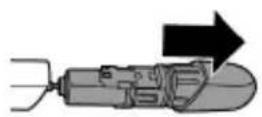
3 Uklonite donji dio aparata savijajući ga prema dolje i povlačeći ga prema vani.
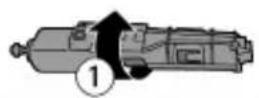
4 Izvadite pretinac baterije odvajanjem donjeg dijela od gornjeg.
5 Odvojite dio za bateriju od donjeg dijela.
6 S pomoću odvijača podignite bateriju iz unutarnjeg kućišta. Baterija je spojena dvostranom vrpcom.
Upozorenje: Budite oprezni, stranice baterija su vrlo oštre.


Jamstvo i podrška
Ako su Vam potrebne informacije ili podrška, molimo posjetite www.philips.com/support ili pročitajte brošuru o međunarodnom jamstvu.
Ograničenja jamstva
natural_image
No sign depicting a faucet with a showerhead, enclosed in a circle (no text or symbols)natural_image
Prohibition sign showing a faucet with a diagonal line and a diagonal line, no text or symbols present.natural_image
Diagram of a mechanical joint or bracket with an inset showing a circular feature (no text or symbols)natural_image
Pure mechanical diagram showing a lever and pivot point without any text or symbolsnatural_image
Pure mechanical diagram showing a lever and pivot point without any text or symbolsnatural_image
Simple line drawing of a plug and plug connecting a cable to a cylindrical device (no text or symbols)1 lespraudiet mazo kontaktdakšu ieriče un adapteri sienas kontaktligzdā.
natural_image
Illustration of a person using a medical or diagnostic tool to apply facial features (no text or symbols present)natural_image
Simple line drawing of a curved pipe with a power button and arrow symbol (no text or labels)natural_image
Diagram of a handheld device with a handle and internal components, no visible text or symbols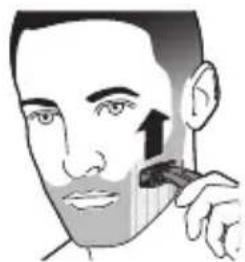
natural_image
Illustration of a person applying a toothbrush to their face (no text or symbols)natural_image
Illustration of a hand using a tool to lift a small object (no text or symbols visible)natural_image
Illustration of a hand holding a tool with a cross mark and curved pipe (no text or symbols)Ierīces tīrīšana

natural_image
Illustration of a hand holding a small object with a shaded interior (no text or symbols)natural_image
Illustration of a hand holding a small object with a dropper, emitting light (no text or symbols)natural_image
Three-step illustration showing a spray gun, a hand holding a spray bottle, and a container with liquid (no text or symbols)natural_image
Illustration of a person holding a chair with a downward arrow indicating motion (no text or symbols)natural_image
Simple line drawing of a device with a curved arrow indicating rotation (no text or symbols)Nomaina
Nolietojuma indikators

natural_image
Diagram of a spray gun with a magnified inset showing the lens (no text or symbols present)natural_image
Illustration of hands using a tool to adjust or install a component, with no visible text or symbolsnatural_image
Illustration of two hands holding a small object with radiating lines, no text or symbols presentnatural_image
No sign depicting a faucet with a showerhead, enclosed in a circle (no text or symbols)natural_image
Prohibition sign showing a faucet without spraying water, enclosed in a circle (no text)natural_image
Diagram of a mechanical joint or bracket with an inset showing a circular detail (no text or symbols)natural_image
Pure mechanical diagram showing a lever and gear assembly without any text or symbolsnatural_image
Pure mechanical diagram showing a lever and pivot point without any text or symbolsnatural_image
Simple line drawing of a plug and a medical device connected by a wire (no text or symbols)natural_image
Illustration of a person using a medical or cosmetic tool to apply face-to-face care (no text or symbols present)natural_image
Simple line drawing of a curved pipe with a black arrow indicating clockwise motion (no text or symbols)Formavimas
natural_image
Illustration showing a hairbrush cutting a tooth with a beaded jaw (no text or symbols)natural_image
Illustration of a hand using a tool to lift a small object (no text or symbols visible)natural_image
Illustration of a hand holding a tool with a cross mark and hook, no text or symbols presentnatural_image
Illustration of a hand holding a container with liquid, no text or symbols presentnatural_image
Illustration of a hand holding a small object with spray or spray, no text or symbols presentnatural_image
Three-step illustration showing a spray gun, a hand holding a spray bottle, and a spray can with liquid (no text or symbols)natural_image
Simple line drawing of a curved object on a stand with a downward arrow indicating motion (no text or symbols)2 Uždarykite apsauginj dangtelj.

natural_image
Simple line drawing of a camera with an arrow indicating rotation (no text or symbols)Pakeitimas
natural_image
Illustration of a hairdryer with a magnified inset showing the brush tip (no text or symbols)natural_image
Illustration of hands using a tool to adjust or install a component, with no visible text or symbolsnatural_image
Illustration of hands holding a mechanical component with a curved arrow indicating motion (no text or symbols)natural_image
Prohibition sign showing a faucet without raindrops, enclosed in a circle (no text)natural_image
Prohibition sign of a faucet without any text or symbolsnatural_image
Diagram of a mechanical joint or bracket with an inset showing a star-shaped feature (no text or symbols)natural_image
Pure mechanical diagram showing a lever and pivot point without any text or symbolsnatural_image
Pure mechanical diagram showing a lever and pivot point without any text or symbolsnatural_image
Simple line drawing of a plug and cable with arrows indicating connection (no text or symbols)natural_image
Illustration of a person using a medical or cosmetic tool to address face area (no text or symbols present)natural_image
Simple line drawing of a curved pipe with a power button symbol (no text or labels)Formázás
natural_image
Illustration showing a hairdryer and a person's face with a brush (no text or symbols)natural_image
Illustration of a hand using a tool to lift a small object (no text or symbols visible)natural_image
Illustration of a hand holding a tool with a cross mark and hook, no text or symbols presentnatural_image
Illustration of a hand holding a small container with a handle, no text or symbols presentnatural_image
Illustration of a hand holding a handheld device with a dropper emitting particles (no text or symbols)natural_image
Three-step illustration showing a spray gun, a hand holding a spray bottle, and a spray can with liquid (no text or symbols)natural_image
Simple line drawing of a chair with a curved arm and a downward arrow, no text or symbols present.natural_image
Simple line drawing of a camera with an arrow indicating rotation (no text or symbols)natural_image
Illustration of a hairdryer with a magnified inset showing the brush tip (no text or symbols)natural_image
Illustration of hands using a tool to adjust or install a component, with no visible text or symbolsnatural_image
Illustration of a hand holding a small object with motion lines indicating movement (no text or symbols)natural_image
Prohibition sign showing a faucet crossed out by a diagonal line, indicating no pollution or leakage (no text present)natural_image
No sign depicting a faucet with a showerhead, enclosed in a circle (no text or symbols)natural_image
Diagram of a mechanical component with a highlighted circular feature and arrow, no text or symbols presentnatural_image
Pure mechanical diagram showing a lever and pivot point without any text or symbolsnatural_image
Pure mechanical diagram showing a lever and pivot point without any text or symbolsnatural_image
Simple line drawing of a plug and plug connecting a cable to a cylindrical device (no text or symbols)natural_image
Illustration of a person applying facial care to the lower face with a medical device (no text or symbols)natural_image
Simple line drawing of a curved pipe with a power button and arrow symbol (no text or labels)1 Włącz urządzenie.
natural_image
Diagram of a mechanical device with a handle and lever mechanism (no text or symbols)
natural_image
Illustration of a person applying makeup to the cheek area with a brush (no text or symbols)natural_image
Illustration of a hand holding a small object with a dark handle, possibly a tool or device (no text or symbols visible)natural_image
Illustration of a hand holding a small object with a cross mark and curved handle (no text or symbols)natural_image
Illustration of a hand holding a small object with a dark arrow pointing to it (no text or symbols present)natural_image
Illustration of a hand holding a small object with radiating lines, possibly a device or tool, emitting powder or spray (no text or symbols present)natural_image
Three-step illustration showing a spray gun, a spray bottle, and a spray can (no text or symbols)natural_image
Simple line drawing of a hand holding a chair with a downward arrow indicating motion (no text or symbols)natural_image
Diagram of a spray gun with a magnified inset showing the lens (no text or symbols present)natural_image
Illustration of hands using a tool to apply material to a small object (no text or symbols present)natural_image
Illustration of a hand holding a small object with a black arrow indicating motion (no text or symbols)natural_image
Prohibition sign of a faucet without any text or symbolsnatural_image
Prohibition sign of a faucet without any text or symbolsnatural_image
Diagram of a mechanical joint or bracket with an inset showing a circular detail (no text or symbols)natural_image
Pure mechanical diagram showing a lever and gear assembly without any text or symbolsnatural_image
Pure mechanical diagram showing a lever and pivot point without any text or symbolsnatural_image
Simple line drawing of a plug and plug connecting a cable to a cylindrical device (no text or symbols)natural_image
Illustration of a person applying facial care to the lower face using a tool (no text or symbols present)natural_image
Simple line drawing of a curved pipe with a black arrow pointing to a circular symbol (no text or labels)Conturare
natural_image
Illustration of a handheld device with a lever and handle (no text or symbols)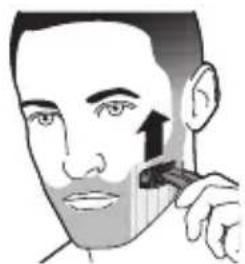
natural_image
Illustration of a person applying a toothbrush to their face (no text or symbols)natural_image
Illustration of a hand using a tool to lift a small object (no text or symbols visible)natural_image
Illustration of a hand holding a tool with a cross mark and hook, no text or symbols presentnatural_image
Illustration of a hand holding a small container with a handle, no text or symbols presentnatural_image
Illustration of a hand holding a small object with a dropper, emitting particles from its tip (no text or symbols)natural_image
Three-step illustration showing a spray gun, a hand holding a spray bottle, and a spray can with liquid (no text or symbols)natural_image
Simple line drawing of a person sitting on a chair holding a tray, with a black arrow indicating downward motion (no text or symbols)natural_image
Simple line drawing of a hand holding a device with a curved arrow indicating rotation (no text or symbols)Înlocuire
Indicator de utilizare

natural_image
Illustration of a hairdryer with a magnified inset showing the brush tip (no text or symbols)natural_image
Illustration of hands using a tool to adjust or install a component, with no visible text or symbolsnatural_image
Illustration of hands holding a small object with a curved arrow indicating motion (no text or symbols)natural_image
Prohibition sign showing a faucet without raindrops, enclosed in a circle (no text)natural_image
Prohibition sign of a faucet without any text or symbolsnatural_image
Diagram of a mechanical component with a highlighted circular feature (no text or symbols)natural_image
Pure mechanical diagram showing a lever and pivot point without any text or symbolsnatural_image
Pure mechanical diagram showing a lever and pivot point without any text or symbolsnatural_image
Simple line drawing of a plug and cable with arrows indicating connection (no text or symbols)natural_image
Simple line drawing of a curved pipe with a power button and arrow symbol (no text or labels)Rroja
natural_image
Diagram of a mechanical device with a lever and handle (no text or symbols)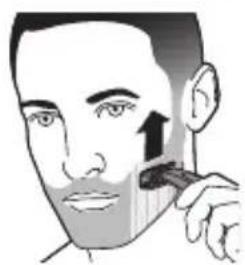
natural_image
Illustration of a person applying a toothbrush to their face, with an upward arrow indicating the application (no text or symbols present)natural_image
Illustration of a hand using a tool to lift a small object (no text or symbols visible)natural_image
Illustration of a hand holding a tool with a cross mark and hook, no text or symbols presentPastrimi i pajisjes
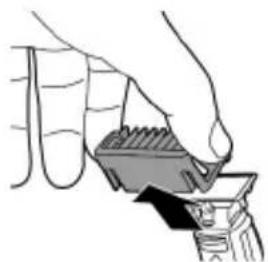
natural_image
Illustration of a hand holding a container with liquid, no text or symbols presentnatural_image
Illustration of a hand holding a small object with spray, no text or symbols presentnatural_image
Three-step illustration showing a spray gun, a hand holding a spray bottle, and a spray can with liquid (no text or symbols)natural_image
Simple line drawing of a person holding a chair with a curved arm, no text or symbols presentnatural_image
Simple line drawing of a camera with an arrow indicating rotation (no text or symbols)Zëvendësimi
natural_image
Illustration of a hairdryer with a magnified inset showing the brush tip (no text or symbols)1 Fikeni pajisjen.
natural_image
Illustration of hands using a tool to adjust or install a component, with no visible text or symbolsnatural_image
Illustration of a hand holding a small object with a black arrow indicating motion (no text or symbols)natural_image
No sign depicting a faucet with a showerhead, enclosed in a circle (no text or symbols)- Napajalnika ne zmočite.
Opozorilo
natural_image
Prohibition sign of a faucet without any text or symbolsnatural_image
Diagram of a mechanical component with a highlighted circular feature (no text or symbols)Kadar kazalnik stanja baterije utripa oranžno, je baterija skoraj prazna.

natural_image
Pure mechanical diagram showing a lever and pivot point without any text or symbolsKadar se aparat polni, kazalnik stanja baterije utripa zeleno.

natural_image
Pure mechanical diagram showing a lever and pivot point without any text or symbolsKo je baterija povsem napolnjena, kazalnik stanja baterije neprekinjeno sveti zeleno.
natural_image
Simple line drawing of a plug and cable with arrows indicating connection (no text or symbols)Vklop in izklop aparata
natural_image
Simple line drawing of a curved object with an arrow pointing to a circular symbol (no text or labels)1 Aparat vklopite s pritiskom na gumb za vklop/izklop.
2 Aparat izklopite s pritiskom na gumb za vklop/izklop.
Britje
1 Vklopite aparat.
2 Rezilo položite na kožo in aparat z rahlim pritiskanjem pomikajte v dolgih potezah navzgor ali v nasprotni smeri rasti dlačic.
Opomba: Površino rezila vedno naslonite plosko na kožo.
natural_image
Illustration of a handheld device with a lever and handle (no text or symbols)
natural_image
Illustration of a person applying a toothbrush to their face (no text or symbols)1 Glavnik pritrdite na rezilo tako, da so konice glavnika obrnjene navzgor.
natural_image
Illustration of a hand using a tool to lift a small object (no text or symbols visible)5 Glavnik odstranite tako, da ga primete na obeh straneh in povlečete z rezila.
natural_image
Illustration of a hand holding a tool with a cross mark and curved handle (no text or symbols)natural_image
Illustration of a hand holding a small container with a handle, no text or symbols present1 Glavnik odstranite z rezila. Pred nameščanjem ali snemanjem glavnika aparat vedno izklopite.

natural_image
Illustration of a hand holding a small object with spray, emitting particles from it (no text or symbols)natural_image
Three-step illustration showing a spray gun, a hand holding a spray bottle, and a spray can with liquid (no text or symbols)natural_image
Simple line drawing of a chair with a downward arrow indicating motion (no text or symbols)natural_image
Simple line drawing of a camera lens with an arrow indicating rotation (no text or symbols)natural_image
Illustration of a spray gun with a magnified inset showing a component (no text or symbols)1 Izklopite aparat.
2 Drsnik za sprostitev rezila previdno potisnite navzgor in rezilo držite na obeh straneh, da ga odstranite. Tako rezilo ne more odleteti z ročaja.
natural_image
Illustration of hands using a tool to adjust or install a small object, with no visible text or symbols.3 Novo rezilo primite na straneh in ga pritisnite na ročaj, da se zaskoči.
natural_image
Illustration of two hands holding a small object with radiating lines, no text or symbols present
natural_image
Prohibition sign showing a faucet without a shower, enclosed in a circle (no text or symbols)natural_image
Prohibition sign showing a faucet without spraying water, enclosed in a circle (no text)- Stojan na nabíjanie neponárajte do vody, ani ho neoplachujte pod tečúcou vodou.
natural_image
Diagram of a mechanical joint or bracket with an inset showing a star-shaped feature (no text or symbols)Ked' indikátor stavu batérie bliká na oranžovo, batéria je takmer vybitá.

natural_image
Pure mechanical diagram showing a lever and pivot point without any text or symbolsKed'sa zariadenie nabíja, indikátor stavu batérie bliká na zeleno.

natural_image
Pure mechanical diagram showing a lever and pivot point without any text or symbolsKed'je batéria úplne nabitá, indikátor stavu batérie svieti na zeleno.
natural_image
Simple line drawing of a plug and cable with arrows indicating connection (no text or symbols)1 Malú koncovku pripojte k zariadeniu a adaptér zapojte do elektrickej zásuvky.
2 Iba modely QP2522, QP2521, QP2520: Ked'je zariadenie pripojené k elektrickej sieti, indikátor nabitia batérie na adaptéri svieti nepretržite.
3 Po ukončení nabíjania odpojte napájaciu jednotku od siete a malú koncovku odpojte od zariadenia.
Zapínanie a vypínanie zariadenia
natural_image
Simple line drawing of a curved pipe with a black arrow pointing to a circular symbol (no text or labels)Tvarovanie
natural_image
Illustration of a person's face with a toothbrush applying product to the lower jaw (no text or symbols)natural_image
Diagram of a handheld device with a handle and lever mechanism (no text or symbols)natural_image
Illustration of a person applying makeup to their face with a brush (no text or symbols)2 Zapnite zariadenie.
natural_image
Illustration of a hand holding a container with liquid, no text or symbols presentČistenie a údržba
natural_image
Illustration of a hand holding a tool with a cross mark and curved handle (no text or symbols)natural_image
Illustration of a hand holding a small container with a handle, no text or symbols presentnatural_image
Illustration of a hand holding a cigarette with a flame, emitting vapor (no text or symbols)natural_image
Illustration of a spray gun spraying liquid onto a surface, with no text or symbols present.natural_image
Illustration of a hand holding a glass with liquid, no text or symbols presentnatural_image
Illustration of a laboratory apparatus with a pipette and tubing (no text or symbols)natural_image
Simple line drawing of a chair with a curved arm and a downward arrow indicating motion (no text or symbols)1 Nasad'te ochranný kryt na hranu čepele.
natural_image
Simple line drawing of a camera with a curved arrow indicating rotation (no text or symbols)Výmena
Indikácia výmeny
natural_image
Diagram of a hairdryer with a magnified inset showing the brush tip (no text or symbols)1 Vypnite zariadenie.
natural_image
Illustration of hands using a tool to interact with a small object, no text or symbols presentnatural_image
Illustration of hands performing a finger press or grip operation with a black arrow indicating motion (no text or symbols)natural_image
Prohibition sign with a faucet and diagonal line, no text or symbols presentnatural_image
Prohibition sign of a faucet without any text or symbolsnatural_image
Diagram of a mechanical joint or connector with a highlighted circular detail (no text or symbols)natural_image
Pure mechanical diagram showing a lever and pivot point without any text, numbers, or symbolsnatural_image
Simple line drawing of a plug inserted into a cable with an arrow indicating direction (no text or symbols)natural_image
Illustration of a person using a medical or cosmetic tool to address face area (no text or symbols present)natural_image
Simple line drawing of a curved object with an arrow pointing to a circular symbol (no text or labels)1 Включете уреда.
natural_image
Diagram of a mechanical device with a lever and handle, no visible text or symbols
natural_image
Illustration of a person applying makeup to their face with a brush (no text or symbols)natural_image
Illustration of a hand holding a small container with a handle, no text or symbols presentnatural_image
Illustration of a hand holding a tool with a cross mark and curved handle (no text or symbols)natural_image
Illustration of a hand holding a small container with a handle, no text or symbols presentnatural_image
Illustration of a hand holding a handheld device with spray particles (no text or symbols)natural_image
Three-step illustration showing a spray gun, a hand holding a spray bottle, and a spray can with liquid (no text or symbols)natural_image
Illustration of a person holding a chair with a downward arrow indicating motion (no text or symbols)natural_image
Simple line drawing of a camera with an arrow indicating rotation (no text or symbols)Смяна
natural_image
Diagram of a spray gun with a magnified inset showing internal components (no text or symbols)natural_image
Illustration of hands using a tool to apply material to a small object (no text or symbols present)natural_image
Illustration of a hand holding a small object with a black arrow indicating motion (no text or symbols)natural_image
Prohibition sign showing a faucet without raindrops, enclosed in a circle (no text)natural_image
Prohibition sign of a faucet without any text or symbolsnatural_image
Diagram of a mechanical component with a highlighted circular feature (no text or symbols)natural_image
Pure mechanical diagram showing a lever and pivot point without any text or symbolsnatural_image
Pure mechanical diagram showing a lever and pivot point without any text or symbolsnatural_image
Simple line drawing of a plug and cable with arrows indicating connection (no text or symbols)natural_image
Illustration of a person using a medical or cosmetic tool to address face area (no text or symbols present)natural_image
Simple line drawing of a curved pipe or channel with an arrow pointing to a circular symbol (no text or labels)natural_image
Illustration of a person applying a toothbrush to their face (no text or symbols)natural_image
Diagram of a handheld device with a handle and control panel, no visible text or symbolsnatural_image
Illustration of a person applying makeup to their face with a brush (no text or symbols)natural_image
Illustration of a hand holding a small object with a shaded interior, possibly a tool or device (no text or symbols visible)natural_image
Illustration of a hand holding a tool with a cross mark and curved handle (no text or symbols)natural_image
Illustration of a hand holding a small object with a shaded interior (no text or symbols)natural_image
Illustration of a hand holding a small object with spray, emitting particles from the mouth (no text or symbols)natural_image
Simple line drawing of a spray gun spraying water onto a surface, with no text or symbols present.natural_image
Illustration of a hand holding a spray gun with liquid, emitting vapor (no text or symbols)natural_image
Illustration of a laboratory apparatus with a pipette and tubing (no text or symbols)natural_image
Illustration of a person lifting a bag with a black arrow indicating downward motion (no text or symbols)natural_image
Simple line drawing of a hand holding a device with a curved arrow indicating rotation (no text or symbols)Замена
natural_image
Illustration of a hairdryer with a magnified inset showing the brush tip (no text or symbols)natural_image
Illustration of hands using a tool to apply material to a small object (no text or symbols visible)natural_image
Illustration of hands holding a tool with a magnified view of a mechanical component (no text or symbols)natural_image
Prohibition sign showing a faucet without spraying water, enclosed in a circle (no text)natural_image
Prohibition sign showing a faucet without spraying water, enclosed in a circle (no text)natural_image
Diagram of a mechanical joint or bracket with a highlighted circular detail (no text or symbols)natural_image
Pure mechanical diagram showing a lever and gear mechanism without any text or symbolsnatural_image
Pure mechanical diagram showing a lever and pivot point without any text or symbolsnatural_image
Simple line drawing of a plug and plug connecting a cable to a cylindrical device (no text or symbols)natural_image
Illustration of a person applying facial care to the lower face with a medical device (no text or symbols)natural_image
Simple line drawing of a curved pipe with a power button and arrow symbol (no text or labels)natural_image
Diagram of a handheld device with a handle and internal components, no visible text or symbolsnatural_image
Illustration of a person's face with a comb, showing a hand holding the comb (no text or symbols present)natural_image
Illustration of a hand holding a small object with a dark arrow pointing downward (no text or symbols)Очистка и уход
natural_image
Illustration of a hand holding a tool with a cross mark and curved handle (no text or symbols)natural_image
Illustration of a hand gripping a small object with a handle, no text or symbols presentnatural_image
Illustration of a hand holding a chair with a curved arm and a downward arrow indicating motion (no text or symbols)natural_image
Simple line drawing of a hand holding a device with a curved arrow indicating rotation (no text or symbols)natural_image
Diagram of a hairdryer with a magnified inset showing the brush tip (no text or symbols)natural_image
Illustration of hands using a tool to adjust or install a component, with radiating lines indicating motion (no text or symbols)natural_image
Illustration of a hand holding a small object with a black arrow indicating motion (no text or symbols)natural_image
Prohibition sign showing a faucet without a shower, enclosed in a circle (no text or symbols)natural_image
Prohibition sign of a faucet without any text or symbolsnatural_image
Diagram of a mechanical component with a highlighted circular feature (no text or symbols)natural_image
Pure mechanical diagram showing a lever and pivot point without any text or symbolsnatural_image
Pure mechanical diagram showing a lever and pivot point without any text or symbolsnatural_image
Simple line drawing of a plug and plug connecting a cable to a cylindrical device (no text or symbols)natural_image
Simple line drawing of a curved pipe with a black arrow pointing to a circular symbol (no text or labels)natural_image
Illustration of a person applying a toothbrush to their cheek (no text or symbols)Гоління
natural_image
Diagram of a handheld device with a handle and connector (no text or symbols visible)natural_image
Illustration of a person applying a toothbrush to their face (no text or symbols)natural_image
Illustration of a hand holding a container with liquid, no text or symbols presentЧищення та догляд
natural_image
Illustration of a hand holding a pen with a cross mark and pipe, no text or symbols presentЧищення пристрою
natural_image
Illustration of a hand holding a small object with a shaded interior, possibly a tool or device (no text or symbols visible)natural_image
Illustration of a hand holding a handheld device emitting sound waves (no text or symbols)natural_image
Simple line drawing of a spray gun spraying water onto a surface (no text or symbols)natural_image
Illustration of a hand holding a glass with liquid, no text or symbols presentnatural_image
Illustration of a laboratory apparatus with a pipette and tubing (no text or symbols)natural_image
Simple line drawing of a folded garment being lifted by a black arrow (no text or symbols)natural_image
Simple line drawing of a hand holding a device with a curved arrow indicating rotation (no text or symbols)Заміна
natural_image
Illustration of a hairdryer with a magnified inset showing the brush tip (no text or symbols)natural_image
Illustration of hands performing a finger press or grip operation with a black arrow indicating motion (no text or symbols)natural_image
Prohibition sign showing a faucet without raindrops, enclosed in a circle (no text)natural_image
Prohibition sign showing a faucet without raindrops, enclosed in a circle (no text)natural_image
Diagram of a mechanical joint or bracket with an inset showing a star-shaped feature (no text or symbols)natural_image
Pure mechanical diagram showing a lever and gear assembly without any text or symbolsnatural_image
Pure mechanical diagram showing a lever and pivot point without any text or symbolsnatural_image
Simple line drawing of a plug and plug connecting a cable to a cylindrical device (no text or symbols)natural_image
Illustration of a person using a medical or CT scanner to address teeth (no text or symbols present)natural_image
Simple line drawing of a curved pipe with a power button and arrow symbol (no text or labels)Кырыну
natural_image
Diagram of a handheld device with a handle and internal components, no visible text or symbolsnatural_image
Illustration of a person applying a toothbrush to their face (no text or symbols)natural_image
Illustration of a hand using a tool to lift a small object (no text or symbols visible)natural_image
Illustration of a hand holding a tool with a cross mark and curved pipe (no text or symbols)natural_image
Illustration of a hand holding a small object with a dark arrow pointing to it (no text or symbols present)natural_image
Illustration of a hand holding a small object with a dropper, emitting light (no text or symbols)natural_image
Illustration of three different spray application methods: spraying a spray gun, pouring liquid into a container, and adding a spray bottle (no text or symbols present)natural_image
Simple line drawing of a chair with a downward arrow indicating motion (no text or symbols)natural_image
Simple line drawing of a camera lens with an arrow indicating rotation (no text or symbols)Ауыстыру
Колданыс көрсеткіші

natural_image
Illustration of a hairdryer with a magnified inset showing the brush tip (no text or symbols)natural_image
Illustration of hands using a tool to adjust or install a mechanical component (no text or symbols present)natural_image
Illustration of hands holding a mechanical component with motion lines indicating movement (no text or symbols)- Introduction
- General description (Fig. 1)
- Important safety information
- Danger
- Warning
- Caution
- Electromagnetic fields (EMF)
- General
- Charging
- Battery status indicator QP2531, QP2530:
- Battery charge indicator QP2522, QP2521, QP2520:
- Charging with the supply unit
- Using the appliance
- English
- Shaving
- Shaving tips and tricks
- Trimming
- Trimming combs
- Trimming tips
- Trimming with comb
- Cleaning and maintenance
- Cleaning the appliance
- Storage
- Replacement
- Usage indicator
- Replacing the blade
- Ordering accessories
- Recycling
- Removing the rechargeable battery
- Warranty and support
- Guarantee restrictions
- Troubleshooting
- English
- Úvod
- Tvarování
- Výměna
- Indikace výměny
- Opšti opis (Sl. 1)
- Indikator napunjenosti baterije za modele QP2522, QP2521 i QP2520:
- Čišćenje aparata
- Zamjena šečiva
- Osade vahetamine
- Upozorenje
- Elektromagnetska polja (EMF)
- Indikator punjenja baterije QP2522, QP2521, QP2520:
- Punjenje s pomoću adaptera
- Upotreba aparata
- Brijanje
- Čišćenje uređaja
- Zamjena dijelova
- Naručivanje dodatnog pribora
- Jamstvo i podrška
- Ograničenja jamstva
- Ierīces tīrīšana
- Nomaina
- Nolietojuma indikators
- Formavimas
- Pakeitimas
- Formázás
- Conturare
- Înlocuire
- Indicator de utilizare
- Rroja
- Pastrimi i pajisjes
- Zëvendësimi
- Opozorilo
- Vklop in izklop aparata
- Britje
- Zapínanie a vypínanie zariadenia
- Čistenie a údržba
- Výmena
- Indikácia výmeny
- Смяна
- Замена
- Очистка и уход
- Гоління
- Чищення та догляд
- Чищення пристрою
- Заміна
- Кырыну
- Ауыстыру
Brand : PHILIPS
Model : OneBlade QP2531
Category : Beard trimmer