
DBT-1 - Earphones Auna - Free user manual and instructions
Find the device manual for free DBT-1 Auna in PDF.


| Product type | In-ear wireless earphones |
| Brand | Auna |
| Model | DBT-1 |
| Dimensions (earphone) | 25 x 20 x 30 mm |
| Weight (per earphone) | 5 g |
| Weight (charging case) | 35 g |
| Power supply | Rechargeable lithium-ion battery (40 mAh per earphone, 300 mAh case) |
| Battery life | Up to 4 hours of listening, 12 hours with case |
| Charging time | About 1.5 hours |
| Connectivity | Bluetooth 5.0 |
| Bluetooth range | Up to 10 meters |
| Bluetooth version | 5.0 |
| Bluetooth profiles | A2DP, AVRCP, HSP, HFP |
| Audio codecs | SBC, AAC |
| Impedance | 32 Ω |
| Frequency response | 20 Hz - 20 kHz |
| Sensitivity | 100 dB |
| Microphone | Built-in, hands-free call compatible |
| Controls | Touch buttons on each earphone (play/pause, volume, call, voice assistant) |
| Water resistance | IPX4 (splash resistant) |
| Included accessories | Charging case, USB-C cable, silicone ear tips (3 sizes), user manual |
| Care and cleaning | Clean with a soft, dry cloth. Do not use chemical products. Remove the ear tips and wash them with lukewarm soapy water. |
| Safety | Do not expose to extreme temperatures. Avoid immersion. Use the provided charger. |
| Spare parts and repairability | Replacement ear tips available. The battery is not user-replaceable. For any repairs, contact Auna customer service. |
| General information | Foldable headset, compact design, compatible with most Bluetooth devices. |
Frequently Asked Questions - DBT-1 Auna
User questions about DBT-1 Auna
0 question about this device. Answer the ones you know or ask your own.
Ask a new question about this device
Download the instructions for your Earphones in PDF format for free! Find your manual DBT-1 - Auna and take your electronic device back in hand. On this page are published all the documents necessary for the use of your device. DBT-1 by Auna.
USER MANUAL DBT-1 Auna
natural_image
White outdoor headboard headphones with blue earband and black logo (no visible text or symbols)
auna
multimedia

Instruction manual 6

Mode d'emploi 9

Instruzioni 12

BT 2.1 + EDR, Profile AVRCP, A2DP, HSP, HFP
Stromversorgung
natural_image
Symbol of a trash bin crossed with a diagonal line, no text or numbers presentElektroaltgeräte
Congratulations on purchasing this product. Please read and follow these instructions, in order to avoid damaging the item. We do not cover any damages that may arise from improper use of the item or the disregard of the safety instructions.
Safety advice
- Read all instructions before using.
- To protect against a fire, electric shock or personal injury, do not immerse cord, electric plugs or device in water or other liquids.
- Do not expose the appliance to extreme temperatures. The appliance shall be used in moderate climates.
- The use of attachments that are not recommended by the appliance manufacturer may result in fire, electric shock or personal injury.
- Do not open the unit by removing any cover parts. Do not attempt to repair the unit. Any repairs or servicing should be done by qualified personell only.
- Only qualified persons may perform technical work on the product. The product may not be opened or changed. The components cannot be serviced by the user. The manufacturer is not responsible for any radio or TV interference caused by unauthorized modifications.
- The appliance is not a toy. Do not let children play with it. Never let children insert foreign objects into the appliance.
- Never clean the surface of the device with solvents, paint thinners, cleansers or other chemical products. Instead, use a soft, dry cloth or soft brush.
- This appliance is to be used with 12V car power supply.
- Save these instructions.
Small objects
Keep small objects (i.e. screws, mounting material, memory cards etc.) and packaging out of the range of children. Do not let Children play with foil. Choking hazard!
Transporting the device
Please keep the original packaging. To gain sufficient protection of the device while shipment or transportation, make sure to put it back in its original packaging.
Cleaning the surface
Do not use any volatile liquids, detergents or the like. Use a clean dry cloth.
Technical Data
Item # 10007072, 10007073
Connection 3.5mm audio jack
BT 2.1 + EDR, profiles AVRCP, A2DP, HSP, HFP
Power supply Li-Ion battery, rechargeable via USB (5V)
Weight ca. 120g
Scope of delivery Device, USB charging cable, 5.5mm audio cable, manual
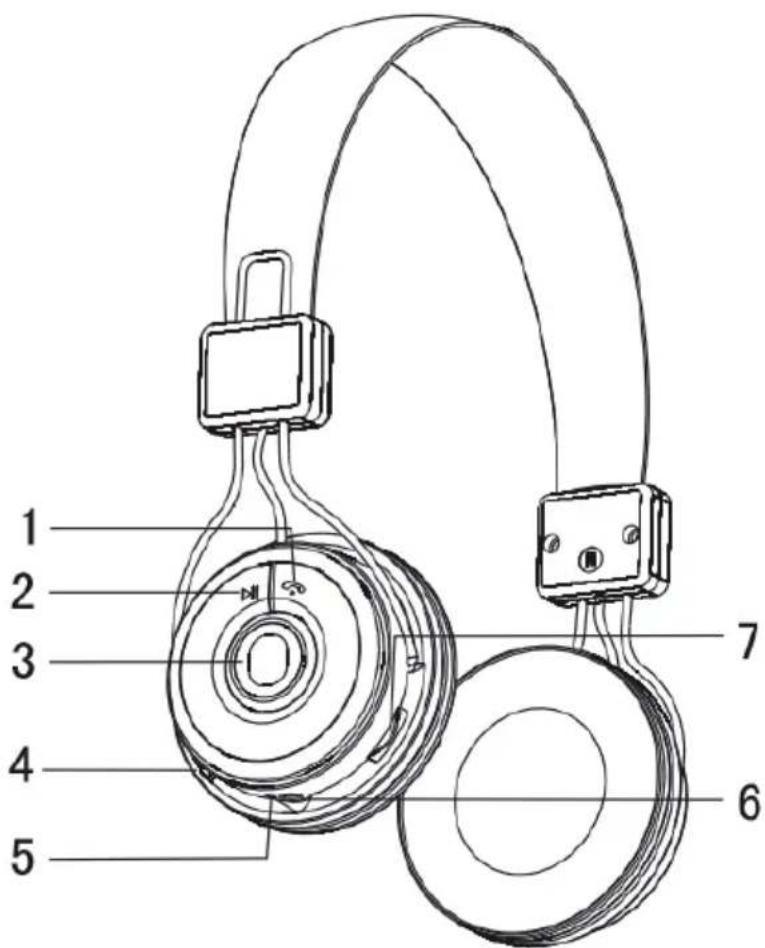
Overview
1

Press: answer/end call / activate voice
dial / switch call
Hold: decline incoming call
Press 2x: redial last number
2

Press: Play/Pause
Hold: Stop
Press with BT_LED on: PAIR
3 Status LED
4 Power on/off
5 Microphone
6 USB charging jack
7

Press: skip/previous
Hold: volume +/-
Instructions
Pairing:
- Make sure the headphones are charged and your BT streaming device is on, with BT activated.
• After switching the headphones on, press and hold ▶II until the red and blue BT LED flash alternatingly. - In the BT connections list of your BT device, look up the DBT1 and pair. When prompted to enter a password, type in "0000".
Charging:
You can charge the internal battery with the headphones powered on or off equally. The red status LED goes off, when the battery is completely charged.
Environment Concerns

natural_image
Symbol of a trash bin crossed out by a diagonal line, representing no waste or discharge (no text or labels present)According to the European waste regulation 2002/96/EG this symbol on the product or on its packaging indicates that this product may not be treated as household waste. Instead it should be taken to the appropriate collection point for the recycling of electrical and electronic equipment. By ensuring this product is disposed of correctly, you will hep prevent potential negative consequences for the environment and human health, which could otherwise be caused by inappropriate waste handling of this product. For more detailed information about recycling of this product, please contact your local council or your household waste disposal service.
Declaration of Conformity
Producer: CHAL-TEC GmbH, Wallstraße 16, 10179 Berlin, Germany.
This product is conform to the following European directives:
1999/05/EC (R&TTE)
2011/65/EU (RoHS)
CE
Chère cliente, cher client,
BT 2.1 + EDR, Profile AVRCP, A2DP, HSP, HFP
natural_image
Symbol of a trash bin crossed with a diagonal line, no text or numbers presentnatural_image
Symbol of a trash bin crossed with a diagonal line, no text or numbers presentnatural_image
Symbol of a trash bin crossed with a diagonal line, no text or numbers present

Brand : Auna
Model : DBT-1
Category : Earphones