
PR3731 - Pain therapy device PHILIPS - Free user manual and instructions
Find the device manual for free PR3731 PHILIPS in PDF.


| Product Type | Transcutaneous Electrical Nerve Stimulation (TENS) device |
| Brand | Philips |
| Model | PR3731 |
| Dimensions | Approximately 10.5 x 6.5 x 2.5 cm |
| Weight | Approximately 150 g (including battery) |
| Power Supply | 2 AAA batteries (1.5 V each) |
| Number of Channels | 2 independent channels |
| Electrode Pads | 4 self-adhesive, reusable pads (50 x 50 mm) |
| Modes | TENS, EMS, massage, acupuncture |
| Intensity Levels | 20 adjustable levels per channel |
| Pulse Frequency | 1 – 150 Hz |
| Pulse Width | 50 – 300 µs |
| Timer Settings | 15, 30, 45, 60 minutes |
| Display | Backlit LCD screen |
| Safety Features | Automatic shut-off after 60 min, pad detection, child lock |
| Maintenance | Replace pads every 30 uses or when adhesion reduces; clean with damp cloth |
| Spare Parts | Replacement pad sets (model PAD-01), belt clip, pouch |
| Accessories Included | 4 electrodes, electrode cables, 2 AAA batteries, storage pouch, user manual |
| Certifications | CE, FDA cleared for over-the-counter use |
Frequently Asked Questions - PR3731 PHILIPS
User questions about PR3731 PHILIPS
0 question about this device. Answer the ones you know or ask your own.
Ask a new question about this device
Download the instructions for your Pain therapy device in PDF format for free! Find your manual PR3731 - PHILIPS and take your electronic device back in hand. On this page are published all the documents necessary for the use of your device. PR3731 by PHILIPS.
USER MANUAL PR3731 PHILIPS
Always here to help you
Register your product and get support at
www.philips.com/welcome

PR3733
PR3731

natural_image
Top-down view of a Philips Bluetooth device with visible mesh texture and control knob (no text or symbols on body)
natural_image
Simple line drawing of an open book with a grid on the left and a closed page on the right (no text or symbols)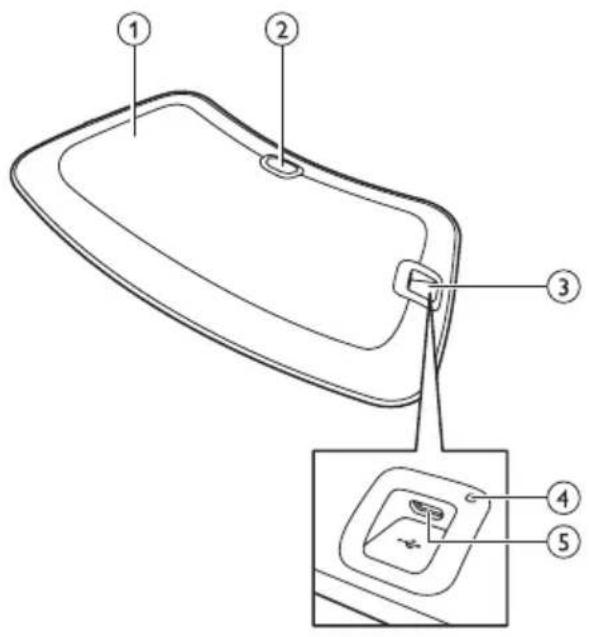
ENGLISH 6
DANSK 27
ESPAÑOL 49
SUOMI 72
NORSK 94
PORTUGUÊS 116
SVENSKA 139
Table of contents
| Introduction 6 | |
| Intended use 6 | |
| Contra-indications, reactions and side effects 7 | |
| Contra-indications 7 | |
| Reactions and side effects 8 | |
| Important safety information 8 | |
| Warning 8 | |
| Caution 10 | |
| Compliance with standards 10 | |
| Electromagnetic emissions and immunity 10 | |
| Treatment schedule and treatment modes | 10 |
| Treatment schedule | 10 |
| Treatment modes | 11 |
| Product overview | 11 |
| Charging the device | 11 |
| Using the device | 12 |
| Positioning the device | 12 |
| Starting and stopping treatment | 14 |
| After treatment | 15 |
| Cleaning | 15 |
| Troubleshooting | 16 |
| Signals on the device | 18 |
| Ordering accessories | 18 |
| Guarantee and support | 18 |
| Recycling 19 | |
| Specifications | 19 |
| Explanation of symbols | 20 |
Introduction
Congratulations on your purchase and welcome to Philips!
To benefit fully from the support that Philips offers, register your product at
www.philips.com/pain-relief/register. Read this user manual carefully before you use the BlueTouch Pain Relief Patch and save it for future reference. This medical device is available without prescription. To achieve the optimal treatment success, we recommend that you use the device according to the treatment schedule and the instructions in this user manual.
If you need further information or have questions, please visit
www.philips.com/pain-relief or contact the Philips Consumer Care
Centre in your country BlueTouch is a trademark owned by Koninklijke Philips N.V.
Intended use
The BlueTouch Pain Relief Patch is a wearable medical device intended for use on and by persons older than 18. It treats muscular back pain by supplying light and warmth to the body by means of optical power and thermal conduction. Its special blue LED light relaxes and helps to heal damaged muscles through improved blood circulation. The intended treatment area of the device is the upper and lower back. You can position the device on the treatment area with a strap and use it during your normal daily activities. The power for the device comes from non-exchangeable rechargeable batteries.
Contra-indications, reactions and side effects
Contra-indications
General health conditions
Do not use the device if any of the following general health conditions apply to you:
- pregnancy or breastfeeding
- fever
- uncontrolled high blood pressure or a cardiovascular condition (stroke, myocardial infarction, angina pectoris, arteriosclerotic vascular disease (ASVD), peripheral vascular disease, or (severe) congestive heart failure)
- severe or uncontrolled diabetes or diabetes with peripheral damage
- presence of an implanted medical device (screw, etc.) in or near the treatment area or presence of an active implantable medical device, such as a cardiac pacemaker, defibrillator, neurostimulator, cochlear implant, or an active drug administration device, anywhere in the body
- widespread pain
- poor general health
- schizophrenia, borderline syndrome or severe depression
- severe osteoporosis (T score of 2.5 and a history of 1 or more bone fractures) or another serious bone disease
Pain-related health problems
Do not use the device if any of the following pain-related health problems apply to you:
- unsuccessful back surgery or surgery to torso, head or back within the previous 8 weeks
- acute dislocation or fracture within the previous 8 weeks
- a degenerative central nervous system disease such as multiple sclerosis or Parkinson's disease
- spinal stenosis that causes back pain
- cauda equina syndrome or other neurological symptoms that indicate neuropathy
- sensory deprivation or diagnosed shingles or post-herpetic neuralgia, especially in the mid-trunk area.
- an inflammatory disease or a chronic disease or an infection known to cause pain, such as spondyloarthropathy, rheumatoid arthritis, lupus erythematodes, Lyme borreliosis
Dermatological or oncological problems
Do not use the device if any of the following dermatological or oncological problems apply to you:
- a history of skin cancer or any other localised cancer or the presence of precancerous lesions or large moles in the treatment area
- sun allergy
- burnt or sunburnt skin
- if you take photosensitising medication, do not use the device if the package insert states that the medication can cause photo-allergic reactions, photo-toxic reactions or that you must avoid sun exposure
-
if you are on steroids, as this medication makes the skin more susceptible to irritation
-
a skin disease such as porphyria, polymorphic light eruption, chronic actinic dermatitis, actinic prurigo or solar urticaria that causes photosensitivity
- infections, eczema, unhealed tattoos, burns, inflammations (e.g. of hair follicles), lacerations, abrasions, herpes simplex, psoriasis, wounds or lesions and haematomas in the treatment area
- allergy to the surface materials of the BlueTouch Pain Relief Patch (polyurethane for the skin contact surface and polyester for the surface that does not touch the skin) or to the polyester of the straps
Reactions and side effects
- It is normal for the skin to become a little red during treatment. The cause of this skin redness is the increased blood circulation due to the warmth of the BlueTouch Pain Relief Patch. This skin redness is harmless and fades after the treatment has ended.
- You may sometimes notice tanning after treatment. The cause of this tan is the exposure to light - a similar effect to that caused by sunlight - or to warmth. This effect is harmless and fades away by itself after a number of weeks and sometimes a few months. Postpone treatment until the tan has disappeared. To prevent tanning, resume treatment in a lower mode and avoid excessive pressure on the BlueTouch Pain Relief Patch during treatment, for example by sitting or lying on it or by leaning heavily against it.
- Blue light may discolour tattoos in the treatment area.
Important safety information
Warning
- The purpose of the BlueTouch Pain Relief Patch is to treat back pain. Do not use it for any other purpose.
- This is a medical device. Keep the device out of the reach of children.
- Read this user manual carefully and always adhere to the treatment and installation instructions.
- Do not use the device on children or babies because of their immature skin.
- Adults with reduced sensory or mental capabilities must not use this device, as they may not be able to use it according to the instructions in this user manual.
- The BlueTouch Pain Relief Patch is not suitable for continuous use. Always adhere to the treatment schedule in chapter ‘Treatment schedule and treatment modes’. Do not treat more often than twice a day.
- If treatment becomes uncomfortable, switch to a lower treatment mode. If treatment is still uncomfortable in low mode, switch off the BlueTouch Pain Relief Patch and stop using it.
- Do not stare into the light emitted by the BlueTouch Pain Relief Patch during operation, as this may lead to eye irritation or eye damage.
- Do not leave the BlueTouch Pain Relief Patch unattended when it is on, as this may cause eye irritation or eye damage when other people stare into the light emitted by the device.
- Do not apply any creams or lotions to the skin before treatment, as this may lead to skin irritation.
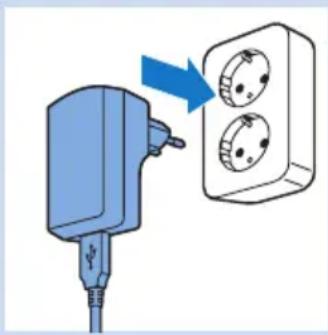
- Only charge the BlueTouch Pain Relief Patch by connecting the USB cable and the adapter supplied with the device to a wall socket.
- Do not wear the BlueTouch Pain Relief Patch while it is charging. There is a risk of electric shock.
- The BlueTouch Pain Relief Patch is not waterproof. Do not use the BlueTouch Pain Relief Patch in wet surroundings. Do not immerse the BlueTouch Pain Relief Patch in water nor rinse it under the tap.
- Keep the adapter dry.
- Never exert excessive pressure on the BlueTouch Pain Relief Patch, for instance by pressing, lying, sitting or standing on it. Do not lean heavily against the BlueTouch Pain Relief Patch when sitting. Excessive pressure on the device may lead to darkening or redness of the skin in the area in contact with the patch.
- Do not squeeze or twist the BlueTouch Pain Relief Patch. Keep the BlueTouch Pain Relief Patch away from sharp, pointed or abrasive objects.
- Always check the BlueTouch Pain Relief Patch and the adapter for damage before use. Do not use the BlueTouch Pain Relief Patch or the adapter if you notice any damage.
- Always have a damaged adapter replaced with one of the original type to avoid a hazard. Contact Philips to obtain a new adapter.
- Do not modify the BlueTouch Pain Relief Patch and its accessories.
- Always return the BlueTouch Pain Relief Patch to a service centre authorised by Philips for examination or repair. Repair by unqualified people could cause a hazardous situation for the user.
- Use and charge the BlueTouch Pain Relief Patch at a temperature between +5°C and +35°C. Store the BlueTouch Pain Relief Patch at a temperature between -20°C and +50°C.
- Only use the BlueTouch Pain Relief Patch in one of the specially designed straps supplied with the device.
- Do not use the device if it is closer than 30cm to wireless communication equipment, such as wireless home network routers and walkie-talkies. This wireless communication equipment may cause electromagnetic interference that prevents the device from operating properly.
Caution
- Do not subject the BlueTouch Pain Relief Patch to heavy shocks or drop it.
- If you take the BlueTouch Pain Relief Patch from a very warm environment to a colder environment, wait approximately 3 hours before you use it.
- To prevent damage to the drum of the washing machine or to other laundry in the drum, wash the straps in a fine-mesh washing bag.
- If the device is not used for several months, recharge it regularly.
Compliance with standards
- This BlueTouch Pain Relief Patch meets all standards relevant for electrical medical appliances and appliances using optical (LED) radiation for home use (IEC60601 family).
Electromagnetic emissions and immunity
- The BlueTouch Pain Relief Patch is approved according to EMC safety standard EN 60601-1-2. It is designed to be used in typical domestic or clinical environments.
Treatment schedule and treatment modes
Treatment schedule
Always stick to the treatment time indicated in this chapter. Do not treat more often than twice a day.
The BlueTouch Pain Relief Patch is suitable for daily use. You can use it when you feel pain, but do not use it more often than twice a day. If you follow the instructions in this chapter, you do not exceed the maximum daily light dose.
Since the effect of the BlueTouch Pain Relief Patch is generally not noticeable immediately, we recommend that you try out the device for at least two weeks before you draw any conclusions about its effectiveness.
Note: You can use the BlueTouch Pain Relief Patch twice in a row for two treatments of 15 minutes, 20 minutes or 30 minutes. To start the second treatment, press the mode button to switch on the device again.
Treatment modes
Modes No. of treatments per day Treatment duration and light
intensity
1: low 1 or 2 30 min at 50%
2: medium 1 or 2 20 min at 75%
3: high 1 or 2 15 min at 100%
- Mode 1 (low): This mode gives a mild warmth sensation and stimulates the release of nitric oxide. You can use this mode twice a day for 30 minutes each time.
- Mode 2 (medium): This mode gives a moderate warmth sensation and stimulates the release of nitric oxide. You can use this mode twice a day for 20 minutes each time.
- Mode 3 (high): This mode gives a full warmth sensation and stimulates the release of nitric oxide. You can use it twice a day for 15 minutes each time.
The warmth and the nitric oxide relax and help to heal damaged muscles through improved blood circulation.
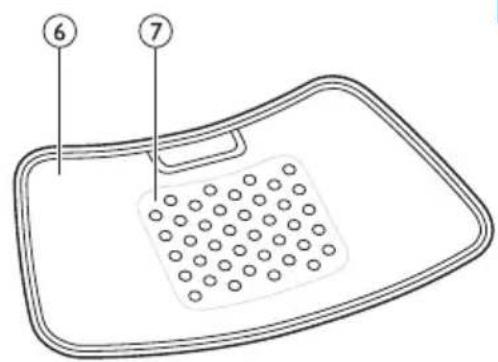
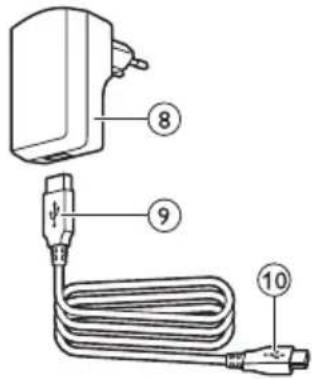
Product overview (Fig. 1)
1 BlueTouch Pain Relief Patch (outside)
2 Mode button
3 Connection panel
4 Charging light
5 Micro USB socket
6 BlueTouch Pain Relief Patch (skin side)
7 Treatment area
8 Adapter
9 Standard USB plug
10 Micro USB plug
Charging the device
You have to charge the BlueTouch Pain Relief Patch before first use.
You also have to charge the device when its battery is low. When you charge the BlueTouch Pain Relief Patch, it takes less than 5 hours to charge the battery. When fully charged, the battery contains enough energy for 4 or more treatments. You can charge the BlueTouch Pain Relief Patch with the adapter and USB cable supplied.
Note: You cannot use the BlueTouch Pain Relief Patch when it is charging.
Note: If the device is not fully charged when you start a treatment, the battery may run out during the treatment. We advise you to always fully charge the device before you start a treatment.
natural_image
Diagram of a plug inserted into a device with a blue arrow indicating upward motion (no text or symbols)
natural_image
Illustration of a blue electrical plug connected to a wall-mounted socket (no text or symbols)
natural_image
Illustration of a blue USB plug inserted into an electrical socket with musical notes and starburst effects (no text or symbols)
natural_image
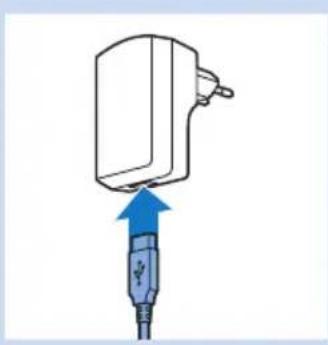
Illustration of a blue USB plug with a circular connector, connected to wires (no text or symbols)1 Insert the standard USB plug into the socket of the adapter.
2 Insert the adapter into a wall socket (100V-240V).
3 Insert the micro USB plug into the socket on the BlueTouch Pain Relief Patch.
Caution: Only use this micro-USB socket to connect the BlueTouch Pain Relief Patch to the mains for charging. Do not connect any other cable with a micro-USB plug to this socket.
When you connect the BlueTouch Pain Relief Patch to the mains, it beeps once to indicate that charging starts. The charging light on the connection panel flashes green slowly and regularly during charging.
4 When the battery is fully charged, the charging light turns solid green.
5 Remove the adapter from the wall socket and pull the USB plug out of the micro USB socket of the BlueTouch Pain Relief Patch.
Using the device
Positioning the device
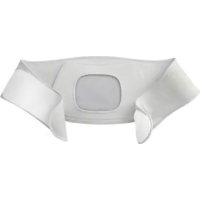
You position the BlueTouch Pain Relief Patch on your body with one of the straps supplied with the device. There is a special strap for treatment of the upper back and a special strap for treatment of the lower back.
Note: Do not wear multiple layers of clothing or tight or thick clothing over the BlueTouch Pain Relief Patch.

natural_image
Diagram of a device with a blue mesh pad and dotted pattern inside, enclosed in a dashed rectangular frame (no text or symbols)
natural_image
Diagram of a drain with a blue arrow indicating flow or direction, no text or symbols present
natural_image
Illustration of a human torso with a blue arrow pointing to the back area, no text or symbols present
natural_image
Human body diagram showing a person's abdomen with arrows indicating movement or pressure points (no text or symbols)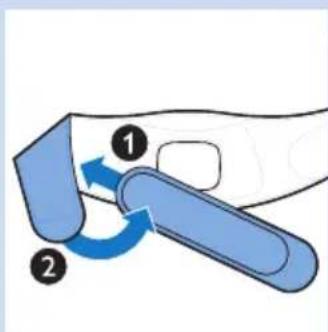
Positioning the lower back strap
To place the BlueTouch Pain Relief Patch in the lower back strap, follow the steps below.
1 Place the lower back strap and the BlueTouch Pain Relief Patch in front of you on a table. Slide the left side of the BlueTouch Pain Relief Patch behind the elastic edge of the opening in the strap.
2 Then slide the other end of the BlueTouch Pain Relief Patch behind the opposite elastic edge of the opening so that the whole patch is inside the lower back strap. Check to make sure that material of the strap does not cover the LEDs. If necessary, shift the BlueTouch Pain Relief Patch a little.
3 Remove clothing from the area to be treated.
Note: Make sure the skin in the area to be treated is clean, entirely dry and free from creams, lotions and other cosmetics.
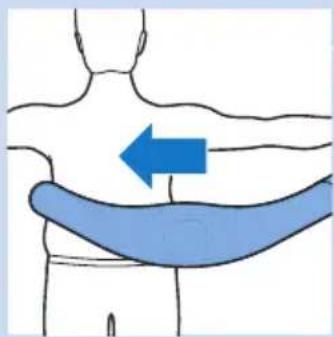
4 Wrap the lower back strap with the BlueTouch Pain Relief Patch in it around your waist with the treatment area of the device facing your back.
5 Fasten the lower back strap with the Velcro strips on both ends of the lower back strap.
Note: Make sure the BlueTouch Pain Relief Patch in the strap is located on the area to be treated and the treatment area is in contact with the skin.
6 If the lower back strap does not fit around your body, you can do the following.
1 Attach the extension strap to the Velcro strip on one end of the lower back strip.
natural_image
Illustration of a human torso with a blue arrow pointing to the back area (no text or symbols)
natural_image
Illustration of a human torso with two blue arrows indicating movement or pressure points (no text or symbols)
natural_image
Illustration of a person performing a shoulder press exercise with a blue arrow indicating direction (no text or symbols)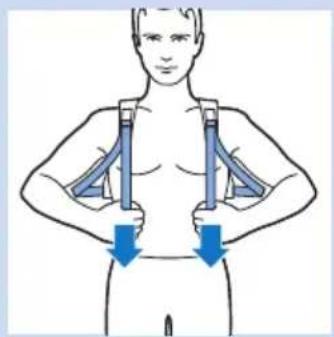
natural_image
Illustration of a human torso with two blue arrows indicating downward pressure or movement (no text or symbols)
2 Then wrap the extended lower back strip around your body.
3 Fasten the lower back strap with the Velcro strip at a width that feels comfortable.
Positioning the upper back strap
1 To put the BlueTouch Pain Relief Patch in the upper back strap, follow the same procedure as described in steps 1 and 2 in section 'Positioning the lower back strap' above.
2 Remove clothing from the area to be treated.
Note: Make sure the skin in the area to be treated is clean, entirely dry and free from creams, lotions and other cosmetics.
3 Put on the upper back strap like a backpack. First, put one arm through the shoulder sling on one side. Then do the same on the other side.
Note: Make sure the BlueTouch Pain Relief Patch in the strap is located on the area to be treated and the LED area is in contact with the skin.
4 Tighten the shoulder slings by pulling the elastic straps.
Starting and stopping treatment
The BlueTouch Pain Relief Patch has three modes and an 'off' setting (see chapter 'Treatment schedule and treatment modes'). Press the mode button one or more times to select one of the three treatment modes. When you press the mode button a fourth time, you switch off the BlueTouch Pain Relief Patch.
1 Mode 1 (low): press once
2 Mode 2 (medium): press twice
3 Mode 3 (high): press three times
4 O (off): press four times
Note: If you want to switch from mode 3 to mode 1 or 2 or from mode 2 to mode 1, you have to press the mode button as many times as required to reach the mode you want to select.

natural_image
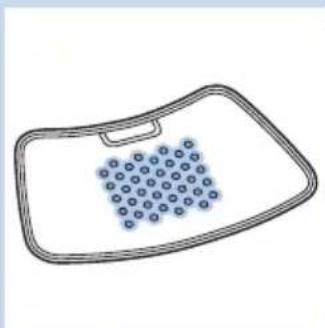
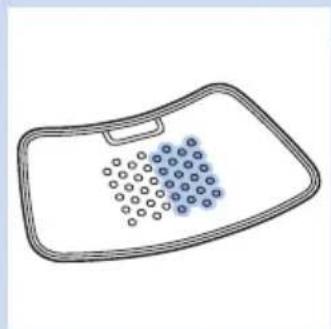
Simple line drawing of a rectangular tray with a perforated interior and blue circular indentations (no text or symbols)In mode 1 (low), four rows of LEDs light up in power-save mode. The BlueTouch Pain Relief Patch beeps once.
Note: After 10 seconds the light intensity slowly increases from power-save mode to the intensity of the mode selected. Put the BlueTouch Pain Relief Patch on the treatment area within these 10 seconds.

natural_image
Simple line drawing of a medical or anatomical device with a grid pattern on the surface (no text or symbols)In mode 2 (medium), six rows of LEDs light up in power-save mode. The BlueTouch Pain Relief Patch beeps twice.

natural_image
Simple line drawing of a bathtub with a circular grid pattern on the interior (no text or symbols)In mode 3 (high), all LEDs light up in power-save mode. The BlueTouch Pain Relief Patch beeps three times.
When the light intensity starts to increase, you hear a dual tone from low to high.
The BlueTouch Pain Relief Patch automatically switches off after the treatment time of the selected mode has elapsed. You hear a triple tone from high to low to indicate that the device has switched off.
Note: If you want to switch to another mode during treatment, for instance because you experience the current intensity as unpleasant, press the mode button one or more times to select another mode. The timer automatically recalculates the remaining treatment time based on the new mode.

Note: If you want to switch off the device before the treatment time has elapsed, press the mode button one or more times until the LEDs switch off and you hear a triple tone from high to low.
After treatment
1 Loosen the strap and remove it from your back.
2 Recharge the BlueTouch Pain Relief Patch if the charging light is solid orange (see chapter 'Charging the device'). Remove the BlueTouch Pain Relief Patch from the strap before you start to recharge it.
Cleaning
Do not immerse the BlueTouch Pain Relief Patch in water or rinse it under the tap.
Always remove the BlueTouch Pain Relief Patch from the strap before you put the strap in the washing machine to clean it.
natural_image
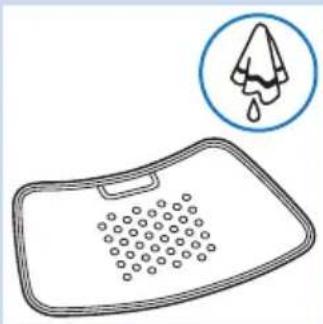
Simple line drawing of a showerhead with a drop icon above it (no text or symbols)1 Clean the BlueTouch Pain Relief Patch with a damp cloth after use.
natural_image
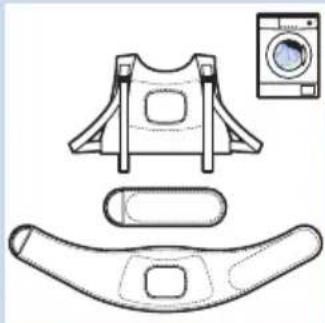
Technical line drawing of a seatbelt device with a washing machine shown alongside (no text or symbols)2 You can wash the BlueTouch Pain Relief straps in the washing machine when they are dirty.
Caution: To prevent damage to the BlueTouch Pain Relief straps and other clothes in the washing machine, wash the straps in a fine-mesh washing bag.

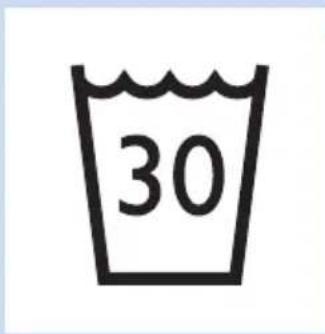
Note: Use a gentle cycle and a temperature of 30^ C maximum. Dry the BlueTouch Pain Relief straps on the air and not in the tumble dryer. Do not iron the straps.
Troubleshooting
This chapter summarises the most common problems you could encounter with the BlueTouch Pain Relief Patch. If you are unable to solve the problem with the information below, contact Philips.
Problem Possible cause Solution
| The BlueTouch Pain Relief Patch suddenly switches off during treatment. | The pre-set treatment time has elapsed. | The BlueTouch Pain Relief Patch is programmed to switch off automatically after the treatment time in the selected treatment mode has elapsed. Just before it switches off you hear a triple tone (high to low). |
| The BlueTouch Pain Relief Patch does not appear to work for me, for I notice no effect. | It may take two weeks before the effects become noticeable. | Be patient and allow more time for the effects to become noticeable. |
Problem Possible cause Solution
| The BlueTouch Pain Relief Patch switches to a lower intensity. | The temperature of the device is too high. | Remove the BlueTouch Pain Relief Patch from your body, switch it off and let it cool down. Make sure that you do not wear too many or too thick clothes over the BlueTouch Pain Relief Patch during treatment. |
| The charging light turns solid red for 8 seconds and the BlueTouch Pain Relief Patch switches off. | The rechargeable battery is empty. | Charge the BlueTouch Pain Relief Patch (see chapter ‘Charging the device’). |
| The charging light is solid orange. | The battery is low and does not contain enough energy for one treatment. | Charge the BlueTouch Pain Relief Patch (see chapter ‘Charging’ the device). |
| The adapter becomes warm during charging. | This is normal. No action required. | |
| A piece of medical equipment malfunctions when the device is switched on or during operation. | The device is too close to the medical equipment. | Do not use the device near medical equipment. |
| The charging light does not start flashing green when I insert the micro USB plug into the micro USB socket on the connection panel. | You have not inserted the adapter or have not inserted it properly into the wall socket. | Insert the adapter into the wall socket properly. |
| You have not inserted the standard USB plug or have not inserted it properly into the adapter. | Insert the standard USB plug into the adapter properly. | |
| The wall socket into which you have inserted the adapter is not live. | Connect another appliance to the same socket to check if the socket is live. If the wall socket is live, but the BlueTouch Pain Relief Patch does not charge, contact Philips. | |
| An error occurred during charging. | Press the button on the BlueTouch Pain Relief Patch to restart charging. | |
| The adapter is connected to the BlueTouch Pain Relief Patch and the charging light is not solid or flashing green. | An error occurred during charging. | Press the button on the BlueTouch Pain Relief Patch to restart charging. |
| The BlueTouch Pain Relief Patch becomes warm during use. | This is normal. No action required. | |
Signals on the device
Sound signals during treatment

natural_image
Illustration of a blue plug with a USB symbol inserted into it, connected to wires (no text or symbols present)- A dual tone (low to high) sounds when the treatment starts and the intensity increases from power-save mode to the intensity of the mode selected.
- A triple tone (high to low) sounds when the treatment ends.
Battery level signals
- The charging light is solid green when the battery contains enough energy for at least one treatment.
- The charging light flashes green slowly and regularly during charging.
- The charging light is solid orange when the battery is low and does not contain enough energy for one treatment.
- The charging light turns solid red for 8 seconds and the device switches off when the battery is empty.
Ordering accessories
To buy accessories or spare parts, visit www.shop.philips.com/service or go to your Philips dealer. You can also contact the Philips Consumer Care Centre in your country. The type number of this device is PR3730.
Spare straps
- Lower back straps are available under type number PR3723.
- Upper back straps are available under type number PR3721.
Guarantee and support
Your device has been designed and developed with the greatest possible care to guarantee an expected service life of 5 years. If you need service or information or if you have a problem, please visit our website at www.philips.com/support or contact the Philips Consumer Care Centre. Its telephone number is:
- Denmark: 35 44 41 30 (Monday to Friday 09:00 - 18:00)
- Finland: 09 88 62 50 41 (Monday - Friday 09:00 - 18:00)
- Norway: 22 97 19 50 (Monday to Friday 09:00 - 18:00)
- Portugal: 800 780 903 (free of charge, Monday - Friday: 09:00 - 18:00)
- Spain: 91 349 65 80 (Monday - Friday: 08:00 - 20:00; Saturday: 09:00 - 18:00)
- Sweden: 08-5792 9067 (Monday to Friday 09:00 - 18:00)
- United Kingdom: 0844 338 04 89 (5p/min. from a BT landline, other landline and mobile providers may charge more).
Guarantee restrictions
The guarantee does not cover the straps and standard wear and tear. The guarantee becomes invalid if you do not use the BlueTouch Pain Relief Patch according to the instructions in this user manual.
Manufacturer's legal address
Philips Consumer Lifestyle B.V.
Tussendiepen 4, 9206 AD Drachten, Netherlands
Recycling

natural_image
Symbol of a waste bin with crossed lines indicating no waste, and a solid black rectangle below (no text or labels)- This symbol means that this product shall not be disposed of with normal household waste (2012/19/EU).
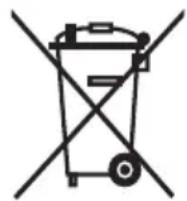
- This symbol means that this product contains a built-in rechargeable battery which shall not be disposed of with normal household waste (2006/66/EC). Follow the instructions in section 'Removing the rechargeable battery' to remove the battery.
- Follow your country's rules for the separate collection of electrical and electronic products and rechargeable batteries. Correct disposal helps prevent negative consequences for the environment and human health.
Removing the rechargeable battery
Note: Always remove the rechargeable battery before you hand in the device at an official collection point. If you have trouble removing the battery, you can also take the device to a Philips service centre, which will remove the battery for you and will dispose of it in an environmentally safe way.
1 Make sure the rechargeable battery is empty. Switch on the device and leave it on until the charging light turns solid red and the device switches off automatically. You may have to repeat this procedure several times until it is no longer possible to switch on the device.
2 Use a screwdriver to separate the upper part of the device from the lower part.
3 Remove the battery. Dispose of the plastic parts and the battery separately according to local rules
Specifications
Model PR3730
| Rated voltage 100-240V | |
| Rated frequency 50-60 Hz | |
| Rated input 15 W | |
| Class Medical device Class IIa | |
| Classification Risk Group 1 (according to IEC60601-2-57) | |
| Ingress of water IP22 | |
| Max. daily dose | < 108.5 J/cm2 if treatment schedule is followed |
| Nominal wavelength | 453 nm |
| Maximum radiant power | 1.44 W (nominal for program 3) |
Model PR3730
| Average irradiance 21.2 mW/cm2 | |
| Maximum temperature (average user) during treatment | Program 1: 40°C |
| Program 2: 41°C | |
| Program 3: 42°C | |
| Maximum temperature (all users) during treatment | Program 1: 45°C |
| Program 2: 46°C | |
| Program 3: 47°C | |
| Peak/average irradiance ratio 2.3 | |
| Battery type Li-lon | |
| Adapter The adapter is specified as part of the | medical system. |
Operation conditions
| Temperature from +5°C to +35°C |
| Relative humidity from 15% to 93% |
| Atmospheric pressure from 700 hPa to 1060 hPa |
Storage conditions
| Temperature from -20°C to +50°C |
| Relative humidity up to 93% (non condensing) |
Explanation of symbols

0344
- This symbol means: Conforms to EC Directives. CE stands for 'Conformité Européenne'. 0344 indicates the notified body number.
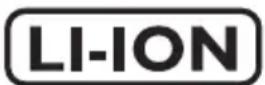
- This symbol means that the device uses LI-ION rechargeable batteries.
IP22

natural_image
Simple black-and-white pictogram of a human figure inside a square frame (no text or symbols)
natural_image
Warning symbol with a black triangle containing a sunburst and radiating lines (no text or numbers)
natural_image
Simple icon of an open book with a lowercase 'i' inside, no text or symbols present.
- This symbol means: protected against access to hazardous parts with a finger and against vertically falling water drops when tilted up to 15 degrees.
- This symbol means that an applied part that includes a patient connection intended to deliver electrical energy or an electrophysiological signal to or from the patient must be Type BF (Body Floating) applied, according to IEC 60601-1. The applied part is the device not including the charger.
- This symbol means: Do not stare at the light source. Risk Group 1 product.
- This symbol means: read the user manual before you start using the device.
- This is the symbol for serial number. This symbol is followed by the manufacturer's serial number.

natural_image
Prohibition sign of a faucet crossed out, no text or symbols present- This symbol means: Do not clean under a running tap.
natural_image
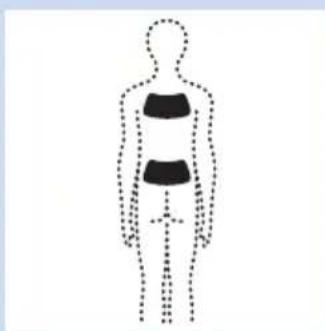
Silhouette of a human figure with dotted outline and internal black-and-white segments (no text or symbols)- This symbol indicates the areas where you may position the BlueTouch Pain Relief Patch.
natural_image
Silhouette of a factory chimney with smokestacks (no text or symbols)- This symbol means 'Manufactured by' and appears next to the address of the legal manufacturer.
natural_image
Symbol of a trash bin with crossed lines indicating no waste or discharge, and a solid black rectangle below (no text or labels)- This symbol means: Do not throw away with the normal household waste.
natural_image
Simple geometric diagram of two concentric squares (no text or symbols)- This symbol indicates that the adapter is double insulated (Class II), according to IEC 60601-1.

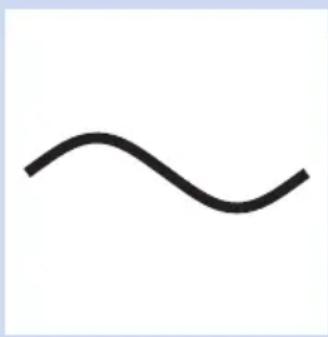
- This symbol means: alternating current.
- This symbol means: direct current.
- This symbol means: Conforms to EC Directives. CE stands for 'Conformité Européenne'.
- This symbol means: may only be used indoors.
- This symbol means: USB connector.

- This symbol means: micro-USB connector.

- This symbol shows that the no-load power CEC (California Energy Commission) Efficiency Level is V (five) in order to meet EU requirements.

- This symbol means that the package and its contents can be stored at temperatures between -20^ and +50^ .

- This symbol means that the 2-year worldwide guarantee applies to this device.
natural_image
Abstract black and white circular arrow symbol with no text or labels- This symbol refers to the Green Dot scheme, which is covered under the European Packaging and Packaging Waste Directive (94/62/EC). Under this scheme, industry has to pay for recycling the packaging materials of consumer goods

- This symbol means: Wash at a temperature of 30^ C max.
- This symbol means: Do not bleach.
- This symbol means: Do not tumble-dry.
- This symbol means: Do not iron.
- This symbol means: do not dry clean.

- This symbol means that the material has been tested for harmful substances according to Oeko-Tex ^® standard 100.

natural_image
Silhouette of a human figure with dotted outline, no text or symbols present- This symbol means that you have to use this strap on the upper back.
natural_image
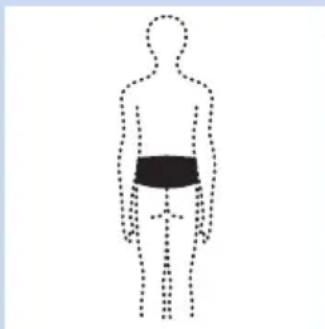
Simple line drawing of a human silhouette with a black band on the lower body, no text or symbols present.- This symbol means that you have to use this strap on the lower back.

- This symbol indicates the manufacturer's batch code so that the batch or lot can be identified.
natural_image
Simple line drawing of a recycling symbol with three chasing arrows (no text or labels)- This symbol means that the packaging material is recyclable.
Indholdsfortegnelse
Introduktion 27
Beregnet anvendelse 27
Kontraindikationer, reaktioner og bivirkninger 28
Kontraindikationer 28
natural_image
Diagram of a plug inserted into a device with a blue arrow indicating upward motion (no text or symbols)natural_image
Illustration of a blue electrical plug connected to a wall-mounted socket (no text or symbols)1 Sæt standard-USB-stikket i adapterens stik.
2 Sæt adapteren i en stikkontakt (100-240 V).
3 Sæt mikro-USB-stikket i tilslutningsstikket i BlueTouch-smertelindringsenheden.
natural_image
Illustration of a blue USB plug inserted into an electrical socket with musical notes and stars (no text or symbols)natural_image
Illustration of a blue USB plug inserted into a socket, with no text or symbols present.natural_image
Diagram of a device with a blue internal component and dotted pattern inside, enclosed in a dashed rectangular frame (no text or symbols)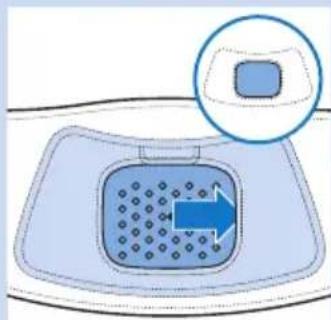
natural_image
Diagram of a drain drain with a blue arrow indicating flow direction, no text or symbols present
natural_image
Illustration of a human torso with a blue arrow pointing to the back area, no text or symbols present
natural_image
Human body diagram showing a highlighted abdominal area with two blue arrows indicating direction (no text or labels)
natural_image
Illustration of a human torso with a blue arrow pointing to the back area (no text or symbols)
natural_image
Illustration of a human torso with blue arrows indicating muscle or pressure direction (no text or symbols)
natural_image
Illustration of a person performing a shoulder press or bandage exercise with a blue arrow indicating direction (no text or symbols present)
natural_image
Illustration of a person with two blue arrows indicating downward pressure or movement on the abdomen (no text or symbols present)
natural_image
Simple line drawing of a bathtub with blue circular indentations on the interior (no text or symbols)natural_image
Simple line drawing of a medical or laboratory device with a tray and circular pattern (no text or symbols)natural_image
Simple line drawing of a rectangular basin with circular indentations inside (no text or symbols)I indstilling 3 (høj) lyser alle lysdioder i energibesparende tilstand. BlueTouch-smertelindringsenheden bipper tre gange.
natural_image
Line drawing of a rectangular kitchen sink with circular indentations and a droplet symbol in the circle (no text or labels)Kom aldrig BlueTouch-smertelindringsenheden ned i vand, og skyl den under vandhanen.
natural_image
Line drawing of a washing machine component with seat, belt, and washer (no text or symbols)natural_image
Illustration of a blue USB plug inserted into a cable socket (no text or symbols)Signaler for batterikapacitet
natural_image
Symbol of a trash bin with crossed lines indicating no waste or restriction, and a solid black rectangle below (no text or symbols)natural_image
Simple black-and-white pictogram of a human figure inside a square frame (no text or symbols)natural_image
Warning symbol with a black triangle containing a sunburst and radiating lines (no text or numbers)natural_image
Icon of an open book with a lowercase 'i' in the center, representing information (no text or symbols beyond the icon itself)natural_image
Prohibition sign showing a faucet crossed out by a diagonal line, indicating no pollution or leakage (no text present)natural_image
Abstract black-and-white graphic of a factory chimney (no text or symbols)natural_image
Symbol of a trash bin crossed with no text or numbers, accompanied by a black prohibition sign below (no text present)natural_image
Simple geometric diagram of two concentric squares (no text or symbols)- Dette symbol angiver, at adapteren er dobbeltisoleret (Klasse II) iht. IEC 60601-1.
natural_image
Simple wavy line drawing with no text or symbols- Dette symbol betyder: Vekselstrøm.

natural_image
Simple black horizontal lines on white background (no text or symbols)natural_image
Simple line drawing of a house with chimney and roof (no text or symbols)natural_image
Simple black arrow symbol pointing upward and downward, with no text or labels- Dette symbol betyder: USB-stik.

- Dette symbol betyder: mikro-USB-stik.

- Dette symbol viser, at strømeffektivitetsniveauet uden belastning er V (fem) iht. CEC (den californiske energikommission) for at opfylde EU-kravene.

natural_image
Abstract black and white circular arrow symbol (no text or symbols)natural_image
Symbol of a pentagram with two crossed lines crossing at the base (no text or labels)natural_image
Pure geometric symbol with crossed lines inside a square (no text or numbers)natural_image
Pure electrical circuit symbol for an antenna (no text or labels)natural_image
Symbol of crossed-out circle with diagonal lines, representing prohibition or exclusion (no text or numbers present)natural_image
Silhouette of a human figure with dotted outline, no text or symbols presentnatural_image
Silhouette of a human figure with a black bandage on the chest, no text or symbols presentnatural_image
Simple line drawing of a recycling symbol with three chasing arrows (no text or labels)natural_image
Diagram of a plug inserted into a device with a blue arrow indicating direction (no text or symbols)
natural_image
Illustration of a blue electrical plug connected to a wall-mounted socket (no text or symbols)natural_image
Illustration of a blue USB plug connecting a socket with a musical note and starburst effect (no text or symbols)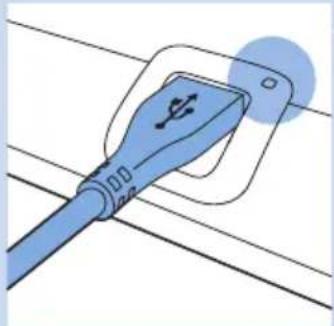
natural_image
Illustration of a blue cable with a USB symbol inserted into its socket, connected to wires (no text or symbols present)natural_image
Diagram of a device with internal components and directional arrow (no text or symbols)
natural_image
Diagram of a drain with a blue arrow indicating flow direction, no text or symbols presentnatural_image
Illustration of a human torso with a blue arrow pointing to the back area, no text or symbols presentnatural_image
Human body diagram showing a highlighted abdominal area with directional arrows indicating movement or pressure (no text or symbols)natural_image
Illustration of a human torso with a blue arrow pointing to the back area (no text or symbols)natural_image
Illustration of a human torso with blue arrows indicating muscle or pressure points on the chest (no text or symbols)natural_image
Illustration of a person performing a shoulder press or bandage device (no text or symbols present)
natural_image
Illustration of a human torso with two blue arrows indicating downward pressure or movement (no text or symbols)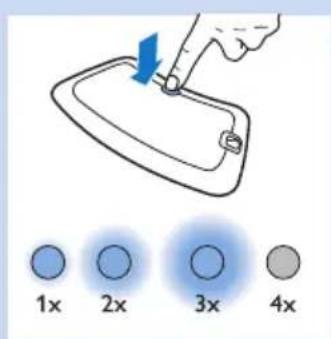

natural_image
Simple line drawing of a bathtub with blue circular indentations on the interior (no text or symbols)natural_image
Simple line drawing of a bathtub with a perforated seat and handle (no text or symbols)natural_image
Simple line drawing of a rectangular tray with a circular pattern on the interior (no text or symbols)natural_image
Simple line drawing of a cleaning board with a droplet symbol above it (no text or labels)natural_image
Technical line drawing of a bicycle seat assembly with front, side, and back views (no text or symbols)
natural_image
Illustration of a blue plug with a USB symbol inserted, connected to wires (no text or symbols present)natural_image
Symbol of a trash bin crossed with a diagonal line, representing no waste or elimination (no text or numbers present)natural_image
Simple black-and-white pictogram of a human figure inside a square frame (no text or symbols)
natural_image
Warning symbol with a triangle and sunburst design (no text)
natural_image
Icon of an open book with a lowercase 'i' inside, representing information (no text or symbols beyond the icon)natural_image
No sign depicting a faucet with a diagonal line and a diagonal slash, indicating no pollution or water release.natural_image
Silhouette of a human figure with dotted outline and internal black bands (no text or symbols)natural_image
Abstract black silhouette of a factory or industrial plant with triangular peaks and a tall chimney (no text or symbols)natural_image
Symbol of a trash bin crossed with a diagonal line, no text or numbers presentnatural_image
Simple black arrow symbol pointing upward and to the right, with no text or labels- Este símbolo significa: conector USB.

- Este símbolo significa: conector micro USB.

natural_image
Abstract black and white circular arrow symbol (no text or symbols)natural_image
Symbol of a pentagram crossing into two triangles (no text or labels)natural_image
Symbol of crossed-out electrical circuit lines without any text or labelsnatural_image
Pure electrical circuit lines without any symbols- Este símbolo significa: no planchar

natural_image
Symbol of crossed-out circle with diagonal lines, representing prohibition or exclusion (no text or numbers present)natural_image
Silhouette of a human figure with dotted outline, no text or symbols presentnatural_image
Silhouette of a human figure with a black bandage on the chest, no text or symbols presentnatural_image
Simple line drawing of a recycling symbol with three chasing arrows (no text or labels)natural_image
Diagram of a plug inserted into a device with a blue arrow indicating upward motion (no text or symbols)natural_image
Illustration of a blue electrical plug connected to a wall-mounted socket (no text or symbols)natural_image
Illustration of a blue USB plug inserted into an electrical socket with musical notes and starburst effects (no text or symbols)natural_image
Illustration of a blue cable with a plug inserted into a socket, connected to wires (no text or symbols)natural_image
Illustration of a human torso with a blue arrow pointing to the back area (no text or symbols)
natural_image
Illustration of a human torso with two blue arrows indicating movement or pressure points (no text or symbols)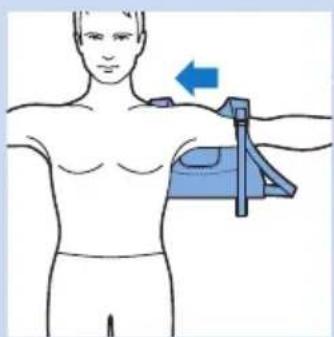
natural_image
Illustration of a person receiving a shoulder massage device with a blue arrow indicating direction (no text or symbols)
natural_image
Illustration of a human torso with two blue arrows indicating downward pressure or movement (no text or symbols)
natural_image
Simple line drawing of a rectangular basin with circular indentations and a handle (no text or symbols)natural_image
Simple line drawing of a bathtub with a grid-patterned interior (no text or symbols)natural_image
Simple line drawing of a bathtub with a circular pattern on the interior (no text or symbols)natural_image
Line drawing of a showerhead with circular inset showing a drop (no text or symbols)
natural_image
Technical line drawing of a seatbelt device with front panel, side panel, and washing machine (no text or symbols)
natural_image
Illustration of a blue USB plug with a connector, mounted on a wire (no text or symbols)natural_image
Symbol of a trash bin crossed with a diagonal line, representing no waste or elimination (no text or numbers present)natural_image
Simple black-and-white pictogram of a human figure inside a square frame (no text or symbols)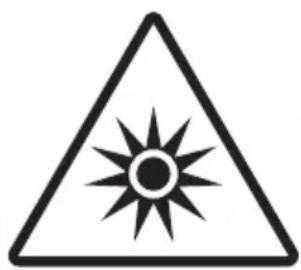
natural_image
Warning symbol with a black triangle and sunburst pattern (no text)natural_image
Icon of an open book with a lowercase 'i' in the center, representing information (no text or symbols beyond the icon itself)
natural_image
Prohibition sign of a faucet crossed out, no text or symbols presentnatural_image
Silhouette of a human figure with dotted outline indicating body segments (no text or symbols)natural_image
Abstract black silhouette of a factory or industrial plant with triangular peaks and a tall chimney (no text or symbols)natural_image
Symbol of a trash bin crossed with no text or numbers, representing waste sorting or disposal (no text present)natural_image
Abstract black and white circular arrow symbol (no text or symbols)natural_image
Symbol of a star with two crossed lines forming an angle (no text or labels)- Ei valkaisua

natural_image
Symbol of crossed-out electrical circuit lines without any text or labels- Ei rumpukuivausta

natural_image
Pure electrical circuit lines without any symbols- Ei silitystä
natural_image
Symbol of crossed-out circle with diagonal lines, representing prohibition or exclusion (no text or numbers present)- Ei kuivapesua

natural_image
Silhouette of a human figure with dotted outline, no text or symbols presentnatural_image
Silhouette of a human figure with a black bandage on the chest, shown in dotted outline (no text or symbols)natural_image
Simple line drawing of a recycling symbol with three chasing arrows (no text or labels)www.philips.com/pain-relief/register.
natural_image
Diagram of a device with a blue arrow pointing to it, showing a plug inserted into a housing (no text or symbols present)1 Sett den standardiserte USB-pluggen inn i kontakten på adapteren.
natural_image
Illustration of a blue electrical plug connected to two wall-mounted electrical outlets (no text or symbols)natural_image
Illustration of a blue USB plug inserted into an electrical socket with musical notes and starburst effects (no text or symbols)natural_image
Illustration of a blue USB plug inserted into a socket, with no text or symbols present.natural_image
Diagram of a device inside a container with a blue arrow indicating direction (no text or symbols)natural_image
Diagram of a drain drain with a blue arrow indicating flow direction, no text or symbols presentnatural_image
Illustration of a human torso with a blue arrow pointing to the back area, no text or symbols presentnatural_image
Human body diagram showing a highlighted abdominal area with two blue arrows indicating direction (no text or symbols)
natural_image
Illustration of a hand holding a blue object with two arrows indicating motion (no text or symbols)
natural_image
Illustration of a human torso with a blue arrow pointing to the back area (no text or symbols)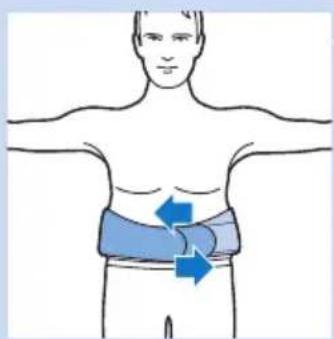
natural_image
Illustration of a human torso with blue arrows indicating movement or pressure points (no text or symbols)
natural_image
Illustration of a person holding a medical device with an arrow indicating force direction (no text or symbols)natural_image
Illustration of a person wearing a full-body medical harness with blue arrows indicating pressure or movement (no text or symbols)natural_image
Simple line drawing of a rectangular basin with circular indentations and a handle (no text or symbols)natural_image
Simple line drawing of a bathtub with blue circular indentations on the interior (no text or symbols)I modus 2 (medium) vil seks rader med LED-lamper tennes i strømsparingsmodus. BlueTouch smertelindringsplaster vil pipe to ganger.
natural_image
Simple line drawing of a rectangular basin with circular indentations on the interior (no text or symbols)natural_image
Simple line drawing of a showerhead with circular inset showing a drop (no text or symbols)Ikke legg BlueTouch-smertelindringsplasteret i vann eller skyll det under springen.
Ta alltid BlueTouch-smertelindringsplasteret ut av plasterbandasjen før du vasker bandasjen i vaskemaskinen.
natural_image
Technical line drawing of a seatbelt device with a washing machine shown in the background (no text or symbols)2 Du kan vaske BlueTouch-plasterbandasjene for smertelindring i vaskemaskinen när de er skitne.
natural_image
Illustration of a blue USB plug with a connector, mounted on a wire (no text or symbols)Batterinivåsignaler
- Ladelampen lyser jevnt grønt när batteriet har nok strøm til minst én behandling.
- Ladelampen blinker grønt sakte og regelmessig under lading.
- Ladelampen lyser jevnt oransje når batterinivået er lavt og batteriet ikke har nok strøm til en behandling.
- Ladelampen lyser jevnt rødt i åtte sekunder, og enheten slås av när batteriet er tomt.
Bestille tilbehør
natural_image
Symbol of a trash bin crossed with no text or numbers, representing waste sorting or disposal (no text present)natural_image
Simple black silhouette of a human figure inside a square frame (no text or symbols)natural_image
Warning symbol with a triangle and sunburst design (no text or numbers)natural_image
Icon of an open book with an information symbol inside, no text or labels presentnatural_image
Prohibition sign of a faucet crossed out, no text or symbols presentnatural_image
Silhouette of a human figure with dotted outline indicating posture (no text or symbols)- Dette symbolet indikerer områder der du kan plassere BlueTouchsmertelindringsplasteret.

natural_image
Abstract black and white circular arrow symbol (no text or labels)- Dette symbolet henviser til Grønt Punkt-ordningen til det europeiske emballasje- og emballasjeavfallsdirektivet (94/62/EF). Ordningen sørger for at industrien må betale for resirkulering av emballasje brukt til forbrukervarer
- Dette symbolet betyr: Vasketemperatur maks 30 °C.

natural_image
Simple geometric symbol of a pentagram with two crossed lines (no text or labels)natural_image
Symbol of crossed-out electrical circuit lines without any text or labelsnatural_image
Pure electrical circuit lines without any symbols- Dette symbolet betyr: Må ikke strykes.

natural_image
Symbol of crossed-out circle with diagonal lines, representing prohibition or exclusion (no text or numbers present)natural_image
Silhouette of a human figure with dotted outline, no text or symbols presentnatural_image
Silhouette of a human figure with a black bandage on the chest, shown in dashed lines (no text or symbols)natural_image
Simple line drawing of a recycling symbol (three chasing arrows) with no text or labels- Dette symbolet betyr at emballasjen kan resirkuleres.
Índice
Introdução 116
natural_image
Diagram of a device with a blue arrow pointing to it, showing a plug inserted into a housing (no text or symbols present)natural_image
Illustration of a blue electrical plug connected to a wall-mounted socket (no text or symbols)1 Introduza a ficha USB padrão na tomada do transformador.
2 Insira o transformador numa tomada eléctrica (100 V-240 V).
3 Insira a ficha micro USB na tomada do BlueTouch Pain Relief Patch.
natural_image
Illustration of a blue plug inserted into a socket with musical notes and stars nearby (no text or symbols)natural_image
Illustration of a blue USB plug inserted into a socket, with no text or symbols present.natural_image
Diagram of a device with a blue arrow pointing to a grid pattern inside a rectangular frame (no text or symbols)natural_image
Diagram of a device with a blue arrow pointing to a grid pattern, enclosed in an inset circle (no text or symbols)
natural_image
Diagram of a human torso with a blue arrow pointing to the back area, showing anatomical contours (no text or symbols)
natural_image
Human torso diagram showing a blue bandage with arrows indicating movement or pressure points (no text or symbols)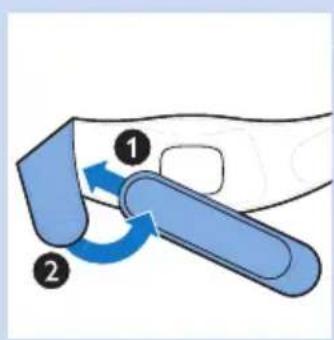
natural_image
Illustration of a hand holding a blue tool with two numbered arrows indicating motion (no text or symbols)
natural_image
Human body diagram showing a blue arrow pointing left to the back area (no text or symbols)
natural_image
Illustration of a human torso with two blue arrows indicating muscle or pressure points on the chest (no text or symbols)
natural_image
Illustration of a person with a blue bandage device attached to the chest, showing a blue arrow indicating direction (no text or symbols present)natural_image
Illustration of a human torso with two blue arrows indicating downward pressure or movement (no text or symbols)natural_image
Simple line drawing of a rectangular basin with circular indentations and a handle (no text or symbols)natural_image
Line drawing of a bathtub with circular indentations on the interior (no text or symbols)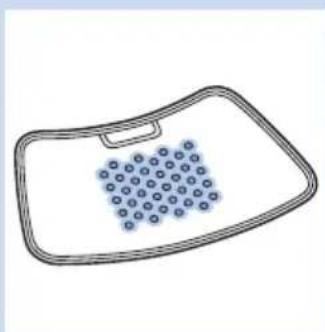
natural_image
Simple line drawing of a rectangular basin with circular indentations on the interior (no text or symbols)natural_image
Line drawing of a kitchen sink with a drop icon (no text or symbols)natural_image
Technical line drawing of a garment with front, side, and back views (no text or symbols)natural_image
Illustration of a blue USB plug with a connector, mounted on a wire (no text or symbols)Encomendar acessórios
natural_image
Symbol of a waste bin with crossed lines indicating no waste or restriction, and a solid black rectangle below (no text or symbols)natural_image
Simple black-and-white pictogram of a human figure inside a square frame (no text or symbols)natural_image
Warning symbol with a triangle and sunburst design (no text)natural_image
Icon of an open book with an information symbol inside, no text or labels presentnatural_image
Prohibition sign of a faucet crossed out, no text or symbols presentnatural_image
Human silhouette diagram with dotted outline indicating body posture (no text or symbols)natural_image
Silhouette of an industrial building with mountain-like structures (no text or symbols)natural_image
Abstract black and white circular arrow symbol (no text or labels)natural_image
Symbol of a star with two crossed lines forming an angle (no text or labels)natural_image
Symbol of crossed-out electrical circuit lines without any text or labelsnatural_image
Pure electrical circuit lines without any symbolsnatural_image
Symbol of crossed-out circle with diagonal lines, representing prohibition or exclusion (no text or numbers present)natural_image
Silhouette of a human figure with dotted outline, no text or symbols presentnatural_image
Silhouette of a human figure with a black bandage on the chest, no text or symbols presentnatural_image
Simple line drawing of a recycling symbol with three chasing arrows (no text or labels)natural_image
Diagram of a device with a blue upward arrow pointing to it, no text or symbols present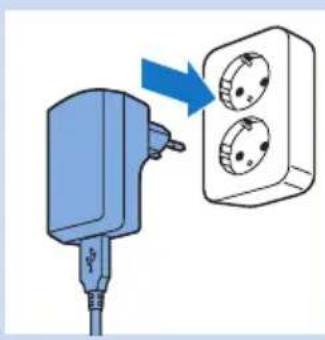
natural_image
Illustration of a blue electrical plug connected to a wall-mounted socket (no text or symbols)natural_image
Illustration of a blue USB plug inserted into an electrical socket with musical notes and starburst effects (no text or symbols)natural_image
Illustration of a blue USB plug with a circular connector, connected to wires (no text or symbols)natural_image
Diagram of a medical device with a blue internal component and dotted pattern, enclosed in a dashed outline (no text or symbols)
natural_image
Diagram of a drain with a blue arrow indicating flow or movement, no text or symbols present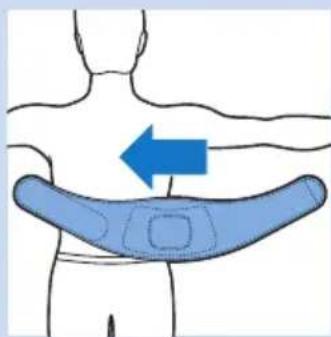
natural_image
Illustration of a human torso with a blue arrow pointing to the back area, no text or symbols present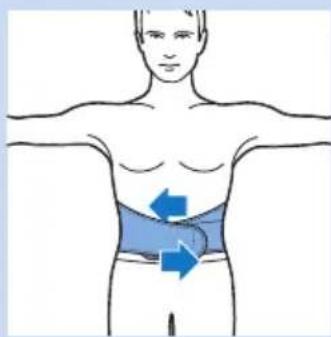
natural_image
Human body diagram showing a highlighted abdominal area with directional arrows indicating movement or pressure (no text or symbols)

natural_image
Illustration of a human torso with a blue arrow pointing to the back area (no text or symbols)natural_image
Illustration of a human torso with arms and a blue directional arrows indicating movement or pressure (no text or symbols)
natural_image
Illustration of a person performing a shoulder press exercise with a blue arrow indicating direction (no text or symbols)
natural_image
Illustration of a human torso with two blue arrows indicating downward pressure or movement (no text or symbols)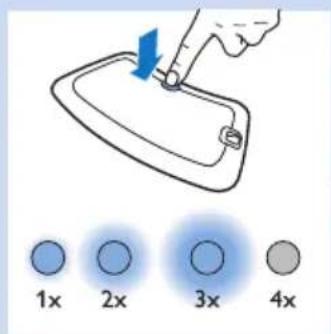
natural_image
Simple line drawing of a bathtub with blue dots and a handle (no text or symbols)natural_image
Line drawing of a bathtub with blue circular indentations on the interior (no text or symbols)natural_image
Simple line drawing of a rectangular tray with a grid pattern on the interior (no text or symbols)natural_image
Simple line drawing of a rectangular toilet with circular perforations and a water drop icon (no text or symbols)natural_image
Technical line drawing of a bicycle seat assembly with front, side, and back views (no text or symbols)
natural_image
Illustration of a blue USB plug with a USB symbol inserted, connected to a cable (no text or symbols present)Batterinivåsignaler
natural_image
Simple black-and-white pictogram of a human figure inside a square frame (no text or symbols)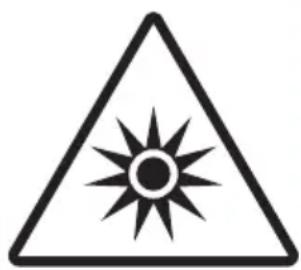
natural_image
Warning symbol with a black triangle and sunburst pattern (no text)natural_image
Icon of an open book with a lowercase 'i' in the center, representing information (no text or symbols beyond the icon itself)natural_image
Prohibition sign of a faucet crossed out, no text or symbols presentnatural_image
Silhouette of a human figure with dotted outline indicating body contours (no text or symbols)natural_image
Abstract black silhouette of a factory or industrial structure with triangular peaks (no text or symbols)natural_image
Symbol of a trash bin crossed with no visible text or labelsnatural_image
Symbol of crossed-out circle with diagonal lines, representing prohibition or exclusion (no text or numbers present)

natural_image
Silhouette of a human figure with dotted outline, no text or symbols present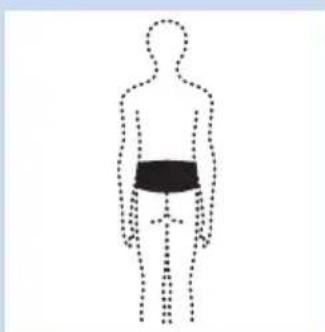
natural_image
Silhouette of a human figure with a black bandage on the chest, shown in dotted outline (no text or symbols)natural_image
Simple line drawing of a recycling symbol with three chasing arrows (no text or labels)Philips Consumer Lifestyle BV
Tussendiepen 4, 9206 AD Drachten, Netherlands
Fax: +31 (0)512594316


- Always here to help you
- Introduction
- Intended use
- Contra-indications, reactions and side effects
- Contra-indications
- General health conditions
- Pain-related health problems
- Dermatological or oncological problems
- Reactions and side effects
- Important safety information
- Warning
- Caution
- Compliance with standards
- Electromagnetic emissions and immunity
- Treatment schedule and treatment modes
- Treatment schedule
- Treatment modes
- Modes No. of treatments per day Treatment duration and light
- intensity
- Product overview (Fig. 1)
- Charging the device
- Using the device
- Positioning the device
- Positioning the lower back strap
- Positioning the upper back strap
- Starting and stopping treatment
- After treatment
- Cleaning
- Troubleshooting
- Signals on the device
- Sound signals during treatment
- Battery level signals
- Ordering accessories
- Spare straps
- Guarantee and support
- Guarantee restrictions
- Manufacturer's legal address
- Recycling
- Removing the rechargeable battery
- Specifications
- Explanation of symbols
- IP22
- Indholdsfortegnelse
- Signaler for batterikapacitet
- www.philips.com/pain-relief/register.
- Batterinivåsignaler
- Bestille tilbehør
- Índice
- Encomendar acessórios
Brand : PHILIPS
Model : PR3731
Category : Pain therapy device