
BlueTouch PRP6100 - Pain therapy device PHILIPS - Free user manual and instructions
Find the device manual for free BlueTouch PRP6100 PHILIPS in PDF.


| Product Type | Pain Therapy Device (TENS/EMS) |
| Brand | Philips |
| Model | BlueTouch PRP6100 |
| Therapy Modes | TENS (Transcutaneous Electrical Nerve Stimulation) and EMS (Electrical Muscle Stimulation) |
| Number of Channels | 2 |
| Electrode Pads | 4 self-adhesive pads (included) |
| Battery Type | Rechargeable Lithium-Ion |
| Battery Life | Up to 15 hours per charge |
| Dimensions | 100 x 55 x 25 mm (approx.) |
| Weight | 85 g (including battery) |
| Intensity Levels | 30 adjustable levels per channel |
| Pulse Frequency | 1-200 Hz |
| Pulse Width | 50-400 μs |
| Timer | 15, 30, 45, 60 minutes |
| Display | LCD screen with intensity and settings |
| Power Source | USB-C charging cable (included) |
| Accessories | Carrying case, electrode pads, USB cable, manual |
| Cleaning | Wipe with damp cloth; do not immerse |
| Safety Certifications | CE, FDA registered |
| Warranty | 2 years limited warranty |
Frequently Asked Questions - BlueTouch PRP6100 PHILIPS
User questions about BlueTouch PRP6100 PHILIPS
0 question about this device. Answer the ones you know or ask your own.
Ask a new question about this device
Download the instructions for your Pain therapy device in PDF format for free! Find your manual BlueTouch PRP6100 - PHILIPS and take your electronic device back in hand. On this page are published all the documents necessary for the use of your device. BlueTouch PRP6100 by PHILIPS.
USER MANUAL BlueTouch PRP6100 PHILIPS

natural_image
Simple line drawing of an open book with a grid on the left and a closed page on the right (no text or symbols)

DEUTSCH 6
ENGLISH 27
Table of contents
natural_image
Blue circular sign with a faucet symbol crossed out by a diagonal line, indicating no manual water release or pollution (no text present)
natural_image
Blue triangular warning symbol with exclamation mark (no text or numbers)natural_image
Blue crossed-out icon of a bucket with a wavy top (no text or symbols)BlueTouch Pain Relief Patch
natural_image
Blue icon of a human figure inside a square frame (no text or symbols)natural_image
Blue circular sign with a diagonal line crossing the eye symbol (no text or numbers)natural_image
Blue triangular warning symbol with exclamation mark (no text or numbers)natural_image
Blue icon of an open book with a lowercase 'i' inside, no text or symbols presentnatural_image
Blue prohibition sign with faucet and shower symbol (no text)natural_image
Blue triangular warning symbol with a sunburst design inside (no text or numbers)natural_image
Blue line icon depicting a trash bin with crossed x-marks and a blue rectangular base (no text or symbols)natural_image
Human silhouette diagram with blue dotted outline indicating body segments (no text or labels)natural_image
Blue abstract geometric shape resembling a stylized building or industrial block (no text or symbols)natural_image
Simple blue line drawing of a house with chimney (no text or symbols)
natural_image
Blue circular sign with a diagonal line crossing a faucet symbol (no text)
natural_image
Blue line icon of a trash bin with crossed lines and a blank rectangular bar below (no text or symbols)
Adapter
natural_image
Blue five-pointed star symbol with intersecting diagonal lines (no text or labels)natural_image
Blue icon of a square with diagonal lines crossing inside, resembling a crossed-out circle or cross symbol (no text or numbers present)natural_image
Blue line icon of an envelope crossed out, no text or symbols presentnatural_image
Blue crossed-out circle symbol with diagonal lines, no text or numbers presentnatural_image
Silhouette of a human figure with a blue shaded abdomen, no text or symbols presentnatural_image
Human silhouette diagram with dotted outline, no text or symbols presentnatural_image
Illustration of a blue USB cable inserted into an audio jack with musical notes and sound waves (no text or symbols)natural_image
Diagram of a blue cable inserted into a plug socket (no text or symbols visible)natural_image
Diagram of a blue cable inserted into a plug socket (no text or symbols visible)natural_image
Close-up of a blue plug inserted into an electrical socket with musical notes and sound waves (no text or symbols visible)natural_image
Diagram of a cable connector with a blue cable inserted, showing internal components (no text or symbols)natural_image
Diagram of a cable inserted into a device with a blue cable (no text or symbols visible)natural_image
Blue triangular warning sign with exclamation mark (no text or symbols)natural_image
Simple line drawing of a bathtub with circular indentations and a handle (no text or symbols)natural_image
Simple line drawing of a medical or anatomical device with a grid pattern inside, no text or symbols present.natural_image
Simple line drawing of a bathtub with a grid of blue dots on the interior (no text or symbols)natural_image
Diagram of a medical device with a blue arrow pointing to a dotted pattern inside a rectangular chamber (no text or symbols)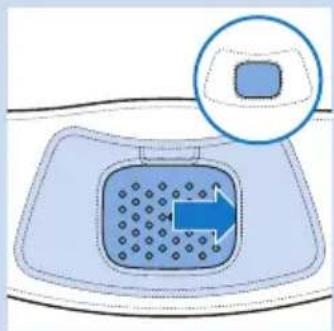
natural_image
Diagram of a drain drain with a blue arrow indicating flow direction, no text or symbols present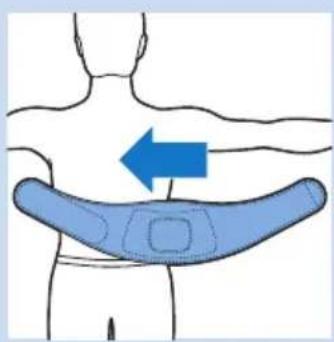
natural_image
Diagram of a human torso with a blue arrow pointing to the back area, showing anatomical contours (no text or symbols)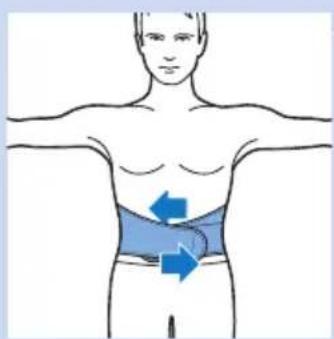
natural_image
Human body diagram showing a highlighted abdomen with two blue arrows indicating direction (no text or symbols)natural_image
Illustration of a person wearing a sling with a blue arrow indicating left motion (no text or symbols)natural_image
Human torso diagram with a blue sleeve and checkmark indicating a specific area (no text or symbols present)natural_image
Human body diagram showing a person with a blue arrow indicating a downward pressure or force on the torso (no text or symbols present)natural_image
Illustration of a person wearing a cross-brimmed bandage, showing torso and arms (no text or symbols)natural_image
Illustration of a hand holding a pen crossed over a tray with particles, no text or symbols presentnatural_image
Blue prohibition symbol with an eye and concentric circles, no text or numbers present.natural_image
Simple line drawing of a bathtub with circular indentations and a 3x multiplier label (no text or symbols on the basin itself)
Überhitzungssignal
natural_image
Simple line drawing of a bathtub with circular perforations and a droplet symbol (no text or labels)natural_image
Line drawing of a women's seat with front and back views, plus an inset image of a washing machine (no text or symbols)| Introduction 27 |
| Important 27 |
| General description 35 |
| Charging 35 |
| Using your BlueTouch Pain Relief Patch 37 |
| Cleaning 42 |
| Environment 43 |
| Guarantee and service 44 |
| Troubleshooting 44 |
| Specifications 45 |
Introduction
| Read this user manual carefully before you use the BlueTouch Pain Relief Patch and save it for future reference. This medical device is available without prescription. To achieve the optimal treatment success, you have to use the device according to the treatment schedule and the instructions in this user manual. In case of any further questions, please ask your pharmacist.BlueTouch is a trademark owned by Koninklijke Philips N.V. |
Intended use
| The BlueTouch Pain Relief Patch is a wearable medical device that intends to treat back pain during normal daily activities by supplying light and heat to the body by means of optical power and thermal conduction. Special blue LED light relaxes and helps heal damaged muscles through improved blood circulation. The BlueTouch Pain Relief Patch is intended to be used on the upper or lower back and can be positioned and adjusted on the treatment area by means of a fabric strap. The device is powered by built-in, non-exchangeable rechargeable batteries. The BlueTouch Pain Relief Patch is intended to be only used and operated by persons older than 18. It should always be used in accordance with the safety procedures and operating instructions included in this user manual and for the purpose for which it is designed. |
Important
Important safety information
Danger
- Keep the adapter dry.
Warning
- Do not immerse the BlueTouch Pain Relief Patch in water nor rinse it under the tap.
- Do not use the BlueTouch Pain Relief Patch in wet surroundings.
- The BlueTouch Pain Relief Patch is not intended for use by persons younger than 18 and persons with reduced physical, sensory or mental capabilities.
- THIS IS A MEDICAL DEVICE. KEEP THE DEVICE OUT OF THE REACH OF CHILDREN.
- Make sure children do not play with the BlueTouch Pain Relief Patch.

natural_image
Blue circular sign with a pictogram of a faucet crossed out, no text or symbols present.
natural_image
Blue triangular warning symbol with exclamation mark (no text or numbers)- Always adhere to the treatment schedule in chapter 'Using your BlueTouch Pain Relief Patch'. Do not treat more than two times a day.
- Only charge the BlueTouch Pain Relief Patch with the adapter supplied or with a micro USB cable, which is not supplied.
- Always check the BlueTouch Pain Relief Patch and the adapter for damage before use.
- Do not use the BlueTouch Pain Relief Patch or the adapter if either is damaged.
- If the adapter is damaged, always have it replaced with one of the original type in order to avoid a hazard. Contact Philips to obtain a new adapter.
- The adapter contains a transformer. Do not cut off the adapter to replace it with another plug, as this causes a hazardous situation.
- Do not connect the adapter of the BlueTouch Pain Relief Patch to an extension cord or a power strip, as this can lead to a hazardous situation.
- Do not modify the BlueTouch Pain Relief Patch and its accessories.
- Do not intentionally touch the sensor in the centre of the BlueTouch Pain Relief Patch when it is switched on.
- Do not place any object on the sensor in the centre of the BlueTouch Pain Relief Patch when it is switched on.
- Never leave the BlueTouch Pain Relief Patch unattended when it is switched on or charging.
- Always return the BlueTouch Pain Relief Patch to a service centre authorised by Philips for examination or repair. Repair by unqualified people could cause a hazardous situation for the user.
Caution
- The BlueTouch Pain Relief Patch is specifically designed to treat back pain during normal daily activities, such as working on the computer, reading, watching TV, gardening and performing household tasks, for instance cooking. Do not use it for any other purpose.
- If treatment becomes uncomfortable, switch to a lower treatment mode. If treatment is still uncomfortable in low mode, switch off the BlueTouch Pain Relief Patch and stop using it.
- Never exert excessive pressure on the BlueTouch Pain Relief Patch, for instance by pressing, lying, sitting or standing on it. Do not lean heavily against the BlueTouch Pain Relief Patch when sitting.
- Only use the BlueTouch Pain Relief Patch in one of the Philips straps that has been specially designed for it. The straps are not supplied with the patch and have to be obtained separately.
- Do not subject the BlueTouch Pain Relief Patch to heavy shocks or drop it.
- Do not squeeze or twist the BlueTouch Pain Relief Patch.
- Keep the BlueTouch Pain Relief Patch away from sharp, pointed or abrasive objects.
- Do not wear the BlueTouch Pain Relief Patch while it is charging.
- Do not apply any creams or lotions to the skin before treatment.
- Blue light may discolour tattoos in the treatment area.
-
Use, charge and store the BlueTouch Pain Relief Patch at a temperature between 10°C and 35°C and at a relative humidity between 30 and 90%.
-
If you take the BlueTouch Pain Relief Patch from a very warm environment to a colder environment, wait approximately 3 hours before you use it.
- Do not look directly into the light emitted by the BlueTouch Pain Relief Patch when it is switched on.
- Do not use the BlueTouch Pain Relief Patch if you have a fever or if you have a health condition and/or use medication or cosmetics that may cause adverse skin reactions in combination with the BlueTouch Pain Relief Patch. Read section ‘Contra-indications’ in this chapter to find out if any apply to you before you start using the BlueTouch Pain Relief Patch.
- To disconnect the BlueTouch Pain Relief Patch from the mains, remove the adapter from the wall socket.
- The BlueTouch Pain Relief Patch is intended for non-continuous use. The exact usage time is stated in chapter 'Using your BlueTouch Pain Relief Patch', section 'Treatment modes, duration and intensity'.
- Always install the BlueTouch Pain Relief Patch according to the instructions in this user manual. Make sure wireless communication devices, such as wireless home network routers, mobile phones, cordless phones and their base stations, and walkie-talkies, are kept at least 6.7 metres away from the BlueTouch Pain Relief Patch, as these devices may affect its working.
- Clean the infrared sensor with a damp cloth after each treatment to ensure it continues to function properly.
- To prevent damage to the drum of the washing machine or to other laundry in the drum, wash the straps in a fine-mesh washing bag.
Contra-indications
Do not use the BlueTouch Pain Relief Patch:
- If your skin is burnt or sunburnt.
- If you have a fever.
- If you have a known sun allergy.
- If you are allergic to the surface materials of the BlueTouch Pain Relief Patch (polyurethane for the skin contact surface, stainless steel for the infrared sensor and a polyamide/elastane mix for the surface that does not touch the skin) or to the DriRelease polyester/cotton mix of the straps.
- If you have any known disease or idiopathic dermatosis such as porphyria, polymorphic light eruption, chronic actinic dermatitis, actinic prurigo or solar urticaria that causes photosensitivity.
- If you have active skin cancer, if you have a history of skin cancer or any other localised cancer in the areas to be treated, if you have pre-cancerous lesions or large moles in the areas to be treated.
- If you are taking photosensitising agents or medications, check the package insert of your medicine and never use the appliance if it is stated that it can cause photo-allergic reactions, photo-toxic reactions or if you have to avoid sun when taking this medicine.
- If you are on steroids. This medication makes the skin more susceptible to irritation.
- If you have infections, eczema, unhealed tattoos, burns, inflammation of hair follicles, open lacerations, abrasions, herpes simplex, psoriasis, wounds or lesions and haematomas in the areas to be treated.
- If you have severe or uncontrolled diabetes or diabetes with peripheral damage.
- If you have uncontrolled arterial hypertension, a history of stroke, myocardial infarction, angina pectoris, arteriosclerotic vascular disease (ASVD), or peripheral vascular disease.
- If you are pregnant or breastfeeding.
- If you have any inflammatory disease that causes pain or any other chronic disease or infection known to cause pain, such as spondyloarthopathy, rheumatoid arthritis, lupus erythematodes, Lyme borreliosis.
- If you have a degenerative central nervous system disease such as multiple sclerosis or Parkinson's disease, or a spinal stenosis that contributes to or causes back pain, or cauda equina syndrome or other neurological symptoms that indicate neuropathy.
- If you have schizophrenia, borderline syndrome or severe depression.
- If you have any sensory deprivation or have been diagnosed with shingles or post-herpetic neuralgia, especially in the mid-trunk area.
- If you have any anatomical pathology or other physical limitation which would prevent you from placing the BlueTouch Pain Relief Patch successfully.
- If you have an active implanted device, such as a cardiac pacemaker, defibrillator, neurostimulator, cochlear implant, or an active drug administration device.
- If you have a history of severe osteoporosis (T score of 2.5 and a history of 1 or more bone fractures), or another severe bone disease.
- If you have had an acute dislocation or fracture within the previous 8 weeks.
- If you have had any failed back surgery or any surgery to torso, head or back within the previous 8 weeks.
- If you have widespread pain.
- If you are in poor general health.
Compliance with standards
- The BlueTouch Pain Relief Patch meets all standards relevant for electrical medical appliances and appliances using optical (LED) radiation for home use.
- The BlueTouch Pain Relief Patch complies with all standards regarding electromagnetic fields (EMF). If handled properly and according to the instructions in this user manual, the Pain Relief Patch is safe to use based on scientific evidence available today.
Explanation of symbols
BlueTouch Pain Relief Patch
- This symbol means: Conforms to EC Directives. CE stands for 'Conformité Européenne'.

- This symbol means: Do not put the BlueTouch Pain Relief Patch in the washing machine.
- This symbol means that the device is protected against dripping water.
- This symbol means: Type BF (Body Floating) applied part.
- This symbol means: Do not stare into the beam of light.
- This symbol is a warning to read the enclosed documents before use and take all safety precautions required.
ENGLISH32

natural_image
Blue icon of an open book with an information symbol inside, no text or labels present.- This symbol means: Read the user manual before you start using the BlueTouch Pain Relief Patch.
natural_image
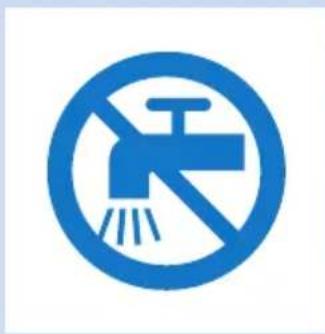
Blue prohibition sign with faucet and shower symbol (no text)- This symbol means: Do not clean under a running tap.

natural_image
Blue triangular warning symbol with a sunburst design inside (no text or numbers)- This symbol means: Do not stare at the light source. Risk Group 1 product (IEC60601-2-57:2011).

natural_image
Blue line icon depicting a trash bin with crossed x-axes and a solid blue rectangle below (no text or symbols)- This symbol means: Do not throw away with the normal household waste. For further instructions, see chapter 'Environment'.

natural_image
Human silhouette diagram with blue dotted outline indicating body segments (no text or labels)- This symbol indicates the areas where the BlueTouch Pain Relief Patch may be positioned.

- This symbol means ‘Manufactured by’ and is displayed together with the Philips logo and wordmark.
Adapter
- This symbol indicates that the adapter is double insulated (Class II).
- This symbol indicates that the adapter may only be used indoors.
- This symbol means: Do not clean under a running tap.
- This symbol means: Do not throw away with the normal household waste. For further instructions, see chapter ‘Environment’.

Straps
- This symbol means: Wash at a temperature of 30^ max.
- This symbol means: Do not bleach.
- This symbol means: Do not tumble-dry.
- This symbol means: Do not iron.
- This symbol means: Do not dry clean.

- This symbol means that the material has been tested for harmful substances according to Oeko-Tex® standard 100.
natural_image
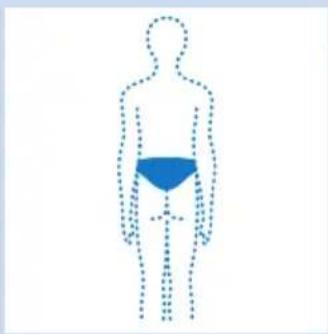
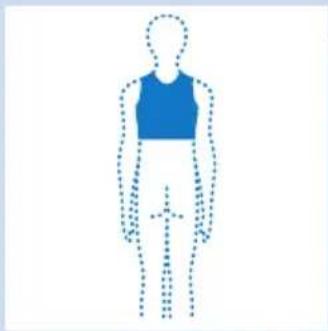
Human silhouette diagram with dotted outline and blue patterned abdomen (no text or symbols)- This symbol means that this strap is to be used on the lower back.
natural_image
Human silhouette diagram with dotted outline, no text or symbols present- This symbol means that this strap is to be used on the upper back.
General description (Fig. 23)
1 BlueTouch Pain Relief Patch (outside)
2 Connection panel
3 Socket for small plug of adapter
4 Charging light
5 Micro USB socket
6 Mode button
7 BlueTouch Pain Relief Patch (skin side)
8 Treatment area
9 Infrared sensor
10 Adapter
11 Small plug
Charging
Fully charge the BlueTouch Pain Relief Patch for the first time and when its power is low. When fully charged, the BlueTouch Pain Relief Patch has enough power for 120 treatment minutes. You can charge the BlueTouch Pain Relief Patch with the adapter supplied or you can charge it by connecting a micro USB cable - not supplied - to the micro USB socket.
Note: Treatment is not possible when the BlueTouch Pain Relief Patch is charging.
Charging with the adapter
When you charge the BlueTouch Pain Relief Patch with the adapter, it takes 2.5 hours to fully charge the BlueTouch Pain Relief Patch.

natural_image
Illustration of a blue USB cable inserted into an audio jack with musical notes and sound waves (no text or symbols)1 Open the cover of the connection panel.
2 Insert the small plug of the adapter into the socket for the small plug on the BlueTouch Pain Relief Patch.
3 Insert the adapter into a wall socket (100V-240V).
When the small plug is connected properly, the BlueTouch Pain Relief Patch beeps once to indicate that charging has started.

natural_image
Diagram of a blue cable inserted into a plug socket (no text or symbols visible)The charging light on the connection panel flashes slowly and regularly while the BlueTouch Pain Relief Patch is charging.

natural_image
Diagram of a cable inserted into a plug socket (no text or symbols visible)4 When the BlueTouch Pain Relief Patch is fully charged, the charging light lights up continuously.
5 Remove the adapter from the wall socket and pull the small plug out of the socket on the BlueTouch Pain Relief Patch.
Charging using the micro USB socket
You can also charge the BlueTouch Pain Relief Patch with a micro USB cable. This cable is not supplied with the BlueTouch Pain Relief Patch. Charging with a micro USB cable can take up to 8 hours.

natural_image
Diagram of a blue plug inserted into an electronic device with musical notes and sound waves (no text or symbols)1 Open the cover of the connection panel.
2 Insert the plug of the micro USB cable into the USB socket.
3 Insert the other plug of the micro USB cable into a USB charger or into your computer.
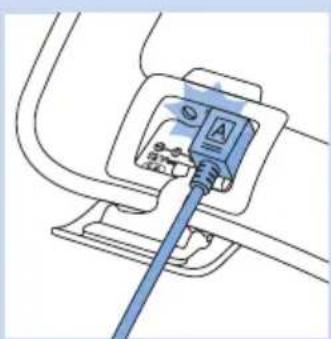
When the micro USB cable is connected properly, the BlueTouch Pain Relief Patch beeps once to indicate that charging has started.
The charging light on the connection panel flashes slowly and continuously while the BlueTouch Pain Relief Patch is charging.
natural_image
Diagram of a cable inserted into a socket socket (no text or symbols visible)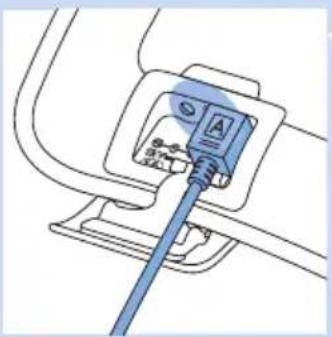
natural_image
Diagram of a cable inserted into a device with a blue cable inserted, showing no text or symbols.4 When the batteries of the BlueTouch Pain Relief Patch are fully charged, the charging light lights up continuously.
5 Remove the plug of the micro USB cable from the micro USB socket on the BlueTouch Pain Relief Patch.
Using your BlueTouch Pain Relief Patch
Treatment schedule

natural_image
Blue triangular warning symbol with exclamation mark (no text or numbers)Always stick to the treatment schedule below. Do not treat more than two times a day.
The BlueTouch Pain Relief Patch has been designed for daily use. You can use it when you feel pain. It is important, however, that you stick to the treatment schedule below and do not treat more often than twice a day. If you follow the schedule below, you do not exceed the maximum daily light dose of 90 J/cm².
Treatment options
The following treatment options are possible:
- two treatments of the lower back per day
- two treatments of the upper back per day
- one treatment of the lower back and one treatment of the upper back per day
Note: You can use the BlueTouch Pain Relief Patch twice in a row for two treatments of 15 minutes, 20 minutes, 30 minutes with a short break in between the treatments. To start the second treatment press the mode button to switch on the device again.
Treatment modes, duration and intensity
Modes No. of treatments per day and
Intensity
treatment duration
1: low 2 × 30 min. 50%
2: medium 2 × 20 min. 75%
3: High 2 × 15 min. 100%
Treatment modes
Selecting the treatment modes
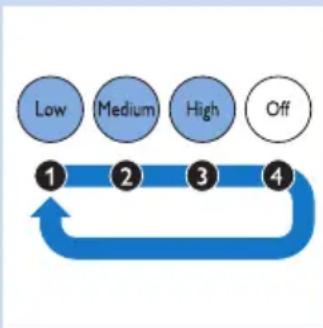
The BlueTouch Pain Relief Patch has three modes and an OFF setting. You have to press the mode button one or more times to select one of the three treatment modes. When you press the mode button a fourth time, you switch off the BlueTouch Pain Relief Patch.
flowchart
graph LR
    A["Low"] --> B["Medium"]
    B --> C["High"]
    C --> D["Off"]
    D --> E["End"]

natural_image
Simple line drawing of a bathtub with circular indentations and a handle (no text or symbols)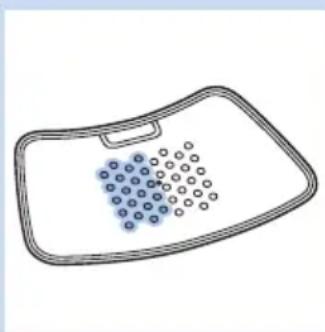
natural_image
Simple line drawing of a medical or anatomical device with blue circular elements arranged in a grid on a rectangular base (no text or symbols)
natural_image
Simple line drawing of a rectangular basin with circular indentations on the interior (no text or symbols)1 Mode 1 (low): press once
2 Mode 2 (medium): press twice
3 Mode 3 (high): press three times
4 O (OFF): press four times
Note: If you want to switch from mode 3 to mode 1 or 2 or from mode 2 to mode 1, you have to press the mode button as many times as required to reach the mode you want to select. If you do not press the required number of times within 2 seconds, the BlueTouch Pain Relief Patch beeps twice and switches off.
Note: If you select another mode within 2 seconds, the treatment timer is not reset to the treatment of the newly selected mode but continues to count down at the point where you switched to the other mode. This means that the remaining treatment time is recalculated for the intensity and the treatment time of the newly selected mode. For example, if you switch from mode 3 to mode 1 and the remaining treatment time in mode 3 was 5 minutes, the remaining treatment time in mode 1 is 10 minutes. In mode 1 the intensity is 50% of that in mode 3, which means that the treatment in mode is twice as long as in mode 3.
Treatment intensity
In mode 1 (low), two rows of LEDs light up. The BlueTouch Pain Relief Patch beeps once.
In mode 2 (medium), four rows of LEDs light up. The BlueTouch Pain Relief Patch beeps twice.
In mode 3 (high), six rows of LEDs light up. The BlueTouch Pain Relief Patch beeps three times.
Note: When you select a mode, the BlueTouch Pain Relief Patch switches on in eye safety mode. In this mode the LEDs operate at a low light intensity that does not harm the eyes. The BlueTouch Pain Relief Patch switches to the intensity of the mode selected when the sensor senses skin contact.
Preparing the BlueTouch Pain Relief Patch for use
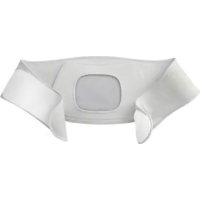
The preferred method for fastening the Pain Relief Patch to the body is by means of one of the fabric straps. There is a special strap for treatment of the upper back and a special strap for treatment of the lower back.
Note: Do not wear multiple layers of clothing or tight or thick clothing over the BlueTouch Pain Relief Patch to prevent the device from switching off before the treatment has been completed. If you wear too tight or thick clothing, the infrared sensor will measure a too high temperature and switch off the device.
natural_image
Diagram of a device with a blue internal component and dotted pattern, enclosed in a dashed outline (no text or symbols)
natural_image
Diagram of a drain drain with a blue arrow indicating flow direction, no text or symbols present
natural_image
Illustration of a human torso with a blue arrow pointing to the back area, no text or symbols present
natural_image
Human body diagram showing a highlighted region with blue arrows indicating movement or pressure (no text or symbols)
natural_image
Illustration of a person's torso with a blue arrow indicating left motion, no text or symbols presentPositioning the lower back strap
To place the BlueTouch Pain Relief Patch in the strap, follow the steps below.
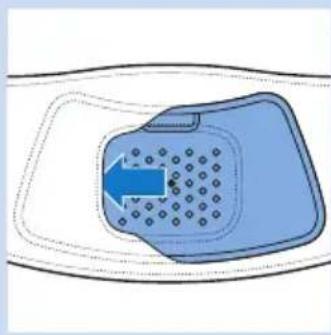
1 Put the lower back strap and the BlueTouch Pain Relief Patch in front of you on a table. Slide the left side of the BlueTouch Pain Relief Patch behind the elastic edge of the opening in the strap.
2 Then slide the other end of the BlueTouch Pain Relief Patch behind the opposite elastic edge of the opening so that the whole patch is inside the lower back strap. Check to make sure that the LEDs are not covered by the material of the strap. If necessary, shift the BlueTouch Pain Relief Patch a little.
3 Remove clothing from the area to be treated.
Note: Make sure the skin in the area to be treated is clean, entirely dry and free from creams, lotions and other cosmetics.
4 Wrap the lower back strap with the BlueTouch Pain Relief Patch in it around your waist with the opening of the strap facing your back.
5 Fasten it with the Velcro strips on both ends of the lower back strap.
Note: Make sure the BlueTouch Pain Relief Patch in the strap is located on the area to be treated and the LED area is in contact with the skin.
Positioning the upper back strap
1 To put the BlueTouch Pain Relief Patch in the upper back strap, follow the same procedure as described in steps 1 and 2 in section 'Positioning the lower back strap' above.
2 Remove clothing from the area to be treated.
Note: Make sure the skin in the area to be treated is clean, entirely dry and free from creams, lotions and other cosmetics.
3 Put the upper back strap on your back with the opening of the strap facing your back.

natural_image
Human torso diagram with a blue outline of the chest area and a checkmark pointing to the lower torso (no text or symbols present)Note: Make sure the BlueTouch Pain Relief Patch in the strap is located on the area to be treated and the LED area is in contact with the skin.

natural_image
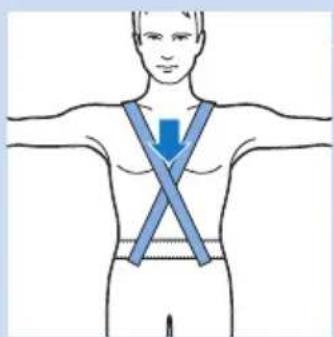
Human torso diagram showing a blue arrow indicating downward pressure or force on the chest (no text or symbols present)4 Fasten the waistband with the Velcro fasteners and fasten the shoulder straps to the two parts of waistband with the Velcro fasteners.
natural_image
Illustration of a human torso with a blue X-bracing band indicating pressure or discomfort (no text or symbols)Note: You can also fasten the shoulder straps crosswise. This may provide a better fit in some situations.
Treatment procedure
1 Press the mode button one or more times to select one of the three treatment modes.
2 When you have selected the treatment mode (see section 'Selecting the treatment modes' in this chapter), the LEDs of the selected mode switch on in eye-safety mode.
3 Treatment starts after the BlueTouch Pain Relief Patch has been placed on the skin and the sensor of the patch senses a temperature of at least 33^ C for at least five seconds.
▶All LEDs of the selected mode light up at full intensity.
Do not intentionally touch the sensor in the centre of the BlueTouch Pain Relief Patch when it is switched on.
Note: You can also place the patch on your back and then press the mode button to select the treatment mode. In that case, the Blue Touch Pain Relief Patch switches on in the selected mode within five seconds.

natural_image
Illustration of a hand crossed over a plate with a blue diagonal line, next to a magnified circular pattern (no text or symbols)
natural_image
Blue circular sign with a diagonal line crossing the eye symbol (no text or numbers)
4 The BlueTouch Pain Relief Patch automatically switches off after the treatment time in the selected mode has elapsed. For the treatment times, see section 'Treatment schedule'.
Interrupting treatment
1 If you want to interrupt the treatment briefly, simply remove the Pain Relief Patch from the skin.
The LEDs of the BlueTouch Pain Relief Patch automatically switch back to eye-safety mode.
Caution: Do not look directly into the light emitted by the LEDs, even when the LEDs operate in eye-safety mode and the treatment time is paused.
Note: After 10 minutes in eye-safety mode, the BlueTouch Pain Relief Patch switches off.
2 To resume the treatment after a brief interruption, place the BlueTouch Pain Relief Patch back onto the skin.
The LEDs of the selected mode automatically switch back on at the intensity selected and the treatment time continues to count down.
Switching off
1 If you want to switch off the Pain Relief Patch before the treatment time has elapsed, press the mode button one or more times until the LEDs switch off.
A sequence of two different tones indicates that the BlueTouch Pain Relief Patch switches off.
Note: The number of times you have to press the mode button until the BlueTouch Pain Relief Patch switches off depends on the mode you selected.
After treatment
Treatment ends automatically after the treatment time in the selected mode has elapsed, unless you remove the BlueTouch Pain Relief Patch and press the mode button to stop treatment earlier.
Note: A sequence of two different tones indicates that the BlueTouch Pain Relief Patch switches off and treatment has ended.
1 Loosen the strap and remove it from your back.
2 Remove the BlueTouch Pain Relief Patch from the strap.
3 Recharge the BlueTouch Pain Relief Patch if it beeps and the charging light flashes to indicate that the batteries are low (see section 'Battery level signals').
Possible reactions and side-effects
- It is normal for the skin to become a little red during treatment. This skin redness is caused by increased blood circulation due to the warmth of the BlueTouch Pain Relief Patch. This skin redness is harmless and fades after the treatment has ended.
- In some cases tanning may be visible after treatment. This tanning is caused by melanin concentrations in the skin and is a similar effect to that caused by exposure to sunlight. It is harmless and fades away within 48 to 72 hours. Postpone treatment until the tanning has disappeared. To prevent tanning, resume treatment in a lower mode and avoid excessive pressure on the BlueTouch Pain Relief Patch during treatment, for example by sitting or lying on it or by leaning heavily against it.
Light and sound signals during use

natural_image
Simple line drawing of a bathtub with blue circular indentations and a star-shaped label containing '3x' (no text or symbols on the diagram itself)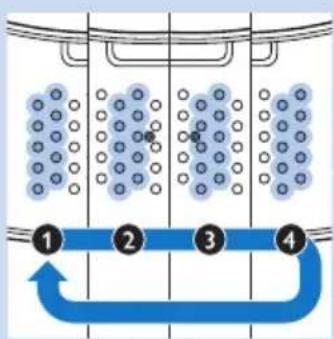
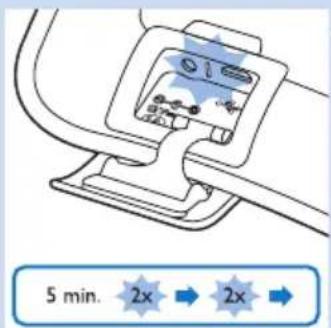

Overheating signal
1 If the sensor measures a too high temperature, the BlueTouch Pain Relief Patch switches off for safety reasons.
2 If the user wants to restart the BlueTouch Pain Relief Patch within 10 minutes after switching off, all LEDs flash slowly three times.
3 After the standard cooling-down time of 10 minutes, the BlueTouch Pain Relief Patch switches on again.
Resetting signal
1 When the software of the BlueTouch Pain Relief Patch no longer responds or another unexpected failure occurs, the BlueTouch Pain Relief Patch automatically resets.
During resetting, two rows of LEDs light up sequentially and you hear four beeps.
After resetting, the BlueTouch Pain Relief Patch works normally again.
Battery level signals
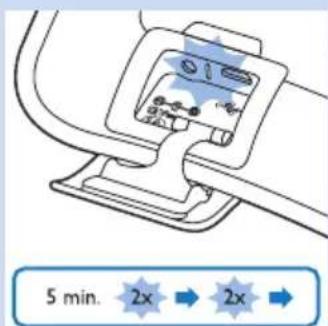
1 If, during use, the charging light flashes twice, pauses and then flashes twice again for 5 minutes and the BlueTouch Pain Relief Patch switches off automatically, the batteries do not contain enough energy to continue the treatment. You have to charge the batteries before you can use the patch again (see chapter 'Charging').
2 If the charging light flashes twice, pauses and then flashes twice again for 5 minutes and you hear a single beep every 30 seconds when you press the mode button, the batteries do not contain enough energy for a treatment. You have to charge the BlueTouch Pain Relief Patch. The beeping continues until you insert the small plug of the adapter into the socket on the connection panel or insert the USB cable into the USB connector (see chapter 'Charging').
Cleaning
Do not immerse the BlueTouch Pain Relief Patch in water or rinse it under the tap.
Always remove the BlueTouch Pain Relief Patch from the strap before you put the strap in the washing machine to clean it.
1 Clean the BlueTouch Pain Relief Patch with a damp cloth.
Caution: Clean the infrared sensor with a damp cloth after each treatment to ensure it continues to function properly.

natural_image
Line drawing of a rectangular plate with circular indentations and a droplet symbol in the circle (no text or labels)
natural_image
Line drawing of a women's seat with a washing machine inset (no text or symbols)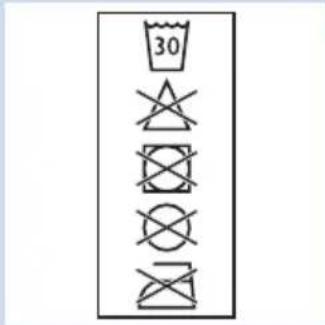
2 The fabric straps can be washed in the washing machine.
Caution: To prevent damage to the drum of the washing machine or to other laundry in the drum, wash the straps in a fine-mesh washing bag.
Note: Use a gentle cycle and a temperature of 30^ C maximum. Dry the straps on the air and not in the tumble dryer. Do not iron the straps.
Environment
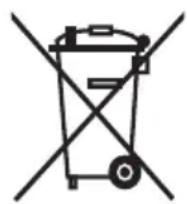
- The integrated batteries of the BlueTouch Pain Relief Patch contain substances that may pollute the environment. The batteries cannot be removed. To ensure proper disposal, take the device to an official collection point. Staff at the collection point will ensure the batteries are removed and disposed of in an environmentally safe way.

- Do not throw away the BlueTouch Pain Relief Patch with the normal household waste at the end of its life, but hand it in at an official collection point for recycling. By doing this, you help to preserve the environment.
Guarantee and service
If you need service or information or if you have a problem, please visit our website at www.philips.de or contact the Philips Consumer Care Centre. Its telephone number is 0800 000 7522.
Guarantee restrictions
The guarantee does not cover standard wear and tear. The guarantee becomes invalid if the BlueTouch Pain Relief Patch is not used according to the instructions in this user manual.
Troubleshooting
This chapter summarises the most common problems you could encounter with the BlueTouch Pain Relief Patch. If you are unable to solve the problem with the information below, contact Philips.
Problem Possible cause Solution
| The LED lights do not go on. | The rechargeable batteries are empty. | Recharge the BlueTouch Pain Relief Patch (see chapter 'Charging'). |
| If you charged the BlueTouch Pain Relief Patch and the LED lights do not go on, the pain relief patch is probably broken. | Contact Philips | |
| The BlueTouch Pain Relief Patch suddenly switches off. | The preset treatment time is finished. | The BlueTouch Pain Relief Patch has been programmed to switch off automatically after the treatment time in the selected treatment mode has elapsed. |
| The rechargeable batteries are empty. | Charge the BlueTouch Pain Relief Patch (see chapter 'Charging'). | |
| The infrared sensor is blocked. | Check the position of the patch in the strap. Make sure the strap does not cover the infrared sensor. If the infrared sensor is not covered but the BlueTouch Pain Relief Patch still switches off, it is probably broken. In that case, contact Philips. | |
| The skin temperature is too high. | Check if you do not wear too many or too thick clothes over the BlueTouch Pain Relief Patch during treatment. | |
| The adapter becomes warm during charging. | This is normal. No action required. | |
| The charging light does not go on when the small plug is inserted into the socket on the connection panel. | The adapter is not inserted or not inserted properly into the wall socket. | Insert the small plug into the socket for the small plug on the connection panel and insert the adapter into a wall socket. |
| The wall socket is not live. Connect another appliance to the same socket to check if the socket is live. If the wall socket is live, but the BlueTouch Pain Relief Patch does not charge, contact Philips. | ||
| The charging light does not go on when I connect the micro USB cable. | The micro USB plug is not inserted into the micro USB socket properly or is not connected to the computer or USB charger properly. | Insert the micro USB plug into the micro USB socket properly and check the connection to the computer or the charger. Make sure the computer or charger is switched on. |
| The BlueTouch Pain Relief Patch becomes warm during use. | This is normal. No action required. | |
Specifications
Model PRP6100/02
Rated voltage (V) 100-240
Rated frequency (Hz) 50-60
Rated input (W) 15
Class Medical device Class IIa
Classification Risk Group 1
Ingress of water IP22
Max. daily dose (J / cm^2) < 90 if treatment schedule is followed
Battery type Li-Ion
Operation conditions
Temperature from +10^ to +35^
Relative humidity from 30% to 90%
Storage conditions
Temperature from -20°C to +35°C
Relative humidity from 30% to 90% (no condensation)
| Guidance and Manufacturer's declaration-electromagnetic emissions | ||
| The Pain Relief Patch BlueTouch is intended for use in the electromagnetic environment specified below. The customer or the user of the Pain Relief Patch BlueTouch should assure that it is used in the following environment: | ||
| Emissions Test Compliance E | Electromagnetic Environment - guidance | |
| RF emissionsCISPR11 | Group 1 The Pain Relief | Patch BlueTouch usesRF energy only for its internal function.Therefore, its RF emissions are very lowand are not likely to cause any interferencein nearby electronic equipment. |
| RF emissionsCISPR11 | Class B The Pain Relief | Patch BlueTouch is suitablefor use in all establishments, includingdomestic establishments and those directlyconnected to the public low-voltage powersupply network that supplies buildings usedfor domestic purposes. |
| Harmonic emissionsIEC 61000-3-2 | Class A | |
| Voltage Fluctuations/Flicker emissionsIEC 61000-3-3 | Complies | |
| Guidance and Manufacturer's declaration-electromagnetic immunity | |||
| The Pain Relief Patch BlueTouch is intended for use in the electromagnetic environment specified below. The customer or the user of the Pain Relief Patch BlueTouch should assure that it is used in the following environment: | |||
| Immunity Test IEC 60601-1-2Test Level | Compliance Level Electromagnetic Environment - guidance | ||
| Electrostatic discharge (ESD)IEC 61000-4-2 | ±6 kV contact±8 kV air | ±6 kV contact±8 kV air | Floors should be made of wood, concrete, or ceramic tile. If floors are covered with synthetic material, the relative humidity should be at least 30%. |
| Electrical fast transient/burstIEC 61000-4-4 | ±2 kV for power supply lines±1 kV for input/output lines | ±2 kV for power supply lines±1 kV for input/output lines | Mains power quality should be that of a typical commercial or hospital environment. |
| SurgeIEC 61000-4-5 | ±1 kV line(s) to line(s)±2 kV line(s) to earth | ±1 kV line(s) to line(s)±2 kV line(s) to earth | Mains power quality should be that of a typical commercial or hospital environment. |
| Voltage dips, short interruptions, and voltage variations on power supply input linesIEC 61000-4-11 | <5% Un (>95% drop in Un) for 0,5 cycle40% Un (60% drop in Un) for 5 cycles70% Un (30% drop in Un) for 25 cycles<5% Un (>95% drop in Un) for 5 seconds | <5% Un (>95% drop in Un) for 0.5 cycle40% Un (60% drop in Un) for 5 cycles70% Un (30% drop in Un) for 25 cycles<5% Un (>95% drop in Un) for 5 seconds | Mains power quality should be that of a typical commercial or hospital environment. If the user of the Pain Relief Patch BlueTouch requires continued operation during power mains interruptions, it is recommended that the Pain Relief Patch BlueTouch be powered from an uninterruptible power supply or a battery. |
| Power frequency (50/60 Hz)magnetic fieldIEC 61000-4-8 | 3 A/m 3 A/m Power frequency magnetic fields | should be at levels characteristic of a typical location in a typical commercial or hospital environment. | |
| NOTE Un is the a.c. mains voltage prior to application of the test level | |||
| Immunity Test IEC | 60601-1-2Test Level | ComplianceLevel | Electromagnetic Environment - guidance |
| RF Common mode/Conducted SusceptibilityIEC 61000-4-6Radiated RF Electromagnetic FieldIEC 61000-4-3 | 3 Vrms150 kHz to 80 MHz3 V/m80 MHz to 2,5 GHz | 3 V3 V/m | Portable and mobile RF communications equipment should be used no closer to any part of the Pain Relief Patch BlueTouch, including cables than the recommended separation distance calculated from the equation applicable to the frequency of the transmitter.Recommended separation distanced=1,2√Pd=1,2√P 80 MHz to 800 MHzd=2,4√P 800 MHz to 2,5 GHzWhere P is the maximum output power rating of the transmitter in watts (W) according to the transmitter manufacturer and d is the recommended separation distance in meters (m).Field strengths from fixed RF transmitters, as determined by an electromagnetic site survey,ashould be less than the compliance level in each frequency range.bInterference may occur in the vicinity of equipment marked with the following symbol: |
| NOTE 1 At 80 MHz and 800 MHz, the higher frequency range applies.NOTE 2 These guidelines may not apply in all situations. Electromagnetic propagation is affected by absorption and reflection from structures, objects and people. | |||
| a Field strengths from fixed transmitters, such as base stations for radio (cellular/cordless) telephones and land mobile radios, amateur radio, AM and FM radio broadcast and TV broadcast cannot be predicted theoretically with accuracy.To assess the electromagnetic environment due to fixed RF transmitters, an electromagnetic site survey should be considered. If the measured field strength in the location in which the Pain Relief Patch BlueTouch is used exceeds the applicable RF compliance level above, the Pain Relief Patch BlueTouch should be observed to verify normal operation. If abnormal performance is observed, additional measures may be necessary, such as re-orienting or relocating the Pain Relief Patch BlueTouchb Over the frequency range 150 kHz to 80 MHz, field strengths should be less than 3 V/m. | |||
Philips Lighting BV
Light & Health Venture
Mathildelaan 1
5616 BH Eindhoven
The Netherlands


CE 0344
www.philips.com

100% recycled paper 100% papier recyclé
4222.005.0331.3



- BlueTouch Pain Relief Patch
- Adapter
- Überhitzungssignal
- Important
- Important safety information
- Danger
- Warning
- Caution
- Contra-indications
- Compliance with standards
- Explanation of symbols
- ENGLISH32
- Straps
- General description (Fig. 23)
- Charging
- Charging with the adapter
- Charging using the micro USB socket
- Using your BlueTouch Pain Relief Patch
- Treatment schedule
- Always stick to the treatment schedule below. Do not treat more than two times a day.
- Treatment options
- Treatment modes, duration and intensity
- Modes No. of treatments per day and
- Intensity
- treatment duration
- Treatment modes
- Selecting the treatment modes
- Treatment intensity
- Preparing the BlueTouch Pain Relief Patch for use
- Positioning the lower back strap
- Positioning the upper back strap
- Treatment procedure
- Interrupting treatment
- Switching off
- After treatment
- Possible reactions and side-effects
- Light and sound signals during use
- Overheating signal
- Resetting signal
- Battery level signals
- Cleaning
- Environment
- Guarantee and service
- Guarantee restrictions
- Troubleshooting
- Specifications
- Model PRP6100/02
- Operation conditions
- Storage conditions
Brand : PHILIPS
Model : BlueTouch PRP6100
Category : Pain therapy device