
SL B10 BPB - Vacuum Cleaner HOTPOINT - Free user manual and instructions
Find the device manual for free SL B10 BPB HOTPOINT in PDF.



| Brand | Hotpoint-Ariston |
| Model | SL B10 BPB |
| Appliance type | Canister vacuum cleaner (Trolley Power) |
| Energy efficiency class | C |
| Annual energy consumption | 38.5 kWh/year |
| Acoustic power level | 79 dB(A) |
| Rated input power | 1000 W |
| Supply voltage | 220-240 V ~ 50/60 Hz |
| Bag type | Pure Clean fabric bag |
| Main filter | Pure Clean Hepa 13 (>99.95% retention) |
| Additional filter | Air Fresh Hepa 13 with activated carbon (depending on model) |
| Handling system | Trolley System with retractable handle |
| Remote control | Remote Power Control (depending on model) |
| Start & Pause function | Yes (depending on model) |
| Power regulator | Electronic (depending on model) or manual |
| Power cord length | Approximately 7 m (red marker) |
| Bag full indicator | Red indicator light |
| Included accessories | Multi deluxe brush, parquet brush, turbo brush, furniture brush, crevice nozzle, delicate surfaces nozzle (depending on model) |
| Filter cleaning | Washable in water, allow to dry completely in open air |
| Bag maintenance | Replace at least once a year or when the red indicator lights up |
| Safety | Device preventing the lid from closing if the bag is not installed correctly |
| Spare parts | Use exclusively original Hotpoint-Ariston parts |
| Carpet efficiency | Class E |
| Hard floor efficiency | Class C |
| Dust emission class | B |
Frequently Asked Questions - SL B10 BPB HOTPOINT
User questions about SL B10 BPB HOTPOINT
0 question about this device. Answer the ones you know or ask your own.
Ask a new question about this device
Download the instructions for your Vacuum Cleaner in PDF format for free! Find your manual SL B10 BPB - HOTPOINT and take your electronic device back in hand. On this page are published all the documents necessary for the use of your device. SL B10 BPB by HOTPOINT.
USER MANUAL SL B10 BPB HOTPOINT
natural_image
Line drawing of a vacuum cleaner with coiled hose and control panel (no text or symbols)EN Operating instructions
FR Mode d'emploi
SL B10 BDB | SL B10 BPB | SL B07 BEW | SL B07 BEB | SL B10 BDW
A
natural_image
Illustration of a hand using a vacuum cleaner to clean the air (no text or symbols visible)
natural_image
Illustration of a hand holding a hose connecting a bag to a surface, with an arrow indicating direction (no text or symbols)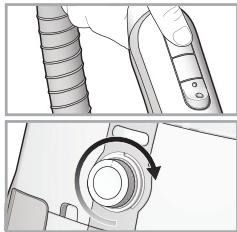
natural_image
Technical illustration of a mechanical component with a circular arrow indicating rotation (no text or symbols)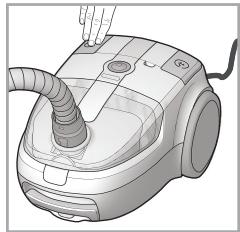
natural_image
Illustration of a vacuum cleaner with a hand inserting a plug into it (no text or symbols visible)B
natural_image
Diagram of a digital camera with no text or symbolsC
natural_image
Technical line drawing of a handheld vacuum tube device with attached clamps (no text or symbols)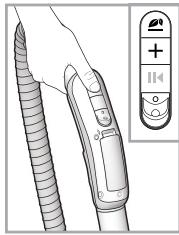
D
natural_image
Illustration of a hand holding a small object inside a container (no text or symbols visible)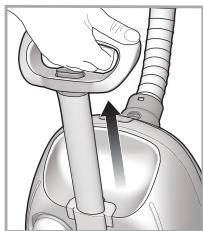
natural_image
Illustration of a hand holding a cylindrical object with an arrow indicating motion or force (no text or symbols)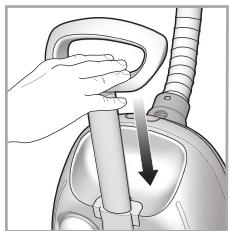
natural_image
Illustration of a hand holding a device with a downward arrow indicating motion (no text or symbols)E
natural_image
Close-up of a vacuum cleaner's side arm and base, showing mechanical components and airflow direction (no text or symbols)F
natural_image
Illustration of a hand holding a vacuum cleaner with a coiled tube (no text or symbols)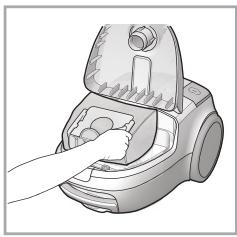
natural_image
Illustration of a hand pressing down on a small mechanical device (no text or symbols visible)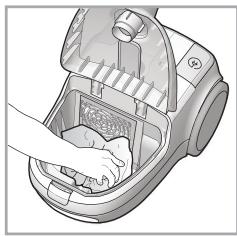
natural_image
Illustration of a hand cleaning a kitchen appliance with a handle (no text or symbols)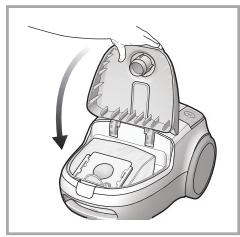
natural_image
Illustration of a hand using a vacuum cleaner to lift a component (no text or symbols visible)G
natural_image
Illustration of a hand holding a vacuum cleaner with a coiled tube (no text or symbols visible)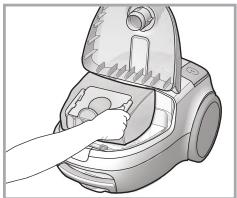
natural_image
Illustration of a hand inserting a small component into a vacuum cleaner (no text or symbols visible)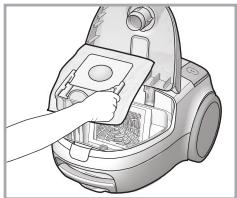
natural_image
Illustration of a hand inserting a component into a vacuum cleaner's air vent (no text or symbols visible)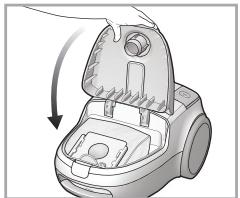
natural_image
Illustration of a vacuum cleaner's internal structure with a downward arrow indicating motion (no text or symbols)H
natural_image
Diagram of a vehicle interior showing structural components and airflow direction (no text or symbols)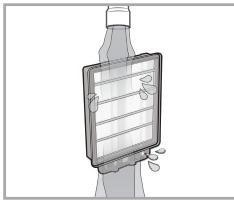
natural_image
Illustration of a bottle with a plastic cover and a handle, no text or symbols present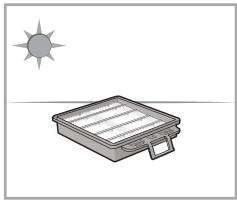
natural_image
Simple line drawing of a sun and a flatbed box on a horizontal surface (no text or symbols)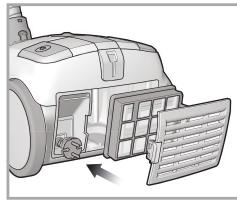
natural_image
Diagram of a spacecraft or spacecraft with a panel and internal structure, no visible text or symbols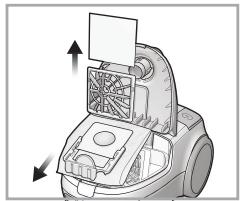
natural_image
Mechanical device with internal fan and mounting bracket, showing directional arrows (no text or symbols)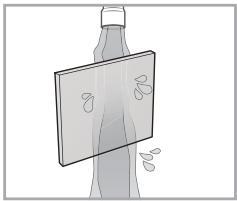
natural_image
Illustration of a human torso with a medical device and abstract markings (no text or symbols)
natural_image
Simple diagram with a sun icon above a tilted square, no text or symbols present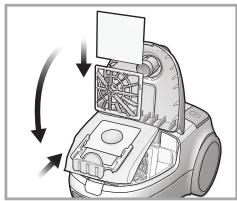
natural_image
Diagram of a robotic vacuum cleaner with airflow arrows indicating motion (no text or symbols)|
natural_image
Two technical illustrations of a vacuum cleaner on tiled floor, showing top and side views (no text or symbols)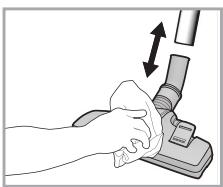
natural_image
Illustration of a hand cleaning a vacuum cleaner with a brush (no text or symbols)J
natural_image
Two-step illustration of a hand using a tool to clean or store floor tiles (no text or symbols)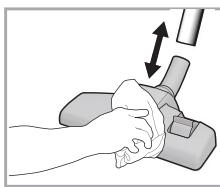
natural_image
Illustration of a hand holding a sponge next to a mechanical device with an upward arrow (no text or symbols)K
natural_image
3D rendering of a broom with handle and base, placed on tiled floor (no text or symbols)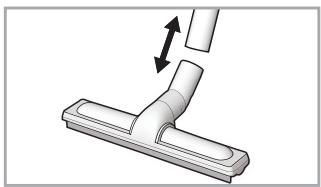
natural_image
Diagram of a vacuum cleaner with a lever and directional arrow indicating motion (no text or symbols)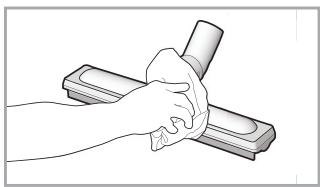
natural_image
Illustration of a hand washing a rectangular object with a tool, no text or symbols presentL
natural_image
3D rendering of a vacuum cleaner on a flat base (no text or symbols visible)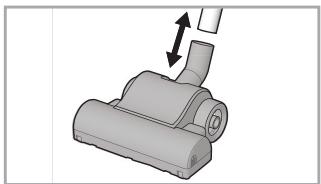
natural_image
3D rendering of a mechanical component with an arrow indicating direction (no text or symbols)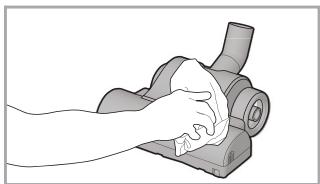
natural_image
Illustration of a hand cleaning a mechanical component (no text or symbols visible)M
natural_image
Illustration of a vacuum cleaner with handle and lever mechanism (no text or symbols)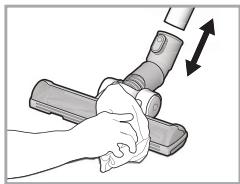
natural_image
Illustration of a hand using a tool to clean or adjust a component, with no visible text or symbols.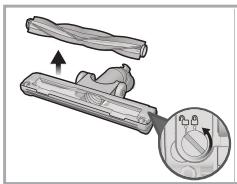
natural_image
Mechanical component diagram showing a lever mechanism with an inset close-up view (no text or symbols)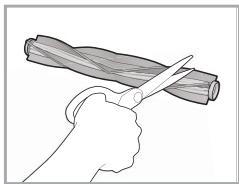
natural_image
Illustration of a hand using scissors to cut a cylindrical object (no text or symbols)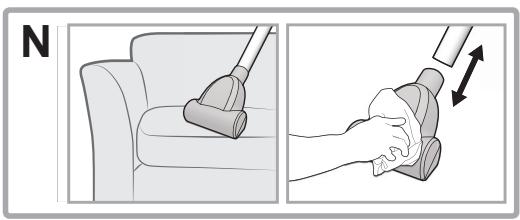
natural_image
Illustration showing two steps of a hand cleaning a small object on a sofa, with no text or symbols present.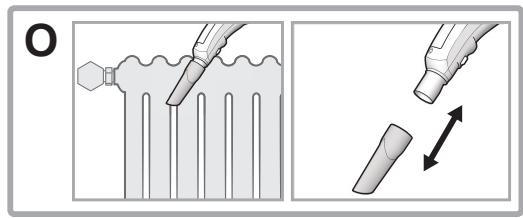
natural_image
Two-step diagram showing a mechanical component being inserted into a housing, with no visible text or symbols.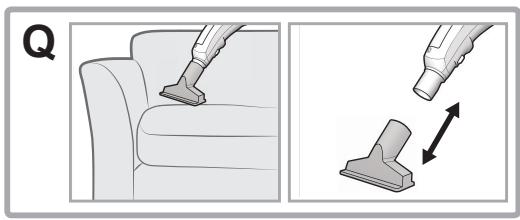
natural_image
Illustration showing a person using a vacuum cleaner on a sofa and a hand holding a small object with directional arrows (no text or symbols)DESCRIZIONE DELL'APPARECCHIO
Remote Power Control (C)
Spazzola imbottiti (N)
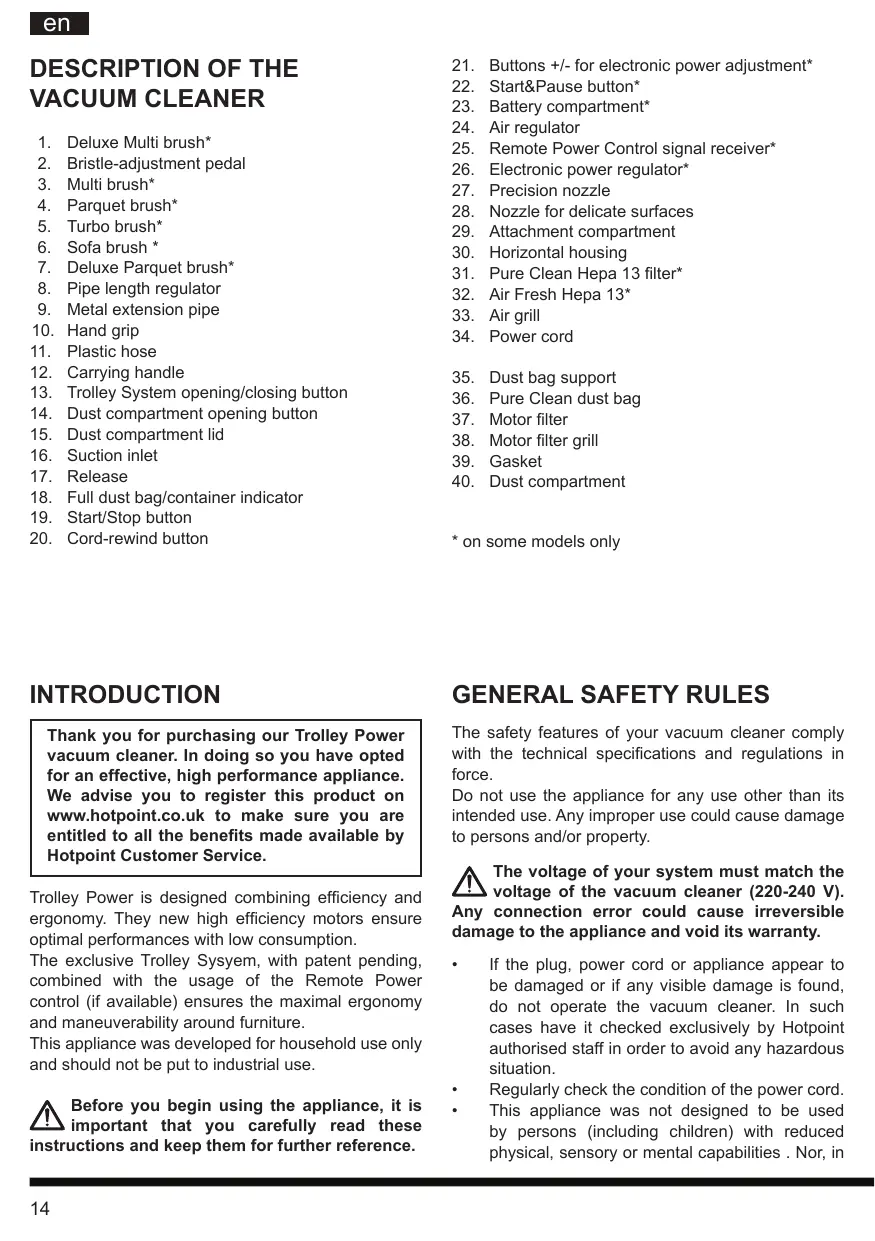
- Deluxe Multi brush*
- Bristle-adjustment pedal
- Multi brush*
- Parquet brush*
- Turbo brush*
- Sofa brush *
- Deluxe Parquet brush*
- Pipe length regulator
- Metal extension pipe
- Hand grip
- Plastic hose
- Carrying handle
- Trolley System opening/closing button
- Dust compartment opening button
- Dust compartment lid
- Suction inlet
- Release
- Full dust bag/container indicator
- Start/Stop button
-
Cord-rewind button
-
Buttons +/- for electronic power adjustment*
- Start&Pause button*
- Battery compartment*
- Air regulator
- Remote Power Control signal receiver*
- Electronic power regulator*
- Precision nozzle
- Nozzle for delicate surfaces
- Attachment compartment
- Horizontal housing
- Pure Clean Hepa 13 filter*
- Air Fresh Hepa 13*
- Air grill
-
Power cord
-
Dust bag support
-
Pure Clean dust bag
-
Motor filter
-
Motor filter grill
-
Gasket
-
Dust compartment
* on some models only
INTRODUCTION
Thank you for purchasing our Trolley Power vacuum cleaner. In doing so you have opted for an effective, high performance appliance. We advise you to register this product on www.hotpoint.co.uk to make sure you are entitled to all the benefits made available by Hotpoint Customer Service.
Trolley Power is designed combining efficiency and ergonomy. They new high efficiency motors ensure optimal performances with low consumption.
The exclusive Trolley Sysyem, with patent pending, combined with the usage of the Remote Power control (if available) ensures the maximal ergonomy and maneuverability around furniture.
This appliance was developed for household use only and should not be put to industrial use.
Before you begin using the appliance, it is important that you carefully read these instructions and keep them for further reference.
GENERAL SAFETY RULES
The safety features of your vacuum cleaner comply with the technical specifications and regulations in force.
Do not use the appliance for any use other than its intended use. Any improper use could cause damage to persons and/or property.
The voltage of your system must match the voltage of the vacuum cleaner (220-240 V). Any connection error could cause irreversible damage to the appliance and void its warranty.
- If the plug, power cord or appliance appear to be damaged or if any visible damage is found, do not operate the vacuum cleaner. In such cases have it checked exclusively by Hotpoint authorised staff in order to avoid any hazardous situation.
• Regularly check the condition of the power cord.
- This appliance was not designed to be used by persons (including children) with reduced physical, sensory or mental capabilities. Nor, in
addition, persons lacking experience or familiarity with the product, unless they are supervised or instructed on the use of the appliance by a person responsible for their safety.
- Supervise children to prevent them from playing with the appliance.
- Never leave the appliance unattended when it is plugged into an electrical outlet.
- Never use the power cord to move or carry the appliance around.
• After use, disconnect the plug from the electrical outlet and rewind the power cord. - Do not bend the power cord and keep it away from sharp edges to avoid any damage.
- Never leave or use the appliance over or close to flames, ovens, flammable materials or other sources of heat.
- Do not use the vacuum cleaner on persons or animals. Keep the suction ends away from your body while it is in operation.
- Before changing an attachment, when cleaning or maintaining the appliance, and in any case after every use, unplug it from the electrical outlet.
- Should you suspect a failure, immediately unplug it from the electrical outlet.
• Never immerse the vacuum cleaner in water or any other liquid. Never spray any liquid
substances onto the appliance.
- Do not leave the appliance in the open air and exposed to inclement weather conditions.
- For safety, we advise you to keep the vacuum cleaner always lower than your own position when cleaning the stairs.
Never suck up any liquid or damp substances as this could affect the operation of the appliance.
- Never suck up any flammable materials or incandescent objects such as ash, cigarette ends etc. Some parts of the vacuum cleaner could catch fire.
- Never suck up any sharp or cutting objects as this could damage the appliance.
- If very fine dust or powders are sucked up such as flour, etc. small electrostatic discharges could occur. When sucking up materials previously mentioned, we advise not to use the metal extension pipe, but only the plastic flexible hose and to set a low suction power level.
- For your safety, every repair or maintenance action should be carried out on the appliance only by Hotpoint authorised staff.
- No responsibility shall be accepted in case of damage resulting from any improper use of the appliance.
COMMISSION DELEGATED REGULATION (EU) NO 665/2013
| Brand | Hotpoint-Ariston | Hotpoint-Ariston | Hotpoint-Ariston | Hotpoint-Ariston | Hotpoint-Ariston |
| Model | SL B10BDB | SL B10BDW | SL B10BPB | SL B07BEB | SL B07BEW |
| Energy Efficiency class | C | C | C | C | A |
| Annual energy consumption in kWh/year,rounded to one decimal place (1) | 36 | 36 | 38.5 | 25 | 25.5 |
| Carpet cleaning performance class | D | D | E | E | E |
| Hard floor cleaning performance class | B | B | C | C | D |
| Dust re-emission class | B | E | B | B | E |
| Sound power level in db(A) | 80 | 80 | 79 | 77 | 77 |
| Rated input power in W | 1000 | 1000 | 1000 | 700 | 700 |
(1) Indicative annual energy consumption (kWh per year), based on 50 cleaning tasks. Actual annual energy consumption will depend on how the appliance is used.
BEFORE FIRST USE
Remove all adhesives, protective plastic materials and cardboard packaging. Make sure all adhesive parts are removed with a soft damp cloth.
Assembling
- Fasten the plastic flexible hose (11) to the suction inlet (16) until it clicks into place. To remove it, press the release (17) and pull it out.
- Fit the metal extension pipe (9) into the hand grip (10) until it locks into place. Use the length regulator (8) to adjust the length of the pipe.
- Fit the attachment you need (see chapter "Attachments") into the end of the metal extension pipe until it locks into place.

If your appliance is equipped with a Remote Power Control, you will need to insert the series supplied (see paragraph “Remote Power I” under chapter “Features”).
USING THE
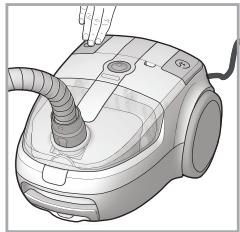
VACUUM CLEANER (A)

The appliance is equipped with a safety device that prevents the dust-compartment om closing unless the dust bag has been ctly installed. Do not force the dust bag lid to and make sure all the parts are in the correct on to allow you to close the lid.

Do not use the vacuum cleaner without filters, Pure Clean dust bag, dust bag support just container, as the appliance could get aged.
- Unwind the power cord (34) and plug the appliance into an electrical outlet (220/240V).

We advise you to unwind the entire power cord (yellow marker: 6,5m; red marker: 7m) void any overheating and damage.
- Press the start/stop button (19) to start the appliance.
- Press the Trolley System opening/closing button (13) to extend the carrying handle (12) to the desired length until it locks into place. Then manoeuvre the vacuum cleaner using the carrying handle when cleaning the house.
- To select the desired suction intensity (based on the model) use the +/- button and electronically adjust the power (21) of
the Remote Power Control; or manually rotate the electronic power regulator (26).

We advise you to use a low suction power on delicate surfaces such as curtains, s, cushions etc to avoid any damage; or at open the air regulator to reduce the suction.
- To pause the vacuum cleaner, if this feature is available, you can use the standby button (22) on the Remote Power Control or the Start & Stop function (based on the model). Just insert the brush into its horizontal housing (30).
- To switch off the appliance press the start/stop button again.
- Disconnect the plug from the electrical outlet and press the cord-rewind button (20) until rewinding is complete.

Make sure the cord does not get entangled during rewinding.
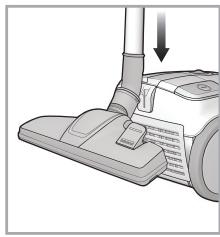
- Secure the floor head into its horizontal / vertical housing and store the appliance.

Do not start the vacuum cleaner if the plastic flexible hose is entangled, as this could age the appliance.
FEATURES
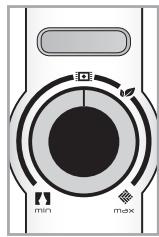
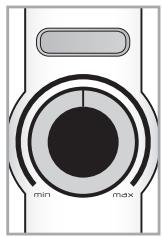
Electronic power regulator (B)
The electronic power regulator (26) (if available) allows to set the suction power required.
On some models, the ideal power levels are indicated, according to the surface to be cleaned: awnings, carpets and hard floors.
The Eco function (if available) allows to save 25% energy, compared with the consumption relative to max suction power, ensuring at the same time cleaning efficacy.
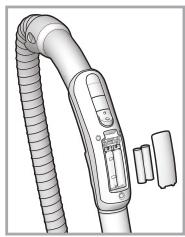
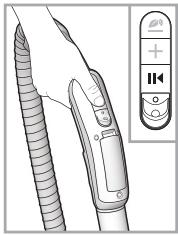
Remote Power Control (C)
The Remote power control (if available) enables you to adjust the suction power directly and effortlessly from the hand grip, with no need to bend. When using the vacuum cleaner, you can keep it on standby by pressing the Start & Pause button (22).
To insert or change the batteries of your Remote Power Control:
- Open the battery compartment (23).
- Insert two AAA batteries, making sure of the
positive and negative poles.
- Close the battery compartment until it clicks into place.
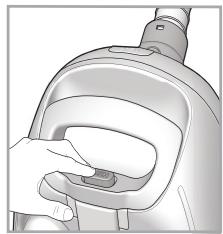
Trolley System (D)
The Trolley System allows you to move your vacuum cleaner easily when cleaning and carry it from room to room effortlessly.
- Press the opening/closing button on the Trolley System (13) to pull out the carry handle (12) until it locks into place at the desired length.
- Having completed your cleaning, press the opening/closing button on the Trolley System and close the carrying handle until it locks into place.

Use the Trolley System's carrying handle to store the appliance, making sure you have ctly locked it into place.
Start & Pause (E)
The Start & Pause function (if available) allows you to keep the vacuum cleaner on stand-by and lock the cleaning head in the park position: just insert the brush into its horizontal housing (30).
Air Fresh Hepa 13 (H)
The Air Fresh Hepa 13 filter (32) (if available), with active carbons treatment, ensures the maximal dust retention (>99,95%) and the filtration of odours.
CLEANING AND MAINTENANCE

Before cleaning or maintaining the vacuum cleaner, make sure it has been unplugged the electrical outlet. Do not use aggressive finances or abrasive materials to clean the stance, its internal parts and attachments. Sure it is thoroughly dry before using again.

Make sure all its parts are thoroughly dry before replacing them.

We advise you to clean the filter at least every 4 months to restore its filtering power. /y case we recommend replacing the filter at every year to ensure maximum performance.
Cleaning the appliance
Use a dry or slightly damp soft cloth to clean the plastic parts (body, dust compartment, flexible hose etc) and the metal extension pipe (9).
Cleaning the dust compartment (F)
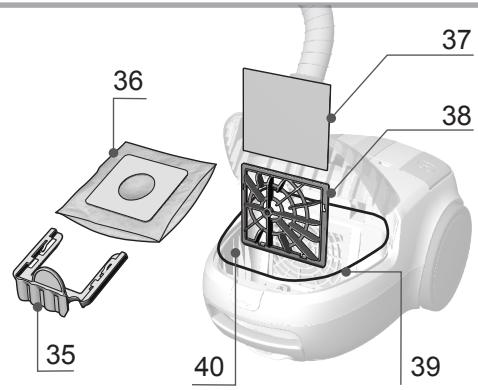
For the routine cleaning of the dust compartment (40):
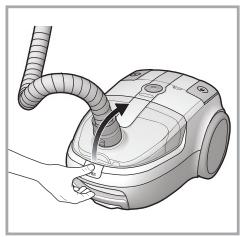
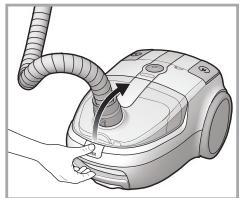
- Press the dust-compartment opening button (14) to open the dust compartment lid (15).
- Remove the Pure Clean dust bag (36).
- Clean the dust compartment by removing any residual dirt with a small brush. If needed, use a damp soft cloth, taking care to wipe all its parts entirely dry.
- Re-place the Pure Clean dust bag or dust container correctly and close the dust compartment lid until it clicks into place.
Replacing the Pure Clean dust bag (G)
We recommend always using Hotpoint original Pure Clean dust bags (on selected models only), because their special fabric allows optimum air filtration, maximum dust/powder retention, high performances and a long motor life.
As the Pure Clean dust bags (36) are made of fabric, they are more resistant than conventional paper bags and can retain very fine dust/powder particles more effectively, thus ensuring maximum hygiene.

We recommend replacing the Pure Clean bag as soon as the full-bag indicator nates. Change at least once a year to be s sure of the hygienic condition of your um cleaner. The pores of a bag clogged with powder particles reduce the motor's suction r and can cause damage.
- Make sure the appliance is disconnected from the electrical outlet.
- Press the dust-compartment opening button (14) to open the dust compartment lid (15).
- Release the bag support (35) and remove the Pure Clean dust bag (36).

Dispose of the dust bag in compliance with all local regulations on waste disposal.
- Slide a new Pure Clean dust bag into the dust bag support completely; then place it back into the special compartment.
- Close the dust compartment lid until it clicks into place.

If you are finding it difficult to close the dust compartment lid, it is likely that the Pure Clean dust bag and/or its dust bag support have not been assembled correctly. Do not force the dust bag lid to close, make sure both parts are in
the correct position to allow lid closure.
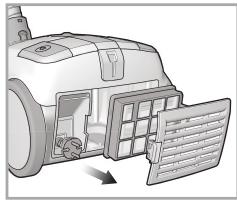
Cleaning the filters (H)
The Pure Clean Hepa 13 filter ensures maximum protection against allergens and maintains high air quality, as the air given back by the appliance is entirely free from dust/powder residues (filtering power > 99.95 %). To clean the Pure Clean Hepa 13 filter (31):
- Disassemble the air grill (33) using the opening tab.
- Remove the Pure Clean Hepa 13 filter by releasing the opening tab.
- Wash the filter under running water, taking care that the jet of water is not too strong.
- Hold it so that the water flows parallel to its folds.
- Let it dry at room temperature until all its parts are thoroughly dry.
- Replace the Pure Clean Hepa 13 filter, paying attention to the position of the notches.
- Fit the air grill into its housing until it clicks into place.
To clean the dust compartment filters (40):
- Press the dust-compartment opening button (14) to open the dust compartment lid (15).
- Remove the Pure Clean dust bag (36), motor filter grill (38) and motor filter (37) from the motor filter grill.
- Clean the motor filter by washing it under running water, taking care that the jet of water is not too strong. Then gently shake water loose.
- When cleaning the motor filter grill, remove any dust/powder residues with a small brush. If needed, use a damp soft cloth.
- Fit the motor filter into the motor filter grill again, taking care to position it gently into the special notches.
- Slide the motor filter grill assembly into the special guides in the dust compartment.
- Fit the Pure Clean dust bag using the special dust bag support.
- Close the dust compartment lid until it clicks into place.
ATTACHMENTS
The attachments can either be supplied as standard features (based on the model) or be purchased separately from Hotpoint authorised centres.
Multi brush/Multi Deluxe brush (J/I)
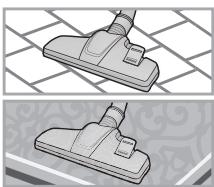
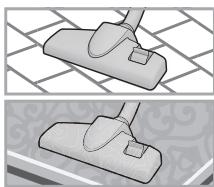
The Multi brush (3) is suitable for vacuuming hard floor and carpets on a daily basis.
The Multi Deluxe brush (1) is designed optimizing the air flow and is especially suitable for vacuuming hard and smooth floors as well as carpets.
Use the bristle-adjustment pedal (2) to clean:

Hard floors

Carpets
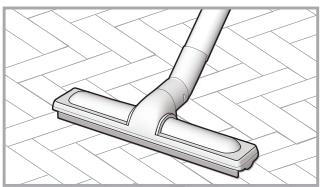
Parquet brush (K)
The Parquet brush (4) is suitable for vacuuming delicate areas such as wooden floors. The special natural bristles enable you to use on very delicate surfaces without harm.
Turbo brush (L)
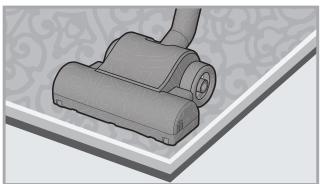
The Turbo brush (5), with rotating bristles, is especially suitable for the in-depth vacuuming of short-pile carpets and removing pet hair. The special antibacterial treatment prevents the proliferation of bacteria. An arrow under the brush indicates where it can be opened for dislodging trapped objects.
Deluxe Parquet brush (M)
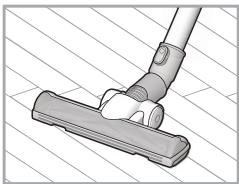
The Deluxe Parquet brush (7) is suitable for vacuuming delicate and parquet floors. The brush is equipped with very delicate rotating bristles, which are operated by the vacuum cleaner's suction power, and soft wheels protecting delicate floors. To clean the plastic parts of the Deluxe Parquet brush, remove the brush from the metal extension pipe (9) and wipe with a dry or slightly damp soft cloth. To clean the rotating bristles, turn the safety lock into position and remove, then disassemble the rotating brush and start cleaning. Remove any hairs or threads that got entangled using scissors, taking care not to damage the bristles.
Upholstery brush (N)
The Upholstery brush (6) is suitable for vacuuming surfaces such as sofas, mattresses, blankets, cushions etc. It is equipped with rotating bristles operated by the vacuum cleaner's suction power that enable you to clean in depth and remove any fur, hairs or mites from fabrics. The protection grill prevents the bristles from touching the surfaces to be cleaned, thus ensuring maximum on fabrics.
Precision nozzle (O)
The precision nozzle in the attachment compartment (29) helps you vacuum corners, crevices and other difficult-to-reach areas.
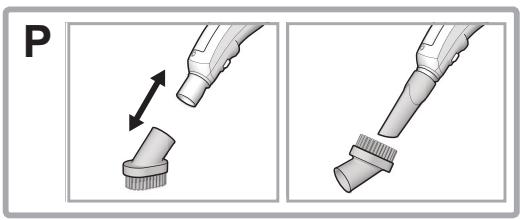
Nozzle for delicate surfaces (P)
The nozzle for delicate surfaces (28) in the attachment compartment (29) is suitable for vacuuming surfaces requiring special care such as radiators, furniture etc. Its special natural bristles enable you to use it on very delicate surfaces without any harm.
Upholstery nozzle (Q)
The upholstery nozzle is suitable for the precise vacuuming of particular surfaces such as sofas, mattresses, blankets, cuscions, etc.
DISPOSAL OF OLD ELECTRICAL APPLIANCES
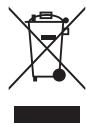
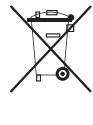
The European Directive 2002/96/EC on Waste Electrical and Electronic Equipment (WEEE), requires that old household electrical appliances must not be disposed
of in the normal unsorted municipal waste stream.
CE Old appliances must be collected separately in order to optimise the recovery and recycling of the materials they contain and reduce the impact on human health and the environment. The crossed out “wheeled bin” symbol on the product reminds you of your obligation, that when you dispose of the appliance it must be separately collected. Consumers should contact their local authority or retailer for information concerning the correct disposal of their old appliance.
TROUBLESHOOTING
Problem
Possible causes / Solutions
The vacuum cleaner cannot be switched on.
The full dust bag/container indicator lights up although it is not full yet.
• The plug was not inserted or is not making contact.
- Change the dust bag. If large quantities of very fine dust/powder are sucked up (e.g. flour, etc), the full dust bag indicator may light up although the bag is not full yet. The reason is that the Pure Clean dust bag is able to retain very fine dust/powder particles, thus ensuring maximum hygiene.
- Clean the dust container in models without dust bag.
• Clean the filters and, if needed, replace them.
- Make sure the expansion pipe, flexible hose and brush are not blocked.
Low suction power.
• Clean the filters and, if needed, replace them.
- Make sure the expansion pipe, flexible hose and brush are not blocked.
- Change the dust bag. If large quantities of very fine dust/powder are sucked up (e.g. flour, etc), the Pure Clean dust bag may become clogged.
• Clean the dust container and its filters.
Remote Power not working.
- Battery not charged.
- The batteries were positioned incorrectly inside the battery compartment. Position the two AAA batteries making sure of the positive and negative poles.
- Remove batteries; then position them again, making sure of the positive and negative poles.
- Electronic appliances or obstacles may be interfering or shielding with the infrared signal.
Small electrostatic discharges occur while sucking up.
- If very fine dust or powders are sucked up such as flour, etc. small electrostatic discharges could occur. When sucking up materials previously mentioned, we advise not to use the metal extension pipe, but only the plastic flexible hose and to set a low suction power level.
The vacuum cleaner whistles or vibrates when in use.
- One or more attachments were assembled incorrectly. Make sure the filters and brushes were assembled according to these instructions. In the model with dust bag make sure that the gasket is correctly in place too.
- The dust bag/container is full. Replace the dust bag or clean the dust container.
• Clean the filters and, if needed, replace them.
• The air regulator is open. Make sure it was closed correctly.
The brush moves with difficulty.
- Reduce suction power, especially on carpets and fabrics in general. Open the air regulator to reduce the “suction effect”.
The dust compartment lid cannot be closed.
- The Pure Clean dust bag or dust container was assembled incorrectly. Make sure it is correctly in place so that the safety lever will let you close the dust compartment lid.
DESCRIPTION DE L'APPAREIL
Remote Power Control (C)
Causes/Solutions possibles
Tel: (0.212) 355 53 00
IMHA ETME
Remote Power Control (C)
Remote Power Control (C)
Szczotka do obić (N)
Trolley Power Bagged
2014/06 ver. 1.0
- DESCRIZIONE DELL'APPARECCHIO
- Remote Power Control (C)
- Spazzola imbottiti (N)
- INTRODUCTION
- GENERAL SAFETY RULES
- Never suck up any liquid or damp substances as this could affect the operation of the appliance.
- BEFORE FIRST USE
- Assembling
- USING THE
- VACUUM CLEANER (A)
- FEATURES
- Electronic power regulator (B)
- Trolley System (D)
- Start & Pause (E)
- Air Fresh Hepa 13 (H)
- CLEANING AND MAINTENANCE
- Cleaning the appliance
- Cleaning the dust compartment (F)
- Replacing the Pure Clean dust bag (G)
- Cleaning the filters (H)
- ATTACHMENTS
- Multi brush/Multi Deluxe brush (J/I)
- Parquet brush (K)
- Turbo brush (L)
- Deluxe Parquet brush (M)
- Upholstery brush (N)
- Precision nozzle (O)
- Nozzle for delicate surfaces (P)
- Upholstery nozzle (Q)
- DISPOSAL OF OLD ELECTRICAL APPLIANCES
- TROUBLESHOOTING
- Problem
- Possible causes / Solutions
- DESCRIPTION DE L'APPAREIL
- Causes/Solutions possibles
- IMHA ETME
- Szczotka do obić (N)
Brand : HOTPOINT
Model : SL B10 BPB
Category : Vacuum Cleaner