
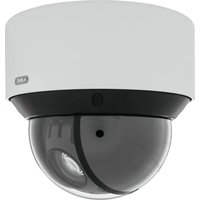
TVCC34010 - Surveillance Camera ABUS - Free user manual and instructions
Find the device manual for free TVCC34010 ABUS in PDF.


| Product type | Surveillance camera |
| Brand | ABUS |
| Model | TVCC34010 |
| Dimensions (L x W x H) | 200 x 80 x 80 mm |
| Weight | 500 g |
| Power supply | 12 V DC power adapter included |
| Power consumption | 5 W |
| Resolution | 1920 x 1080 pixels (Full HD) |
| Night vision | Integrated infrared LEDs, range up to 20 m |
| Viewing angle | 90° (diagonal) |
| Motion detection | Yes, with email or app notification |
| Recording | On microSD card (up to 128 GB) or NAS server |
| Connectivity | Ethernet RJ45, Wi-Fi 2.4 GHz |
| Supported protocols | IPv4, HTTP, FTP, SMTP, ONVIF |
| Protection rating | IP66 (weather-resistant) |
| Operating temperature | -20 °C to 50 °C |
| Maintenance and cleaning | Clean with a soft, dry cloth. Do not use abrasive products. |
| Safety | Install at height to prevent unauthorized access. Use security cables. |
| Spare parts and repairability | Repairs must be carried out by an ABUS authorized professional. No spare parts available for the user. |
| General information | 2-year manufacturer's warranty. Made in Germany. |
Frequently Asked Questions - TVCC34010 ABUS
User questions about TVCC34010 ABUS
0 question about this device. Answer the ones you know or ask your own.
Ask a new question about this device
Download the instructions for your Surveillance Camera in PDF format for free! Find your manual TVCC34010 - ABUS and take your electronic device back in hand. On this page are published all the documents necessary for the use of your device. TVCC34010 by ABUS.
USER MANUAL TVCC34010 ABUS
natural_image
Close-up of a white surveillance camera with visible lens and control buttons (no text or symbols)natural_image
Close-up of a white surveillance camera with visible lens and control buttons (no text or symbols on the device itself)Bedienungsanleitung
Version 09/2013
CE
natural_image
Simple line drawing of a symmetrical object with concentric circles and a central dot (no text or symbols)natural_image
Technical line drawings of mechanical components and base assemblies (no text or symbols)natural_image
Coiled network cable with multiple connectors (no text or symbols visible)20m Kombikabel
natural_image
Pure diagonal line pattern without any text, numbers, or symbols
natural_image
Technical line drawing of a mechanical component with three screws and a central housing (no text or symbols)natural_image
Technical line drawing of a mechanical assembly with a component and directional arrow (no text or symbols)natural_image
Close-up of a white surveillance camera with visible lens and control buttons (no text or symbols on the device itself)User guide
Version 09/2013
CE
English translation of the original German user guide. Keep for future use!
Introduction
Dear Customer,
Thank you for purchasing this product.
This device complies with the requirements of the applicable EU directives. The declaration of conformity can be ordered from:
To maintain this condition and to ensure risk-free operation, you as the user must observe these operation instructions!
Before initial start-up, read through the complete operating instructions observing operating and safety instructions.
All company and product names mentioned in this document are registered trademarks. All rights reserved.
If you have any questions, please contact your installer or your local dealer!

Disclaimer
This user manual was prepared with greatest care. If you should notice omissions or inaccuracies, please inform us about these on the back of this manual given address. The ABUS Security-Center GmbH assumes no liability for technical and typographical faults and reserves the right to make at any time modifications to the product or user manual without a previous announcement. The company is not liable or responsible for direct and indirect subsequent damages which are caused in connection with the equipment, the performance and the use of this product. No guarantee for the content of this document is taken.
Icon explanation
 | A flash in the triangle is used if there is danger for the health, e.g. by an electric shock. |
 | An exclamation mark in the triangle points to an important note in this user manual which must be minded. |
 | This symbol can be found when you are to be given tips and information on operation. |
Important safety advice
 | The warranty will expire for damage due to non-compliance with these operating instructions. ABUS will not be liable for any consequential loss! |
 | ABUS will not accept liability for damage to property or personal injury caused by incorrect handling or non-compliance with the safety-instructions.In such cases the warranty will expire. |
The following safety information and hazard notes are not only intended to protect your health, but also to protect the device from damage. Please read the following points carefully:
- There are no components inside the product that require servicing. Dismantling the product invalidates the CE certification and the guarantee / warranty.
- The product may be damaged if it is dropped, even from a low height.
- Install the device so that the image sensor is not subjected to direct sunlight. Pay attention to the installation instructions in the corresponding section of this user guide.
Avoid the following adverse conditions during operation:
- Moisture or excess humidity
• Extreme heat or cold - Direct sunlight
- Dust or flammable gases, vapours, or solvents
• Strong vibrations
• Strong magnetic fields (e.g. next to machines or loudspeakers) - The camera must not be installed on unstable surfaces
General safety information:
- Do not leave packaging material lying around. Plastic bags, sheeting, polystyrene packaging, etc., can pose a danger to children if played with.
- The surveillance camera contains small parts which could be swallowed, and should be kept out of reach of children for safety reasons.
- Do not insert any objects into the device through the openings.
- Only use replacement devices and accessories that are approved by the manufacturer. Do not connect any non-compatible products.
- Please pay attention to the safety information and user guides for the other connected devices.
- Check the device for damage before commissioning. Do not put the device into operation if you detect any damage.
- Adhere to the operating voltage limits specified in the technical data. Higher voltages could destroy the device and pose a health risk (electric shock).
Safety information
- Power supply: power supply unit 100–240 V AC, 50/60 Hz / 12 V DC, 1,5 A (included in the scope of delivery)
Only operate this device on a power source which supplies the power specified on the type plate. If you are unsure which voltage is supplied at the installation location, contact your power supply company.
Disconnect the device from the power supply before carrying out maintenance or installation work. - Overloading
Avoid overloading electrical sockets, extension cables, and adapters, as this can result in fires or electric shocks. - Cleaning
Only use a damp cloth to clean the device. Do not use corrosive cleaning materials.
Disconnect the device from the power supply while doing so.
Warnings
Observe all safety and operating instructions before putting the device into operation for the first time.
-
Observe the following information to avoid damage to the power cable and plug:
-
Do not modify or manipulate the power cable or plug.
- Do not bend or twist the power cable.
- Do not pull the cable when disconnecting the device from the power – always take hold of the plug.
-
Ensure that the power cable is positioned as far away as possible from any heating equipment, as this could otherwise melt the plastic coating.
-
Follow these instructions. Non-compliance with these instructions could lead to an electric shock.
-
Never open the housing or power supply unit.
- Do not insert any metallic or flammable objects into the device.
-
Use overvoltage protection to prevent damage caused by overvoltage (e.g. electrical storms).
-
Disconnect defective devices from the power immediately and contact your specialist dealer.
| During the installation into an existing video surveillance system make sure that all devices are disconnected from the low and supply voltage circuit. | |
| If in doubt allow a professional electrician to mount, install and wire-up your device. Improper electrical connection to the mains does not only represent at threat to you but also to other persons.Wire-up the entire system making sure that the mains and low voltage circuit remain separated and cannot come into contact with each other in normal use or due to any malfunctioning. |
Unpacking
While you are unpacking the device please handle it with utmost care.
| If you notice any damage of the original packaging, please check at first the device.If the device shows damages, please contact your local dealer. |
Table of contents
- Intended use .... 18
- Scope of delivery....18
- Features and Functions....18
- Camera description....19
- Mounting / installation 19
5.1 Mounting the camera.... 19
5.2 Aligning the camera....20
5.3 Power supply....21
5.4 Installing the video cable....21
- Maintenance and cleaning 21
6.1 Maintenance....21
6.2 Cleaning....22
-
Disposal 22
-
Technical Data 22
1. Intended use
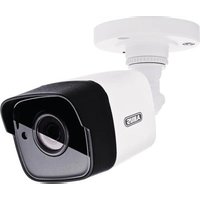
The dome camera is designed for both daytime and night-time use. Thanks to its protection class IP66 it can used both inside and outside. The day/night outdoor dome camera is equipped with a high-quality image sensor. It is used for video surveillance in conjunction with a recording device or surveillance monitor.
For a detailed description of functions, refer to Section 3, "Features and functions".
2. Scope of delivery

natural_image
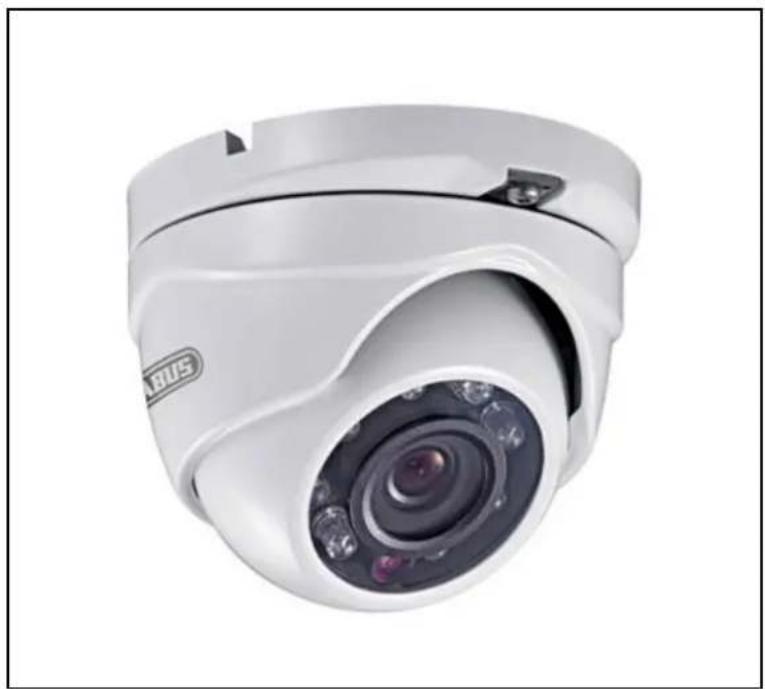
Simple line drawing of a circular object with concentric rings and a central hole (no text or symbols)Day/night mini outdoor dome camera including mounting material

natural_image
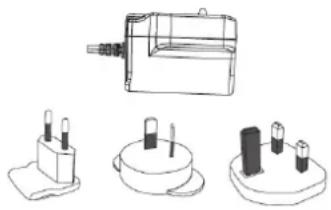
Technical line drawings of electronic components including a motor and three base devices (no text or symbols)Power supply unit including EU, Australian and UK adapters 12 V DC / 1.5 A
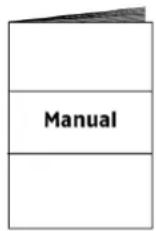
Manual

natural_image
Coiled cable with multiple connectors, no visible text or symbols20 m combination cable
3. Features and Functions
- Compact day/night vision outdoor dome camera
- Various camera installation options – whether indoors or outdoors
- Simple design and high protection class (IP66)
• Detailed high resolution, thanks to 600 TVL - Includes 20 m combination cable
- Ideal for the extension of TVVR30004 or TVVR30104
4. Camera description
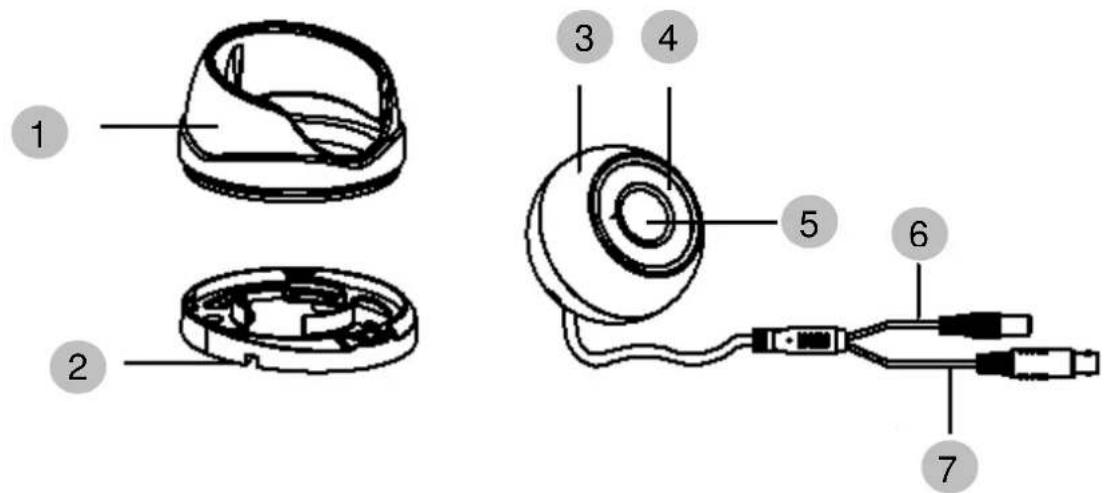
| 1 | Camera cap |
| 2 | Base plate |
| 3 | Camera body |
| 4 | IR LEDs |
| 5 | Lens |
| 6 | Power supply |
| 7 | Video signal |
5. Mounting / installation
5.1 Mounting the camera

IMPORTANT!
The camera must be disconnected from the power supply during installation.
Loosen the fixing screws for the camera cap and remove them. Use the accompanying drilling template for drilling the mounting holes. Secure the base plate with the screws and dowels provided.

natural_image
Pure diagonal line pattern without any text, numbers, or symbols
natural_image
Technical line drawing of a mechanical component with three screws inserted (no text or symbols)Guide the cable through the base plate, and when necessary, through the side opening. Then screw on the camera cap and secure with the fixing screws.

natural_image
Technical line drawing of a mechanical assembly with a component and directional arrow (no text or symbols)5.2 Aligning the camera
Loosen the fixing screws in order to align the camera.
The camera can now be aligned in 3 axes.
Please tighten the screws again when finished.

Incline 75°
Pivot 90°
Rotation 360^
5.3 Power supply
| IMPORTANT!Before starting installation, ensure that the power supply system voltage and the rated voltage of the camera are identical. | ||
 | (1) Video signal (BNC)(2) Power supply12 V DC (5.5 x 2.1 mm) | |
The cameras have a 12 V DC power supply. Ensure correct polarity when connecting. A plug-in power supply unit (round plug, 5.5 mm x 2.1 mm) is provided for the connection.
5.4 Installing the video cable
In order to transmit the video signal to a converter, monitor, or recorder, a coaxial cable of type RG59 with BNC plug (male) must be connected to the "Video OUT" connection. The cable length to the next device may not exceed 150 meters. Suitable signal amplifiers can be installed to increase the range.
6. Maintenance and cleaning
6.1 Maintenance
Regularly check the product's physical state, e.g. check for damage of the housing.
If you suspect that safe operation cannot be guaranteed anymore, disconnect the product and ensure that it cannot be used by mistake. Remove the batteries.
You can assume that safe operation is not possible anymore when
• the device shows visible damage,
• the device does not function anymore

Please note:
The product is absolutely maintenance-free for you. There are no components on the inside of the product to be checked or services by you, never open it.
6.2 Cleaning
Wipe the product with a clean, dry cloth. If the device is very dirty, you can moisten the cloth with lukewarm water.

Ensure that no liquids can get into the device. Do not use any chemical cleaners, since they could damage the housing surface or the screen (discolorations).
7. Disposal

Important: The EU Directive 2002/96/EC regulates the proper return, treatment and recycling of used electronic devices. This symbol means that in the interest of environmental protection the device must be disposed of separately from household or industrial waste at the end of its service life in accordance with applicable local legal guidelines. Disposing of used devices can be done at official recycling centers in your country. Obey local regulations when disposing of material. Further details on returns (also for non-European countries) can be obtained at your local authority. Separate collection and recycling saves natural resources and ensures that all the provisions for protecting health and environment are observed when recycling the product.
8. Technical Data
| Model number | TVCC34010 |
| Image sensor | 1/3" DIS |
| Camera type | Day/night outdoor camera |
| Resolution | 600 TVL |
| Pixels (effective) | 720 (H) x 480 (V) |
| Lens | 3.6 mm, fixed lens |
| Horizontal angle of view | 68.4° |
| Day/night switch | Electromechanical IR-cut filter |
| Minimum illumination (colour) | 0.1 lux |
| Minimum illumination (IR) | 0 lux |
| Noise reduction | >52 dB |
| Electronic shutter control | 1/25 ~ 1/15,000 sec. |
| Backlight compensation | Yes |
| Video system | PAL / NTSC |
| IR LEDs | 12 |
| IR range | 10 m |
| Connections | Video signal (BNC), power supply (DC) |
| Power supply | 12 V DC |
| Power consumption | Max. 5 W |
| Operating temperature | -20 °C – 50 °C |
| Humidity | Max. 90% |
| Protection class | IP 66 |
| Dimensions (Hx∅) | 89.6 mm x 59.1 mm |
| Weight | 400 g |
TVCC34010
natural_image
Close-up of a white surveillance camera with visible lens and control buttons (no text or symbols on the device itself)natural_image
Simple line drawing of a circular object with concentric rings and a central hole (no text or symbols)natural_image
Technical line drawings of three electronic components with no visible text or symbolsnatural_image
Coiled cable with multiple connectors, no visible text or symbolsCâble combiné 20 m
natural_image
Pure geometric pattern of diagonal lines forming a V-shape (no text or symbols)
natural_image
Technical diagram of a mechanical assembly with screws and a central housing (no text or labels)natural_image
Technical line drawing of a mechanical assembly with a component and directional arrow (no text or symbols)natural_image
Close-up of a white surveillance camera with visible lens and control buttons (no text or symbols on the device itself)natural_image
Simple line drawing of a symmetrical object with concentric circles and a central hole (no text or symbols)Dag/nacht mini buiten-domecamera incl. bevestigingsmateriaal
natural_image
Technical line drawings of three electronic components with no visible text or symbolsVoeding incl. EU-, AU- en UK-adapter 12 V DC / 1,5 A

Handleiding

natural_image
Coiled cable with multiple connectors (no text or symbols visible)20 m combikabel
natural_image
Pure diagonal line pattern without any text, numbers, or symbols
natural_image
Technical line drawing of a mechanical component with three screws and a central housing (no text or symbols)natural_image
Technical diagram of a mechanical assembly with a component and directional arrow (no text or symbols)natural_image
Close-up of a white surveillance camera with visible lens and control buttons (no text or symbols on the device itself)natural_image
Simple line drawing of a symmetrical object with concentric circles and a central hole (no text or symbols)Udendørs dag/nat-mini-domekamera inkl. monteringsmateriale

natural_image
Technical line drawings of mechanical components and base assemblies (no text or symbols)natural_image
Coiled network cable with multiple connectors (no text or symbols visible)20 m kombikabel
| 1 | Kamerakappe |
| 2 | Bundplade |
| 3 | Kamerahus |
| 4 | IR-LED'er |
| 5 | Objektiv |
| 6 | Spændingsforsyning |
| 7 | Videosignal |
5. Montage/installation
natural_image
Pure diagonal line pattern without any text, numbers, or symbols
natural_image
Technical diagram of a mechanical component with three screws and internal parts (no text or labels)natural_image
Technical diagram showing a mechanical assembly above a bowl with an upward arrow indicating motion (no text or symbols present)5.2 Justering af kameraet
Løsn fastgørelsesskruen for at justere kameraet.
Kameraet kan nu justeres i 3 akser.
Important: The EU Directive 2002/96/EC regulates the proper return, treatment and recycling of used electronic devices. This symbol means that in the interest of environmental protection the device must be disposed of separately from household or industrial waste at the end of its service life in accordance with applicable local legal guidelines. Disposing of used devices can be done at official recycling centers in your country. Obey local regulations when disposing of material. Further details on returns (also for non-European countries) can be obtained at your local authority. Separate collection and recycling saves natural resources and ensures that all the provisions for protecting health and environment are observed when recycling the product.
8. Teknisk data
natural_image
Close-up of a white surveillance camera with visible lens and control buttons (no text or symbols on the device itself)natural_image
Simple line drawing of a circular object with concentric rings (no text or symbols)natural_image
Technical line drawings of electronic components including a battery, switch, and potentiometer (no text or symbols)natural_image
Coiled network cable with multiple connectors (no text or symbols visible)Cable combi de 20 m
natural_image
Pure geometric pattern of diagonal lines forming a V-shape (no text or symbols)
natural_image
Technical diagram of a mechanical assembly with screws and a central housing (no text or labels)natural_image
Technical diagram of a mechanical assembly with a component and a magnified view of the housing (no text or symbols)natural_image
Close-up of a white surveillance camera with visible lens and control buttons (no text or symbols on the device itself)Instrukcja obsługi
Version 09/2013
CE
natural_image
Simple line drawing of a circular object with concentric rings and a central hole (no text or symbols)natural_image
Technical line drawings of three electronic components with no visible text or symbolsZasilacz z adapterem EU, AU i UK 12 V DC / 1,5 A
Instrukcja

natural_image
Coiled cable with multiple connectors (no text or symbols visible)Kabel kombi 20 m
3. Cechy i funkcje
natural_image
Pure geometric pattern of diagonal lines forming a V-shape (no text or symbols)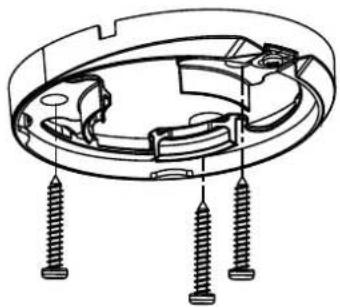
natural_image
Technical line drawing of a mechanical component with three screws inserted (no text or symbols)natural_image
Technical diagram showing a mechanical assembly above a bowl with an upward arrow indicating motion (no text or symbols present)natural_image
Close-up of a white surveillance camera with visible lens and control buttons (no text or symbols on the device itself)natural_image
Simple line drawing of a symmetrical object with concentric circles and a central dot (no text or symbols)natural_image
Technical line drawings of three electronic components with no visible text or symbolsnatural_image
Coiled network cable with multiple connectors (no text or symbols visible)natural_image
Pure diagonal line pattern without any text, numbers, or symbols
natural_image
Technical diagram of a mechanical assembly with three screws and a central housing (no text or labels)natural_image
Technical line drawing of a mechanical assembly with a component and directional arrow (no text or symbols)natural_image
Close-up of a white surveillance camera with visible lens and control buttons (no text or symbols on the device itself)Bruksanvisning
Version 09/2013
CE
natural_image
Simple line drawing of a circular object with concentric rings and a central hole (no text or symbols)natural_image
Technical line drawings of three electronic components with pins, shown from different angles (no text or symbols)natural_image
Coiled cable with multiple connectors (no text or symbols visible)20 m kombikabel
5. Montering/Installation
natural_image
Pure geometric lines forming a diagonal pattern on a horizontal line (no text or symbols)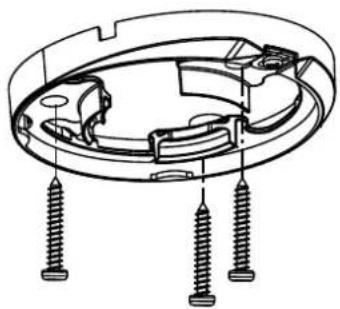
natural_image
Technical diagram of a mechanical assembly with screws and housing (no text or labels)natural_image
Technical diagram of a mechanical assembly with a component and directional arrow (no text or labels)natural_image
Close-up of a white radar-style surveillance camera (no visible text or symbols)natural_image
Simple line drawing of a symmetrical object with concentric circles and a central dot (no text or symbols)natural_image
Technical line drawings of mechanical components and base assemblies (no text or symbols)natural_image
Coiled cable with multiple connectors (no text or symbols visible)20 м комби – кабель
natural_image
Pure geometric lines forming a diagonal pattern on a horizontal line (no text or symbols)
natural_image
Technical diagram of a mechanical assembly with three screws and a central housing (no text or labels)natural_image
Technical diagram of a mechanical assembly with a component and directional arrow (no text or labels)These operating instructions are published by ABUS Security-Center GmbH & Co.KG, Linker Kreuthweg 5, 86444 Affing, Germany. No reproduction (including translation) is permitted in whole or part e.g. photocopy, microfilming or storage in electronic data processing equipment, without the express written consent of the publisher.
The operating instructions reflect the current technical specifications at the time of print. We reserve the right to change the technical or physical specifications.

Note de l'éditeur
© Copyright 09/2013 by ABUS Security-Center
- Bedienungsanleitung
- User guide
- Introduction
- Disclaimer
- Icon explanation
- Important safety advice
- The following safety information and hazard notes are not only intended to protect your health, but also to protect the device from damage. Please read the following points carefully:
- Safety information
- Warnings
- Unpacking
- Table of contents
- Intended use
- Scope of delivery
- Features and Functions
- Camera description
- Mounting / installation
- Mounting the camera
- IMPORTANT!
- Aligning the camera
- Power supply
- Installing the video cable
- Maintenance and cleaning
- Maintenance
- Please note:
- Cleaning
- Disposal
- Technical Data
- TVCC34010
- Montage/installation
- Justering af kameraet
- Teknisk data
- Instrukcja obsługi
- Cechy i funkcje
- Bruksanvisning
- Montering/Installation
- Note de l'éditeur
Brand : ABUS
Model : TVCC34010
Category : Surveillance Camera