
23411 - Network card / adapter VIVANCO - Free user manual and instructions
Find the device manual for free 23411 VIVANCO in PDF.


| Product type | USB / Ethernet network adapter |
| Brand | Vivanco |
| Model | 23411 |
| Interface | USB 2.0 or 3.0 (depending on version) |
| Network connector | RJ45 (Ethernet 10/100/1000 Mbps) |
| Supported operating systems | Windows, macOS, Linux |
| Power supply | Via USB port (bus-powered) |
| Dimensions (approx.) | 6.5 x 2.5 x 1.5 cm |
| Weight (approx.) | 20 g |
| Main functions | Addition of an Ethernet port, Plug & Play, Auto MDI/MDIX |
| Maintenance and cleaning | Clean with a soft, dry cloth; do not use liquids |
| Safety | Do not expose to moisture, extreme temperatures; unplug before cleaning |
| Spare parts and repairability | No detachable parts; repair by a professional |
| General information | Wired network adapter for computer, compatible with most systems |
Frequently Asked Questions - 23411 VIVANCO
User questions about 23411 VIVANCO
0 question about this device. Answer the ones you know or ask your own.
Ask a new question about this device
Download the instructions for your Network card / adapter in PDF format for free! Find your manual 23411 - VIVANCO and take your electronic device back in hand. On this page are published all the documents necessary for the use of your device. 23411 by VIVANCO.
USER MANUAL 23411 VIVANCO
USER'S GUIDE Bedienungsanleitung Notice d'emploi Instrucciones de uso Istruzioni per l'uso Gebruiksaanwijzing Instruções de uso Instrukcja obsługi Brugermanualer Bruksanvisning
EDV Nr. 23411 NET 100 PCI-N
23411 PCI Fast Ethernet Card
GB
1. Introduction
This PCI-based Card is a 10/100BASE-TX Fast Ethernet PCI Card that implements the 32-bit-wide, and bus mastering interface. The Vivanco Fast Ethernet Card is based upon Industry Standard PCI local bus specification revision 2.0, that features the Plug-and-Play(PnP) function, making it fully auto-configurable.
The Vivanco Fast Ethernet Card is a dual-speed Card connected to an Ethernet network with a single connection over an unshielded twisted-pair (UTP) cable. The Card automatically senses and switches to either 10 Mbps or 100 Mbps. For 100 Mbps operation, the Card supports operation on Category 5 UTP cable. For 10 Mbps operation, the Card supports operation on Category 3, 4, or 5 UTP cable.
2. Card Installation
This section describes how to install your Vivanco Fast Ethernet Card. Please perform the following steps to install the card.
- Turn off your computer and all peripherals.
- Make a note of how the cables and cords are connected to the computer and disconnect them.
- Remove your personal computer's cover (please refer to the owner's manual of your personal computer).
- Discharge the static electricity you might carry by for example touching with your hands the metallic backside of your computer.
- Select any available bus mastering PCI slot, and remove the slot cover.
- Carefully install the Vivanco Fast Ethernet Card into the expansion slot by firmly pressing the card into the connector slot, until the Card is seated well in the expansion slot, then fasten the card with a screw from the slot cover.
- Reinstall your personal computer's cover and reconnect the power cord and all cables.
- Connect the Ethernet cable to the RJ-45 connector on your personal computer.
3. Installation of the driver
Note: before installing the driver: Finish section 2. Card Installation first.
This Fast Ethernet Card can be used with many different Operating Systems.
In this manual is described how to install the Card on the following Operating Systems:
- Win98/ME (see 3.1)
• Win2000 / XP / Vista (see 3.2)
For installing the Fast Ethernet Card on other Operating Systems, please refer to the readme file on the driver disk.
23411
PCI Fast Ethernet Card
3.1 Installing on a Windows 98/ME Operating System
The Vivanco Fast Ethernet Card features PnP therefore the installation is very easy. Please follow the guidelines below to install the drivers for your Vivanco Fast Ethernet Card.
Turn on your PC.
Windows 98/ME will automatically detect a new device. Press NEXT to install the drivers. Let windows look for the best driver for your device (first option) and press NEXT.
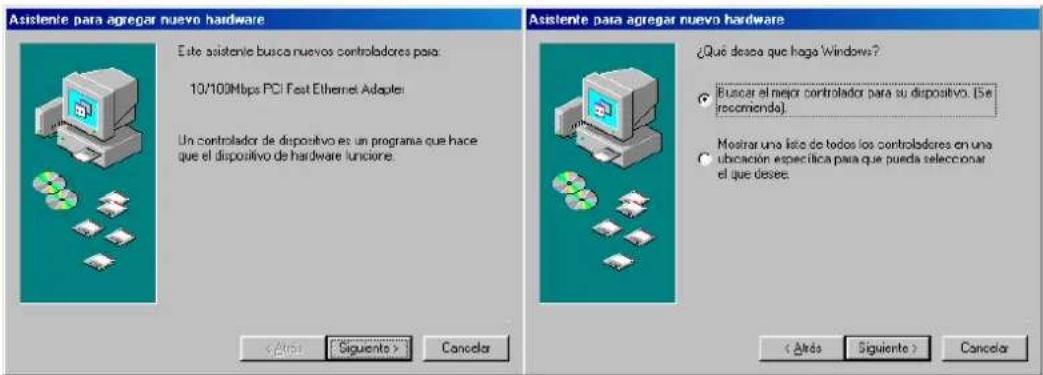
Insert the driver disk (3.5") in the drive and select disk units (first selection) and specify the location: A:\WIN98 or A:\WINME continue by pressing NEXT

Press NEXT again to install the drivers for the Vivanco Fast Ethernet Card. It is possible that Windows asks you to insert your Windows 98/ME CD-ROM. In this case please insert your Windows 98/ME CD-ROM in the CD-ROM drive, type D:\WIN98 or D:\WINME followed by pressing OK.
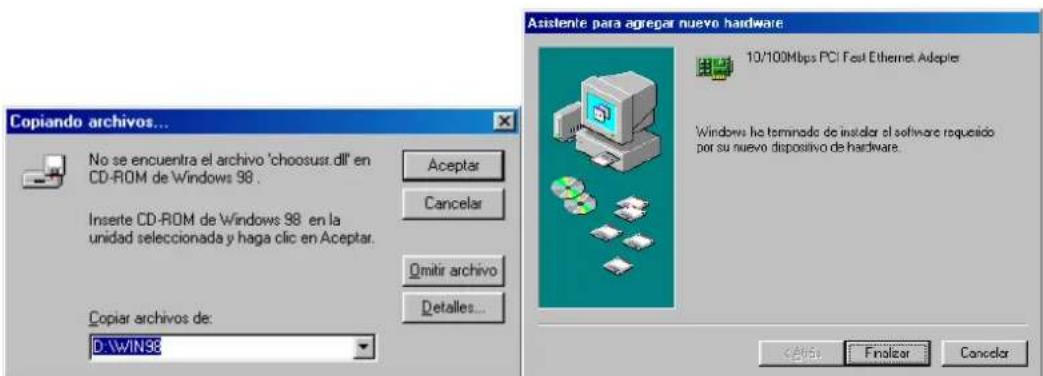
Press FINISH to complete the installation process.
23411 PCI Fast Ethernet Card
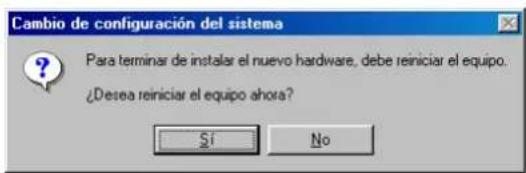
Before using the Vivanco Fast Ethernet Card you have to restart your computer: Press Yes to restart your computer.
The Vivanco Fast Ethernet Card features PnP therefore the installation is very easy. Please follow the guidelines below to install the drivers for your Vivanco Fast Ethernet Card.
Turn on your PC.
Windows will automatically install the drivers for Vivanco Fast Ethernet Card. Windows will not give a message that it is installing drivers for the Vivanco Fast Ethernet Card.
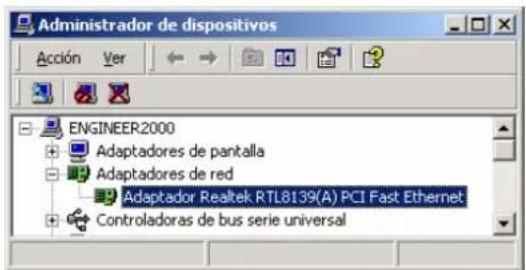
To check that the Vivanco Fast Ethernet Card is really installed you can do the following: Press: Start→Settings→Control Panel, double click on System, then click the Hardware view followed by selecting Device Manager. The following Card will be displayed:
To connect to a LAN Network follow the guidelines below. Press: Start→Settings→Network connections. The following screen (below, left) will appear: Right click on connection LAN (Local Area Network) and select properties, the screen below on the right will appear.
23411
PCI Fast Ethernet Card

Now select the TCP/IP protocol and properties. For configuring an IP address, you have to select "Use the following IP address" and type the correct IP address (See also image below for an example). Please remember not to use identical IP addresses in one LAN network. When having set the IP address, please press OK to finish the installation process.

2. Hardware installation
3. Driver installation
Wiring Connector: RJ-45
Bus Characteristics: 32 bits bus master;
PCI local bus revision 2.0
I/O address: Assigned by the BIOS to a free
I/O address block
IRQ Line: INTA; assigned by the BIOS
to a free IRQ (interrupt) number
Dimensions: 120mm x 45mm
Emission Compliance: FCC Part 15 Class B
EN 55022 Class B
CJSPR 22 Class B
Immunity Compliance: IEC 801-2
(Électrostatic Discharge)
IEC 801-3
(Radiated Immunity)
IEC 801-4
(Electrical Fast Transient/Burst)
Power Consumption: 300mA, 5V
Operating Temperature: 0 to 55 degrees Centigrade
Operating Humidity: 10% to 90%, non-condensing
FCC Compliance Statement
This device complies with Part 15 of the FCC rules. Operation is subject to the following two conditions:
(1) this device may not cause harmful interference, and (2) this device must accept any interference received, including interference that may cause undesired operation.
NOTE
This equipment has been tested and found to comply with the limits for a Class B digital device, pursuant to Part 15 of the FCC rules. These limits are designed to provide reasonable protection against harmful interference in a residential installation. This equipment generates, uses and can radiate radio frequency energy and, if not installed and used in accordance with the instructions, may cause harmful interference to radio communications. However, there is no guarantee that interference will not occur in a particular installation. If this equipment does cause harmful interference to radio or television reception, which can be determined by turning the equipment off and on, the user is encouraged to try to correct the interference by one or more of the following measures:
- Reorient or relocate the receiving antenna.
- Increase the separation between the equipment and receiver.
- Connect the equipment into an outlet on a circuit different from that to which the receiver is connected.
- Consult the dealer or an experienced radio / TV technician for help.
This Class B digital apparatus meets all requirements of the
Canadian Interference-Causing Equipment Regulations.
23411
PCI Fast Ethernet Card
CE Compliance Statement
We hereby certify that the PCI Ethernet Card complies with the EN 50081-1 and EN 50082-1 requirements.
CE
NOTE:
EN 50081-1 standard EN 55022 Class B
(CISPR 22 Class B)
EN 50082-1 standard IEC 801-2
(Electrostatic Discharge)
IEC 801-3
(Radiated Immunity)
IEC 801-4
(Electrical Fast Transient/Burst)
Disclaimer
Information in this document is subject to change without notice. The manufacturer does not make any representations or warranties (implied or otherwise) regarding the accuracy and completeness of this document and shall in no event be liable for any loss of profit or any commercial damages, including but not limited to special, incidental, consequential, or other damages. No part of this document may be reproduced or transmitted in any form, electronic or mechanical, by any means, including photocopying, recording or information recording and retrieval systems without the expressed written permission of the manufacturer. All brand names and product names mentioned in this document are trademarks, or registered trademarks of their respective holders.
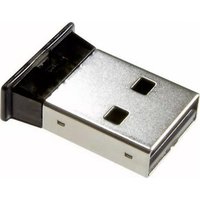


Brand : VIVANCO
Model : 23411
Category : Network card / adapter