
31037 - Receiver VIVANCO - Free user manual and instructions
Find the device manual for free 31037 VIVANCO in PDF.


| Product Type | AV Receiver |
| Brand | Vivanco |
| Model | 31037 |
| Dimensions (W x H x D) | 430 mm x 70 mm x 300 mm |
| Weight | 5.5 kg |
| Power Supply | AC 230V, 50Hz |
| Power Consumption | 350 W (max), <0.5 W (standby) |
| Audio Output Power | 5 x 100 W (8 ohms, 1 kHz, 0.1% THD) |
| Supported Audio Formats | Dolby Digital, DTS, PCM |
| Inputs | 4x HDMI, 2x Optical, 2x Coaxial, 3x RCA Audio, 1x Phono (MM) |
| Outputs | 1x HDMI (ARC), 1x Subwoofer Pre-out, Speaker terminals (5.1) |
| Main Functions | Surround sound processing, AM/FM tuner, Bluetooth streaming, multi-room audio |
| Remote Control | Included (IR) |
| Display | Fluorescent dot matrix |
| Maintenance & Cleaning | Wipe with dry cloth; avoid liquids; ensure ventilation |
| Safety | Class I; auto power-off after 30 mins idle |
| Spare Parts & Repairability | 7-year availability of spare parts; repair by qualified personnel |
| General Information | Designed for home theater; supports 4K passthrough; firmware update via USB |
Frequently Asked Questions - 31037 VIVANCO
User questions about 31037 VIVANCO
0 question about this device. Answer the ones you know or ask your own.
Ask a new question about this device
Download the instructions for your Receiver in PDF format for free! Find your manual 31037 - VIVANCO and take your electronic device back in hand. On this page are published all the documents necessary for the use of your device. 31037 by VIVANCO.
USER MANUAL 31037 VIVANCO
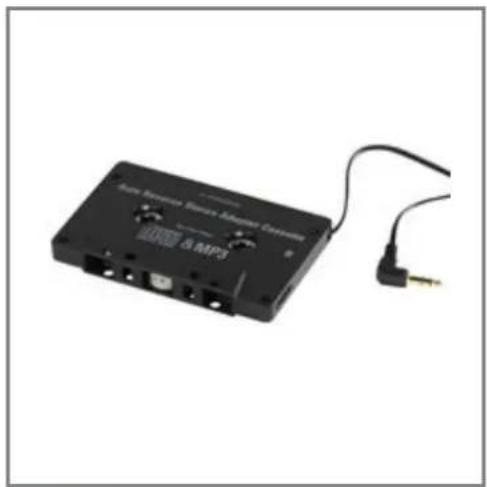
VIVANCO 31037 Car adapter cassette
natural_image
Black cassette tape with attached cable and gold connector (no visible text or symbols)For the connection of MP3 players to car radios with a cassette deck
3.5 mm plug, stereo
■ With auto-reverse function
Color: black
Short text: IACA2
EDP.No.: 31037
VIVANCO

Ewige Weide
22926 Ahrensburg
Phone: +49 4102 / 231 0
Fax: +49 4102 / 231 160
This expression was provided on www.vivanco.de in: 15.04.2016 09:31:29


Brand : VIVANCO
Model : 31037
Category : Receiver