
Actioncam 500 Sunrise - Camcorder ROLLEI - Free user manual and instructions
Find the device manual for free Actioncam 500 Sunrise ROLLEI in PDF.


| Product Type | Action Camcorder |
| Brand | Rollei |
| Model | Actioncam 500 Sunrise |
| Maximum Video Resolution | 4K Ultra HD (3840 x 2160) at 30 fps |
| Photo Resolution | 16 megapixels |
| Viewing Angle | 170° wide angle |
| Image Stabilization | Electronic Image Stabilization (EIS) |
| Waterproof | Up to 10 meters without housing |
| Screen | 2-inch touchscreen LCD |
| Battery | Rechargeable lithium-ion 1050 mAh |
| Battery Life | Approximately 1h30 in 4K |
| Storage | microSD card up to 128 GB (not included) |
| Connectivity | Wi-Fi, Bluetooth |
| Sensor | 16 MP CMOS sensor |
| Dimensions | 62 x 41 x 23 mm |
| Weight | 85 g (without accessories) |
| Power Supply | Rechargeable battery via USB-C |
| Main Features | Loop recording, time-lapse, slow motion, sport mode, underwater mode |
| Maintenance and Cleaning | Clean with a soft, dry cloth. Avoid chemical products. |
| Safety | Do not expose to extreme temperatures. Use only recommended chargers. |
| Spare Parts and Repairability | Battery, USB cable, mounting brackets available online. Repairability index not communicated. |
| General Information | User manual available for download at notice-facile.com |
Frequently Asked Questions - Actioncam 500 Sunrise ROLLEI
User questions about Actioncam 500 Sunrise ROLLEI
0 question about this device. Answer the ones you know or ask your own.
Ask a new question about this device
Download the instructions for your Camcorder in PDF format for free! Find your manual Actioncam 500 Sunrise - ROLLEI and take your electronic device back in hand. On this page are published all the documents necessary for the use of your device. Actioncam 500 Sunrise by ROLLEI.
USER MANUAL Actioncam 500 Sunrise ROLLEI
Rollei Actioncam 500 Sunrise
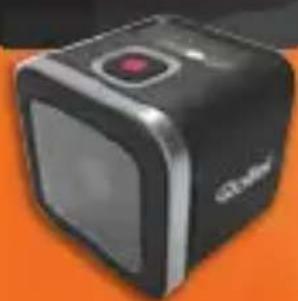

USER GUIDE
FOR ENGLISH | GERMAN | SPANISH | PORTUGUESE ITALIAN | GREEK | FRENCH | DUTCH | POLISH | CZECH HUNGARIAN | SWEDISH | FINNISH | NORWEGIAN DANISH
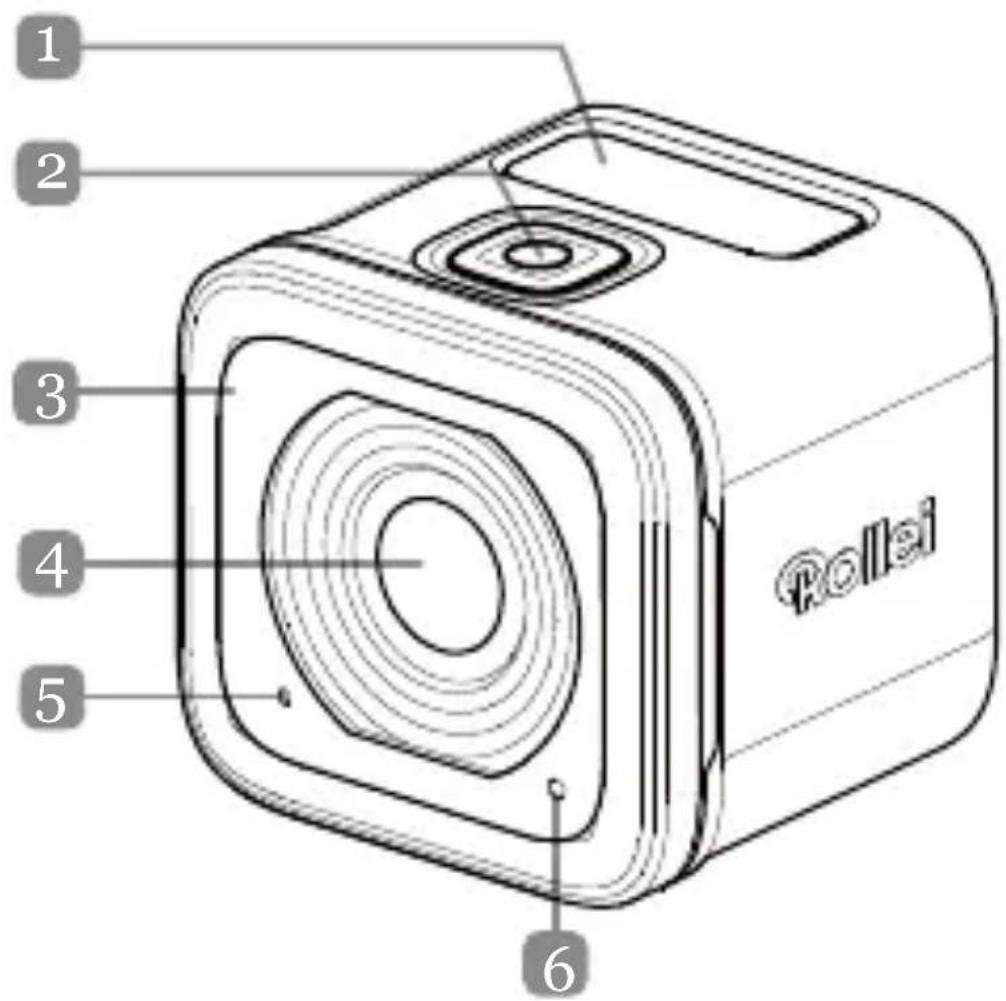
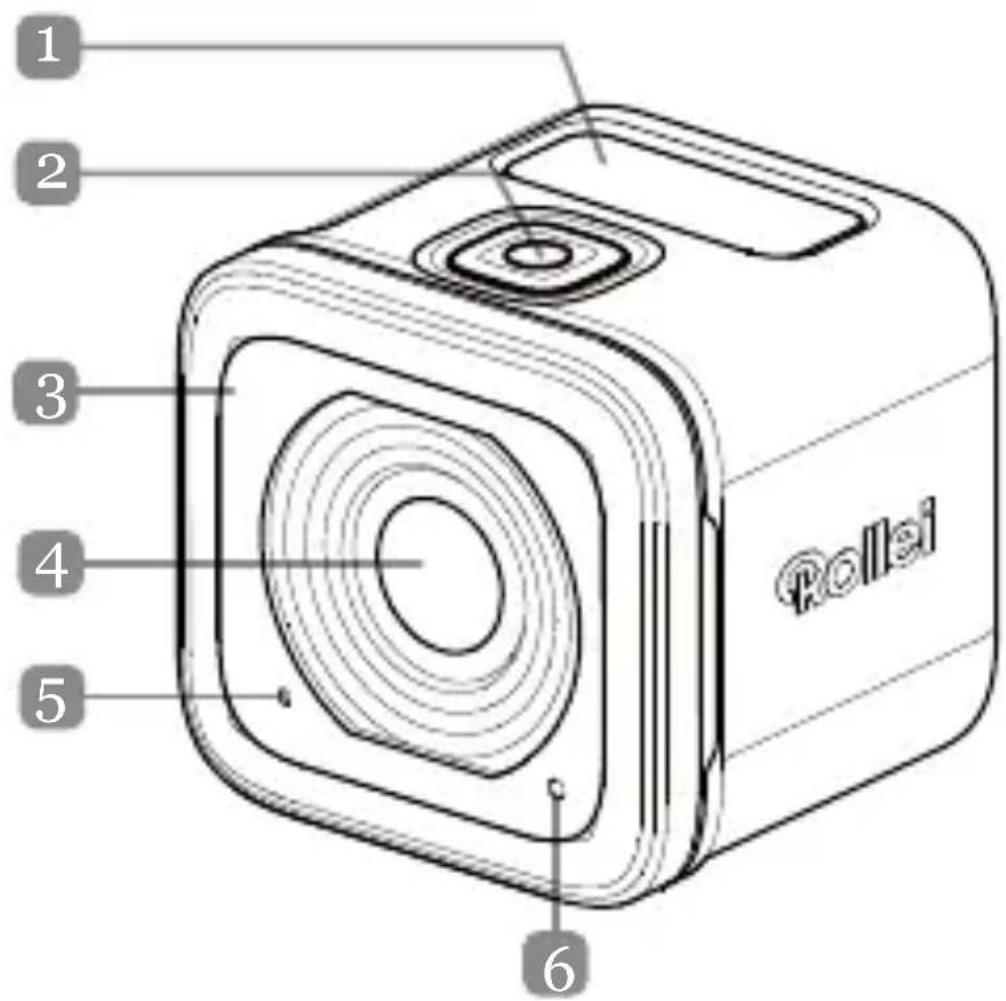
Product Overview
EN|1

EN|2
Names of Parts
- OLED Display
2.Shutter Button (☐) - Buzzer
- Lens
- Microphone
- Processing LED
- Wi-Fi Button (10)
- Power Button (⏻)
- Power LED Indicator
- Wi-Fi LED Indicator
- Strap Eyelet
- IO/Battery Cover
Specifications
Lens
OLED Display
Memory
Fixed Focus Lens
128*36 (0.9 inch), Mono White
microSD, microSDHC and
microSDXC memory card
up to 32 GB. (Class 10 or higher)
Image ResolutionVideo:
4K/15fps, 4K/12.5fps
2.7K/30fps, 2.7K/25fps,
1080p/60fps,1080p/50fps
1080p/30fps,1080p/25fps
720p/120fps,720p/100fps,
720p/60fps,720p/50fps
Still image:
8MP, 6M(16:9)/6M
Wi-Fi
Waterproof
802.11 b/g/n
IPX8
(10m)
EN|3
Installing the Battery and Memory Card

EN|4
Installing the Battery and Memory Card

EN|5
Before you start using your camera, you need to insert the included battery and a memory card (sold separately).
- Push the latch down to unlock the IO/battery cover.
- Slide the IO/battery cover away from the device and open the cover.
- Insert the battery into the battery compartment, observing the correct polarity.
- With the gold contacts facing down, insert the memory card into the memory card slot. Push the memory card until it clicks into place.
- Close the IO/battery cover and push the latch upwards to securely lock the cover.
NOTE: Use the USB cable to charge the battery.
EN|6
Turning the Device On
Press and hold the Power button (⏻) for 2 seconds to turn on the camera.
Recording Videos
By default, the Camera is automatically in Video mode when turned on.
- Press the Shutter button to start recording.
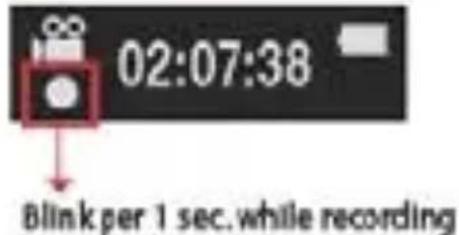
- Press the Shutter button to stop recording.
Capturing Photos
- Press the Power button to switch to Photo mode.
- Press the Shutter button to take a photo.
NOTE: To view the recorded files, you have to transfer those files to your computer first or connect your camera to an external display.
EN|7
Switching Modes
Press the Power button repeatedly to switch modes.
![graph TD A["Settings mode"] --> B["Animation"] B --> C["After 1 sec."] C --> D["Video mode: 52:38, 1080P60"] B --> E["After 1 sec."] E --> F["Photo mode: 238, 8MP"] B --> G["After 1 sec."] G --> H["Photo Burst mode: 2383/PS"] B --> I["After 1 sec."] I --> J["Time Lapse mode: 8 MP"] A --> K["Settings…](/content/2026/06/1267930/images/70f706247fc56d340ba2dbd655471f8ebd83638fb89a5223f4586e88d0f4e699.jpg)
EN|8
Changing the Camera Settings
- Press the Power button repeatedly to switch to Settings mode.
- Press the Shutter button to enter Settings mode.
- Press the Power button repeatedly to select the desired menu option.
- Press the Shutter button to enter the submenu.
- Press the Power button repeatedly to select the desired setting.
- Press the Shutter button to confirm the selection.
NOTE: To return to Video mode, press and hold the Shutter button for 2 seconds.
EN|9
![graph TD A["1080P-60FPS"] --> B["8 MP"] B --> C["Photo Resolution menu"] C --> D["3/1sec."] D --> E["Time Lapse options"] E --> F["CAPTURE SETTINGS"] F --> G["Capture Settings"] G --> H["DELETE"] H --> I["Delete"] I --> J["EXIT"] J --> K["Exit"] subgraph "The animation of default camera mode" L["Mon…](/content/2026/06/1267930/images/8a249a91dfd41215ddde1d896d124dfcd89666dc5b67b62da96e7a2ecaa3fe88.jpg)
EN|10
All options in the menu of Camera function
| Camera Modes | Camera Setting | ||
 | Video |  | Video Resolution /FPS Modes |
 | Photo |  | Photo resolution modes |
 | Photo Burst Ph |  | BURST options |
 | Time Lapse Tim |  | Lapse |
 | Settings Captu |  | Setting |
 | SETUP | ||
 | Wireless controls | ||
 | Delete | ||
EN|11
| Capture Setting Set up | |||
 | upside down Defa |  | |
 | Spot Meter |  | Q- SHOT (note1) |
 | Looping Video |  | Status Lights |
 | White Balance Sou |  | Indicator |
 | HDR Power saving |  | |
 | EV Adjustment |  | age |
 | DATE/TIME | ||
 | System Information | ||
 | NTSC/PAL | ||
EN|12
Note1: With Q- Shot function is selected, the
camera will begin to record or capture base on the default mode at power up.
Note2: other special function - Auto Exposure Lock
If double press the WiFi
exposure at the current setting, and the AE
lock icon AE will appear on the screen.
If disable the function, double press the WiFi Key.
EN|13
Connecting to an External Display
To view the recorded files, connect this camera to an external display (i.e. TV) using the HDMI cable as shown in the illustration.
When connected, press the Power button repeatedly to select the desired operation icon and press the Shutter button to confirm the selection.
→ Select ▶ to play the video.
→ Select ▶ to view the previous file.
→ Select ➤ to view the next file.
→ Select 6 to start the slideshow.
EN|14

NOTE: HDMI Cable sold separately
EN|15
Connecting to a Computer
System Requirements
| WINDOWS | MACINTOSH |
| ● Windows XP(SP2) or Vista and later● 3.2GHz Pentium 4 or faster● DirectX 9.0c or later● Minimum 1GB of system RAM● Video card with minimum of RAM256MB | ● MAC OS X 10.4.11 or later● 2.0GHz Intel Core Duo or faster● Minimum 1GB of system RAM● Video card with minimum of RAM128MB |
To transfer the recorded files to a computer or use this device as a webcam, connect this camera to a computer or notebook using the USB cable as shown in the illustration.
When connected, press the Power button repeatedly the to select the desired mode and press the Shutter EN|16
button to confirm the selection.
→ Select PC to transfer files.
→ Select PC CAMERA to use this device as a webcam.

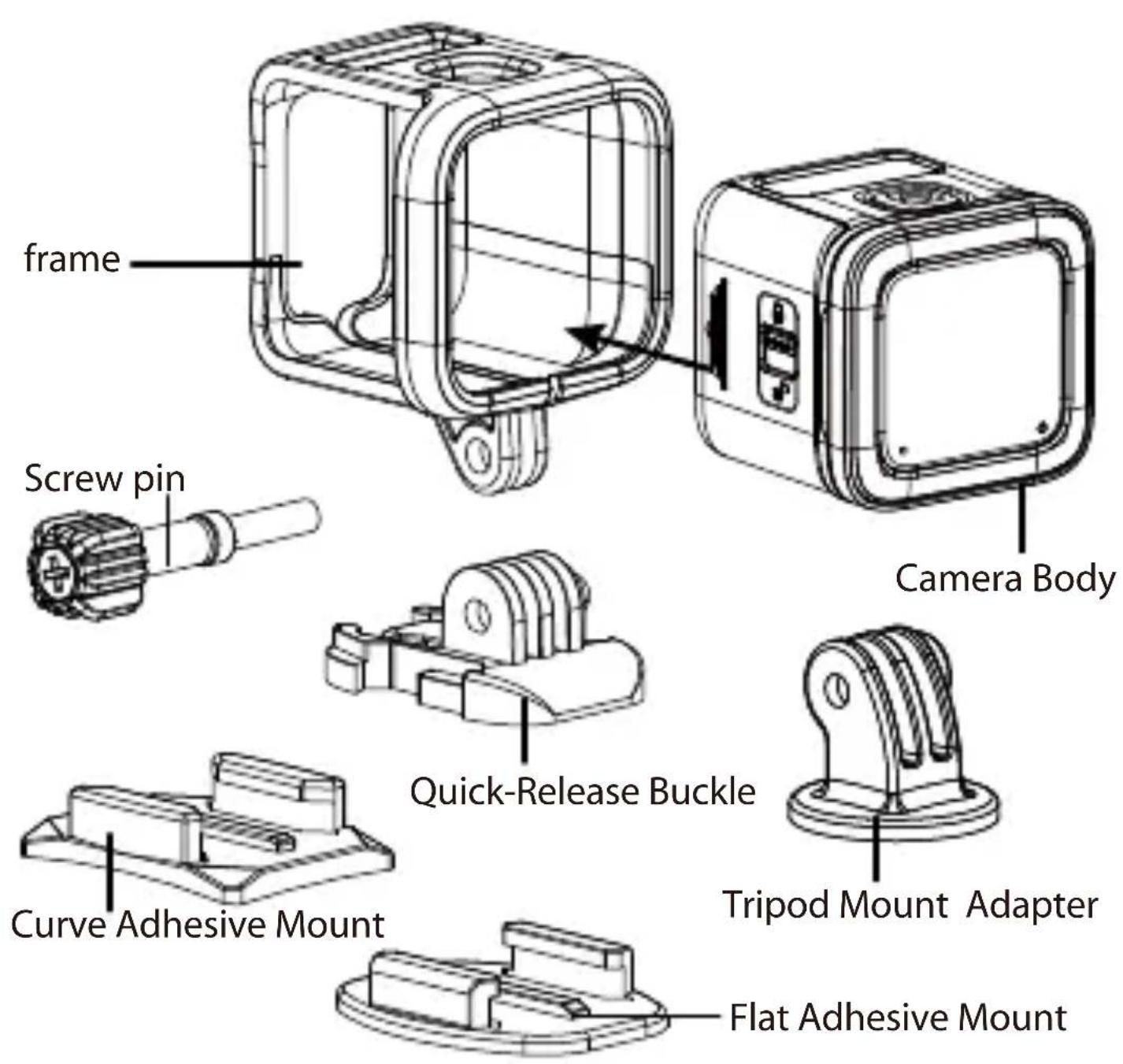
Rollei Actioncam 500 Sunrise Accessories List
Battery
- Micro USB cable
Frame
- Screw Pin
- Quick Release Buckle
- Flat Adhesive Mount
• Curve Adhesive Mount
- Tripod Mount Adapter
EN|17
Connecting to a Mobile Device
Select the SSID of this unit to connect this camera to your mobile device.
- Turn on the Wi-Fi function on your mobile device.
- Select the camera's SSID (Wireless network name).
- Enter the password to connect with your mobile device.
NOTE: The default SSID and password settings are:
→ SSID: actioncamera
→ Password: 12345678
Operating Temperature: -5 to 40 degrees Celsius
EN|18
APP Download :
Make sure your mobile device's and camera's WiFi is turn on.
Users can search the "Rollei Actioncam 500 Sunrise" and download it free of charge from "Google Play Store" and Apple "App Store".
After installing and connecting your mobile device and camera, you can control camera to record video and capture through device.

Notice : Using the camera under/near water.
- Make sure that no foreign matter such as sand, t and hair gets inside the IO/ Battery cover dir before using.
- Confirm that the IO/Battery is closed and lock the latch securely before using.
- Need to clear and dry the sealing gasket of IO/Battery Cover after using. Even a small amount of foreign matter may lead to water entering the water or scratch its gasket
EN|20

TEMPERATURE WARNING MESSAGE
The Temperature Warning Message will appear the LCD and power off automatically when the camera becomes too hot while operating.
Let your camera to cool down before using it again. Don't worry about the safe promble, the camera has overheat of protecting itself.
Users have to use the connection to USB interfaces with USB 2.0 version or higher.
Caution

Risk of explosion if battery replaced aced by an incorrect type.
Dispose of used batteries according to the instructions.
EN|21
Conformity
The Manufacturer hereby declares that the CE marking was applied to the Rollei Action Cam 500 Sunrise in accordance with the basic requirements and other relevant provisions of the following CE Directives:
2011/65/EC RoHs Directive
2004/108/EC Low Voltage Directive
1999/5/EG R&TTE Directive
2006/95/EEC LVD Directive
2009/125/EG EuP Directive
2002/96/EG WEEE Directive

The EC Declaration of Conformity can be requested from the address specified on the Warranty card. EN|22
License Statement
The software used in this product is licensed subject to a license pursuant to the GNU – General Public License conditions. We expressly draw attention to the fact that under the GNU – General Public License conditions no liability is accepted. The starting point for the software is the software published online at http://sg-gpl.net/
The software listed there is licensed pursuant of the GNU – General Public License conditions. Device- related changes have been made to this software for the product The source in question. text of the software implemented in the product
EN|23
in question can be obtained in response to an enquiry sent to the e - mail address info@rollei.com In this instance your e - mail must contain details of what the relevant product is, the relevant serial number and documentary evidence of your commercial source of supply as well as documentary evidence of the date on which the product was purchased from the trade source of supply. We guarantee supply of the source text of the implemented software for a period of at least three years from date of purchase from the trade source of supply where the trade source of supply has sourced the product from us directly or via strictly trade - only dealers.
EN|24
Mounting the Camera
To install the camera into the frame and mount it on its stand, do the following:
- Need a quick-release buckle is assembling on the adhesive mount.
- Using your fingers, pry open the bottom of the frame. Then install the camera into the frame.
- Attach the frame to the adapter slot of the stand. Then install and tighten the thumb screw.
- Attach the adhesive mount on smooth and clean surface.
NOTE: To obtain optimum adhesion, firmly attaching the mount.press int EN 25
EN 26
Produktübersicht
DE|1

DE|2
1080p/60 fps, 1080p/50 fps
1080p/30 fps, 1080p/25 fps
720p/120 fps, 720p/100 fps,
720p/60 fps,720p/50 fps
Foto:
8 MP, 6 M (16:9)/6 M
WLAN 802.11
b/g/n
DE|4
DE|5
1080p/60fps, 1080p/50fps
1080p/30fps, 1080p/25fps
720p/120fps,720p/100fps,
720p/60fps,720p/50fps
Imagen fija:
8MP,6M(16:9)/6M
Wi-Fi 802.11
b/g/n
Sumergible IPX8 (10m)
ES|3
ES|4
ES|5
ES|15
Directiva WEEE 2002/96/EG
4K/15fps, 4K/12,5fps 2,7K/30fps, 2,7K/25fps, 1080p/60fps, 1080p/50fps 1080p/30fps, 1080p/25fps 720p/120fps,720p/100fps, 720p/60fps,720p/50fps Still image: 8MP,6M(16:9)/6M
Wi-Fi
802.11
b/g/n
À proda d'água
IPX8
(10m)
PB|3
PB|4
PB|5
PB|15
4K/15fps, 4K/12.5fps 2,7K/30fps, 2,7K/25fps, 1080p/60fps, 1080p/50fps 1080p/30fps, 1080p/25fps 720p/120fps, 720p/100fps, 720p/60fps, 720p/50fps Foto: 8MP, 6M(16:9)/6M
Wi-Fi 802.11 b/g/n
IT |4
IT | 5
IT 15
EL | 2
1080p/60fps, 1080p/50fps
1080p/30fps, 1080p/25fps
720p/120fps, 720p/100fps,
720p/60fps, 720p/50fps
Φωτογραφία:
8MP, 6M(16:9)/6M
Wi-Fi 802.11 b/g/n
EL | 4
EL | 5
EL | 15
720p/120ips,720p/100ips,
FR|4
FR|5
FR|15
Rollei Actioncam 500 Sunrise Liste des accessoires
Directive R&TTE 1999/5/EG
Directive LVD 2006/95/EEC
Directive EuP 2009/125/EG
Directive WEEE 2002/96/EG

NL | 2
1080p/60fps, 1080p/50fps
1080p/30fps, 1080p/25fps
720p/120fps,720p/100fps,
720p/60fps,720p/50fps
Foto:
8MP,6M(16:9)/6M
Wifi
802.11
b/g/n
Waterbestendig
IPX8 (10m)
NL | 3
NL | 4
NL | 5
NL | 15
PL | 2
Nazwy części
PL | 4
PL | 5
PL | 15
CZ|2
Názvy částí
1080p/60fps, 1080p/50fps
1080p/30fps, 1080p/25fps
720p/120fps, 720p/100fps,
720p/60fps, 720p/50fps
Fotografie:
8MP,6M(16:9)/6M
Wi-Fi 802.11 b/g/n
Vodotěsnost IPX8 (10 m)
CZ|3
CZ|4
CZ|5
CZ|15
HU|2
1080p/60 fps, 1080p/50 fps
1080p/30 fps, 1080p/25 fps
720p/120 fps, 720p/100 fps,
720p/60 fps,720p/50 fps
Állókép:
8 MP,6 M(16:9)/6 M
Wi-Fi 802.11 b/g/n
Vízálló IPX8 (10 m)
HU|3
HU|4
HU|5
HU|15
4K/15fps, 4K/12.5fps
2,7K/30fps, 2,7K/25fps,
1080p/60fps, 1080p/50fps
1080p/30fps, 1080p/25fps
720p/120fps,720p/100fps,
720p/60fps,720p/50fps
Stillbild:
8MP,6M(16:9)/6M
Wi-Fi
802.11
b/g/n
SV|4
SV|5
SV|15
Ansluta till en dator
Systemkrav
| WINDOWS MACINTOSH | |
| ● Windows XP(SP2), Vista eller senare● 3,2 GHz Pentium 4 eller snabbare● DirectX 9.0c eller senare● Minst 1 GB system-RAM● Videokort med minst 256MB RAM | ● MAC OS X 10.4.11 eller senare● 2,0GHz Intel Core Duo eller snabbare● Minst 1 GB system-RAM● Videokort med minst 128 MB RAM |
1080p/60 fps, 1080p/50 fps
1080p/30 fps, 1080p/25 fps
720p/120 fps,720p/100 fps,
720p/60f ps,720p/50 fps
Still-kuva:
8MP,6M (16:9)/6M
Wi-Fi
802.11
b/g/n
FI | 2
FI | 5
FI 15
NO|2
Navn på deler
- OLEO-skjerm
- Lukkerknapp (☐)
- Summer
- Objektiv
- Mikrofon
- Behandlings-LED
- Wi-Fi-knapp (☐)
- Strømknapp (⏻)
- Strøm-LED-indikator
- Wi-Fi-LED-indikator
- Stroppehull
- IU/Batterideksel
Spesifikasjoner
2,7K / 30 b/s, 2,7K / 25 b/s,
1080p / 60 b/s, 1080p / 50 b/s
1080p / 30 b/s, 1080p / 25 b/s
720p / 120 b/s,720p / 100 b/s,
720p / 60 b/s,720p / 50 b/s
Stillbilde:
8 MP, 6M (16:9) / 6M
Wi-Fi
802.11
b/g/n
NO|4
NO|5
NO|15
Koble til en datamaskin
Systemkrav
| WINDOWS MACINTOSH | |
| ● Windows XP (SP2) eller Vista og nyere● 3,2 GHz Pentium 4 eller raskere● DirectX 9.0c eller nyere● Minimum 1 GB RAM● Skjermkort med minimum 256 MB RAM | ● Mac OS X 10.4.11 eller nyere● 2,0 GHz Intel Core Duo eller raskere● Minimum 1 GB RAM● Skjermkort med minimum 128 MB RAM |
Når du skal overføre filer som er tatt opp til en datamaskin eller bruke denne enheten som et webkamera, kobler du kameraet til en datamaskin med USB-kabelen som vist på tegningen.
1080p/60fps, 1080p/50fps
1080p/30fps, 1080p/25fps
720p/120fps,720p/100fps,
720p/60fps,720p/50fps
Still-billede:
8MP,6M(16:9)/6M
Wi-Fi 802.11
b/g/n
Vandtæt IPX8(10m)
DA|3
DA|4
DA|5
DA|15
Rollei Service Germany
Denisstraße 28a
D-67663 Kaiserslautern
Hotline +49 (0)6 31/3 42 84 49
Distribution:
Subject to technical changes!




- PRODUCT OVERVIEW
- NAMES OF PARTS
- SPECIFICATIONS
- LENS
- OLED DISPLAY
- MEMORY
- IMAGE RESOLUTIONVIDEO
- WI-FI
- WATERPROOF
- INSTALLING THE BATTERY AND MEMORY CARD
- TURNING THE DEVICE ON
- RECORDING VIDEOS
- CAPTURING PHOTOS
- SWITCHING MODES
- CHANGING THE CAMERA SETTINGS
- ALL OPTIONS IN THE MENU OF CAMERA FUNCTION
- NOTE1: WITH Q- SHOT FUNCTION IS SELECTED, THE
- NOTE2: OTHER SPECIAL FUNCTION - AUTO EXPOSURE LOCK
- CONNECTING TO AN EXTERNAL DISPLAY
- CONNECTING TO A COMPUTER
- ROLLEI ACTIONCAM 500 SUNRISE ACCESSORIES LIST
- CONNECTING TO A MOBILE DEVICE
- APP DOWNLOAD
- NOTICE : USING THE CAMERA UNDER/NEAR WATER
- TEMPERATURE WARNING MESSAGE
- CONFORMITY
- LICENSE STATEMENT
- MOUNTING THE CAMERA
- PRODUKTÜBERSICHT
- ROLLEI ACTIONCAM 500 SUNRISE LISTE DES ACCESSOIRES
- WIFI
- 802.11
- B/G/N
- WATERBESTENDIG
- IPX8 (10M)
- NAZWY CZĘŚCI
- NÁZVY ČÁSTÍ
- ANSLUTA TILL EN DATOR
- NAVN PÅ DELER
- SPESIFIKASJONER
- KOBLE TIL EN DATAMASKIN
- SYSTEMKRAV
- DISTRIBUTION
Brand : ROLLEI
Model : Actioncam 500 Sunrise
Category : Camcorder