
KN-TTUSB100 - Audio/video converter KONIG - Free user manual and instructions
Find the device manual for free KN-TTUSB100 KONIG in PDF.


| Product type | Analog-to-digital audio/video converter |
| Brand | König |
| Model | KN-TTUSB100 |
| Dimensions (L x W x H) | Approx. 12 x 7 x 2.5 cm |
| Weight | Approx. 150 g |
| Power supply | USB port (5 V, 500 mA) |
| Video input | Composite (yellow RCA) or S-Video |
| Audio input | 2 x RCA (L/R) or 3.5 mm jack |
| Output | USB 2.0 to computer |
| Maximum video resolution | 720 x 576 (PAL) / 720 x 480 (NTSC) |
| Supported audio formats | PCM 16-bit, 44.1 kHz / 48 kHz |
| Included software | Capture and conversion software (e.g., VirtualDub, Honestech) |
| Compatible operating system | Windows 7/8/10/11, macOS 10.12 and later |
| Main functions | Digitization of VHS, Hi8, V8 tapes, analog camcorders and audio |
| Care and cleaning | Clean with a soft, dry cloth. Do not use abrasive products. |
| Safety | Do not expose to moisture. Unplug during storms. Use only with shielded cables. |
| Spare parts and repairability | This product contains no user-serviceable parts. In case of defect, contact customer service. |
| Package contents | Adapter, USB cable, RCA audio/video cables, software on CD (or download link), user manual |
| Warranty | 2 years |
| General information | Designed for digitizing analog sources. Requires a computer with a USB port. |
Frequently Asked Questions - KN-TTUSB100 KONIG
User questions about KN-TTUSB100 KONIG
0 question about this device. Answer the ones you know or ask your own.
Ask a new question about this device
Download the instructions for your Audio/video converter in PDF format for free! Find your manual KN-TTUSB100 - KONIG and take your electronic device back in hand. On this page are published all the documents necessary for the use of your device. KN-TTUSB100 by KONIG.
USER MANUAL KN-TTUSB100 KONIG

MANUAL (p. 2)
AUDIO/PHONO USB ADAPTER
MODE D'EMPLOI(p12)
ADAPTATEUR AUDIO/PHONO USB
MANUALE (p. 22)
ADATTATORE USB AUDIO/PHONO
HASZNÁLATI ÚTMUTATÓ (o. 32.)
AUDIO/PHONO ADAPTER, USB
MANUAL DE USO (p. 27)
ADAPTADOR USB DE
AUDIO/MICRÓFONO
KÄYTTÖOHJE (s. 37)
AUDIO/PHONO USB-SOVITIN
The KN-TTUSB100 is an ultra compact bidirectional USB/AUDIO adapter.
Convert your vinyl, CDs, audio cassettes or any other analogue audio source to MP3 or WAV on your PC. Switchable audio input: line or phono and it can be used as PC-sound card: USB/audio line output.
Features:
• RIAA pre-amplifier circuit for PHONO IN
• Line in / Pre-Amp out switch
• MM/MC selection for different phonograph cartridges
- Compatible with Windows® or Mac® OS default drivers
- USB bus powered
• Audio sampling rates can be set up to 48 KHz for 2 channel recording
- Compatible with Windows® 2000/XP/Vista and Mac® OSX
System Requirements:
Turntable
Phonograph disk
Computer with USB ports and 500 mA powering capacity
Recording software
Connections:


1) USB mini 5pin Out connection
2) Switch (Line in - Pre-Amp Out)
3) 3.5mm jack connection
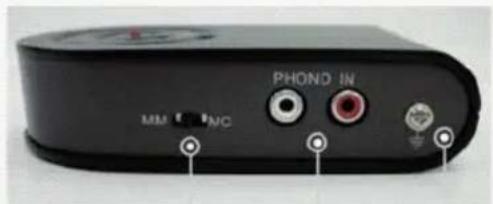
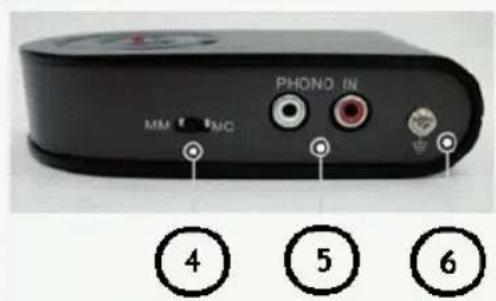
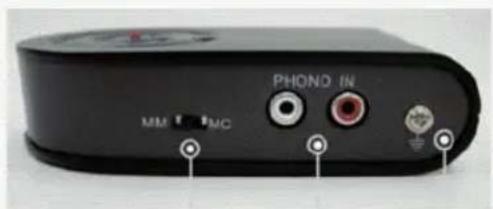
4) MM/MC switch
5) Phono in (2xRCA)
6) Grounding
7) LED indication.
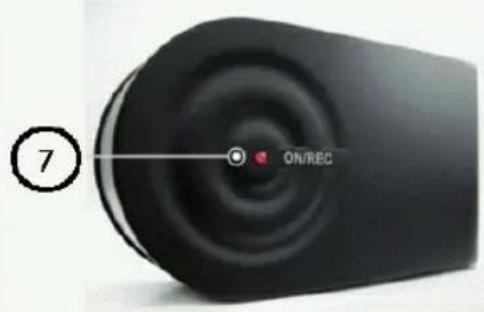
Application:
- Convert analogue music on phonographic disk to digital format.
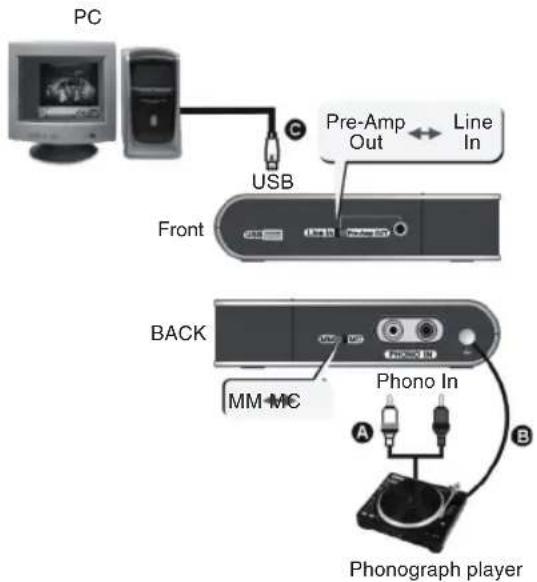
Follow the description to record music from a vinyl record.
A. Connect the R,L → R,L cable to the turntable and USB preamplifier.
B. In order to prevent a HUM noise caused by mismatching of the turntable and USB preamplifier, it is recommended that the user connects the grounding cable between the 2 devices.
C. Connect the USB cable to the PC (or notebook) and USB Pre-Amp as the illustration shows.
When the USB connection is ok, the PC will auto-detect this unit as "USB PREAMP". You can then start to use this device on your computer
Operation:
A. Connect the turntable to the USB preamplifier
B. Play the vinyl record
C. Select the MM/MC position for the different types of pickup heads for turntables
D. Now you can start recording with your audio grabbing software on a PC /notebook
- PHONO preamplifier (Stand Alone or operated with PC at the same time):
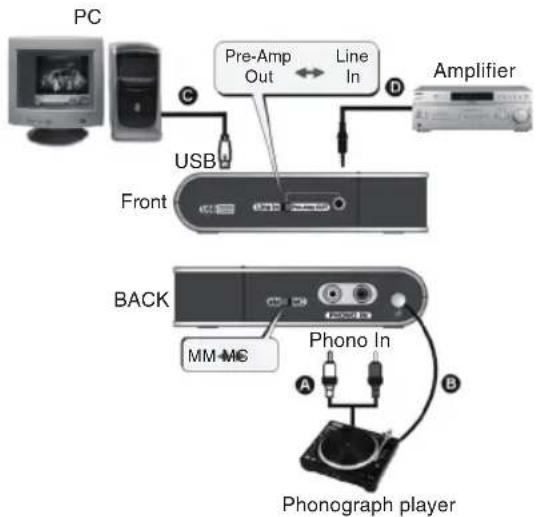
A. Connect the audio cable R,L → R,L to the turntable and USB Pre-Amp.
B. In order to prevent a HUM noise caused by mismatching of the turntable and USB preamplifier, it is recommended that the user connects the grounding cable between the 2 devices.
C. Get the USB → mini USB cable and connect your PC and the USB Pre-Amp. Please make sure the connection is good because the USB preamplifier is powered via the USB port.
D. Connect the 3.5mm → Audio R, L cable, and connect the "Line In/Pre-Amp Out" port and the Audio R, L end to your stereo amplifier.
E. Set the slide on the USB preamplifier to the "Pre-Amp Out" position
• Line-in grabbing:
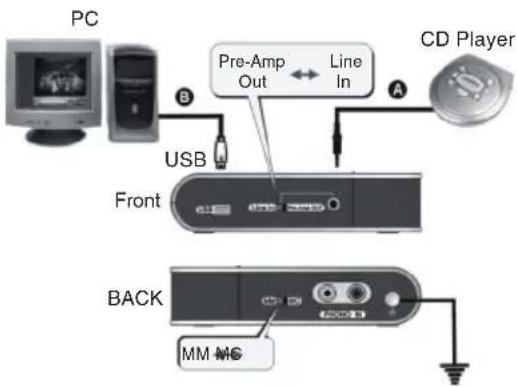
You can use this USB Pre Amp to rip a Line-in signal from an audio device such as CD
A. Connect the audio cable R,L → 3.5mm to your CD player and USB preamplifier as the illustration shows.
B. Take the USB A → mini 5 cable. Connect your PC or notebook to the USB preamplifier as the illustration shows.
- If your audio device only supports 3.5mm stereo output:
A. Buy a 3.5mm → 3.5mm cable (not included), connect one end to the "Line In/Pre-Amp Out" port on the USB preamplifier and the other to the 3.5mm output of your audio device.
B. Set the slide position on the USB preamplifier to "Line In"
Operation:
A. Power on and play your audio device
B. You can now start to rip the audio to your PC or notebook
Trouble shooting:
-
If the computer does not detect the USB preamplifier
a. Please make sure the connection is correct.
b. Please re-connect the USB preamplifier to your USB port, and then check the auto-detection function. (When the unit is detected, the LED light should be on) -
What are the minimum system requirements?
A computer with an USB port and with 500mA powering capacity is sufficient.
- Why is the Pre-Amp OUT not working?
a. Please make sure the connection is correct.
b. Please make sure the slide position is set to "Pre-Amp OUT".
- What kind of recording program can I use?
Please use the existing recording program in your OS or try to download free audio programs from the Internet.
Declaration of conformity
We,
Nedis B.V.
De Tweeling 28
Declare that product:
Brand: König Electronic
Model: KN-TTUSB100
Description: AUDIO/PHONO USB ADAPTER
Is in conformity with the following standards
EN 55022, EN 55024, EN 61000-3-2, EN 61000-3-3
IEC 61000-4-2, IEC 61000-4-3, IEC 61000-4-4, IEC 61000-4-5
IEC 61000-4-6, IEC 61000-4-8, IEC 61000-4-11
And complies with the requirements of the European Union Directives 89/336/EEC, 92/31/EEC and 93/68/EEC.
's-Hertogenbosch, 01 October 2008

Mrs. J. Gilad
Purchase Director

Safety precautions:
Do not expose the product to water or moisture.
Maintenance:
Clean only with a dry cloth. Do not use cleaning solvents or abrasives.
Warranty:
No guarantee or liability can be accepted for any changes and modifications of the product or damage caused due to incorrect use of this product.
General:
Designs and specifications are subject to change without notice.
All logos brands and product names are trademarks or registered trademarks of their respective holders and are hereby recognized as such.
Attention:

This product is marked with this symbol. It means that used electrical and electronic products should not be mixed with general household waste. There is a separate collections system for these products.

Copyright ©
DEUTSCH
Einführung:

IEC 61000-4-2, IEC 61000-4-3, IEC 61000-4-4, IEC 61000-4-5
IEC 61000-4-6, IEC 61000-4-8, IEC 61000-4-11

IEC 61000-4-2, IEC 61000-4-3, IEC 61000-4-4, IEC 61000-4-5
IEC 61000-4-6, IEC 61000-4-8, IEC 61000-4-11

IEC 61000-4-2, IEC 61000-4-3, IEC 61000-4-4, IEC 61000-4-5
IEC 61000-4-6, IEC 61000-4-8, IEC 61000-4-11




IEC 61000-4-2, IEC 61000-4-3, IEC 61000-4-4, IEC 61000-4-5
IEC 61000-4-6, IEC 61000-4-8, IEC 61000-4-11
IEC 61000-4-2, IEC 61000-4-3, IEC 61000-4-4, IEC 61000-4-5
IEC 61000-4-6, IEC 61000-4-8, IEC 61000-4-11
①
2
3

4
5
6
IEC 61000-4-2, IEC 61000-4-3, IEC 61000-4-4, IEC 61000-4-5
IEC 61000-4-6, IEC 61000-4-8, IEC 61000-4-11
IEC 61000-4-2, IEC 61000-4-3, IEC 61000-4-4, IEC 61000-4-5
IEC 61000-4-6, IEC 61000-4-8, IEC 61000-4-11
IEC 61000-4-2, IEC 61000-4-3, IEC 61000-4-4, IEC 61000-4-5
IEC 61000-4-6, IEC 61000-4-8, IEC 61000-4-11
Och uppfyller kraven i den Europeiska unionens direktiv 89/336/EEC, 92/31/EEC and 93/68/EEC.
's-Hertogenbosch, den 1 oktober 2008

Fru J. Gilad
Inköpsdirektör

IEC 61000-4-2, IEC 61000-4-3, IEC 61000-4-4, IEC 61000-4-5
IEC 61000-4-6, IEC 61000-4-8, IEC 61000-4-11
a je v souladu s požadavky směrnic EU 89/336/EEC, 92/31/EEC a 93/68/EEC.




IEC 61000-4-2, IEC 61000-4-3, IEC 61000-4-4, IEC 61000-4-5
IEC 61000-4-6, IEC 61000-4-8, IEC 61000-4-11

Brand : KONIG
Model : KN-TTUSB100
Category : Audio/video converter