
SensoTouch 3D RQ1284 - Razor PHILIPS - Free user manual and instructions
Find the device manual for free SensoTouch 3D RQ1284 PHILIPS in PDF.


| Brand | Philips |
| Model | SensoTouch 3D RQ1284 |
| Product Type | Rotary shaver |
| Shaving System | 3D contour detection with flexible heads |
| Number of Heads | 3 |
| Blade Material | Stainless steel |
| Power Source | Rechargeable battery (Li-Ion) |
| Charging Time | Approx. 1 hour |
| Usage Time | Approx. 50 minutes |
| Quick Charge | Yes, 5-minute charge for one shave |
| Voltage | 100-240 V (automatic voltage adaptation) |
| Wet/Dry Use | Yes, fully washable |
| Cleaning System | Rinse under running water; includes cleaning brush |
| Display | LED battery and charging indicator |
| Travel Lock | Yes |
| Replacement Heads | Philips RQ12 series (every 2 years) |
| Dimensions (approx.) | 6.5 x 5.5 x 17.5 cm |
| Weight (approx.) | 0.6 kg |
| Included Accessories | Shaver, charging stand, protective cap, cleaning brush |
| Warranty | 2 years |
Frequently Asked Questions - SensoTouch 3D RQ1284 PHILIPS
User questions about SensoTouch 3D RQ1284 PHILIPS
0 question about this device. Answer the ones you know or ask your own.
Ask a new question about this device
Download the instructions for your Razor in PDF format for free! Find your manual SensoTouch 3D RQ1284 - PHILIPS and take your electronic device back in hand. On this page are published all the documents necessary for the use of your device. SensoTouch 3D RQ1284 by PHILIPS.
USER MANUAL SensoTouch 3D RQ1284 PHILIPS
Always here to help you

RQ1200 series

natural_image
Close-up of a Philips SenseTouch 3D scanner with black and gold casing (no visible text or symbols on body)User manual
PHILIPS

ENGLISH 4
БЪЛГАРСКИ 28
ČEŠTINA 54
EESTI 78
HRVATSKI 102
MAGYAR 126
КАЗАКША 149
LIETUVIŠKAI 174
LATVIEŠU 198
POLSKI 222
ROMÂNĂ 246
РУССКИЙ 271
SLOVENSKY 296
SLOVENŠČINA 320
SRPSKI 344
УКРАЇНСЬКА 368
Introduction
Congratulations on your purchase and welcome to Philips! To fully benefit from the support that Philips offers, register your product at www.philips.com/welcome.
Please read this user manual, as it contains information about the features of this shaver as well as some tips to make shaving easier and more enjoyable.
General description (Fig. 1)
A Shaver
1 Display
2 Shaver on/off button
3 Protection cap
4 RQ12 Shaving unit
5 Trimmer
6 Trimmer on/off slide
B RQ111 Beard Styler attachment (RQ1296, RQ1295, RQ1286, RQ1285, RQ1275, RQ1265 only)
7 Hair length selector
8 Comb of Beard Styler attachment
C Foldable charger
D Jet Clean System (RQ1296CC, RQ1295CC, RQ1290CC, RQ1286CC, RQ1285CC, RQ1284CC, RQ1280CC, RQ1275CC, RQ1265CC, RQ1260CC, RQ1252CC, RQ1251CC, RQ1250CC only)
9 'Cleaning chamber empty' symbol
10 Cleaning symbol
11 Drying symbol
12 Jet Clean System on/off button (RQ1008 only: and up/down button for program selection)
13 Cleaning chamber release button
14 Shaver holder
E Cleaning brush
F HQ200 Cleaning fluid (RQ1296CC, RQ1295CC, RQ1290CC, RQ1286CC, RQ1285CC, RQ1284CC, RQ1280CC, RQ1275CC, RQ1265CC, RQ1260CC, RQ1252CC, RQ1251CC, RQ1250CC only)
G Pouch
H Adapter
Important
Read this important information carefully before you use the shaver, the Jet Clean system (RQ1296CC, RQ1295CC, RQ1290CC, RQ1286CC, RQ1285CC, RQ1284CC, RQ1280CC, RQ1275CC, RQ1265CC, RQ1260CC, RQ1252CC, RQ1251CC, RQ1250CC only) and the charging stand. Save this leaflet for future reference.

natural_image
Prohibition sign of a faucet with no text or symbols (black and white graphic)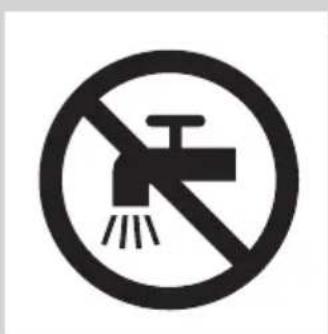
natural_image
Prohibition sign of a faucet crossed out, no text or symbols present
natural_image
Simple line drawing of a showerhead spraying water into a container (no text or symbols)Danger
- Keep the adapter dry.
Warning
- The adapter contains a transformer. Do not cut off the adapter to replace it with another plug, as this causes a hazardous situation.
- The shaver, the Jet Clean system and the charging stand are not intended for use by persons (including children) with reduced physical, sensory or mental capabilities, or lack of experience and knowledge, unless they have been given supervision or instruction concerning use of these appliances by a person responsible for their safety.
- Children should be supervised to ensure that they do not play with the shaver, the Jet Clean system and the charging stand.
- Always unplug the shaver before you clean it under the tap.
Caution
- Never immerse the Jet Clean system or the charging stand in water nor rinse it under the tap.
- Never use water hotter than 80^ C to rinse the shaver.
- Do not use the shaver, Jet Clean system, adapter, charging stand or any other part if it is damaged, as this may cause injury. Always replace a damaged adapter, charging stand or part with one of the original type.
- Only use the Jet Clean system with the original HQ200 Jet Clean solution.
- Always place the Jet Clean system on a stable, level and horizontal surface to prevent leakage.
- When the Jet Clean system is ready for use, do not move it to prevent leakage of cleaning fluid.
- The Jet Clean system thoroughly cleans but does not disinfect your shaver, therefore do not share the shaver with others.
- Never use compressed air, scouring pads, abrasive cleaning agents or aggressive liquids such as petrol or acetone to clean the appliance.
- Water may leak from the socket at the bottom of the shaver when you rinse it. This is normal and not dangerous because all electronics are enclosed in a sealed power unit inside the shaver.
Compliance with standards
- This shaver is waterproof and complies with the internationally approved safety regulations. It is suitable for use in the bath or shower and for cleaning under the tap. For safety reasons, the shaver can therefore only be used cordlessly.
- The shaver and the Jet Clean system comply with all applicable standards and regulations regarding exposure to electromagnetic fields.
General
- The adapter is equipped with an automatic voltage selector and is suitable for mains voltages ranging from 100 to 240 volts.
- The adapter transforms 100-240 volts to a safe low voltage of less than 24 volts.
- Maximum noise level: Lc = 69dB(A)
The display
Note: Before you use the shaver for the first time, remove the protective foil from the display.
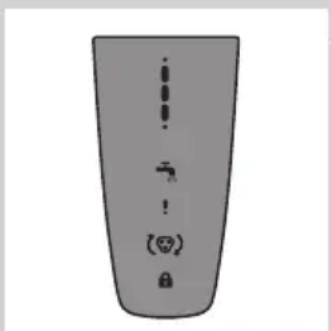
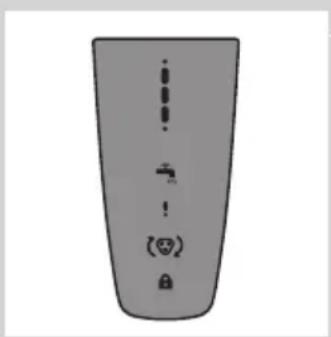
The various shaver types have different displays, which are shown in the figures below.
natural_image
Illustration of a remote control tower with ventilation grille and function keys (no text or symbols)- RQ1275, RQ1265, RQ1261, RQ1260
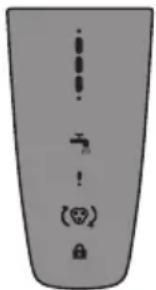
- RQ1273, RQ1252, RQ1251, RQ1250
Charging
- Charging takes approx. 1 hour.
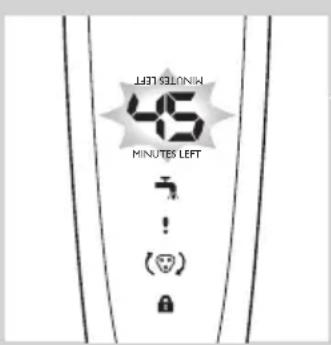
RQ129x, RQ128x
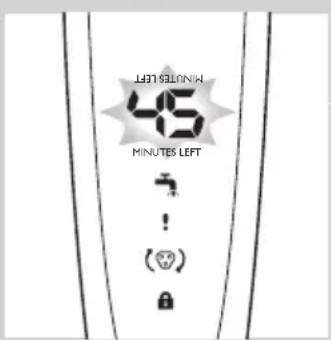
- When the shaver is charging, the minutes indication flashes.
- The shaving minutes increase until the shaver is fully charged.
- Quick charge: When the shaver contains enough energy for one shave, the display shows 5 minutes in red.
RQ127x, RQ126x, RQ125x
Note: The displays of the various shaver types look different, but the charging lights work in the same way.
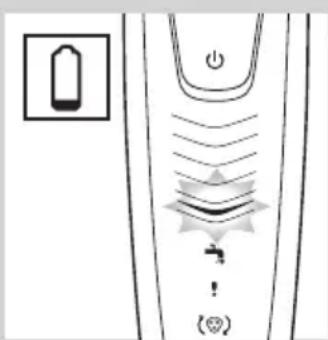
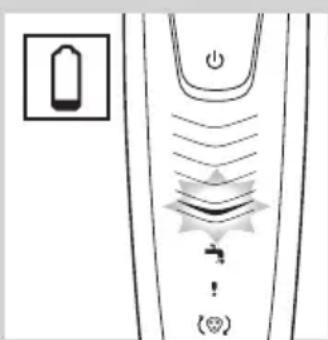
- When the shaver is charging, first the bottom charging light flashes, then the second charging light, and so on until the shaver is fully charged.
- Quick charge: When the shaver contains enough energy for one shave, the bottom charging light alternately flashes orange and white.
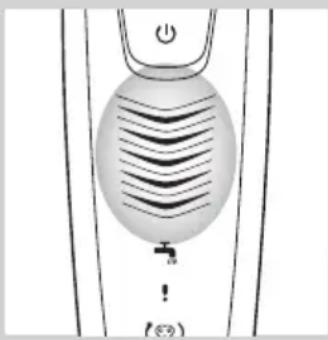
Battery fully charged

natural_image
Simple line drawing of a showerhead with water tap and power button (no text or symbols)RQ129x, RQ128x
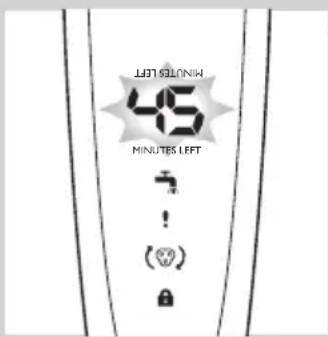
- When the battery is fully charged, the minutes indication lights up continuously. After approx. 30 minutes, the display automatically switches off again.
Note: The shaver is equipped with an intelligent self-learning system that monitors the shaver's energy consumption and converts the remaining battery capacity into shaving minutes. The energy consumption and therefore the remaining number of shaving minutes depend on your skin and beard type and your shaving behaviour (e.g. the use of shaving gel). If the number of shaving minutes of the fully charged shaver is less than 60 minutes, this is completely normal and does not mean that the battery capacity of the shaver has diminished.
RQ127x, RQ126x, RQ125x
Note: The displays of the various shaver types look different, but the charging lights work in the same way.
- When the battery is fully charged, all charging lights light up continuously. After approx. 30 minutes, the display automatically switches off again.
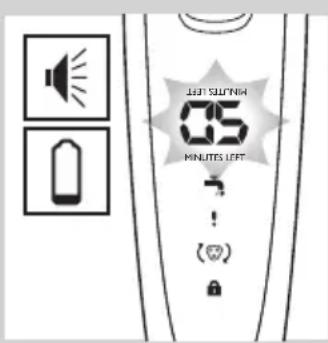
Battery low

RQ129x, RQ128x
- When the battery is almost empty (when there are only 5 or fewer shaving minutes left), the minutes indication starts to flash.
- When you switch off the shaver, the shaving minutes continue to flash for a few more seconds. You hear a beep when there are no shaving minutes left.
RQ127x, RQ126x, RQ125x
Note: The displays of the various shaver types look different, but the charging lights work in the same way.
- When the battery is almost empty (when there are only 5 or fewer shaving minutes left), the bottom charging light flashes orange.
- When you switch off the shaver, the bottom charging light continues to flash orange for a few seconds.
Remaining battery capacity
RQ129x, RQ128x
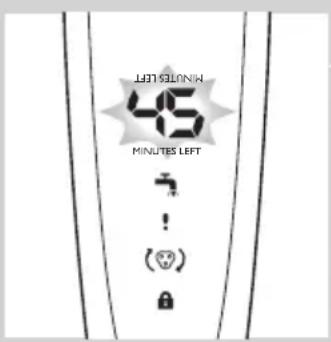
- The remaining battery capacity is indicated by the number of shaving minutes shown on the display.
RQ127x, RQ126x, RQ125x
Note: The displays of the various shaver types look different, but the charging lights work in the same way.
- The remaining battery capacity is indicated by the flashing charging lights.

natural_image
Pure electrical circuit lines without any symbolsClean shaver
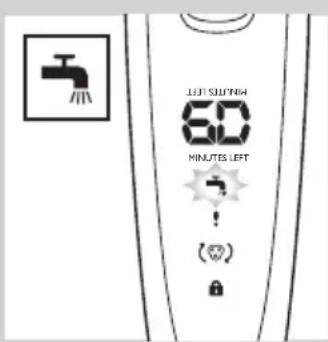
For optimal shaving performance, we advise you to clean the shaver after every use.
Note: The displays of the various shaver types look different, but show the same symbol.
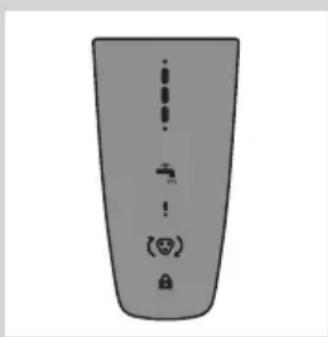
- The tap symbol flashes to remind you to clean the shaver.
Replace shaving unit
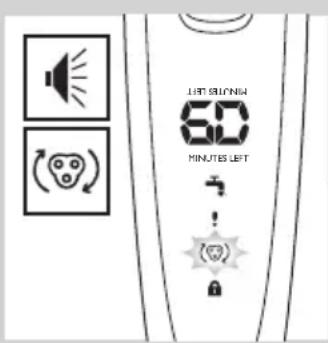
For maximum shaving performance, we advise you to replace the shaving unit every two years.
Note: The displays of the various shaver types look different, but show the same symbol.
- To remind you to replace the shaving unit, the appliance is equipped with a replacement reminder which is activated automatically after approx. two years. The replacement reminder is repeated at 9 successive shaves(RQ128x, RQ127x, RQ126x, RQ125x only) or until you reset the shaver.
Travel lock (RQ128x, RQ127x, RQ126x, RQ125x only)
You can lock the shaver when you are going to travel. The travel lock prevents the shaver from being switched on by accident.
Note: The displays of the various shaver types look different, but show the same symbol.

Activating the travel lock
1 Press the on/off button for 3 seconds to enter the travel lock mode.
RQ128x: The display starts to count down from 3. At 1, the appliance beeps to indicate that it is locked.
The lock symbol lights up on the display. After a few seconds it goes out.
Deactivating the travel lock
1 Press the on/off button for 3 seconds.
The motor starts running to indicate that the travel lock has been deactivated.
The shaver is now ready for use again.
Note: When you place the shaver in the plugged-in charger or Jet Clean System, the travel lock is automatically deactivated.
Power-saving mode (RQ129x only)

The appliance is equipped with an automatic power-saving mode. When the shaver enters the power-saving mode, the light in the on/off button goes out to save energy.
- When the appliance is switched off but detects movement for 5 minutes (for instance when you are travelling with the shaver in your suitcase), it automatically goes into power-saving mode. This mode prevents the shaver from being switched on by accident.
The lock symbol flashes on the display to indicate that the appliance is in power-saving mode.
- To deactivate the power-saving mode, simply press the on/off button.
Blocked shaving heads

Note: The displays of the various shaver types look different, but show the same symbol.
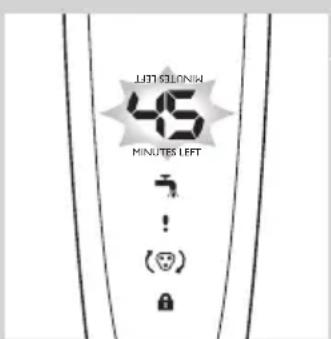
- If the shaving heads are blocked, the shaving unit symbol, the tap symbol and the exclamation mark flash. In this case, the motor cannot run because the shaving heads are soiled or damaged.
- When this happens, you have to clean the shaving unit or replace it.
- The shaving unit symbol, the tap symbol and the exclamation mark continue to flash until you unblock the shaving heads.
Charging
Charging takes approx. 1 hour.
RQ129x, RQ128x, RQ127x, RQ126x: A fully charged shaver has a shaving time of up to 60 minutes.
Note: RQ129x, RQ128x: When the battery is fully charged, the display shows the actual remaining shaving minutes (see section 'Battery fully charged' in chapter 'The display').
RQ125x: A fully charged shaver has a shaving time of up to 50 minutes.
Charge the shaver before you use it for the first time and when the display indicates that the battery is almost empty (see section 'Battery low' in chapter 'The display').
Quick charge
After the shaver has charged for 3 minutes, it contains enough energy for one shave.
Charging in the charger

natural_image
Line drawing of a mechanical device with a tool inserted, no text or symbols present1 Insert the small plug into the charger.

natural_image
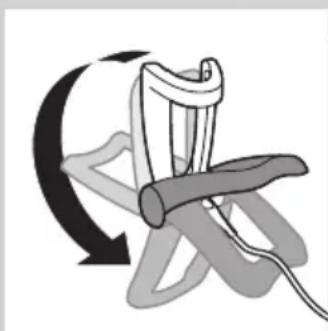
Diagram of a mechanical device with a curved arrow indicating rotational motion (no text or symbols)2 Unfold the charger ('click').
3 Put the adapter in the wall socket.

natural_image
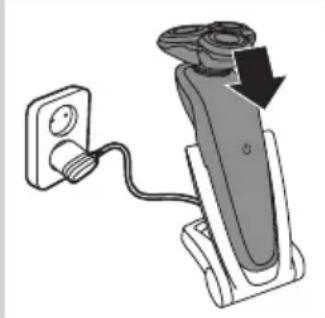
Diagram of a handheld device with a cable and power outlet, showing a downward arrow indicating motion (no text or symbols present)4 Put the shaver in the charger.
The display shows that the shaver is charging (see chapter 'The display').
Charging in the Jet Clean System (RQ1296CC, RQ1295CC, RQ1290CC, RQ1286CC, RQ1285CC, RQ1284CC, RQ1280CC, RQ1275CC, RQ1265CC, RQ1260CC, RQ1252CC, RQ1251CC, RQ1250CC only)
natural_image
Line drawing of a vacuum cleaner with a lid and handle (no text or symbols)1 Put the small plug in the Jet Clean System.
2 Put the adapter in the wall socket.
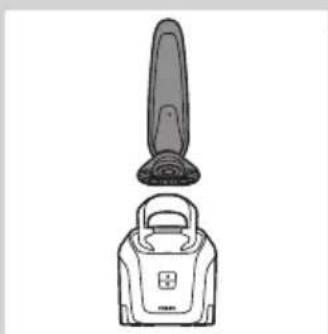
3 Hold the shaver upside down above the holder with the back of the shaver pointing towards the holder.
Note: The shaver cannot be placed in the Jet Clean System when the protection cap is on the shaving unit.
Note: RQ129x only: when you turn the shaver upside down, the minutes indication on the display is also turned upside down so you can still see to what level the battery is charged.

4 Place the shaver body in the holder behind the two clips (1) and press it down until it locks into place (2).
The display shows that the shaver is charging (see section 'Charging' in chapter 'The display').
Using the shaver
Shaving
Skin adaptation period
Your first shaves may not bring you the result you expect and your skin may even become slightly irritated. This is normal. Your skin and beard need time to adapt to any new shaving system.
We advise you to shave regularly (at least 3 times a week) for a period of 3 weeks to allow your skin to adapt to the new shaver. During this period, use your new electric shaver exclusively and do not use other shaving methods. If you use different shaving methods, it is more difficult for your skin to adapt to the new shaving system.

natural_image
Illustration of a person using a tool to cut the face area, showing two different angles (no text or symbols present)1 Press the on/off button once to switch on the shaver.
The display lights up for a few seconds.
2 Move the shaving heads over your skin in circular movements.
- Do not make straight movements.
3 Press the on/off button once to switch off the shaver.
The display lights up for a few seconds and then shows the remaining battery capacity.
Wet shaving
You can also use this shaver on a wet face with shaving foam or shaving gel. To shave with shaving foam or shaving gel, follow the steps below:
1 Apply some water to your skin.
2 Apply shaving foam or shaving gel to your skin.
3 Rinse the shaving unit under the tap to ensure that the shaving unit glides smoothly over your skin.
4 Press the on/off button once to switch on the shaver.
5 Move the shaving heads over your skin in circular movements.
Note: Rinse the shaver under the tap regularly to ensure that it continues to glide smoothly over your skin.
6 Dry your face and thoroughly clean the shaver after use (see chapter 'Cleaning and maintenance').
Note: Make sure you rinse all foam or shaving gel off the shaver.
Trimming
You can use the trimmer to groom your sideburns and moustache.
natural_image
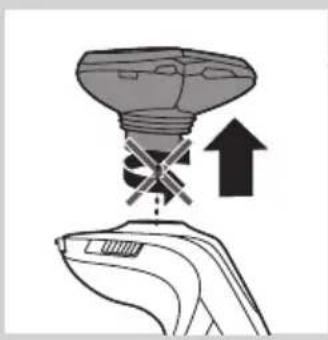
Illustration of a hand holding a device with a light bulb above and an upward arrow indicating motion (no text or symbols)1 Pull the shaving unit straight off the shaver.
Note: Do not twist the shaving unit while you pull it off the shaver.
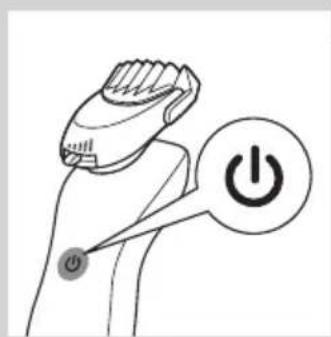
2 Press the on/off button once to switch on the shaver.
The display lights up for a few seconds.

natural_image
Line drawing of a handheld device with a curved handle and arrow indicating direction (no text or symbols)3 Slide the trimmer slide forwards to slide out the trimmer.
4 You can now start trimming.
5 Slide the trimmer slide backwards to retract the trimmer.
6 Press the on/off button once to switch off the shaver.
The display lights up for a few seconds and shows the remaining battery capacity.
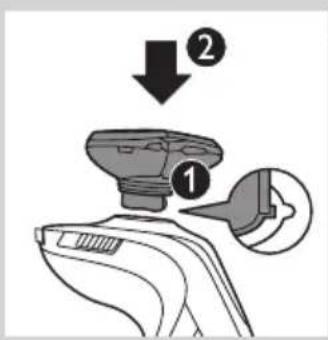
7 Insert the lug of the shaving unit into the slot in the top of the shaver (1). Then press down the shaving unit (2) to attach it to the shaver ('click').

natural_image
Illustration of a hand holding a device with a light bulb above and an upward arrow indicating motion (no text or symbols)Using the Beard Styler attachment (RQ1296, RQ1295, RQ1286, RQ1285, RQ1275, RQ1265 only)
1 Make sure the shaver is switched off.
2 Pull the shaving unit straight off the shaver.
Note: Do not twist the shaving unit while you pull it off the shaver.

natural_image
Illustration of a hand holding a device with a magnified inset showing internal components (no text or symbols)3 Insert the lug of the Beard Styler attachment into the slot in the top of the shaver (1). Then press down the beard styler attachment (2) to attach it to the shaver ('click').
Using the Beard Styler attachment with comb
You can use the Beard Styler attachment with the comb attached to style your beard at one fixed setting, but also at different length settings. The hair length settings on the Beard Styler attachment correspond to the remaining hair length after cutting and range from 1 to 5mm.

natural_image
Illustration of a hand holding a handheld device with a lightning bolt indicating compression (no text or symbols)1 Slide the comb straight into the guiding grooves on both sides of the beard stylist attachment ('click').

2 Press the length selector (1) and then push it to the left or right (2) to select the desired hair length setting.
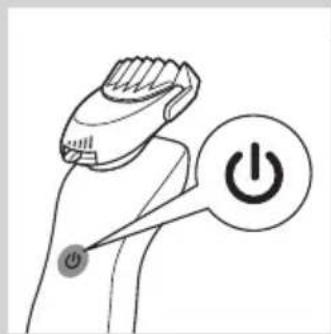
3 Press the on/off button on the shaver to switch it on.

natural_image
Line drawing of a person applying a hair product to their beaded neck (no text or symbols)4 You can now start styling your beard.
Using the Beard Styler attachment without comb
You can use the Beard Styler attachment without the comb to contour your beard, moustache or sideburns.

natural_image
Line drawing of a hand holding a small electric shaver with a curved blade and arrow indicating motion (no text or symbols)
natural_image
Illustration of two hands holding a small object with checkmark and cross symbols, separated by a diagonal line (no text or labels)
natural_image
Line drawing of a person applying a hair product to their ear (no text or symbols)
natural_image
Line drawing of a man's head and shoulders with a beard (no text or symbols)
natural_image
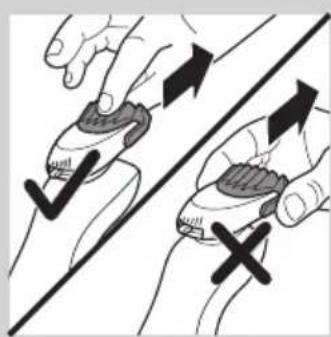
Line drawing of a man's head and beard (no text or symbols)1 Pull the comb off the Beard Styler attachment.
Note: Grab the comb in the centre to pull it off the Beard Styler attachment. Do not pull at the sides of the comb.
2 Press the on/off button to switch on the shaver.
3 You can now start contouring your beard, moustache, sideburns or neckline.
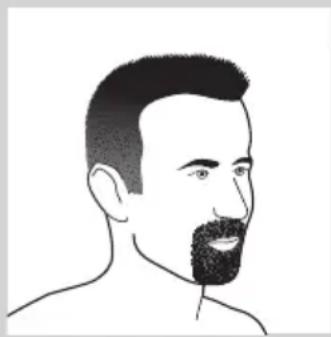
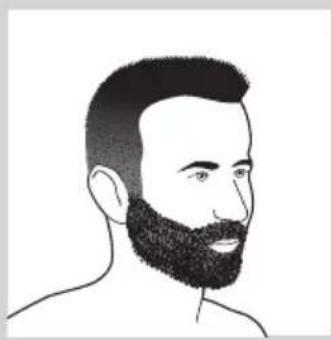
Beard styles
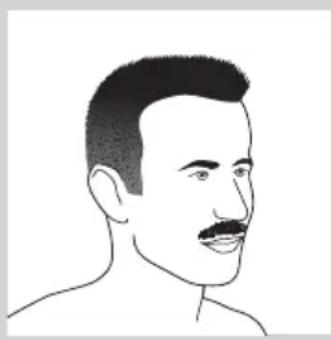
Below you find some examples of beard styles you can create.
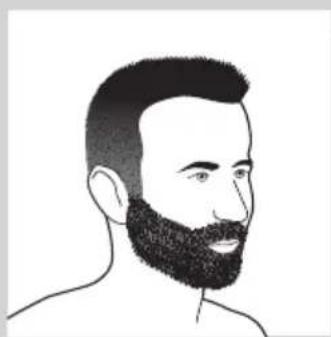
- A stubble look
- A full beard
natural_image
Line drawing of a male's head and shoulders (no text or symbols)- A moustache
natural_image
Line drawing of a man's head and shoulders with a beard (no text or symbols)- A goatee
Cleaning and maintenance
Never use scouring pads, abrasive cleaning agents or aggressive liquids such as petrol or acetone to clean the shaver, its accessories and the Jet Clean System (RQ1296CC, RQ1295CC, RQ1290CC, RQ1286CC, RQ1285CC, RQ1284CC, RQ1280CC, RQ1275CC, RQ1265CC, RQ1260CC, RQ1252CC, RQ1251CC, RQ1250CC only).
- The best and most hygienic way to clean the shaver is in the Jet Clean System. You can also rinse the shaver under the tap or clean it with the cleaning brush supplied.
- Be careful with hot water. Always check if the water is not too hot, to prevent your hands from getting burnt.
- Clean the shaver after every shave for optimal shaving performance.
- You can clean the outside of the shaver with a damp cloth.
- Regular cleaning guarantees better shaving performance.
Cleaning the shaving unit

Be careful with hot water. Always check if the water is not too hot, to prevent your hands from getting burnt.
1 Rinse the shaving unit under a hot tap for some time.

natural_image
Line drawing of a hand holding a small object with a curved arrow indicating rotation (no text or symbols)
2 Pull open the three shaving heads one by one.
3 Rinse all three shaving heads and all three hair chambers under a hot tap for 30 seconds.
Note: You can also brush the shaving heads and hair chambers with the cleaning brush supplied.
Be careful with hot water. Always check if the water is not too hot, to prevent your hands from getting burnt.
4 Carefully shake off excess water and leave the shaving heads open to let the shaving unit dry completely.
Never dry the shaving unit with a towel or tissue, as this may damage the shaving heads.
Cleaning the shaving unit in the Jet Clean System (RQ1296CC, RQ1295CC, RQ1290CC, RQ1286CC, RQ1285CC, RQ1284CC, RQ1280CC, RQ1275CC, RQ1265CC, RQ1260CC, RQ1252CC, RQ1251CC, RQ1250CC only)

The Jet Clean System comes in two types:
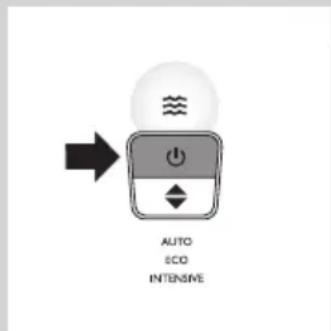
- Type RQ1008 has three cleaning programs: the eco program, the auto program and the intensive program. Press the up/down button to select the cleaning program you prefer.
Note: The eco program has a shorter drying time, to save energy. The intensive program is a more thorough cleaning program.

- Type RQ1007 has one automatic cleaning program. When you press the on/off button, the Jet Clean System starts cleaning in the automatic cleaning program.
Preparing the Jet Clean System for use
Fill the cleaning chamber before first use.
1 Put the small plug in the Jet Clean System.
2 Put the adapter in the wall socket. The holder automatically moves to the highest position.

3 Simultaneously press the release buttons on both sides of the cleaning chamber (1). Then lift the Jet Clean System off the cleaning chamber (2).
The cleaning chamber remains behind.
4 Unscrew the cap from the bottle with HQ200 cleaning fluid.
natural_image
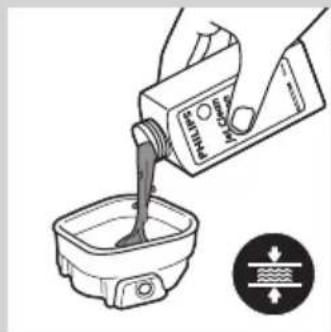
Illustration of a hand pouring liquid into a container with a water level indicator (no text or symbols)5 Fill the cleaning chamber with HQ200 cleaning fluid to a level between the two lines.

natural_image
Illustration of hands using a tool to press or clean a small container with a downward arrow (no text or symbols)6 Place the Jet Clean System back onto the cleaning chamber.
Make sure the release buttons click back into place.
Using the Jet Clean System
Note: If you use the shaver with shaving foam or shaving gel, we advise you to rinse it under the hot tap before you clean it in the Jet Clean System. This guarantees an optimal lifetime for the cleaning fluid.

natural_image
Line drawing of a hairdryer with a flat blade and a closed handle (no text or symbols)1 Hold the shaver upside down above the holder with the back of the shaver pointing towards the holder.

2 Place the shaver body in the holder behind the two clips (1) and press it down until it locks into place (2).
The display shows that the shaver is charging (see chapter 'The display').
3 RQ1008: Press the up/down button to select a cleaning program.


natural_image
Simple line drawing of a handbag with a handle and decorative base, no text or symbols present.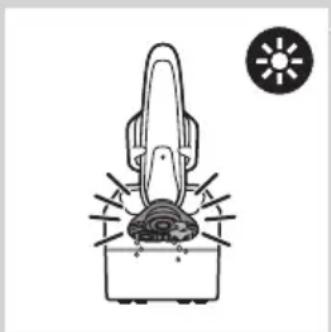
natural_image
Simple line drawing of a hairdryer with a sun icon above (no text or symbols)
natural_image
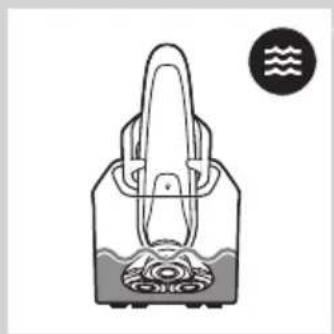
Illustration of a hand holding a bag with a clock and a U-shaped symbol (no text or labels)4 Press the on/off button on the Jet Clean System to start the cleaning program.
The shaver display stops showing the charging indication.
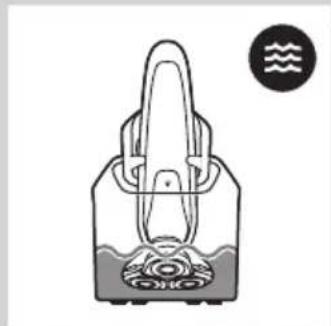
The cleaning light starts to flash and the shaver is automatically lowered into the cleaning fluid.
The cleaning light flashes throughout the cleaning program, which takes a few minutes.
Note: RQ1007: The cleaning program takes 4 to 6 minutes.
Note: RQ1008: The auto and eco cleaning programs take 4 to 6 minutes. The intensive program takes approx. 35 minutes.
During the first phase of the cleaning program, the shaver automatically switches on and off several times and moves up and down.
During the second phase of the cleaning program, the shaver is placed in the drying position, indicated by the flashing drying symbol. This phase takes approx. 2 hours. The shaver stays in this position until the end of the program.
Note: RQ1008: The drying phase takes 1 hour when you have selected the eco program.
After the cleaning program, the charging indication appears on the shaver display (see chapter 'The display').
Note: If you press the on/off button of the Jet Clean System during the cleaning program, the program aborts. In this case, the cleaning or drying light stops flashing and the holder moves to the highest position.
Note: If you remove the adapter from the wall socket during the cleaning program, the program aborts. The holder remains in its current position. When you put the adapter back into the wall socket, the holder moves to the highest position.
- When the cleaning fluid drops below the minimum level, the ‘cleaning chamber empty’ symbol starts to flash and the holder returns to its starting position.
- If you use the Jet Clean System to clean your shaver every day, you need to refill the cleaning chamber approx. every 15 days.
Cleaning the Jet Clean System
Clean the cleaning chamber every 15 days.
You can wipe the outside of the Jet Clean System with a damp cloth.
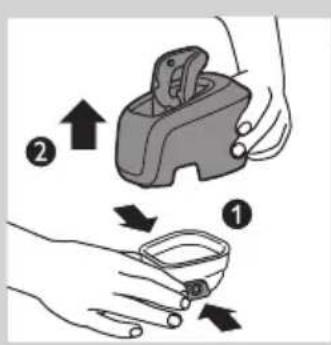
1 Simultaneously press the release buttons on both sides of the Jet Clean System (1). Then lift the Jet Clean System off the cleaning chamber (2).
The cleaning chamber remains behind.

natural_image
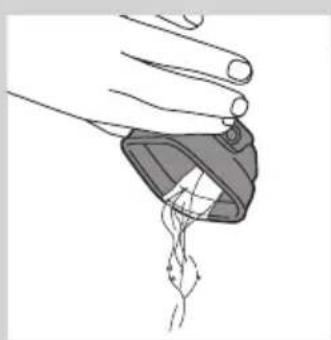
Illustration of a hand holding a small object with a string attached, no text or symbols present2 Pour any remaining cleaning fluid out of the cleaning chamber. You can simply pour the cleaning fluid down the sink.
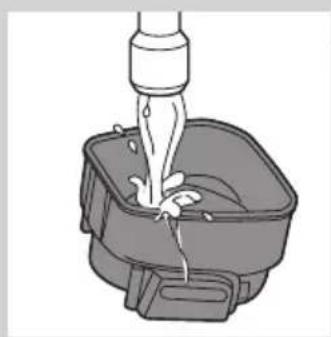
natural_image
Illustration of a faucet pouring liquid into a square basin (no text or symbols)3 Rinse the cleaning chamber under the tap. The cleaning chamber is not dishwasher-proof.

natural_image
Illustration of a hand pouring liquid into a container with a water level indicator (no text or symbols)4 Fill the cleaning chamber with HQ200 cleaning fluid to a level between the two lines.

natural_image
Illustration of hands using a tool to remove a small container with liquid, showing a downward arrow and sparkles (no text or symbols)5 Place the Jet Clean System back onto the cleaning chamber. Make sure the release buttons click back into place.
Extra-thorough cleaning method
Make sure the appliance is switched off.
1 Pull the shaving unit straight off the shaver.
Note: Do not twist the shaving unit while you pull it off the shaver.

natural_image
Illustration of a hand holding a device with a light bulb above and an upward arrow indicating motion (no text or symbols)
natural_image
Diagram of a hand holding a mechanical device with rotating components (no text or symbols)

natural_image
Mechanical gear assembly diagram showing a rotating shaft and gear mechanism (no text or labels)
natural_image
Diagram showing a hand holding a gear-like object with arrows indicating direction of movement or force (no text or symbols present)2 Pull open the three shaving heads one by one.
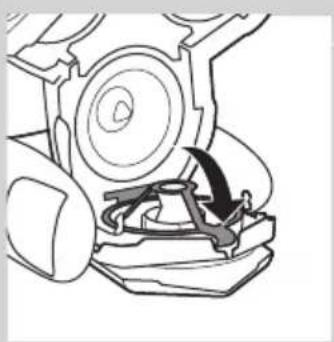
3 Press the retainer release tab (1) until the retainer opens (2).
Note: Do not clean more than one cutter and shaving guard at a time, since they are all matching sets. If you accidentally put a cutter in the wrong shaving guard, it may take several weeks before optimal shaving performance is restored.
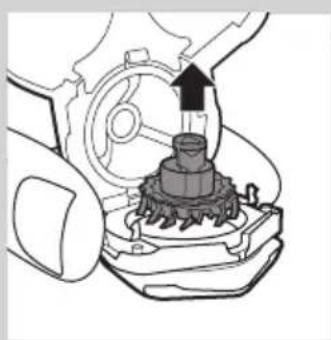
4 Remove the cutter from the shaving guard.
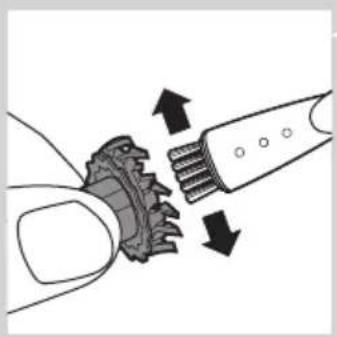
5 Clean the cutter with the cleaning brush supplied.
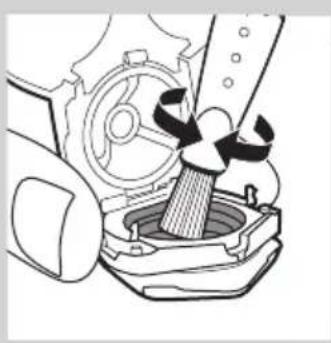
natural_image
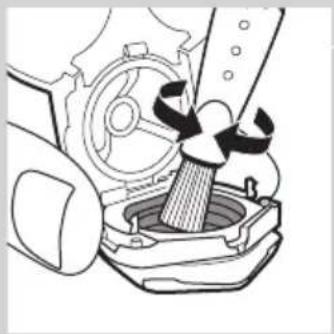
Mechanical assembly diagram showing a piston inside a housing with gears and a handle (no text or symbols)6 Clean the inside of the shaving guard.

natural_image
Mechanical assembly diagram showing a gear and motor component with a downward arrow indicating motion (no text or symbols)7 After cleaning, place the cutter back into the shaving guard with the cutter legs pointing downwards.
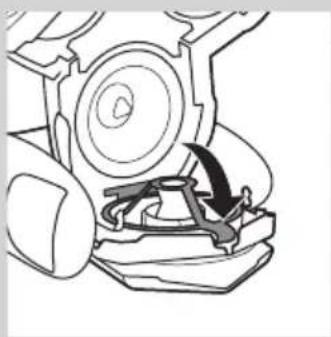
natural_image
Mechanical assembly diagram showing a rotating component with a curved arrow indicating motion (no text or symbols)8 Press down the retainer over the cutter.
9 Close the shaving heads.

10 Insert the lug of the shaving unit into the slot in the top of the shaver (1). Then press the shaving unit downwards (2) to attach it to the shaver ('click').
Cleaning the trimmer
Clean the trimmer every time you have used it.
1 Slide the trimmer slide forwards to slide out the trimmer.

natural_image
Line drawing of a handheld device with a black arrow pointing to a component (no text or symbols)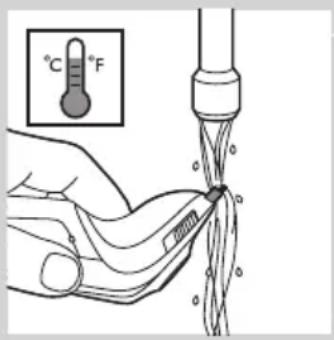
2 Rinse the trimmer under a hot tap for some time.
3 Slide the trimmer slide backwards to retract the trimmer.
Tip: For optimal trimmer performance, lubricate the trimmer teeth with a drop of sewing machine oil every six months.
Cleaning the Beard Styler attachment (RQ1296, RQ1295, RQ1286, RQ1285, RQ1275, RQ1265 only)

natural_image
Illustration of a hand washing clothes with a fork and spoon (no text or symbols)Clean the Beard Styler attachment every time you have used it.
1 Pull the comb off the Beard Styler attachment.
2 Rinse the Beard Styler attachment and the comb separately under a hot tap for some time.
Note: You can also clean the Beard Styler attachment and the comb with the cleaning brush supplied.
3 Lubricate the trimmer teeth with a drop of sewing machine oil every six months.
Storage

natural_image
Line drawing of a pliers with an arrow indicating motion (no text or symbols)1 Slide the protection cap onto the shaving unit to prevent damage to the shaving heads.
2 Store the shaver in the pouch supplied.
Replacement

For maximum shaving performance, we advise you to replace the shaving unit every two years.
Only replace the shaving unit with an original RQ12 Philips Shaving unit.
1 The shaving unit symbol flashes (all types) and you hear a beep (RQ129x, RQ128x only) when you switch off the shaver.
Note: The displays of the different types look different, but show the same symbol.

natural_image
Illustration of a hand holding a device with a light bulb and an upward arrow, no text or symbols present.2 Pull the old shaving unit straight off the shaver.
Note: Do not twist the shaving unit while you pull it off the shaver.
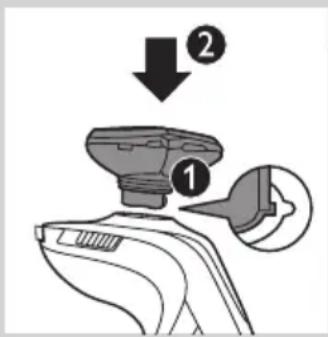
3 Insert the lug of the new RQ12 shaving unit into the slot in the top of the shaver (1). Then press down the shaving unit (2) to attach it to the shaver ('click').

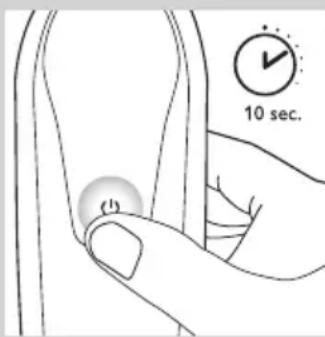
4 RQ128x/RQ127x/RQ126x/RQ125x: To reset the shaver, press and hold the on/off button for approx. 10 seconds.
Note: If you do not reset the shaver at the first replacement reminder, it continues to beep (RQ128x only) and show the shaving unit symbol at 8 more shaves or until you reset the shaver.
Note for RQ129x: You do not need to reset the shaver. After 3 shaves, the replacement reminder (flashing shaving unit symbol and beeping) is deactivated automatically.
Ordering accessories
To purchase accessories for this appliance, please visit our online shop at www.shop.philips.com/service. If the online shop is not available in your country, go to your Philips dealer or a Philips service centre. If you have any difficulties obtaining accessories for your appliance, please contact the Philips Consumer Care Centre in your country. You find its contact details in the worldwide guarantee leaflet.
The following parts are available:
- HQ8505 adapter
- RQ12 Philips Shaving Unit
- HQ110 Philips Shaving Head Cleaning Spray
- HQ200 Philips Cleaning Fluid
- RQ111 Beard Styler attachment

Shaving heads
- We advise you to replace your shaving heads every two years. Always replace the shaving unit with an original RQ12 Philips Shaving Unit.
Cleaning
- Specific types only: use Jet Clean Solution (HQ200) for regular cleaning of the shaving heads.
Environment

natural_image
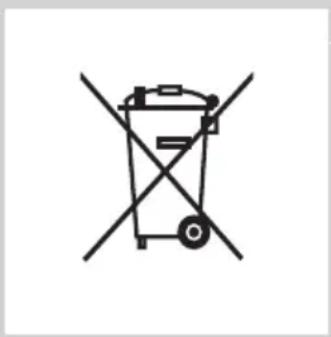
Symbol of a trash bin crossed with no visible text or labels- Do not throw away the appliances with the normal household waste at the end of their life, but hand them in at an official collection point for recycling. By doing this, you help to preserve the environment.

natural_image
Symbol of a trash bin crossed with no visible text or labels- The built-in rechargeable shaver battery contains substances that may pollute the environment. Always remove the battery before you discard or hand in the shaver at an official collection point. Dispose of the battery at an official collection point for batteries. If you have trouble removing the battery, you can also take the appliance to a Philips service centre. The staff of this centre will remove the battery for you and will dispose of it in an environmentally safe way.
Removing the rechargeable shaver battery
Only remove the rechargeable battery when you discard the shaver. Make sure the battery is completely empty when you remove it.
Be careful, the battery strips are sharp.
1 Remove the back panel of the shaver with a screwdriver.
2 Remove the rechargeable battery.
Guarantee and support
If you need support or if you have a problem, please visit www.philips.com/support or read the separate worldwide guarantee leaflet.
Guarantee restrictions
The shaving heads (cutters and shaving guards) are not covered by the terms of the international guarantee because they are subject to wear.
Troubleshooting
This chapter summarises the most common problems you could encounter with the appliance. If you are unable to solve the problem with the information below, visit www.philips.com/support for a list of frequently asked questions or contact the Consumer Care Centre in your country.
Problem Possible cause Solution
| The shaver does not shave as well as it used to. | The shaving heads are damaged or worn. Replace the shaving unit (see chapter 'Replacement'). | |
| Long hairs obstruct the shaving heads. Clean the shaving heads by following the steps of the extra-thorough cleaning method (see chapter 'Cleaning and maintenance'). | ||
| Specific types only: The Jet Clean System has not cleaned the shaver properly, because the cleaning fluid in the cleaning chamber is soiled or the cleaning fluid level is too low. | Clean the shaver thoroughly before you continue shaving. If necessary, clean and refill the cleaning chamber (see chapter 'Cleaning and maintenance'). | |
| The shaver does not work when I press the on/off button. | The rechargeable battery is empty. Recharge the battery (see chapter 'Charging'). | |
| Specific types only: The travel lock is activated. | Press the on/off button for 3 seconds to deactivate the travel lock. | |
| The shaving unit is soiled or damaged to such an extent that the motor cannot run. In this case, the shaving unit symbol, the tap symbol and the exclamation mark flash. | Clean the shaving unit or replace it (see chapters 'Cleaning and maintenance' and 'Replacement'). | |
| The temperature of the shaver is too high. In this case, the shaver does not work and the exclamation mark on the display flashes. | Switch off the shaver and let it cool down. As soon as the temperature of the shaver has dropped sufficiently, you can switch on the shaver again. | |
Problem Possible cause Solution
| RQ1296CC,RQ1295CC,RQ1290CC,RQ1286CC,RQ1285CC,RQ1284CC,RQ1280CC,RQ1275CC,RQ1265CC,RQ1260CC,RQ1252CC,RQ1251CC,RQ1250CC only: The shaver is not entirely clean after I clean it in the Jet Clean System. | The cleaning fluid in the cleaning chamber is soiled. | Empty and rinse the cleaning chamber and refill it with new cleaning fluid. |
| The cleaning fluid level is too low. If the fluid volume in the cleaning chamber drops below the minimum level during the cleaning program, the program aborts.The cleaning light and the ‘cleaning chamber empty’ symbol flash at intervals and the holder returns to its starting position. | Refill the cleaning chamber with cleaning fluid to a level between the two lines (see chapter ‘Cleaning and maintenance’). | |
| You have used another cleaning fluid than the original Philips cleaning fluid. | Only use HQ200Philips Cleaning Fluid. | |
| The Jet Clean System does not work when I press the on/off button. | The Jet Clean System is not connected to the mains. | Put the small plug in the Jet Clean System and put the adapter in the wall socket. |
| You have not placed the shaver in the Jet Clean System properly, so there is no electrical connection between the Jet Clean System and the shaver. | Press the shaver tightly into the holder to lock it into place. | |
| The shaver is not fully charged after I charge it in the charger/Jet Clean System. | You have not placed the shaver in the charger/Jet Clean System (specific types only) properly. | Make sure you press the shaver until it locks into place. |
Problem Possible cause Solution
| RQ129x/RQ128x: The shaver is fully charged, but the display shows less than 60 shaving minutes. | The shaver is equipped with an intelligent self-learning system that monitors the shaver's energy consumption and converts the remaining battery capacity into shaving minutes. The energy consumption and therefore the remaining number of shaving minutes depend on your skin and beard type and your shaving behaviour (e.g. the use of shaving gel). | If the number of shaving minutes of the fully charged shaver is less than 60 minutes, this is completely normal and does not mean that the battery capacity of the shaver has diminished. |
| RQ1008: The operating time of the Jet Clean System is suddenly shorter or longer than it used to be. | You have selected another cleaning program. The Jet Clean System has three cleaning programs: the eco program, the normal program and the intensive program. Each of these programs has a different operating time. | Press the up/down button on the Jet Clean System to select the cleaning program of your preference (see chapter 'Cleaning and maintenance'). |
Въведение
natural_image
Prohibition sign showing a faucet without raindrops, enclosed in a circle (no text)
natural_image
Prohibition sign showing a faucet without a shower, enclosed in a circle (no text)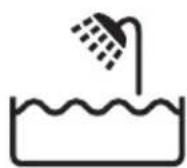
Опасност
natural_image
Illustration of a remote control device with ventilation grille and function buttons (no text or symbols)- RQ1275, RQ1265, RQ1261, RQ1260

natural_image
Simple diagram of a device with vertical lines and icons, no text or symbols present- RQ1273, RQ1252, RQ1251, RQ1250
Зареждане
natural_image
Pure electrical circuit lines without any symbolsRQ127x, RQ126x, RQ125x
RQ129x, RQ128x
natural_image
Simple line drawing of a showerhead with water tap, no text or symbols presentRQ127x, RQ126x, RQ125x
RQ127x, RQ126x, RQ125x
natural_image
Pure electrical circuit lines without any symbolsnatural_image
Line drawing of a mechanical device with a tool inserted, no text or symbols presentnatural_image
Diagram of a mechanical device with a curved arrow indicating rotation or motion (no text or symbols)natural_image
Diagram of a handheld device with a cable and plug, showing a downward arrow indicating motion (no text or symbols present)natural_image
Line drawing of a vacuum cleaner with a pointed tip and handle (no text or symbols)natural_image
Illustration of a person applying facial contour to another person's neck, showing different facial contours (no text or symbols present)natural_image
Diagram showing a light bulb above a handheld device with an upward arrow, indicating a process or operation (no text or symbols present)natural_image
Line drawing of a handheld device with a black arrow pointing to the handle (no text or symbols)

natural_image
Illustration of a hand holding a device with a light bulb above and an upward arrow indicating motion (no text or symbols)natural_image
Illustration of a hand holding a device with a magnified inset showing internal components (no text or symbols)
natural_image
Illustration of a hand holding a handheld device with a lightning bolt indicating compression (no text or symbols)

natural_image
Line drawing of a person applying a hair product to their beaded neck (no text or symbols)natural_image
Line drawing of a hand holding a small electronic device with a black arrow indicating motion (no text or symbols)natural_image
Illustration of two hands holding a device with checkmark and cross symbols, no text or labels presentnatural_image
Line drawing of a person applying hair to their ear (no text or symbols)natural_image
Line drawing of a man's head and shoulders with a beard (no text or symbols)- Стил с набола брада
natural_image
Line drawing of a man's head and beard (no text or symbols)- Цяла брада

natural_image
Line drawing of a male's head and shoulders (no text or symbols)- Мустаци

natural_image
Line drawing of a man's head and shoulders with a beard (no text or symbols)- Козя брадичка

natural_image
Line drawing of a hand using a tool to lift a textured object, no text or symbols present
natural_image
Line drawing of a vacuum cleaner with a handle and spool, shown from top and bottom (no text or symbols)

natural_image
Simple line drawing of a handbag with a handle and internal components, no text or symbols present.natural_image
Simple line drawing of a hairdryer with a sun icon above (no text or symbols)
natural_image
Illustration of a handbag with a circular icon showing 'U' and a calendar-like symbol (no text or symbols on the main subject)

natural_image
Illustration of a hand holding a small object with a curved line inside, no text or symbols presentnatural_image
Illustration of a faucet pouring liquid into a square basin (no text or symbols)natural_image
Illustration of a hand pouring liquid into a container with a water level indicator (no text or symbols)natural_image
Illustration of hands using a handheld device to remove a small container with liquid, no text or symbols presentnatural_image
Diagram showing a device with a light bulb and a hand holding a device, with an upward arrow indicating motion or change (no text or symbols present)natural_image
Diagram of a hand holding a mechanical device with rotating components (no text or symbols)natural_image
Mechanical assembly diagram showing gear and shaft components (no text or labels)natural_image
Diagram showing a hand turning a gear with arrows indicating motion or force (no text or symbols)natural_image
Mechanical assembly diagram showing a hammer inside a gear mechanism (no text or symbols)natural_image
Mechanical assembly diagram showing a gear and motor component with an arrow indicating motion (no text or symbols)natural_image
Mechanical assembly diagram showing a rotating component with a curved arrow indicating motion (no text or symbols)natural_image
Line drawing of a handheld device with a black arrow indicating direction (no text or symbols)natural_image
Illustration of two hands using a tool to lift water from a bowl (no text or symbols)natural_image
Line drawing of a tool with an arrow indicating motion (no text or symbols)natural_image
Illustration of a hand holding a device with a light bulb above and an upward arrow indicating motion (no text or symbols)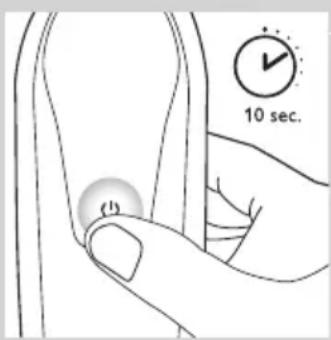
natural_image
Symbol of a waste bin with crossed lines indicating no waste, and a solid black rectangle below (no text or labels)natural_image
Prohibition sign showing a faucet without a shower, enclosed in a circle (no text or symbols)
natural_image
Prohibition sign showing a faucet without a shower, enclosed in a circle (no text)
Nebezpečí
natural_image
Illustration of a remote control device with ventilation grille and control buttons (no text or symbols)- RQ1275, RQ1265, RQ1261, RQ1260
natural_image
Top-down view of a remote control panel with indicator lights and navigation buttons (no text or symbols)- RQ1273, RQ1252, RQ1251, RQ1250

Nabíjení
natural_image
Pure electrical circuit lines without any symbolsnatural_image
Simple line drawing of a showerhead with water tap, no text or symbols presentRQ129x, RQ128x
RQ129x, RQ128x
natural_image
Pure electrical circuit lines without any symbolsnatural_image
Line drawing of a mechanical device with a probe inserted, showing no text or symbols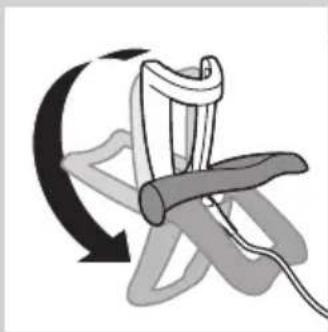
natural_image
Diagram of a mechanical device with a curved arrow indicating rotation or motion (no text or symbols)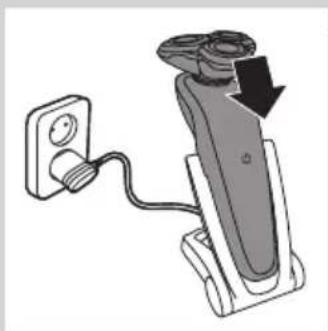
natural_image
Diagram of a handheld device with cable and plug, showing a downward arrow indicating motion (no text or symbols present)natural_image
Line drawing of a vacuum cleaner with a handle and blade (no text or symbols)natural_image
Illustration of a person applying facial hair to another person's face, showing different facial expressions (no text or symbols present)natural_image
Line drawing of a person applying a hair to their beache, no text or symbols present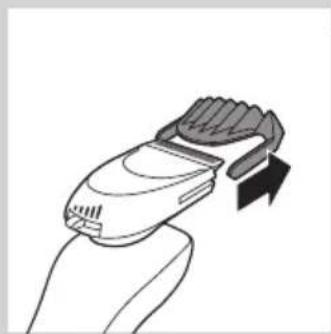
natural_image
Line drawing of a hand holding a small electric shaver with a black arrow indicating motion (no text or symbols)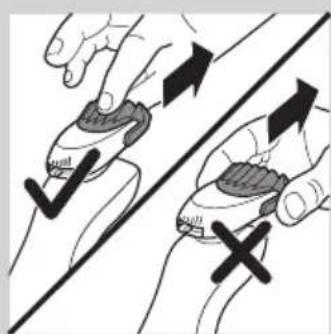
natural_image
Illustration of two hands holding a device with directional arrows indicating movement or force (no text or symbols present)
natural_image
Line drawing of a person applying makeup to their ear (no text or symbols)
natural_image
Line drawing of a man's head and shoulders with a beard (no text or symbols)natural_image
Line drawing of a man's head and shoulders with a beard (no text or symbols)- Plnovous

natural_image
Line drawing of a man's head and shoulders (no text or symbols)- Knír

natural_image
Line drawing of a man's head and shoulders with a beard (no text or symbols)- Bradka
Čištění a údržba
natural_image
Line drawing of a hand holding a small object with a curved arrow indicating rotation (no text or symbols)natural_image
Illustration of a hand holding a small device with a downward arrow and sound waves, no text or symbols presentnatural_image
Illustration of a vacuum cleaner with a lid and handle (no text or symbols)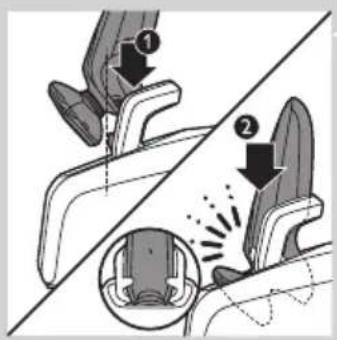

natural_image
Simple line drawing of a handbag with a handle and water level, no text or symbols present
natural_image
Diagram of a hairdryer with a sun icon and gear base (no text or symbols)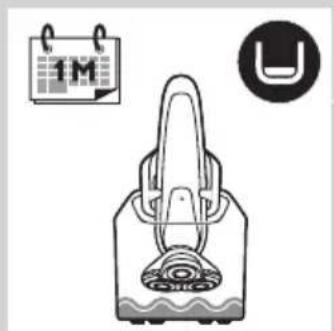
natural_image
Illustration of a handbag with a decorative swirl design, next to a calendar icon labeled '1M' and a U symbol (no text or symbols on the main elements)natural_image
Illustration of a hand holding a small object with a curved line extending from it, no text or symbols present.2 Vylijte z čisticí komory zbytky čisticí kapaliny.
natural_image
Illustration of a faucet dispensing water into a square basin (no text or symbols)natural_image
Illustration of a hand pouring liquid into a container with a water level indicator (no text or symbols)natural_image
Illustration of hands using a handheld device to remove or clean material, with no text or symbols present.natural_image
Illustration of a hand holding a device with a light bulb above and an upward arrow indicating motion (no text or symbols)
natural_image
Diagram of a hand holding a mechanical device with rotating components (no text or symbols)
natural_image
Mechanical gear assembly diagram showing a rotating shaft and gear mechanism (no text or labels)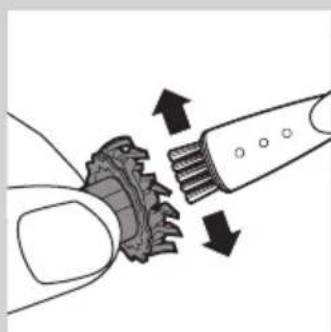
natural_image
Diagram showing a mechanical component being inserted into a toothbrush, with arrows indicating direction (no text or symbols present)natural_image
Mechanical assembly diagram showing a piston inside a motor (no text or symbols)natural_image
Mechanical assembly diagram showing a gear and motor component with a downward arrow indicating motion (no text or symbols)natural_image
Mechanical assembly diagram showing a rotating component with a curved arrow indicating motion (no text or symbols)natural_image
Line drawing of a handheld device with a black arrow pointing to a component (no text or symbols)natural_image
Illustration of a hand pouring liquid from a bottle onto a slide, with no text or symbols present.natural_image
Line drawing of a pliers tool with an arrow indicating motion (no text or symbols)natural_image
Illustration of a hand holding a device with a light bulb and an upward arrow, no text or symbols present.natural_image
Symbol of a waste bin with crossed lines indicating no waste, and a solid black rectangle below (no text or labels)natural_image
No smoking sign with a faucet symbol (no text or numbers present)
natural_image
No smoking sign with a faucet symbol (no text or numbers present)
natural_image
Simple line drawing of a showerhead spraying water into a container (no text or symbols)Oht
- Hoidke adapterit kuivana.
Hoiatus
natural_image
Illustration of a remote control device with ventilation grille and navigation buttons (no text or symbols)- RQ1275, RQ1265, RQ1261, RQ1260
- RQ1273, RQ1252, RQ1251, RQ1250
Laadimine
natural_image
Simple line drawing of a showerhead with water tap, no text or symbols presentRQ129x, RQ128x
RQ129x, RQ128x
natural_image
Pure electrical circuit lines without any symbolsPardli puhastamine
natural_image
Line drawing of a mechanical device with a tool inserted, no text or symbols presentnatural_image
Diagram of a mechanical device with a curved arrow indicating rotation or motion (no text or symbols)natural_image
Diagram of a handheld device with a cable and plug, showing a downward arrow indicating motion (no text or symbols present)natural_image
Line drawing of a vacuum cleaner with a top-mounted blade and handle (no text or symbols)natural_image
Illustration of a person using a tool to cut the face area, showing facial changes (no text or symbols present)Piiramine
natural_image
Illustration of a hand holding a device with a light bulb above and an upward arrow indicating motion (no text or symbols)natural_image
Line drawing of a handheld device with a curved handle and arrow indicating direction (no text or symbols)natural_image
Illustration of a hand holding a device with a light bulb above and an upward arrow indicating motion (no text or symbols)natural_image
Illustration of a hand holding a small device with a magnified inset showing internal components (no text or symbols)natural_image
Illustration of a hand holding a handheld device with a lightning bolt indicating compression (no text or symbols)natural_image
Line drawing of a person applying a hair product to their beaded neck (no text or symbols)natural_image
Line drawing of a hand holding a small electric shaver with a curved blade and arrow indicating motion (no text or symbols)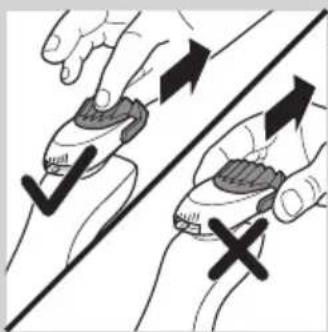
natural_image
Illustration of two hands holding a device with checkmark and cross symbols, no text or labels present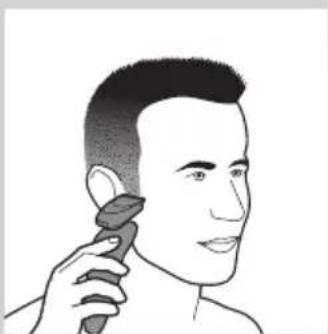
natural_image
Line drawing of a person applying a hair product to their ear (no text or symbols)
natural_image
Line drawing of a man's head and shoulders with a beard (no text or symbols)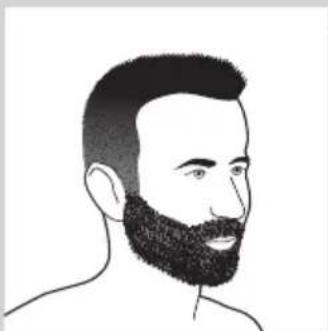
natural_image
Line drawing of a man's head and shoulders with a beard (no text or symbols)natural_image
Line drawing of a male's face with short hair and mustache (no text or symbols)- Vuntsid

natural_image
Line drawing of a man's head and shoulders (no text or symbols)- Kitsehabe
natural_image
Line drawing of a hand holding a small object with a curved arrow indicating rotation (no text or symbols)
natural_image
Illustration of a hand pouring liquid into a container with a water level indicator (no text or symbols)natural_image
Illustration of hands holding a small container with a downward arrow indicating compression or disassembly (no text or symbols)natural_image
Line drawing of a hairdryer with a flat blade and a closed handle (no text or symbols)natural_image
Simple line drawing of a handbag with a handle and decorative base, accompanied by a circular icon with wave symbols (no text or labels)
natural_image
Simple line drawing of a hairdryer with a sun icon nearby (no text or symbols)
natural_image
Illustration of a handbag with a spiral pattern inside, next to a calendar icon labeled '1M' and a U symbol (no text or symbols on the main diagram)natural_image
Illustration of a hand holding a small object with a string attached, no text or symbols presentnatural_image
Illustration of a faucet pouring liquid into a square basin (no text or symbols)natural_image
Illustration of a hand pouring liquid into a container with a water level indicator (no text or symbols)natural_image
Illustration of hands using a handheld device to remove a small container with liquid, no text or symbols presentnatural_image
Illustration of a hand holding a device with a light bulb above and an upward arrow indicating motion (no text or symbols)
natural_image
Diagram of a hand holding a mechanical device with rotating components (no text or symbols)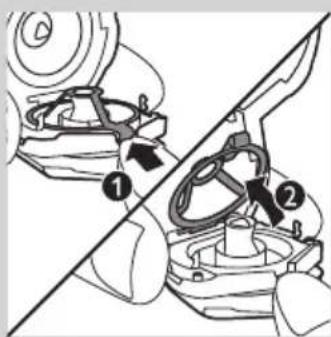

natural_image
Mechanical gear assembly diagram showing a rotating shaft and housing (no text or labels)
natural_image
Diagram showing a hand turning a gear with arrows indicating direction (no text or symbols)natural_image
Mechanical assembly diagram showing a piston inside a motor (no text or symbols)natural_image
Mechanical assembly diagram showing a gear and motor component with a downward arrow indicating motion (no text or symbols)natural_image
Mechanical assembly diagram showing a rotating component with a curved arrow indicating motion (no text or symbols)natural_image
Line drawing of a handheld device with a black arrow pointing to a component (no text or symbols)
natural_image
Illustration of two hands pouring liquid from a bottle onto a surface, separated by a diagonal line (no text or symbols)natural_image
Illustration of a pliers being cut with an arrow indicating motion (no text or symbols)natural_image
Illustration of a hand holding a device with a light bulb and an upward arrow, no text or symbols present.natural_image
Symbol of a waste bin with crossed lines indicating no waste, and a solid black rectangle below (no text or labels)natural_image
Symbol of a trash bin crossed out by two diagonal lines (no text or numbers present)natural_image
Prohibition sign showing a faucet without a shower, enclosed in a circle (no text or symbols)
natural_image
Prohibition sign showing a faucet without a shower, enclosed in a circle (no text or symbols)
Opasnost
- Pazite da adapter uvijek bude suh.
Upozorenje
natural_image
Front view of a computer monitor with ventilation grille and control buttons (no text or symbols)- RQ1275, RQ1265, RQ1261, RQ1260

- RQ1273, RQ1252, RQ1251, RQ1250
Punjenje
- Punjenje traje približno 1 sat.
RQ129x, RQ128x
natural_image
Simple diagram of a device with a water tap and power button, no text or symbols presentRQ127x, RQ126x, RQ125x
- Kada je baterija gotovo prazna (kada preostane samo 5 minuta ili manje vremena za brijanje), donji indikator punjenja treperi narančastom bojom.
- Kada isključite aparat za brijanje, donji indikator punjenja treperi narančasto još nekoliko sekundi.
Preostali kapacitet baterija
RQ129x, RQ128x
- Preostali kapacitet baterije prikazan je na zaslonu trajanjem brijanja u minutama.
RQ127x, RQ126x, RQ125x
natural_image
Pure electrical circuit lines without any symbolsZa učinkovitije brijanje aparat očistite nakon svake uporabe.
Napomena: Zasloni raznih vrsta aparata za brijanje izgledaju različito, ali prikazuju isti simbol.
natural_image
Line drawing of a mechanical device with a tool inserted, showing no text or symbols1 Umetnite mali utikač u punjač.
natural_image
Diagram of a mechanical device with a curved arrow indicating rotation or motion (no text or symbols)2 Rasklopite punjač ("klik").
3 Adapter ukopčajte u zidnu utičnicu.
natural_image
Diagram of a handheld device with a power outlet and cable, showing a scroll wheel and a black arrow indicating motion (no text or symbols present)4 Aparat stavite u punjač.
Na zaslonu je naznačeno da se aparat puni (pogledajte poglavlje "Zaslon").
Punjenje u sustavu Jet Clean (samo RQ1296CC, RQ1295CC, RQ1290CC, RQ1286CC, RQ1285CC, RQ1284CC, RQ1280CC, RQ1275CC, RQ1265CC, RQ1260CC, RQ1252CC, RQ1251CC, RQ1250CC)

natural_image
Line drawing of a vacuum cleaner with a lid and handle (no text or symbols)1 Mali utikač ukopčajte u sustav Jet Clean.
2 Adapter ukopčajte u zidnu utičnicu.
3 Držite aparat za brijanje naopako iznad držača tako da je stražnja strana aparata za brijanje usmjerena prema držaču.
Napomena: Aparat za brijanje ne može se postaviti u sustav Jet Clean kada se na jedinici za brijanje nalazi zaštitni poklopac.
natural_image
Illustration of a person applying facial hair to another person's face, showing the two angles (no text or symbols present)natural_image
Diagram showing a light bulb being lifted by a hand with an upward arrow, no text or symbols presentTrimer možete koristiti za podrezivanje zalizaka i brkova.
1 Jedinicu za brijanje povucite s aparata.
natural_image
Line drawing of a handheld device with a black arrow indicating direction (no text or symbols)7 Jezičac jedinice za brijanje umetnite u utor na aparatu za brijanje (1). Zatim jedinicu za brijanje pritisnite prema dolje (2) kako bi se pričvrstila na aparat ("klik").
Uporaba nastavka za oblikovanje brade (samo RQ1296, RQ1295, RQ1286, RQ1285, RQ1275, RQ1265)

natural_image
Diagram showing a device with a handle and a lamp, indicating upward motion (no text or symbols)1 Provjerite je li aparat isključen.
2 Jedinicu za brijanje povucite s aparata.
3 Jezičac nastavka za oblikovanje brade umetnite u utor na vrhu aparata za brijanje (1). Zatim nastavak za oblikovanje brade pritisnite prema dolje (2) kako biste ga pričvrstili na aparat ("klik").
natural_image
Illustration of a hand holding a small electronic device with a black arrow indicating compression or disassembly (no text or symbols present)1 Češalj gurnite izravno u vodilice s obje strane nastavka za oblikovanje brade ("klik").

natural_image
Line drawing of a person using a power shaver with a 'Power' button (no text or symbols on the figure itself)natural_image
Line drawing of a man brushing his neck with a comb (no text or symbols)4 Sada možete započeti oblikovanje brade.
Uporaba nastavka za oblikovanje brade bez češlja
Nastavak za oblikovanje brade možete koristiti bez češlja kako biste oblikovali bradu, brkove ili zaliske.

natural_image
Line drawing of a hand holding a small electronic device with a black arrow indicating motion (no text or symbols)1 Češalj povucite s nastavka za oblikovanje brade.
natural_image
Illustration of two hands holding a device with directional arrows indicating movement or change (no text or symbols present)Napomena: Uhvatite češalj na sredini kako biste ga povukli s nastavka za oblikovanje brade. Nemojte povlačiti češalj držeći ga za krajeve.
natural_image
Illustration of a person applying hair to their ear (no text or symbols present)3 Sada možete započeti oblikovanje brade, brkova, zalizaka ili linije uz vrat.
Stilovi brade
natural_image
Line drawing of a man's head and shoulders with short hair and beard (no text or symbols)- Kratka, čekinjasta brada

natural_image
Line drawing of a man's head and shoulders with a beard (no text or symbols)- Puna brada

natural_image
Line drawing of a male face with short hair and mustache (no text or symbols)- Brkovi

natural_image
Line drawing of a man's head and shoulders (no text or symbols)- Kozja bradica
natural_image
Line drawing of a hand holding a small object with a curved arrow indicating rotation (no text or symbols)natural_image
Line drawing of a vacuum cleaner with a lid and handle (no text or symbols)

natural_image
Simple line drawing of a handbag with a handle and internal components, accompanied by a circular icon with wave symbols (no text or labels)
natural_image
Diagram of a mechanical device with a circular component and a base, no text or symbols present.natural_image
Illustration of a handbag with a circular icon showing 'U' and a calendar symbol (no text or symbols on the main subject)
natural_image
Illustration of a hand holding a small object with a curved line extending from it, no text or symbols present.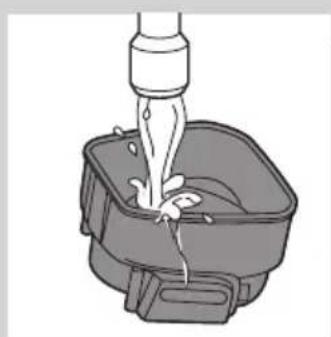
natural_image
Illustration of a faucet dispensing water into a square basin (no text or symbols)
natural_image
Illustration of a hand pouring liquid into a container with a sensor icon and directional arrows (no text or symbols)Nakon programa čišćenja, na zaslonu aparata za brijanje prikazuje se indikator punjenja (pogledajte poglavlje "Zaslon").
natural_image
Illustration of hands using a handheld device to remove liquid from a small container (no text or symbols)5 Sustav Jet Clean vratite na komoru za čišćenje.
natural_image
Illustration of a hand holding a device with a light bulb and an upward arrow, no text or symbols present.natural_image
Diagram of a hand holding a mechanical device with rotating components (no text or symbols)natural_image
Mechanical gear assembly diagram showing a rotating shaft and gear mechanism (no text or labels)4 Izvadite rezač iz štitnika.
natural_image
Diagram showing gear meshing with arrows indicating direction (no text or symbols)5 Rezač čistite isporučenom četkicom za čišćenje.
natural_image
Line drawing of a mechanical device with a brush applying material into a housing (no text or symbols)6 Očistite unutrašnjost štitnika za brijanje.

natural_image
Mechanical assembly diagram showing gear and shaft components with a downward arrow indicating motion (no text or symbols)7 Nakon čišćenja rezač vratite u štitnik za brijanje tako da izbočine na rezaču budu okrenute prema dolje.
natural_image
Mechanical assembly diagram showing a rotating component with a curved arrow indicating motion (no text or symbols)8 Pritisnite držač preko rezača.
10 Jezičac jedinice za brijanje umetnite u utor na aparatu za brijanje (1). Zatim jedinicu za brijanje pritisnite prema dolje (2) kako bi se pričvrstila na aparat ("klik").
Čišćenje trimera
Očistite trimer nakon svake uporabe.

natural_image
Line drawing of a handheld device with a black arrow indicating direction (no text or symbols)natural_image
Illustration of two hands performing a water droplet drop operation, showing liquid transfer and spray (no text or symbols)natural_image
Illustration of a pliers or tool with an arrow indicating motion (no text or symbols present)1 Zaštitni poklopac postavite na jedinicu za brijanje kako se glave za brijanje ne bi oštetile.
2 Aparat za brijanje spremite u isporučenu torbicu.
Zamjena dijelova
natural_image
Diagram showing a device with a light bulb and a plus sign, no text or symbols present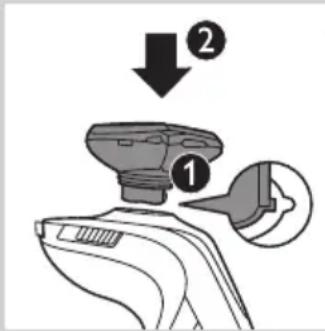
2 Staru jedinicu za brijanje povucite s aparata.
natural_image
Symbol of a trash bin with crossed lines indicating no waste or restriction, and a solid black rectangle below (no text or labels)- Aparate koji se više ne mogu koristiti nemojte odlagati s uobičajenim otpadom iz kućanstva nego ih odnesite u predviđeno odlagalište na recikliranje. Time ćete pridonijeti očuvanju okoliša.
natural_image
Symbol of a trash bin crossed out by two crossed lines, representing no waste or discharge (no text or labels)natural_image
Prohibition sign showing a faucet without a shower, enclosed in a circle (no text or symbols)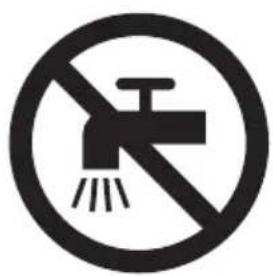
natural_image
Prohibition sign showing a faucet without a shower, enclosed in a circle (no text or symbols)
Vigyázat!
natural_image
Illustration of a remote control device with ventilation grille and control buttons (no text or symbols)- RQ1275, RQ1265, RQ1261, RQ1260
- RQ1273, RQ1252, RQ1251, RQ1250
Töltés
natural_image
Simple line drawing of a showerhead with water tap and power button (no text or symbols)RQ127x, RQ126x, RQ125x
natural_image
Diagram of a device with a power button and a water tap, no text or symbols present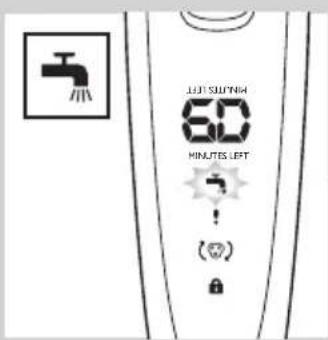
natural_image
Line drawing of a mechanical device with a probe inserted, showing no text or symbols
natural_image
Diagram of a mechanical device with a curved arrow indicating rotation or motion (no text or symbols)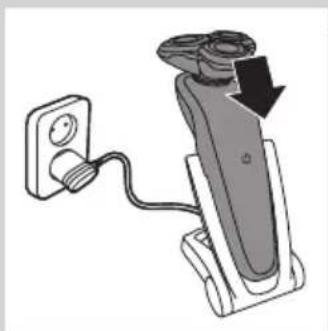
natural_image
Diagram of a handheld device with cable and plug, showing a downward arrow indicating motion (no text or symbols present)natural_image
Line drawing of a vacuum cleaner with a top-mounted blade and base (no text or symbols)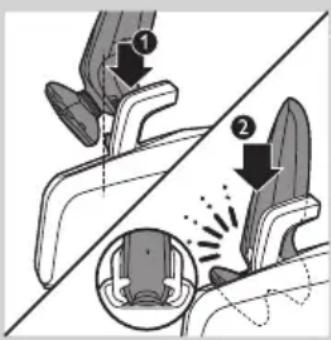
natural_image
Illustration of a person applying facial hair to another person's face, separated by a diagonal line (no text or symbols)natural_image
Diagram showing a device with a funnel and an upward arrow, no text or symbols presentnatural_image
Illustration of a hand holding an electric shaver with a magnified inset showing the tip and internal mechanism (no text or symbols)natural_image
Illustration of a hand holding a small electronic device with a black arrow indicating motion or force (no text or symbols)natural_image
Line drawing of a person using a power shaver with a 'Power' button (no text or symbols on the diagram itself)natural_image
Line drawing of a person applying a hair to their beache, no text or symbols presentnatural_image
Line drawing of a handheld device with a scroll wheel and directional arrow (no text or symbols)natural_image
Illustration of two hands holding a medical or robotic device with directional arrows indicating movement (no text or symbols)natural_image
Line drawing of a person applying hair to their ear (no text or symbols)natural_image
Line drawing of a man's head and shoulders with short hair and beard (no text or symbols)- Borostás hatás
natural_image
Line drawing of a man's head and shoulders with a beard (no text or symbols)- Teljes szakáll

natural_image
Line drawing of a man's head and shoulders (no text or symbols)- Bajusz

natural_image
Line drawing of a man's head and shoulders with a beard (no text or symbols)- Kecskeszakáll
natural_image
Line drawing of a hand holding a small object with a curved arrow indicating rotation (no text or symbols)natural_image
Illustration of a handheld electronic device labeled RQ1007, with no visible text or symbols on the device itself.natural_image
Illustration of hands using a handheld device to interact with a small container, showing motion and spray effects (no text or symbols)natural_image
Line drawing of a hairdryer with a flat blade and a closed body (no text or symbols)

natural_image
Simple line drawing of a handbag with a handle and internal components, no text or symbols present.
natural_image
Diagram of a mechanical device with a gear and base, accompanied by a circular symbol (no text or labels)
natural_image
Illustration of a handbag with decorative elements including a calendar icon and a U-shaped symbol (no text or symbols present)
natural_image
Illustration of a hand holding a medical device with a catheter inserted (no text or symbols)
natural_image
Illustration of a faucet pouring liquid into a container with water flowing out (no text or symbols)
natural_image
Illustration of a hand pouring liquid into a container with a water level indicator (no text or symbols)
natural_image
Illustration of hands using a handheld device to remove liquid from a small bowl (no text or symbols)natural_image
Diagram showing a device with a light bulb and a cross symbol, with an upward arrow indicating motion or change (no text or symbols present)natural_image
Diagram of a hand turning a mechanical component with rotating parts (no text or symbols)natural_image
Mechanical gear assembly diagram showing a shaft and gear mechanism (no text or labels)natural_image
Diagram showing a hand turning a gear with arrows indicating motion (no text or symbols)natural_image
Mechanical assembly diagram showing a hammer inside a gear mechanism (no text or symbols)natural_image
Mechanical assembly diagram showing a gear and motor component with an arrow indicating motion (no text or symbols)natural_image
Mechanical assembly diagram showing a rotating component with a curved arrow indicating motion (no text or symbols)natural_image
Line drawing of a handheld device with a black arrow pointing to a component (no text or symbols)natural_image
Illustration of a hand pouring liquid from a bottle onto a slide, with another hand holding a container (no text or symbols)natural_image
Line drawing of a pliers with an arrow indicating force application (no text or symbols)natural_image
Diagram showing a device with a light bulb and a cross symbol, with an upward arrow indicating motion or change (no text or symbols present)natural_image
Symbol of a waste bin with crossed lines indicating no waste, and a solid black rectangle below (no text or labels)natural_image
Prohibition sign showing a faucet without a shower, enclosed in a circle (no text or symbols)
natural_image
No sign depicting a faucet with a showerhead, enclosed in a circle (no text or symbols)
Қауіпті жағдайлар
natural_image
Illustration of a remote control with ventilation grille and function buttons (no text or symbols)- RQ1275, RQ1265, RQ1261, RQ1260

natural_image
Simple grayscale illustration of a vertical bar with four small icons below (no text or symbols)- RQ1273, RQ1252, RQ1251, RQ1250
Зарядтау
natural_image
Illustration of a computer monitor with ventilation grille and control buttons (no text or symbols)
natural_image
Top-down view of a device with a vertical line and control buttons (no text or symbols)

RQ129x, RQ128x
natural_image
Diagram of a showerhead with water level indicator and control panel (no text or symbols)RQI27x, RQI26x, RQI25x
natural_image
Diagram of a device with a power button and a water tap, no text or symbols presentnatural_image
Line drawing of a mechanical device with a tool inserted, no text or symbols presentnatural_image
Diagram of a mechanical device with a curved arrow indicating rotation or motion (no text or symbols)natural_image
Diagram of a handheld device with a cable and plug, showing a black arrow indicating direction (no text or symbols present)natural_image
Line drawing of a vacuum cleaner with a top-mounted blade and a closed lid (no text or symbols)natural_image
Illustration of a person applying facial hair to another person's face, showing the correct and incorrect visual techniques (no text or symbols present)natural_image
Diagram showing a device with a light bulb and an upward arrow, no text or symbols presentnatural_image
Line drawing of a handheld device with a black arrow pointing to the handle (no text or symbols)natural_image
Diagram showing a device with a light bulb and a hand holding a device, with an upward arrow indicating motion (no text or symbols present)natural_image
Illustration of a hand holding a small electronic device with a black arrow indicating compression or disassembly (no text or symbols present)natural_image
Line drawing of a man brushing his neck with a comb (no text or symbols)natural_image
Line drawing of a hand holding a small electric shaver with a curved arrow indicating motion (no text or symbols)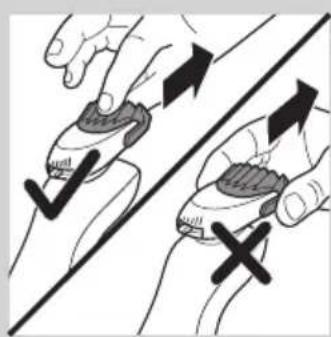
natural_image
Illustration of two hands holding a device with directional arrows indicating movement or force (no text or symbols)
natural_image
Line drawing of a person applying makeup to their ear (no text or symbols)
natural_image
Line drawing of a man's head and shoulders with a beard (no text or symbols)
natural_image
Line drawing of a man's head and beard (no text or symbols)natural_image
Line drawing of a male's face with short hair and mustache (no text or symbols)- MypT

natural_image
Line drawing of a man's head and shoulders (no text or symbols)- Шокша сакал
natural_image
Line drawing of a hand holding a small object with a curved arrow indicating rotation (no text or symbols)
2 Уш кыру ушын бір-бірлеп тартып ашыңыз.
natural_image
Illustration of a handheld device labeled RQ1007, featuring a handle and control buttons (no text or symbols on the device itself)natural_image
Illustration of hands using a handheld device to remove or clean material, with no text or symbols present.natural_image
Line drawing of a vacuum cleaner with a top-mounted blade and base device (no text or symbols)natural_image
Simple line drawing of a handbag with a handle and decorative base, no text or symbols present.
natural_image
Diagram of a hairdryer with a sun icon and no text or symbols
natural_image
Illustration of a handbag with a decorative swirl inside, next to a calendar icon and a U-shaped symbol (no text or symbols present)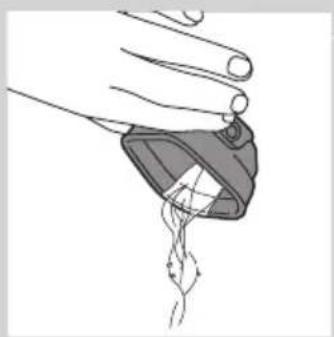
natural_image
Illustration of a hand holding a small object with a curved line inside, no text or symbols present
natural_image
Illustration of a bucket being inserted into a basin with liquid, no text or symbols present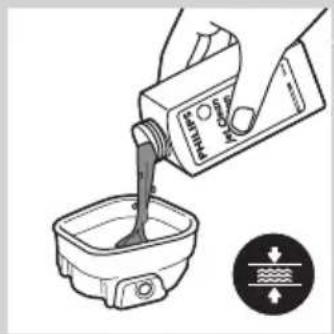
natural_image
Illustration of a hand pouring liquid into a bowl with a directional control symbol (no text or labels)
natural_image
Illustration of hands using a tool to remove or apply a small container, with no text or symbols present.natural_image
Diagram showing a device with a light bulb and a cross symbol, no text or labels present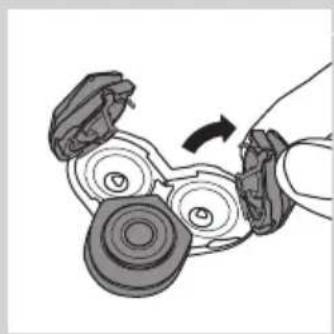
natural_image
Mechanical assembly diagram showing a hand turning a component with rotating parts (no text or symbols)

natural_image
Mechanical gear assembly diagram showing a rotating shaft and gear mechanism (no text or labels)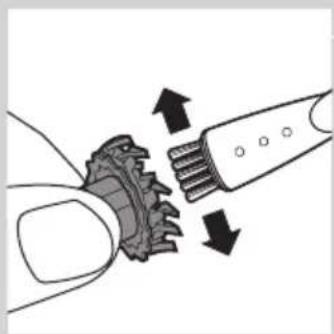
natural_image
Diagram showing gear meshing with arrows indicating direction (no text or symbols)2 Уш кыру ушын бір-бірлеп тартып ашыңыз.
natural_image
Mechanical assembly diagram showing a hammer inside a gear mechanism (no text or symbols)natural_image
Mechanical assembly diagram showing a gear and motor component with a downward arrow indicating motion (no text or symbols)natural_image
Mechanical assembly diagram showing a rotating component with a curved arrow indicating motion (no text or symbols)natural_image
Line drawing of a handheld device with a black arrow pointing to the tip (no text or symbols)Триммерді тазалау
natural_image
Illustration of a hand holding a water droplet above a surface, with another hand partially visible below (no text or symbols)natural_image
Illustration of a pliers or tool with an arrow indicating motion (no text or symbols present)natural_image
Diagram showing a device with a light bulb and a hand holding a tool, with an upward arrow indicating motion (no text or symbols present)natural_image
Symbol of a waste bin with crossed lines indicating no waste, and a solid black rectangle below (no text or labels)natural_image
Symbol of a trash bin crossed out by two diagonal lines (no text or numbers present)natural_image
Prohibition sign showing a faucet without a shower, enclosed in a circle (no text or symbols)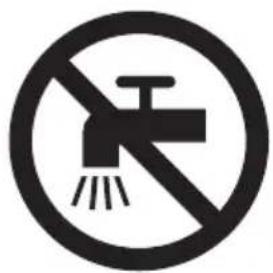
natural_image
Prohibition sign showing a faucet without a shower, enclosed in a circle (no text or symbols)
Pavojus
natural_image
Illustration of a remote control tower with ventilation grille and navigation buttons (no text or symbols)- RQ1275, RQ1265, RQ1261, RQ1260
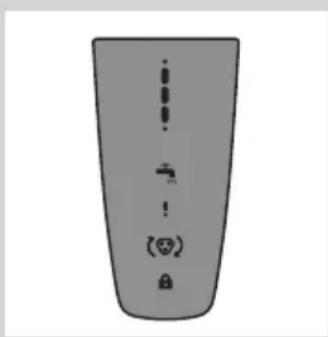
natural_image
Top-down view of a gray rectangular device with internal symbols and icons (no readable text or labels)- RQ1273, RQ1252, RQ1251, RQ1250

Ikrovimas
natural_image
Diagram of a device with a water tap and power button, no text or symbols presentnatural_image
Diagram of a scientific apparatus with a central oval component and labeled ports (no readable text or symbols)RQ129x, RQ128x
RQ129x, RQ128x
natural_image
Pure electrical circuit lines without any symbolsnatural_image
Diagram of a mechanical device with a tool inserted, showing no text or symbols.natural_image
Diagram of a mechanical device with a curved arrow indicating rotational motion (no text or symbols)natural_image
Diagram of a handheld device with a power outlet connected to a wall-mounted cable, showing a downward arrow indicating motion (no text or symbols present)natural_image
Line drawing of a vacuum cleaner with a top-mounted blade and base cover (no text or symbols)natural_image
Illustration of a person applying facial contour to another person's lower face, showing both methods (no text or symbols)natural_image
Illustration of a person applying facial contour to another person's face, showing both methods (no text or symbols present)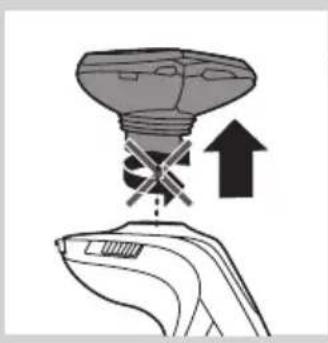
natural_image
Diagram showing a light bulb above a curved surface with an upward arrow, indicating a process or operation (no text or symbols present)natural_image
Line drawing of a handheld device with a black arrow pointing to the handle (no text or symbols)natural_image
Illustration of a hand holding a device with a light bulb and an upward arrow, no text or symbols present.natural_image
Illustration of a hand holding a device with a magnified inset showing internal components (no text or symbols)
natural_image
Illustration of a hand holding a small electronic device with a handle and emitting light rays (no text or symbols)

natural_image
Line drawing of a person using a power shaver with a 'Power' button (no text or symbols on the diagram itself)
natural_image
Illustration of a person brushing a beaded neck with a comb (no text or symbols)natural_image
Line drawing of a hand holding a small electric shaver with a curved blade and arrow indicating motion (no text or symbols)
natural_image
Illustration of two hands holding a device with checkmark and cross symbols, no text or labels present
natural_image
Line drawing of a person applying a hair product to their ear (no text or symbols)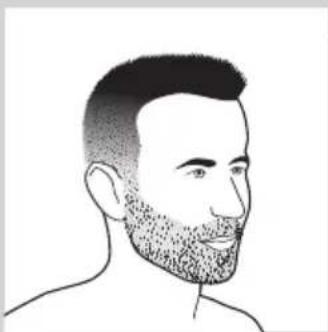
natural_image
Line drawing of a man's head and shoulders with a beard (no text or symbols)
natural_image
Line drawing of a man's head and shoulders with a beard (no text or symbols)natural_image
Line drawing of a male's face with short hair and mustache (no text or symbols)- Ūsai

natural_image
Line drawing of a man's head and shoulders with a beard (no text or symbols)- Ožio barzdelė
natural_image
Line drawing of a hand holding a small object with a curved arrow indicating rotation (no text or symbols)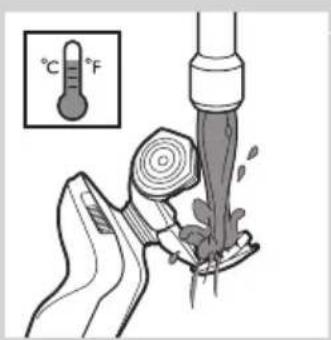
natural_image
Illustration of a hand pouring liquid into a container with a pressure gauge (no text or symbols)natural_image
Illustration of hands using a tool to remove or clean material, showing a drop and droplet (no text or symbols)natural_image
Line drawing of a hairdryer with a flat blade and a closed handle (no text or symbols)natural_image
Simple line drawing of a handbag with a handle and internal components, no text or symbols present.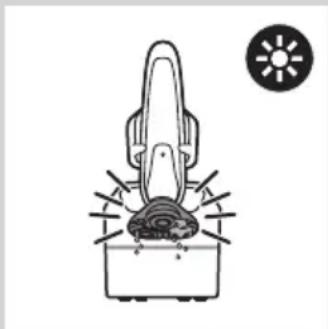
natural_image
Simple line drawing of a hairdryer with a sun icon above (no text or symbols)
natural_image
Illustration of a handbag with a circular icon showing '1M' and a U symbol, no text or symbols present.1 Vienu metu nuspauskite atleidimo mygtukus abiejose „Jet Clean“ sistemos pusèse (1). Tada nuo valymo kameros nukelkite „Jet Clean“ sistema (2).
natural_image
Illustration of a hand holding a small object with a string attached, showing internal structure (no text or symbols)natural_image
Illustration of a faucet pouring liquid into a square basin (no text or symbols)natural_image
Illustration of hands using a tool to clean or spray a small container (no text or symbols)natural_image
Illustration of a hand holding a light bulb with an upward arrow indicating motion or force (no text or symbols present)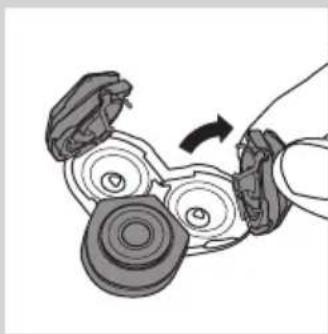
natural_image
Diagram of a hand holding a mechanical device with rotating components (no text or symbols)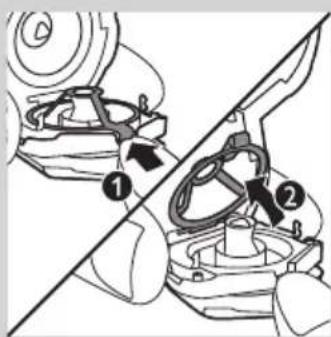

natural_image
Mechanical gear assembly diagram showing a rotating shaft and housing (no text or labels)
natural_image
Diagram showing a hand holding a gear with arrows indicating direction of motion or force (no text or symbols present)natural_image
Mechanical assembly diagram showing a piston inside a motor (no text or symbols)natural_image
Mechanical assembly diagram showing a gear and motor component with a downward arrow indicating motion (no text or symbols)natural_image
Mechanical assembly diagram showing a rotating component with a curved arrow indicating motion (no text or symbols)natural_image
Line drawing of a handheld device with a black arrow pointing to a component (no text or symbols)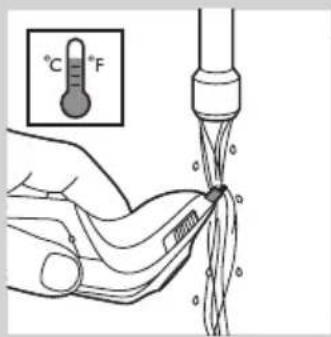
natural_image
Illustration of two hands pouring liquid from a bottle onto a surface, separated by a diagonal line (no text or symbols)natural_image
Line drawing of a pliers with an arrow indicating force or movement (no text or symbols)natural_image
Illustration of a hand holding a device with a light bulb and an upward arrow, no text or symbols present.natural_image
Symbol of a trash bin crossed with no visible text or labelsnatural_image
Symbol of a trash bin crossed with no visible text or labelsnatural_image
Prohibition sign showing a faucet without a shower, enclosed in a circle (no text or symbols)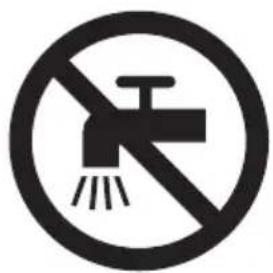
natural_image
Prohibition sign showing a faucet without a shower, enclosed in a circle (no text or symbols)
Briesmas
- Glabājiet adapteri sausu.
Brīdinājums!
natural_image
Illustration of a remote control tower with ventilation grille and navigation buttons (no text or symbols)- RQ1275, RQ1265, RQ1261, RQ1260

natural_image
Top-down view of a remote control panel with indicator lights and navigation buttons (no text or symbols)- RQ1273, RQ1252, RQ1251, RQ1250

Lādēšana
natural_image
Diagram of a device with layered components and a plus symbol, no readable text or labels presentnatural_image
Simple line drawing of a showerhead with water tap, no text or symbols presentRQ129x, RQ128x

RQ129x, RQ128x
natural_image
Pure electrical circuit lines without any symbolsSkuvekla tīrīšana
natural_image
Diagram of a mechanical device with a tool inserted, showing no text or symbolsnatural_image
Diagram of a mechanical device with a curved arrow indicating rotation or motion (no text or symbols)natural_image
Diagram of a handheld device with a cable and power outlet, showing a downward arrow indicating motion (no text or symbols present)natural_image
Line drawing of a vacuum cleaner with a pointed tip and handle (no text or symbols)natural_image
Illustration of a person using a tool to cut the face area, showing two different angles (no text or symbols present)natural_image
Illustration of a light bulb with a cross symbol and an upward arrow, no text or symbols present1 Izvelciet skūšanas bloku no skuvekla.
natural_image
Line drawing of a curved mechanical component with an arrow indicating direction (no text or symbols)natural_image
Illustration of a hand holding a device with a light bulb above and an upward arrow indicating motion (no text or symbols)natural_image
Illustration of a hand holding a device with a magnified inset showing internal components (no text or symbols)natural_image
Illustration of a hand holding a handheld device with a lightning bolt indicating compression (no text or symbols)3 Nospiediet skuvekja iesl./izsl. pogu, lai to ieslēgtu.

natural_image
Line drawing of a person applying a hair product to their beaded neck (no text or symbols)natural_image
Line drawing of a hand holding a small electronic device with a black arrow indicating motion (no text or symbols)
natural_image
Illustration of two hands holding a device with checkmark and cross symbols, no text or labels present
natural_image
Line drawing of a person applying makeup to their ear (no text or symbols)
natural_image
Line drawing of a man's head and shoulders with short hair and beard (no text or symbols)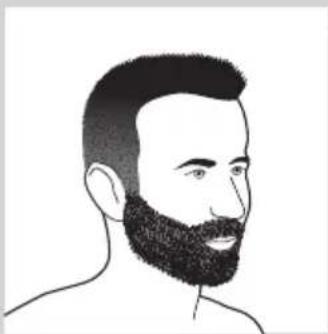
natural_image
Line drawing of a man's head and shoulders with a beard (no text or symbols)natural_image
Line drawing of a male's face with short hair and mustache (no text or symbols)- Ūsas

natural_image
Line drawing of a man's head and shoulders (no text or symbols)- Kīlbārdina
Tīrīšana un kopšana
natural_image
Line drawing of a hand holding a small object with a curved arrow indicating rotation (no text or symbols)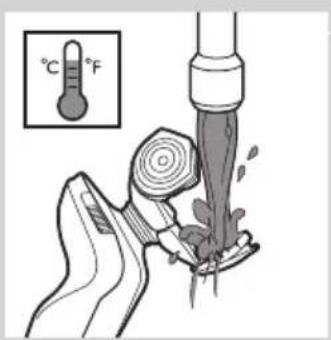
natural_image
Illustration of a hand pouring liquid into a container with a water level indicator (no text or symbols)natural_image
Illustration of hands holding a small container with a downward arrow indicating compression or disassembly (no text or symbols)natural_image
Line drawing of a hairdryer with a flat blade and a closed handle (no text or symbols)natural_image
Simple line drawing of a handbag with a handle and decorative base, no text or symbols present.
natural_image
Simple line drawing of a hairdryer with a sun icon nearby (no text or symbols)
natural_image
Illustration of a handbag with a circular logo and a calendar icon (no text or symbols)natural_image
Illustration of a hand holding a small object with a string attached, no text or symbols presentnatural_image
Illustration of a faucet pouring liquid into a square basin (no text or symbols)natural_image
Illustration of a hand pouring liquid into a container with a water level indicator (no text or symbols)natural_image
Illustration of hands using a tool to remove a small container with liquid, showing a downward arrow and scattered particles (no text or symbols)natural_image
Illustration of a hand holding a light bulb with an upward arrow indicating motion or force (no text or symbols)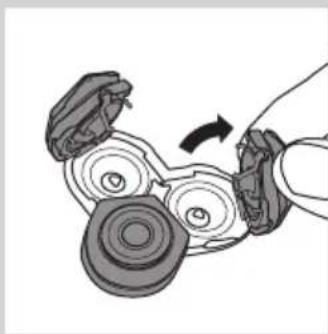
natural_image
Diagram of a hand turning a mechanical component with rotating parts (no text or symbols)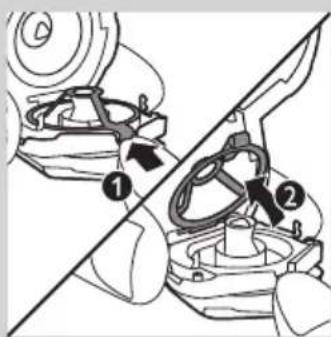
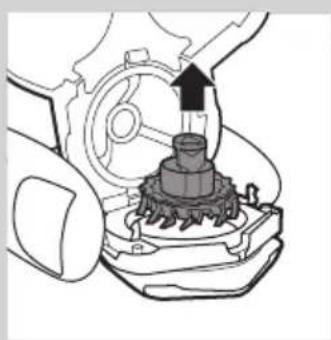
natural_image
Mechanical gear assembly diagram showing a rotating shaft and housing (no text or labels)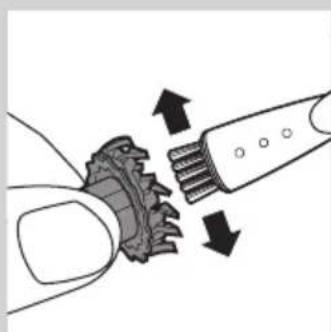
natural_image
Diagram showing a hand holding a gear with arrows indicating direction of motion or force (no text or symbols present)natural_image
Mechanical assembly diagram showing a piston inside a housing with gears and a handle (no text or symbols)natural_image
Mechanical assembly diagram showing a gear and motor component with a downward arrow indicating motion (no text or symbols)natural_image
Mechanical assembly diagram showing a rotating component with a curved arrow indicating motion (no text or symbols)natural_image
Line drawing of a handheld device with a black arrow pointing to a component (no text or symbols)natural_image
Illustration of a hand holding a fish and a shoe against a diagonal line (no text or symbols)natural_image
Line drawing of a handheld tool with an arrow indicating motion (no text or symbols)natural_image
Illustration of a hand holding a device with a light bulb above and an upward arrow indicating motion (no text or symbols)2 Izvelciet veco skūšanas bloku no skuvekla.
4 Modeliem RQ128x/RQ127x/RQ126x/RQ125x: lai atiestatītu skuvekli, nospiediet un turiet nospiestu iesl./izsl. pogu apt. 10 sekundes.
natural_image
Symbol of a waste sorting bin with no text or labelsnatural_image
Prohibition sign showing a faucet without a shower, enclosed in a circle (no text or symbols)
natural_image
Prohibition sign showing a faucet without a shower, enclosed in a circle (no text or symbols)
Niebezpieczeństwo
natural_image
Illustration of a remote control device with ventilation grille and function buttons (no text or symbols)- RQ1275, RQ1265, RQ1261, RQ1260

natural_image
Simple grayscale illustration of a vertical object with four small icons below, no text or symbols present.- RQ1273, RQ1252, RQ1251, RQ1250
Ładowanie
natural_image
Illustration of a remote control tower with ventilation grille and control buttons (no text or symbols)
natural_image
Top-down view of a gray rectangular device with vertical dotted lines and small icons below (no text or symbols)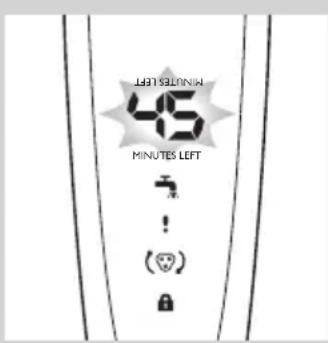
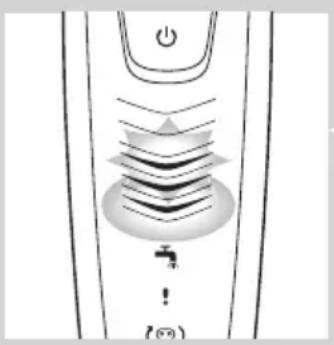
RQ127x, RQ126x, RQ125x
RQ129x, RQ128x
natural_image
Simple diagram of a water level device with a valve and power button, no text or symbols present.RQ127x, RQ126x, RQ125x
RQ129x, RQ128x
natural_image
Pure electrical circuit lines without any symbolsnatural_image
Technical line drawing of a mechanical device with a tool inserted (no text or symbols)natural_image
Diagram of a mechanical device with rotating arm and curved arrow indicating rotation (no text or symbols)natural_image
Diagram of a handheld device with a power outlet and cable, showing a scroll wheel and a black arrow indicating motion (no text or symbols present)natural_image
Line drawing of a vacuum cleaner with a top component and base device (no text or symbols)natural_image
Illustration of a person using a tool to cut the face area, showing facial expressions (no text or symbols present)natural_image
Diagram showing a device with a light bulb and a hand holding a device, with an upward arrow indicating motion (no text or symbols present)natural_image
Line drawing of a curved mechanical component with a black arrow indicating direction (no text or symbols)natural_image
Illustration of a lamp with a handle and an upward arrow indicating motion (no text or symbols)natural_image
Illustration of a hand holding a medical device with a magnified inset showing internal components (no text or symbols)natural_image
Illustration of a hand holding a small electronic device with a lightning bolt indicating compression (no text or symbols)natural_image
Line drawing of a man brushing his neck with a comb (no text or symbols)natural_image
Line drawing of a handheld device with a black arrow indicating motion (no text or symbols)natural_image
Illustration of two hands holding a device with directional arrows indicating movement or force (no text or symbols)natural_image
Line drawing of a person applying a hairdryer to their ear (no text or symbols)natural_image
Line drawing of a man's head and shoulders with short hair and beard (no text or symbols)natural_image
Line drawing of a man's head and shoulders with a beard (no text or symbols)- Pełna broda
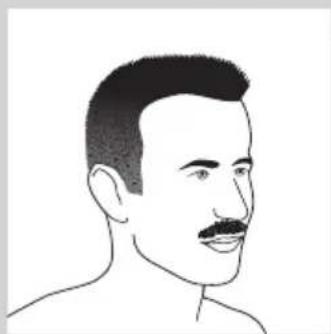
natural_image
Line drawing of a male's head and shoulders (no text or symbols)- Wasy
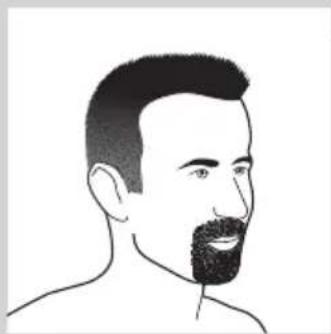
natural_image
Line drawing of a man's head and shoulders (no text or symbols)- Kozia bródka
natural_image
Line drawing of a hand holding a small object with a curved arrow indicating rotation (no text or symbols)natural_image
Line drawing of a vacuum cleaner with a lid and blade (no text or symbols)
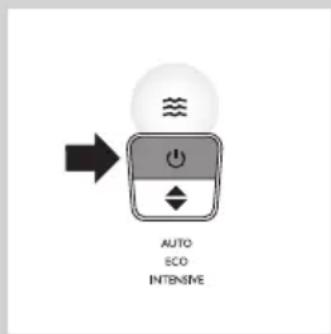

natural_image
Simple line drawing of a handbag with decorative elements and a circular icon (no text or symbols)
natural_image
Simple line drawing of a mechanical device with no text or symbolsnatural_image
Illustration of a handbag with a circular icon showing '1M' and a U symbol (no text or symbols on the main diagram)

natural_image
Illustration of a hand holding a small container with liquid, no text or symbols present
natural_image
Illustration of a faucet pouring liquid into a container with a handle (no text or symbols)
natural_image
Illustration of a hand pouring liquid into a container with a directional arrow symbol (no text or labels)natural_image
Illustration of a hand holding a device with a downward arrow and a small bowl nearby, emitting powder (no text or symbols)natural_image
Illustration of a hand holding a device with a light bulb and an upward arrow, no text or symbols present.natural_image
Diagram of a hand holding a mechanical device with rotating components (no text or symbols)natural_image
Mechanical gear assembly diagram showing a rotating shaft and housing (no text or symbols)natural_image
Diagram showing gear meshing with arrows indicating direction (no text or symbols)natural_image
Mechanical assembly diagram showing a piston inside a housing with gears and a handle (no text or symbols)natural_image
Mechanical assembly diagram showing gear and shaft components with a downward arrow indicating motion (no text or symbols)natural_image
Mechanical assembly diagram showing a rotating component with a curved arrow indicating motion (no text or symbols)natural_image
Line drawing of a handheld device with a black arrow pointing to the tip (no text or symbols)natural_image
Illustration of a hand pouring liquid from a bottle onto a surface, with another hand pouring liquid from a container (no text or symbols)natural_image
Illustration of a pliers or tool with an arrow indicating motion (no text or symbols present)natural_image
Diagram showing a device with a light bulb and a cross symbol, with an upward arrow indicating motion or change (no text or symbols present)natural_image
Symbol of a trash bin with crossed lines and a solid black rectangle below (no text or numbers present)natural_image
Symbol of a trash bin crossed out by two crossed lines, representing no waste or discharge (no text or labels)natural_image
Prohibition sign showing a faucet without a shower, enclosed in a circle (no text or symbols)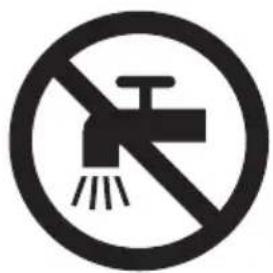
natural_image
Prohibition sign showing a faucet without a shower, enclosed in a circle (no text or symbols)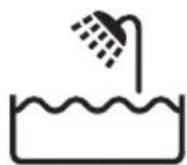
Pericol
natural_image
Illustration of a stylized computer monitor with ventilation grille and control buttons (no text or symbols)- RQ1275, RQ1265, RQ1261, RQ1260
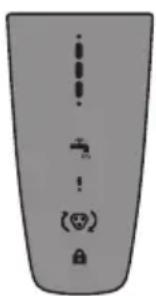
natural_image
Simple diagram of a device with vertical lines and icons, no text or symbols present- RQ1273, RQ1252, RQ1251, RQ1250
Încărcare

RQ129x, RQ128x
natural_image
Diagram of a showerhead with water level indicator and control panel (no text or symbols)RQ127x, RQ126x, RQ125x
natural_image
Pure electrical circuit lines without any symbolsnatural_image
Line drawing of a mechanical device with a tool inserted, no text or symbols presentnatural_image
Diagram of a mechanical device with a curved arrow indicating rotation or motion (no text or symbols)natural_image
Diagram of a handheld device with a cable and plug, showing a black arrow indicating direction (no text or symbols present)natural_image
Illustration of a vacuum cleaner with a top-mounted blade and a closed lid (no text or symbols)natural_image
Illustration of a person applying facial contour to another person's lower face, showing different facial contours (no text or symbols present)Tunderea
natural_image
Diagram showing a light bulb being lifted by an arrow, with no text or symbols present.natural_image
Line drawing of a handheld device with a black arrow pointing to a component (no text or symbols)natural_image
Illustration of a hand holding a device with a light bulb and an upward arrow, no text or symbols present.natural_image
Illustration of a hand holding a device with a magnified inset showing internal components (no text or symbols)
natural_image
Illustration of a hand holding a handheld device with a lightning bolt indicating compression (no text or symbols)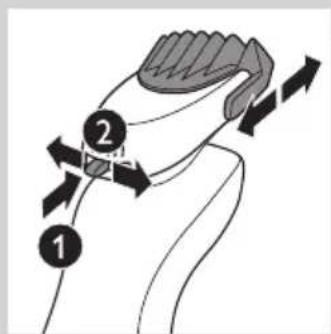
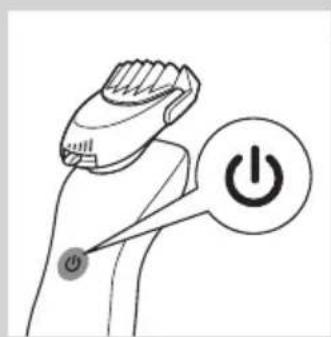
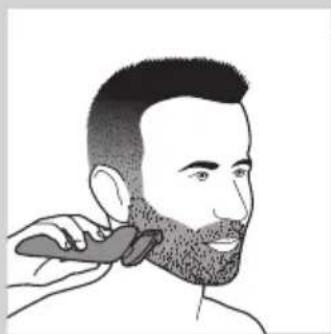
natural_image
Line drawing of a person applying a hair product to their beaded neck (no text or symbols)natural_image
Line drawing of a hand holding a small electronic device with a black arrow indicating motion (no text or symbols)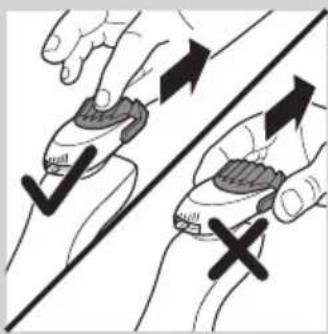
natural_image
Illustration of two hands holding a device with checkmark and cross symbols, no text or labels present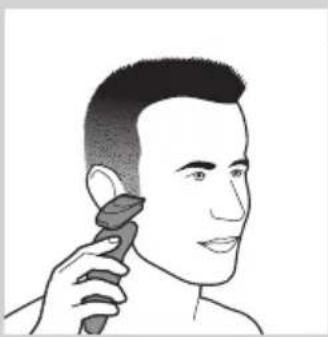
natural_image
Line drawing of a person applying hair to their ear (no text or symbols)
natural_image
Line drawing of a man's head and shoulders with short hair and beard (no text or symbols)
natural_image
Line drawing of a man's head and shoulders with a beard (no text or symbols)natural_image
Line drawing of a male's face with short hair and mustache (no text or symbols)- O mustață

natural_image
Line drawing of a man's head and shoulders (no text or symbols)- Un barbişon
natural_image
Line drawing of a hand inserting a plug into a device (no text or symbols)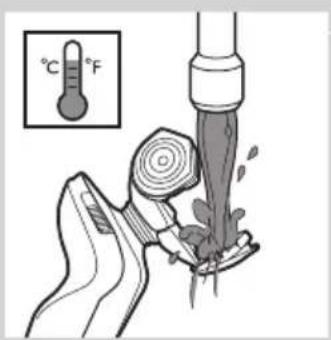
natural_image
Illustration of a handheld device labeled RQ1007, featuring a stylized kettlebell with a handle and control buttons (no readable text beyond label)
natural_image
Illustration of a hand pouring liquid into a container with a sensor device (no text or symbols)
natural_image
Illustration of hands holding a small container with a downward arrow and scattered dots (no text or symbols)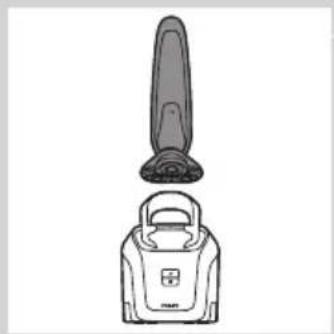
natural_image
Line drawing of a hairdryer with a flat blade and a closed handle (no text or symbols)
natural_image
Simple line drawing of a handbag with a handle and decorative base, no text or symbols present.natural_image
Simple line drawing of a hairdryer with a sun icon nearby (no text or symbols)natural_image
Illustration of a handbag with a decorative swirl inside, accompanied by a calendar icon and a U-shaped symbol (no text or symbols present)natural_image
Illustration of a hand holding a small object with a string attached, no text or symbols presentnatural_image
Illustration of a faucet pouring liquid into a square basin (no text or symbols)natural_image
Illustration of a hand pouring liquid into a container with a water level indicator (no text or symbols)natural_image
Illustration of hands using a handheld device to remove or clean a small container (no text or symbols)natural_image
Mechanical assembly diagram showing a piston inside a housing with gears and a handle (no text or symbols)natural_image
Mechanical assembly diagram showing a gear and motor component with a downward arrow indicating motion (no text or symbols)natural_image
Mechanical assembly diagram showing a rotating component with a curved arrow indicating motion (no text or symbols)natural_image
Line drawing of a handheld device with a black arrow pointing to a component (no text or symbols)natural_image
Illustration of two hands pouring liquid from a bottle onto a surface, with no text or symbols present.natural_image
Line drawing of a pliers with an arrow indicating motion (no text or symbols)natural_image
Illustration of a hand holding a device with a light bulb above and an upward arrow indicating motion (no text or symbols)

natural_image
Symbol of a trash bin crossed with no text or numbers, representing waste sorting or disposal (no text present)natural_image
Prohibition sign showing a faucet without a shower, enclosed in a circle (no text or symbols)
natural_image
Prohibition sign showing a faucet without raindrops, enclosed in a circle (no text)Опасно!
natural_image
Illustration of a remote control device with ventilation grille and function buttons (no text or symbols)- RQ1275, RQ1265, RQ1261, RQ1260

- RQ1273, RQ1252, RQ1251, RQ1250
Зарядка
natural_image
Pure electrical circuit lines without any symbols

natural_image
Diagram of a device with a circular component and a water tap, no text or symbols presentRQ129x, RQ128x
natural_image
Pure electrical circuit lines without any symbolsnatural_image
Line drawing of a mechanical device with a tool inserted, no text or symbols presentnatural_image
Diagram of a mechanical device with a curved arrow indicating rotation or motion (no text or symbols)natural_image
Diagram of a handheld device with a cable and power outlet, showing a downward arrow indicating motion (no text or symbols present)natural_image
Line drawing of a vacuum cleaner with a pointed tip and handle (no text or symbols)natural_image
Illustration of a person applying facial hair to another person's face, showing the correct and incorrect states (no text or symbols present)natural_image
Diagram showing a light bulb above a handheld device with an upward arrow, indicating a process or operation (no text or symbols present)
natural_image
Line drawing of a handheld device with a black arrow pointing to a component (no text or symbols)

natural_image
Illustration of a hand holding a lamp with a light bulb above and an upward arrow indicating motion (no text or symbols)natural_image
Illustration of a hand holding a small device with a magnified inset showing internal components (no text or symbols)natural_image
Illustration of a hand holding a handheld device with a lightning bolt indicating compression (no text or symbols)natural_image
Line drawing of a person brushing their beard with a comb (no text or symbols)natural_image
Line drawing of a hand holding a small electronic device with a black arrow indicating motion (no text or symbols)
natural_image
Illustration of two hands holding a device with checkmark and cross symbols, no text or labels present
natural_image
Line drawing of a person applying makeup to their ear (no text or symbols)
natural_image
Line drawing of a man's head and shoulders with short hair and beard (no text or symbols)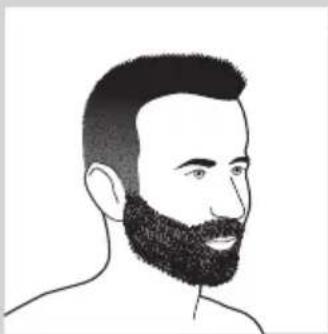
natural_image
Line drawing of a man's head and shoulders with a beard (no text or symbols)natural_image
Line drawing of a male's head and shoulders (no text or symbols)- Усы

natural_image
Line drawing of a man's head and shoulders with a beard (no text or symbols)- Эспаньолка
Очистка и уход
natural_image
Line drawing of a hand holding a small object with a curved arrow indicating rotation (no text or symbols)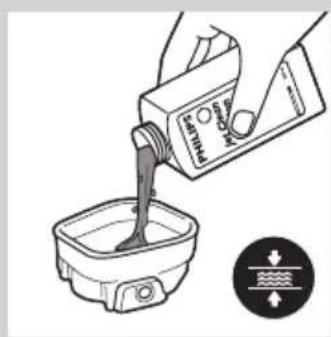
natural_image
Illustration of a hand pouring liquid into a container with a water level indicator (no text or symbols)
natural_image
Illustration of hands using a handheld device to remove a small container with liquid, no text or symbols present
natural_image
Line drawing of a vacuum cleaner with a top component and a base device (no text or symbols)

natural_image
Simple line drawing of a bag with a handle and water level, no text or symbols present
natural_image
Simple line drawing of a mechanical device with a sunburst symbol (no text or labels)natural_image
Illustration of a handbag with a lid and a circular icon containing the letter 'U' (no text or symbols on the main diagram)

natural_image
Illustration of a hand holding a small object with a pointed tip, emitting a flowing liquid (no text or symbols)
natural_image
Illustration of a faucet pouring liquid into a square basin (no text or symbols)
natural_image
Illustration of a hand holding a device with a downward arrow and a small bowl nearby, emitting powder (no text or symbols)natural_image
Illustration of a hand holding a device with a light bulb and an upward arrow, no text or symbols present.natural_image
Diagram of a hand holding a mechanical device with rotating components (no text or symbols)natural_image
Mechanical assembly diagram showing gear and shaft components (no text or labels)natural_image
Diagram showing gear meshing with arrows indicating direction (no text or symbols)natural_image
Mechanical assembly diagram showing a hammer striking a gear (no text or symbols)natural_image
Mechanical assembly diagram showing a gear and motor component with no visible text or symbolsnatural_image
Mechanical assembly diagram showing a rotating component with a curved arrow indicating motion (no text or symbols)natural_image
Line drawing of a handheld device with a black arrow indicating direction (no text or symbols)natural_image
Illustration of two water droplets falling from a pipe, separated by a diagonal line (no text or symbols)natural_image
Illustration of a pliers or tool with an arrow indicating motion (no text or symbols present)natural_image
Illustration of a hand holding a device with a light bulb above and an upward arrow indicating motion (no text or symbols)RQ1284CC, RQ1280CC, RQ1275CC, RQ1265CC, RQ1260CC,
RQ1252CC, RQ1251CC, RQ1250CC) a stojana na nabíjanie si pozorne prečítajte tieto dôležité informácie. Odložte si tento leták na neskoršie použitie.

natural_image
Prohibition sign showing a faucet without a shower, enclosed in a circle (no text or symbols)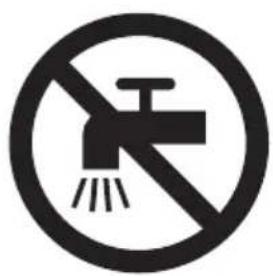
natural_image
Prohibition sign showing a faucet without raindrops, enclosed in a circle (no text)
Nebezpečenstvo
- Adaptér udržiavajte v suchu.
Varovanie
natural_image
Illustration of a remote control tower with ventilation grille and control buttons (no text or symbols)- RQ1275, RQ1265, RQ1261, RQ1260
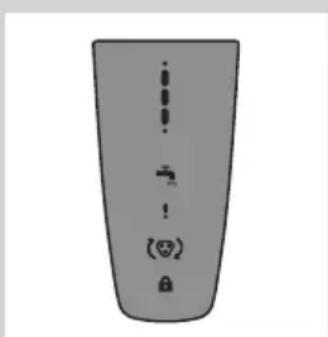
- RQ1273, RQ1252, RQ1251, RQ1250
Nabíjanie

- Nabíjanie trvá približne 1 hodinu.
RQ129x, RQ128x
natural_image
Pure electrical circuit lines without any symbolsRQ127x, RQ126x, RQ125x
natural_image
Simple line drawing of a showerhead with water tap, no text or symbols presentRQ127x, RQ126x, RQ125x
RQ129x, RQ128x
natural_image
Pure electrical circuit lines without any symbolsnatural_image
Line drawing of a mechanical device with a tool inserted, no text or symbols presentnatural_image
Diagram of a mechanical device with a curved arrow indicating rotation or motion (no text or symbols)natural_image
Diagram of a handheld device with a power outlet connected to a wall-mounted cable, showing a scroll wheel and a black arrow indicating motion (no text or symbols present)natural_image
Line drawing of a vacuum cleaner with a top view and base view (no text or symbols)natural_image
Illustration of a person applying facial contour to another person's lower face, showing different shading patterns (no text or symbols)natural_image
Illustration of a hand holding a device with a light bulb above and an upward arrow indicating motion (no text or symbols)natural_image
Line drawing of a handheld device with a black arrow pointing to the tip (no text or symbols)natural_image
Illustration of a hand holding a lamp with a lampshade and an upward arrow, no text or symbols present.1 Uistite sa, že holiaci strojček je vypnutý.
2 Vytiahnite holiacu jednotku z holiaceho strojčeka.
natural_image
Illustration of a hand holding a small device with a magnified inset showing internal components (no text or symbols)3 Výstupok nástavca na tvarovanie brady zasuňte do drážky v hornej časti holiaceho strojčeka (1). Potom nástavec na tvarovanie brady zatlačte nadol (2), aby ste ho tak pripojili k holiacemu strojčeku („cvaknutie“).
natural_image
Illustration of a hand holding a small electronic device with a lightning bolt and arrow indicating action (no text or symbols)natural_image
Line drawing of a man brushing his neck with a comb (no text or symbols)natural_image
Line drawing of a handheld device with a black arrow indicating motion (no text or symbols)natural_image
Illustration of two hands holding a device with directional arrows indicating movement or change (no text or symbols present)natural_image
Illustration of a person applying a hair product to their ear (no text or symbols)natural_image
Line drawing of a man's head and shoulders with short hair and beard (no text or symbols)- Strnisko

natural_image
Line drawing of a man's head and shoulders with a beard (no text or symbols)- Plná brada

natural_image
Line drawing of a male's head and shoulders (no text or symbols)- Fúzy

natural_image
Line drawing of a man's head and shoulders with a beard (no text or symbols)- Kozia briadka
Čistenie a údržba
Na čistenie holiaceho strojčeka, jeho príslušenstva a systému Jet Clean (len modely RQ1296CC, RQ1295CC, RQ1290CC, RQ1286CC, RQ1285CC, RQ1284CC, RQ1280CC, RQ1275CC, RQ1265CC, RQ1260CC, RQ1252CC, RQ1251CC, RQ1250CC) nikdy nepoužívajte drôtenky, drsné čistiace prostriedky ani agresívne kvapaliny ako benzín či acetón.
natural_image
Line drawing of a hand holding a small object with a curved arrow indicating rotation (no text or symbols)natural_image
Line drawing of a vacuum cleaner with a top component and a base device (no text or symbols)

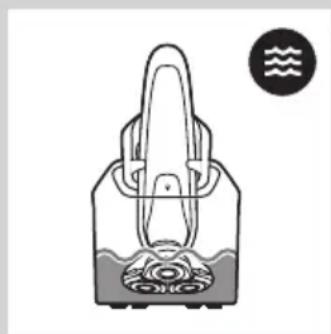
natural_image
Simple line drawing of a handbag with decorative floral pattern and a circular icon (no text or symbols)
natural_image
Simple line drawing of a mechanical device with a sun icon and gear-like base (no text or symbols)natural_image
Illustration of a handbag with a circular icon showing '1M' and a U symbol (no text or labels)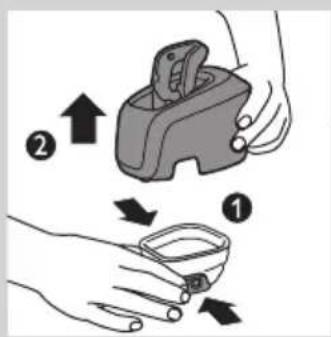

natural_image
Illustration of a hand holding a small object with a curved line extending from it, no text or symbols present.
natural_image
Illustration of a faucet pouring liquid into a container with a handle (no text or symbols)
natural_image
Illustration of a hand pouring liquid into a container with a directional arrow symbol (no text or labels)natural_image
Illustration of hands using a tool to remove a small container with liquid, showing a downward arrow (no text or symbols)5 Systém Jet Clean nasad'te spät' na čistiacu komoru.
natural_image
Illustration of a hand holding a device with a light bulb above and an upward arrow indicating motion (no text or symbols)natural_image
Diagram of a hand holding a mechanical device with rotating components (no text or symbols)natural_image
Mechanical gear assembly diagram showing a rotating shaft and gear mechanism (no text or labels)4 Vyberte strihaciu jednotku z holiaceho krytu.

natural_image
Diagram showing gear meshing with arrows indicating direction (no text or symbols)5 Strihaciu jednotku očistite pomocou priloženej čistiacej kefky.

natural_image
Line drawing of a mechanical device with a brush applying material into a housing (no text or symbols)natural_image
Mechanical assembly diagram showing gear and shaft components with a downward arrow indicating motion (no text or symbols)natural_image
Mechanical assembly diagram showing a rotating component with directional arrows (no text or labels)natural_image
Line drawing of a handheld device with a black arrow pointing to the tip (no text or symbols)natural_image
Illustration of a hand pouring liquid from a bottle onto a pair of shoes, separated by a diagonal line (no text or symbols)natural_image
Illustration of a pliers or tool with an arrow indicating motion (no text or symbols present)1 Na holiacu jednotku nasad'te ochranný kryt, aby sa nepoškodili holiace hlavy.
2 Zariadenie odložte do dodaného puzdra.
Výmena
natural_image
Illustration of a hand holding a device with a light bulb above and an upward arrow indicating motion (no text or symbols)2 Vytiahnite starú holiacu jednotku z holiaceho strojčeka.
natural_image
Symbol of a trash bin with crossed lines indicating no waste or restriction, and a solid black rectangle below (no text or labels)natural_image
Symbol of a trash bin crossed with no text or numbers, representing waste sorting or disposal (no text present)natural_image
Prohibition sign showing a faucet without a shower, enclosed in a circle (no text or symbols)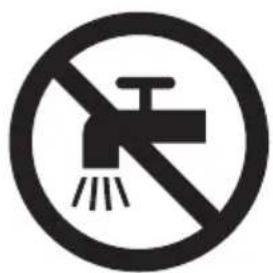
natural_image
Prohibition sign showing a faucet without a shower, enclosed in a circle (no text or symbols)
Nevarnost
natural_image
Illustration of a remote control device with ventilation grille and function buttons (no text or symbols)- RQ1275, RQ1265, RQ1261, RQ1260

natural_image
Top-down view of a remote control panel with icons for alarm, lock, and function buttons (no text or symbols on the panel itself)- RQ1273, RQ1252, RQ1251, RQ1250

Polnjenje
- Polnjenje traja približno eno uro.
RQ129x, RQ128x
RQ129x, RQ128x
natural_image
Diagram of a water level sensor with a valve and power button, showing internal flow lines (no text or symbols)RQ127x, RQ126x, RQ125x
natural_image
Pure electrical circuit lines without any symbolsnatural_image
Line drawing of a mechanical device with a tool inserted, no text or symbols presentnatural_image
Diagram of a mechanical device with a curved arrow indicating rotation or motion (no text or symbols)natural_image
Diagram of a handheld device with a power outlet connected to a wall-mounted cable, showing a scroll wheel and a black arrow indicating motion (no text or symbols present)4 Brivnik postavite v polnilnik.
Zaslon prikaže, da se brivnik polni (oglejte si poglavje “Zaslon”).
Polnjenje v sistemu Jet Clean (samo RQ1296CC, RQ1295CC, RQ1290CC, RQ1286CC, RQ1285CC, RQ1284CC, RQ1280CC, RQ1275CC, RQ1265CC, RQ1260CC, RQ1252CC, RQ1251CC, RQ1250CC)
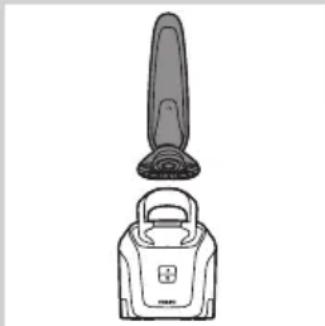
natural_image
Line drawing of a vacuum cleaner with a top view and base view (no text or symbols)4 Ohišje brivnika postavite v nosilec za dve zaponki (1) in ga potisnite navzdol, da se zaskoči (2).
Zaslon prikaže, da se brivnik polni (oglejte si razdelek “Polnjenje” v poglavju “Zaslon”).
Uporaba brivnika
Britje
natural_image
Illustration of a person applying facial contour to another person's face, showing different shading patterns (no text or symbols)natural_image
Illustration of a hand holding a device with a light bulb above and an upward arrow indicating motion (no text or symbols)natural_image
Line drawing of a handheld device with a black arrow pointing to the tip (no text or symbols)3 Drsnik prirezovalnika potisnite naprej, da izvlečete prirezovalnik.
natural_image
Diagram showing a device with a handle and a lamp, indicating upward motion (no text or symbols)natural_image
Illustration of a hand holding a small electronic device with a black arrow indicating compression or disassembly (no text or symbols present)1 Glavnik potisnite naravnost v vodila na obeh straneh nastavka za oblikovanje brade ("klik").

2 Pritisnite drsnik za dolžino (1) in ga potisnite levo ali desno (2), da izberete želeno dolžino dlak.

3 Pritisnite gumb za vklop/izklop na brivniku, da ga vklopite.

natural_image
Line drawing of a man brushing his neck with a comb (no text or symbols)natural_image
Line drawing of a handheld device with a black arrow indicating motion (no text or symbols)natural_image
Illustration of two hands holding a device with directional arrows indicating movement or force (no text or symbols)Opomba: Glavnik primite na sredini in povlecite z nastavka za oblikovanje brade. Glavnika ne vlecite na straneh.
2 Za vklop brivnika pritisnite gumb za vklop/izklop.

natural_image
Illustration of a person applying a hair product to their ear (no text or symbols)natural_image
Line drawing of a man's head and shoulders with short hair and beard (no text or symbols)- Neobrit videz

natural_image
Line drawing of a man's head and beard (no text or symbols)- Polna brada

natural_image
Line drawing of a male face with short hair and mustache (no text or symbols)- Brki

natural_image
Line drawing of a man's head and shoulders with short hair and beard (no text or symbols)- Kozja bradica
natural_image
Line drawing of a hand holding a small object with a curved arrow indicating rotation (no text or symbols)natural_image
Illustration of a hand pouring liquid into a container with a pressure gauge, showing fluid flow direction (no text or symbols)6 Sistem Jet Clean postavite nazaj v čistilno komoro.
natural_image
Illustration of hands using a handheld device to remove or apply liquid, with no text or symbols present.natural_image
Line drawing of a vacuum cleaner with a top component and base device (no text or symbols)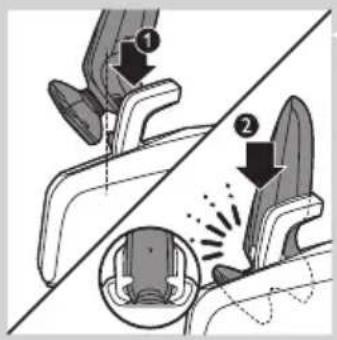
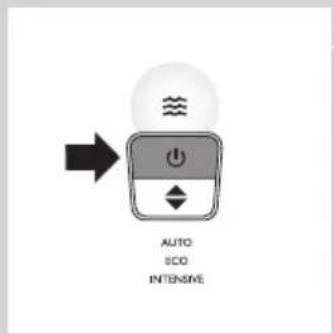

natural_image
Simple line drawing of a container with a handle and internal components, no text or symbols present.
natural_image
Simple line drawing of a mechanical device with a sun icon (no text or symbols)
natural_image
Illustration of a handbag with a circular logo and '1M' calendar icon (no text or symbols on the main subject)1 Hkrati pritisnite gumba za sprostitev na stranskih delih sistema Jet Clean (1). Nato sistem Jet Clean dvignite iz čistilne komore (2).
Čistilna komora ostane zadaj.
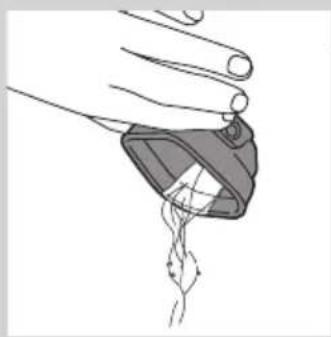
natural_image
Illustration of a hand holding a small object with a string attached, no text or symbols presentnatural_image
Illustration of a faucet pouring liquid into a square basin (no text or symbols)3 Čistilno komoro sperite pod tekočo vodo.
natural_image
Illustration of a hand pouring liquid into a container with a water level indicator (no text or symbols)natural_image
Illustration of hands using a tool to remove a small container with liquid, showing a downward arrow and sparkles (no text or symbols)5 Sistem Jet Clean postavite nazaj v čistilno komoro.
natural_image
Illustration of a hand holding a light bulb with an upward arrow indicating motion or force (no text or symbols present)
natural_image
Diagram of a hand turning a mechanical component with rotating parts (no text or symbols)

natural_image
Mechanical gear assembly diagram showing a rotating shaft and housing (no text or labels)
natural_image
Diagram showing a mechanical gear or worm gear being inserted into a toothbrush, with arrows indicating direction (no text or symbols present)natural_image
Mechanical assembly diagram showing a piston inside a housing with gears and a handle (no text or symbols)natural_image
Mechanical assembly diagram showing a gear and motor component with a downward arrow indicating motion (no text or symbols)natural_image
Mechanical assembly diagram showing a rotating component with a curved arrow indicating motion (no text or symbols)8 Držalo pritisnite navzdol, da ga namestite čez rezilo.
9 Zaprite brivne glave.
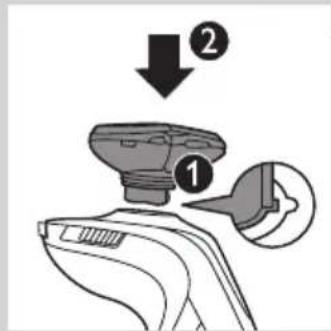
natural_image
Line drawing of a handheld device with a black arrow pointing to a component (no text or symbols)2 Prirezovalnik nekaj časa spirajte pod vročo tekočo vodo.
3 Drsnik prirezovalnika potisnite nazaj, da uvlečete prirezovalnik.
natural_image
Illustration of two hands performing a water droplet drop operation, showing liquid splashing around objects (no text or symbols)natural_image
Line drawing of a pliers or tool with an arrow indicating motion (no text or symbols)natural_image
Illustration of a hand holding a device with a light bulb above and an upward arrow indicating motion (no text or symbols)natural_image
Symbol of a trash bin crossed with no visible text or labelsnatural_image
Symbol of a trash bin crossed with no visible text or labelsnatural_image
Prohibition sign showing a faucet without a shower, enclosed in a circle (no text or symbols)
natural_image
Prohibition sign showing a faucet without raindrops, enclosed in a circle (no text)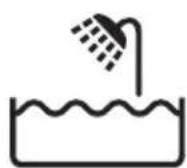
Opasnost
- Neka adapter bude suv.
Upozorenje
- Adapter ima ugrađen transformator. Nemojte da uklanjate adapter da biste ga zamenili drugim priključkom, jer se na taj način izlažete opasnosti.
Napomena: Pre prve upotrebe aparata za brijanje skinite zaštitnu foliju sa ekrana.
natural_image
Front view of a remote control device with ventilation grille and function buttons (no text or symbols)- RQ1275, RQ1265, RQ1261, RQ1260
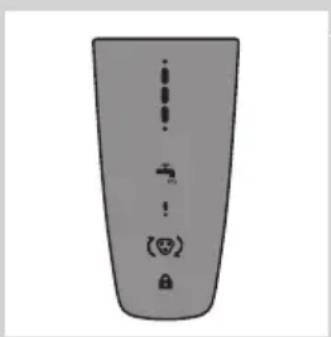
natural_image
Simple grayscale illustration of a device with no text or symbols, featuring a vertical line and control icons (no readable text or symbols)- RQ1273, RQ1252, RQ1251, RQ1250

Punjenje
- Punjenje traje oko 1 sat.
RQ129x, RQ128x
RQ129x, RQ128x
- Kada se baterija potpuno napuni, indikator minuta će početi stalno da svetli. Nakon približno 30 minuta ekran će se ponovo automatski isključiti.
Napomena: Ovaj aparat za brijanje opremljen je inteligentnim sistemom za samoučenje koji nadgleda potrošnju energije aparata za brijanje i pretvara preostali kapacitet baterije u minute za brijanje. Potrošnja energije i preostali minuti za brijanje zavise od tipa kože i brade, kao i od vaših navika za brijanje (nrp. upotreba gela za brijanje). Ako je broj minuta za brijanje potpuno napunjenog aparata za brijanje manji od 60 minuta, to je potpuno normalno i ne znači da je kapacitet baterije izgubljen.

natural_image
Simple diagram of a device with a water tap and power button, no text or symbols presentRQ127x, RQ126x, RQ125x
Napomena: Ekrani na različitim modelima aparata za brijanje izgledaju drugačije, ali indikator punjenja radi na isti način.
- Kada se baterija potpuno napuni, svi indikatori punjenja će početi stalno da svetle. Nakon približno 30 minuta ekran će se ponovo automatski isključiti.
Skoro prazna baterija

RQ129x, RQ128x
- Kada je baterija skoro prazna (kada ostane samo 5 ili manje minuta za brijanje), indikator minuta će početi da treperi.
- Kada isključite aparat za brijanje, minuti za brijanje nastavljaju da trepere još nekoliko sekundi. Kada više nema minuta, oglasiće se zvučni signal.
RQ127x, RQ126x, RQ125x
Napomena: Ekrani na različitim modelima aparata za brijanje izgledaju drugačije, ali indikator punjenja radi na isti način.

natural_image
Pure electrical circuit lines without any symbols- Preostali kapacitet baterije pokazuju indikatori punjenja koji trepere.
Čišćenje aparata za brijanje

Za optimalne rezultate brijanja, preporučuje se da očistite aparat za brijanje nakon svake upotrebe.
Napomena: Ekrani na različitim modelima aparata za brijanje izgledaju drugačije, ali prikazuju isti simbol.
- Simbol slavine treperi kako bi vas podsetio da očistite aparat za brijanje.
Zamena jedinice za brijanje
natural_image
Line drawing of a mechanical device with a tool inserted, showing no text or symbols1 Stavite mali utikač u punjač.

natural_image
Diagram of a mechanical device with a curved arrow indicating rotation or motion (no text or symbols)2 Rasklopite punjač ("klik").
3 Uključite adapter u utičnicu.

natural_image
Diagram of a handheld device with a cable and plug, showing a black arrow indicating direction (no text or symbols present)4 Stavite aparat za brijanje u punjač.
Na ekranu se prikazuje da se aparat puni (pogledajte poglavlje „Ekran“).
Punjenje u Jet Clean sistemu (samo RQ1296CC, RQ1295CC, RQ1290CC, RQ1286CC, RQ1285CC, RQ1284CC, RQ1280CC, RQ1275CC, RQ1265CC, RQ1260CC, RQ1252CC, RQ1251CC i RQ1250CC)

natural_image
Line drawing of a vacuum cleaner with a top view and a side-view view (no text or symbols)1 Priključite mali utikač u Jet Clean sistem.
2 Uključite adapter u utičnicu.
3 Držite aparat za brijanje naopako iznad držača, sa naličjem aparata okrenutim ka držaču.
Napomena: Aparat za brijanje ne može da se postavi u Jet Clean sistem kada se na jednici za brijanje nalazi zaštitni poklopac.
natural_image
Illustration of a person applying facial contour to another person's face, showing different facial contours (no text or symbols present)1 Jednom pritisnite dugme za uključivanje/isključivanje da biste uključili aparat za brijanje.
natural_image
Illustration of a hand holding a device with a light bulb above and an upward arrow indicating motion (no text or symbols)1 Skinite jedinicu za brijanje sa aparata.
natural_image
Line drawing of a handheld device with a black arrow pointing to a component (no text or symbols)3 Povucite klizač trimera unapred da biste izbacili trimer.
4 Sada možete početi sa podrezivanjem.
5 Povucite klizač trimera unazad da biste uvukli trimer.
6 Jednom pritisnite dugme za uključivanje/isključivanje da biste isključili aparat za brijanje.
7 Ubacite ušicu jedinice za brijanje u prorez na vrhu aparata za brijanje (1). Zatim pritisnite jedinicu za brijanje nadole (2) da biste je pričvrstili za aparat („klik“).
Upotreba dodatka za oblikovanje brade (samo RQ1296, RQ1295, RQ1286, RQ1285, RQ1275 i RQ1265)
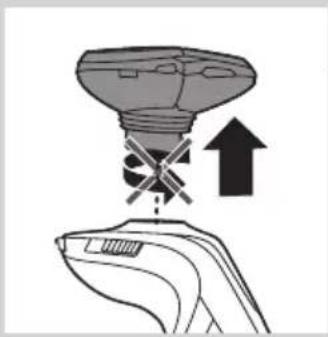
natural_image
Illustration of a hand holding a device with an upward arrow indicating motion or change (no text or symbols present)1 Proverite da li ste isključili aparat za brijanje.
2 Skinite jedinicu za brijanje sa aparata.
natural_image
Illustration of a hand holding a medical device with a magnified inset showing internal components (no text or symbols)3 Ubacite ušicu dodatka za oblikovanje brade u prorez sa gornje strane aparata za brijanje (1). Zatim pritisnite dodatak za oblikovanje brade nadole (2) da biste ga pričvrstili za aparat („klik“).

natural_image
Illustration of a hand holding a handheld device with a lightning bolt indicating compression (no text or symbols)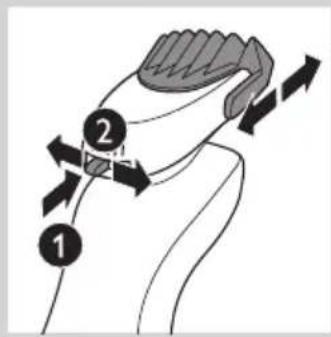
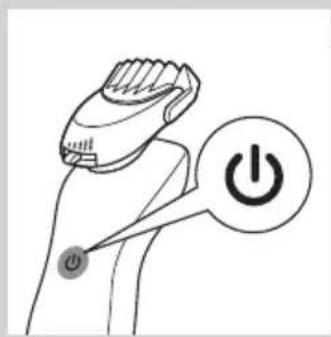
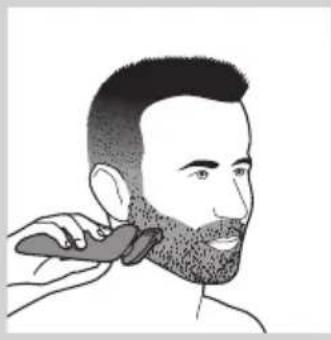
natural_image
Line drawing of a person applying a toothbrush to their beache (no text or symbols)
natural_image
Line drawing of a handheld device with a scroll wheel and directional arrow (no text or symbols)Upotreba dodatka za oblikovanje brade sa češljem
Dodatak za oblikovanje brade možete da koristite sa montiranim češljem kako biste bradu podrezali na neku od fiksnih postavki dužine. Postavke dužine dlačica na dodatku za oblikovanje brade odgovaraju dužini dlačica nakon podrezivanja i idu od 1 do 5 mm.
natural_image
Illustration of two hands holding a device with checkmark and cross symbols, no text or labels presentNapomena: Uhvatite češalj za sredinu i povucite ga sa dodatka za oblikovanje brade. Nemojte da vučete češalj za bočne strane.
2 Pritisnite jednom dugme za uključivanje/isključivanje da biste uključili aparat za brijanje.

natural_image
Line drawing of a person applying hair to their ear (no text or symbols)3 Sada možete da započnete sa oblikovanjem brade, brkova, zulufa ili linije kose.
Stilovi brade
U nastavku su navedeni primeri stilova brade koje možete da kreirate.

natural_image
Line drawing of a man's head and shoulders, showing detailed hair and beard (no text or symbols)- Čekinjasti izgled
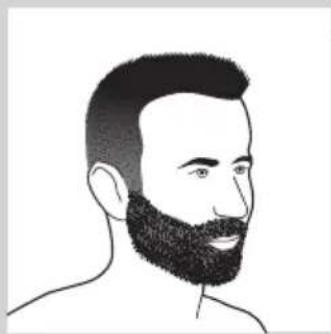
natural_image
Line drawing of a man's head and beard (no text or symbols)- Puna brada

natural_image
Line drawing of a male face with short hair and mustache (no text or symbols)- Brkovi
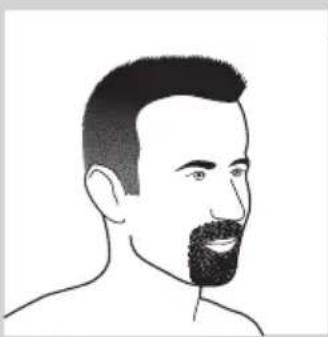
natural_image
Line drawing of a man's head and shoulders with a beard (no text or symbols)- Brada oko usta
Pazite sa vrućom vodom. Uvek proverite da voda ne bude prevruća da biste izbegli opekotine na rukama.
natural_image
Illustration of a hand holding a small object with a curved arrow indicating rotation (no text or symbols)2 Povlačenjem otvorite tri glave za brijanje jednu po jednu.
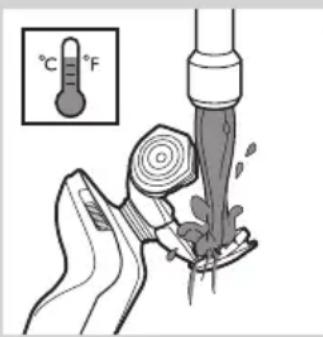

natural_image
Illustration of a hand pouring liquid into a container with a water level indicator (no text or symbols)
natural_image
Illustration of hands using a handheld device to remove liquid from a small bowl (no text or symbols)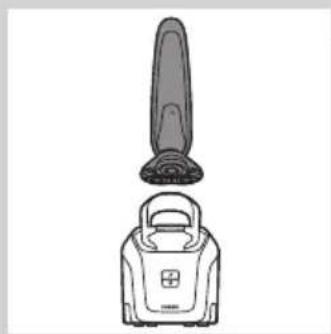
natural_image
Line drawing of a vacuum cleaner with a top-mounted blade and base (no text or symbols)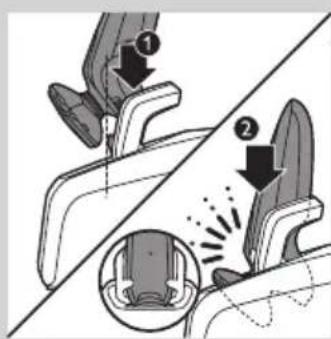
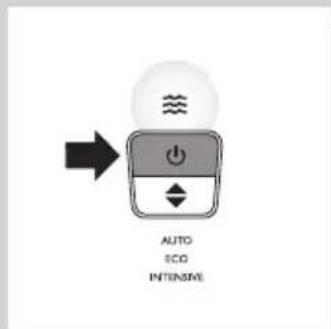
natural_image
Simple line drawing of a container with a handle and internal components, no text or symbols present.
natural_image
Simple line drawing of a hairdryer with a sun icon above (no text or symbols)
natural_image
Illustration of a handbag with a circular icon showing 'U' and a calendar-like symbol (no text or labels)
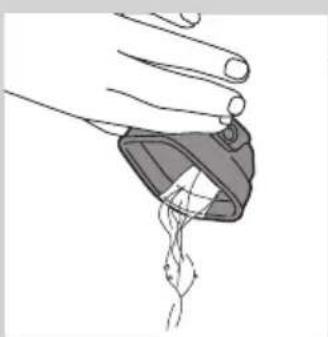
natural_image
Line drawing of a hand holding a small object with a dark container and a thin filament, no text or symbols present.natural_image
Illustration of a faucet pouring liquid into a square basin (no text or symbols)3 Isperite komoru za čišćenje pod mlazom vode.
Komora za čišćenje ne može da se pere u mašini za pranje posuđa.
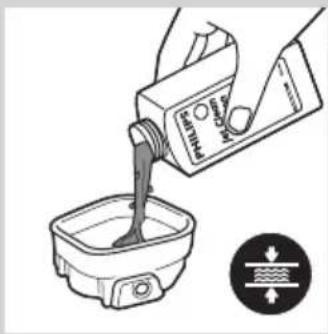
natural_image
Illustration of a hand pouring liquid into a container with a water level indicator (no text or symbols)natural_image
Illustration of hands using a handheld device to remove liquid from a small bowl (no text or symbols)5 Vratite Jet Clean sistem na komoru za čišćenje.
Pazite da dugmad za oslobađanje dobro legnu na svoja mesta.
Metod izuzetno temeljnog čišćenja

natural_image
Illustration of a hand holding a device with a light bulb and an upward arrow, no text or symbols present.Proverite da li ste isključili aparat.
1 Skinite jedinicu za brijanje sa aparata.
natural_image
Diagram of a hand holding a mechanical device with rotating components (no text or symbols)2 Povlačenjem otvorite tri glave za brijanje jednu po jednu.

natural_image
Mechanical assembly diagram showing a gear and motor component with an arrow indicating motion (no text or symbols)4 Izvadite rezač iz štitnika.
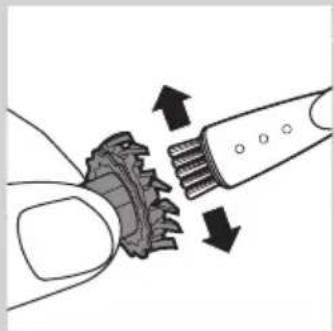
natural_image
Diagram showing a hand turning a gear with arrows indicating direction (no text or symbols)natural_image
Mechanical assembly diagram showing a hammer inside a gear mechanism (no text or symbols)6 Očistite unutrašnjost štitnika.
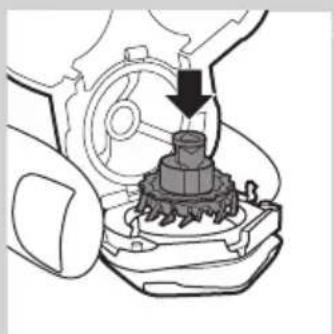
natural_image
Mechanical assembly diagram showing gear and shaft components with a downward arrow indicating motion (no text or symbols)7 Nakon čišćenja vratite rezač u štitnik tako da nožice rezača budu okrenute nadole.

natural_image
Mechanical assembly diagram showing a rotating component with a curved arrow indicating motion (no text or labels)8 Vratite osigurač preko rezača.
9 Zatvorite glave za brijanje.

10 Ubacite ušicu jedinice za brijanje u prorez na vrhu aparata za brijanje (1). Zatim pritisnite jedinicu za brijanje ka dole (2) da biste je pričvrstili za aparat („klik“).
Čišćenje trimera
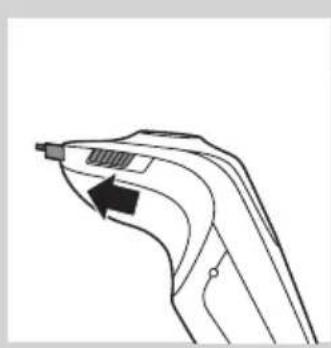
natural_image
Line drawing of a handheld device with a black arrow pointing to the tip (no text or symbols)Trimer očistite nakon svake upotrebe.
1 Povucite klizač trimera unapred da biste izbacili trimer.

2 Izvesno vreme ispirajte trimer pod mlazom vruće vode.
3 Povucite klizač trimera unazad da biste uvukli trimer.
Savet: Za najbolje rezultate, podmažite zupce trimera jednom kapi ulja za šivaću mašinu na svakih šest meseci.
natural_image
Illustration of a fish being lifted by a tool, showing water droplets and a close-up of the fish (no text or symbols)natural_image
Line drawing of a pliers with an arrow indicating force or movement (no text or symbols)1 Stavite zaštitni poklopac na jedinicu za brijanje da biste sprečili oštećenja na glavama za brijanje.
natural_image
Diagram showing a hand holding a device with a lamp and a cross symbol, indicating an upward movement (no text or labels present)3 Ubacite ušicu nove RQ12 jedinice za brijanje u prorez na vrhu aparata za brijanje (1). Zatim pritisnite jedinicu za brijanje nadole (2) da biste je pričvrstili za aparat („klik“).


4 RQ128x/RQ127x/RQ126x/RQ125x: da biste resetovali aparat za brijanje, pritisnite dugme za uključivanje/isključivanje i zadržite ga približno 10 sekundi.
natural_image
Symbol of a waste bin with no text or labels, crossed by two crossed lines and a solid black rectangle below (no text or symbols present)natural_image
Prohibition sign showing a faucet without a shower, enclosed in a circle (no text or symbols)
natural_image
Prohibition sign showing a faucet without a shower, enclosed in a circle (no text or symbols)
Небезпечно
natural_image
Illustration of a remote control device with ventilation grille and function buttons (no text or symbols)- RQ1275, RQ1265, RQ1261, RQ1260

natural_image
Simple diagram of a device with vertical lines and icons, no text or symbols present- RQ1273, RQ1252, RQ1251, RQ1250
Заряджання
RQ129x, RQ128x
natural_image
Diagram of a showerhead with water level indicator and control panel (no text or symbols)RQ127x, RQ126x, RQ125x
natural_image
Pure electrical circuit lines without any symbolsnatural_image
Line drawing of a mechanical device with a tool inserted, no text or symbols presentnatural_image
Diagram of a mechanical device with a curved arrow indicating rotational motion (no text or symbols)natural_image
Diagram of a handheld device with a cable and plug, showing a black arrow indicating direction (no text or symbols present)natural_image
Illustration of a vacuum cleaner with a top-mounted blade and a closed lid (no text or symbols)natural_image
Illustration of a person applying facial contour to another person's lower face, showing different facial contours (no text or symbols present)natural_image
Illustration of a hand holding a device with a light bulb above and an upward arrow indicating motion (no text or symbols)natural_image
Line drawing of a handheld device with a black arrow indicating direction (no text or symbols)natural_image
Illustration of a hand holding a device with a light bulb and an upward arrow, no text or symbols present.natural_image
Illustration of a hand holding a medical device with a magnified inset showing internal components (no text or symbols)natural_image
Illustration of a hand holding a handheld device with a lightning bolt and arrow indicating action (no text or symbols)


natural_image
Line drawing of a person applying a hair product to their beaded neck (no text or symbols)natural_image
Line drawing of a hand holding a small electric shaver with a curved arrow indicating motion (no text or symbols)natural_image
Illustration of two hands holding a device with directional arrows indicating movement or force (no text or symbols)natural_image
Line drawing of a person applying makeup to their ear (no text or symbols)natural_image
Line drawing of a man's head and shoulders with a beard (no text or symbols)- Щетина

natural_image
Line drawing of a man's head and beard (no text or symbols)- Борода
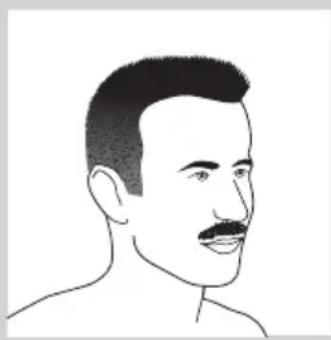
natural_image
Line drawing of a male's face with short hair and mustache (no text or symbols)- Byca

natural_image
Line drawing of a man's head and shoulders (no text or symbols)- Еспаньйолка
Чищення та догляд
natural_image
Line drawing of a hand holding a small object with a curved arrow indicating rotation (no text or symbols)


natural_image
Illustration of hands using a handheld device to remove or clean material, with no text or symbols present.
natural_image
Line drawing of a vacuum cleaner with a pointed tip and handle (no text or symbols)
natural_image
Simple line drawing of a handbag with a handle and a circular icon showing wave symbols (no text or labels)natural_image
Simple line drawing of a hairdryer with a sun icon nearby (no text or symbols)natural_image
Illustration of a handbag with a circular icon showing 'U' and a calendar-like symbol (no text or symbols on the main subject)
natural_image
Illustration of a hand holding a small object with a dark container and a thin rod inserted, showing internal structure (no text or symbols)
natural_image
Illustration of a faucet dispensing liquid into a container with water flowing out (no text or symbols)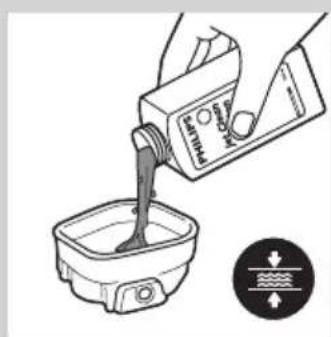
natural_image
Illustration of a hand pouring liquid into a container with a water level indicator (no text or symbols)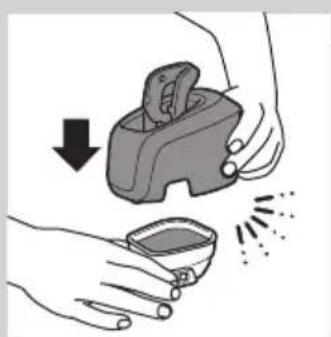
natural_image
Illustration of hands using a handheld device to remove a small container with liquid, showing a downward arrow (no text or symbols)natural_image
Diagram showing a device with a light bulb and a cross symbol, with an upward arrow indicating motion or change (no text or symbols present)natural_image
Diagram of a hand turning a mechanical component with rotating parts (no text or symbols)natural_image
Mechanical gear assembly diagram showing a shaft and gear mechanism (no text or labels)natural_image
Diagram showing a hand turning a gear with arrows indicating motion (no text or symbols)natural_image
Mechanical assembly diagram showing a hammer inside a gear with a handle (no text or symbols)natural_image
Mechanical assembly diagram showing a gear and motor component with a downward arrow indicating motion (no text or symbols)natural_image
Mechanical assembly diagram showing a rotating component with a curved arrow indicating motion (no text or symbols)natural_image
Line drawing of a handheld device with a black arrow pointing to a component (no text or symbols)Чищення тримера
natural_image
Illustration of two water droplets spraying into a pipe, no text or symbols presentnatural_image
Line drawing of a pliers with an arrow indicating force application (no text or symbols)natural_image
Diagram showing a light bulb above a curved surface with an upward arrow, indicating a process or operation (no text or symbols present)natural_image
Symbol of a waste bin with crossed lines indicating no waste or restriction, and a solid black rectangle below (no text or symbols)natural_image
Symbol of a trash bin crossed with a diagonal line, representing no waste or discharge (no text or labels)- Always here to help you
- User manual
- PHILIPS
- Introduction
- General description (Fig. 1)
- Important
- Danger
- Warning
- Caution
- Compliance with standards
- General
- The display
- Charging
- RQ129x, RQ128x
- RQ127x, RQ126x, RQ125x
- Battery fully charged
- Battery low
- Remaining battery capacity
- Clean shaver
- Replace shaving unit
- Travel lock (RQ128x, RQ127x, RQ126x, RQ125x only)
- Activating the travel lock
- Deactivating the travel lock
- Power-saving mode (RQ129x only)
- Blocked shaving heads
- Quick charge
- Charging in the charger
- Using the shaver
- Shaving
- Skin adaptation period
- Wet shaving
- Trimming
- Using the Beard Styler attachment with comb
- Using the Beard Styler attachment without comb
- Beard styles
- Cleaning and maintenance
- Cleaning the shaving unit
- Preparing the Jet Clean System for use
- Using the Jet Clean System
- Cleaning the Jet Clean System
- Extra-thorough cleaning method
- Cleaning the trimmer
- Cleaning the Beard Styler attachment (RQ1296, RQ1295, RQ1286, RQ1285, RQ1275, RQ1265 only)
- Storage
- Replacement
- Ordering accessories
- Shaving heads
- Cleaning
- Environment
- Removing the rechargeable shaver battery
- Guarantee and support
- Guarantee restrictions
- Troubleshooting
- Въведение
- Опасност
- Зареждане
- Nebezpečí
- Nabíjení
- Čištění a údržba
- Oht
- Hoiatus
- Laadimine
- Pardli puhastamine
- Piiramine
- Opasnost
- Upozorenje
- Punjenje
- Preostali kapacitet baterija
- Uporaba nastavka za oblikovanje brade (samo RQ1296, RQ1295, RQ1286, RQ1285, RQ1275, RQ1265)
- Uporaba nastavka za oblikovanje brade bez češlja
- Stilovi brade
- Čišćenje trimera
- Zamjena dijelova
- Vigyázat!
- Töltés
- Қауіпті жағдайлар
- Зарядтау
- RQI27x, RQI26x, RQI25x
- Триммерді тазалау
- Pavojus
- Ikrovimas
- Briesmas
- Brīdinājums!
- Lādēšana
- Skuvekla tīrīšana
- Tīrīšana un kopšana
- Niebezpieczeństwo
- Ładowanie
- Pericol
- Încărcare
- Tunderea
- Опасно!
- Зарядка
- Очистка и уход
- Nebezpečenstvo
- Varovanie
- Nabíjanie
- Čistenie a údržba
- Výmena
- Nevarnost
- Polnjenje
- Uporaba brivnika
- Britje
- Skoro prazna baterija
- Čišćenje aparata za brijanje
- Zamena jedinice za brijanje
- Upotreba dodatka za oblikovanje brade (samo RQ1296, RQ1295, RQ1286, RQ1285, RQ1275 i RQ1265)
- Upotreba dodatka za oblikovanje brade sa češljem
- Metod izuzetno temeljnog čišćenja
- Небезпечно
- Заряджання
- Чищення та догляд
- Чищення тримера
Brand : PHILIPS
Model : SensoTouch 3D RQ1284
Category : Razor