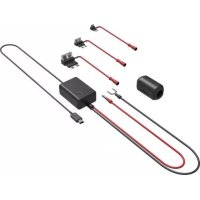
KCA-S210A - Audio accessory KENWOOD - Free user manual and instructions
Find the device manual for free KCA-S210A KENWOOD in PDF.


| Product type | Switching unit for CD/MD changer |
| Brand | KENWOOD |
| Model | KCA-S210A |
| Main functions | Switching between two disc changers, AUX input, wired controller |
| Number of supported changers | Up to 2 disc changers |
| Controller cable length | 5 m |
| Connection cable length | 2 m |
| Power supply | 12 V DC (via the head unit) |
| Housing material | Plastic |
| Dimensions (approx.) | 100 x 60 x 25 mm |
| Weight (approx.) | 150 g |
| Operating temperature | 0 °C to 40 °C |
| Compatibility | KENWOOD head units from groups A, B, C, D |
| Included accessories | Controller, connection cable, Velcro straps, self-tapping screws, cable tie, double-sided adhesive tape |
| Maintenance and cleaning | Clean with a soft, dry cloth. Do not use solvents. |
| Safety instructions | Install away from heat, direct sunlight, and water. Do not block ventilation openings. |
| Repairability | Spare parts available through KENWOOD after-sales service |
| Warranty | 1 year (depending on country) |
Frequently Asked Questions - KCA-S210A KENWOOD
User questions about KCA-S210A KENWOOD
0 question about this device. Answer the ones you know or ask your own.
Ask a new question about this device
Download the instructions for your Audio accessory in PDF format for free! Find your manual KCA-S210A - KENWOOD and take your electronic device back in hand. On this page are published all the documents necessary for the use of your device. KCA-S210A by KENWOOD.
USER MANUAL KCA-S210A KENWOOD
CD / MD CHANGER SWITCHING UNIT WITH AUXILIARY RCA STEREO INPUT
page 2-7
INSTRUCTION MANUAL
UNITE DE COMMUTAION DU CHANGEUR CD/MD AVEC
ENREE STEREO RCA AUXILIAIRE Page 8-13
MODE D'EMPLOI
CD-/MD-WECHSLER-SCHALTGERAT MIT ZUSÄTZLICHEM
RCA-STEREO-EINGANG Page 14-19
BEDIENUNGSANLEITUNG
SCHAKELEENHEID VOOR DE CD / MD WISSELAAR MET
EXTRA CINCH STEREO INGANG▶Page 20-25
GEBRUKSAANWIJZING
UNITA DI COMMUTAZIONE DEL MULTILETTORE CD / MD
CON INGRESSO STEREO RCA AUSILIARIO Page 26-31
ISTRUZIONI PER L'USO
(4) Velcro strip. 2
(5) Self-tapping screw ( 4 × 16 mm) .....2
⑥ Cable band. 1
Double-sided adhesive tape 1
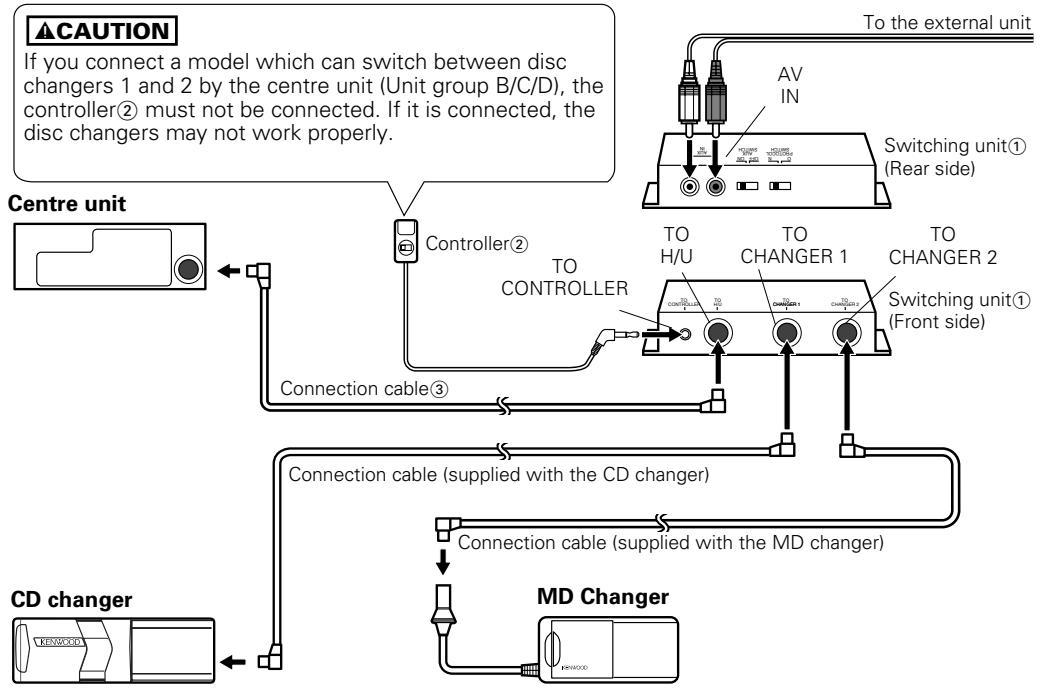
Connection
NOTE
- After connecting the equipment, press the reset button on the centre unit.
- The figure shows that one CD changer and one MD changer are connected. Two CD changers or two MD changers may be connected.
- A disc player such as the KDC-D300 may be connected instead of the disc changer.
- If you wish to adjust the cable length in accordance with the installation location of the switching unit, such as in the trunk space, the disc changer extension cable may be used instead of the connection cable③.
IMPORTANT INFORMATION
This unit is NOT designed to be connected directly to a CD changer that was manufactured and sold before 1994. If you plan to use such units, please read the following information carefully.
To control KDC-C600/KDC-C800/KDC-601/KDC-401
A CA-DS100 (sold separately as an optional accessory), along with the extension cord supplied with the CD changer, are required.
- KDC-C200/ KDC-C300/ KDC-C301/ KDC-C400/ KDC-C100/ KDC-C302/ C205/ C705 and CD changer Manufactured by Other Companies are not compatible with this Kenwood model.
FAILURE TO FOLLOW THESE INSTRUCTIONS MAY RESULT IN DAMAGE TO THIS UNIT AND/OR THE CD CHANGER.
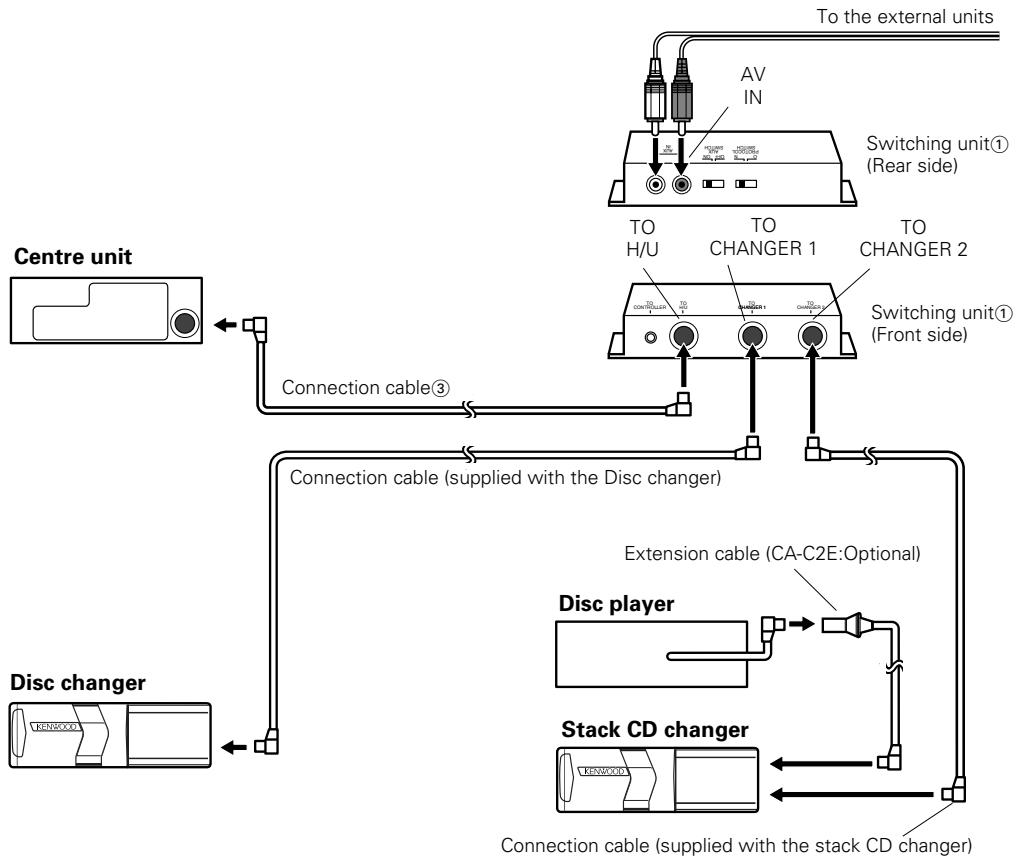
If you want to connect a stack CD changer
CAUTION
- Connect it to a centre unit belonging to Group C or Group D.
- Connect the stack CD changer to the terminal labelled TO CHANGER 2.
- The KDC-C810 cannot be connected.
- Up to two disc changers can be connected.
- The O-N switch on the disc changer and the disc player should be set to "N". If you set it to "O", the equipment will not function correctly.
- The total length of the cable between the units should not be more than 13m .

- If the voltage is low and the internal temperature of the switching unit is low, switching may fail to work properly in some cases.
- The AUX switch on the stack CD changer should be switched "OFF" before using the equipment. The AUX terminal on the KCA-S210A switching unit is the one that should be used.
■ Installing the switching unit with a board in the trunk space
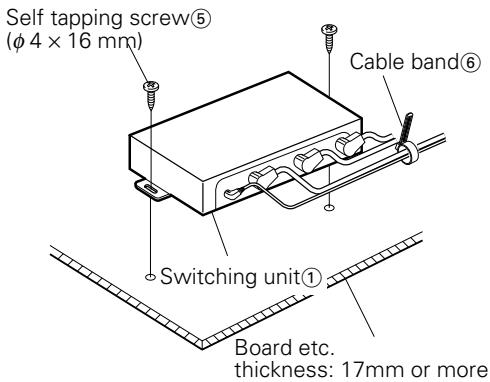
- Install the switching unit with self-tapping screws(5) ( 4 × 16 ~mm)
- Bind the cables with cable band⑥.
■ Installing the switching unit on the carpet under a seat
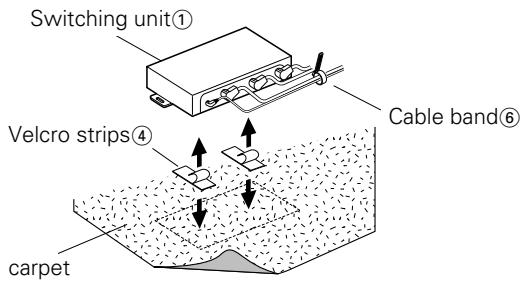
- Remove the backing from the Velcro strips ④ and attach it to the bottom of the switching unit ① . Install the switching unit on the carpet.
- Bind the cables with cable band⑥.
CAUTION
Install the switching unit ① in places that do not obstruct driving.
- Install the switching unit ① in places where it is not touched by the tip of the shoes of a rear seat passenger.
- Do not install the unit in places where it is exposed to direct sunlight, high heat, or where water may splash over it.
- Do not place anything on top of the switching unit ①.
■ Installing the controller
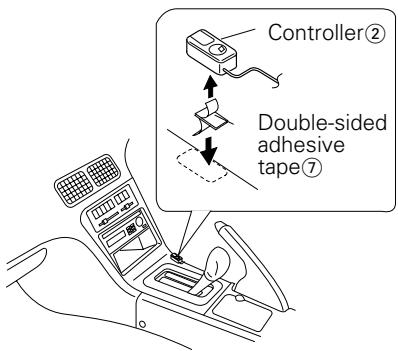
- Wipe off the installation location with a cleaning cloth.
CAUTION
- Install the controller (2) on a flat surface. If it is installed on a curved surface, the tape adhesion may weaken and the controller may come off.
- Do not install the controller (2) in places (such as on the dashboard) where it is exposed to direct sunlight and the temperature becomes high. Otherwise, the controller (2) will become deformed and unusable.
-
Install the controller ② in places that do not obstruct driving. Install the controller ② temporarily and verify that the handle, shift knob, and side brake can be operated smoothly.
-
Secure the controller ② in the specified place with the double-sided adhesive tape ⑦ .
Identifying the type of centre unit you intend to connect
The setting of the PROTOCOL switch and the operation used to switch to AUX sound will differ depending on the type of centre unit (cassette receiver, CD receiver, and so on) you are going to connect. Find out which of the following groups your centre unit belongs to, then consult the relevant section of this manual.
Group A
This group covers centre units with disc changer control, where the source selection does not allow you to switch the disc changer between 1 and 2.
■Group B
This group covers centre units with disc changer control, where the source selection allows you to switch between 1 and 2, where the manual instructs you to set the O-N switch on the disc changer to "O", or where the O-N switch operation is not covered.
Group C
This group covers centre units with disc changer control, where the source selection allows you to switch between 1 and 2, where the manual instructs you to set the O-N switch on the disc changer to "N".
Group D
This group covers units released on to the market in or after 1999, where the manual covers AUX mode under source selection.
Setting the PROTOCOL switch
You will need to set the PROTOCOL switch according to the centre unit you wish to connect.
CAUTION
Turn the centre unit power off before operating the PROTOCOL switch.
If the unit you are connecting belongs to Group A or Group B
Set the PROTOCOL switch to the "O" position.
CAUTION
If you move the PROTOCOL switch to the "N" position, the switching unit will become inoperable. (If the disc changer you have connected has an O-N switch, set it to the "O" position also.)
If the unit you are connecting belongs to Group C or Group D
Set the PROTOCOL switch to the "N" position.
CAUTION
-
If you move the PROTOCOL switch to the "O" position, then even if you have connected a disc changer supporting CD text, the CD text and the disc name (DNPS) will fail to be displayed on the centre unit. (If the connected disc changer has an O-N switch, set it to the "N" position also.)
-
If the disc changer you are connecting does not have an O-N switch, you will not be able to use the disc name setting (DNPS) function.
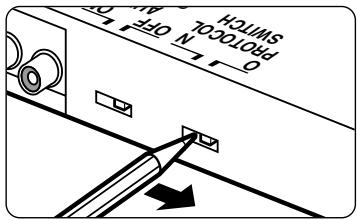
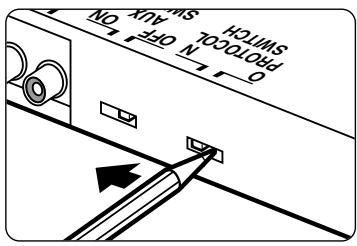
Unit group A
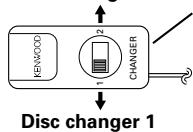
Select the disc changer to be controlled with the controller②. When the disc changer mode is selected with the source button, playing begins.
Disc changer 2
Controller②
You can switch between disc changers 1 and 2 by the switching unit.
CAUTION
- You cannot change the disc-changer number while a disc changer is playing. To change the disc changer number, press the source button to stop playing, then change the disc changer number with the controller(2). Select the disc changer mode with the source button.
- When the disc changer number is changed and play begins, the disc changer number data before it was switched may be shown temporarily on the display of the centre unit.
Unit groups B/C/D
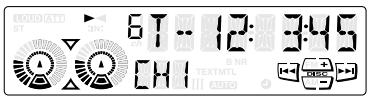
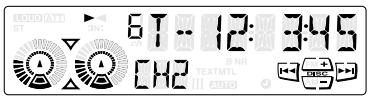
Each time the SRC button (or CH button) on the centre unit is pressed, the disc auto changer mode changes between disc changer modes 1 and 2. When the desired disc changer number is selected, playing starts.
How to switch to AUX sound
If the unit you are connecting belongs to group A
| ① | Turn the centre unit power off, or select another source, then set the AUX switch on the switching unit to "ON". | |
| ② | Set the controller switch to "1" NOTE If you have only connected the AUX terminal, you will not need to carry out any further operations. | KENWOOD 1 CH2 |
| ③ | Select <DISC or CH> on the centre unit. The sound input to the AUX terminal will now be output. The centre unit display will stay in the following state: Disc No.=1, Track No.=1, Playing time = 0 min 0 sec | TAPE EJECT CD-MC TUN or SRC |
CAUTION
- If you are going to connect only one disc changer, connect it to the TO CHANGER 2 terminal on the switching unit.
- If you are going to connect only the AUX terminal of the switching unit, you do not need to connect a controller.
- After selecting
on the centre unit, you will not be able to switch to AUX sound, even if you operate the switching unit or the controller switch.
NOTE
If you want to listen to the sound from the unit connected to the terminal TO CHANGER 1 or 2 on the switching unit, first either turn off the power to the centre unit, or switch to another source, then turn the AUX switch to "OFF". Next, turn the controller switch to "1" or "2", and select
If the unit you are connecting belongs to group B
| ① | Either switch the centre unit power off, or select another source, then set the switching unit AUX switch to "ON". | |
| ② | On the centre unit, select <DISC1 or CH1>. The sound input to the AUX terminal will now be output. The centre unit display will stay in the following state: Disc No.=1, Track No.=1, Playing time = 0 min 0 sec | MDCD 1-2 CH 1-2 CH 1-2 CH 1-2 CH 1-2 CH 1-2 CH 1-2 CH 1-2 CH 1-2 CH 1-2 CH 1-2 CH 1-2 CH 1-2 CH 1-2 CH 1-2 CH 1-2 CH 1-2 CH 1-1 CH 1-1 CH 1-1 CH 1-1 CH 1-1 CH 1-1 CH 1-1 CH 1-1 CH 1-1 CH 1-1 CH 1-1 CH 1-1 CH 1-1 CH 1-1 CH 1-1 CH 1-1 CH 1-1 CH 2 CH 2 CH 2 CH 2 CH 2 CH 2 CH 2 CH 2 CH 2 CH 2 CH 2 CH 2 CH 2 CH 2 CH 2 CH 2 CH 2 CH 2 CH 2 CH 2 CH 2 CH 2 CH 2 CH 2 CH 2 CH 1 CH 1 CH 1 CH 1 CH 1 CH 1 CH 1 CH 1 CH 1 CH 1 CH 1 CH 1 CH 1 CH 1 CH 1 CH 1 CH 1 CH 1 CH 1 CH 1 CH 1 CH 1 CH 1 CH 1 CH 1 CH 2 CH 2 CH 2 CH 2 CH 2 CH 2 CH 2 CH 2 CH 2 CH 2 CH 2 CH 2 CH 2 CH 2 CH 2 CH 2 CH 2 CH 2 CH 2 CH 2 CH 2 CH 2 CH 2 CH 2 CH CH CH CH CH CH CH CH CH CH CH CH CH CH CH CH CH CH CH CH CH CH CH CH CH CH CH CH CH CH CH CH CH CH CH CH CH CH CH CH CH CH CH CH CH CH CH CH CH CH ch CH CH CH CH CH CH CH CH CH CH CH CH CH CH CH CH CH CH CH CH CH CH CH CH CH CH CH CH CH CH CH CH CH CH CH CH CH CH CH CH CH CH CH CH CH CH CH CH CH Ch CH CH CH CH CH CH CH CH CH CH CH CH CH CH CH CH CH CH CH CH CH CH CH CH CH CH CH CH CH CH CH CH CH CH CH CH CH CH CH CH CH CH CH CH CH CH CH CH CH CL CH CH CH CH CH CH CH CH CH CH CH CH CH CH CH CH CH CH CH CH CH CH CH CH CH CH CH CH CH CH CH CH CH CH CH CH CH CH CH CH CH CH CH CH CH CH CH CH CH CHA CH CH CH CH CH CH CH CH CH CH CH CH CH CH CH CH CH CH CH CH CH CH CH CH CH CH CH CH CH CH CH CH CH CH CH CH CH CH CH CH CH CH CH CH CH CH CH CH CH H H H H H H H H H H H H H H H H H H H H H H H H H H H H H H H H H H H H H H H H H H H H H H H H H H CH CH CH CH CH CH CH CH CH CH CH CH CH CH CH CH CH CH CH CH CH CH CH CH CH CH CH CH CH CH CH CH CH CH CH CH CH CH CH CH CH CH CH CH CH CH CH CH CH C CH CH CH CH CH CH CH CH CH CH CH CH CH CH CH CH CH CH CH CH CH CH CH CH CH CH CH CH CH CH CH CH CH CH CH CH CH CH CH CH CH CH CH CH CH CH CH CH CH CMCD 1-2 CH CH CH CH CH CH CH CH CH CH CH CH CH CH CH CH CH CH CH CH CH CH CH CH CH CH CH CH CH CH CH CH CH CH CH CH CH CH CH CH CH CH CH CH CH CH CH CH CH |
NOTE
If you want to listen to the sound from the unit connected to the TO CHANGER 1 terminal of the switching unit, first either turn the centre unit power off, or select another source, and then set the AUX switch to "OFF", and select
If the unit you are connecting belongs to group C
| ① | Turn the centre unit power off, then set the switching unit AUX switch to “ON”. | |
| ② | On the centre unit, select <DISC2 or CH2>. The sound input to the AUX terminal will now be output. | SRC |
NOTE
If you want to listen to the sound from the unit connected to the TO CHANGER 2 terminal of the switching unit, turn the power off, set the AUX switch to "OFF", and then select
If the unit you are connecting belongs to group D
| ① | Turn the centre unit power OFF, then set the AUX switch on the switching unit to “ON”. | |
| ② | On the centre unit, select <AUX>. The sound input to the AUX terminal will now be output. | SRC |
CAUTION
Leave the AUX switch in the "ON" position. If you move the AUX switch on the switching unit to the "OFF" setting,