
CCD-2000 - Camera KENWOOD - Free user manual and instructions
Find the device manual for free CCD-2000 KENWOOD in PDF.


| Product Type | Rear view camera for vehicle |
| Brand | KENWOOD |
| Model | CCD-2000 |
| Sensor | 1/4 inch color CCD |
| Number of pixels | 492 (V) x 542 (H), approx. 270,000 effective pixels |
| Lens | Wide-angle, focal length f = 1.6 mm, F2.8 |
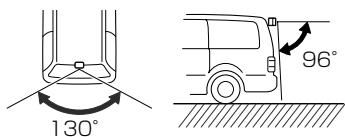
| Viewing angle | Horizontal: approx. 130°, Vertical: approx. 96° |
| Scanning system | Interlaced |
| Video output | 1 Vp-p / 75 Ω, mirror image |
| Operating voltage | 14.4 V (11 V - 16 V) |
| Max. power consumption | 150 mA |
| Weight (camera) | 32 g |
| Weight (video unit) | 32 g |
| Operating temperature | -20 °C to 60 °C |
| Storage temperature | -30 °C to 80 °C |
| Included accessories | Power cord, 2 cable harnesses, camera bracket, screws |
| Installation | Recommended by a specialized technician; connection to a 12 V DC negative power supply |
| Maintenance | Clean the installation surface; avoid high-pressure and automatic washing |
| Safety | Use only a fuse of correct value; do not cut the fuse of the red power wire |
| Repairability and recycling | Do not dispose of with household waste; recycle at an approved center (crossed-out wheeled bin symbol) |
Frequently Asked Questions - CCD-2000 KENWOOD
User questions about CCD-2000 KENWOOD
0 question about this device. Answer the ones you know or ask your own.
Ask a new question about this device
Download the instructions for your Camera in PDF format for free! Find your manual CCD-2000 - KENWOOD and take your electronic device back in hand. On this page are published all the documents necessary for the use of your device. CCD-2000 by KENWOOD.
USER MANUAL CCD-2000 KENWOOD
Take the time to read through this instruction manual.
Familiarity with installation and operation procedures will help you obtain the best performance from your new Rear View Camera.
For your records
Record the serial number, found on the back of the unit, in the spaces designated on the warranty card, and in the space provided below. Refer to the model and serial numbers whenever you call upon your Kenwood dealer for information or service on the product. Model CCD-2000 Serial number
US Residence Only
WARNING
To prevent injury or fire, take the following precautions:
- To prevent a short circuit, never put or leave any metallic objects (such as coins or metal tools) inside the unit.
- Installation and wiring of this product require specialist skill and experience. To assure your safety, please request a specialist technician to install the unit.
CAUTION
To prevent damage to the product, take the following precautions:
- Make sure to ground the unit to a negative 12V DC power supply.
- When replacing a fuse, only use a new fuse with the prescribed rating. Using a fuse with the wrong rating may cause your unit to malfunction.
- Do not use your own screws. Use only the screws provided. If you use the wrong screws, you could damage the unit.
NOTE
- This product is a rear view camera for checking the view at the rear of a car.
- A rear view camera is a camera that provides symmetrical images in the same way as rear and side view mirrors.
- Connection to a TV with an RCA video input is possible, but confirm whether the TV you use has a reverse gear connection function.
- Direct sunlight or strong light (sunlight reflected from a bumper etc.) on the camera may result in smear above and below the location where the light strikes, but this is not a malfunction.
- This product is designed to supplement the driver's rear view, but the camera images do not show all dangers and obstacles. Be sure to look behind you when reversing to confirm the view.
- This product features a wide-angle lens, so the near view is wide and the far view is narrow, which may create a false sense of distance. Be sure to look behind you when reversing to confirm the view.
- Do not wash your car with an automatic car wash or high-pressure water as it may result in water entering the camera or the camera falling off.
-
Check camera bracket installation before driving. Are the screws loose?
-
Is the camera bracket firmly secured?
- If the rear view camera comes loose while you are driving it may cause an accident.
Before finally installing the unit, connect the wiring temporarily, making sure it is all connected up properly, and the unit and the system work. -
When mounting this unit, make sure none of the leads are trapped between this unit and the surrounding metalwork or fittings.
-
Do not mount this unit near the heater outlet, where it would be affected by heat, or near the doors, where rainwater might splash onto it. (Never install in locations such as the above because of the danger of malfunction due to high temperatures.)
- Before drilling any mounting holes always check behind where you want to drill the holes. Do not drill into the gas line, brake line, electrical wiring or other important parts.
- If this unit is installed in the passenger compartment, anchor it securely so it does not break free while the car is moving, and cause injury or an accident.
- If this unit is installed under a front seat, make sure it does not obstruct seat movement. Route all leads and cords carefully around the sliding mechanism so they do not get caught or pinched in the mechanism and cause a short circuit.
Accessories
① Power cord
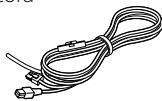
1
② Wiring harness
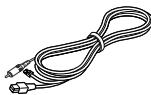
1
③ Camera bracket

1
(4) Screw

2
Installation Procedure
- To prevent a short circuit, remove the key from the ignition and disconnect the battery.
2.Make the proper input and output wire connections for each unit. - Connect the wiring harness wires in the following order: ground, ignition, reverse and camera unit.
- Connect the wiring harness connector to the video box unit.
5.Install the unit in your car.
6.Reconnect the battery.
WARNING
- If you connect the ignition wire (Red) to the car chassis (Ground), you may cause a short circuit, that in turn may start a fire. Always connect those wires to the power source running through the fuse box.
- Do not cut out the fuse from the ignition wire (Red). The power supply must be connected to the wires via the fuse.
CAUTION
- If your car's ignition does not have an ACC position, connect the ignition wires to a power source that can be turned on and off with the ignition key. If you connect the ignition wire to a power source with a constant voltage supply, as with battery wires, the battery may die.
- If the fuse blows, first make sure the wires aren't touching to cause a short circuit, then replace the old fuse with one with the same rating.
- Insulate unconnected wires with vinyl tape or other similar material. To prevent a short circuit, do not remove the caps on the ends of the unconnected wires or the terminals.
After the unit is installed, check whether the brake lamps, blinkers, wipers, etc. on the car are working properly. - Install so that it does not obstruct the rear field of view.
- Install so that it does not protrude from the side of the car.
- Do not perform installation in rain or fog.
- When humidity is high, dry the surface to which the unit is to be attached before installing.
- Moisture on the attachment surface reduces adhesive strength, which may lead to the unit coming off.
- Do not attach the camera bracket to areas on the car body treated with fluorocarbon resin, or glass.
-
May result in the rear view camera falling off.
-
Do not apply water to the unit.
- Do not expose the unit to rain.
- Do not subject the camera to unnecessary force.
-
Thoroughly clean where tape is used for sticking on the unit.
-
Refer to the Instruction's manual for details on connecting the other units, then make connections correctly.
- Secure the wiring with cable clamps or adhesive tape.
- To protect the wiring, wrap adhesive tape around them where they lie against metal parts.
- Route and secure all wiring so it cannot touch any moving parts, such as the gear shift, handbrake and seat rails.
- Do not route wiring in places that get hot, such as near the heater outlet. If the insulation of the wiring melts or gets torn, there is a danger of the wiring short-circuiting to the vehicle body.
- When replacing the fuse, be sure to use only fuse of the rating prescribed on the fuse holder.
To minimize noise locate the TV antenna cable, radio antenna cable and RCA cable as far away from each other as possible. -
Do not install the video box unit in places where it may become subject to high temperatures or humidity, such as:
-
Places close to a heater, vent or air conditioner.
- Places exposed to direct sunlight, such as on top of the dashboard or the rear shelf.
- Places that may be splashed by rain, for example close to the door.
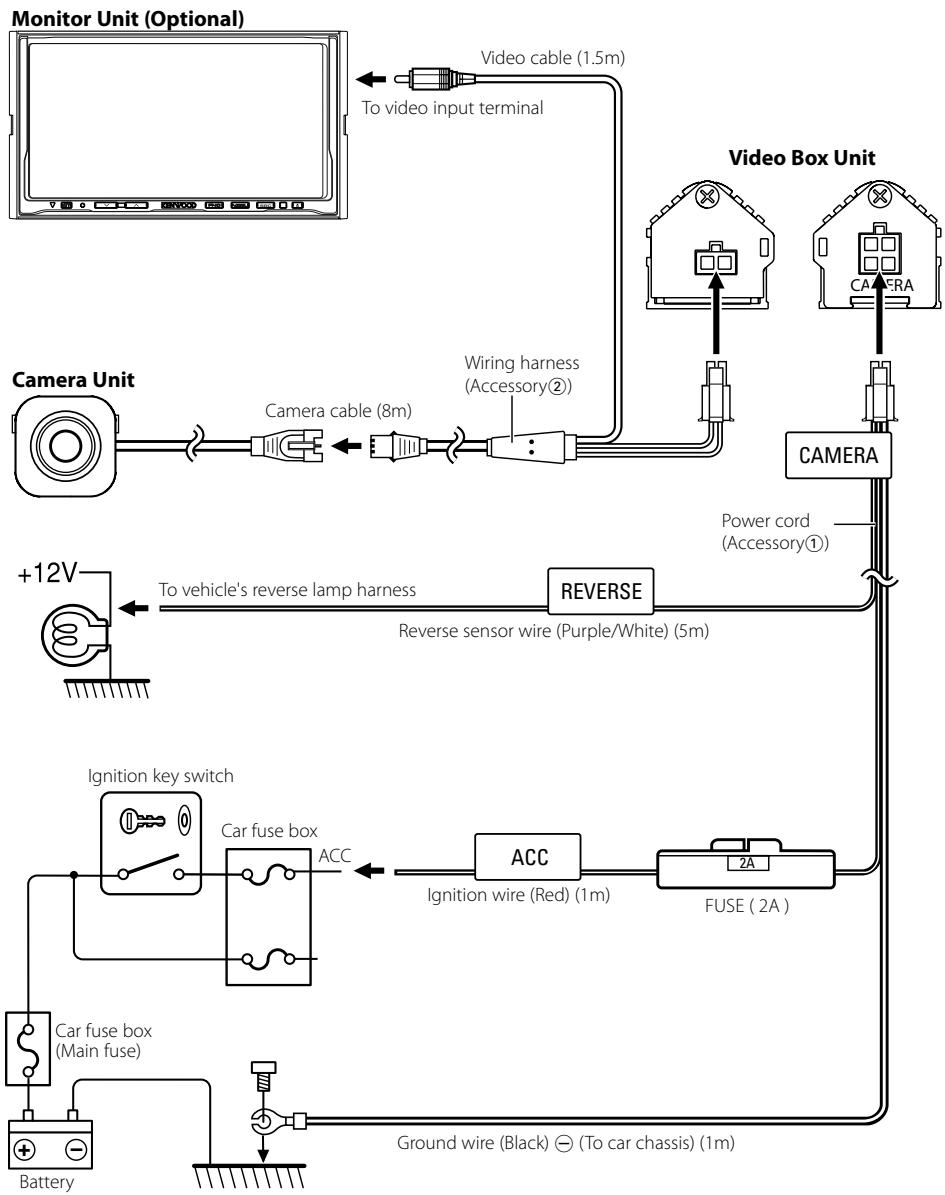
If you connect the ignition wire (Red) to the car chassis (Ground), you may cause a short circuit, that in turn may start a fire. Always connect those wires to the power source running through the fuse box.
Installation for Camera Unit
1 Clean the surface to which the rear view camera is to be installed. Use a cloth or other item to wipe oil, wax, dust and any other dirt from installation surface.
CAUTION
- Locate the rear view camera in the position you want it installed. Adjust the angle of the rear view camera, and install so that the camera doesn't touch the car.
- When sticking to a glass surface, stick it on in a position that assures the camera doesn't touch the rear window.
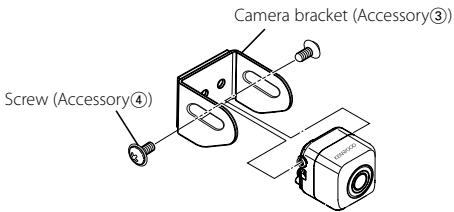
2 Peel off the sheet on back of the camera bracket (Accessory③) and stick it on.
CAUTION
- Press the camera bracket with your fingers to stick it to installation surface. Touching the adhesive surface or sticking the unit on a second time reduces adhesive strength, which may result in the unit falling.
- If the temperature of the attachment surface is low, warm with a hair dryer or other means before installing to improve adhesive strength.
3 Attach the rear view camera to the camera bracket (Accessory③) with the installation screws (Accessory④).
CAUTION
- The rear view camera is attached so that the logo of Kenwood is on the upper surface.
4 Adjust the angle so that bumper or rear edge of the car is displayed at the bottom of the monitor screen.
Installation example
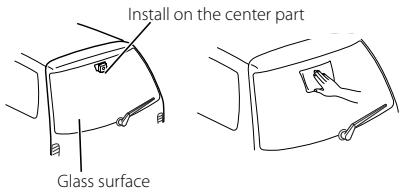
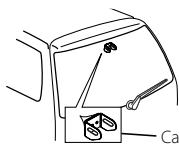
Camera bracket (Accessory③)
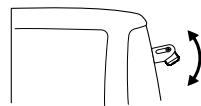
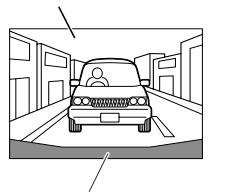
Monitor screen
Bumper or rear edge of car
Specifications subject to change without notice.
Camera Unit
Output video
: Mirror image (for rear view confirmation)
Sensor
: 1/4-inch color CCD sensor
Number of pixels
: 492 (vertical) x 542 (horizontal)
(Effective number of pixels roughly 270,000)
Lens
:Wide angle, focal length f = 1.6mm F value 2.8
Angle of view
: Horizontal: approx. 130^
: Vertical: approx. 96^
Iris system
: Electronic iris
Scanning system
:Interlace
Synchronizing system
: Internal synchronization
Video output
:1Vp-p/75Ω
Video Box Unit
Operating voltage
: 14.4V (11V - 16V)
Max. current consumption
:150mA
General
Dimensions (W× H× D)
Camera unit: 27mm × 27mm × 26mm
Video box unit: 54mm × 23mm × 33mm
Operational temperature range
: -20°C ~ 60°C
Storage temperature range
: -30°C ~ 80°C
Weight
Camera unit: 32g
Video box unit: 32g
This Product is not installed by the manufacturer of a vehicle on the production line, nor by the professional importer of a vehicle into an EU Member State.
Information on Disposal of Old Electrical and Electronic Equipment (applicable for EU countries that have adopted separate waste collection systems)
Products with the symbol (crossed-out wheeled bin) cannot be disposed as household waste. Old electrical and electronic equipment should be recycled at a facility capable of handling these items and their waste byproducts. Contact your local authority for details in locating a recycle facility nearest to you. Proper recycling and waste disposal will help conserve resources whilst preventing detrimental effects on our health and the environment.
FCC WARNING
This equipment may generate or use radio frequency energy. Changes or modifications to this equipment may cause harmful interference unless the modifications are expressly approved in the instruction manual. The user could lose the authority to operate this equipment if an unauthorized change or modification is made.
NOTE
This equipment has been tested and found to comply with the limits for a Class B digital device, pursuant to Part 15 of the FCC Rules. These limits are designed to provide reasonable protection against harmful interference in a residential installation. This equipment may cause harmful interference to radio communications, if it is not installed and used in accordance with the instructions. However, there is no guarantee that interference will not occur in a particular installation. If this equipment does cause harmful interference to radio or television reception, which can be determined by turning the equipment off and on, the user is encouraged to try to correct the interference by one or more of the following measures:
- Reorient or relocate the receiving antenna.
- Increase the separation between the equipment and receiver.
- Connect the equipment into an outlet on a circuit different from that to which the receiver is connected.
- Consult the dealer or an experienced radio/TV technician for help.
NOTE
This Class B digital apparatus complies with Canadian ICES-003.
ATTENTION
Camera : 27mm x 27mm x 26mm
Boitier video : 54mm x 23mm x 33mm