
SC 6.12 - Sports Watch SIGMA - Free user manual and instructions
Find the device manual for free SC 6.12 SIGMA in PDF.


| Product type | Sports watch |
| Brand | Sigma |
| Model | SC 6.12 |
| Power supply | Button cell battery (type CR2032) |
| Estimated battery life | Several months (depending on usage) |
| Display | Digital LCD |
| Display content | Time, stopwatch, date, alarm, laps, best lap |
| Main functions | Stopwatch, lap memory, best lap, Easy LapView, 7 training sessions in memory |
| Buttons | 4 buttons: START/LAP, STOP, Toggle/+, Toggle/- |
| Modes | Training mode, clock mode, menu, memory |
| Settings | Time, date, alarm, tone |
| Training memory | Last 7 sessions with date, start time, split time, laps |
| Estimated dimensions | 45 x 45 x 12 mm |
| Estimated weight | 50 g |
| Care and cleaning | Clean with a soft, dry cloth; avoid chemicals |
| Safety | Do not dispose of battery in household waste; take to an approved collection center |
| Spare parts and repairability | Not specified; battery replaceable by user |
| General information | CE declaration available at www.sigmasport.com; limited warranty (excluding batteries, normal wear, misuse) |
Frequently Asked Questions - SC 6.12 SIGMA
User questions about SC 6.12 SIGMA
0 question about this device. Answer the ones you know or ask your own.
Ask a new question about this device
Download the instructions for your Sports Watch in PDF format for free! Find your manual SC 6.12 - SIGMA and take your electronic device back in hand. On this page are published all the documents necessary for the use of your device. SC 6.12 by SIGMA.
USER MANUAL SC 6.12 SIGMA

SC 6.12
STOPWATCH
TOP BUTTON - MEMORY - ALARM
| Contents | Activating the SC 6.12 |  | |
| 1 Activating the SC 6.12 11 | You will receive your SC 6.12 in transport mode to conserve the battery. You must therefore wake it up before its first use. This can be done as follows: | 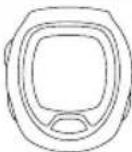 | |
| 2 Starting and stopping the SC 6.12 11 | |||
| 3 Accessing the menu level 12 | |||
| 4 Accessing the training sessions 12 | |||
| 5 Configuring settings (time/date/alarm) 14 | Press and hold the START/LAP button for five seconds.The watch is now in time mode. |  | |
| 6 Display overview 15 | |||
| 7 Button functions 16 | |||
| Further information | Starting and stopping the SC 6.12 |  | |
| For further information and to view our frequently asked questions (FAQs),please visit www.sigmasport.com. | To train with your SC 6.12, press and hold any button for two seconds. |  | |
| Warranty conditions | Your SC 6.12 is now in training mode. | 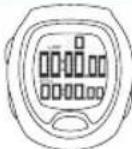 | |
| The warranty does not cover the battery, changes due to normal wear and tear,damage caused by improper handling/use or damage caused by a lack of care,commercial use or accidents. | Press the top button to start training. |  | |
| You can find the CE declaration under: www.sigmasport.com | |||
| Batteries must not be disposed of in household waste (Battery Law)! Please take the batteries to an official collection point for disposal. | Press the stop button to end the training session.The stopwatch stops. If you wish to exit the training menu,press and hold the bottom left button. |  | |
| 3 | Accessing the menu level | ||
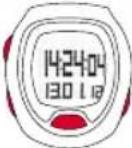 | To access your SC 6.12's menu level, press and hold any button for two seconds. | Your SC 6.12 is now in training mode. | 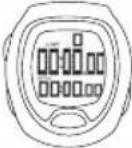 |
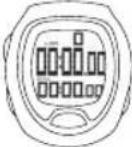 | Your SC 6.12 is now in training mode. | To access the menu level, press and hold the bottom right button for two seconds. |  |
 | To access the menu level, press and hold the bottom right button for two seconds. | Press the top button to select the menu option MEM. |  |
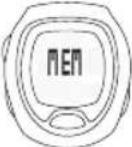 | You are now in the menu level and can select between MEM and SET. By selecting MEM, you can view your last seven training sessions.To set the clock, select SET. To exit the menu level, press and hold the bottom right button for two seconds. | You are now in the training memory in which you can use the Toggle/+ and Toggle/- buttons to scroll back and forth through the individual training sessions. The date on which the training session took place is displayed. This makes it easy for you to select the desired session by pressing the top button. |  |
 | |||
| You can view the following data, starting with training session's start time:→ Start time→ Average lap time→ All laps including an indication of the best lap [best lap symbol] | 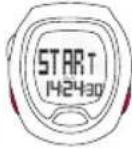 | ||
| 4 | Accessing the training sessions | ||
 | To access your training sessions on your SC 6.12, press and hold any button for two seconds. | Press the Toggle/+ or Toggle/- button to switch between the laps. | |
| 5 | Configuring settings(time/date/alarm) | Display overview6 | |
 | To configure settings, such as the time, on your SC 6.12,you should proceed as follows: Press and hold any buttonfor two seconds. | → Sleep mode: | |
 | Your SC 6.12 is now in training mode. | ||
 | To access the menu level, press and hold the bottom rightbutton for two seconds. | → Training mode:Best lap icon ......Number of lapsLight mode is enabledLap timeStopwatchStopwatch iconAlarm icon | |
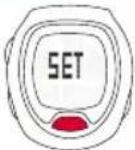 | To configure a setting, select SET by pressing the top button. | ||
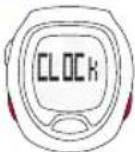 | CLOCK appears. Press the Toggle/+ or Toggle/- button togo to one of the setting options CLOCK/DATE/ALARM/TONE. Confirm your selection by pressing the top button. | → Accessing the memory: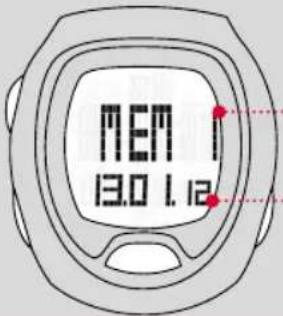 Training sessionnumberThe most recenttraining session isnumber 1Date of the trainingsession Training sessionnumberThe most recenttraining session isnumber 1Date of the trainingsession | |
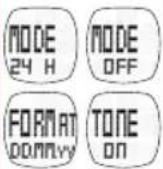 | Press the Toggle/+ or Toggle/- button to increase ordecrease the value. Press the top button to confirm thevalue. To cancel the setting process, press the STOP button.You can use this procedure for all four menu options. | ||

Button functions
You can operate your sport computer by either pressing or pressing and holding the buttons [for two seconds].
STOP button:
Press:
In training mode:
Stop the stopwatch.
In setting mode:
Go back to the
previous view
Press and hold:
In training mode:
Reset training session -
the data is saved.
In setting mode:
No function
Toggle/-:
Press:
In training mode:
Change the view
from stopwatch to time.
In setting mode:
Navigate between the
menu options and
decrease values.
Press and hold:
In training mode:
End the training session.
The training session is
saved and can be accessed
in the memory (MEM).
In setting mode:
Rapidly decrease values.
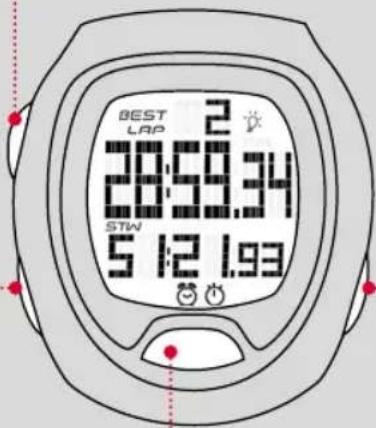
START/Lap:
Press:
In training mode:
Start training or
record lap.
In setting mode:
No function.
Press and hold:
In training mode:
Open the Easy LapView function
to view previous laps.
In setting mode:
No function.
Toggle/+:
Press:
In training mode:
Change the view
from stopwatch to time.
In setting mode:
Navigate between the menu
options and increase values.
Press and hold:
In training mode:
Open the menu level.
In setting mode:
Close the menu level or
rapidly decrease values.
Asia, Australia, South America, Africa
4F, No.192, Zhonggong 2 nd Rd.,
Xitun Dist., Taichung City 407, Taiwan



Brand : SIGMA
Model : SC 6.12
Category : Sports Watch