
XW-NAW1-K - Bluetooth speaker PIONEER - Free user manual and instructions
Find the device manual for free XW-NAW1-K PIONEER in PDF.



| Product type | Docking station with amplified speakers (Bluetooth speaker not mentioned in the manual) |
| Brand | Pioneer |
| Model | XW-NAW1-K |
| Dimensions (without feet) | 520 mm (W) × 281 mm (H) × 83 mm (D) |
| Weight | 3.3 kg |
| Power supply | AC adapter 100-240 V AC, 50/60 Hz, output 16 V DC / 2.25 A |
| Output power | 15 W + 15 W (1 kHz, 10% THD, 8 Ω) |
| Speakers | 13 mm horn tweeters, 76 mm neodymium woofer-midrange with port |
| Connectivity | Docking station for iPod/iPhone (30-pin connector), auxiliary audio input (3.5 mm mini-jack), component video output |
| Main functions | iPod/iPhone playback, iPod charging, infrared remote control, wall-mountable, touch control panel |
| iPod/iPhone compatibility | iPod nano (2nd to 5th generation), iPod classic, iPod touch (1st and 2nd generation), iPhone (1st, 3G, 3GS) |
| Included accessories | Main unit, fixing feet, AC adapter (UK type), inserts, remote control, CR2025 lithium battery, warranty card, instruction manual |
| Installation | On flat surface (with feet) or wall-mounted (screws not included, spacing 260 mm) |
| Maintenance and cleaning | Use a soft, dry cloth; for stubborn dirt, soft cloth dampened with diluted neutral detergent (5-6 times water), wring well; do not use thinners, benzene or insecticides |
| Safety | Do not expose to moisture, do not place water containers nearby, ventilate (10 cm above and on sides), do not obstruct openings, unplug during storms or prolonged absence |
| Repairability | No user-serviceable parts; refer all servicing to qualified personnel |
| Environment | Operating temperature: +5 °C to +35 °C, relative humidity < 85%; do not use outdoors |
| General information | Manual available in FR, DE, EN, ES, IT, NL; warranty included; product not intended for Japan |
Frequently Asked Questions - XW-NAW1-K PIONEER
User questions about XW-NAW1-K PIONEER
0 question about this device. Answer the ones you know or ask your own.
Ask a new question about this device
Download the instructions for your Bluetooth speaker in PDF format for free! Find your manual XW-NAW1-K - PIONEER and take your electronic device back in hand. On this page are published all the documents necessary for the use of your device. XW-NAW1-K by PIONEER.
USER MANUAL XW-NAW1-K PIONEER
Slim Speaker System for iPod
Discover the benefits of registering your product online at http://www.pioneer.co.uk (or http://www.pioneer.eu).
Pioneer product via http://www.pioneer.nl -
http://www.pioneer.be (of http://www.pioneer.eu).
Operating Instructions
Mode d'emploi
Bedienungsanleitung
The lightning flash with arrowhead symbol, within an equilateral triangle, is intended to alert the user to the presence of uninsulated “dangerous voltage” within the product’s enclosure that may be of sufficient magnitude to constitute a risk of electric shock to persons.
CAUTION
RISK OF ELECTRIC SHOCK DO NOT OPEN
CAUTION:
TO PREVENT THE RISK OF ELECTRIC SHOCK, DO NOT REMOVE COVER (OR BACK). NO USER-SERVICEABLE PARTS INSIDE. REFER SERVICING TO QUALIFIED SERVICE PERSONNEL.

The exclamation point within an equilateral triangle is intended to alert the user to the presence of important operating and maintenance (servicing) instructions in the literature accompanying the appliance.
D3-4-2-1-1_A1_En
Information for users on collection and disposal of old equipment and used batteries
(Symbol for equipment)

(Symbol examples) for batteries
These symbols on the products, packaging, and/or accompanying documents mean that used electrical and electronic products and batteries should not be mixed with general household waste.
For proper treatment, recovery and recycling of old products and used batteries, please take them to applicable collection points in accordance with your national legislation.
By disposing of these products and batteries correctly, you will help to save valuable resources and prevent any potential negative effects on human health and the environment which could otherwise arise from inappropriate waste handling.
For more information about collection and recycling of old products and batteries, please contact your local municipality, your waste disposal service or the point of sale where you purchased the items.
These symbols are only valid in the European Union.
For countries outside the European Union:
If you wish to discard these items, please contact your local authorities or dealer and ask for the correct method of disposal. K058a_
K058a_A1_En
WARNING
This equipment is not waterproof. To prevent a fire or shock hazard, do not place any container filled with liquid near this equipment (such as a vase or flower pot) or expose it to dripping, splashing, rain or moisture.
D3-4-2-1-3_A1_En
WARNING
Before plugging in for the first time, read the following section carefully. The voltage of the available power supply differs according to country or region. Be sure that the power supply voltage of the area where this unit will be used meets the required voltage (e.g., 230 V or 120 V) written on the AC adapter label.
D3-4-2-1-4*_A1_En
WARNING
To prevent a fire hazard, do not place any naked flame sources (such as a lighted candle) on the equipment.
D3-4-2-1-7a_A1_En
Operating Environment
Operating environment temperature and humidity: +5 °C to +35 °C (+41 °F to +95 °F); less than 85 %RH (cooling vents not blocked) Do not install this unit in a poorly ventilated area, or in locations exposed to high humidity or direct sunlight (or strong artificial light)
D3-4-2-1-7c ^* _A1_En
VENTILATION CAUTION
When installing this unit, make sure to leave space around the unit for ventilation to improve heat radiation (at least 10 cm at top and 10 cm at each side).
WARNING
Slots and openings in the cabinet are provided for ventilation to ensure reliable operation of the product, and to protect it from overheating. To prevent fire hazard, the openings should never be blocked or covered with items (such as newspapers, table-cloths, curtains) or by operating the equipment on thick carpet or a bed.
D3-4-2-1-7b*_A1_En
This speaker system is cannot be used nearby a CRT-based TV or color monitor. When using this kind of CRT-based TV or color monitor, install the speakers away from the display device. Any other device liable to be influenced by magnetism (floppy disk drive, cassette tape recorder, video tape player, etc.) should also be kept at a distance from the speaker system.
AC adapter caution
- Make sure to grasp the body of the AC adapter when removing it from the power outlet. If you pull the power cord, it may become damaged which could lead to fire and/or electrocution.
- Do not attempt to plug in or remove the AC adapter with wet hands. This may result in electrocution.
- Insert the prongs of the AC adapter all the way into the power outlet. If the connection is incomplete, heat may be generated which could lead to fire. Furthermore, contact with the connected prongs of the adapter may result in electrocution.
- Do not insert the AC adapter into a power outlet where the connection remains loose despite inserting the prongs all the way into the outlet. Heat may be generated which could lead to fire. Consult with the retailer or an electrician regarding replacement of the power outlet.
- Do not place the unit, a piece of furniture, etc., on the power cord, or pinch the cord. Never make a knot in the cord or tie it with other cords. The power cords should be routed such that they are not likely to be stepped on. A damaged AC adapter and power cord can cause a fire or give you an electrical shock. Check the AC adapter and the power cord once in a while. When you find it damaged, ask your nearest PIONEER authorized service center or your dealer for a replacement.
CAUTION
The ⏻/I (Power) key on this unit will not completely shut off all power from the AC outlet. Since the AC adapter serves as the main disconnect device for the unit, you will need to unplug it from the AC outlet to shut down all power. Therefore, make sure the unit has been installed so that the AC adapter can be easily unplugged from the AC outlet in case of an accident. To avoid fire hazard, the AC adapter should also be unplugged from the AC outlet when left unused for a long period of time (for example, when on vacation).
D3-4-2-2-2a*_A1_En
This product is for general household purposes. Any failure due to use for other than household purposes (such as long-term use for business purposes in a restaurant or use in a car or ship) and which requires period.
K041_A1_En
Thank you for buying this Pioneer product.
Please read through these operating instructions so that you will know how to operate your model properly. After you have finished reading the instructions, put them in a safe place for future reference.
Introduction
Unpack
The first thing to do is unpack the XW-NAW1-K package and make sure it includes all of the following contents:
• XW-NAW1-K main unit
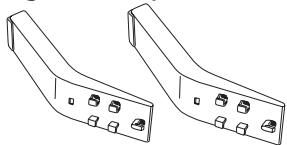
• Legs for table placement
natural_image
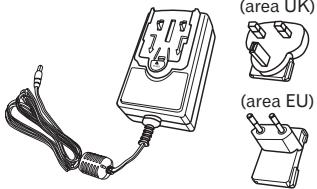
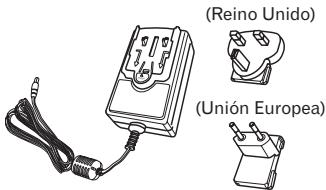
Technical line drawing of two bracket-shaped metal components with mounting holes (no text or symbols)- AC adapter
natural_image
Illustration of a handheld electronic device with two labeled regions: UK region and EU region, shown without any text or symbols on the device itself.Also:
- Adapter inserts
- Remote control
• Lithium battery (CR2025) - Warranty Card
- Operating Instructions (This document)
Power adapter assembling
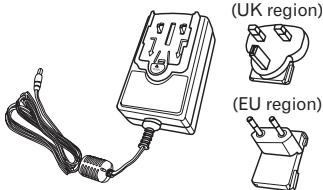
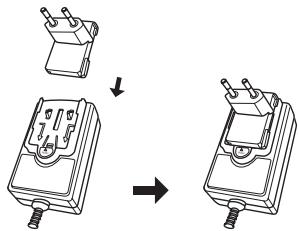
Slide the power plug along the guide rails of the AC adapter as shown in the figure below until there is an audible click.
text_image
Diagram showing a device being processed from a component, with arrows indicating the process.Once you've found where you'd like to put the XW-NAW1-K, you have two placement options:
Stand it up:
The XW-NAW1-K comes with removable legs for upright placement on a flat surface. Simply attach the legs to the back of the XW-NAW1-K to leave the unit in this position (see below for details).
Hang it on the wall:
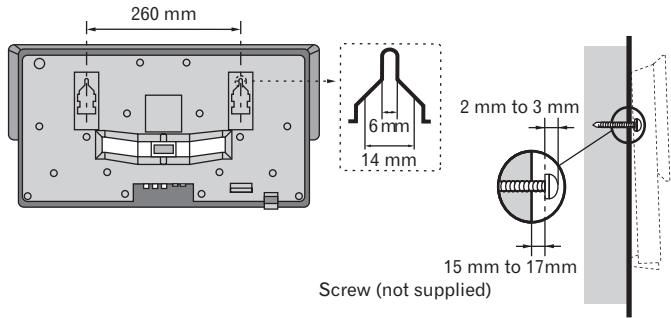
The back of the XW-NAW1-K has two mounting holes that fit over screws of article on the market (refer to page 7).
Attaching the legs for table placement
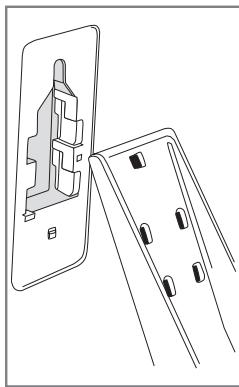
- Position one of the legs over one of the recessed areas on the back of the XW-NAW1-K as shown.
- Insert the leg into the recessed area and press upward to lock it in place.
- Repeat with the other leg. The XW-NAW1-K is ready to place upright on a flat surface.
natural_image
Line drawing of a wall-mounted electrical socket with mounting holes (no text or symbols)Wall mounting XW-NAW1-K to a wall
XW-NAW1-K is can be mounted on a wall if desired. Before performing a wall mounting, complete the wiring connections.
Caution
- Remember that XW-NAW1-K is heavy and that its weight could cause the screws to work loose, or the wall material to fail to support it, resulting in XW-NAW1-K falling. Make sure that the wall you intend to mount XW-NAW1-K on is strong enough to support them. Do not mount on plywood or soft surface walls. If you are unsure of the qualities, consult a professional for advice.
- Pioneer is not responsible for any accidents or damage that result from improper installation, misuse or modification of the product, or natural disasters.
- Mounting screws are not supplied. Use screws suitable for wall material and support the weight of XW-NAW1-K.
text_image
260 mm 6 mm 14 mm 2 mm to 3 mm 15 mm to 17mm Screw (not supplied)- Hang the XW-NAW1-K as shown, on the screws that are aligned to the two mounting holes on the rear of the XW-NAW1-K.
- Confirm that the screws come fully to the top of the mounting holes.
Once you've found a place for your XW-NAW1-K, you're just a step or two away from experiencing the music from your iPod like you've never heard it before. All you have to do is insert any iPod with 30-pin dock connector into the universal dock of the XW-NAW1-K. Then plug the XW-NAW1-K in, turn it on, and enjoy!
The XW-NAW1-K offers other usage options as well. You can use it to listen to other audio sources or send the video from your iPod to a display.
Plugging in and turning on
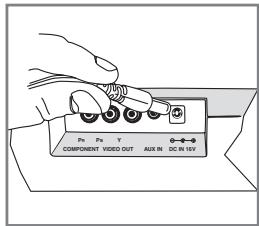
- Insert the cable of the AC adapter into the DC IN jack on the bottom of the XW-NAW1-K.
- Plug the AC adapter into a wall outlet or surge protector.
Note:
- Do not use a switchable outlet. This AC adapter should be plugged in so that it stays vertical or lays flat.
- Please do not use the one other than the attachment.
- Press the ⏻/I (power) key on the front panel of the XW-NAW1-K.
text_image
Pe Pe T COMPONENT VIDEO OUT AUX IN DC IN 15VCaution
Do not insert the power plug in the wall outlet without attaching it to the AC adapter.
- A short circuit may result if a metal piece gets in the space between the electrodes or an electric shock may result when pulled out from the outlet.
Confirm what iPod models are supported
This system is compatible with the audio and video of the iPod nano third generation and above, iPod classic, iPod touch and iPhone. It also supports audio playback on the iPod nano second generation.
Always use the most recent version of iPod software available. Operation compatibility may vary depending on the version of the software used.
Note:
- Some functions may be restricted depending on the model or software version.
- iPod is licensed for reproduction of non-copyrighted materials or materials the user is legally permitted to reproduce.
- Pioneer cannot under any circumstances accept responsibility for any direct or indirect loss arising from any inconvenience or loss of recorded material resulting from the iPod failure.
Inserting your iPod
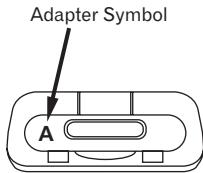
Adapter identification chart
| Adapter Symbol | |||
| iPod | classic | 80 GB | C |
| 160 GB (2007) | D | ||
| 120 GB 160 GB (2009) | C | ||
| nano | 2nd generation | A | |
| 3rd generation | B | ||
| 4th generation | A | ||
| 5th generation | B | ||
| touch | 1st generation | E | |
| 2nd generation | E | ||
| iPhone | 4 GB 8 GB 16 GB | E | |
| 3G | 8 GB 16 GB | E | |
| 3GS | 16 GB 32 GB | E | |
text_image
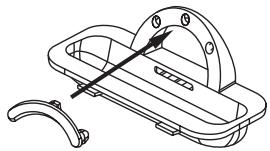
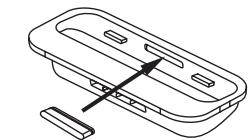
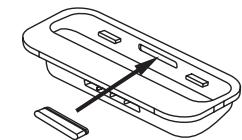
Adapter Symbol A- All adapters other than Adaptor Symbol A and B come with a rubber.
natural_image
Technical line drawing of a mechanical device with handle and curved base (no text or symbols)iPhone
natural_image
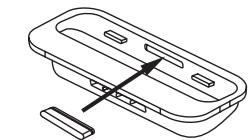
Technical line drawing of a mechanical component with internal slots and a separate slot (no text or symbols)Rubber
Adapter E
Adapter C, D
Inserting your iPod
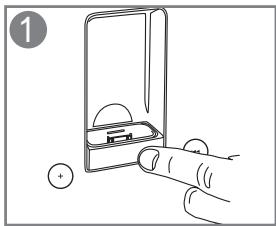
- Push the front of the XW-NAW1-K's dock. The docking door opens.
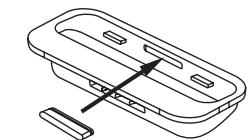
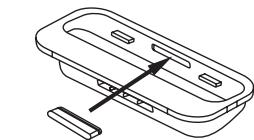
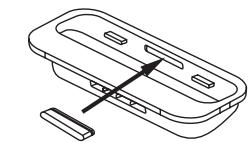
- Find the insert that goes with your iPod model (or use the insert that came with your iPod). The models compatible with each insert are listed in one of the corners on the top of the insert. Gently place the insert over the 30-pin dock. The back of the insert should rest on the ridge just behind the dock on the XW-NAW1-K.
natural_image
Illustration of a hand inserting a battery into a device (no text or symbols)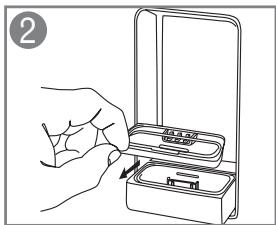
natural_image
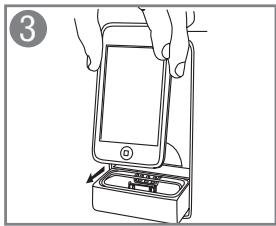
Line drawing of a hand inserting a device into a box (no text or symbols)- Place the dock connector on your iPod onto the XW-NAW1-K dock. Push down gently until the iPod rests firmly in the insert and on the dock.
- Gently press the docking door back into place as shown. The door clicks when it's completely closed.
Note:
It is not trouble though the noise might occur when iPod / iPhone is detached in Power on.
natural_image
Line drawing of a hand inserting a smartphone into a device (no text or symbols)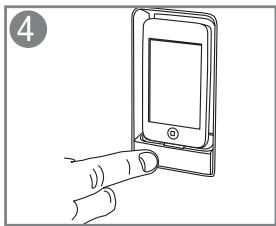
natural_image
Illustration of a hand interacting with a smartphone (no text or symbols visible)Front Panel Keys
☐/I (Power) Turns the XW-NAW1-K on and off. Also brings a docked iPod out of sleep mode when the XW-NAW1-K turns on.
VOLUME - / + Turns the XW-NAW1-K volume down or up.
◀◀ (Skip back) Goes to the previous track (or to the beginning of the song currently playing) in the current playlist on your docked iPod.
▶/Ⅱ (Play / Pause) Starts and pauses playback on your docked iPod.
Press and hold the ▶/■ (Play / Pause) key to switch to AUX.
▶▶▶ (Skip forward) Goes to the following track in the current playlist on your docked iPod.
Before Using The remote control
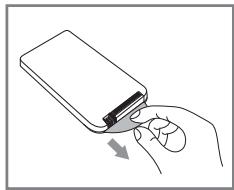
Remove the protective seal from the battery casing.
natural_image
Illustration of a hand holding a closed book with a mouse pointer (no text or symbols)Remote control
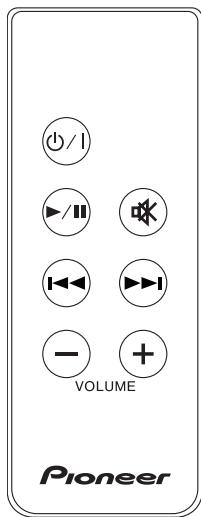
The remote control that came with the XW-NAW1-K can operate the functions of an iPod that is docked.
Important: The remote control cannot be used to control the playback functions of the auxiliary source. For these audio sources, the remote control and main unit controls can only be used to adjust the volume level, mute, and power functions for the XW-NAW1-K.
Caution
When using lithium batteries, please observe the following:
- There is danger of explosion if the battery is incorrectly replaced. Make sure to replace only with the same or equivalent type recommended by the manufacturer.
- Dispose of used battery cells immediately after replacement. Keep away from children.
- If swallowed, please contact a doctor immediately.
- Lithium batteries may present a fire or chemical burn hazard if misused. Do not disassemble, heat above 100 °C, or incinerate.
- Remove the battery if the unit isn't going to be used for a month or more.
- When disposing of used batteries, please comply with governmental regulations or environmental public instruction's rules that apply in your country / area.
WARNING
- Do not use or store batteries in direct sunlight or other excessively hot place, such as inside a car or near a heater. This can cause batteries to leak, overheat, explode or catch fire. It can also reduce the life or performance of batteries.
☐/I (Power) Turns the XW-NAW1-K on and off. Also brings a docked iPod out of sleep mode when the XW-NAW1-K turns on.
▶/Ⅱ (Play / Pause) Starts and pauses playback on your docked iPod. Press and hold the ▶/Ⅱ (Play / Pause) key to switch to AUX.
(Mute) Lowers the XW-NAW1-K volume to its minimum level.
◀◀◀ (Skip back) Goes to the previous track (or to the beginning of the song currently playing) in the current playlist on your docked iPod.
▶▶▶ (Skip forward) Goes to the following track in the current playlist on your docked iPod.
VOLUME - / + Turns the XW-NAW1-K volume down or up.
text_image
+/I ▶/II OK ▶/← ▶/← ▶/← - + VOLUME PioneerConnecting to an auxiliary audio source
- Make sure the XW-NAW1-K and the auxiliary audio source are both turned off.
- Connect an audio cable (not included) to the output of the audio source.
This end of the cable should match the output of the source (for example, 3.5 mm stereo mini-jack, 1/4" stereo jack, or RCA stereo jacks).
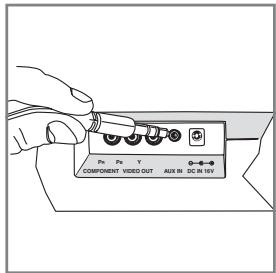
- Connect the other end of the audio cable to the auxiliary input jack on the bottom of the XW-NAW1-K. This end of the cable must be a 3.5 mm stereo minijack.
- Turn on the audio source and the XW-NAW1-K. Press and hold the ▶/■ (Play / Pause) key on the XW-NAW1-K remote control or front panel to turn your iPod off. (it will continue to charge while it's connected). Start playing the auxiliary audio source.
text_image
Pe Pe Y COMPONENT VIDEO OUT AUX IN DC IN 16VTo switch back to your docked iPod:
Turn off the auxiliary source press the ▶/■ (Play / Pause) key on the XW-NAW1-K remote control or front panale to turn on your iPod.
Connecting to a video display
- Make sure the XW-NAW1-K and the video display device are both turned off.
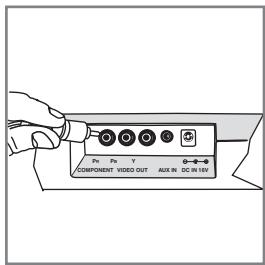
- Connect a component video cable (not included) to the component video output jacks on the bottom of the XW-NAW1-K. Make sure you match the color of each plug to a jack of the same color.
- Connect the other end of the component video cable to an available set of component video input jacks on the video display device. Make sure you match the color of each plug to a jack of the same color.
- Turn on the video source and XW-NAW1-K. Select the correct input on the video source to watch the signal from the XW-NAW1-K.
- Select a video on your iPod and play it.
text_image
Ps Px Y COMPONENT VIDEO OUT AUX IN DC IN 10VImportant: Make sure the video settings on your iPod are adjusted correctly to watch video on a separate display. You might need to remove the iPod from the XW-NAW1-K dock to change these settings. See the user manual that came with your iPod for more information.
Troubleshooting
Incorrect operations are often mistaken for trouble and malfunctions. If you think that there is something wrong with this component, check the points below. Sometimes the trouble may lie in another component. Investigate the other components and electrical appliances being used. If the trouble cannot be rectified even after exercising the checks listed below, ask your nearest Pioneer authorized service center or your dealer to carry out repair work.
- If the unit does not operate normally due to external effects such as static electricity disconnect the power plug from the outlet and insert again to return to normal operating conditions.
iPod Does Not Connect to Speaker System
- Remove iPod from the dock and confirm that you are using the appropriate insert for the model of iPod you have.
- Detach the iPod from the XW-NAW1-K and check for any obstructing debris.
- Reinsert iPod into docking port and establish a secure connection.
No Sound Is Produced
- Inspect wall outlet and ensure that the AC adapter is firmly plugged into the outlet.
- If you're trying to listen to an auxiliary audio source, make sure the audio cables are securely connected to the source and to the XW-NAW1-K.
- Make sure the XW-NAW1-K is turned on. Press the power button on the XW-NAW1-K front panel if the front panel is not illuminated.
- Select and play the desired music you wish to play.
• Make sure that the volume is turned up. - If there still is no sound, remove the iPod from the docking port, turn the XW-NAW1-K off, unplug the unit from the wall outlet, wait one to two minutes, and then plug the AC adapter back into the wall outlet, turn the XW-NAW1-K back on, put your iPod into the dock, and try the above steps again.
Remote Control Does Not Control Docked iPod
- Remove the iPod from the docking port and reattach it, making sure that there is a secure fit between the iPod and the docking port.
- Make sure that there is a clear path between the remote control and the remote sensor on the unit, and make sure that you are pointing the remote control directly at the remote sensor on the unit.
- Remove the remote control's battery to ensure that it is correctly inserted in the battery compartment. If not inserted properly, realign the battery to fit securely into the compartment.
- Move around the room and try to use the remote from more than one location.
- Press the remote control's power button on and off to verify that the remote signal is controlling the main unit.
- If you still cannot operate the docked iPod with the remote control, make sure the remote control operates the other speaker system functions (volume, power). If it does not control these functions, replace the battery in the remote control with a new battery.
iPod Does Not Charge
- Turn the XW-NAW1-K off.
- Remove iPod from the docking port and confirm that you are using the appropriate insert for the model of iPod you have.
- Detach the iPod from the dock and check for obstructing debris that may have lodged in the docking port.
- Reinsert iPod into docking port and establish a secure connection.
- Turn the XW-NAW1-K back on.
Video Does Not Display On My TV
- Make sure the component video cable is securely connected to both the XW-NAW1-K video output jacks and the video display's input jacks.
- Make sure you've selected the correct input on your video display. See your display's user guide for more information.
- Make sure you've made the proper adjustments to the video settings on your iPod. See the user guide that came with your iPod for more information.
Maintenance of external surfaces
- Clean the surface by wiping with a soft, dry cloth.
- When the surfaces are very dirty, wipe with a soft cloth dipped in some neutral cleanser diluted five or six times with water, and wrung out well, and then wipe again with a dry cloth. Do not use furniture wax or cleaners.
- Never use thinners, benzine, insecticide sprays and other chemicals on or near this unit, since these will corrode the surfaces.
Product specifications
Model: XW-NAW1-K
RMS Power Output: 15 W+15 W (1 kHz, 10% T.H.D., 8 Ω)
13 mm horn-loaded tweeters
76 mm Neodymium mid-bass drivers with ported enclosure
Proximity sensor touch panel
Component video output
Auxiliary audio input
iPod: 5 V, 500 mA
AC adapter
Power requirement: AC 100 V to 240 V, 50 Hz/60 Hz
Rated output : DC 16 V/2.25 A
Weight (without package): 3.3 kg
Dimensions (without legs): 520 mm(W) × 281 mm(H) × 83 mm(D)
Note:
- Specifications and the design are subject to possible modifications without notice, due to improvements.
• This product is not designed for use in JAPAN.
About iPod / iPhone
Made for

iPod iPhone
“Made for iPod” and “Made for iPhone” mean that an electronic accessory has been designed to connect specifically to iPod or iPhone, respectively, and has been certified by the developer to meet Apple performance standards. Apple is not responsible for the operation of this device or its compliance with safety and regulatory standards.
iPod and iPhone are trademarks of Apple Inc., registered in the U.S. and other countries.
IMPORTANT

ATTENTION
DANGER D' ELECTROCUTION NE PAS OUVRIR

natural_image
Technical line drawing of two bracket-shaped metal components with mounting holes (no text or symbols)natural_image
Illustration of a multimeter with two separate labeled components (Type UE), no text or symbols present.Et :
text_image
Diagram showing three stages of a device with labeled components and directional arrows indicating process flow.natural_image
Technical line drawing of a mechanical component with mounting holes and a housing (no text or symbols)natural_image
Technical line drawing of a mechanical component with no visible text or symbolsiPhone
natural_image
Isometric line drawing of a mechanical component with a central arrow indicating direction (no text or symbols)Caoutchouc
Adaptateur E
Connexion de l'iPod
natural_image
Line drawing of a hand pressing a button into a device (no text or symbols)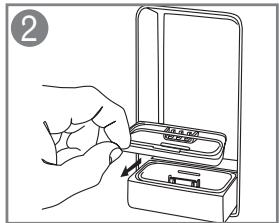
text_image
② M3.5.01 M3.5.01text_image
Diagram showing a hand inserting a smartphone into a device with an arrow indicating the process.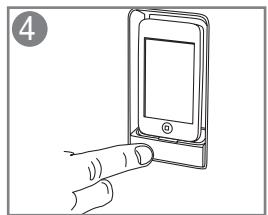
natural_image
Illustration of a hand interacting with a smartphone screen (no text or symbols visible)natural_image
Illustration of a hand holding a closed notebook with a finger pointing to it (no text or symbols)Télécommande
▶/■ (Lecture / Pause) sans la relâcher.
text_image
VOLUME PioneerPublication de Pioneer Corporation.
© 2010 Pioneer Corporation.
natural_image
Technical line drawing of two bracket-shaped metal components with mounting holes (no text or symbols)natural_image
Illustration of a handheld electronic device with wires and connectors, labeled (Region EU), showing no text or symbols beyond labels.Ebenso:
text_image
Diagram showing a device being processed from an initial component, with arrows indicating the process.natural_image
Technical line drawing of a mechanical component with two views (no text or symbols)natural_image
Technical line drawing of a mechanical device with handle and curved base (no text or symbols)iPhone
natural_image
Technical line drawing of a mechanical component with a central arrow indicating direction (no text or symbols)Rubber (Gummi)
Adapter E
Adapter C, D
Einführen Ihres iPods
natural_image
Line drawing of a hand inserting a battery into a slot (no text or symbols)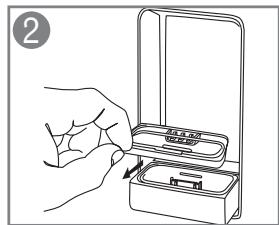
natural_image
Line drawing of a hand inserting a plastic bag into a container (no text or symbols)natural_image
Line drawing of a hand inserting a smartphone into a device (no text or symbols)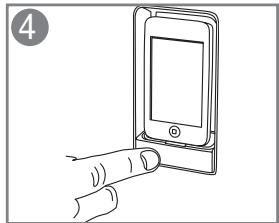
natural_image
Line drawing of a hand inserting a smartphone into a holder (no text or symbols)natural_image
Illustration of a hand inserting a device into a folder (no text or symbols)Fernbedienung
Proximity sensor Touch-Panel
natural_image
Technical line drawing of two bracket-shaped metal components with mounting holes (no text or symbols)- Adattatore AC
natural_image
Illustration of a multimeter with two labeled parts: (area UK) and (area EU), shown without any text or symbols on the device itself.E anche:
natural_image
Diagram showing three stages of a device with a switch, no text or symbols presentnatural_image
Technical line drawing of a mechanical component with two views (no text or symbols)natural_image
Technical line drawing of a mechanical device with handle and curved base (no text or symbols)iPhone
natural_image
Isometric line drawing of a mechanical component with a central arrow indicating direction (no text or symbols)Gomma
Adattatore E
Adattatore C, D
Inserire l'iPod
natural_image
Illustration of a hand inserting a battery into a device (no text or symbols)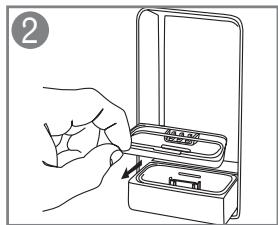
natural_image
Line drawing of a hand inserting a device into a box (no text or symbols)natural_image
Line drawing of a hand inserting a smartphone into a battery holder (no text or symbols)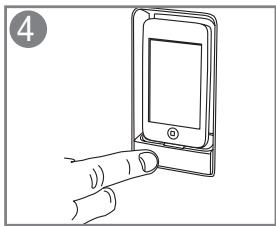
natural_image
Line drawing of a hand inserting a smartphone into a device (no text or symbols)natural_image
Illustration of a hand holding a closed book with a finger pointing to it (no text or symbols)text_image
+/I ▶/II ▶/III ▶/IV VOLUME PioneerCopyright © 2010 Pioneer Corporation.
natural_image
Technical line drawing of two bracket-shaped metal components with mounting holes (no text or symbols)• Wisselstroomadapter
natural_image
Illustration of a multimeter with wiring and a separate terminal device labeled (Regio EU), no text or symbols present.Tevens:
text_image
Diagram showing a device being processed from a base, with arrows indicating the process.natural_image
Line drawing of a door panel with a handle and mounting holes, shown from two angles (no text or symbols)natural_image
Technical line drawing of a mechanical component with no visible text or symbolsiPhone
natural_image
Technical line drawing of a mechanical component with a central fastener and base (no text or symbols)Rubber
Adapter E
Adapter C, D
natural_image
Line drawing of a hand inserting a battery into a device (no text or symbols)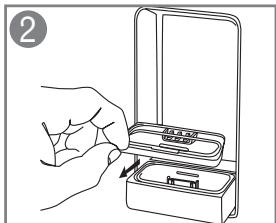
natural_image
Line drawing of a hand inserting a device into a box (no text or symbols)natural_image
Line drawing of a hand inserting a smartphone into a battery (no text or symbols)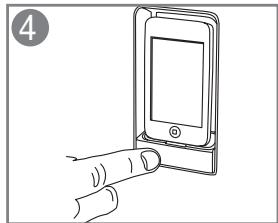
natural_image
Line drawing of a hand inserting a smartphone into a device (no text or symbols)Toetsen voorpaneel
natural_image
Illustration of a hand holding a closed book with a finger pointing to it (no text or symbols)Afstandsbediening
text_image
+/I ▶/II ▶/II ▶/II VOLUME - + Pioneer13 mm Horn Loaded Tweeters
76 mm Neodymium midbas drivers met ported enclosure
Copyright © 2010 Pioneer Corporation.
natural_image
Technical line drawing of two bracket-shaped metal components with mounting holes (no text or symbols)- Adaptador de CA
text_image
Diagram showing a device being processed into a larger component, with Chinese text labels indicating the process.natural_image
Technical line drawing of a mechanical component with mounting holes and a housing (no text or symbols)natural_image
Technical line drawing of a mechanical device with handle and curved base (no text or symbols)iPhone
natural_image
Technical line drawing of a mechanical component with internal slots and a separate slot (no text or symbols)Caucho
Adaptador E
Adaptador C, D
Inserción del iPod
natural_image
Line drawing of a hand inserting a battery into a device (no text or symbols)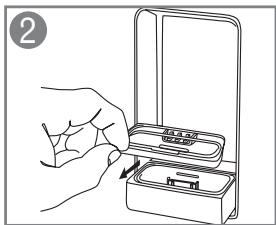
natural_image
Line drawing of a hand inserting a plastic bag into a tray (no text or symbols)natural_image
Line drawing of a hand inserting a smartphone into a device (no text or symbols)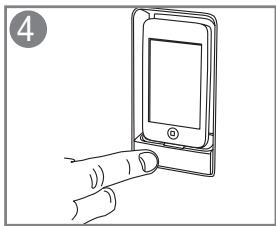
natural_image
Line drawing of a hand pointing at a smartphone screen (no text or symbols)natural_image
Illustration of a hand holding a closed book with a finger pointing to it (no text or symbols)Mando a distancia
text_image
+/I ▶/II ▶/II ▶/II VOLUME - + Pioneerhttp://www.pioneer.co.uk
http://www.pioneer.fr
http://www.pioneer.de
http://www.pioneer.it
http://www.pioneer.nl-http://www.pioneer.be
http://www.pioneer.es
http://www.pioneer.eu
Published by Pioneer Corporation.
Copyright © 2010 Pioneer Corporation.
All rights reserved.
Publication de Pioneer Corporation.
© 2010 Pioneer Corporation.
PIONEER ELECTRONICS (USA) INC.
P.O. BOX 1540, Long Beach, California 90801-1540, U.S.A. TEL: (800) 421-1404
PIONEER ELECTRONICS OF CANADA, INC.
300 Allstate Parkway, Markham, Ontario L3R 0P2, Canada
TEL: 1-877-283-5901, 905-479-4411
PIONEER EUROPE NV
Haven 1087, Keetberglaan 1, B-9120 Melsele, Belgium TEL: 03/570.05.11
PIONEER ELECTRONICS ASIACENTRE PTE. LTD.
253 Alexandra Road, #04-01, Singapore 159936 TEL: 65-6472-7555
PIONEER ELECTRONICS AUSTRALIA PTY. LTD.
178-184 Boundary Road, Braeside, Victoria 3195, Australia, TEL: (03) 9586-6300
PIONEER ELECTRONICS DE MEXICO S.A. DE C.V.
Blvd.Manuel Avila Camacho 138 10 piso Col.Lomas de Chapultepec, Mexico, D.F. 11000
TEL: 55-9178-4270
K002_B1_En